
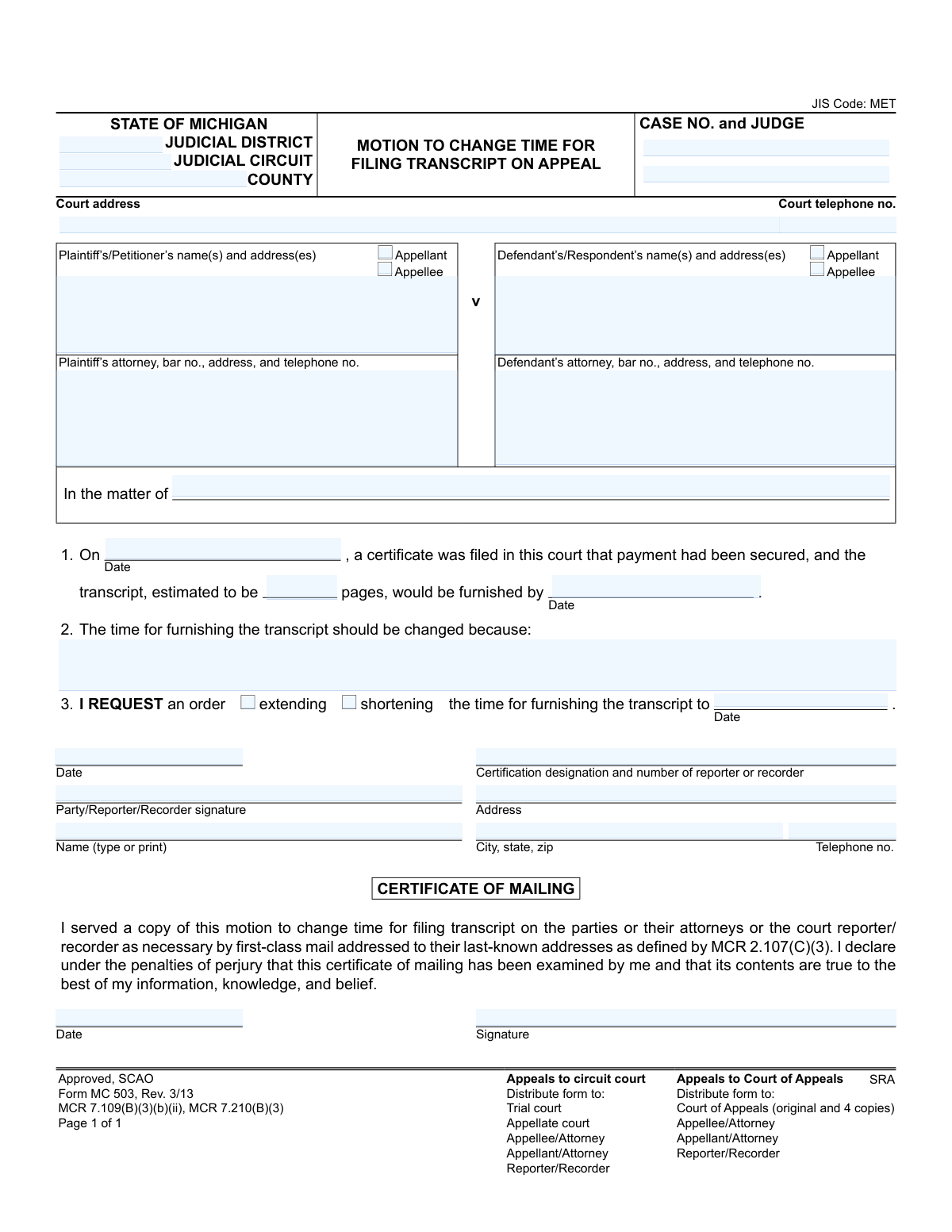
Yes! You can use AI to fill out Form MC 503, Motion to Change Time for Filing Transcript on Appeal
Don't type 32 fields by hand. Tell our AI about yourself, or upload a document you already have, and it fills every field in seconds. You check it, then download, print or sign.
The AI does the filling. You just check it.
No typing into boxes, nothing to install.
What this form asks for
The AI fills all of it, from your answers or your documents.
The AI checks your answers before you download
13 checks built for this form, so a wrong date or a missing answer is caught before anyone else sees it.
This check ensures that the 'Case No.' and 'County' fields are not empty. These fields are critical for identifying the specific legal case and jurisdiction, and their absence would make it impossible to file the motion with the correct court and associate it with the proper record. If this validation fails, the form submission should be rejected with an error message indicating the required fields.
Validates that exactly one of the two options, 'extending' or 'shortening', is selected in Section 3. A user must specify the nature of the time change request. Submitting with neither or both selected would make the motion ambiguous and unserviceable by the court. The form should enforce this choice, for example, by using radio buttons.
If the 'extending' option is selected, this check verifies that the new requested date ('date change') is chronologically after the original furnished date ('date furnished on'). Requesting an extension to a date that has already passed or is the same as the original due date is illogical and would be rejected. This prevents nonsensical requests from being submitted.
If the 'shortening' option is selected, this validation ensures the new requested date ('date change') is chronologically before the original furnished date ('date furnished on'). It is illogical to request to shorten the time to a date that is later than the original deadline. This check maintains the logical integrity of the request.
This check confirms that the text area for Section 2, explaining why the time for furnishing the transcript should be changed, is not left blank. This justification is the core of the motion and is legally required for a judge to consider the request. A submission without a reason is incomplete and would be summarily denied.
Ensures that the 'estimated pages' field contains a positive integer. The number of pages is a key factor in determining a reasonable timeline for transcript preparation. The value cannot be zero, negative, a decimal, or text. This validation prevents data entry errors and ensures the information is useful for the court's assessment.
And 7 more checks
- Consistent Appellant/Appellee Designation
- Chronological Filing Dates
- Valid Date Formatting
- Attorney Bar Number Format
- Signatory Information Completeness
- Certificate of Mailing Date Logic
- Valid Telephone Number Format
Let AI fill out your MC 503
No typing. Every field filled in seconds, checked, ready to sign.
How to Fill Out MC 503 Online for Free in 2026
What the AI walks you through.
- Navigate to an AI-powered form-filling service like Instafill.ai and upload or select the MC 503 form.
- Provide the court and case information, including the judicial district, circuit, county, case number, and judge's name.
- Enter the details for the plaintiff/petitioner and defendant/respondent, along with their attorneys' information.
- State the original transcript filing details, such as the date the certificate was filed, the estimated pages, and the original due date.
- Explain the reason for the time change and check the box to indicate whether you are requesting to extend or shorten the time, specifying the new requested date.
- Sign and date the motion. If you are mailing the form, complete the Certificate of Mailing section to certify that all parties have been served.
- Review all the information auto-filled by the AI for accuracy, then download the completed form for filing with the appropriate court and distribution to all parties.
Common Mistakes in Completing MC 503
The ones the AI is built to catch.
Entering Incorrect Case Information
Confusing 'Appellant' and 'Appellee'
Providing a Vague Justification for the Time Change
Omitting or Incorrectly Stating Attorney Bar Numbers
Using Inconsistent or Illogical Dates
Failing to Specify 'Extending' or 'Shortening'
Incomplete or Unsigned Certificate of Mailing
Improper or Missing Signatures
Illegible Handwriting on a Non-Fillable Form
Failing to Distribute Copies Correctly
Frequently Asked Questions About MC 503
Is it really free for 7 days?
Can I fill other forms too?
How do I cancel?
How does the AI fill out MC 503?
What happens to my information?
How complex is MC 503 to fill out?
What is the purpose of the 'Motion to Change Time for Filing Transcript on Appeal' form?
Who should fill out this form?
What information do I need before I start filling out this form?
What is a valid reason to request a change in the transcript filing time?
What is a 'transcript' and who is the 'reporter/recorder'?
How do I submit this form after I've completed it?
What is the 'Certificate of Mailing' section for?
How long will it take for my motion to be approved?
Can I use this form to get more time to file my own appeal brief?
What happens if the court denies my motion?
Can AI tools help me fill out this form?
How can I fill out this form online?
The PDF of this form I found is not fillable. What should I do?
Get your MC 503 filled out by AI
$0 today. Cancel before Nov 11 and you pay nothing.
Other forms like this one
Michigan court forms: Form MC 03, Answer, Civil, Form MC 02, Appearance, Form MC 6, Notice to Appear, Form MC 01, Summons, State of Michigan, Form MC 01a, Complaint, Form MC 01b, Motion for Second Summons and Order, State of Michigan Blank Court Form, Form MC 07, Default Request and Entry, Form MC 07a, Default Request, Entry, and Judgment (Sum Certain), Form MC 09, Dismissal, Form MC 09a, Dismissal, Nonservice/No Progress, Form MC 10, Judgment, Civil, Form MC 11, Subpoena, Order to Appear and/or Produce, Request and Writ for Garnishment (Periodic), Form MC 13, Request and Writ for Garnishment (Nonperiodic), Form MC 14, Garnishee Disclosure, Form MC 15, Motion and Affidavit for Installment Payments/To Amend Order for Installment Payments, Form MC 15a, Order Regarding Installment Payments, Form MC 16, Motion to Set Aside Order for Installment Payments, State of Michigan, Form MC 16a, Order on Motion to Set Aside Order for Installment Payments
court appeal forms: Form N161, Appellant's Notice (All appeals except small claims track appeals and appeals to the Family Division of the High Court), Designation of Record on Appeal (Civil) (Maricopa County Justice Courts, Arizona) (Form APP 8150-702), Form N161, Appellant’s notice (All appeals except small claims track appeals and appeals to the Family Division of the High Court), Declaration for Court of Appeal Proceedings, Form MC 55, Claim of Appeal, Form MC 56, Bond on Appeal, Form MC 57, Certificate of Records Transmitted for Appeal and Notice to Parties, Form MC 60, Notice of Record Return from Circuit Court/Court of Appeals, Form MC 501, Reporter/Recorder Certificate of Ordering Transcript on Appeal, Civil Appeal Case Information Statement, Form APP-014, Appellant's Proposed Statement on Appeal (Unlimited Civil Case), Form CR-125, Notice of Appeal—Commitment (Penal Code or Welfare and Institutions Code), Form CR-134, Notice Regarding Record on Appeal (Misdemeanor), Form CR-135, Proposed Statement on Appeal (Misdemeanor), Form CR-136, Order Concerning Appellant's Proposed Statement on Appeal (Misdemeanor), Form CR-137, Abandonment of Appeal (Misdemeanor), Form CR-142, Notice of Appeal and Record on Appeal (Infraction), Form CR-143, Proposed Statement on Appeal (Infraction), Form CR-105, Defendant's Financial Statement on Eligibility for Appointment of Counsel and Reimbursement and Record on Appeal at Public Expense, Form CR-133, Request for Court-Appointed Lawyer in Misdemeanor Appeal
court filing forms: Debtor’s(s’) Chapter 13 Plan (Containing a Motion for Valuation), Form MC 98, Statement of Grievance Regarding e-Filing Access Plan, Form MC 502, Notice of Filing of Transcript and Affidavit of Mailing, Form MC 514, Receipt of Prepaid Filing Fees for MiFILE Transaction, Form EFS-005-JV/JV-141, Electronic Service: Consent, Withdrawal of Consent, Address Change (Juvenile), Form EFS-006, Withdrawal of Consent to Electronic Service (Electronic Filing and Service), Form EFS-020, Proposed Order (Cover Sheet), Form EFS-005-CV, Consent to Electronic Service and Notice of Electronic Service Address, Judicial Council of California, Form EFS-007, Request for Exemption from Mandatory Electronic Filing and Service, Form EFS-010, Notice of Change of Electronic Service Address, Form EFS-008, Order of Exemption from Mandatory Electronic Filing and Service, Form VL-125, Order on Application to Vacate Prefiling Order and Remove Plaintiff/Petitioner from Judicial Council Vexatious Litigant List, Form VL-120, Application for Order to Vacate Prefiling Order and Remove Plaintiff/Petitioner From Judicial Council Vexatious Litigant List, Form VL-100, Prefiling Order—Vexatious Litigant, New Jersey Judiciary, Appellate Division, Request for Extension of Transcript Filing, New Jersey Judiciary – Tax Court Supplemental eCourts Proof of Service (used for service after electronic filing), Victim’s Assistance and Survivor Protection Act (VASPA) Filing Packet, Superior Court of Arizona in Maricopa County, Protected Address Request for eFiling Only
Let AI fill out your MC 503
Your trial starts once a card is added. You pay nothing before Nov 11.
Our AI already knows this form, all 32 fields of it. Skip the typing: tell it about yourself, or upload what you have, and it fills the whole form in seconds.
- AI fills every field on the form, checkboxes included
- No typing into boxes: answer a few questions, or upload a document you already have, an old copy of this form, a photo of a document
- The AI checks the answers; you review and change anything before you download
- Download the finished PDF, print it, or sign it online
- Encrypted, and never used to train AI
Cancel before Nov 11 and you pay nothing.
A card is needed to start the trial. Cancel in two clicks from your account.
Terms · Privacy