Yes! You can use AI to fill out Declaration for Court of Appeal Proceedings

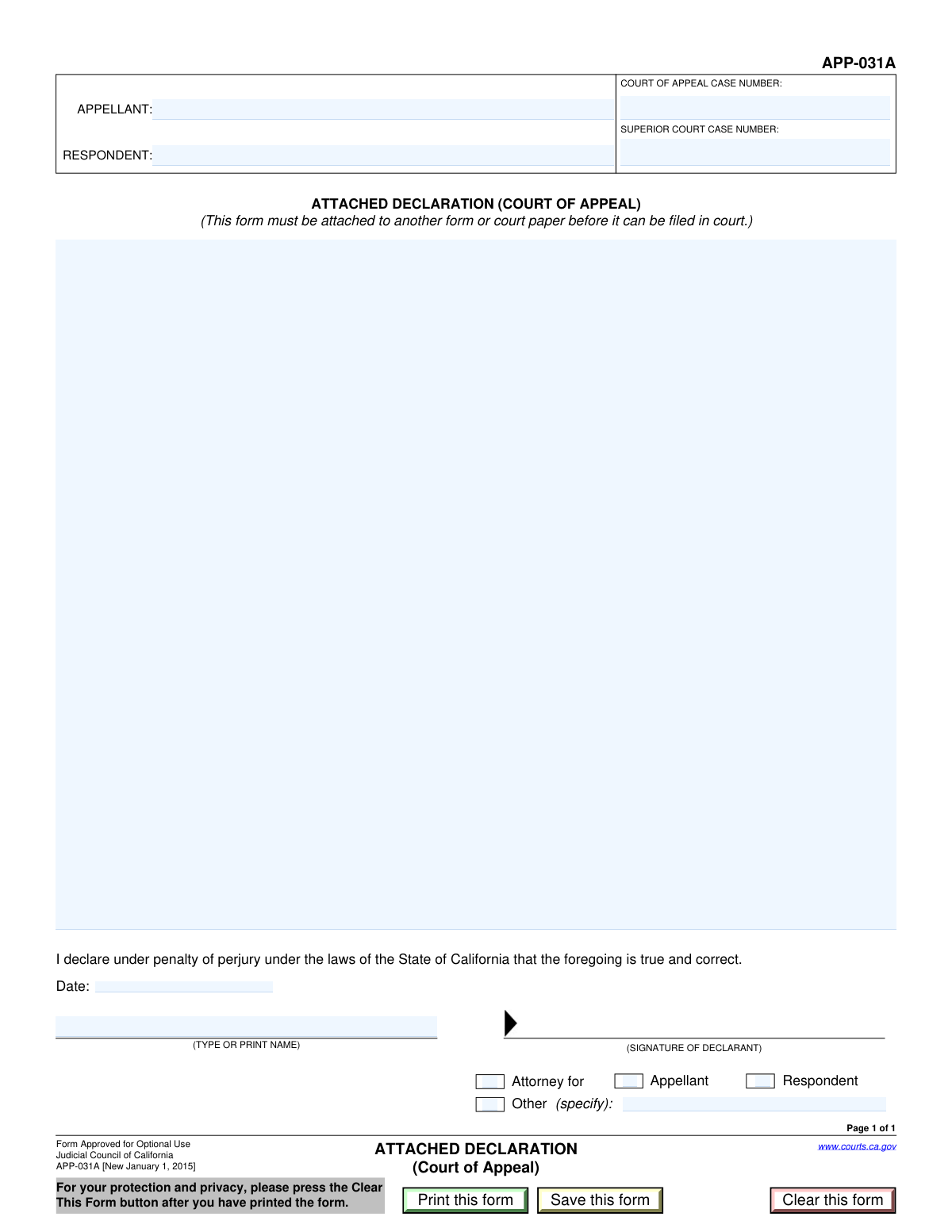
A Declaration for Court of Appeal Proceedings is a formal written statement submitted to a court, signed by the declarant under penalty of perjury, attesting to the truthfulness of its contents. This document is crucial for providing evidence, supporting motions, or presenting factual information relevant to an appeal, which can significantly influence the court's decisions. Today, this form can be filled out quickly and accurately using AI-powered services like Instafill.ai, which can also convert non-fillable PDF versions into interactive fillable forms.
Our AI automatically handles information lookup, data retrieval, formatting, and form filling.
It takes less than a minute to fill out Declaration for Court of Appeal using our AI form filling.
Securely upload your data. Information is encrypted in transit and deleted immediately after the form is filled out.

Form specifications

Form name: Declaration for Court of Appeal Proceedings
Number of fields: 15
Number of pages: 1
Language: English
Categories: court appeal forms, court forms, UK court forms
main-image

Instafill Demo: How to fill out PDF forms in seconds with AI

How to Fill Out Declaration for Court of Appeal Online for Free in 2026

Are you looking to fill out a DECLARATION FOR COURT OF APPEAL form online quickly and accurately? Instafill.ai offers the #1 AI-powered PDF filling software of 2026, allowing you to complete your DECLARATION FOR COURT OF APPEAL form in just 37 seconds or less.
Follow these steps to fill out your DECLARATION FOR COURT OF APPEAL form online using Instafill.ai:
  1. 1 Navigate to Instafill.ai and upload or select the Declaration form for your court case.
  2. 2 Use the AI assistant to populate the case information, including the appellant and respondent names, and the Court of Appeal and Superior Court case numbers.
  3. 3 Carefully write or paste your detailed statement into the 'Declaration Content' section, ensuring all facts are presented clearly and truthfully.
  4. 4 Identify your role in the case by checking the appropriate box (e.g., Appellant, Respondent, Attorney) and specifying if 'Other' is selected.
  5. 5 Enter the current date of signing and provide your full printed name in the designated signature details section.
  6. 6 Review all entered information for accuracy and completeness before saving or printing the final document for signature and filing with the court.

Our AI-powered system ensures each field is filled out correctly, reducing errors and saving you time.

Why Choose Instafill.ai for Your Fillable Declaration for Court of Appeal Form?

Speed

Complete your Declaration for Court of Appeal in as little as 37 seconds.

Up-to-Date

Always use the latest 2026 Declaration for Court of Appeal form version.

Cost-effective

No need to hire expensive lawyers.

Accuracy

Our AI performs 10 compliance checks to ensure your form is error-free.

Security

Your personal information is protected with bank-level encryption.

Frequently Asked Questions About Form Declaration for Court of Appeal

This form is used to submit a formal statement of facts to the court regarding an appeal. It allows a person (the declarant) to provide information they swear is true and correct, under penalty of perjury.

This form should be filled out by anyone involved in an appeal who needs to provide a sworn statement to the court. This can be the appellant, the respondent, their attorneys, or another individual with relevant information.

These numbers are located on official court documents related to your case. The Superior Court number is from the original trial, and the Court of Appeal number is assigned when the appeal is filed.

In this section, you should provide a clear, factual statement relevant to the appeal. Write in the first person and only include facts that you have direct personal knowledge of.

The 'Appellant' is the party who is appealing the lower court's decision. The 'Respondent' is the party who is defending the lower court's decision against that appeal.

You should check the box next to 'Other (specify)' and then write your specific role in the case in the 'Other Declarant Role' field. For example, you could be a witness, guardian, or administrator.

After filling out and signing the form, you must file it with the correct Court of Appeal. Be sure to follow the court's specific rules for filing documents, which may include e-filing, mail, or in-person delivery.

You should type or print your full legal name in this field. This is the name of the person making the declaration and signing the form.

Yes, services like Instafill.ai use AI to help you accurately auto-fill form fields with your information. This can save you time and help prevent common errors.

You can use a service like Instafill.ai to complete this form online from any device. Simply upload the PDF, and the platform will allow you to type your information directly into the fields.

If you have a non-fillable or 'flat' PDF, you can use a tool like Instafill.ai to instantly convert it into an interactive, fillable form. This allows you to easily type in your information without needing to print it.

The 'Save this form' button allows you to save a copy of the form with your entered information to your computer. The 'Clear this form' button will erase all the information you have entered, giving you a blank form to start over.

Yes, a declaration is a legal document that must be signed by the declarant. After printing the form, you will need to physically sign it before filing it with the court.

Compliance Declaration for Court of Appeal
Validation Checks by Instafill.ai

1
Appellant Name Completeness
This check verifies that the 'Appellant Name' field is not empty. The appellant's name is a fundamental piece of information required for case identification and legal processing. If this field is left blank, the form cannot be correctly associated with the case, leading to processing delays or rejection.
2
Respondent Name Completeness
This check ensures that the 'Respondent Name' field has been filled out. Similar to the appellant's name, the respondent's name is critical for identifying all parties involved in the legal matter. A missing respondent name makes the document incomplete and legally insufficient for court filing.
3
Court of Appeal Case Number Format
This validation inspects the 'Court of Appeal Case Number' to ensure it conforms to a standard format (e.g., contains specific prefixes, numbers, and/or dashes). An incorrectly formatted case number can cause filing errors and prevent the document from being docketed correctly. This check helps catch typos and formatting mistakes early.
4
Superior Court Case Number Presence
This check confirms that the 'Superior Court Case Number' field is not empty. This number is essential for linking the appeal to the original trial court proceedings, providing a complete judicial history. Failure to provide this number can disrupt the chain of custody for the case file and cause significant administrative issues.
5
Declaration Content Minimum Length
This validation ensures that the 'Declaration Content' field contains more than just a few words, verifying that a substantive statement has been provided. The purpose of the form is to submit a detailed declaration, and an empty or near-empty field defeats this purpose. If the validation fails, the user is prompted to provide a complete statement.
6
Declaration Date Format and Validity
This check verifies that the 'Declaration Date' is a real, valid date entered in an accepted format (e.g., MM/DD/YYYY). The date of a declaration is legally significant, establishing when the statement was made under penalty of perjury. An invalid or improperly formatted date can call the document's authenticity into question.
7
Declaration Date Cannot Be in the Future
This logical check ensures the 'Declaration Date' is not a future date. A declaration can only be signed on the current day or a past day; it is logically and legally impossible to sign it in the future. This validation prevents simple data entry errors that could invalidate the entire document.
8
Declarant Printed Name Completeness
This check verifies that the 'Declarant Printed Name' field is filled out. This name identifies the individual making the sworn statement and is required for legal accountability. Without a printed name, the signature may be illegible or ambiguous, rendering the declaration invalid.
9
Exclusive Declarant Role Selection
This validation ensures that only one of the declarant role checkboxes ('Appellant', 'Respondent', 'Attorney for', 'Other') is selected. A declarant typically holds a single primary role in the context of the declaration, and selecting multiple roles creates ambiguity. This check enforces clarity and prevents contradictory information on the form.
10
Conditional Requirement for 'Other Declarant Role'
This check enforces that if the 'Other (specify)' checkbox is selected, the corresponding 'Other Declarant Role' text field must be filled in. This is important because simply checking 'Other' is insufficient; the court needs to know the specific capacity in which the person is signing. Failure to specify the role will result in an incomplete submission.
11
Conditional Emptiness of 'Other Declarant Role'
This validation ensures that if the 'Other (specify)' checkbox is not selected, the 'Other Declarant Role' text field must be empty. This prevents stray, irrelevant information from being submitted when the declarant's role is already defined as Appellant, Respondent, or Attorney. It helps maintain the form's clarity and precision.
12
Declarant-Appellant Name Consistency Check
This logical check verifies that if the 'Appellant' checkbox is selected as the declarant's role, the 'Declarant Printed Name' matches the 'Appellant Name' entered in the case information section. This cross-references information to ensure consistency and confirms the person signing is indeed the party they claim to be. A mismatch would indicate a significant error.
13
Declarant-Respondent Name Consistency Check
This validation confirms that if the 'Respondent' checkbox is selected, the 'Declarant Printed Name' is the same as the 'Respondent Name' from the case information. This ensures the identity of the declarant is consistent with their stated role in the case. Discrepancies can lead to the document being rejected for inaccuracy.
14
Attorney Name Distinction from Parties
This check ensures that if the 'Attorney for' checkbox is selected, the 'Declarant Printed Name' does not match either the 'Appellant Name' or the 'Respondent Name'. An attorney is a distinct individual representing a party, not the party themselves. This validation prevents a party from incorrectly identifying themselves as their own counsel on the form, which has specific legal implications.

Common Mistakes in Completing Declaration for Court of Appeal

Transposing or Confusing Case Numbers

Users often mistakenly enter the Superior Court case number in the field for the Court of Appeal, or vice versa. These numbers are distinct and not interchangeable, so confusing them can lead to the document being misfiled or rejected entirely. To avoid this, carefully cross-reference the case numbers with official court documents and double-check which number corresponds to which court before entering it.

Incomplete or Incorrect Party Names

Appellants and respondents are frequently listed using initials, nicknames, or incomplete legal names. Court filings require the full, official names of all parties as they appear on other legal documents to ensure proper identification. Using incorrect names can cause processing delays and require the submission of a corrected form.

Failing to Specify Role When 'Other' is Selected

A common error is checking the 'Other (specify)' box without filling in the corresponding text field to describe the declarant's role. This leaves the court guessing about the signer's capacity (e.g., Guardian ad litem, Custodian of Records), which can invalidate the declaration. If you select 'Other', you must always provide a specific description of your role in the case.

Missing or Conflicting Declarant Role Selection

Filers sometimes forget to check any box to indicate their role, or they check multiple conflicting boxes (e.g., both 'Appellant' and 'Respondent'). The form requires one clear selection to establish the declarant's standing. This omission or ambiguity can lead to the form being rejected for being incomplete or unclear.

Incorrect Case Number Formatting

Court systems often rely on specific formats for case numbers, including prefixes, suffixes, and dashes (e.g., 'S123456' vs. 'S-123456'). Entering the number without the correct formatting can cause rejections in electronic filing systems or data entry errors by court clerks. Always copy the case number exactly as it appears on official court notices to ensure accuracy.

Vague or Unclear Declaration Statement

The free-text 'Declaration Content' field is often filled with statements that are too general, emotional, or not fact-based. A declaration must provide a clear, concise, and factual account relevant to the legal issue at hand. A poorly written declaration can weaken your legal position and may be disregarded by the judge.

Using an Invalid or Incorrectly Formatted Date

People may enter the date in the wrong format (e.g., DD-MM-YYYY instead of MM/DD/YYYY), or accidentally enter a future or incorrect date. The declaration date must reflect the actual day of signing and follow the court's required format. An invalid date can be grounds for the court to question the document's authenticity and reject the filing.

Losing Data by Not Saving the PDF Correctly

Users often fill out PDF forms within a web browser and then print or close the tab, causing all entered information to be lost. This happens because the data isn't saved to the file itself. To prevent this, always use the form's 'Save' button or download the file to your computer before you begin filling it out and save your progress frequently.

Illegible Handwriting on a Printed Form

If the form is only available as a non-fillable PDF, it must be printed and completed by hand, which often results in illegible writing. Unreadable names, case numbers, and declarations can lead to critical data entry errors by court staff and cause the document to be rejected. AI-powered tools like Instafill.ai can convert flat PDFs into fillable digital forms to ensure all entries are typed, clear, and accurate.

Signing in the 'Printed Name' Field

The 'Declarant Printed Name' field requires the name to be typed or clearly printed for legibility, but many people mistakenly place their signature there. A signature in this box can be unreadable and does not meet the requirement of a printed name, leading to rejection. The signature belongs on a dedicated signature line, while this field is for identification. AI form-fillers like Instafill.ai can prevent this by populating the printed name correctly.
Saved over 80 hours a year

“I was never sure if my IRS forms like W-9 were filled correctly. Now, I can complete the forms accurately without any external help.”

Kevin Martin Green

Your data stays secure with advanced protection from Instafill and our subprocessors

Robust compliance program

Transparent business model

You’re not the product. You always know where your data is and what it is processed for.

ISO 27001, HIPAA, and GDPR

Our subprocesses adhere to multiple compliance standards, including but not limited to ISO 27001, HIPAA, and GDPR.

Security & privacy by design

We consider security and privacy from the initial design phase of any new service or functionality. It’s not an afterthought, it’s built-in, including support for two-factor authentication (2FA) to further protect your account.

Fill out Declaration for Court of Appeal with Instafill.ai

Worried about filling PDFs wrong? Instafill securely fills declaration-for-court-of-appeal-proceedings forms, ensuring each field is accurate.