
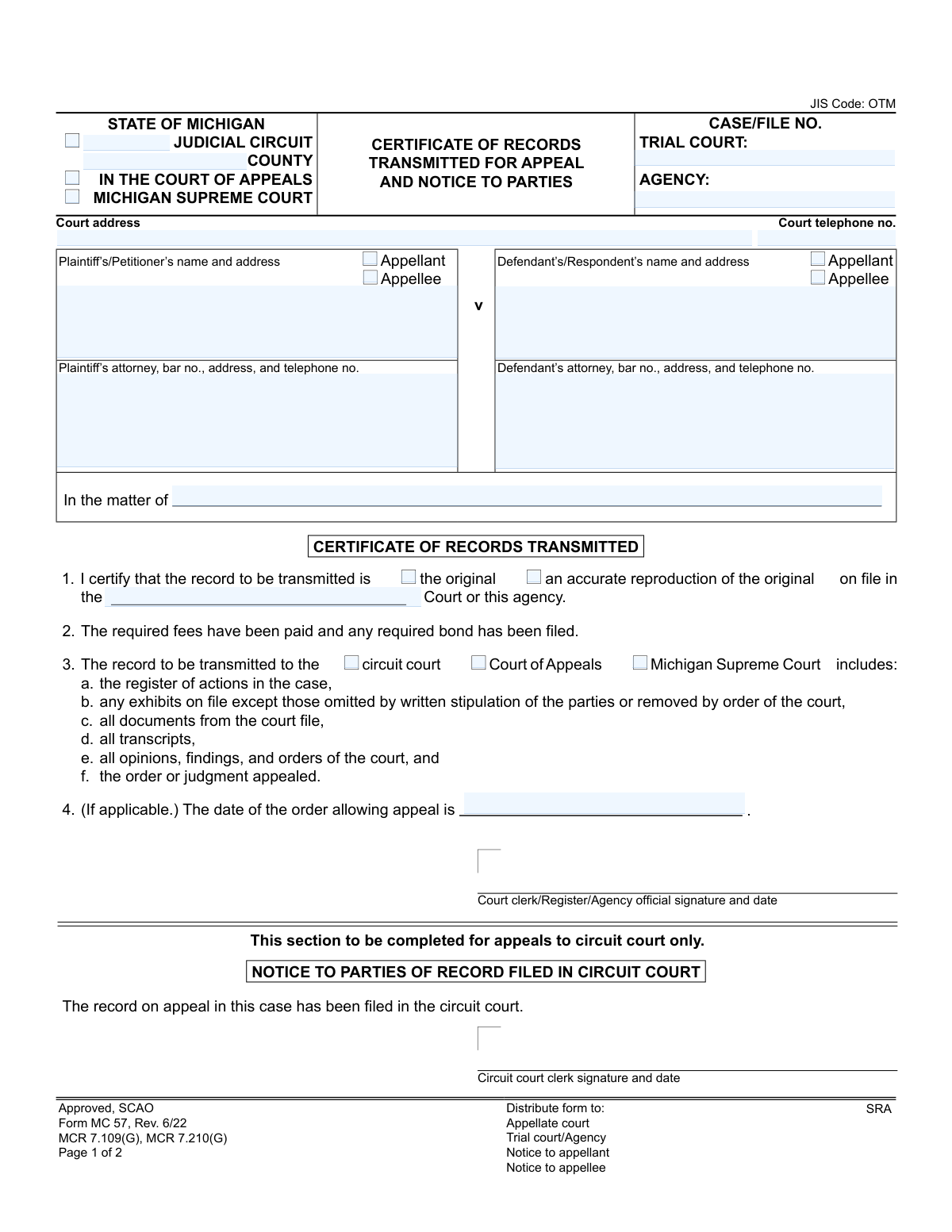
Yes! You can use AI to fill out Form MC 57, Certificate of Records Transmitted for Appeal and Notice to Parties
Don't type 26 fields by hand. Tell our AI about yourself, or upload a document you already have, and it fills every field in seconds. You check it, then download, print or sign.
The AI does the filling. You just check it.
No typing into boxes, nothing to install.
What this form asks for
The AI fills all of it, from your answers or your documents.
The AI checks your answers before you download
13 checks built for this form, so a wrong date or a missing answer is caught before anyone else sees it.
This validation ensures that the 'Trial Court Case No' or 'Agency File No' field is populated. It checks that the number conforms to the standard format used by Michigan courts, which is crucial for uniquely identifying the case file being appealed. A missing or malformed case number would prevent the appellate court from locating the correct record, leading to rejection.
This check verifies that one party is designated 'Appellant' and the other is 'Appellee'. It is a fundamental requirement of an appeal that there is an appealing party and a responding party. The form will be flagged for correction if both parties are marked as Appellant, both as Appellee, or if these designations are missing.
This validation ensures that exactly one destination court is selected in section 3 ('transmitted circuit court', 'transmitted court of appeals', or 'transmitted Michigan Supreme Court'). An appeal record can only be transmitted to a single jurisdiction at a time. Submissions with no selection or multiple selections are ambiguous and will be rejected.
This check confirms that either 'the original' or 'an accurate reproduction of the original' checkbox is marked in section 1. This information is vital for the receiving court to understand the nature of the documents they are getting. Failure to specify the record type will result in the form being returned for completion.
This rule validates that any provided attorney 'bar no.' follows the official Michigan State Bar format, typically a 'P' followed by a sequence of digits. This ensures the attorney is correctly identified and can be verified as a member in good standing with the state bar. An invalid format could indicate a typo or an unauthorized representative.
This validation checks that the 'appeal order date' is a valid date that occurs on or before the submission date. An appeal cannot be based on a future order, so this check prevents logical and legal impossibilities. It ensures the timeline of the legal process is correctly documented.
And 7 more checks
- Completeness of Party Information
- Case Number Consistency Across Pages
- Source Court/Agency Identification
- Logical Date Sequence for Certification
- Plaintiff's Role in Appeal
- Defendant's Role in Appeal
- Judicial Circuit and County Specification
Let AI fill out your MC 57
No typing. Every field filled in seconds, checked, ready to sign.
How to Fill Out MC 57 Online for Free in 2026
What the AI walks you through.
- Navigate to Instafill.ai and upload or select the MC 57 form.
- Provide the case information, including the trial court case number, agency file number, and the specific appellate court the record is being sent to.
- Identify the parties (Plaintiff/Petitioner and Defendant/Respondent) and their attorneys, including names, addresses, and bar numbers.
- Complete the certification section by indicating if the record is original or a reproduction and confirming all required fees have been paid.
- Enter the date of the order allowing the appeal, if applicable.
- The court clerk or agency official will digitally sign and date the certificate to validate the transmission of records.
- Review all auto-filled information for accuracy before finalizing, printing, and distributing the form to the appellate court, trial court, and all parties involved in the appeal.
Common Mistakes in Completing MC 57
The ones the AI is built to catch.
Misidentifying the Appellant and Appellee
Omitting or Transposing Case and File Numbers
Providing Incomplete Attorney Information
Selecting the Wrong Destination Court
Forgetting the 'Order Allowing Appeal' Date
Missing Clerk Signatures and Dates
Failing to Enter the Case Number on Page Two
Entering Inaccurate or Outdated Party Addresses
Using an Obsolete Version of the Form
Frequently Asked Questions About MC 57
Is it really free for 7 days?
Can I fill other forms too?
How do I cancel?
How does the AI fill out MC 57?
What happens to my information?
How complex is MC 57 to fill out?
What is the purpose of Form MC 57, the Certificate of Records Transmitted for Appeal?
Who is responsible for filling out this form?
I received a copy of this form. What do I need to do now?
What is the difference between the 'Appellant' and the 'Appellee'?
What is included in the 'record' that is transmitted for appeal?
The form states that 'required fees have been paid.' Which fees does this refer to?
What happens in my appeal after this form is filed?
Can I use an AI tool to help me fill out this specific form?
How can Instafill.ai help me with my other appeal documents?
Some of my appeal forms are non-fillable PDFs. What can I do?
What does the 'Certificate of Mailing' on the second page signify?
What is a 'register of actions' as listed on the form?
Does this form mean my appeal has been approved?
Get your MC 57 filled out by AI
$0 today. Cancel before Nov 11 and you pay nothing.
Other forms like this one
Michigan court forms: Form MC 03, Answer, Civil, Form MC 02, Appearance, Form MC 6, Notice to Appear, Form MC 01, Summons, State of Michigan, Form MC 01a, Complaint, Form MC 01b, Motion for Second Summons and Order, State of Michigan Blank Court Form, Form MC 07, Default Request and Entry, Form MC 07a, Default Request, Entry, and Judgment (Sum Certain), Form MC 09, Dismissal, Form MC 09a, Dismissal, Nonservice/No Progress, Form MC 10, Judgment, Civil, Form MC 11, Subpoena, Order to Appear and/or Produce, Request and Writ for Garnishment (Periodic), Form MC 13, Request and Writ for Garnishment (Nonperiodic), Form MC 14, Garnishee Disclosure, Form MC 15, Motion and Affidavit for Installment Payments/To Amend Order for Installment Payments, Form MC 15a, Order Regarding Installment Payments, Form MC 16, Motion to Set Aside Order for Installment Payments, State of Michigan, Form MC 16a, Order on Motion to Set Aside Order for Installment Payments
court appeal forms: Form N161, Appellant's Notice (All appeals except small claims track appeals and appeals to the Family Division of the High Court), Designation of Record on Appeal (Civil) (Maricopa County Justice Courts, Arizona) (Form APP 8150-702), Form N161, Appellant’s notice (All appeals except small claims track appeals and appeals to the Family Division of the High Court), Declaration for Court of Appeal Proceedings, Form MC 55, Claim of Appeal, Form MC 56, Bond on Appeal, Form MC 60, Notice of Record Return from Circuit Court/Court of Appeals, Form MC 501, Reporter/Recorder Certificate of Ordering Transcript on Appeal, Form MC 503, Motion to Change Time for Filing Transcript on Appeal, Civil Appeal Case Information Statement, Form APP-014, Appellant's Proposed Statement on Appeal (Unlimited Civil Case), Form CR-125, Notice of Appeal—Commitment (Penal Code or Welfare and Institutions Code), Form CR-134, Notice Regarding Record on Appeal (Misdemeanor), Form CR-135, Proposed Statement on Appeal (Misdemeanor), Form CR-136, Order Concerning Appellant's Proposed Statement on Appeal (Misdemeanor), Form CR-137, Abandonment of Appeal (Misdemeanor), Form CR-142, Notice of Appeal and Record on Appeal (Infraction), Form CR-143, Proposed Statement on Appeal (Infraction), Form CR-105, Defendant's Financial Statement on Eligibility for Appointment of Counsel and Reimbursement and Record on Appeal at Public Expense, Form CR-133, Request for Court-Appointed Lawyer in Misdemeanor Appeal
Let AI fill out your MC 57
Your trial starts once a card is added. You pay nothing before Nov 11.
Our AI already knows this form, all 26 fields of it. Skip the typing: tell it about yourself, or upload what you have, and it fills the whole form in seconds.
- AI fills every field on both pages, checkboxes included
- No typing into boxes: answer a few questions, or upload a document you already have, an old copy of this form, a photo of a document
- The AI checks the answers; you review and change anything before you download
- Download the finished PDF, print it, or sign it online
- Encrypted, and never used to train AI
Cancel before Nov 11 and you pay nothing.
A card is needed to start the trial. Cancel in two clicks from your account.
Terms · Privacy