Yes! You can use AI to fill out Form CR-133, Request for Court-Appointed Lawyer in Misdemeanor Appeal

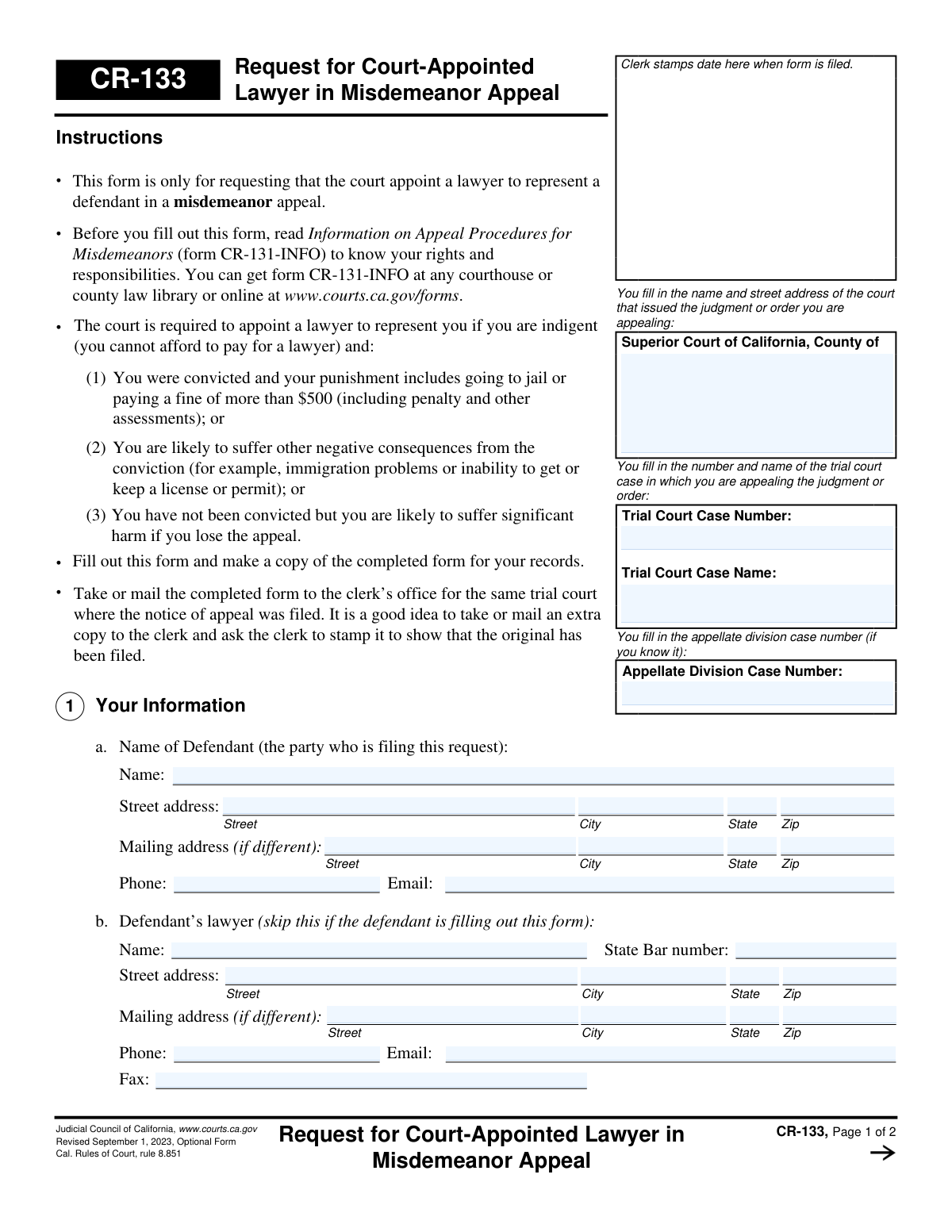
Form CR-133, Request for Court-Appointed Lawyer in Misdemeanor Appeal, is a California Judicial Council form used by defendants who have been convicted of a misdemeanor and are appealing the decision. It allows them to formally request that the court appoint legal counsel for them if they are indigent (unable to afford a lawyer) and meet certain criteria, such as facing jail time or a significant fine. Today, this form can be filled out quickly and accurately using AI-powered services like Instafill.ai, which can also convert non-fillable PDF versions into interactive fillable forms.
CR-133 is part of the California court forms and court appeal forms categories on Instafill.
Our AI automatically handles information lookup, data retrieval, formatting, and form filling.
It takes less than a minute to fill out CR-133 using our AI form filling.
Securely upload your data. Information is encrypted in transit and deleted immediately after the form is filled out.

Form specifications

Form name: Form CR-133, Request for Court-Appointed Lawyer in Misdemeanor Appeal
Number of fields: 50
Number of pages: 1
Language: English
main-image

Instafill Demo: How to fill out PDF forms in seconds with AI

How to Fill Out CR-133 Online for Free in 2026

Are you looking to fill out a CR-133 form online quickly and accurately? Instafill.ai offers the #1 AI-powered PDF filling software of 2026, allowing you to complete your CR-133 form in just 37 seconds or less.
Follow these steps to fill out your CR-133 form online using Instafill.ai:
  1. 1 Navigate to Instafill.ai and upload or select Form CR-133.
  2. 2 Provide the court and case information, including the Superior Court name, trial court case number, and appellate division case number.
  3. 3 Enter your personal information as the defendant, including your name, address, and contact details. If an attorney is completing the form, their information must also be provided.
  4. 4 Answer the questions about your case, including whether you had a court-appointed lawyer in the trial court. If not, you will need to attach Form CR-105 to show financial hardship.
  5. 5 Describe the punishment from the trial court, such as jail time, fines, or probation, and detail any other negative consequences you are likely to suffer from the conviction.
  6. 6 Carefully review all the information populated by the AI for accuracy, then e-sign and date the form.
  7. 7 Download the completed form to file with the clerk's office of the trial court where the notice of appeal was filed.

Our AI-powered system ensures each field is filled out correctly, reducing errors and saving you time.

Why Choose Instafill.ai for Your Fillable CR-133 Form?

Speed

Complete your CR-133 in as little as 37 seconds.

Up-to-Date

Always use the latest 2026 CR-133 form version.

Cost-effective

No need to hire expensive lawyers.

Accuracy

Our AI performs 10 compliance checks to ensure your form is error-free.

Security

Your personal information is protected with bank-level encryption.

Frequently Asked Questions About Form CR-133

This form is used to formally request that the court appoint a lawyer for you in a misdemeanor appeal if you are indigent, meaning you cannot afford to hire one yourself.

You should fill out this form if you are appealing a misdemeanor conviction or order and cannot afford to pay for an attorney to represent you in the appeal process.

You are eligible if you are indigent and your case involves potential jail time, a fine over $500, or other significant negative consequences like immigration problems or loss of a professional license.

You must take or mail the completed form to the clerk's office for the same trial court where your notice of appeal was filed.

Yes, if you were not represented by a court-appointed lawyer in the trial court, you must also complete and attach Form CR-105, the Defendant's Financial Statement, to prove you cannot afford a lawyer.

On the form, you would indicate you did not have a court-appointed lawyer and then submit Form CR-105 to demonstrate your current financial inability to hire a lawyer for the appeal.

This section is for consequences beyond the sentence, such as potential deportation, loss of a professional license, or inability to keep a job as a result of the conviction.

Possibly. The court can review your financial situation later, and if it determines you are able to pay, it may order you to pay back all or part of the legal costs.

Yes, the form instructs you to read 'Information on Appeal Procedures for Misdemeanors' (form CR-131-INFO) to understand your rights and responsibilities during the appeal.

The trial court case number can be found on any of the legal documents from your original misdemeanor case. It is important to copy it exactly as it appears on those documents.

Yes, services like Instafill.ai use AI to help you accurately auto-fill form fields with your information, which saves time and reduces the chance of errors.

Simply upload the CR-133 PDF to the Instafill.ai platform. The service will make the document interactive, allowing you to easily type in your information and complete the form digitally.

You can use a tool like Instafill.ai, which is designed to convert non-fillable PDFs into interactive forms that you can complete and sign on your computer.

The court will review your request and financial information to determine if you qualify. If you do, the court will appoint a lawyer to represent you in your appeal.

Compliance CR-133
Validation Checks by Instafill.ai

1
Ensures Case Number Consistency Across Pages
This check verifies that the 'Trial Court Case Number' entered on page 1 is identical to the one entered on page 2. This is crucial for maintaining document integrity and ensuring the pages are not mismatched with another case. If the numbers do not match, the user will be prompted to correct the discrepancy before submission.
2
Verifies Completeness of Trial Court Case Information
This check ensures that both the 'Trial Court Case Number' and 'Trial Court Case Name' fields on page 1 are filled out. This information is fundamental for the court clerk to identify and locate the correct case file to which this request pertains. Submitting the form without this core identifying information would make it impossible to process, so an error is shown if either field is left blank.
3
Validates Defendant's Name is Provided
This validation ensures that the 'Name of Defendant' field in Section 1 is not empty. The defendant's name is the primary identifier for the request and is legally required to process the form. A failure to provide this information will prevent form submission and display an error message indicating the field is mandatory.
4
Ensures Exclusive Selection for Prior Representation
This validation confirms that in Section 2, the user has selected either 'Yes' or 'No', but not both, regarding prior court-appointed representation. This question is mandatory and requires a single, unambiguous answer to determine the next steps for proving financial eligibility. If neither or both are selected, the user will be required to make a single valid choice.
5
Conditional Requirement for Financial Statement (CR-105)
This check is triggered if the user selects 'No' in Section 2, indicating they were not represented by a court-appointed lawyer previously. The validation confirms the user acknowledges that they must attach Form CR-105 (Defendant's Financial Statement). This is critical because eligibility for a court-appointed lawyer is based on indigence, which CR-105 proves; failure to attach it will result in the request being rejected.
6
Validates Fine Amount When Box is Checked
This rule checks that if the 'A fine' checkbox in Section 3b is selected, the corresponding amount field is filled with a valid, positive numerical value. This information is essential for the court to assess whether the punishment meets the criteria for appointing a lawyer (e.g., fine over $500). If the box is checked but the amount is empty or invalid, an error will prompt the user to enter the correct fine amount.
7
Validates Restitution Amount When Box is Checked
This validation ensures that if the 'Restitution' checkbox in Section 3c is checked, the associated amount field contains a valid, positive numerical value. Providing the restitution amount is necessary for the court to have a complete picture of the financial penalties imposed. If the checkbox is selected without a corresponding amount, the form will be considered incomplete and the user will be notified to provide the value.
8
Enforces Mutual Exclusivity of Conviction Status Sections
This validation checks the logical consistency between Section 3 (for convicted defendants) and Section 4 (for non-convicted defendants). The system will ensure that information is entered in only one of these two sections, but not both, as they are mutually exclusive. If data is present in both, an error will be displayed, requiring the user to clear the information from the incorrect section.
9
Validates Signature Date Format and Plausibility
This check verifies that the 'Date' field at the end of the form is filled with a valid date in an accepted format (e.g., MM/DD/YYYY). It also ensures the date is not in the future, as the form must be signed on or before the day of filing. An invalid format or a future date would render the signature legally questionable, so the system will reject it and ask for a correction.
10
Ensures Printed Name is Provided for Signature
This validation confirms that the 'Type or print name' field accompanying the signature line is completed. This printed name clarifies the identity of the signatory, which is crucial if the signature itself is difficult to read. Without a printed name, the form may be rejected for being improperly executed, so submission is blocked until the field is filled.
11
Validates Attorney's State Bar Number Format
This rule applies if the 'Defendant's lawyer' section (1b) is completed. It verifies that the 'State Bar number' field contains a value that conforms to the expected format for California State Bar numbers. This ensures the person listed is a legitimate, identifiable attorney, which is essential for court records. An invalid format will trigger an error, prompting the user to correct the number.
12
Validates Presence of Defendant Contact Information
This validation ensures that the defendant has provided sufficient contact information in Section 1. It checks that either a valid 'Phone' number or a complete 'Street address' (including city, state, and zip) is entered. This is critical for the court to communicate with the defendant about the status of their request; failure to provide contact details will halt the submission process.
13
Validates Superior Court County is Specified
This validation ensures that the user has filled in the county name in the 'Superior Court of California, County of' field at the top of the form. This information is essential for routing the document to the correct court jurisdiction for processing. Submitting the form without the county name would make it impossible to file, so the system will block submission until this mandatory field is completed.
14
Ensures Correct Email Address Format
This check validates that any value entered into the 'Email' fields for either the defendant or their lawyer follows the standard '[email protected]' format. While optional, if an email is provided, it must be valid to ensure electronic communications from the court are deliverable. An incorrectly formatted email address will trigger a warning, asking the user to correct it or leave the field blank.

Common Mistakes in Completing CR-133

Failing to Attach Required Financial Statement (CR-105)

In Section 2, if you check 'No' to indicate you were not represented by a public defender in the trial court, you must attach Form CR-105 to prove your financial indigence. This is a frequent and critical error, as its omission leads to an automatic rejection or significant delay of your request for a lawyer. To avoid this, carefully read Section 2 and ensure you download, complete, and attach Form CR-105 if it applies to your situation.

Entering Incorrect Case Numbers or Names

Applicants often mistype the Trial Court Case Number or incorrectly write the Trial Court Case Name in the header section. These clerical errors can cause the document to be misfiled, sent to the wrong department, or rejected, delaying the entire process. Always cross-reference this information with official documents from your trial court case to ensure 100% accuracy. AI-powered tools like Instafill.ai can help prevent this by storing case information and auto-filling it correctly across all related legal forms.

Vague or Incomplete Description of Negative Consequences

Section 3f asks for 'other negative consequences' of the conviction, which is a key factor for establishing eligibility. Many people provide weak, generic answers or leave it blank, failing to mention critical details like potential immigration issues, loss of a professional license, or inability to secure housing or employment. A vague answer gives the court no reason to believe significant harm exists, which can lead to a denial of your request.

Missing Signature or Date

Forgetting to sign and date the form is a simple but fatal mistake that renders the entire document legally invalid and unprocessed. This often happens when filers are rushing to complete the paperwork and overlook the signature line at the very end. An unsigned form will be returned, causing unnecessary delays. Always perform a final check of the bottom of page 2 to ensure you have provided a physical signature and the current date before filing.

Providing Outdated or Unreliable Contact Information

The court uses the address, phone number, and email in Section 1 for all official communications, including hearing dates and decisions. Providing an old address or an email account that isn't checked regularly can lead to missed deadlines and critical updates about your case. To avoid this, ensure all contact information is current and will be reliable for the duration of the appeal. Using a tool like Instafill.ai can help maintain a current profile and populate forms with the correct, up-to-date information every time.

Filing the Form in the Incorrect Court

The instructions specify that this form must be filed with the clerk's office of the trial court where the original case was heard, not the appellate court. Misunderstanding this procedural step and sending the form to the wrong location is a frequent error that results in the form being returned. This wastes valuable time and can jeopardize filing deadlines. Always confirm the correct filing location, which is the Superior Court listed at the top of the form.

Inaccurate or Incomplete Punishment Details

In Section 3, applicants must detail their punishment, including the exact amount of fines (with assessments) and restitution, or the length of probation. People often guess or provide incomplete figures. Since the severity of the punishment is a direct factor in eligibility, inaccurate information can weaken the request. Refer to your official sentencing paperwork to find the exact figures and terms to ensure your application is as strong as possible.

Attempting to Fill a Non-Fillable PDF by Hand

Many people access this form online as a flat PDF that cannot be typed into, leading to handwritten submissions that can be illegible and prone to errors. This can cause the court clerk to misinterpret information or reject the form entirely if it cannot be read. To avoid this, use a service like Instafill.ai, which can convert non-fillable PDFs into interactive, fillable forms, ensuring the final document is clean, legible, and professional.

Failing to Keep a 'Filed' Copy for Records

The form explicitly recommends making a copy for your records and even getting an extra copy stamped by the clerk as proof of filing. Many applicants skip this step, leaving them with no proof if the court loses the document or a dispute arises over the filing date. Always make a photocopy of the completed, signed form before you submit it, and if filing in person, bring an extra copy and ask the clerk to stamp it with the filing date for your records.

Misunderstanding the Purpose of Section 4

Section 4 is specifically for applicants who have *not* been convicted but are appealing a different type of court order. A common mistake is for a convicted person to try and fill out this section, causing confusion. Conversely, a person appealing a non-conviction order might mistakenly skip it. It is crucial to only fill out the section that applies to your specific situation: Section 3 if you were convicted, or Section 4 if you were not.
Saved over 80 hours a year

“I was never sure if my IRS forms like W-9 were filled correctly. Now, I can complete the forms accurately without any external help.”

Kevin Martin Green

Your data stays secure with advanced protection from Instafill and our subprocessors

Robust compliance program

Transparent business model

You’re not the product. You always know where your data is and what it is processed for.

ISO 27001, HIPAA, and GDPR

Our subprocesses adhere to multiple compliance standards, including but not limited to ISO 27001, HIPAA, and GDPR.

Security & privacy by design

We consider security and privacy from the initial design phase of any new service or functionality. It’s not an afterthought, it’s built-in, including support for two-factor authentication (2FA) to further protect your account.

Fill out CR-133 with Instafill.ai

Worried about filling PDFs wrong? Instafill securely fills form-cr-133-request-for-court-appointed-lawyer-in-misdemeanor-appeal forms, ensuring each field is accurate.

Related forms by category

California court forms Judicial Council of California Form SC-105, Request for Court Order and Answer (Small Claims), Judicial Council of California Form SC-120, Defendant’s Claim and ORDER to Go to Small Claims Court (Small Claims), Judicial Council of California Form SER-001, Request for Sheriff to Serve Court Papers, Judicial Council of California Form SER-001, Request for Sheriff to Serve Court Papers, Affidavit for Collection of Personal Property California Probate Code Section 13100, Form POS-040, Proof of Service—Civil, Declaration of Facts of Death (California Superior Court), declaration-of-marriage-for-court-proceeding-california-family-law, ADOPT-200, Adoption Request, ADOPT-200, Stepparent Adoption Request, ADOPT-210, Adoption Agreement, ADOPT-310, Contact After Adoption Agreement, Judicial Council of California Form ADOPT-200, Adoption Request, Form ADR-107, Mediation Attendance Sheet, Form ADR-110, Order Appointing Referee, Form ADR-109, Stipulation or Motion for Order Appointing Referee, Form ADR-102, Request for Trial De Novo After Judicial Arbitration, Form ADR-108, Referee's Report (Code Civ. Proc., §§ 638, 639), Form ADR-106, Petition to Confirm, Correct, or Vacate Contractual Arbitration Award, Form ADR-104, Rejection of Award and Request for Trial After Attorney-Client Fee Arbitration · + 557 more →
court appeal forms Form N161, Appellant's Notice (All appeals except small claims track appeals and appeals to the Family Division of the High Court), Designation of Record on Appeal (Civil) (Maricopa County Justice Courts, Arizona) (Form APP 8150-702), Form N161, Appellant’s notice (All appeals except small claims track appeals and appeals to the Family Division of the High Court), Declaration for Court of Appeal Proceedings, Form MC 55, Claim of Appeal, Form MC 56, Bond on Appeal, Form MC 57, Certificate of Records Transmitted for Appeal and Notice to Parties, Form MC 60, Notice of Record Return from Circuit Court/Court of Appeals, Form MC 501, Reporter/Recorder Certificate of Ordering Transcript on Appeal, Form MC 503, Motion to Change Time for Filing Transcript on Appeal, Civil Appeal Case Information Statement, Form APP-014, Appellant's Proposed Statement on Appeal (Unlimited Civil Case), Form CR-125, Notice of Appeal—Commitment (Penal Code or Welfare and Institutions Code), Form APP-002, Notice of Appeal/Cross-Appeal (Unlimited Civil Case), Form CR-134, Notice Regarding Record on Appeal (Misdemeanor), Form CR-135, Proposed Statement on Appeal (Misdemeanor), Form CR-136, Order Concerning Appellant's Proposed Statement on Appeal (Misdemeanor), Form CR-137, Abandonment of Appeal (Misdemeanor), Form CR-142, Notice of Appeal and Record on Appeal (Infraction), Form CR-143, Proposed Statement on Appeal (Infraction) · + 20 more →