
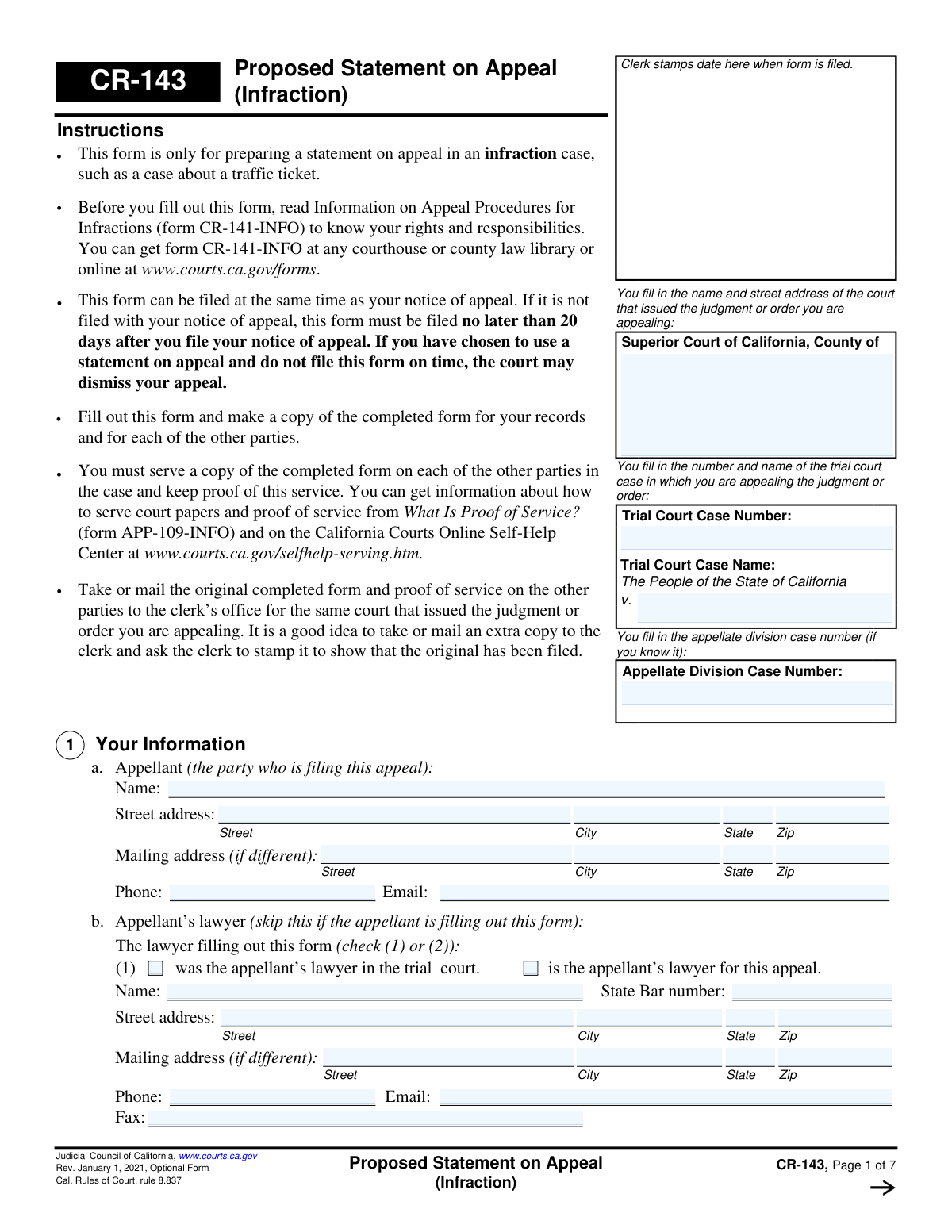
Yes! You can use AI to fill out Form CR-143, Proposed Statement on Appeal (Infraction)
Don't type 139 fields by hand. Tell our AI about yourself, or upload a document you already have, and it fills every field in seconds. You check it, then download, print or sign.
The AI does the filling. You just check it.
No typing into boxes, nothing to install.
What this form asks for
The AI fills all of it, from your answers or your documents.
The AI checks your answers before you download
14 checks built for this form, so a wrong date or a missing answer is caught before anyone else sees it.
Ensures that the 'Trial Court Case Number' and 'Trial Court Case Name' fields on page 1 are filled out. These fields are critical for associating the appeal with the correct original case in the court system. If this information is missing, the filing could be rejected or misrouted, causing significant delays.
Verifies that the appellant's full name and street address (including street, city, state, and zip code) are provided in Section 1a. This information is mandatory for official correspondence and legal identification of the filing party. Failure to provide a complete address will result in an incomplete submission and may prevent the court from contacting the appellant.
If attorney information is provided in Section 1b, this check validates that the 'State Bar number' field contains only digits and is of a valid length (e.g., 5-6 digits). This ensures the attorney is properly identified and their credentials can be verified with the State Bar of California. An invalid number would prevent verification and could invalidate the representation.
Validates that at least one of the checkboxes in Section 3 ('Reasons for Your Appeal') is selected. The appellant must specify the legal grounds for the appeal, such as 'not substantial evidence' or 'prejudicial error'. Without a selected reason, the appeal lacks a legal basis and the form is considered incomplete.
Checks that if a reason for appeal is selected in Section 3, the corresponding text box explaining the reason is not empty. For example, if 'There was not substantial evidence' is checked, the explanation field must be filled. This is crucial as the explanation provides the core argument for the appeal; a missing explanation makes the claim unsubstantiated.
Ensures that in Section 4c, exactly one of the three plea options ('pleaded not guilty to all', 'pleaded guilty to only the following', 'pleaded guilty to all') is selected. These options are mutually exclusive, and selecting more than one or none creates an ambiguity about the case's history. The form must be returned for correction if this rule is violated.
And 8 more checks
- Conditional Plea Charge Specification
- Conditional Motion Details Trigger
- Conditional Trial Summary Trigger
- Conditional Testimony Summary
- Header Case Number Consistency
- Conditional Fine Amount
- Signature Date and Name Requirement
- Email Address Format
Let AI fill out your CR-143
No typing. Every field filled in seconds, checked, ready to sign.
How to Fill Out CR-143 Online for Free in 2026
What the AI walks you through.
- Navigate to Instafill.ai and upload or select Form CR-143, Proposed Statement on Appeal (Infraction).
- Use the AI assistant to accurately fill in your personal information, your lawyer's details (if applicable), and the specific trial court and case information.
- Clearly state the reasons for your appeal by checking the appropriate boxes and providing detailed explanations for why you believe there was a lack of substantial evidence or a prejudicial error occurred.
- Provide information about the charges against you, your plea, and a summary of any motions made during the case, including the court's rulings.
- Summarize the trial testimony and other evidence presented that is relevant to your appeal, including your own testimony, officer testimony, and that of any other witnesses.
- Detail the trial court's final findings, the sentence imposed (fine, traffic school, etc.), and attach any necessary additional pages.
- Review all the information for accuracy, then use the platform to sign and date the form before downloading it for filing with the court and serving on the other parties.
Common Mistakes in Completing CR-143
The ones the AI is built to catch.
Arguing Facts Instead of Legal Errors
Incorrect or Incomplete Case Information
Providing Opinions in Factual Summaries
Missing the Filing Deadline
Failure to Serve the Opposing Party and File Proof of Service
Using Vague or Unsupported Claims of Error
Incorrectly Identifying the Date of Notice of Appeal
Submitting an Illegible or Incomplete Form
Failing to Attach and Properly Label Supplemental Pages
Confusing the Citation Number with the Trial Court Case Number
Frequently Asked Questions About CR-143
Is it really free for 7 days?
Can I fill other forms too?
How do I cancel?
How does the AI fill out CR-143?
What happens to my information?
How complex is CR-143 to fill out?
What is the purpose of the CR-143 'Proposed Statement on Appeal' form?
Who needs to fill out this form?
What is the deadline for filing Form CR-143?
What kind of reasons for an appeal are valid on this form?
Where do I file the completed Proposed Statement on Appeal?
Do I need to provide a copy of this form to anyone else?
What information do I need for Section 3, 'Reasons for Your Appeal'?
What should I do for Section 6 if my case did not go to trial?
What key pieces of information should I have ready before filling out this form?
Is this form the same as a Notice of Appeal?
Can I use an AI tool to help me complete this form?
How can I fill out the CR-143 form online?
The PDF of the form I downloaded is not fillable. What can I do?
Get your CR-143 filled out by AI
$0 today. Cancel before Oct 31 and you pay nothing.
Other forms like this one
California state forms: Judicial Council of California Form DE-111, Petition for Probate (Probate—Decedents Estates), DS 1891, Applicant/Vendor Disclosure Statement (State of California Department of Developmental Services), Judicial Council of California Form DE-120, Notice of Hearing—Decedent's Estate or Trust, Judicial Council of California Form DE-120, Notice of Hearing—Decedent's Estate or Trust, Murrieta Police Department Citizen Complaint Form (California Penal Code § 148.6 Advisory Statement), California Department of Social Services, Sworn Statement, State of California Department of Transportation California Civil Rights Laws Certification, State of California Department of Transportation Darfur Contracting Act Certification, Form DOT ADM-0077, State of California Department of Transportation, Contract Requirements, State of California Department of Transportation Subcontractor List, State of California Department of Transportation, Certified DVBE Summary, Bidder Declaration GSPD-05-105, State of California Level of Care Rate Determination Protocol Matrix, State of California Accessible Form, State of California Form SOC 321, Request for Order and Consent - Paramedical Services, State of California Darfur Contracting Act Certification, State of California Department of Veterans Affairs COMMERCIALLY USEFUL FUNCTION (CUF) CERTIFICATION FORM, Form ADR-100, Statement of Agreement or Nonagreement, Civil Appeal Case Information Statement, Form APP-014, Appellant's Proposed Statement on Appeal (Unlimited Civil Case)
California court forms: Judicial Council of California Form SC-105, Request for Court Order and Answer (Small Claims), Judicial Council of California Form SC-120, Defendant’s Claim and ORDER to Go to Small Claims Court (Small Claims), Judicial Council of California Form SER-001, Request for Sheriff to Serve Court Papers, Judicial Council of California Form SER-001, Request for Sheriff to Serve Court Papers, Affidavit for Collection of Personal Property California Probate Code Section 13100, Form POS-040, Proof of Service—Civil, Declaration of Facts of Death (California Superior Court), declaration-of-marriage-for-court-proceeding-california-family-law, ADOPT-200, Adoption Request, ADOPT-200, Stepparent Adoption Request, ADOPT-210, Adoption Agreement, ADOPT-310, Contact After Adoption Agreement, Judicial Council of California Form ADOPT-200, Adoption Request, Form ADR-107, Mediation Attendance Sheet, Form ADR-110, Order Appointing Referee, Form ADR-109, Stipulation or Motion for Order Appointing Referee, Form ADR-102, Request for Trial De Novo After Judicial Arbitration, Form ADR-108, Referee's Report (Code Civ. Proc., §§ 638, 639), Form ADR-106, Petition to Confirm, Correct, or Vacate Contractual Arbitration Award, Form ADR-104, Rejection of Award and Request for Trial After Attorney-Client Fee Arbitration
court appeal forms: Form N161, Appellant's Notice (All appeals except small claims track appeals and appeals to the Family Division of the High Court), Designation of Record on Appeal (Civil) (Maricopa County Justice Courts, Arizona) (Form APP 8150-702), Form N161, Appellant’s notice (All appeals except small claims track appeals and appeals to the Family Division of the High Court), Declaration for Court of Appeal Proceedings, Form MC 55, Claim of Appeal, Form MC 56, Bond on Appeal, Form MC 57, Certificate of Records Transmitted for Appeal and Notice to Parties, Form MC 60, Notice of Record Return from Circuit Court/Court of Appeals, Form MC 501, Reporter/Recorder Certificate of Ordering Transcript on Appeal, Form MC 503, Motion to Change Time for Filing Transcript on Appeal, Civil Appeal Case Information Statement, Form APP-014, Appellant's Proposed Statement on Appeal (Unlimited Civil Case), Form CR-125, Notice of Appeal—Commitment (Penal Code or Welfare and Institutions Code), Form CR-134, Notice Regarding Record on Appeal (Misdemeanor), Form CR-135, Proposed Statement on Appeal (Misdemeanor), Form CR-136, Order Concerning Appellant's Proposed Statement on Appeal (Misdemeanor), Form CR-137, Abandonment of Appeal (Misdemeanor), Form CR-142, Notice of Appeal and Record on Appeal (Infraction), Form CR-105, Defendant's Financial Statement on Eligibility for Appointment of Counsel and Reimbursement and Record on Appeal at Public Expense, Form CR-133, Request for Court-Appointed Lawyer in Misdemeanor Appeal
Let AI fill out your CR-143
Your trial starts once a card is added. You pay nothing before Oct 31.
Our AI already knows this form, all 139 fields of it. Skip the typing: tell it about yourself, or upload what you have, and it fills the whole form in seconds.
- AI fills every field on all 7 pages, checkboxes included
- No typing into boxes: answer a few questions, or upload a document you already have, an old copy of this form, a photo of a document
- The AI checks the answers; you review and change anything before you download
- Download the finished PDF, print it, or sign it online
- Encrypted, and never used to train AI
Cancel before Oct 31 and you pay nothing.
A card is needed to start the trial. Cancel in two clicks from your account.
Terms · Privacy