Yes! You can use AI to fill out State of California Department of Transportation California Civil Rights Laws Certification

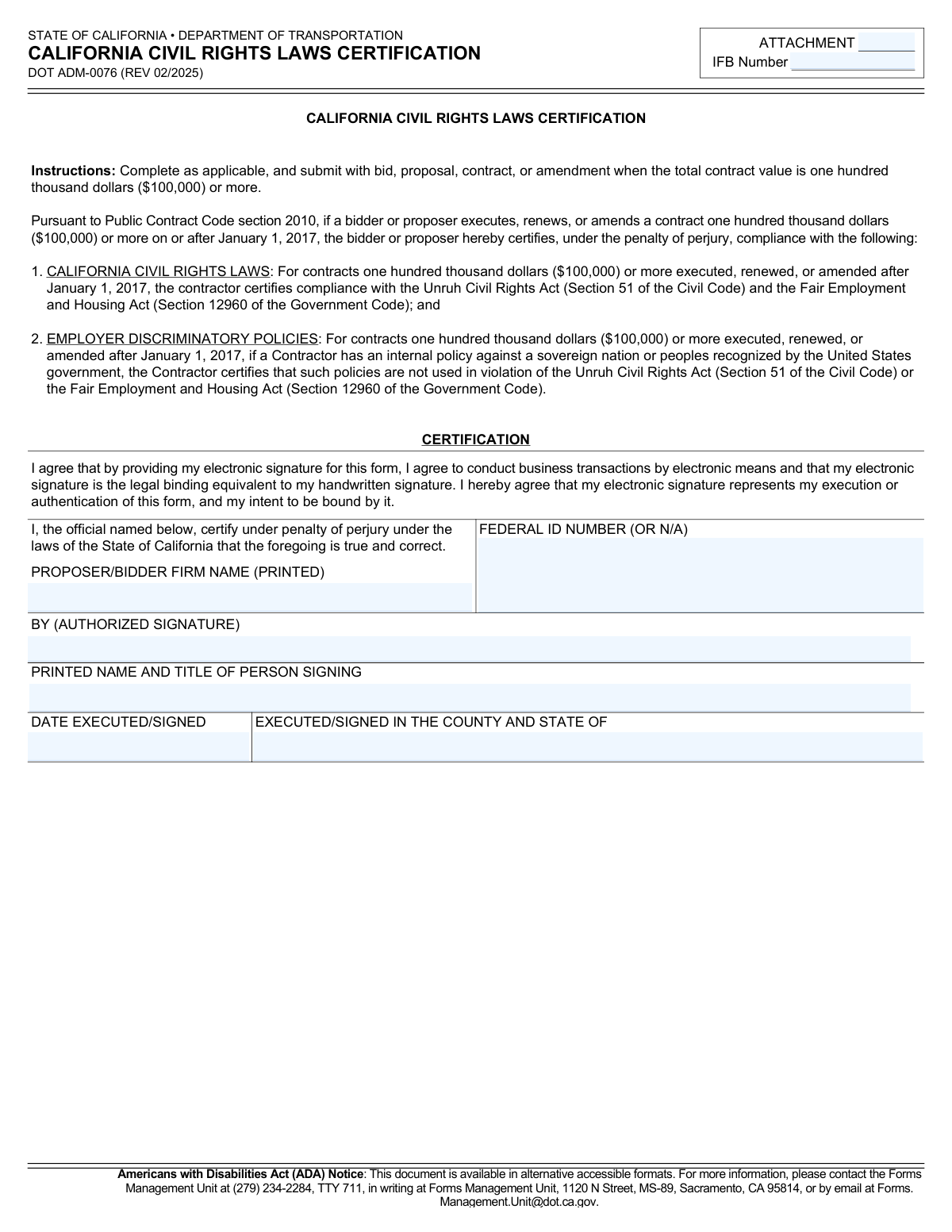
Form DOT ADM-0076, the California Civil Rights Laws Certification, is a document required by the California Department of Transportation for any bidder or proposer on a contract valued at $100,000 or more. By signing, the entity certifies under penalty of perjury that it complies with the Unruh Civil Rights Act and the Fair Employment and Housing Act, and does not have internal policies that violate these laws. Today, this form can be filled out quickly and accurately using AI-powered services like Instafill.ai, which can also convert non-fillable PDF versions into interactive fillable forms.
Our AI automatically handles information lookup, data retrieval, formatting, and form filling.
It takes less than a minute to fill out DOT ADM-0076 using our AI form filling.
Securely upload your data. Information is encrypted in transit and deleted immediately after the form is filled out.

Form specifications

Form name: State of California Department of Transportation California Civil Rights Laws Certification
Number of pages: 2
Language: English
Categories: transportation forms, California state forms, PA state forms, Department of State forms, certification forms, NJ state forms
main-image

Instafill Demo: How to fill out PDF forms in seconds with AI

How to Fill Out DOT ADM-0076 Online for Free in 2026

Are you looking to fill out a DOT ADM-0076 form online quickly and accurately? Instafill.ai offers the #1 AI-powered PDF filling software of 2026, allowing you to complete your DOT ADM-0076 form in just 37 seconds or less.
Follow these steps to fill out your DOT ADM-0076 form online using Instafill.ai:
  1. 1 Navigate to Instafill.ai and upload or select the DOT ADM-0076 form.
  2. 2 Provide your business information, including the Proposer/Bidder Firm Name and Federal ID Number.
  3. 3 Enter the specific Invitation for Bids (IFB) Number associated with your contract proposal.
  4. 4 Carefully review the certification statements regarding compliance with the Unruh Civil Rights Act and the Fair Employment and Housing Act.
  5. 5 Enter the printed name and title of the authorized person signing the certification.
  6. 6 Provide the date and the county and state where the form is being executed.
  7. 7 Apply your electronic signature to certify the information and finalize the document for submission with your bid.

Our AI-powered system ensures each field is filled out correctly, reducing errors and saving you time.

Why Choose Instafill.ai for Your Fillable DOT ADM-0076 Form?

Speed

Complete your DOT ADM-0076 in as little as 37 seconds.

Up-to-Date

Always use the latest 2026 DOT ADM-0076 form version.

Cost-effective

No need to hire expensive lawyers.

Accuracy

Our AI performs 10 compliance checks to ensure your form is error-free.

Security

Your personal information is protected with bank-level encryption.

Frequently Asked Questions About Form DOT ADM-0076

This form is used to certify that your business complies with California's key civil rights and fair employment laws. It is a mandatory requirement for certain contracts with the California Department of Transportation (Caltrans).

Any bidder or proposer who is executing, renewing, or amending a contract with Caltrans valued at one hundred thousand dollars ($100,000) or more must complete and submit this certification.

No, the instructions clearly state this certification is required for contracts, renewals, or amendments with a total value of $100,000 or more.

Disclosure of this information is mandatory. Failure to provide a completed form will prevent eligibility and delay or prevent the processing of your bid, proposal, or contract.

You will need your firm's name, Federal ID Number, the IFB (Invitation for Bids) Number, and the printed name, title, and signature of an authorized person, along with the date and location of signing.

The form allows you to enter 'N/A' in the Federal ID Number field if it is not applicable to your firm.

You are certifying under penalty of perjury that your company complies with the Unruh Civil Rights Act and the Fair Employment and Housing Act, and does not use discriminatory policies.

You must submit the completed form along with your bid, proposal, contract, or amendment to which it applies.

Yes, the form explicitly states that providing an electronic signature is the legal binding equivalent to a handwritten signature and indicates your intent to be bound by the certification.

The personal information is collected to facilitate the processing of the form and to review your eligibility for the contract, as required by state and federal privacy laws.

Yes, services like Instafill.ai use AI to accurately auto-fill form fields from your saved information, which can save time and reduce errors.

Simply upload the DOT ADM-0076 PDF to the Instafill.ai platform. The service will automatically identify the fields, allowing you to fill them in, sign electronically, and download the completed document.

You can use a service like Instafill.ai, which can convert flat, non-fillable PDFs into interactive forms. This allows you to easily type your information and sign electronically directly on the document.

For alternative accessible formats, you can contact the Caltrans Forms Management Unit at (279) 234-2284, TTY 711, or by email at [email protected].

Compliance DOT ADM-0076
Validation Checks by Instafill.ai

1
IFB Number is Required
This check ensures that the 'IFB Number' field is not empty. The Invitation for Bids (IFB) number is critical for associating this legal certification with the correct procurement document. Failure to provide this number will result in a validation error, as the certification cannot be processed without being linked to a specific bid or proposal.
2
Proposer/Bidder Firm Name is Required
This validation verifies that the 'PROPOSER/BIDDER FIRM NAME (PRINTED)' field has been filled out. The legal name of the firm is essential for identifying the entity making the certification. A missing firm name makes the document legally insufficient, and the submission will be rejected until the name is provided.
3
Federal ID Number Format and Content Validation
This check validates that the 'FEDERAL ID NUMBER' field contains either a correctly formatted 9-digit Employer Identification Number (EIN) in XX-XXXXXXX format or the exact text 'N/A'. The field cannot be left blank or contain other text. This ensures that a valid identifier is captured or that its absence is explicitly noted, which is necessary for proper entity verification and tax purposes.
4
Authorized Signature is Required
This check ensures the 'BY (AUTHORIZED SIGNATURE)' field is not empty, confirming that an electronic signature has been provided. As a legal certification made under penalty of perjury, a signature is mandatory to attest to the truthfulness of the statements. An unsigned form is invalid and will be rejected.
5
Printed Name and Title of Signer is Required
This validation confirms that the 'PRINTED NAME AND TITLE OF PERSON SIGNING' field is completed. This information is necessary to identify the individual who signed the form and to verify their authority to bind the company to this certification. A submission lacking this information is incomplete and will be returned for correction.
6
Date Executed/Signed is a Valid, Non-Future Date
This check verifies two things: that the 'DATE EXECUTED/SIGNED' field contains a valid date in a recognized format (e.g., MM/DD/YYYY) and that the date is not in the future. The execution date establishes when the certification became legally effective. An invalid format or a future date would render the document's timing ambiguous or incorrect, causing the submission to fail validation.
7
County and State of Execution is Required
This validation ensures the 'EXECUTED/SIGNED IN THE COUNTY AND STATE OF' field is not left blank. This information establishes the legal jurisdiction under which the certification was made, which is a required element for a declaration made under penalty of perjury. The form will be considered incomplete and rejected if this location is missing.
8
Attachment Identifier Presence
This check verifies that the 'Attachment' identifier field is populated. This identifier is used by the processing system to track and categorize the submitted document correctly. Without this identifier, the form could be misfiled or lost, so submissions lacking it will be flagged as incomplete.
9
Printed Name and Title Content Analysis
This check analyzes the 'PRINTED NAME AND TITLE OF PERSON SIGNING' field to ensure it likely contains both a name and a job title. It may look for multiple words and common title keywords (e.g., 'President', 'CEO', 'Manager', 'Owner'). This helps prevent users from entering only a name or only a title, ensuring the record is complete for verifying the signer's authority.
10
County and State Format Validation
This validation inspects the 'EXECUTED/SIGNED IN THE COUNTY AND STATE OF' field to ensure it contains a plausible county and a valid U.S. state name or abbreviation. For example, it would check for a comma separating the values and validate the state against a known list. This improves data quality and confirms the legal jurisdiction is specified correctly, preventing errors from ambiguous or malformed location data.
11
Firm Name is Not Placeholder Text
This check ensures the 'PROPOSER/BIDDER FIRM NAME (PRINTED)' field does not contain common placeholder text such as 'Test', 'Company Name', or 'N/A'. Submitting a legal certification requires the actual legal name of the entity. Using placeholder text would invalidate the submission, so the system will reject such entries to ensure data integrity.
12
Date Executed/Signed is Required
This validation confirms that the 'DATE EXECUTED/SIGNED' field is not empty. The date of signature is a critical piece of information that establishes the timeline of the certification and its applicability. A form submitted without a date is legally incomplete and will be rejected.

Common Mistakes in Completing DOT ADM-0076

Missing or Incorrect IFB Number

Bidders often overlook the 'IFB Number' field at the top of the form or are unsure what to enter, leading them to leave it blank or input a different internal reference number. This makes it difficult for the agency to associate the certification with the correct bid, causing processing delays or disqualification. Always locate the specific Invitation for Bids (IFB) number on the primary solicitation document and enter it exactly as shown.

Using an Informal or DBA Firm Name

The form requires the legal name of the firm, but applicants sometimes enter a 'Doing Business As' (DBA) name, an abbreviation, or an informal version. This can create a mismatch with official registration documents, potentially invalidating the certification or causing contract processing issues. Ensure the name entered is the exact legal entity name registered with the state and the IRS.

Incorrect Federal ID Number Entry

Errors in the Federal ID Number (EIN) are common, including transposed digits or entering a state ID number by mistake. Sole proprietors may be confused and leave it blank when they should use 'N/A' if not applicable. An incorrect ID can halt the entire verification process, so it's crucial to copy it carefully from official tax documents. AI-powered form filling tools like Instafill.ai can help validate such numeric entries.

Signature by an Unauthorized Person

This certification must be signed by an individual with the legal authority to bind the company to a contract and its attestations. Often, an administrative assistant or a project manager without this authority signs the form, which can render the entire bid non-responsive. Verify that the signer is a corporate officer or an officially designated authorized agent as per the company's bylaws.

Mismatch Between Signature and Printed Name

A common oversight is when the signature does not clearly correspond to the printed name, or the printed name is misspelled. For example, signing as 'Bob Smith' when the printed name is 'Robert J. Smith' can raise questions about the signer's identity and authority. The printed name should be the full, legal name of the signer, and the signature should be their standard, legally binding signature.

Omitting the Signer's Title

Applicants frequently print their name but forget to include their official title (e.g., President, CEO, Managing Partner). The title is essential as it helps the agency verify that the person has the authority to make the certification on behalf of the firm. Forgetting the title can lead to requests for clarification and delay the bid evaluation process.

Incorrect or Incomplete Execution Location

The form requires the county and state where the document was signed, which is a critical element for a statement made 'under penalty of perjury.' People often list only a city, forget the county, or enter the company's headquarters location instead of where they physically were when signing. This technical error can be grounds for rejection, so it's important to accurately state the location of signing.

Using an Improper Date Format or an Invalid Date

The date of execution is often entered in an inconsistent format (e.g., DD/MM/YY instead of MM/DD/YYYY), or worse, it is future-dated or incorrectly back-dated. An invalid or ambiguous date can call the validity of the certification into question and may lead to disqualification. Always use a clear, unambiguous date format (like MM/DD/YYYY) and ensure it reflects the actual day of signing. AI-powered tools like Instafill.ai can help by automatically formatting dates correctly.

Submitting an Incomplete Form

Due to haste, applicants may accidentally leave one or more fields blank, such as the Federal ID Number or the execution county. The form's notice explicitly states that failure to provide all information is mandatory and will delay or prevent processing. To avoid this, perform a final review of every field before submission, or use a tool like Instafill.ai which can flag missing required fields.

Illegible Information on a Printed Form

If the PDF is not fillable and is completed by hand, poor handwriting can make names, numbers, and signatures unreadable, forcing the agency to guess or reject the form. This is a common issue with non-fillable government PDFs. To prevent this, it's best to use a tool like Instafill.ai that can convert flat, non-fillable PDFs into an electronically fillable format, ensuring all entries are clear and legible.

Failure to Submit the Certification with the Bid

The instructions state to 'submit with bid, proposal, contract, or amendment.' Bidders sometimes forget to include this certification form in their final submission package, treating it as a separate or post-award requirement. This omission can render the entire bid non-responsive and lead to immediate disqualification, as it is a mandatory component for contracts over $100,000.
Saved over 80 hours a year

“I was never sure if my IRS forms like W-9 were filled correctly. Now, I can complete the forms accurately without any external help.”

Kevin Martin Green

Your data stays secure with advanced protection from Instafill and our subprocessors

Robust compliance program

Transparent business model

You’re not the product. You always know where your data is and what it is processed for.

ISO 27001, HIPAA, and GDPR

Our subprocesses adhere to multiple compliance standards, including but not limited to ISO 27001, HIPAA, and GDPR.

Security & privacy by design

We consider security and privacy from the initial design phase of any new service or functionality. It’s not an afterthought, it’s built-in, including support for two-factor authentication (2FA) to further protect your account.

Fill out DOT ADM-0076 with Instafill.ai

Worried about filling PDFs wrong? Instafill securely fills state-of-california-department-of-transportation-california-civil-rights-laws-certification forms, ensuring each field is accurate.