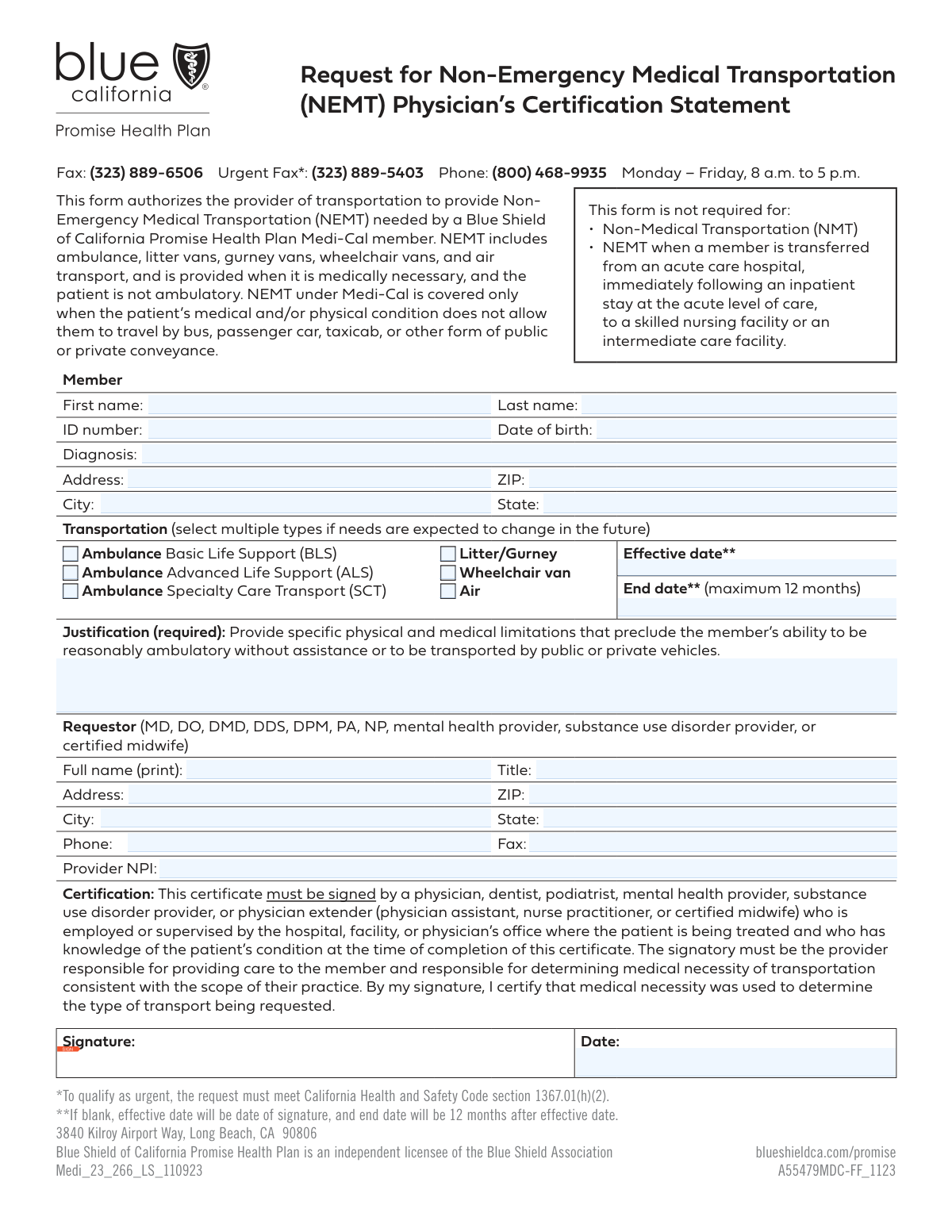
Yes! You can use AI to fill out Physician Certification Statement for Non-Emergency Medical Transportation

A Physician Certification Statement (PCS) for Non-Emergency Medical Transportation (NEMT) is a form completed by a healthcare professional to verify a patient's medical necessity for specialized transport. This document details the patient's physical and medical limitations, justifying why they cannot safely use a private vehicle or public transit for medical appointments. Today, this form can be filled out quickly and accurately using AI-powered services like Instafill.ai, which can also convert non-fillable PDF versions into interactive fillable forms.
Our AI automatically handles information lookup, data retrieval, formatting, and form filling.
It takes less than a minute to fill out NEMT PCS Form using our AI form filling.
Securely upload your data. Information is encrypted in transit and deleted immediately after the form is filled out.

Form specifications

Form name: Physician Certification Statement for Non-Emergency Medical Transportation
Number of fields: 29
Number of pages: 1
Language: English
Categories: certification forms, Medi-Cal forms, medical forms, NJ state forms, PA state forms, physician forms, transportation forms, VA medical forms
main-image

Instafill Demo: How to fill out PDF forms in seconds with AI

How to Fill Out NEMT PCS Form Online for Free in 2026

Are you looking to fill out a NEMT PCS FORM form online quickly and accurately? Instafill.ai offers the #1 AI-powered PDF filling software of 2026, allowing you to complete your NEMT PCS FORM form in just 37 seconds or less.
Follow these steps to fill out your NEMT PCS FORM form online using Instafill.ai:
  1. 1 Navigate to Instafill.ai and upload your Physician Certification Statement form, or select it from our template library.
  2. 2 Use the AI assistant to accurately fill in the 'Member Information' section, including their name, ID number, date of birth, and diagnosis.
  3. 3 In the 'Transportation Details' section, check the boxes for the required level of service, such as ambulance or wheelchair van, and specify the effective and end dates.
  4. 4 Clearly articulate the medical necessity in the 'Justification for NEMT' section, detailing the specific physical limitations that prevent the member from using other transportation methods.
  5. 5 Complete the 'Requestor Information' section with your professional details, including your name, title, address, and NPI number.
  6. 6 Carefully review all entered information for accuracy, then electronically sign and date the form in the designated fields to certify the statement.
  7. 7 Securely download, print, or share the completed and signed NEMT certification form directly from the platform.

Our AI-powered system ensures each field is filled out correctly, reducing errors and saving you time.

Why Choose Instafill.ai for Your Fillable NEMT PCS Form Form?

Speed

Complete your NEMT PCS Form in as little as 37 seconds.

Up-to-Date

Always use the latest 2026 NEMT PCS Form form version.

Cost-effective

No need to hire expensive lawyers.

Accuracy

Our AI performs 10 compliance checks to ensure your form is error-free.

Security

Your personal information is protected with bank-level encryption.

Frequently Asked Questions About Form NEMT PCS Form

This form is used to request and medically justify Non-Emergency Medical Transportation (NEMT) for a member who cannot use standard public or private vehicles due to their physical or medical condition.

A healthcare provider or an authorized representative (the 'Requestor') who can certify the member's medical necessity for specialized transportation should complete and sign this form.

You must describe the specific physical and medical limitations preventing the member from being ambulatory or using a standard vehicle. For example, mention if the member is bed-bound, requires medical monitoring, or cannot safely transfer.

You can request services for a period of up to 12 months. The 'End Date' you enter on the form cannot be more than one year after the 'Effective Date'.

Basic Life Support (BLS) is for stable patients, Advanced Life Support (ALS) is for patients needing a higher level of care like cardiac monitoring, and Specialty Care Transport (SCT) is for critically ill patients requiring specialized in-transit care.

You will need the member's personal details like their ID number and date of birth, their medical diagnosis, and your own professional information as the requestor, including your NPI number.

Select 'Litter/Gurney' if the member must remain lying down during transport. Choose 'Wheelchair van' if the member can sit upright in a wheelchair but is unable to transfer to a standard vehicle seat.

The National Provider Identifier (NPI) is a unique identification number for health care providers. It is typically required to process medical requests, so you should include it if you have one.

Submission instructions are not on the form itself. You should refer to the member's health plan or transportation broker for the correct fax number or mailing address.

Yes, services like Instafill.ai use AI to accurately auto-fill form fields from your records, which can save you time and help prevent data entry errors.

Simply upload the form to the Instafill.ai platform. The AI will make the fields interactive, allowing you to type in the information, add your signature, and download the completed PDF.

You can use a tool like Instafill.ai, which automatically converts non-fillable PDFs into interactive forms. This allows you to easily type your information directly into the fields online.

Compliance NEMT PCS Form
Validation Checks by Instafill.ai

1
Validates Member ID Number Format
This check ensures the Member ID Number adheres to a predefined format, such as a specific length or alphanumeric pattern. Correctly identifying the member is critical for processing the request and linking it to the correct health plan records. An invalid ID format will halt the submission and require correction to prevent data mismatches.
2
Ensures Date of Birth is a Valid Past Date
This validation confirms that the entered Date of Birth is a real calendar date and occurs before the current date. An invalid or future date represents a data entry error, making it impossible to verify member eligibility or age-related medical needs. Failure will require the user to correct the date before the form can be submitted.
3
Requires At Least One Transportation Type Selection
This check ensures that at least one checkbox under 'Transportation Details' (e.g., Ambulance, Wheelchair van) is selected. Without a specified mode of transport, the request is incomplete and cannot be fulfilled. The system should prompt the requestor to select the necessary service type to ensure the authorization is actionable.
4
Validates Logical Sequence of Effective and End Dates
This validation ensures the 'End Date' for transportation services is on or after the 'Effective Date'. A logical date range is essential for scheduling, authorization, and billing purposes. An inverted or illogical date range would cause processing errors and require manual correction by the user.
5
Enforces 12-Month Maximum Duration for Services
As specified in the form instructions, this check verifies that the 'End Date' is no more than 12 months after the 'Effective Date'. This rule enforces policy limits on the duration of a single authorization, ensuring periodic reassessment of the member's needs. Submissions with a duration exceeding 12 months will be rejected, requiring the requestor to adjust the dates.
6
Ensures Justification for NEMT is Provided and Sufficient
This validation confirms that the 'Justification for NEMT' text field is not empty and meets a minimum character count. This narrative is critical for medical necessity review and is required to approve non-emergency transportation. An empty or insufficient justification will result in an error, prompting the user to provide a detailed explanation.
7
Validates Requestor's NPI Number Format
This check verifies that the 'Requestor NPI' is a valid 10-digit number, potentially including a checksum validation (Luhn algorithm) to catch common typos. A valid National Provider Identifier is required to identify the requesting provider for communication, compliance, and auditing purposes. An invalid NPI will prevent form submission.
8
Confirms Presence of Signature and Certification Date
This validation ensures that both the signature field has been completed and the 'Certification Date' has been entered. These elements are legally required to attest to the accuracy of the information and the medical necessity of the request. An incomplete certification section will render the form invalid and block submission.
9
Validates Certification Date is On or Before Effective Date
This check ensures the 'Certification Date' is not later than the 'Effective Date' of the requested services. A provider must certify the need for a service before or on the day it is scheduled to begin. A post-dated certification is logically inconsistent and could cause compliance issues, so the form will be rejected.
10
Verifies ZIP Code, City, and State Consistency
This check cross-references the entered ZIP Code, City, and State for both the member and requestor to ensure they form a valid geographical combination. This can be done using a postal code database to prevent mismatches, such as entering a California ZIP code with a New York city. Correcting this at the point of entry prevents routing errors and service delays.
11
Ensures Exclusive Selection of Ambulance Type
This check validates that if any ambulance service is selected, only one of the options (BLS, ALS, or SCT) is chosen. A member typically requires a single level of ambulance care per trip, and selecting multiple types is ambiguous for dispatch. This prevents scheduling conflicts and ensures the correct, most appropriate resources are dispatched.
12
Validates Requestor Phone and Fax Number Formats
This validation checks that the 'Requestor Phone' and 'Requestor Fax' numbers follow a standard format (e.g., 10 digits, possibly with parentheses and hyphens). A valid contact number is crucial for contacting the requestor if there are questions about the submission. An incorrectly formatted number could lead to communication breakdowns and delays in authorization.

Common Mistakes in Completing NEMT PCS Form

Providing a Vague or Incomplete Justification

This occurs when the requestor enters a generic statement like 'Patient needs a ride' instead of the required specifics. The form asks for detailed physical and medical limitations, so a weak justification is the most common reason for denial. To avoid this, clearly describe why the member's condition prevents them from using a standard vehicle, referencing specific mobility and medical needs.

Entering an Invalid Service Date Range

A frequent error is setting an 'End Date' that is more than 12 months after the 'Effective Date', which violates the form's explicit instructions. Another common mistake is accidentally entering an end date that is before the effective date. These logical errors lead to automatic rejection, so it's crucial to double-check the dates to ensure they form a valid and compliant period. AI-powered tools can automatically validate date ranges against form rules.

Transcribing the Member ID Number Incorrectly

Manually typing the Member ID often leads to transcription errors such as transposed digits or missing numbers. Since this ID is the primary key for identifying the patient, even a small mistake can cause the request to be rejected or, worse, processed for the wrong member. Always double-check the ID against the member's official card to ensure accuracy.

Forgetting to Include the Requestor's Signature

Submitting an unsigned form is a critical but common oversight that renders the entire request invalid. A signature certifies the accuracy and necessity of the information provided. An unsigned form will be immediately returned, causing significant delays in arranging transportation. If the form is a non-fillable PDF, a tool like Instafill.ai can convert it to a fillable version that allows for a digital signature.

Missing or Invalid Requestor NPI

The Requestor's National Provider Identifier (NPI) is essential for verifying the requesting provider's credentials. Leaving this field blank or entering an incorrect 10-digit number will prevent the payer from authenticating the request, leading to denial. To prevent this, ensure the correct NPI is entered; AI form-filling tools like Instafill.ai can securely store and accurately populate this information automatically.

Failing to Select a Transportation Type

Requestors sometimes forget to check any of the boxes specifying the type of transportation needed (e.g., 'Wheelchair van', 'Litter/Gurney'). This omission leaves the transportation provider with no information on what kind of vehicle to dispatch, making it impossible to fulfill the request. Always review the form to ensure one of the transportation options is clearly selected based on the member's needs.

Using Unclear or Abbreviated Medical Diagnoses

Entering non-standard abbreviations or overly general terms in the 'Diagnosis' field can lead to confusion and rejection. The reviewer needs a clear, specific diagnosis to confirm that the need for NEMT is medically justified. To avoid this, use full, standard medical terminology or the relevant ICD-10 code to ensure the diagnosis is understood and accepted.

Entering an Incomplete or Incorrect Member Address

Mistakes in the member's street address, city, or ZIP code can result in a failed pickup, causing the member to miss their medical appointment. This often happens due to typos or using outdated information. Verifying the address with the member before submission is crucial. AI tools like Instafill.ai can help prevent this by auto-completing and validating addresses against a postal service database.

Incorrect Date Formatting

For fields like 'Date of Birth', 'Effective Date', and 'Certification Date', using an incorrect format (e.g., DD-MM-YYYY instead of MM/DD/YYYY) is a common data entry error. This can cause processing system errors and delays. To avoid this, pay close attention to any specified date formats (like MM/DD/YYYY). AI-powered form fillers can help by automatically formatting dates into the required structure.

Mismatched Certification and Service Dates

An error occurs when the 'Certification Date' does not logically align with the 'Effective Date' of service. For example, dating the certification weeks after the transportation service has already begun can raise red flags during review. This can lead to questions about the legitimacy of the request and cause delays. Ensure the certification date precedes or matches the start of the service period.
Saved over 80 hours a year

“I was never sure if my IRS forms like W-9 were filled correctly. Now, I can complete the forms accurately without any external help.”

Kevin Martin Green

Your data stays secure with advanced protection from Instafill and our subprocessors

Robust compliance program

Transparent business model

You’re not the product. You always know where your data is and what it is processed for.

ISO 27001, HIPAA, and GDPR

Our subprocesses adhere to multiple compliance standards, including but not limited to ISO 27001, HIPAA, and GDPR.

Security & privacy by design

We consider security and privacy from the initial design phase of any new service or functionality. It’s not an afterthought, it’s built-in, including support for two-factor authentication (2FA) to further protect your account.

Fill out NEMT PCS Form with Instafill.ai

Worried about filling PDFs wrong? Instafill securely fills physician-certification-statement-for-non-emergency-medical-transportation forms, ensuring each field is accurate.