Yes! You can use AI to fill out Carer Payment and Carer Allowance – Medical Report (SA431) for a child under 16 years
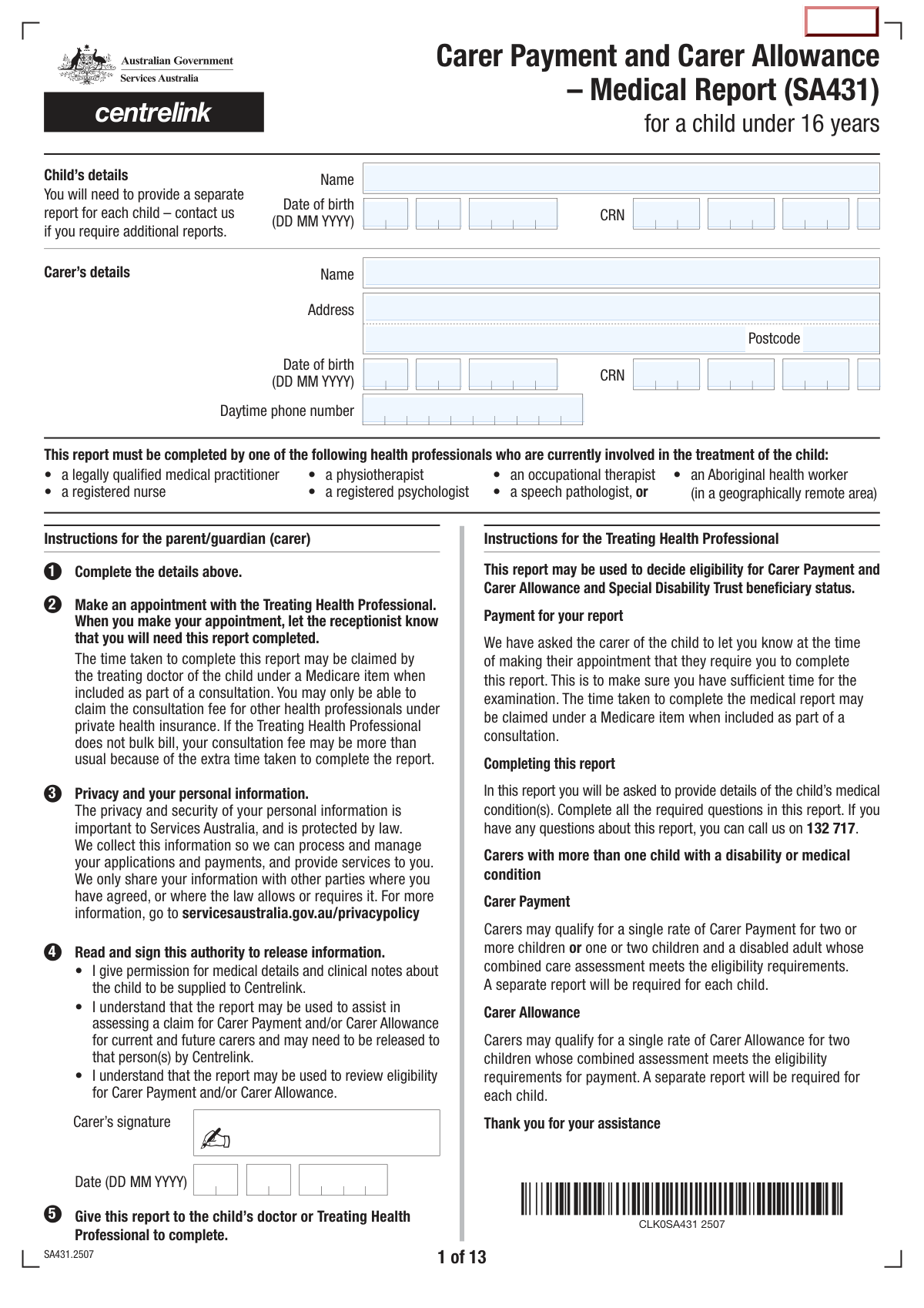
SA431 is an official Services Australia (Centrelink) medical report completed by a treating health professional to document a childâs diagnosed disability/medical condition and the resulting functional impacts and care needs. It supports decisions about a carerâs eligibility for Carer Payment and Carer Allowance, including ongoing reviews, and may also be used when considering Special Disability Trust beneficiary status. The form includes condition details, whether the condition is permanent/temporary, recognised condition categories, and structured functional assessments across communication, self-care, mobility, behaviour, and special care needs. Accurate completion is important because it is relied on as clinical evidence in determining payment eligibility and care load requirements.
Our AI automatically handles information lookup, data retrieval, formatting, and form filling.
It takes less than a minute to fill out SA431 using our AI form filling.
Securely upload your data. Information is encrypted in transit and deleted immediately after the form is filled out.
Form specifications
| Form name: | Carer Payment and Carer Allowance – Medical Report (SA431) for a child under 16 years |
| Number of pages: | 13 |
| Filled form examples: | Form SA431 Examples |
| Language: | English |
| Categories: | beneficiary forms, disability forms, CAR forms, child care forms, Centrelink forms, carer forms |
Instafill Demo: filling out a legal form in seconds
How to Fill Out SA431 Online for Free in 2026
Are you looking to fill out a SA431 form online quickly and accurately? Instafill.ai offers the #1 AI-powered PDF filling software of 2026, allowing you to complete your SA431 form in just 37 seconds or less.
Follow these steps to fill out your SA431 form online using Instafill.ai:
- 1 Enter the child’s details and the carer’s details at the top of the form (names, CRNs, dates of birth, address, contact number), ensuring a separate SA431 is used for each child.
- 2 Have the parent/guardian (carer) read and sign the authority to release medical information to Centrelink, dating the declaration.
- 3 Provide the form to the treating health professional currently involved in the child’s care (e.g., doctor, psychologist, OT, physio, speech pathologist, registered nurse; or Aboriginal health worker in a remote area).
- 4 The treating health professional completes the medical condition section: primary and other conditions, onset date, whether permanent/temporary, expected duration, and whether extra care is required for 14+ hours per week.
- 5 The health professional answers the recognised disability/medical condition questions (including whether the condition appears in the listed categories) and completes the functional ability ratings for receptive/expressive language, feeding, hygiene/grooming, dressing, social/community skills, and fine/gross motor mobility.
- 6 Complete the behaviour and special care needs sections, and the high-care/personal-care questions (including whether more than one carer is required and relevant dates/episodes), adding any clarifying comments.
- 7 The treating health professional completes their provider details and certification (name, qualifications, provider number if applicable, employer/service, signature and date) and returns the report to Services Australia or via the carer; if the form indicates information that could harm the child if released, return it directly to the specified Services Australia address.
Our AI-powered system ensures each field is filled out correctly, reducing errors and saving you time.
Why Choose Instafill.ai for Your Fillable SA431 Form?
Speed
Complete your SA431 in as little as 37 seconds.
Up-to-Date
Always use the latest 2026 SA431 form version.
Cost-effective
No need to hire expensive lawyers.
Accuracy
Our AI performs 10 compliance checks to ensure your form is error-free.
Security
Your personal information is protected with bank-level encryption.
Frequently Asked Questions About Form SA431
This medical report is used by Services Australia (Centrelink) to help assess eligibility for Carer Payment and/or Carer Allowance for a child under 16. It may also be used to assess Special Disability Trust beneficiary status and to review eligibility in the future.
The report must be completed by a treating health professional currently involved in the childâs treatment, such as a legally qualified medical practitioner, physiotherapist, occupational therapist, registered nurse, registered psychologist, speech pathologist, or (in geographically remote areas) an Aboriginal health worker.
Yes. A separate medical report is required for each child under 16 you are claiming forâcontact Services Australia if you need additional reports.
You must complete the childâs and carerâs details at the start (including names, dates of birth, address, phone number, and CRNs if known) and sign the authority to release information so the treating professional can provide medical details to Centrelink.
The treating health professional can still complete the form by describing the childâs condition(s) and symptoms. The form specifically allows a description where a diagnosis has not yet been made.
The treating health professional indicates whether the condition is permanent or temporary and provides details such as when it began and whether a permanent condition is improving or non-improving, or whether a temporary condition is expected to last at least 12 months.
It asks whether the childâs condition requires additional care beyond what is typical for their age, totaling 14 hours or more each week. The treating professional should base this on the childâs care needs due to the disability/medical condition.
These lists help identify conditions that Services Australia recognises for assessment purposes (for example, certain neurological, genetic, sensory, respiratory, and other serious conditions). The treating professional indicates if the child has any listed condition and may select the relevant code.
They must tick one box per category to reflect the childâs usual ability most of the time, including when using aids or equipment. If the childâs ability is age appropriate, the first option should be selected; if the child cannot do any listed skills, the last option should be selected.
The form instructs that answers should reflect what the child is currently able to do most of the time. The treating professional should consider typical day-to-day functioning rather than rare best or worst days.
These questions capture behaviours (such as aggression, absconding, or self-injury) and special care needs (such as tube feeding, tracheostomy, oxygen therapy, wheelchair use, catheterisation, or chemotherapy). The form states behaviours should be assessed based on the childâs behaviour while receiving prescribed medication.
If the child needs personal care for a significant period every day, the form asks whether the care load is so high that more than one carer is required (for example, continuous day-and-night care or tasks requiring two people). In some circumstances, two or more carers may qualify for Carer Payment for the same child.
If the treating professional is not a legally qualified medical practitioner, the form asks for details of a legally qualified medical practitioner who can certify the diagnosis listed in question 1. This includes the practitionerâs name, qualifications, address, and contact phone number.
The time taken to complete the report may be claimed under a Medicare item when it is included as part of a consultation (typically by a doctor). Other health professionals may only be able to claim the consultation fee through private health insurance, and if the provider does not bulk bill, the consultation may cost more due to the extra time.
The completed report can be given to the carer or returned directly to Services Australia. If the treating professional answers âYesâ to question 34 (information that could harm the child if released), the report must be returned directly to Services Australia, Carer Services, PO Box 7805, CANBERRA BC ACT 2610.
Compliance SA431
Validation Checks by Instafill.ai
1
Validates Child and Carer Date of Birth format and plausibility
Checks that both the childâs and carerâs dates of birth are provided and match the required format (DD MM YYYY), represent real calendar dates, and are not in the future. It also validates plausibility (e.g., carer DOB indicates an adult, and child DOB indicates the child is under 16 as required by the form). If the format is invalid or the ages are out of scope, the submission should be rejected or routed for manual review because eligibility and correct assessment depend on age.
2
Ensures Child is under 16 at time of report/signature date
Calculates the childâs age using the child DOB and the relevant form date (e.g., carer signature date and/or treating professional signature date) to ensure the child is under 16 for this specific SA431 version. This prevents using the wrong medical report type and avoids incorrect eligibility decisions. If the child is 16 or older, the system should fail validation and prompt for the correct form/report pathway.
3
Validates CRN presence and format for both Child and Carer
Checks that both CRN fields are completed (where required) and conform to the expected Services Australia CRN format (length/character set rules used by the system). It should also validate that the child CRN and carer CRN are not identical unless explicitly allowed by business rules (typically they should differ). If CRNs are missing or malformed, the claim cannot be reliably matched to the correct records and should be blocked pending correction.
4
Validates names are complete and not placeholder text
Ensures the childâs name and carerâs name fields are populated with realistic values (e.g., not blank, not 'N/A', not a single character, and not containing invalid symbols). This is important for identity matching, correspondence, and preventing misfiled medical evidence. If validation fails, the submission should be returned for correction because downstream matching and audit trails depend on accurate names.
5
Validates Australian address completeness and postcode format
Checks that the carer address includes required components (address line(s) and postcode) and that the postcode is exactly 4 digits. Where the system has postcode-to-state/suburb reference data, it should validate that the postcode is consistent with the entered locality (if captured) or at least is a valid Australian postcode. If the address is incomplete or the postcode is invalid, the form should be flagged because it affects contactability and jurisdictional processing.
6
Validates phone number format for carer and treating professional contact numbers
Ensures daytime phone number (carer) and contact phone number (treating professional) are present where required and match acceptable Australian formats (e.g., 10-digit mobile starting with 04, or landline with area code, allowing spaces). This validation reduces failed contact attempts and delays in clarifying medical evidence. If invalid, the system should require correction or prompt for an alternative contact number.
7
Requires carer authority signature and date to be completed
Checks that the carerâs signature and the carer signature date are present and the date is in DD MM YYYY format. This authority is required to permit release of medical details and clinical notes to Centrelink, and missing consent can make the report unusable. If absent or invalid, the submission should be rejected or held as incomplete until properly signed and dated.
8
Validates treating health professional identity fields and signature/date
Ensures the treating health professional section (name, professional qualifications, address, contact phone, postcode) is completed, and that the professional signature and date are present and correctly formatted. This is essential to establish provenance of the medical report and support audit/verification. If any of these are missing, the report should fail validation because it cannot be relied upon as certified medical evidence.
9
Validates treating professional type and legal practitioner dependency (Question 32)
If Question 32 indicates the completing professional is not a legally qualified medical practitioner, the form must include the legally qualified medical practitionerâs details (name, qualifications, address, contact phone, postcode) who can certify the diagnosis. This ensures diagnoses requiring medical practitioner certification are properly supported. If Q32 = 'No' and the certifying practitioner details are missing, the submission should be rejected as non-compliant.
10
Requires primary condition/diagnosis details and onset date consistency (Questions 1–4)
Checks that the primary disability/medical condition (and any other conditions if provided) is entered, and that the condition start date (Question 3) is provided in DD MM YYYY format and is not after the report/signature date. It also enforces that the condition type selection (Permanent vs Temporary) is made. If missing or inconsistent, the assessment cannot determine duration and eligibility and should be returned for completion.
11
Enforces permanent/temporary branching rules (Questions 4–6)
Validates that if the condition is marked Permanent, the permanent condition status is selected (Non improving vs Improving) and the 'expected to be present for' temporary duration fields are not selected. Conversely, if Temporary is selected, the expected duration (At least 12 months vs Less than 12 months) must be selected and permanent-only fields must be blank. If branching is violated, the system should flag the submission because duration drives eligibility and review scheduling.
12
Validates extra care requirement response and minimum-hours logic (Question 6)
Ensures Question 6 is answered (Yes/No) regarding whether the condition requires extra care and attention for 14 hours or more per week. This is a key eligibility threshold for Carer Allowance/Payment assessment and must not be left blank. If unanswered, the submission should be treated as incomplete and not progressed to scoring/decisioning.
13
Validates recognised condition indicator and selection consistency (Questions 7–9)
If the user answers 'Yes' to Question 9 (child has a listed condition), the form should require at least one recognised disability/medical condition code selection from the lists in Questions 7 or 8. If 'No' is selected at Q9, the system should ensure no recognised-condition codes are ticked (or else prompt to reconcile). If inconsistent, the submission should be flagged because it affects whether functional assessment questions are required and how evidence is interpreted.
14
Enforces single-choice selection for functional ability questions (Questions 11–18)
For each functional domain (receptive language, expressive language, feeding, hygiene/grooming, dressing, social/community, fine motor, gross motor), validates that exactly one checkbox option is selected, including the 'cannot do any of the things listed above' option where applicable. Multiple selections or no selection create ambiguous scoring and can lead to incorrect eligibility outcomes. If validation fails, the system should block submission and require the respondent to correct the selections.
15
Validates behaviour and special care needs selections include a coherent 'None' rule (Questions 19 and 26)
Checks that for behaviour (Q19) and special care needs (Q26), 'None of the above apply' cannot be selected at the same time as any other option in that section. This prevents contradictory data that would distort care needs assessment. If both 'None' and other items are selected, the system should fail validation and require the user to choose either specific items or none.
16
Validates high-care pathway dates and carer count requirements (Questions 20–31)
Applies conditional completeness rules: if the form indicates more than one carer is required (Q25 or Q30 = Yes), then the number of carers (Q26 or Q31) must be provided and must be a positive integer within a reasonable range (e.g., 2â10). If the temporary high-care pathway requires a care period (Q28), both 'From' and 'To' dates must be present, valid DD MM YYYY dates, and 'To' must be on/after 'From'. If these conditions are not met, the submission should be flagged because care duration and staffing are central to eligibility and payment arrangements.
17
Validates harmful-information disclosure details when Q34 is 'Yes'
If Question 34 indicates there is information that might harm the childâs physical or mental well-being if released, the form must include the identified information and a clear reason why it should not be released. This supports Freedom of Information handling and ensures sensitive content is managed correctly, including the instruction to return directly to Services Australia. If Q34 = 'Yes' but details are blank, the submission should be rejected or routed for urgent follow-up due to privacy and safety risk.
Common Mistakes in Completing SA431
People often have the report completed by a health professional who is not one of the approved types listed on the form, or by someone not currently involved in the childâs treatment. This can lead to the report being rejected or delayed because Services Australia may not accept evidence from an ineligible provider. To avoid this, confirm the treating professional is an approved provider type and is actively involved in the childâs care before the appointment, and ensure they complete and sign the relevant sections.
A frequent error is entering the carerâs information in the childâs fields (or vice versa), or leaving key identifiers like CRN, date of birth, address, or postcode incomplete. This happens because both partiesâ details appear together at the start and the form is often filled quickly at reception. Missing or mismatched identifiers can prevent the report from being correctly matched to the claim, causing processing delays. Carefully verify each section header (Child vs Carer) and double-check CRNs and dates of birth before submission.
The form repeatedly requires dates in DD MM YYYY, but many people enter dates as DD/MM/YY, MM/DD/YYYY, or leave dates blank (e.g., condition start date, signature date, care period dates). This can create ambiguity and may trigger follow-up requests or reassessment because timelines are central to eligibility. Always write dates in the exact requested format and ensure every required date field is completed, including signature dates and âFrom/Toâ care period dates where applicable.
At question 1, some reports list broad terms (e.g., âdevelopmental delay,â âbehaviour issues,â âmobility problemsâ) without a clear primary condition, supporting diagnoses, or a descriptive clinical summary when no diagnosis exists. This often happens when the condition is still under investigation or the provider assumes Centrelink already has background information. Vague entries can reduce the reportâs usefulness and may lead to requests for additional evidence. Clearly state the primary condition, list comorbidities, and include a concise description of functional impact if a formal diagnosis is pending.
People commonly tick âPermanentâ but then indicate it is âImproving,â or select âTemporaryâ without specifying whether it will last at least 12 months, or provide a start date that conflicts with the stated duration. These inconsistencies usually occur because the permanence/duration questions are split across multiple items with branching instructions. Contradictory responses can undermine the credibility of the report and delay eligibility decisions. Review questions 3â6 as a set and ensure the start date, permanence/temporary selection, and expected duration/improvement all align clinically.
Question 6 is often answered based on general parenting time or supervision rather than âextra care and attentionâ attributable to the medical condition. This can lead to over- or under-stating care needs, affecting eligibility outcomes. The consequence may be an incorrect assessment or a request for clarification about what care tasks are above age-appropriate needs. To avoid this, estimate only the additional care time caused by the condition (e.g., therapies, feeding support, toileting assistance, behaviour management, medical procedures) and ensure it reflects typical weeks.
Some applicants/providers either skip the recognised conditions list, tick an incorrect category/code, or answer âNoâ at question 9 even when a listed condition clearly applies. This happens because the list is long, uses specific diagnostic criteria, and includes abbreviations that can be overlooked. Incorrect selection can route the assessment down the wrong pathway and delay processing. Carefully cross-check the childâs confirmed diagnosis against the exact wording/criteria in questions 7â8 and ensure question 9 matches that determination.
For questions 11â18, the form instructs âTick one box onlyâ for each domain, but people often tick several levels to show variability or âsometimesâ ability. This usually happens when the childâs functioning fluctuates or when the respondent wants to capture nuance. Multiple ticks can invalidate the response set and may require rework or clarification. Choose the single statement that best reflects the childâs usual ability most of the time (including with aids/equipment), and use the comments section to explain variability.
Another common mistake is rating the child as if they have no supports, or rating based on best-day/worst-day rather than typical functioning. The form explicitly says abilities include what the child can do using aids/appliances and should reflect what they can do most of the time, consistently, to a reasonable standard. Misrating can lead to an inaccurate functional assessment and an incorrect eligibility outcome. Re-read the instructions before Q11â18 and answer based on usual performance with current supports and prescribed medication where relevant.
Because the form contains many âGo toâ directions, people frequently complete the wrong sections or miss required follow-up questions (e.g., life expectancy questions 20â26, temporary care period questions 27â31, or the legally qualified medical practitioner details at question 32). This often occurs when the form is printed and filled manually without carefully following the navigation. Missing required sections can result in an incomplete report and processing delays. Follow the branching prompts step-by-step and, before submission, scan for unanswered questions that should have been completed based on prior âYes/Noâ responses.
Reports are often submitted without the carerâs signed authority (parent/guardian section), without the treating professionalâs signature/date, or without key provider identifiers (name, qualifications, provider number if applicable, contact details, stamp). Additionally, if question 34 is answered âYes,â the form must be returned directly to Services Australia, but people sometimes hand it back to the carer instead. These issues can invalidate the report, breach handling instructions, or cause significant delays. Ensure both the carer and treating professional sign and date in DD MM YYYY, complete question 37 fully, and follow the return instructionsâespecially the direct return requirement when Q34 is âYes.â
Saved over 80 hours a year
âI was never sure if my IRS forms like W-9 were filled correctly. Now, I can complete the forms accurately without any external help.â
Kevin Martin Green
Your data stays secure with advanced protection from Instafill and our subprocessors

Robust compliance program
Transparent business model
Youâre not the product. You always know where your data is and what it is processed for.
ISO 27001, HIPAA, and GDPR
Our subprocesses adhere to multiple compliance standards, including but not limited to ISO 27001, HIPAA, and GDPR.
Security & privacy by design
We consider security and privacy from the initial design phase of any new service or functionality. Itâs not an afterthought, itâs built-in, including support for two-factor authentication (2FA) to further protect your account.
Fill out SA431 with Instafill.ai
Worried about filling PDFs wrong? Instafill securely fills carer-payment-and-carer-allowance-medical-report-s forms, ensuring each field is accurate.



