
Instafill.ai
7 days free
AI form filling · 352 fields · 10 pages · done in seconds

Yes! You can use AI to fill out California Participating Physician Application

Don't type 352 fields by hand. Tell our AI about yourself, or upload a document you already have, and it fills every field in seconds. You check it, then download, print or sign.
7 days free, then $19.99/month · Cancel anytime
AI fills it, no typingEncrypted, never used to train AICancel in two clicks
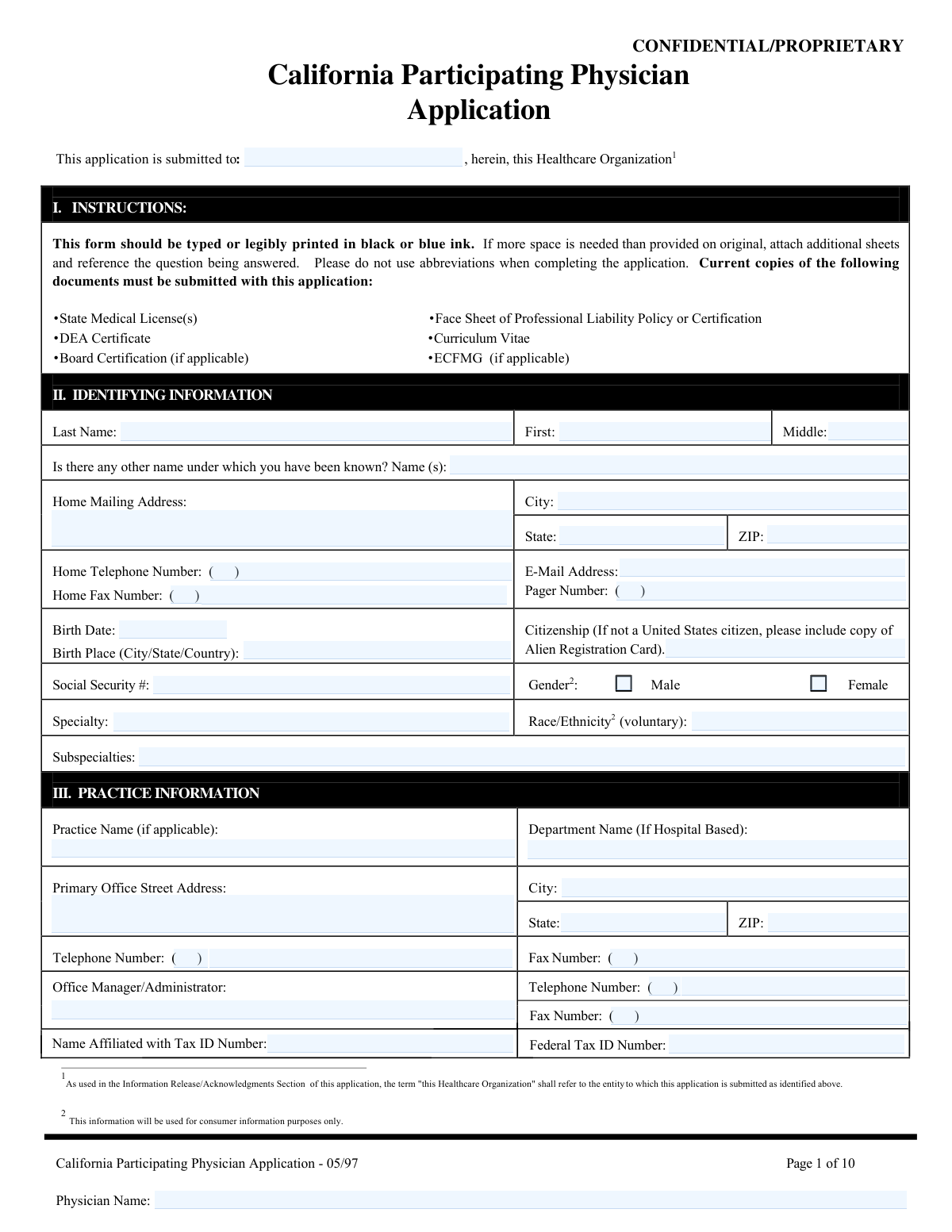
California Participating Physician Application, page 1
Very Complex · 85/100Form Complexity Index

The AI does the filling. You just check it.

No typing into boxes, nothing to install.

Tell the AI about youAnswer a few questions in plain words, or upload a document you already have. That is all the typing there is.
AI fills every field in secondsIt puts each answer in the right box on every page, tables and checkboxes included.
Check it and downloadReview every field, change anything, then download, print or sign the PDF.

What this form asks for

The AI fills all of it, from your answers or your documents.

The California Participating Physician Application is a comprehensive credentialing document used by physicians to apply for participation in California-based healthcare organizations, such as hospitals, medical groups, and health plans. It is essential for verifying a physician's qualifications, including their education, training, licensure, work history, and professional standing, to ensure they meet the required standards for patient care. Today, this form can be filled out quickly and accurately using AI-powered services like Instafill.ai, which can also convert non-fillable PDF versions into interactive fillable forms.
Fillable fields352
Pages10
Sections77
Tables and lists8
Questions that depend on earlier answers3
Form Complexity IndexVery Complex, 85/100

The AI checks your answers before you download

14 checks built for this form, so a wrong date or a missing answer is caught before anyone else sees it.

Social Security Number Format Validation

This check verifies that the Social Security Number is entered in the standard XXX-XX-XXXX format. It also ensures the number is not a known invalid pattern, such as all zeros or sequential numbers. This validation is critical for accurate identity verification and is a prerequisite for many downstream processes like background checks and tax reporting. If the format is incorrect, the system will prevent submission and prompt the user to correct the entry.

DEA Registration Number Structure and Checksum

This validation confirms the DEA Registration Number follows the required structure of two letters followed by seven numbers. It checks that the first letter is a valid registrant type (e.g., 'A', 'B', 'F', 'M') and the second letter matches the first letter of the applicant's last name. A checksum calculation is also performed on the seven digits to ensure the number is mathematically valid, preventing typographical errors and flagging potentially fraudulent numbers.

Chronological Validation of Education and Training Dates

This logical check cross-references dates across the education and postgraduate training sections to ensure a valid timeline. It verifies that the pre-medical graduation date is before the medical school graduation date, which must be before the internship start date, and that all training periods ('From'/'To' dates) are sequential and logical. This is vital for verifying the applicant's career progression and identifying data entry errors or unexplained gaps in training.

Required Explanation for Adverse Attestation Answers

This check enforces a critical business rule in the Attestation section. If an applicant answers 'Yes' to any question from A through K, or 'No' to question L, the system requires that a detailed explanation be provided in the corresponding addendum or text field. The application submission is blocked until this mandatory explanation is provided, ensuring all potential red flags are fully disclosed for credentialing review.

Federal Tax ID Number (EIN) Format Validation

This check ensures that the Federal Tax ID Number entered for any practice location follows the standard 9-digit Employer Identification Number (EIN) format, which is XX-XXXXXXX. This prevents the submission of incorrectly formatted numbers that would cause failures in billing, payment, and tax reporting systems. An error message is displayed if the format is invalid, requiring the user to correct the entry.

Work History Chronological Gap Detection

This validation analyzes the 'From' and 'To' dates in the Work History and Postgraduate Training sections to detect any chronological gaps greater than a predefined period (e.g., 90 days). Since the form requires all gaps to be explained, this check ensures compliance by flagging unexplained periods of inactivity. This is critical for the credentialing process, as reviewers must account for the applicant's entire professional timeline.

And 8 more checks
  • Active California Medical License Check
  • Mandatory Explanation for Incomplete Training
  • Conditional ECFMG Number Requirement
  • Secondary/Tertiary Office Data Completeness
  • Signature Date Validity and Presence
  • Professional Liability History Date Logic
  • Peer Reference Exclusion Check
  • Prohibition of Abbreviations in Institution Names

Let AI fill out your California Participating Physician Application - 05/97

No typing. Every field filled in seconds, checked, ready to sign.

7 days free, then $19.99/month · Cancel anytime

How to Fill Out California Participating Physician Application - 05/97 Online for Free in 2026

What the AI walks you through.

  1. Navigate to Instafill.ai and upload the California Participating Physician Application form.
  2. Use the AI assistant to automatically populate your identifying information, practice details, and contact information across all relevant sections.
  3. Enter your premedical, medical, and postgraduate training history, including institutions, dates, and program details.
  4. Provide your board certification, medical licensure, DEA registration, and professional liability insurance information, attaching digital copies of required documents.
  5. List your current and past hospital affiliations, provide a complete work history, and input the contact details for your professional references.
  6. Carefully answer all 'Yes' or 'No' attestation questions regarding your professional background, and provide detailed explanations on a separate sheet if required.
  7. Review the entire completed application for accuracy, then electronically sign and date the attestation and information release sections before submitting to the healthcare organization.

Common Mistakes in Completing California Participating Physician Application - 05/97

The ones the AI is built to catch.

Forgetting to Submit All Required Documents
The instructions on page one clearly list required attachments like medical licenses, DEA certificate, and a professional liability policy face sheet. Applicants often overlook this checklist and submit the form without all necessary documents. This is a primary cause for immediate rejection or significant processing delays, as the credentialing team cannot verify information without the source documents.
Unexplained Gaps in Work or Training History
The application requires a complete, chronological history of training (Section VII) and work (Section XV), with instructions to explain any gaps on a separate page. Applicants frequently leave time gaps of several months or more between roles without providing the required explanation. Credentialing bodies view unexplained gaps as a major red flag that halts the application process pending further investigation.
Failing to Explain 'Yes' Answers in the Attestation Section
Section XVI requires a detailed explanation on a separate sheet for any 'yes' answer to questions A-K. Many applicants check 'yes' but neglect to attach the corresponding explanation, rendering the application incomplete and raising serious concerns. This critical omission can lead to automatic denial, as it suggests either a lack of attention to detail or an attempt to hide adverse information.
Incomplete or Inaccurate Professional Liability History
Section XII requires a complete record of all professional liability carriers for the past seven years, not just the current one. Applicants often forget a past carrier, misremember policy dates, or fail to attach the required policy face sheet. Since continuous coverage must be verified, an incomplete or inaccurate insurance history is a critical error that will stop the credentialing process until it is fully documented.
Using Abbreviations or Inconsistent Names
The instructions explicitly state 'Please do not use abbreviations,' yet applicants often shorten institution names, practice groups, or states. Furthermore, using a name that does not exactly match official documents (e.g., medical license, tax records) causes verification failures. These inconsistencies require manual correction and clarification, delaying the entire application.
Forgetting to Enter Physician Name on Each Page
The header of every page includes a field for the 'Physician Name,' which serves to identify the pages if they become separated. It is a very common oversight for applicants to fill this out on the first page but forget it on subsequent pages of the 10-page document. This can lead to processing errors and lost information. A good practice is to fill in all page headers before completing the rest of the form.
Listing Inappropriate or Unreachable Peer References
Section XIV specifies that references must not be relatives or current partners and should be familiar with the applicant's clinical work. Applicants may list inappropriate references for convenience or provide outdated contact information. This significantly slows down the process, as the credentialing team must reject the references and request new ones, adding weeks to the timeline.
Submitting an Illegible Hand-Written Application
The form allows for it to be 'legibly printed,' but poor handwriting can make critical data like license numbers, names, and dates impossible to read accurately. This leads to data entry errors, failed verifications, and requests for clarification. Since the form is a flat, non-fillable PDF, using a service like Instafill.ai to convert it into a typed, fillable version is the best way to ensure perfect legibility and avoid these preventable delays.
Using an Invalid or Missing Signature
The application requires original, handwritten signatures on pages 8 and 9, and explicitly states that a 'Stamped Signature Is Not Acceptable.' Using a signature stamp or simply forgetting to sign one of the two required locations are common mistakes that invalidate the attestation. This will cause the application to be returned immediately for proper signing, restarting the submission clock.
Entering Incorrect 'Name Affiliated with Tax ID Number'
Section III asks for the Federal Tax ID Number and the 'Name Affiliated with Tax ID Number.' Physicians sometimes mistakenly enter their own name when the Tax ID actually belongs to their practice group's legal entity. This mismatch causes verification failures with the IRS and payment systems, leading to significant credentialing and reimbursement delays. It is crucial to confirm the exact legal name associated with the EIN before filling out this section.
Using Incorrect or Inconsistent Date Formats
Many sections specify a date format of (mm/yy), particularly for education and employment history. Applicants often enter dates in other formats like mm/dd/yyyy or write out the month, causing confusion and potential data entry errors. Consistently using the specified format is essential for smooth processing. AI-powered form-filling tools like Instafill.ai can help prevent this by automatically validating and formatting dates correctly.

Frequently Asked Questions About California Participating Physician Application - 05/97


Is it really free for 7 days?
Yes. You pay $0 today. Cancel before Nov 8 and you are never charged. Keep it, and it is $19.99 a month for 5 fills of your California Participating Physician Application - 05/97.
Can I fill other forms too?
This plan is for your California Participating Physician Application - 05/97: your own AI agent fills it as often as 5 times a month. To fill other forms and upload your own, choose a Professional plan from your account.
How do I cancel?
From your account, in two clicks, any time. No email, no call.
How does the AI fill out California Participating Physician Application - 05/97?
You answer a few questions in plain words, or upload a document you already have. The AI reads what you give it and puts each answer into the right field of California Participating Physician Application - 05/97, on every page, in seconds. It checks the answers against the form's own rules, and you review and change anything before you download, print or sign.
What happens to my information?
It is encrypted in transit and at rest, and it is never used to train AI.
How complex is California Participating Physician Application - 05/97 to fill out?
California Participating Physician Application - 05/97 has a Form Complexity Index of 85 out of 100, in the very complex tier: 352 fillable fields across 10 pages. Instafill.ai's AI fills it in under a minute, with every field there for you to review before you download.
What is the purpose of the California Participating Physician Application?
This application is used by physicians to apply for credentialing and participation with a specific healthcare organization in California, such as a hospital, medical group, or health plan. It gathers the necessary professional, educational, and legal information to verify your qualifications.
Who needs to fill out this form?
Any physician seeking to become a participating provider with a California-based healthcare organization that requires this specific application for its credentialing process must complete this form.
What documents do I need to submit with this application?
You must submit current copies of your State Medical License(s), DEA Certificate, Board Certification (if applicable), the face sheet of your professional liability insurance policy, your Curriculum Vitae (CV), and your ECFMG certificate (if you are a foreign medical graduate).
Can I just attach my CV instead of filling out the work history section?
Yes, the form states that a current Curriculum Vitae is sufficient for the Work History section, provided it contains all the requested information. However, you must still explain any gaps in your professional work history on a separate page.
What should I do if I have to answer 'yes' to one of the Attestation Questions in Section XVI?
If you answer 'yes' to any question from A through K, or 'no' to question L, you must provide a full, detailed explanation on a separate sheet of paper. Be sure to reference the specific question number your explanation corresponds to.
Who can I use as a peer reference?
You must list three professional references who are directly familiar with your clinical work, preferably from your specialty. You cannot use relatives, current partners, or associates in your practice.
What if I do not have hospital privileges?
If you do not have hospital privileges, you are required to explain the circumstances on Addendum A. You should then check the box for 'Addendum A' on the final page of the application to indicate you are including it.
Are stamped or digital signatures acceptable on this form?
No, the form explicitly states on pages 8 and 9 that a stamped signature is not acceptable. You must provide an original, handwritten signature in the required sections.
What happens if my information changes after I submit the application?
You are obligated to inform the healthcare organization of any changes to the information provided while the application is being processed. The 'Information Release/Acknowledgments' section details specific events that require immediate notification.
Where do I send the completed application?
You submit the application directly to the healthcare organization you are applying to join. The name of this organization should be written on the first page of the application form.
Can I use an AI tool to help me fill out this long application?
Yes, services like Instafill.ai use AI to accurately auto-fill form fields with your saved information, which can save you significant time and help prevent errors on detailed applications like this one.
How can I fill out this form online using Instafill.ai?
Simply upload the PDF of the California Participating Physician Application to the Instafill.ai platform. The service will make the form fillable online, allowing you to use your saved profile to automatically populate your personal, educational, and professional details.
The PDF I have of this form is not fillable. What can I do?
If you have a non-fillable or 'flat' PDF, you can use a service like Instafill.ai to instantly convert it into an interactive, fillable form. This allows you to type your answers directly into the fields instead of printing the form and filling it out by hand.
Is it mandatory to provide my race and ethnicity?
No, providing your race and ethnicity in Section II is voluntary. The form indicates this information is collected for consumer information purposes only.
Encrypted in transit and at restNever used to train AIDelete your forms any time

Get your California Participating Physician Application - 05/97 filled out by AI

$0 today. Cancel before Nov 8 and you pay nothing.

Other forms like this one

California medical forms: California Participating Practitioner Application, State of California Form SOC 321, Request for Order and Consent - Paramedical Services, California Form DS 326, Driver Medical Evaluation

medical provider forms: Medically Prescribed Treatment (Non-Medication) Form — Provider Treatment Order Form | Office of School Health | School Year 2025–2026, Form HFS 2243, Provider Enrollment Application Illinois Medical Assistance Program, Form WH-380-E, Certification of Health Care Provider

physician forms: Form CA-20, Attending Physician's Report, Form 1776, Physician’s Statement for Disabled License Plates or Placards, Continental American Insurance Company (CAIC) / Aflac Group Critical Illness Claim Form (with Attending Physician’s Statement, HIPAA Authorization to Obtain Information, and Electronic Funds Transaction Authorization), Assurity Life Insurance Company Disability Claim Form — Attending Physician’s Statement, Physician’s Statement of Disability / Functional Limitations (ICD Diagnosis Codes, Treatment, ADLs, and Return-to-Work), National Fire & Marine Insurance Company Physicians Professional Liability Application, CMS-855I, Medicare Enrollment Application for Physicians and Non-Physician Practitioners, Physician Certification Statement for Non-Emergency Medical Transportation, Form CMS L564, Physician's/Supplier's Statement for Emergency Services, Physician's Professional Liability Insurance Application, Attending Physician’s Statement, Attending Physician's Statement for Disability Claim, Physician's Report for Child Care, Rule 12.36—Form 4: Physician or Mental Health Professional’s Report of Examination, Form CMS-460, Medicare Participation Agreement, Form CMS-855O, Medicare Enrollment Application

physician application forms: National Fire & Marine Insurance Company Physicians Professional Liability Application, CMS-855I, Medicare Enrollment Application for Physicians and Non-Physician Practitioners, Physician's Professional Liability Insurance Application, Form CMS-855O, Medicare Enrollment Application

healthcare credentialing forms: Healthcare Professional Credentialing Application

7 days free, then $19.99/month · Cancel anytime