Yes! You can use AI to fill out Healthcare Professional Credentialing Application

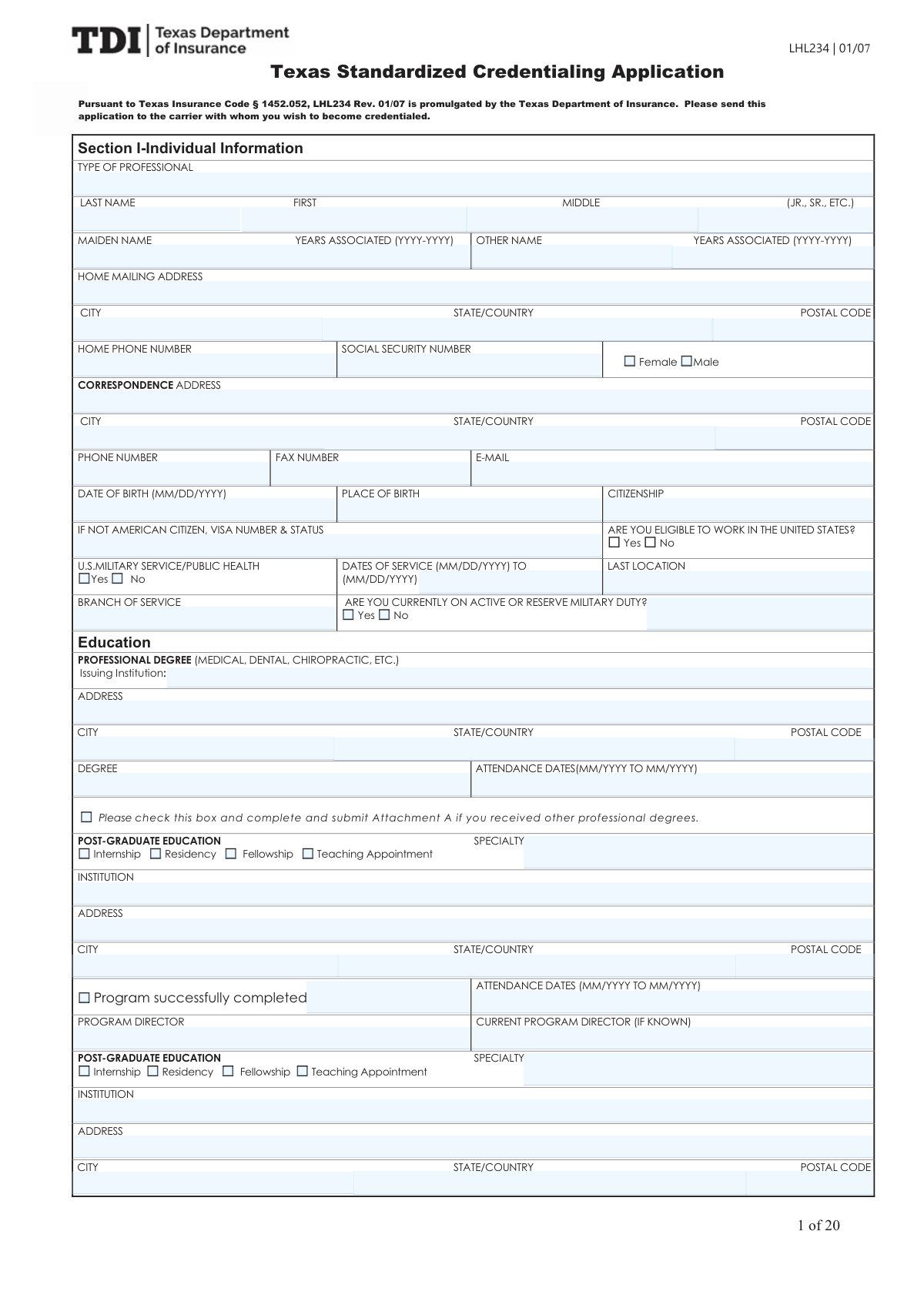
The Healthcare Professional Credentialing Application is a detailed form used by physicians, nurses, and other medical professionals to apply for privileges with hospitals and to join managed care networks. It serves as a comprehensive record of the applicant's education, training, licensure, work history, malpractice claims, and professional standing, which is essential for the verification process that ensures patient safety and quality of care. This extensive application requires meticulous detail across numerous sections, from personal data to practice specifics. Today, this form can be filled out quickly and accurately using AI-powered services like Instafill.ai, which can also convert non-fillable PDF versions into interactive fillable forms.
Our AI automatically handles information lookup, data retrieval, formatting, and form filling.
It takes less than a minute to fill out Credentialing Application using our AI form filling.
Securely upload your data. Information is encrypted in transit and deleted immediately after the form is filled out.

Form specifications

Form name: Healthcare Professional Credentialing Application
Number of pages: 20
Language: English
Categories: healthcare forms, credentialing forms, CAR forms, health care forms, L.A. Care forms, health forms
main-image

Instafill Demo: How to fill out PDF forms in seconds with AI

How to Fill Out Credentialing Application Online for Free in 2026

Are you looking to fill out a CREDENTIALING APPLICATION form online quickly and accurately? Instafill.ai offers the #1 AI-powered PDF filling software of 2026, allowing you to complete your CREDENTIALING APPLICATION form in just 37 seconds or less.
Follow these steps to fill out your CREDENTIALING APPLICATION form online using Instafill.ai:
  1. 1 Navigate to Instafill.ai and upload or select the Healthcare Professional Credentialing Application form.
  2. 2 Allow the AI to scan the form and automatically pre-fill your personal information, including your name, contact details, and Social Security Number.
  3. 3 Review and complete the sections on your professional degrees, post-graduate training, and any other graduate-level education, letting the AI assist with institution names and addresses.
  4. 4 Enter your professional licenses, DEA registration, and provider identifiers like NPI. Use the AI to help populate your detailed work history, including employer details and dates.
  5. 5 Provide information on your current and previous hospital affiliations and professional liability insurance. If applicable, complete the detailed malpractice claims history section with AI assistance.
  6. 6 Carefully answer all disclosure questions regarding licensure, sanctions, and health status. Fill in the details for each practice location, including services offered, office hours, and accessibility information.
  7. 7 Thoroughly review the entire application for accuracy, electronically sign the document, and attach all required supplemental documents (like your DEA certificate and W-9s) before submitting to the credentialing body.

Our AI-powered system ensures each field is filled out correctly, reducing errors and saving you time.

Why Choose Instafill.ai for Your Fillable Credentialing Application Form?

Speed

Complete your Credentialing Application in as little as 37 seconds.

Up-to-Date

Always use the latest 2026 Credentialing Application form version.

Cost-effective

No need to hire expensive lawyers.

Accuracy

Our AI performs 10 compliance checks to ensure your form is error-free.

Security

Your personal information is protected with bank-level encryption.

Frequently Asked Questions About Form Credentialing Application

This is a professional credentialing application for healthcare providers like physicians, nurses, and therapists. You should fill it out when applying for credentials, hospital privileges, or to participate with a managed care organization.

You will likely need to attach copies of your DEA certificate, professional liability insurance policy face sheet, and IRS W-9s. Depending on your practice, you may also need to include CLIA certifications, radiology certifications, or your military service record (DD214).

Your 'Home Mailing Address' is your personal residence. The 'Correspondence Address' is where you want to receive all official mail related to this application, which could be your office or a P.O. Box.

The form includes several attachments for this purpose. Use Attachment A for additional degrees, Attachment C for extra work history, and Attachments D and E for additional hospital affiliations.

You must explain any employment gaps lasting more than six months. Use the 'Work History - Gap Explanations' section to provide the dates and a brief reason for the gap.

In the board certification section, indicate that you are not currently board certified, and then select the option for 'Taken exam — results pending for board'. This allows you to accurately represent your status.

If you do not have hospital privileges, you can indicate this and then describe your 'Admitting arrangements'. This may include the name of a covering physician or a formal transfer agreement you have with a local hospital.

If you answer 'Yes' to any disclosure question regarding licensure, sanctions, or malpractice, you must provide a complete and detailed explanation. Use the provided explanation section, making sure to reference the specific question number.

For each of the three references, you must provide their full name, professional title, current phone number, and complete mailing address. Ensure this information is accurate as they will be contacted during the verification process.

Yes, if you have been with your current malpractice carrier for less than five years, you must provide details about your previous insurer. This includes the carrier's name, address, policy number, and coverage dates.

Yes, services like Instafill.ai use AI to auto-fill form fields accurately and save time. This can be especially helpful for long and repetitive credentialing applications like this one.

To fill this form out online, you can upload the PDF to a platform like Instafill.ai. The service will make the document interactive, allowing you to type your information directly into the fields and save your progress.

If you have a flat, non-fillable PDF, you can use a service like Instafill.ai to make it interactive. The tool converts the document into a fillable format, so you can easily complete it on your computer.

The directory name is what will be publicly displayed for patients, while the IRS W-9 name is the legal corporate name used for billing and tax purposes. It is crucial that the W-9 name matches your official tax documents exactly.

Compliance Credentialing Application
Validation Checks by Instafill.ai

1
Validates Social Security Number Format
This check ensures the 'Social Security Number' field contains a valid 9-digit number, potentially allowing for hyphens (XXX-XX-XXXX). This is critical for accurate applicant identification, background checks, and reporting to federal databases. If the entry does not match the required format, the submission will fail, and the user will be prompted to enter a valid SSN.
2
Ensures Exclusive Gender Selection
This validation confirms that only one of the 'Female' or 'Male' checkboxes is selected, as selecting both is a logical contradiction. This ensures data integrity for demographic and identification purposes. If both or neither are selected in a required context, the form will display an error and prevent submission until a single choice is made.
3
Requires Explanation for 'Yes' Answers in Disclosure Section
This validation ensures that for any disclosure question (e.g., Questions 1-23) answered with 'Yes', the corresponding explanation field is filled out. These explanations are mandatory for the credentialing committee to assess potential risks and understand the context of the disclosure. If a 'Yes' answer is provided without an explanation, the form submission will be blocked until the required narrative is entered.
4
Validates Work History Date Chronology
For each work history entry, this validation ensures the employment 'End Date' is not before the 'Start Date'. This check maintains the logical integrity of the professional timeline, which is essential for verifying experience and identifying any unexplained gaps. An invalid date range would trigger an error message, requiring the user to correct the dates before the form can be submitted.
5
Requires Military Details if Service is Indicated
This check enforces that if the 'U.S. Military Service / Public Health — Yes' box is checked, then the related fields ('Dates of Service', 'Last Location of Service', 'Branch of Service') must be completed. This information is necessary for verifying the applicant's service history as part of the background check. Failure to provide these details when service is indicated will result in a validation error, preventing submission until the required information is provided.
6
Ensures License Expiration Date Follows Issue Date
For each professional license entered, this check verifies that the 'Expiration Date' is on or after the 'Original Date of Issue'. An expiration date that precedes the issue date is a logical impossibility and indicates a data entry error. The system should flag this inconsistency and require the user to input correct dates to ensure the license information is valid and accurate.
7
Requires Admitting Arrangements if No Hospital Privileges
This validation confirms that if the 'Do you have hospital privileges? — No' box is checked, the 'Admitting arrangements (if no privileges)' text field must be filled out. This information is crucial for patient safety and continuity of care, as it explains how the provider will manage hospitalizations. A failure to provide these arrangements will block submission and prompt the user to describe their plan.
8
Requires Explanation for Significant Work History Gaps
This check automatically identifies any gaps of six months or more between the end date of one job and the start date of the next in the 'Work History' section. If such a gap is found, the system requires that a corresponding 'Gap Explanation' field is completed. Unexplained gaps are a significant point of review in credentialing, so this validation ensures a complete and verifiable professional timeline is provided.
9
Validates Correspondence E-mail Address Format
This check verifies that the 'Correspondence E-mail Address' field contains a value that follows the standard email format (e.g., [email protected]). A valid email is essential for all official communication with the applicant regarding their application status. An invalid format will trigger an error message, requiring the user to correct the email address before submission.
10
Requires Board Certification Details if Certified
This validation ensures that if 'Primary Specialty — Board Certified: Yes' is checked, then the 'Name of Certifying Board' and 'Initial Certification Date' fields are not empty. This information is fundamental to verifying the applicant's specialty qualifications and is a core part of the credentialing process. If the applicant indicates they are board certified but fails to provide these details, the form will be considered incomplete.
11
Ensures Attachment G is Indicated for Malpractice History
This validation checks that if the '16 - Malpractice claims history: Yes' box is checked, the '16 - Attachment G (If yes) checkbox' is also checked. This serves as a confirmation that the applicant acknowledges the requirement to provide detailed information on a separate attachment. Failing to check the attachment box will result in an error, reminding the user of the requirement to submit Attachment G with the necessary details.
12
Validates Conditional ECFMG Information
This check ensures that if the 'ECFMG — N/A' box is not checked, then the applicant must provide their ECFMG status. If 'ECFMG Number Provided' is selected, the 'ECFMG number' and 'ECFMG issue date' fields must be completed. This is essential for verifying the credentials of foreign-trained physicians, and incomplete or contradictory information will trigger a validation error.
13
Requires Provider Number if Participating in Medicare/Medicaid
This validation checks that if 'Participating Medicare Provider — Yes' is checked, the 'Medicare Provider Number' field is filled. A similar check is performed for Medicaid participation. This data is essential for verifying the provider's status with government payers and for billing setup. If participation is indicated without a provider number, the submission will be flagged as incomplete.
14
Validates Total Hospital Admission Percentage
This check calculates the sum of all entered hospital admission percentages, including the 'Percentage of admissions to primary hospital' and percentages for any other hospital affiliations. The total should not logically exceed 100%. This validation ensures the data provided is realistic and internally consistent. If the sum is over 100, an error message will appear, asking the applicant to review and correct the values.

Common Mistakes in Completing Credentialing Application

Saved over 80 hours a year

“I was never sure if my IRS forms like W-9 were filled correctly. Now, I can complete the forms accurately without any external help.”

Kevin Martin Green

Your data stays secure with advanced protection from Instafill and our subprocessors

Robust compliance program

Transparent business model

You’re not the product. You always know where your data is and what it is processed for.

ISO 27001, HIPAA, and GDPR

Our subprocesses adhere to multiple compliance standards, including but not limited to ISO 27001, HIPAA, and GDPR.

Security & privacy by design

We consider security and privacy from the initial design phase of any new service or functionality. It’s not an afterthought, it’s built-in, including support for two-factor authentication (2FA) to further protect your account.

Fill out Credentialing Application with Instafill.ai

Worried about filling PDFs wrong? Instafill securely fills healthcare-professional-credentialing-application forms, ensuring each field is accurate.