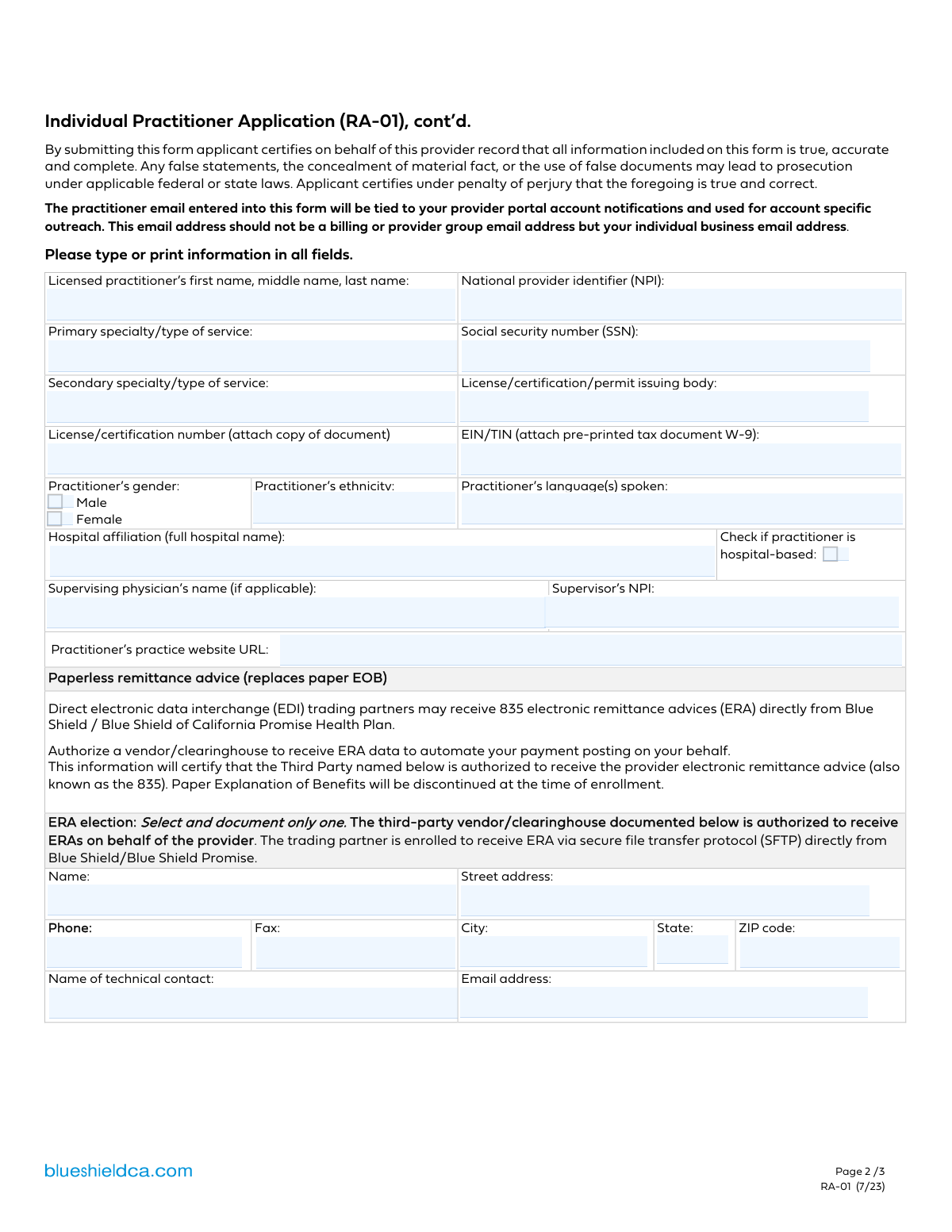
Yes! You can use AI to fill out Practitioner Information and Credentialing Form
The Practitioner Information and Credentialing Form is a crucial document used by health insurance companies, hospitals, and healthcare networks to gather and verify the professional details of medical practitioners. It captures essential data such as licenses, specialties, NPI, practice locations, accessibility features, and billing information, which is vital for credentialing, network participation, and creating accurate provider directories for patients. Today, this form can be filled out quickly and accurately using AI-powered services like Instafill.ai, which can also convert non-fillable PDF versions into interactive fillable forms.
Practitioner Information Form is part of the
credentialing forms and practitioner forms categories on Instafill.
Our AI automatically handles information lookup, data retrieval, formatting, and form filling.
It takes less than a minute to fill out Practitioner Information Form using our AI form filling.
Securely upload your data. Information is encrypted in transit and deleted immediately after the form is filled out.
Form specifications
| Form name: | Practitioner Information and Credentialing Form |
| Number of fields: | 118 |
| Number of pages: | 3 |
| Language: | English |
More forms in Credentialing forms
Instafill Demo: How to fill out PDF forms in seconds with AI
How to Fill Out Practitioner Information Form Online for Free in 2026
Are you looking to fill out a PRACTITIONER INFORMATION FORM form online quickly and accurately? Instafill.ai offers the #1 AI-powered PDF filling software of 2026, allowing you to complete your PRACTITIONER INFORMATION FORM form in just 37 seconds or less.
Follow these steps to fill out your PRACTITIONER INFORMATION FORM form online using Instafill.ai:
- 1 Navigate to Instafill.ai and upload or select the Practitioner Information Form.
- 2 Use the AI assistant to input the practitioner's personal and professional details, including name, NPI, SSN/TIN, and license information.
- 3 Enter the complete address, contact details, office hours, and accessibility features for the primary practice location. Repeat for any additional locations.
- 4 Specify the practitioner's specialties, patient acceptance policies (e.g., new patients, age limits), and services offered, such as telehealth.
- 5 Provide accurate billing addresses and contact information, along with details for any Electronic Remittance Advice (ERA) vendors if required.
- 6 Carefully review all entered information for accuracy across all sections, then use the platform's tools to electronically sign and date the document.
- 7 Download the completed form and submit it to the requesting healthcare organization or insurance plan as instructed.
Our AI-powered system ensures each field is filled out correctly, reducing errors and saving you time.
Why Choose Instafill.ai for Your Fillable Practitioner Information Form Form?
Speed
Complete your Practitioner Information Form in as little as 37 seconds.
Up-to-Date
Always use the latest 2026 Practitioner Information Form form version.
Cost-effective
No need to hire expensive lawyers.
Accuracy
Our AI performs 10 compliance checks to ensure your form is error-free.
Security
Your personal information is protected with bank-level encryption.
Frequently Asked Questions About Form Practitioner Information Form
This form is used to collect detailed information about a medical practitioner, their practice locations, and professional credentials. It is typically used for provider network enrollment, credentialing, or updating provider directory information.
This form should be completed by licensed medical practitioners, including physicians and other healthcare providers. It is required for those seeking to join or update their information with a healthcare plan or hospital network.
Use your Social Security Number (SSN) if you are an individual practitioner operating as a sole proprietor. Use the Employer Identification Number (EIN) or Taxpayer Identification Number (TIN) if your practice is incorporated or has employees.
No, if you check the 'Hospital-based' box, you should skip the sections for daily office hours, patient acceptance, and gender limitations. These sections are specified as being only for non-hospital-based practitioners.
If you practice independently and are not required to have a supervising physician, you can leave the 'Supervising Physician's Name' and 'Supervisor's NPI' fields blank. These fields are only for practitioners who work under supervision.
An ERA (Electronic Remittance Advice) Vendor is a third-party clearinghouse that processes your electronic insurance payments and statements. This information is required to ensure that your practice's electronic payments are routed correctly.
No, the billing address fields only need to be completed if your billing address is different from your practice's service location address. If they are the same, you can leave those fields empty.
This form is designed to capture information for up to two locations. You should contact the organization that provided the form for instructions on how to submit information for additional locations, as you may need to complete a separate form.
You should gather your personal NPI, SSN or practice TIN/EIN, and license number. Also, have the full address and contact details for each practice location, as well as information about your ERA vendor, if you use one.
Yes, services like Instafill.ai use AI to help you complete forms like this one accurately and efficiently. These tools can auto-fill your saved information, reducing repetitive data entry and saving you time.
Simply upload the form to the Instafill.ai platform. The AI will identify all the fields, and you can then use your saved profile to auto-fill your practitioner, practice, and license information with a single click.
If you have a non-fillable or 'flat' PDF, you can use a service like Instafill.ai to convert it into an interactive, fillable form. This allows you to type your answers directly into the fields instead of printing and writing by hand.
This section asks for specific details about accessibility at your practice location(s), such as accessible parking, exam rooms, and medical equipment. This information helps patients with disabilities know if your facility can accommodate their needs.
Compliance Practitioner Information Form
Validation Checks by Instafill.ai
1
NPI Format and Structure Validation
This check ensures the National Provider Identifier (NPI) is a 10-digit number. It verifies that the field is not empty and contains only numeric characters, conforming to the standard NPI format. This is critical for uniquely identifying health care providers in standard transactions like billing and is a mandatory field for most healthcare-related processing.
2
SSN Format Validation
Validates that the Social Security Number (SSN) field contains exactly 9 digits, often formatted as XXX-XX-XXXX. This check is crucial for ensuring the correct capture of a highly sensitive and legally significant identifier used for tax and identity verification purposes. An invalid format could lead to rejection by downstream systems.
3
Conditional Logic for Hospital-Based Status
This validation verifies that if the 'Hospital-based' checkbox is checked, all dependent fields marked as 'Fill only if practitioner is hospital-based is No' are left empty. This enforces the form's logic, preventing the collection of irrelevant data (like office hours or private practice details) for hospital-based practitioners, thus ensuring data cleanliness and relevance.
4
Supervisor NPI Completeness Check
Ensures that if the 'Supervising Physician's Name' field is populated, the corresponding 'Supervisor's NPI' field must also be filled. This rule maintains data integrity by requiring the unique identifier for any listed supervisor. This is essential for credentialing, verification, and understanding reporting hierarchies.
5
Mutually Exclusive Gender Selection
This check confirms that only one of the gender checkboxes ('Male' or 'Female') can be selected for the practitioner. It prevents contradictory or ambiguous data entry for a fundamental demographic field. If both are selected, the form submission should be flagged as an error.
6
Patient Age Range Logical Consistency
Validates that the value entered in 'Highest age 1' is greater than or equal to the value in 'Lowest age 1'. This check prevents the entry of illogical age ranges for patient acceptance. An invalid range would make patient filtering and reporting impossible, so this rule ensures the data makes practical sense.
7
ERA Vendor Address Completeness
If the 'ERA Vendor Street Address' field is filled, this validation requires that 'ERA Vendor City', 'ERA Vendor State', and 'ERA Vendor ZIP Code' must also be populated. This ensures that a complete and usable mailing address is captured for the Electronic Remittance Advice vendor. An incomplete address would prevent successful communication or mail delivery.
8
Practice Website URL Format
This check verifies that the 'Practitioner's Practice Website URL' field contains a string that conforms to a valid URL format (e.g., starts with 'http://' or 'https://' and includes a domain). This ensures that the provided link is functional and can be used by patients or administrators to access the practice's online presence. A broken link provides a poor user experience and reflects badly on the data quality.
9
Conditional Billing Address Fields
This validation ensures that the billing address fields (Billing Address, City, State, ZIP) are only populated if the 'Billing address differs from service location' checkbox is marked as 'Yes'. If the checkbox is not checked, these fields should be empty or ignored. This rule prevents redundant data entry and ensures billing information is only captured when it is explicitly different from the practice location.
10
Second Practice Location Conditional Fields
Verifies that all fields conditional on a second practice location (e.g., 'City Location 2', 'Sun 2', etc., marked with 'Fill only if Second Practice Location is Yes') are empty if the condition is not met. This enforces the form's structure, preventing orphaned data from being submitted for a non-existent location. It is a critical check for maintaining a clean and logical data structure.
11
Phone Number Format Validation
This check applies to all phone and fax number fields on the form, such as 'Prac appt phone # 1' and 'ERA Vendor Phone'. It validates that the input is a 10-digit number, allowing for common formats like (XXX) XXX-XXXX or XXXXXXXXXX. This ensures the captured phone numbers are valid and can be used for communication.
12
Email Address Format Validation
Validates that the 'ERA Vendor Email Address' and 'ind prac business email -1' fields contain a string in a valid email format (e.g., '[email protected]'). This is essential for ensuring that automated communications, notifications, and other electronic correspondence can be successfully delivered to the intended recipient.
13
State Abbreviation Validation
This rule checks all 'State' fields to ensure the entry is a valid two-letter US state or territory abbreviation. Using a standardized list of abbreviations is crucial for address validation, mail delivery, and geographic data consistency. An invalid entry would cause address lookups and mailings to fail.
14
ZIP Code Format Validation
Ensures all ZIP code fields contain either a 5-digit or 9-digit (ZIP+4) numeric value. Correctly formatted ZIP codes are essential for accurate mail delivery, geographic analysis, and linking to other location-based data. This validation prevents data entry errors that would render address information unusable.
15
Mutually Exclusive Gender Limitation
This check ensures that for a given practice location, the gender limitation checkboxes ('N/A', 'Male only', etc.) are mutually exclusive. A practice cannot simultaneously have no limitations and be limited to a specific gender. This validation prevents logical contradictions in the patient access information.
Common Mistakes in Completing Practitioner Information Form
Practitioners who check the 'Hospital-based' box often mistakenly fill out sections intended only for non-hospital-based practices, such as office hours and patient acceptance limitations. This creates confusing and contradictory data, which can delay application processing while the information is clarified. To avoid this, carefully read the instructions for each section, which often state 'Fill only if practitioner is not hospital-based', and skip these sections if you are hospital-based.
The form requires multiple unique identifiers like NPI, SSN, and EIN/TIN, which are prone to typos or being entered in the wrong field. Such errors lead to immediate data validation failures and application rejection, as these numbers are critical for verification and billing. Always double-check each number against your source documents before submitting. AI-powered tools like Instafill.ai can help prevent these errors by validating number formats and cross-referencing data to ensure accuracy.
The free-text fields for daily office hours often lead to inconsistent entries like '9-5', '9am to 5pm', or 'All Day'. This ambiguity makes it difficult to standardize the information for provider directories, potentially showing incorrect hours to patients. To prevent this, use a consistent format for all days, such as '9:00 AM - 5:00 PM', and clearly write 'Closed' if applicable.
The section for the Electronic Remittance Advice (ERA) vendor requires specific contact and address information that the practitioner may not have readily available. Submitting incomplete or guessed information for the clearinghouse will prevent the successful setup of electronic payments, leading to significant reimbursement delays. Before filling out the form, contact your billing department or clearinghouse to obtain the exact vendor name, address, and technical contact information.
When a practitioner has a second location, they must complete a large, repetitive set of fields, including address, hours, and accessibility options. It is easy to overlook one or more of these required fields for the second location, resulting in an incomplete and inaccurate provider directory listing for that site. To avoid this, treat the second location section as a completely separate form and meticulously review every field to ensure it has been filled out correctly.
A common error is to leave the supervisor's NPI blank when one is required, or to mistakenly enter the practitioner's own NPI in the supervisor field. This can cause credentialing and claims processing issues, especially for associate-level practitioners. Verify the correct NPI for the designated supervisor and ensure it is entered only in the specified 'Supervisor's NPI' field. Using a tool like Instafill.ai can help by flagging potentially duplicated identifiers.
The form requests the 'full name... including first name, middle name, and last name,' but applicants often omit their middle name or initial. This can cause a mismatch when the application is cross-referenced with official databases like the NPI registry or state licensing boards, leading to verification failures. Ensure your name is entered exactly as it appears on your medical license. If the form is a non-fillable PDF, a tool like Instafill.ai can convert it into an interactive version to make data entry easier.
When entering the 'Practitioner's Practice Website URL,' users often forget to include the 'https://www.' prefix or make a small typo in the domain name. This results in a broken link in the online provider directory, preventing patients from accessing the practice website. To avoid this, copy and paste the full URL directly from your browser's address bar. Smart form fillers can also automatically validate the URL format to ensure it's a working link.
Several specific accessibility options (e.g., 'Exam room,' 'Parking') are dependent on a primary checkbox being selected first, but users frequently check the specific options without selecting the main parent checkbox. This creates illogical data and can lead to your practice being incorrectly listed as either accessible or not. Carefully follow the dependency rules, ensuring the main accessibility checkbox is marked before selecting the specific features available.
The form allows for a separate billing address if it differs from the practice location, but this is a conditional section. Users sometimes enter the billing address in the primary practice address fields or forget to fill out the separate billing section when necessary. This error can cause payments and important correspondence to be sent to the wrong location. Confirm if your billing address is different from your service address and fill out the appropriate sections accordingly.
Saved over 80 hours a year
“I was never sure if my IRS forms like W-9 were filled correctly. Now, I can complete the forms accurately without any external help.”
Kevin Martin Green
Your data stays secure with advanced protection from Instafill and our subprocessors

Robust compliance program
Transparent business model
You’re not the product. You always know where your data is and what it is processed for.
ISO 27001, HIPAA, and GDPR
Our subprocesses adhere to multiple compliance standards, including but not limited to ISO 27001, HIPAA, and GDPR.
Security & privacy by design
We consider security and privacy from the initial design phase of any new service or functionality. It’s not an afterthought, it’s built-in, including support for two-factor authentication (2FA) to further protect your account.
Fill out Practitioner Information Form with Instafill.ai
Worried about filling PDFs wrong? Instafill securely fills practitioner-information-and-credentialing-form forms, ensuring each field is accurate.