Yes! You can use AI to fill out SFHP Doula Credentialing Application Checklist

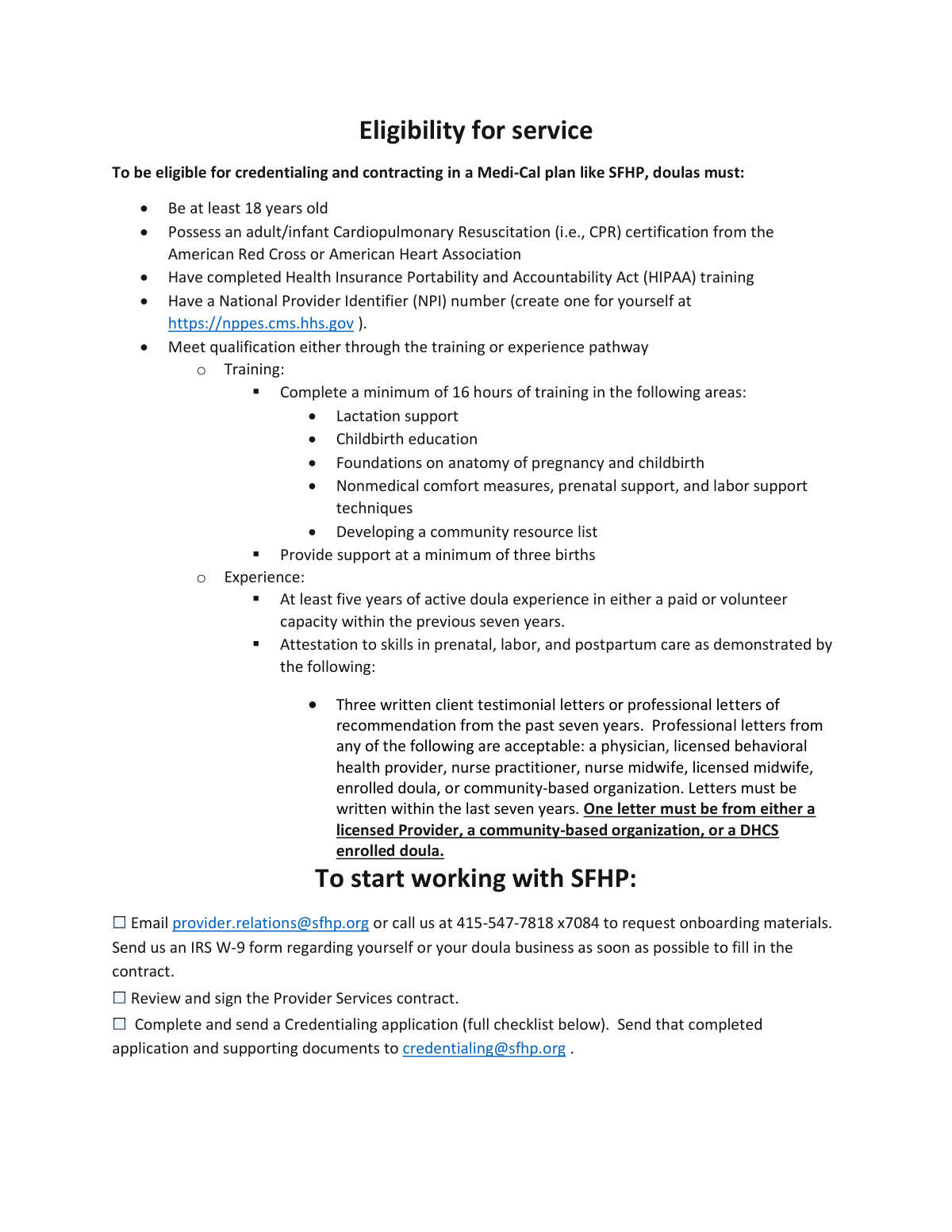
This document is a comprehensive checklist provided by the San Francisco Health Plan (SFHP) for doulas applying for credentialing to serve Medi-Cal members. It details all required qualifications, documents, and forms, such as the IRS W-9, CPR certification, and proof of training or experience. Completing this checklist accurately is a critical step for doulas to ensure their application is complete and can be processed. Today, this form and its associated documents can be filled out quickly and accurately using AI-powered services like Instafill.ai, which can also convert non-fillable PDF versions into interactive fillable forms.
SFHP Doula Credentialing Checklist is part of the credentialing forms category on Instafill.
Our AI automatically handles information lookup, data retrieval, formatting, and form filling.
It takes less than a minute to fill out SFHP Doula Credentialing Checklist using our AI form filling.
Securely upload your data. Information is encrypted in transit and deleted immediately after the form is filled out.

Form specifications

Form name: SFHP Doula Credentialing Application Checklist
Number of fields: 18
Number of pages: 3
Language: English
main-image

Instafill Demo: How to fill out PDF forms in seconds with AI

How to Fill Out SFHP Doula Credentialing Checklist Online for Free in 2026

Are you looking to fill out a SFHP DOULA CREDENTIALING CHECKLIST form online quickly and accurately? Instafill.ai offers the #1 AI-powered PDF filling software of 2026, allowing you to complete your SFHP DOULA CREDENTIALING CHECKLIST form in just 37 seconds or less.
Follow these steps to fill out your SFHP DOULA CREDENTIALING CHECKLIST form online using Instafill.ai:
  1. 1 Navigate to Instafill.ai and upload the SFHP Doula Credentialing Application Checklist and any related forms like the W-9.
  2. 2 Use the AI-powered tool to automatically fill in your personal and business information across the application and required attachments.
  3. 3 Carefully review all the pre-filled information for accuracy, including your name, NPI number, and contact details.
  4. 4 Go through the checklist section, checking off each item as you gather and prepare the required supporting documents like your CPR certification, resume, and letters of recommendation.
  5. 5 Digitally attach all necessary supporting documents, such as your driver's license, malpractice insurance face sheet, and proof of training or experience, directly to your application package.
  6. 6 Electronically sign and date the application, attestation forms, and any other required documents before downloading the complete package.
  7. 7 Download the final, completed application package and email it to the specified SFHP email addresses (e.g., [email protected]) as instructed on the form.

Our AI-powered system ensures each field is filled out correctly, reducing errors and saving you time.

Why Choose Instafill.ai for Your Fillable SFHP Doula Credentialing Checklist Form?

Speed

Complete your SFHP Doula Credentialing Checklist in as little as 37 seconds.

Up-to-Date

Always use the latest 2026 SFHP Doula Credentialing Checklist form version.

Cost-effective

No need to hire expensive lawyers.

Accuracy

Our AI performs 10 compliance checks to ensure your form is error-free.

Security

Your personal information is protected with bank-level encryption.

Frequently Asked Questions About Form SFHP Doula Credentialing Checklist

This application is for doulas who want to become credentialed and contracted with San Francisco Health Plan (SFHP) to provide services to Medi-Cal members.

To be eligible, you must be at least 18 years old, have CPR and HIPAA training, possess a National Provider Identifier (NPI) number, and meet specific requirements through either a training or experience pathway.

The Training Pathway is for newer doulas and requires 16+ hours of specific training and attending three births. The Experience Pathway is for established doulas with at least five years of recent experience and requires three letters of recommendation.

To begin, you should email [email protected] or call 415-547-7818 x7084 to request the necessary onboarding materials and contract.

You must send your completed application and all required documents via email to [email protected].

A National Provider Identifier (NPI) is a unique ID number for health care providers, and yes, you must have one to be eligible. You can create one for free on the official NPPES website.

You are required to include a written explanation for any employment gaps on your CV or resume that last longer than six months.

No, solo practitioners are not required to submit DHCS forms 6207 and 6208. These forms are only required for incorporated doulas and doula groups.

Key documents include a completed application, proof of meeting the training or experience pathway, CPR certification, a W-9 form, a resume, and a copy of your malpractice insurance face sheet.

You must have a current adult and infant Cardiopulmonary Resuscitation (CPR) certification from either the American Red Cross or the American Heart Association.

Yes, AI-powered services like Instafill.ai can help you accurately auto-fill form fields, saving you time and reducing the chance of errors.

You can upload the SFHP application forms to Instafill.ai, which will convert them into an interactive format. The AI can then help you fill in your information quickly and accurately before you download the completed documents for submission.

If you have a non-fillable or 'flat' PDF, you can use a service like Instafill.ai to convert it into an interactive, fillable form. This allows you to easily type your information directly into the fields.

Compliance SFHP Doula Credentialing Checklist
Validation Checks by Instafill.ai

Common Mistakes in Completing SFHP Doula Credentialing Checklist

Submitting Incomplete or Incorrect Pathway Documentation

Applicants often get confused between the Training and Experience pathways, which have very different documentation requirements. A common error is submitting a training certificate without the required syllabus if topics aren't listed, or for the Experience pathway, providing recommendation letters that don't meet the strict criteria. This mistake leads to immediate requests for more information and significant delays in the credentialing process. To avoid this, create a checklist specific to your chosen pathway and verify each document against the requirements before submission.

Providing a Non-Compliant CV or Resume

The form requires a resume covering the last 5 years with specific 'month and year' start/end dates and an explanation for any employment gaps over 6 months. Many applicants submit a generic resume that only lists years or omits explanations for gaps, leading to an automatic request for a revised CV. This simple oversight can delay the entire application review. Always tailor your resume to meet the exact formatting requirements listed in the application instructions.

Submitting Mismatched FEIN or W-9 Information

A critical error is a mismatch between the legal name on the application and the name registered with the IRS for the FEIN or on the W-9 form. This frequently occurs when an individual's name is used on one form but a business name is on another. This discrepancy causes an automatic rejection by the finance department, halting the process until corrected and perfectly matched documents are provided.

Omitting Signatures or Dates on Required Forms

The application packet contains multiple documents that must be individually signed and dated, such as the application itself, attestations, and DHCS forms. It is very common for applicants to miss one or more of these signature lines in a large packet. An unsigned form is considered incomplete and will be returned, forcing the applicant to resubmit and restarting the processing clock. Double-check every page for signature and date fields before sending.

Misunderstanding Conditional Document Requirements

Several documents, like the DHCS forms 6207/6208 or the Language Assessment, are only required under specific conditions. Applicants often make one of two mistakes: they fail to include a required document because they missed the condition that applies to them, or they submit unnecessary documents. Both scenarios create extra work for the credentialing team and can cause confusion or delays. Carefully read the notes next to each checklist item to determine if it applies to you.

Providing an Unaccepted or Expired CPR Certification

The instructions explicitly state that CPR certification must be from the American Red Cross or American Heart Association. Applicants sometimes submit certifications from other valid, but unlisted, organizations, or they submit a certification that has recently expired. This is an automatic failure point that requires the applicant to obtain and submit a new, compliant certification, which can take time and significantly delay the application.

Failing to Meet Specific Criteria for Recommendation Letters

The Experience Pathway has highly specific rules for its three recommendation letters that are easy to miss. A frequent mistake is not ensuring that at least one letter comes from the required list of professionals (e.g., a licensed provider or community-based organization). Applicants may also submit letters that are older than the seven-year limit. These errors invalidate the experience attestation and require the applicant to solicit new, compliant letters, stalling their progress.

Confusing the 'Provider Relations' and 'Credentialing' Email Addresses

The form lists two different email addresses for two different purposes: one for requesting materials and another for submitting the completed application. Applicants in a hurry often mix these up, sending their entire credentialing packet to the wrong department. This can lead to the application being lost or significantly delayed as it gets rerouted internally. Always double-check the 'To:' field in your email to ensure it's going to the correct destination.

Submitting a Poorly Scanned or Handwritten Application

When an application is provided as a non-fillable PDF, applicants often print, handwrite, and scan it, which can result in illegible information, missed fields, and data entry errors by the processing team. A messy submission can be returned for clarification, causing delays. AI-powered form-filling tools like Instafill.ai can convert these flat PDFs into easily fillable digital forms, ensuring a clean, typed, and professional submission that avoids these issues.

Forgetting to Include the Malpractice Insurance Face Sheet

The application requires a 'Malpractice Insurance Face Sheet,' which is typically a one-page summary of coverage. A common mistake is for applicants to either forget this document entirely or to send the entire, multi-page insurance policy instead. Sending the wrong document requires the credentialing staff to search for the information or reject the submission, slowing down the review process. Ensure you request the specific 'face sheet' or 'certificate of insurance' from your provider.
Saved over 80 hours a year

“I was never sure if my IRS forms like W-9 were filled correctly. Now, I can complete the forms accurately without any external help.”

Kevin Martin Green

Your data stays secure with advanced protection from Instafill and our subprocessors

Robust compliance program

Transparent business model

You’re not the product. You always know where your data is and what it is processed for.

ISO 27001, HIPAA, and GDPR

Our subprocesses adhere to multiple compliance standards, including but not limited to ISO 27001, HIPAA, and GDPR.

Security & privacy by design

We consider security and privacy from the initial design phase of any new service or functionality. It’s not an afterthought, it’s built-in, including support for two-factor authentication (2FA) to further protect your account.

Fill out SFHP Doula Credentialing Checklist with Instafill.ai

Worried about filling PDFs wrong? Instafill securely fills sfhp-doula-credentialing-application-checklist forms, ensuring each field is accurate.