Yes! You can use AI to fill out Doula Provider Credentialing Application

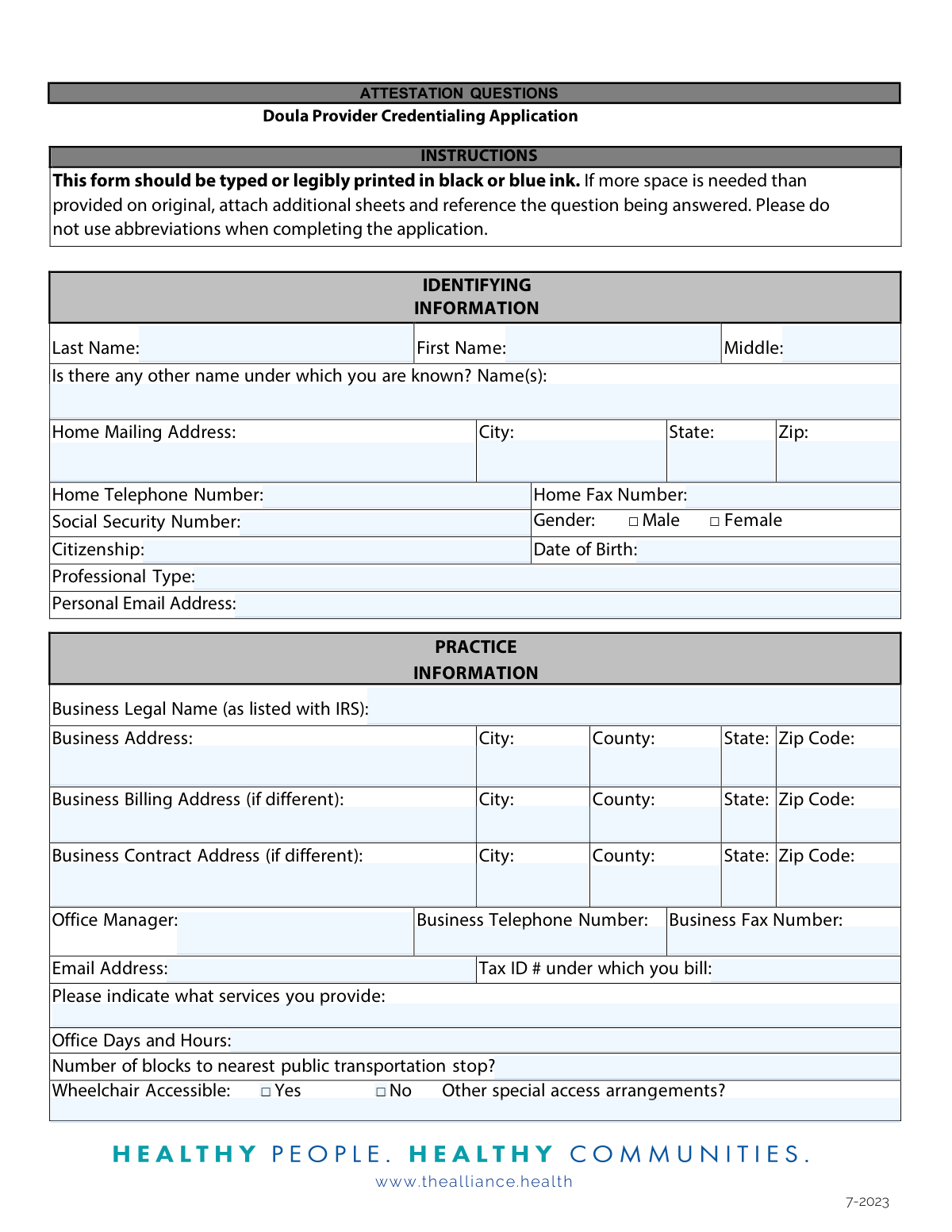
This form is the Doula Provider Credentialing Application for the Central California Alliance for Health (the Alliance). It is a comprehensive packet used to gather personal, professional, and practice information from doulas seeking to become credentialed providers within the Alliance's network, which is a requirement to serve Medi-Cal beneficiaries. The application requires detailed disclosures, attestations, and numerous supporting documents to verify qualifications and background. Today, this form can be filled out quickly and accurately using AI-powered services like Instafill.ai, which can also convert non-fillable PDF versions into interactive fillable forms.
Doula Credentialing Application is part of the credentialing forms category on Instafill.
Our AI automatically handles information lookup, data retrieval, formatting, and form filling.
It takes less than a minute to fill out Doula Credentialing Application using our AI form filling.
Securely upload your data. Information is encrypted in transit and deleted immediately after the form is filled out.

Form specifications

Form name: Doula Provider Credentialing Application
Number of fields: 272
Number of pages: 21
Language: English
main-image

Instafill Demo: How to fill out PDF forms in seconds with AI

How to Fill Out Doula Credentialing Application Online for Free in 2026

Are you looking to fill out a DOULA CREDENTIALING APPLICATION form online quickly and accurately? Instafill.ai offers the #1 AI-powered PDF filling software of 2026, allowing you to complete your DOULA CREDENTIALING APPLICATION form in just 37 seconds or less.
Follow these steps to fill out your DOULA CREDENTIALING APPLICATION form online using Instafill.ai:
  1. 1 Navigate to Instafill.ai and upload or select the Doula Provider Credentialing Application.
  2. 2 Use the AI assistant to automatically populate your personal identifying information, such as your full name, address, date of birth, and contact details.
  3. 3 Enter your practice information, including business legal name, address, office hours, and services provided for all locations.
  4. 4 Input your professional details, including licensure numbers, education history, work history for the last five years, and professional liability insurance information.
  5. 5 Carefully answer all attestation questions regarding your professional history, legal background, and ability to perform services.
  6. 6 Gather and prepare digital copies of all required supplementary documents, such as your CPR certification, HIPAA training, business license, and Form W-9.
  7. 7 Review all entered information for accuracy, electronically sign the application and all required addendums (A & B, Declaration of Confidentiality, etc.), and submit the complete package as instructed.

Our AI-powered system ensures each field is filled out correctly, reducing errors and saving you time.

Why Choose Instafill.ai for Your Fillable Doula Credentialing Application Form?

Speed

Complete your Doula Credentialing Application in as little as 37 seconds.

Up-to-Date

Always use the latest 2026 Doula Credentialing Application form version.

Cost-effective

No need to hire expensive lawyers.

Accuracy

Our AI performs 10 compliance checks to ensure your form is error-free.

Security

Your personal information is protected with bank-level encryption.

Frequently Asked Questions About Form Doula Credentialing Application

This application is for doulas who wish to join the Central California Alliance for Health (the Alliance) provider network to become a credentialed provider for Medi-Cal services.

You must submit the completed application, Addendums A & B, a W-9 form, a Curriculum Vitae (CV), copies of your NPI number, CPR and HIPAA training certifications, professional liability coverage, and documentation for either the Training or Experience Pathway.

Yes, federal law requires that all Alliance-contracted providers are screened and enrolled in the Department of Health Care Services (DHCS) Medi-Cal Fee-for-Service Program, which is a separate process from this application.

You can submit all required forms and documents by emailing them to [email protected] or by faxing them to 831-430-5528.

The Training Pathway requires you to complete a minimum of 16 hours of training in specific areas like lactation support and childbirth education, and to have provided support at a minimum of three births.

You must provide a written explanation for any employment gaps that last longer than six months. Your CV should cover at least the most recent five years of employment.

Yes, if applicable, you must provide a copy of your professional liability coverage with limits of at least $1,000,000 per claim and $3,000,000 in aggregate.

If you have no pending or settled claims to report, you must check the box at the top of Addendum B to attest to this and then sign the bottom of the form.

The form does not specify a timeline, but it states that all applications are reviewed by the Alliance Peer Review and Credentialing Committee. To ensure timely processing, you should submit all required documents as soon as possible.

For questions about the credentialing application, you can email the Alliance’s Credentialing Department at [email protected]. For questions about the DHCS enrollment requirement, contact Alliance Provider Services.

Yes, services like Instafill.ai use AI to auto-fill form fields accurately and save time, which is especially helpful for long applications like this one.

You can upload the PDF of the Doula Provider Credentialing Application to the Instafill.ai platform. The service will make the document interactive, allowing you to easily type your information into the fields and download the completed form.

If your PDF is not fillable, you can use a service like Instafill.ai. It can convert flat, non-fillable PDFs into interactive forms that you can complete and sign digitally.

As outlined in Addendum A, you have the right to review non-privileged information obtained for your application, be informed of your application's status upon request, and correct any erroneous information found in your file.

Compliance Doula Credentialing Application
Validation Checks by Instafill.ai

1
Social Security Number Format
This check verifies that the Social Security Number (SSN) is provided and follows the standard 9-digit format, which can be XXX-XX-XXXX or XXXXXXXXX. It is crucial for identity verification and for tax reporting purposes as required by the W-9 form. If the SSN is missing or in an invalid format, the application cannot be processed and must be returned to the applicant for correction.
2
National Provider Identifier (NPI) Format
Validates that the NPI Number field contains a 10-digit numeric value. The NPI is a unique identification number for covered health care providers, essential for billing and administrative functions within the healthcare system. An invalid or missing NPI will prevent claims processing and must be corrected before the credentialing process can continue.
3
License and Certification Date Logic
Ensures that for all licenses and certifications (e.g., Professional License, Business License, CPR Certification), the expiration date is a valid date that occurs after the issue date. This check prevents data entry errors and confirms that the applicant holds currently valid credentials. An application with an expired license or an illogical date sequence will be flagged for immediate follow-up.
4
Professional Liability Coverage Minimums
Verifies that the professional liability insurance amounts meet or exceed the minimums specified in the application instructions, which are $1,000,000 per occurrence and $3,000,000 aggregate. This is a critical risk management requirement for the network. If the coverage amounts are below the minimum, the application is considered incomplete and cannot be approved until proof of adequate coverage is provided.
5
Work History Gap Explanation
This validation checks the work history section to ensure it covers the most recent 5 years and that there are no unexplained gaps in employment lasting more than 6 months. The instructions require an explanation for any such gaps. This check is important for understanding a provider's continuous professional background and identifying potential red flags. Failure to provide a required explanation will pause the application pending receipt of the missing information.
6
Conditional Explanation for Attestation Questions
This check ensures that if an applicant answers 'Yes' to any of the attestation questions A through K, or 'No' to question L, a corresponding detailed explanation is provided. These questions pertain to adverse events like license restrictions, sanctions, or criminal convictions. An affirmative answer without a detailed explanation makes the application incomplete and requires manual intervention to obtain the necessary details for a thorough review.
7
Addendum B Conditional Requirement
This validation creates a logical link between Attestation Question J and Addendum B. If the applicant answers 'Yes' to question J (regarding professional liability cases), the system must verify that Addendum B has been completed for each case. If the answer is 'No', the system should confirm that the 'no pending/settled claims to report' box on Addendum B is checked, ensuring consistency and completeness of liability disclosures.
8
Doula Qualification Pathway Logic
Validates that on the 'Doula Attestation' form, the applicant has selected exactly one of two options: the 'Training Pathway' or the 'Experience Pathway'. It then checks that the required information for the chosen pathway (e.g., 'Name of Program' and 'Total Hours' for Training, or attached letters for Experience) is provided. This ensures the applicant has clearly demonstrated how they meet the minimum qualifications to be a doula in the network.
9
W-9 Name and TIN Consistency
This check cross-references the W-9 form with the main application. It verifies that the 'Name (as shown on your income tax return)' on the W-9 matches the 'Business Legal Name (as listed with IRS)' or the individual's name on the application. It also validates that the Taxpayer Identification Number (TIN) format (SSN or EIN) is appropriate for the business type selected, which is critical for preventing tax reporting errors and payment delays.
10
Required Attachments Completeness
This is a master check to confirm that all documents listed as required on the first page of the application have been submitted. This includes items like Addendum A & B, W-9, CV, copy of NPI number, and proof of HIPAA training. Missing any of these mandatory documents will render the application incomplete and halt the credentialing process until all required materials are received.
11
Signature and Date Field Completeness
Verifies that all pages requiring a signature and date are properly executed by the applicant. This includes the main application attestation, Addendum A, Addendum B, New Provider Training acknowledgement, Declaration of Confidentiality, and others. Unsigned forms are not legally binding and can invalidate the entire application, so this check is essential for compliance and legal validity.
12
Attestation Question L Critical Flag
This validation specifically checks the response to Attestation Question L, 'Are you able to perform all the services required...'. A 'Yes' response is expected. A 'No' response is a critical issue that must immediately flag the application for high-level review, as it indicates the applicant may not be able to fulfill their professional duties safely or effectively.
13
Taxonomy Code Structure
This check validates that the provided Taxonomy Code is a 10-character alphanumeric string. This code is used to classify the provider's specialty for billing and network directory purposes. An incorrect or improperly formatted code can lead to claim denials and incorrect provider listings, making this format validation crucial for operational accuracy.
14
Address Completeness Logic
This validation checks the Business Address, Business Billing Address, and Business Contract Address fields. If the billing or contract address fields are left blank, the system assumes they are the same as the primary business address. If they are filled out, the check ensures all components (Street, City, State, Zip) are present to form a complete address, preventing mail and communication errors.

Common Mistakes in Completing Doula Credentialing Application

Incomplete Supporting Document Submission

The application requires numerous supporting documents, from a W-9 to HIPAA training proof and a Curriculum Vitae. Applicants often overlook one or more items on this extensive checklist, leading to an incomplete submission. An incomplete application cannot be processed, causing significant delays and requiring follow-up communication to obtain the missing files. To avoid this, create a personal checklist and double-check that every required document is attached before submission.

Improper CV Formatting and Unexplained Gaps

The form specifically requires the Curriculum Vitae (CV) to use MM/YYYY date formats, cover the last 5 years of employment, and include explanations for any employment gaps over 6 months. Many applicants submit a standard CV that doesn't meet these specific formatting rules or they forget to attach a separate sheet explaining employment gaps. This fails the initial review, delaying the credentialing process until a properly formatted and complete CV is provided. Carefully read the CV requirements and tailor your document accordingly before submitting.

Mismatched Name and Taxpayer ID on Form W-9

A frequent error occurs on the W-9 when a sole proprietor enters their business name on 'Name' line but provides their Social Security Number (SSN) as the Taxpayer Identification Number (TIN). The name entered must match the TIN provided; for an SSN, this is the individual's name, and for an Employer Identification Number (EIN), it's the business's legal name. This mismatch causes tax reporting errors and payment delays. Ensure the name and number combination is correct as per IRS guidelines to prevent processing holds.

Failing to Explain 'Yes' Answers on Attestation Questions

The application contains several critical attestation questions (A-L) about licensure, sanctions, and legal history. When an applicant answers 'yes' to questions A through K, they are required to provide a full, detailed explanation on a separate sheet. A common mistake is checking 'yes' but failing to attach the required explanation, or providing one that is too vague. This is a major red flag that halts the review process immediately until a satisfactory explanation is received.

Incorrectly Completing the Professional Liability Addendum (Addendum B)

Addendum B requires information on malpractice claims. Applicants with no claims often forget to check the mandatory box at the top stating 'Please check here if there are no pending/settled claims to report.' This omission creates ambiguity, forcing reviewers to follow up for clarification. Conversely, applicants with claims to report may provide an incomplete summary, delaying the review. It is crucial to either check the 'no claims' box or provide a thorough, detailed narrative for each claim as instructed.

Missing Signatures on Multiple Forms and Addenda

This application packet contains numerous separate documents that require a signature, including the main application, Addendum A, Addendum B, the Declaration of Confidentiality, and the Doula Attestation. It is very common for applicants to miss one or more signature lines when rushing to complete the packet. A single missing signature invalidates that portion of the application and requires the credentialing department to send the documents back, significantly extending the processing time. AI-powered tools like Instafill.ai can help by highlighting all required signature fields to ensure none are missed.

Insufficient Documentation for the Chosen Doula Pathway

The 'Doula Attestation' form requires applicants to choose either a 'Training Pathway' or an 'Experience Pathway' and provide specific proof. Applicants often make mistakes here, such as choosing the Experience Pathway but providing only two letters of recommendation instead of three, or submitting letters that don't meet the source criteria (e.g., from a licensed provider). This failure to meet the specific evidence requirements for their chosen pathway leads to an automatic rejection of the attestation. Ensure your supporting documents precisely match the requirements for the pathway you select.

Submitting Expired or Invalid License and Certification Details

The 'Professional Licensure' section requires multiple numbers, including CPR certification, business license, and NPI. Applicants sometimes enter an expired CPR or business license number, or they provide a number that doesn't match the copy of the document they attach. This discrepancy causes a failure during the primary source verification stage. Always verify that all licenses and certifications are current and that the numbers entered on the form exactly match the supporting documents.

Using Unapproved Abbreviations

The instructions explicitly state, 'Please do not use abbreviations when completing the application.' However, applicants frequently use abbreviations for schools, previous employers, or state names out of habit. This can create ambiguity and forces the reviewer to guess or seek clarification, slowing down data entry and verification. To avoid this, write out all names and terms in full as instructed. Using a tool like Instafill.ai can help by auto-completing fields with the full, correct information, preventing the use of unapproved abbreviations.

Illegible Handwriting on a Printed Form

The application is a non-fillable PDF, and the instructions permit it to be 'legibly printed in black or blue ink.' A common issue is handwriting that is difficult to read, especially for critical data like Social Security Numbers, NPI numbers, or email addresses. Illegible information can lead to data entry errors, failed background checks, and communication breakdowns, requiring the application to be returned for clarification. To prevent this, it is best to type on the form if possible. Tools like Instafill.ai can convert flat PDFs into fillable versions, allowing you to type directly into the fields for perfect clarity.
Saved over 80 hours a year

“I was never sure if my IRS forms like W-9 were filled correctly. Now, I can complete the forms accurately without any external help.”

Kevin Martin Green

Your data stays secure with advanced protection from Instafill and our subprocessors

Robust compliance program

Transparent business model

You’re not the product. You always know where your data is and what it is processed for.

ISO 27001, HIPAA, and GDPR

Our subprocesses adhere to multiple compliance standards, including but not limited to ISO 27001, HIPAA, and GDPR.

Security & privacy by design

We consider security and privacy from the initial design phase of any new service or functionality. It’s not an afterthought, it’s built-in, including support for two-factor authentication (2FA) to further protect your account.

Fill out Doula Credentialing Application with Instafill.ai

Worried about filling PDFs wrong? Instafill securely fills doula-provider-credentialing-application forms, ensuring each field is accurate.