Yes! You can use AI to fill out Oregon Practitioner Credentialing Application (including Attachment A: Professional Liability Action Detail)

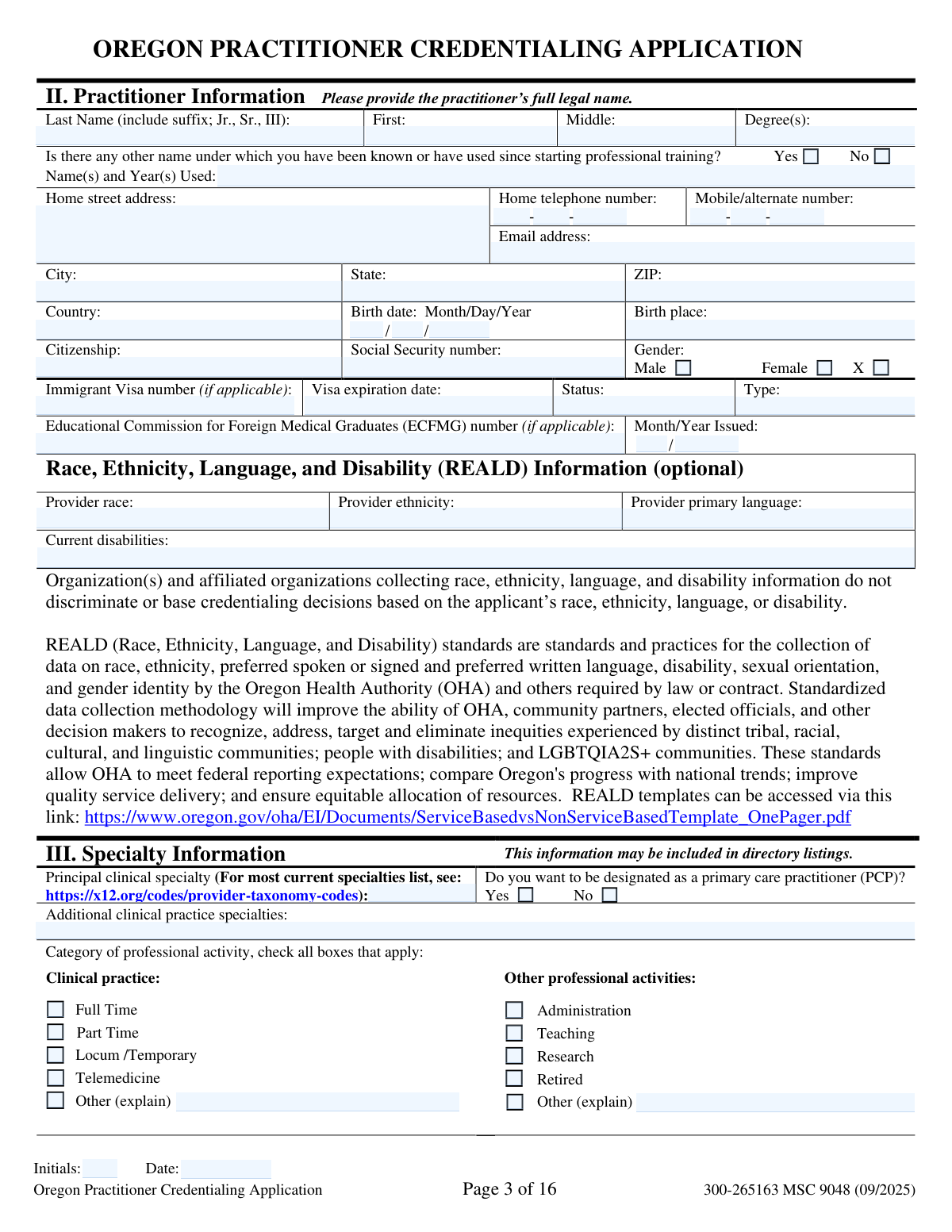
The Oregon Practitioner Credentialing Application is a standardized, statewide credentialing form developed under House Bill 2144 (1999) by the Advisory Committee on Physician Credentialing Information (ACPCI) for use by hospitals and health plans in Oregon. It compiles a practitioner’s legal identity, specialties, education and training, licensure/registrations (e.g., Oregon license, DEA/CSR, NPI), facility affiliations, work history, peer references, CME, and professional liability insurance. The application also includes required attestation questions and an authorization/release allowing organizations to verify the information provided. Completing it accurately and without altering the form’s wording/format is important because omissions or misstatements can lead to denial of credentialing or termination of privileges/participation.
Our AI automatically handles information lookup, data retrieval, formatting, and form filling.
It takes less than a minute to fill out Oregon Practitioner Credentialing Application using our AI form filling.
Securely upload your data. Information is encrypted in transit and deleted immediately after the form is filled out.

Form specifications

Form name: Oregon Practitioner Credentialing Application (including Attachment A: Professional Liability Action Detail)
Number of pages: 16
Filled form examples: Form Oregon Practitioner Credentialing Application Examples
Language: English
Categories: insurance forms, credentialing forms
main-image

Instafill Demo: filling out a legal form in seconds

How to Fill Out Oregon Practitioner Credentialing Application Online for Free in 2026

Are you looking to fill out a OREGON PRACTITIONER CREDENTIALING APPLICATION form online quickly and accurately? Instafill.ai offers the #1 AI-powered PDF filling software of 2026, allowing you to complete your OREGON PRACTITIONER CREDENTIALING APPLICATION form in just 37 seconds or less.
Follow these steps to fill out your OREGON PRACTITIONER CREDENTIALING APPLICATION form online using Instafill.ai:
  1. 1 Gather required supporting documents (current state professional license(s), DEA or CSR certificate, ECFMG if applicable, and professional liability policy face sheet/certificate), plus any additional sheets needed for explanations or extra entries.
  2. 2 Enter Practitioner Information and Specialty Information (legal name, contact details, identifiers as applicable, and clinical specialty/PCP designation), and initial/date the page as required.
  3. 3 Complete credentials and practice details: board certification/other certifications, practice and employment locations, call coverage arrangements, and all education/training sections (undergraduate through fellowships as applicable).
  4. 4 Provide licensure and ID numbers (Oregon license/registration, DEA/CSR, NPI, Medicare/Medicaid numbers if applicable), list other state licenses ever held, and document hospital/facility affiliations and complete professional practice/work history including explanations for gaps over two months.
  5. 5 Add peer references (three peers familiar with current competence), list CME from the past two years, and complete professional liability insurance (current and prior carriers for the past five years).
  6. 6 Answer all Attestation Questions (yes/no) and prepare signed/dated separate explanations for any “yes” responses; if you have any past/current claims or lawsuits, complete Attachment A for each claim.
  7. 7 Sign and date the Attestation section and the Authorization and Release of Information form (and Attachment A if used), ensure every page is initialed/dated, then submit the completed package to the requesting hospital/health plan (not to the state).

Our AI-powered system ensures each field is filled out correctly, reducing errors and saving you time.

Why Choose Instafill.ai for Your Fillable Oregon Practitioner Credentialing Application Form?

Speed

Complete your Oregon Practitioner Credentialing Application in as little as 37 seconds.

Up-to-Date

Always use the latest 2026 Oregon Practitioner Credentialing Application form version.

Cost-effective

No need to hire expensive lawyers.

Accuracy

Our AI performs 10 compliance checks to ensure your form is error-free.

Security

Your personal information is protected with bank-level encryption.

Frequently Asked Questions About Form Oregon Practitioner Credentialing Application

This is a uniform credentialing application developed by the Advisory Committee on Physician Credentialing Information (ACPCI) for use by Oregon hospitals and health plans to credential and recredential practitioners.

Practitioners applying for initial credentialing or recredentialing with an Oregon health care related organization (such as a hospital, health plan, medical group, IPA, HMO/PPO/PHO, or similar entity) may be asked to complete it.

No. The form instructs you to return the completed application to the health care related organization(s) requesting it, not to the state.

No. The application states that any modification to the wording or format (including the Attestation Questions and Authorization/Release) will invalidate the application.

Yes, you must complete the application in its entirety, but if a section does not apply to you or your practitioner type, you should check the “Does Not Apply” box at the top of that section.

The form should be typed (using a different font than the form) or legibly printed in black or blue ink.

You must submit current copies of: your state professional license(s), DEA certificate or CSR certificate, ECFMG (if applicable), and the face sheet of your professional liability policy or certificate.

A CV is optional, but it is not an acceptable substitute for completing the application sections (including Professional Practice/Work History).

Yes. The instructions state that each page requires the applicant’s initials and the date the application was last reviewed.

You must sign and date the Attestation section (page 13) and the Authorization and Release of Information form (page 14), and also sign Attachment A if you complete it.

Attach additional sheets as needed and reference the question/section being answered; for Attestation “Yes” answers, the form also requires you to sign and date each additional sheet.

REALD stands for Race, Ethnicity, Language, and Disability information; the form indicates this section is optional and states credentialing decisions are not based on these responses.

You must account for all time from entry into medical/professional school to the present and explain any gaps greater than two months in the gap explanation section (or attach a sheet if needed).

If you answer “Yes” to any attestation item, you must provide details and reasons on a separate sheet (signed and dated), as specified by the question.

You must complete Attachment A for each past or current professional liability claim or lawsuit that has been filed against you; you may photocopy the page and submit one completed Attachment A per claim, and court documents alone are not accepted in place of the form.

Compliance Oregon Practitioner Credentialing Application
Validation Checks by Instafill.ai

1
Ensures applicant initials and last-reviewed date are present on every page requiring them
Validates that each page of the application that includes an 'Initials' and 'Date' line has both fields completed. This is required by the form instructions and indicates the practitioner reviewed each page for accuracy. If any page is missing initials or a date, the submission should be flagged as incomplete and returned for correction before credentialing review proceeds.
2
Prevents altered form wording/format (application, attestation, releases, and Attachment A)
Checks that the submitted content matches the official Oregon Practitioner Credentialing Application wording and structure, especially for the Attestation Questions and Authorization/Release sections where modifications explicitly invalidate the application. This protects legal enforceability and standardization across organizations. If any text is modified, removed, or re-ordered in a way that changes meaning, the application should be rejected as invalid and resubmission required on the unmodified form.
3
Validates required signatures and dates on Attestation, Authorization/Release, and Attachment A when applicable
Confirms the practitioner has signed and dated the Attestation (page 14) and the Authorization and Release of Information (page 15). Also verifies Attachment A is signed and dated for each claim when the practitioner answers 'Yes' to the liability-claims attestation question. If signatures/dates are missing, the submission is legally incomplete and must be returned for completion.
4
Validates practitioner identity fields completeness and legal-name consistency
Ensures the practitioner’s full legal name (last/first/middle) and degree(s) are provided and that any suffix is captured in the last-name field as instructed. If the applicant indicates they have used other names, the alternate name(s) and year(s) used must be present and plausible. If identity fields are incomplete or inconsistent, the record should be held because primary source verification (licenses, education, sanctions) may fail or match the wrong person.
5
Validates SSN format and presence when required for credentialing/business use
Checks that the Social Security number is either blank only when allowed by the receiving organization’s policy or is provided in a valid 9-digit format (with or without dashes). This is important for identity verification, sanctions checks, and payer enrollment matching. If the SSN is malformed or missing when required, the submission should be flagged for correction and may be unable to proceed to verification.
6
Validates birth date format and logical plausibility
Ensures birth date is entered in Month/Day/Year format and represents a real calendar date. Also checks plausibility (e.g., not in the future and consistent with education/training timelines). If invalid, the application should be flagged because identity verification and background checks may be compromised.
7
Validates contact information formats (phone, fax, email) across practitioner and practice sections
Checks that all phone and fax numbers follow a consistent 10-digit format (with optional extension where provided) and that email addresses are syntactically valid. This includes home/mobile, primary/secondary office, credentialing contact, and reference contact details. If formats are invalid or key contact fields are missing, the application should be returned because verification and follow-up communications may fail.
8
Validates address completeness and ZIP/state consistency for U.S. addresses
Ensures street, city, state, and ZIP are present for home and practice locations when the country is the U.S., and that state abbreviations are valid (e.g., OR) and ZIP codes are 5-digit or ZIP+4. For non-U.S. addresses, validates that country is provided and U.S.-specific constraints are not incorrectly applied. If address data is incomplete or inconsistent, the submission should be flagged because primary source verification mailings and directory listings may be inaccurate.
9
Validates specialty and PCP designation consistency
Checks that a principal clinical specialty is provided and, if the practitioner requests PCP designation, the specialty is compatible with primary care designation per the organization’s taxonomy rules (or triggers a manual review). Also validates that additional specialties are not duplicates of the principal specialty and are entered in an acceptable taxonomy format if required. If inconsistent, the application should be flagged to prevent incorrect directory listings and network designation errors.
10
Validates board certification date logic and expiration rules
For each board certification entry, validates that the 'date certified/recertified' is in month/year format, is not in the future (unless explicitly allowed), and that expiration (if provided) is after the certification/recertification date. If the applicant indicates they are not currently board certified, requires an intent statement with relevant testing dates as prompted. If these checks fail, the submission should be flagged because certification status affects credentialing eligibility and directory accuracy.
11
Validates other certifications (e.g., ACLS/BLS) date sequencing and expiration presence
Ensures each listed certification includes a type, certification month/year, and (when applicable) an expiration month/year that is after the certification date. This prevents expired or illogical certification records from being accepted without review. If dates are missing or inconsistent, the entry should be rejected or routed for correction, as these certifications may be required for privileges.
12
Validates licensure/registration identifiers and expiration dates (Oregon license, DEA, CSR, NPI)
Checks that the Oregon license/registration number and type are present and that the expiration date is a valid Month/Day/Year date not already expired (or else flagged for review). If DEA/CSR are provided, validates identifier formats (alphanumeric where applicable) and that issue dates precede expiration dates. Also validates NPI numbers are 10 digits for both individual (Type 1) and group (Type 2) when supplied; failures should block submission because licensure and controlled-substance authority are core credentialing requirements.
13
Validates visa fields conditionality and expiration logic for non-citizens
If the applicant provides an immigrant visa number or indicates a non-citizen status requiring work authorization, validates that visa type/status and visa expiration date are present and that the expiration date is a valid future (or current) date. If citizenship is U.S. citizen and visa fields are filled, flags for potential data entry error. If validation fails, the application should be held because eligibility to practice/work may be unclear.
14
Validates education and training chronology and completion explanations
Ensures all education/training entries have start and graduation/completion dates in the required month/year format and that start dates precede end dates. If the practitioner answers 'No' to completing a program, requires an attached explanation as instructed. If chronology is impossible or explanations are missing, the submission should be flagged because training verification and gap analysis depend on accurate timelines.
15
Validates work history coverage and enforces gap explanation rule (>2 months)
Checks that professional practice/work history accounts for time from entry into medical/professional school to present, and that each employment entry has from/to month/year with no overlaps or impossible sequences. Detects gaps greater than two months and requires Section XVII-B to be completed unless 'Does not apply' is legitimately true (i.e., no qualifying gaps). If gaps are unexplained, the application should be returned because credentialing standards require continuous history disclosure.
16
Validates attestation question responses and required supplemental details/attachments for 'Yes' answers
Ensures every attestation item (A–N) has a clear 'Yes' or 'No' response and that any 'Yes' response includes the required detailed explanation on a separate signed/dated sheet. Specifically enforces that a 'Yes' to professional liability claims/lawsuits triggers completion of Attachment A for each claim. If any attestation is unanswered or required details are missing, the submission should be rejected as incomplete because these disclosures drive risk and eligibility determinations.

Common Mistakes in Completing Oregon Practitioner Credentialing Application

Not initialing and dating every page (or using inconsistent “last reviewed” dates)

This application requires the applicant’s initials and the date the page was last reviewed on each page, and many people only sign the attestation/authorization pages. Missing initials/dates can cause the packet to be treated as incomplete and delay credentialing. Before submission, flip through all pages and ensure every “Initials/Date” line is completed consistently with the actual last review date.

Typing/formatting changes that “invalidate the application”

Applicants often reformat the document, edit question wording, or paste answers in a way that alters the form layout (especially the Attestation Questions and Authorization/Release). The form explicitly states modifications to wording or format will invalidate the application, which can force a full resubmission. Avoid editing the template; type responses in the provided fields (using a different font than the form) or attach clearly labeled supplemental sheets that reference the question number.

Leaving sections blank instead of checking “Does Not Apply”

Several sections (e.g., Board Certification, Graduate Education, Internship/Residency/Fellowship, Other State Licenses, CME, Liability history lists) include a “Does not apply” option, but applicants frequently leave them empty. Blank sections look like omissions and trigger follow-up requests. If a section truly doesn’t apply to your practitioner type or history, check “Does Not Apply” and only add a brief note if clarification is needed.

Using a CV as a substitute for required work history and training details

The form states a CV is optional and “not an acceptable substitute,” yet many applicants attach a CV and provide partial entries in Sections XVII (Work History) and training sections. Credentialing teams need the form’s specific fields (dates, contacts, addresses, liability carrier, gaps explanation) for primary source verification. Use the CV only as a supplement and fully complete the form fields, adding extra sheets in the same structure when space runs out.

Incomplete legal name and “other names used” history

Applicants often enter a preferred name, omit suffixes (Jr., Sr., III), or forget to list prior names (maiden name, name changes) and the years used since starting professional training. This causes verification mismatches with licenses, DEA, board certifications, and education records, leading to delays. Enter your full legal name exactly as it appears on your license and list every other name used with the corresponding years.

Date format errors (mixing Month/Year with Month/Day/Year or leaving partial dates)

This form uses both Month/Year (e.g., education and work history) and Month/Day/Year (e.g., license expiration, liability policy effective dates), and applicants frequently provide the wrong format or only a year. Incorrect or partial dates can prevent verification and may be interpreted as missing information. Follow the format shown next to each field and, when unsure, confirm exact dates from official documents before entering them.

NPI confusion: entering the wrong NPI type (individual vs group) or leaving one out

The application requests both Entity Type 1 (individual) NPI and Entity Type 2 (group) NPI for practice locations, and applicants often swap them or provide only one. This can create billing/roster errors and delays in enrollment with payers and facilities. Verify your Type 1 NPI from NPPES and confirm the clinic/group’s Type 2 NPI with the organization, then place each in the correct field.

Practice location/contact details missing or mismatched (credentialing contact vs office manager vs billing address)

Applicants commonly repeat the same contact for every line, omit extensions/fax numbers, or provide a billing address that doesn’t match the practice location without indicating “if different.” Credentialing staff rely on these fields to send verifications, contracts, and roster updates; wrong contacts slow the process. Confirm the correct credentialing contact, office manager, and billing/mailing address for each location and include direct phone numbers, extensions, and emails where available.

Not providing call coverage/continuity of care plan when no admitting privileges exist

In Section VII and the hospital affiliations section, applicants sometimes list no call coverage or fail to explain continuity of care if they do not have admitting privileges anywhere. This raises patient safety and coverage concerns and often triggers additional documentation requests. List specific covering practitioners (name and specialty) and, if you lack admitting privileges, clearly describe your plan for admissions and inpatient continuity (including where patients are admitted and who assumes care).

Work history gaps over two months not explained (or dates not accounting for all time since school)

Section XVII requires accounting for all time from entry into medical/professional school to present and explaining gaps greater than two months, but applicants frequently omit unemployment, parental leave, relocation, research time, or locums periods. Unexplained gaps are a common cause of credentialing delays and may prompt compliance concerns. Build a month-by-month timeline, enter every position/activity with From/To Month/Year, and use Section XVII-B (or an attachment) to explain any gap over two months.

Professional liability insurance details incomplete (claims-made vs occurrence, retroactive date, limits, or missing face sheet)

Applicants often forget to check claims-made vs occurrence, omit the retroactive date (critical for claims-made policies), or leave out per-claim/aggregate limits and policy effective/expiration dates. The instructions also require attaching the policy face sheet or certificate, which is frequently missing. Use the declarations/face sheet to copy values exactly, ensure the coverage type is checked, and attach the current certificate each time you submit the application.

Attestation “Yes” answers without required signed, dated explanations (and missing Attachment A for claims)

When applicants answer “Yes” to any attestation item, they often provide no details, forget to sign/date the additional sheet, or submit court/board documents instead of completing the requested narrative. For malpractice history, many fail to complete Attachment A for each claim/lawsuit, even though the form states it is required and court documents alone are not acceptable. For every “Yes,” write a clear explanation referencing the question letter, include dates and outcomes, sign and date the page, and complete a separate Attachment A for each claim.
Saved over 80 hours a year

“I was never sure if my IRS forms like W-9 were filled correctly. Now, I can complete the forms accurately without any external help.”

Kevin Martin Green

Your data stays secure with advanced protection from Instafill and our subprocessors

Robust compliance program

Transparent business model

You’re not the product. You always know where your data is and what it is processed for.

ISO 27001, HIPAA, and GDPR

Our subprocesses adhere to multiple compliance standards, including but not limited to ISO 27001, HIPAA, and GDPR.

Security & privacy by design

We consider security and privacy from the initial design phase of any new service or functionality. It’s not an afterthought, it’s built-in, including support for two-factor authentication (2FA) to further protect your account.

Fill out Oregon Practitioner Credentialing Application with Instafill.ai

Worried about filling PDFs wrong? Instafill securely fills oregon-practitioner-credentialing-application-incl forms, ensuring each field is accurate.