Yes! You can use AI to fill out SFHP Initial Application, California Participating Practitioner Application

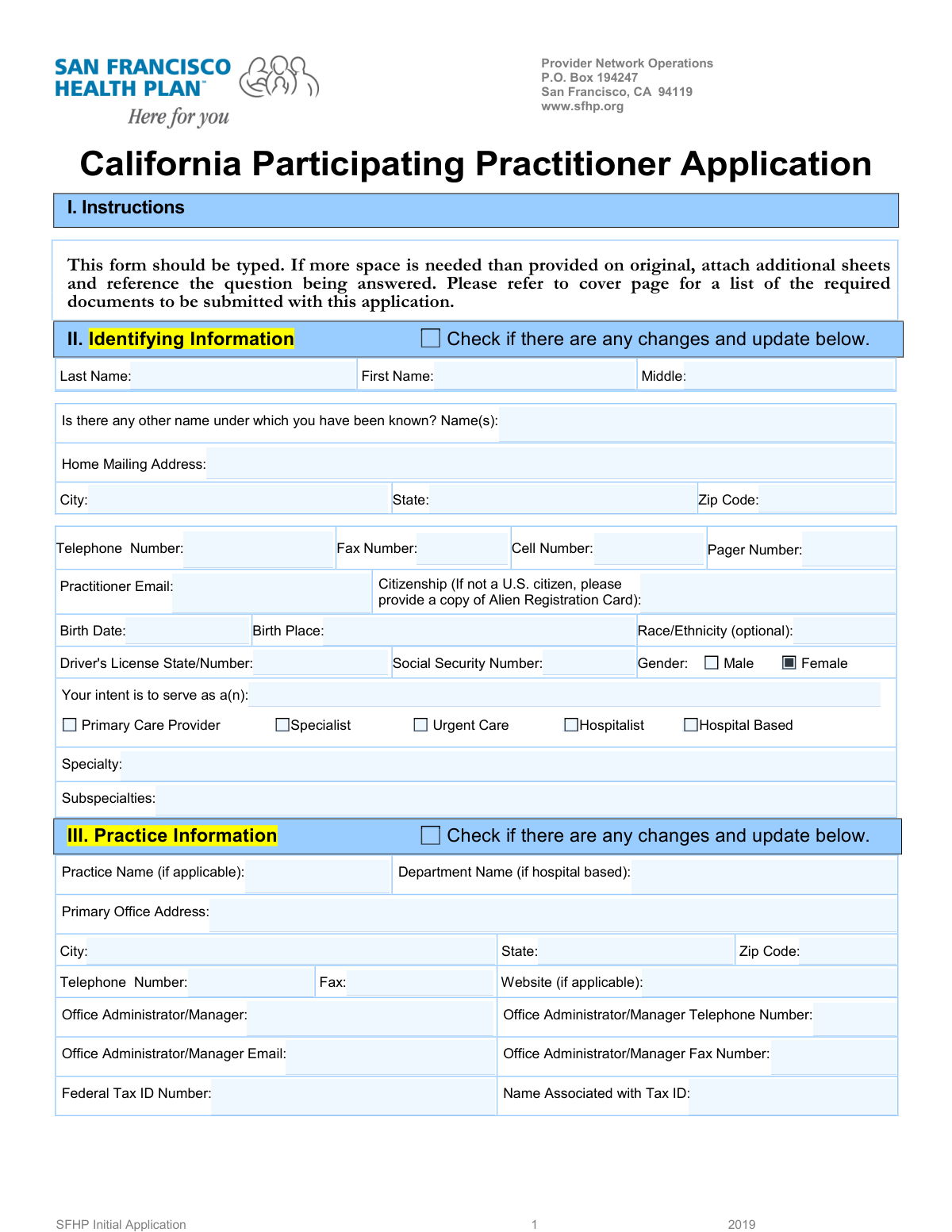
The California Participating Practitioner Application is a detailed form required for healthcare practitioners seeking to join the San Francisco Health Plan (SFHP) provider network. It gathers extensive information about the provider's personal details, practice locations, education, work history, and licensure to facilitate the credentialing process. Completing this form is a critical step for providers to become eligible to treat SFHP members. Today, this form can be filled out quickly and accurately using AI-powered services like Instafill.ai, which can also convert non-fillable PDF versions into interactive fillable forms.
SFHP Initial Application is part of the practitioner application forms and practitioner forms categories on Instafill.
Our AI automatically handles information lookup, data retrieval, formatting, and form filling.
It takes less than a minute to fill out SFHP Initial Application using our AI form filling.
Securely upload your data. Information is encrypted in transit and deleted immediately after the form is filled out.

Form specifications

Form name: SFHP Initial Application, California Participating Practitioner Application
Number of fields: 711
Number of pages: 22
Language: English
main-image

Instafill Demo: How to fill out PDF forms in seconds with AI

How to Fill Out SFHP Initial Application Online for Free in 2026

Are you looking to fill out a SFHP INITIAL APPLICATION form online quickly and accurately? Instafill.ai offers the #1 AI-powered PDF filling software of 2026, allowing you to complete your SFHP INITIAL APPLICATION form in just 37 seconds or less.
Follow these steps to fill out your SFHP INITIAL APPLICATION form online using Instafill.ai:
  1. 1 Navigate to Instafill.ai and upload or select the SFHP Initial Application form.
  2. 2 Use the AI assistant to automatically fill in your personal identifying information, such as your full name, contact details, Social Security Number, and birth date.
  3. 3 Provide comprehensive details for each practice location, including addresses, office managers, hours, languages spoken, and tax ID numbers.
  4. 4 Enter your complete professional history, including medical education, internships, residencies, fellowships, state licenses, and board certifications.
  5. 5 List all current and past hospital affiliations, your full work history since training, and details of your professional liability insurance carriers for the last five years.
  6. 6 Carefully answer all 'Yes/No' attestation questions regarding your professional background, licensure history, and any past disciplinary or legal actions.
  7. 7 Review all the information populated by the AI for accuracy, then electronically sign the attestation and information release sections to complete and submit your application.

Our AI-powered system ensures each field is filled out correctly, reducing errors and saving you time.

Why Choose Instafill.ai for Your Fillable SFHP Initial Application Form?

Speed

Complete your SFHP Initial Application in as little as 37 seconds.

Up-to-Date

Always use the latest 2026 SFHP Initial Application form version.

Cost-effective

No need to hire expensive lawyers.

Accuracy

Our AI performs 10 compliance checks to ensure your form is error-free.

Security

Your personal information is protected with bank-level encryption.

Frequently Asked Questions About Form SFHP Initial Application

This application is used by medical practitioners, such as physicians and specialists, to apply for credentialing and participation in the San Francisco Health Plan (SFHP) provider network. It gathers comprehensive information about your professional background, practice, and qualifications for review.

Any healthcare practitioner intending to serve as a Primary Care Provider, Specialist, Urgent Care provider, or Hospitalist within the San Francisco Health Plan (SFHP) network must complete this application. It is the initial step for joining the network.

You will need detailed information and may need to attach copies of your medical license, DEA certificate, board certifications, professional liability insurance face sheet, and CLIA certificate if applicable. Having these documents on hand will make the application process smoother.

You must chronologically list all work activities since completing your postgraduate training directly on the form or an attached sheet. It is also critical to explain any gaps in your work history on a separate page to avoid processing delays.

You must list three professional references who are familiar with your clinical work, preferably from your specialty. These references cannot be relatives or current partners, and at least one must have the same credentials as you (e.g., an MD for an MD).

If you do not have hospital privileges, you must provide a written explanation in the designated space on the form. This explanation should include your plan for ensuring continuity of care for your patients who may require hospitalization.

If you answer 'Yes' to any attestation question, you must provide a full, detailed explanation on a separate sheet of paper. For questions about professional liability cases (Questions 9 and 10), you must also complete Addendum B for each case.

Submit the typed application and all required documents to the Provider Network Operations P.O. Box address listed at the top of the form. The instructions specify the form should be typed, not handwritten.

You can list languages spoken by you and your staff in Section III (Practice Information) for each practice location. Additionally, the 'Employee Language Skills Self-Assessment Tool' must be completed for any bilingual staff who communicate with patients in a language other than English.

No, this designation is optional. You should only select 'Yes' and check the relevant criteria if you meet the specific qualifications outlined by the DMHC and wish to be listed as an HIV/AIDS specialist in the provider directory.

Addendum A explains your rights as an applicant, Addendum B is for detailing professional liability actions, Addendum C is the DHCS Provider Agreement for Medi-Cal, and Addendum D contains supplemental questions for DHCS. You must complete and sign these as required by your specific circumstances.

Yes, you can use AI-powered services like Instafill.ai to help complete this form. These tools can accurately auto-fill many fields based on your provided information, which can save significant time and reduce errors.

Simply upload the SFHP application PDF to the Instafill.ai platform. The service will convert it into a fillable form, and you can then use its AI capabilities to auto-populate your personal, practice, and professional information across the document.

The form instructions state it should be typed, so using a non-fillable PDF can be difficult. Services like Instafill.ai can convert flat, non-fillable PDFs into interactive, fillable forms that you can easily complete, save, and print on your computer.

Compliance SFHP Initial Application
Validation Checks by Instafill.ai

1
Social Security Number Format and Completeness
This check ensures the Social Security Number field is not empty and follows the standard XXX-XX-XXXX format. The SSN is critical for identity verification, background checks, and reporting to federal agencies. If the format is incorrect or the field is empty, the submission will be rejected, and the user will be prompted to enter a valid 9-digit SSN.
2
Medical License and DEA Expiration Date Validity
This validation verifies that the expiration dates for the California Medical License and DEA Registration are provided and are in the future. Practicing with an expired license or DEA registration is illegal and poses a significant compliance risk. If an expiration date is in the past or is missing, the application will be flagged for immediate review and cannot be approved until valid, current licensure is provided.
3
Conditional Requirement for Specialty
This check ensures that if the practitioner selects 'Specialist' as their intended role, the 'Specialty' text field must be filled out. This information is essential for network adequacy, provider directories, and correct patient referrals. A failure in this validation would prevent the user from proceeding until they specify their medical specialty.
4
Work History Gap Detection
This validation analyzes the 'From' and 'To' dates of all entries in the Work History section to ensure there are no unexplained gaps in employment since postgraduate training. A continuous work history is required for credentialing to review a practitioner's full professional experience. If a gap of more than a specified period (e.g., 30 days) is detected, the system will require the applicant to provide a written explanation for that time.
5
Attestation Question Explanation Requirement
This check enforces that if an applicant answers 'Yes' to any of the critical attestation questions (e.g., questions 1-8, 10-16), a corresponding explanation must be provided. These questions relate to licensure actions, sanctions, criminal history, and malpractice, and a 'Yes' answer requires detailed context for the credentialing committee to review. Failure to provide a required explanation will block the submission of the application.
6
National Provider Identifier (NPI) Format Validation
This validation confirms that the Individual National Physician Identifier (NPI) is a 10-digit number. The NPI is a standard, unique identifier required for all healthcare providers in the U.S. for billing and administrative functions. The check may also include a Luhn algorithm (checksum) validation to catch common data entry errors, ensuring the number is not just 10 digits but a mathematically valid NPI.
7
Conditional Requirement for Alternate Billing Information
This check validates that if the applicant indicates that none of their listed practices (Primary, Secondary, Tertiary) handle billing, then the subsequent fields for the external billing company must be completed. This includes the billing company name, address, contact person, and Federal Tax ID. This ensures that the health plan has accurate information to process claims and payments, preventing administrative delays and payment issues.
8
Training and Education Date Chronology
This validation performs a logical check on dates in the Education and Training section. It ensures the Medical School Graduation Date occurs before the Internship start date, and that for all internships, residencies, and fellowships, the 'To' date occurs after the 'From' date. This maintains the integrity of the practitioner's timeline and helps verify that training was completed in a logical sequence.
9
Professional Liability Coverage Continuity
This check reviews the effective and expiration dates of all professional liability carriers listed for the past five years. It verifies that there are no gaps in coverage during this period. Continuous liability coverage is a standard requirement for network participation, and any lapse in coverage is a major red flag that must be explained and reviewed by the credentialing committee.
10
Conditional Requirement for Age Limitation Specification
This validation ensures that if the practitioner answers 'Yes' to the question 'Is your practice limited to certain ages?', the corresponding text field to 'specify limitation' is mandatory. This information is critical for patient-facing provider directories and referral systems to ensure patients are directed to a provider who can treat them. An application with a 'Yes' answer but no specification will be considered incomplete.
11
Final Attestation Signature and Date Completeness
This check verifies that the final applicant signature and date fields on the attestation and information release pages are not empty. The signature is a legal affirmation that all information provided is true and complete, and it authorizes the verification process. An application without a signature and date is legally invalid and cannot be processed.
12
Peer Reference Uniqueness and Relation Check
This validation ensures that the three peer references listed are not relatives, current partners, or associates, as specified in the instructions. It would cross-reference the reference names against the applicant's name and the names of any listed partners or employed physicians. This is important to ensure the references are objective and can provide an unbiased assessment of the applicant's professional competence.
13
Conditional Requirement for 'Other' Mailing Address
This check validates that if the 'Other' checkbox is selected in the 'Mailing Address' section, the subsequent free-text field for the address must be filled in. This ensures that a valid mailing address is captured if none of the practice locations are suitable for correspondence. Failure to provide the address would result in an incomplete application and potential communication failures.
14
Citizenship Documentation Attachment Verification
This validation checks that if the applicant's citizenship is anything other than 'U.S. citizen', a file attachment for the 'Alien Registration Card' has been uploaded. This is a legal requirement to verify the practitioner's eligibility to work in the United States. The system would prevent submission if the condition is met but no corresponding file is attached.

Common Mistakes in Completing SFHP Initial Application

Incomplete or Unexplained Gaps in Work History

Practitioners often have gaps between training and employment, which must be chronologically accounted for in Section X. Applicants frequently overlook the instruction to explain any time gaps on a separate sheet, assuming their CV is sufficient. This omission is a major red flag for credentialing committees, leading to significant delays and requests for information. To avoid this, carefully review your timeline and attach a signed letter explaining any period not covered by education or employment. AI-powered tools like Instafill.ai can help by flagging chronological gaps in date ranges, prompting you to provide the necessary explanation.

Failing to Provide Explanations for 'Yes' Attestation Answers

The Attestation Questions in Section XIII are critical, and any 'Yes' answer requires a full, detailed explanation on a separate sheet. Applicants often check 'Yes' but forget to attach the corresponding explanation, rendering the application incomplete. This is a serious oversight that immediately stops the review process and requires the credentialing body to send the application back. To avoid this, use smart form-filling tools like Instafill.ai that can use conditional logic to require an attachment if a 'Yes' box is checked, preventing this common oversight.

Mismatched Federal Tax ID and Associated Name

Sections III and IV require both the Federal Tax ID Number and the exact legal name associated with it. A common error is entering a provider's personal name when the Tax ID belongs to a group practice, or vice-versa. This mismatch will cause payment and tax reporting errors, leading to claim rejections and significant administrative rework. Before filling out the form, verify the exact name registered with the IRS for the provided Tax ID number to ensure they match perfectly.

Missing the Continuity of Care Plan for No Hospital Privileges

In Section VIII, practitioners without hospital privileges are required to provide a written plan for continuity of care. Many applicants who lack privileges simply leave this section blank, not realizing it's a mandatory requirement for ensuring patient safety. An application without this plan will be rejected, as the health plan must verify that patient care can be seamlessly transferred to a hospital setting. If you don't have privileges, you must attach a formal document outlining your process for hospital admissions.

Submitting a CV Instead of Completing the Work History Section

The instructions for Section X (Work History) explicitly state that a curriculum vitae (CV) is not sufficient and that all activities must be listed chronologically on the form itself. Despite this clear directive, busy practitioners often attach their CV and leave the section blank. This results in an automatic rejection of the application. Since this form is often a non-fillable PDF, using a tool like Instafill.ai can convert it into an interactive, fillable version, making it easy to enter the data directly as required.

Missing Signatures on Multiple Pages

This extensive application requires signatures in multiple locations, including the main attestation (Page 14), information release (Page 15), and several addenda. It is very common for applicants to miss one or more of these signature lines, especially on the less prominent addenda pages. A single missing signature invalidates that section and can halt the entire credentialing process. Digital form-filling tools like Instafill.ai ensure all required signature fields are completed before allowing submission, effectively eliminating this risk.

Incorrectly Reporting Professional Liability History

Section XI requires a complete five-year history of all professional liability carriers, but a frequent mistake is to list only the current carrier. Furthermore, when reporting a liability case on Addendum B, applicants may fail to complete a separate addendum for each individual case as instructed. These omissions can be interpreted as attempts to hide information and will lead to processing delays. To avoid this, carefully document all carriers from the last five years and use a separate Addendum B for each claim.

Inconsistent Information Across Multiple Practice Locations

The form requests detailed information for up to three separate practice locations (Primary, Secondary, Tertiary). Applicants with multiple offices often provide inconsistent data across these sections or fail to completely fill out the information for each location. This leads to inaccurate provider directories and patient confusion. AI-powered tools like Instafill.ai can help maintain consistency by auto-populating shared information, such as a group's Tax ID, across all relevant sections to reduce manual entry errors.

Failing to Disclose All Previous Names

In Section II, applicants are asked to list any other names under which they have been known, such as maiden names or previous legal names. This is often skipped, especially if the name change was long ago. However, credentialing verification checks are run against all known names, and failure to disclose them can cause verification failures and raise questions about transparency. Always list all prior legal and professional names to ensure a smooth and complete background check.

Using Incorrect Date Formats

Several sections, particularly VI (Education/Training) and VIII (Affiliations), specify a 'mm/yyyy' format for dates. Applicants frequently default to using a 'mm/dd/yyyy' format out of habit. While seemingly minor, this formatting error can cause data entry issues for the credentialing system and may require manual correction, slowing down the verification process. AI-powered form-filling tools like Instafill.ai can automatically format dates into the required 'mm/yyyy' format and validate entries to prevent these errors.
Saved over 80 hours a year

“I was never sure if my IRS forms like W-9 were filled correctly. Now, I can complete the forms accurately without any external help.”

Kevin Martin Green

Your data stays secure with advanced protection from Instafill and our subprocessors

Robust compliance program

Transparent business model

You’re not the product. You always know where your data is and what it is processed for.

ISO 27001, HIPAA, and GDPR

Our subprocesses adhere to multiple compliance standards, including but not limited to ISO 27001, HIPAA, and GDPR.

Security & privacy by design

We consider security and privacy from the initial design phase of any new service or functionality. It’s not an afterthought, it’s built-in, including support for two-factor authentication (2FA) to further protect your account.

Fill out SFHP Initial Application with Instafill.ai

Worried about filling PDFs wrong? Instafill securely fills sfhp-initial-application-california-participating-practitioner-application-1 forms, ensuring each field is accurate.