Yes! You can use AI to fill out Form CMS-855I, Medicare Enrollment Application for Physicians and Non-Physician Practitioners
Form CMS-855I is a Centers for Medicare & Medicaid Services (CMS) enrollment application required for all physicians and eligible non-physician professionals who wish to bill the Medicare program and receive a Medicare billing number (PTAN). It is used for new enrollments, revalidations, reactivations, changes to enrollment information, and establishing or terminating reassignments of Medicare benefits to organizations or groups. The form collects personal identifying information, specialty details, practice location data, legal history, and banking information necessary for Medicare participation. Today, this complex multi-section form can be filled out quickly and accurately using AI-powered services like Instafill.ai, which can also convert non-fillable PDF versions into interactive fillable forms.
Our AI automatically handles information lookup, data retrieval, formatting, and form filling.
It takes less than a minute to fill out CMS-855I using our AI form filling.
Securely upload your data. Information is encrypted in transit and deleted immediately after the form is filled out.
Form specifications
| Form name: | Form CMS-855I, Medicare Enrollment Application for Physicians and Non-Physician Practitioners |
| Number of pages: | 1 |
| Language: | English |
| Categories: | CAR forms, healthcare provider forms, practitioner forms, CMS forms, physician forms, enrollment forms, L.A. Care forms, enrollment application forms, Medicare forms |
Instafill Demo: How to fill out PDF forms in seconds with AI
How to Fill Out CMS-855I Online for Free in 2026
Are you looking to fill out a CMS-855I form online quickly and accurately? Instafill.ai offers the #1 AI-powered PDF filling software of 2026, allowing you to complete your CMS-855I form in just 37 seconds or less.
Follow these steps to fill out your CMS-855I form online using Instafill.ai:
- 1 Navigate to Instafill.ai and upload the CMS-855I PDF or select it from the available form library to begin filling it out online.
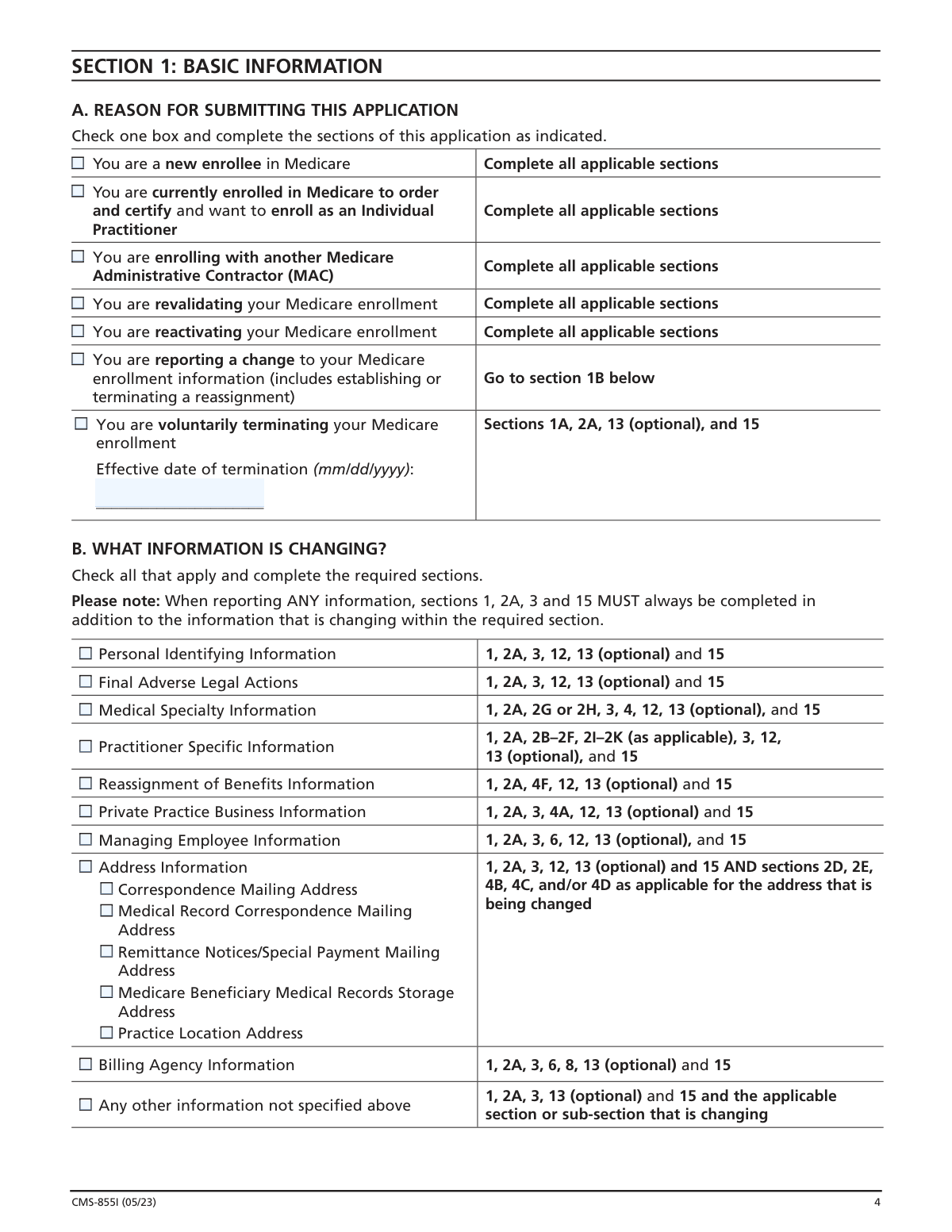
- 2 Complete Section 1 by selecting your reason for submitting the application (new enrollment, revalidation, reactivation, change of information, or voluntary termination) and identify which sections apply to your situation.
- 3 Fill in Section 2 with your personal identifying information, including your full legal name, Social Security Number, date of birth, NPI, license and certification details, specialty type, and correspondence mailing address.
- 4 Complete Section 3 to disclose any final adverse legal actions, such as felony convictions, license revocations, or OIG exclusions, and Section 4 to provide your business information, practice location(s), reassignment of benefits details, and medical records storage address.
- 5 Fill out Sections 6 and 8 as applicable to report managing employee information and any billing agency or agent you use to submit Medicare claims on your behalf.
- 6 Review Section 12 to identify and gather all required supporting documentation (e.g., CMS-460, CMS-588 EFT Agreement, IRS CP-575, copies of licenses and certifications) to attach to your application.
- 7 Complete Section 15 by carefully reading the Certification Statement, then sign and date the application as the individual practitioner; if applicable, have the authorized official of the receiving organization also sign Section 15C before submitting to your designated Medicare Administrative Contractor (MAC).
Our AI-powered system ensures each field is filled out correctly, reducing errors and saving you time.
Why Choose Instafill.ai for Your Fillable CMS-855I Form?
Speed
Complete your CMS-855I in as little as 37 seconds.
Up-to-Date
Always use the latest 2026 CMS-855I form version.
Cost-effective
No need to hire expensive lawyers.
Accuracy
Our AI performs 10 compliance checks to ensure your form is error-free.
Security
Your personal information is protected with bank-level encryption.
Frequently Asked Questions About Form CMS-855I
The CMS-855I is the Medicare Enrollment Application for Physicians and Non-Physician Practitioners. All physicians and eligible professionals (as defined in section 1848(k)(3)(B) of the Social Security Act) must complete this form to enroll in Medicare, receive a Medicare billing number, revalidate or reactivate enrollment, report changes to enrollment information, or establish/terminate a reassignment of Medicare benefits.
Yes. You can enroll or update your Medicare enrollment information either by using the Internet-based Provider Enrollment, Chain and Ownership System (PECOS) at PECOS.CMS.HHS.GOV, or by completing and mailing the paper CMS-855I form. PECOS is the faster and preferred method, but both options are accepted.
Yes, you must obtain an NPI before enrolling in Medicare and include it on this application. The NPI is assigned separately through the National Plan and Provider Enumeration System (NPPES) at NPPES.cms.hhs.gov. Importantly, the name and SSN (or Legal Business Name and TIN) you use on this form must exactly match what you used to obtain your NPI.
You must mail the completed application with original signatures and all required documentation to your designated Medicare Administrative Contractor (MAC). The MAC that services your state is responsible for processing your enrollment. To find the mailing address for your designated MAC, visit CMS.gov/Medicare/Provider-Enrollment-and-Certification.
Required supporting documents may include: copies of all final adverse legal action documentation, completed Form CMS-460 (Medicare Participating Physician or Supplier Agreement) for initial enrollments or reactivations, completed Form CMS-588 (Electronic Funds Transfer Authorization Agreement) with a voided check or bank letter, IRS confirmation of your Tax Identification Number and Legal Business Name (e.g., IRS Form CP-575), IRS Form 8832 if your business is a Disregarded Entity LLC, IRS Form 501(c)(3) if registered as non-profit, and copies of certification and proof of educational requirements for acupuncture services if applicable.
If you are a physician with multiple primary specialties, you must complete and submit a separate CMS-855I application for each primary specialty. You may select only one primary specialty per application, though you may designate multiple secondary specialties on the same application.
A reassignment of Medicare benefits is an authorization that allows an eligible organization or group (such as a clinic or group practice) to submit claims and receive Medicare Part B payments for services you rendered as a member of that organization. All reassignment actions—including establishing, changing, or terminating a reassignment—must now be reported via the CMS-855I, as the previous CMS-855R form has been discontinued.
Yes. Section 3 requires you to report ALL applicable final adverse legal actions, including federal and state convictions, license revocations or suspensions, OIG exclusions, and Medicaid terminations, regardless of whether records were expunged or any appeals are pending. This section must be filled out in its entirety with all applicable attachments included.
No. As an individual practitioner, you are the only person who can sign Section 15A and 15B of this application. The authority to sign cannot be delegated to any other person. However, if you are establishing or terminating a reassignment of benefits, the Delegated or Authorized Official of the receiving organization/group must also sign Section 15C.
If your designated MAC requests additional documentation to support or validate information on your application, you are responsible for providing that documentation within 30 days of the request, as required by 42 C.F.R. section 424.525(a)(1) and (2). Failure to respond may result in delays or denial of your enrollment application.
Yes. AI-powered services like Instafill.ai can help you accurately auto-fill the CMS-855I form fields, saving significant time and reducing the risk of errors. Instafill.ai can also convert flat, non-fillable PDF versions of the form into interactive fillable forms, making the process even easier.
To fill out the CMS-855I online using Instafill.ai, visit Instafill.ai and upload your CMS-855I PDF. The AI will guide you through each section, auto-filling fields based on the information you provide. Once complete, you can download the filled form, print it with original signatures, and mail it to your designated MAC with all required supporting documents.
If you have a flat, non-fillable version of the CMS-855I PDF, Instafill.ai can convert it into an interactive fillable form so you can type your information directly into the document. This eliminates the need to handwrite the form, which is actually required—the instructions state the form must be typed and may not be handwritten.
According to the Paperwork Reduction Act disclosure on the form, the estimated time to complete the CMS-855I ranges from 0.5 to 3 hours per response, including reviewing instructions, gathering data, and completing the form. The actual time will vary depending on your situation, such as whether you are a new enrollee, revalidating, or simply reporting a change.
Providing false information on the CMS-855I can result in serious criminal, civil, and administrative penalties. These include fines up to $250,000 and imprisonment up to 5 years under 18 U.S.C. section 1001, civil penalties of $5,000–$10,000 per violation under the False Claims Act, civil monetary penalties up to $10,000 per item or service under the Social Security Act, and potential exclusion from the Medicare program. Falsification can also result in denial or revocation of your Medicare billing privileges.
Compliance CMS-855I
Validation Checks by Instafill.ai
1
Social Security Number Format and NPPES Consistency Validation
Validates that the Social Security Number (SSN) entered in Section 2A follows the standard 9-digit format (XXX-XX-XXXX) with no letters or special characters beyond hyphens. This check also verifies that the name and SSN provided match exactly what was used to obtain the applicant's NPI in NPPES, as CMS requires these to be identical in both PECOS and NPPES. If the SSN format is invalid or the name/SSN combination does not match NPPES records, the application will be rejected and enrollment delayed until corrected information is submitted.
2
National Provider Identifier (NPI) Type Consistency Validation
Ensures that a Type 1 (Individual) NPI is entered in Section 2A for the individual practitioner, and that a Type 2 (Organization) NPI is entered in Section 4A1 when a professional corporation, professional association, or LLC is reported. Mixing NPI types or entering an organization NPI in the individual practitioner field would cause a mismatch with NPPES records and prevent proper enrollment processing. If the wrong NPI type is submitted, the MAC will be unable to verify the provider's identity and the application will be returned or rejected.
3
Date of Birth Format and Reasonableness Validation
Validates that all Date of Birth fields (Section 2A for the individual practitioner, Section 6A for managing employees, and Section 8 for individual billing agents) are entered in the required mm/dd/yyyy format and represent a plausible date for a licensed medical professional. The date must not be in the future, must reflect an age consistent with having completed medical or professional training (generally at least 18 years old), and must match the applicant's Social Security Administration record. An invalid or implausible date of birth will cause a mismatch with SSA records and result in application rejection.
4
Reason for Submission Selection and Required Sections Completeness Check
Verifies that exactly one reason for submission is selected in Section 1A, and that all sections required for that specific reason are completed. For example, a voluntary termination submission must include an effective termination date and complete Sections 1A, 2A, 13 (optional), and 15, while a change of information submission must also complete Section 1B and all sections relevant to the specific change being reported. Failure to select a reason or to complete all required sections for the selected reason will result in the application being returned as incomplete, delaying enrollment or change processing.
5
Effective Date Format and Logical Validity for Change Actions
Validates that all effective dates provided for change, add, or remove actions throughout the form (Sections 2D, 2E, 4B, 4C, 4D, 4F, 6A, 8, and 13) are entered in the required mm/dd/yyyy format and represent a logically valid date. Effective dates for terminations must not precede the original enrollment date, and effective dates for new reassignments must not be in the past beyond a reasonable processing window. An improperly formatted or logically inconsistent effective date will prevent the MAC from processing the requested change and may result in payment disruptions.
6
License, Certification, and DEA Registration Active Status and Date Validation
Checks that all license numbers, certification numbers, and DEA registration numbers entered in Section 2B are accompanied by valid effective dates in mm/dd/yyyy format and that the issuing state is specified. If a compact license is indicated, the 'Yes' checkbox must be selected. The system verifies that at least one of the three subsections (Active License, Active Certification, or DEA Registration) is completed or marked 'Not Applicable,' and that the specialty reported in the license or certification aligns with the primary specialty selected in Section 2G or 2H. Missing or expired credentials will result in denial of enrollment or billing privileges.
7
Primary Specialty Single Selection and Separate Application Requirement Validation
Ensures that only one specialty is designated as Primary (P) in Section 2G for physicians or that only one specialty type is checked in Section 2H for non-physician practitioners, as the form explicitly prohibits multiple primary specialty designations on a single application. If a practitioner has multiple primary specialties or non-physician specialty types, a separate CMS-855I must be submitted for each. Selecting more than one primary specialty on a single application will cause the form to be rejected, and the practitioner must resubmit separate applications for each primary specialty.
8
Practice Location Address Physical Street Address Validation
Validates that all practice location addresses entered in Section 4B contain a physical street address as recorded by the United States Postal Service and do not contain a Post Office (P.O.) Box. Similarly, the Medicare Beneficiary Medical Records Storage Address in Section 4D must be a physical location and cannot be a P.O. Box or drop box. The correspondence mailing address in Section 2D may be a P.O. Box, but it cannot be a billing agent or medical management company address. Submitting a P.O. Box as a practice location or records storage address will result in the application being returned for correction.
9
Legal Business Name and TIN Consistency with IRS Records and NPPES Validation
Verifies that the Legal Business Name (LBN) and Tax Identification Number (TIN) entered in Section 4A1 for corporations, associations, or LLCs exactly match the name and TIN on IRS records (as confirmed by IRS Form CP-575 or equivalent) and also match the LBN and TIN used to obtain the organization's NPI in NPPES. The form instructions explicitly state that these must be identical in both PECOS and NPPES. Any discrepancy between the LBN/TIN on the application and IRS or NPPES records will result in rejection of the business entity enrollment and require resubmission with corrected documentation.
10
Final Adverse Legal Action Complete Reporting and Documentation Validation
Checks that Section 3C is fully completed whenever a 'Yes' response is given to the final adverse legal action question, including the specific action taken, the date it occurred, and the federal or state agency or court/administrative body that imposed the action. This same completeness requirement applies to the business entity adverse legal action history in Section 4A2 and the managing employee adverse legal action history in Section 6B. All applicable final adverse legal actions must be reported regardless of whether records were expunged or appeals are pending, and supporting documentation (notifications, resolutions, reinstatement letters) must be attached; incomplete reporting may constitute a material misrepresentation subject to criminal and civil penalties.
11
Reassignment of Benefits Dual Enrollment and Concurrent Application Validation
Validates that when a reassignment of benefits is being established in Section 4F, both the individual practitioner (Section 2A) and the receiving organization/group are currently enrolled in Medicare or are concurrently enrolling via a CMS-855B for the organization/group and a CMS-855I for the individual practitioner. The form requires that the organization/group's Legal Business Name match what was reported on their CMS-855B enrollment, and the individual's name must match their SSA record. If either party is not enrolled or concurrently enrolling, the reassignment cannot take effect and the application will be held pending enrollment of the unenrolled party.
12
Certification Statement Signature and Date Completeness Validation
Ensures that Section 15B contains both a handwritten signature and a date in mm/dd/yyyy format from the individual practitioner identified in Section 2A, as the form explicitly states that the authority to sign cannot be delegated to any other person. When a reassignment is being established or terminated, Section 15C must also be signed and dated by the delegated or authorized official of the receiving organization/group or individual. The printed name in Section 15B must match the name provided in Section 2A. An unsigned or undated certification statement will result in the application being returned unprocessed, as CMS cannot enroll a provider without a valid signed certification.
13
Business Structure Selection and Required IRS Documentation Consistency Validation
Verifies that the business structure selected in Section 4A (Proprietary, Non-Profit, or Disregarded Entity) is consistent with the required supporting documentation submitted with the application. Non-profit entities must submit IRS Form 501(c)(3), Disregarded Entities must submit IRS Form 8832, and sole proprietors using an EIN must submit IRS Form CP-575. If a business structure is selected but the corresponding IRS documentation is not included, or if the documentation submitted does not match the selected structure, the MAC will request the missing documents and the application will be delayed until all required documentation is received within the 30-day response window.
14
Electronic Funds Transfer (EFT) Authorization Agreement Submission Validation
Checks that a completed CMS-588 Electronic Funds Transfer Authorization Agreement accompanied by a voided check or bank letter is included with the application for all initial enrollments and reactivations where the practitioner is not reassigning 100% of their benefits to a group or organization. If the practitioner currently receives payments electronically and is not changing banking information, the CMS-588 is not required, but this exception must be verifiable against existing PECOS records. Additionally, if Medicare payments are directed to a bank where the practitioner has a lending relationship, a written waiver of the bank's right of offset must be provided; failure to include required EFT documentation will delay payment setup.
15
Billing Agency Address Cannot Match Correspondence Mailing Address Validation
Validates that the billing agency or agent address entered in Section 8 is not the same as the correspondence mailing address provided in Section 2D, as the form explicitly prohibits this. This check also ensures that the correspondence mailing address in Section 2D is not a billing agent, billing agency, or medical management company address. If the billing agency address matches the correspondence address, or if the correspondence address is identified as belonging to a billing entity, the application will be flagged for correction to ensure that MAC communications reach the provider directly rather than being intercepted by a third-party billing entity.
16
Specialty-Specific Subsection Completion Consistency Validation
Ensures that practitioners who select certain specialty types in Section 2H complete the corresponding specialty-specific subsections: Clinical Psychologists and Psychologists Billing Independently must complete Section 2I; Physical Therapists and Occupational Therapists in Private Practice must complete Section 2J; and Clinical Nurse Specialists and Nurse Practitioners must complete Section 2K. For psychologists billing independently, all four questions (2I2a through 2I2d) must be answered, and if the practice is located in an institution, the follow-up questions must also be completed. Failure to complete the required specialty-specific subsection will result in the application being returned as incomplete, as these sections contain eligibility-determining information specific to each specialty type.
Common Mistakes in Completing CMS-855I
Applicants frequently enter their name in a format that does not exactly match their Social Security Administration records — for example, using a nickname, omitting a middle name, or using a married name without updating SSA records first. The form explicitly requires that the name and SSN in Section 2A match the provider's social security record exactly. A mismatch causes the application to be rejected or significantly delayed, as CMS cross-references this data with SSA. Always verify your legal name as it appears on your Social Security card before completing the form, and ensure any name changes have been reported to SSA prior to submission. AI-powered form filling tools like Instafill.ai can help flag inconsistencies between name fields and expected formats.
Many applicants either submit the application before obtaining their National Provider Identifier (NPI) or enter an NPI whose associated name, SSN, Legal Business Name, or TIN does not exactly match what is on file in NPPES. The form requires that the Name, SSN, LBN, TIN, and NPI match exactly in both PECOS and NPPES. Submitting mismatched information results in rejection and processing delays. Applicants should verify their NPI record at NPPES.cms.hhs.gov before completing the application and ensure all identifying information is consistent across both systems.
Applicants often check the wrong box in Section 1A — for example, checking 'new enrollee' when they are actually revalidating, or checking 'change of information' when they should be enrolling with a new MAC. Each reason for submission requires different sections to be completed, so selecting the wrong reason leads to incomplete or incorrect sections being filled out, causing the application to be returned. Carefully read all options in Section 1A and match your specific situation before proceeding. If reporting a change, also complete Section 1B to specify exactly what is changing.
A very common mistake is checking a reason in Section 1A or 1B but then not completing all the sections required for that reason. For instance, when reporting a change to address information, applicants forget that Sections 1, 2A, 3, and 15 must always be completed in addition to the specific address section. Incomplete applications are returned by the MAC, causing significant enrollment delays. Before submitting, cross-reference the section checklist in Section 1B against every section you have completed to ensure nothing is missing.
Applicants frequently enter a 'doing business as' name or an abbreviated version of their business name in Section 4A instead of the exact Legal Business Name as registered with the IRS. The form explicitly states the LBN must match IRS tax documents, and the MAC will verify this against IRS records. A mismatch results in rejection and requires resubmission with corrected documentation. Always copy the LBN exactly as it appears on your IRS Form CP-575 or other IRS correspondence, and submit that document as supporting documentation. Tools like Instafill.ai can help ensure the LBN field is populated consistently with supporting documents.
Applicants sometimes enter a P.O. Box as their practice location address in Section 4B, which is explicitly prohibited. The practice location must be a specific physical street address as recorded by the United States Postal Service where services are actually rendered to Medicare beneficiaries. Submitting a P.O. Box causes the application to be rejected. If you only render services in patients' homes and have no separate office, you may use your home address but must note in Section 4E3 that it is for administrative purposes only.
Many applicants forget to include the completed CMS-588 Electronic Funds Transfer Authorization Agreement along with a voided check or bank letter, or they submit the CMS-588 without the required supporting bank documentation. Medicare issues all routine payments via EFT, so missing this form means payments cannot be processed. The CMS-588 is required for initial enrollments and reactivations unless the applicant is reassigning 100% of benefits to a group/organization. Always attach the CMS-588 with a voided check or official bank letter confirming account information when submitting an initial enrollment or reactivation application.
Applicants sometimes omit adverse legal actions because they believe expunged records, pending appeals, or older incidents do not need to be reported. However, the form explicitly states that ALL applicable final adverse legal actions must be reported regardless of whether records were expunged or appeals are pending, and covers a 10-year lookback period for convictions. Omitting required disclosures can result in denial of enrollment, revocation of billing privileges, and potential fraud penalties. Review all categories listed in Section 3 carefully and disclose every applicable action, attaching all relevant documentation such as notifications, resolutions, and reinstatement letters.
Applicants frequently make errors with reassignment of benefits, such as using the discontinued CMS-855R form, failing to have both the individual practitioner sign Section 15B and the delegated/authorized official of the organization sign Section 15C, or submitting a reassignment before both parties are enrolled in Medicare. The CMS-855R has been discontinued and all reassignment actions must now be reported via the CMS-855I. Both the individual practitioner and the eligible organization/group must be currently enrolled or concurrently enrolling before a reassignment can take effect. Ensure both required signatures are obtained and that enrollment status is confirmed for all parties before submission.
Despite clear instructions stating the form must be typed and may not be handwritten, some applicants complete the paper CMS-855I by hand. Handwritten applications are not accepted and will be returned by the MAC, causing significant delays in enrollment. All fields must be completed using a computer or typewriter. Applicants who struggle with the paper form should consider using the Internet-based PECOS system at PECOS.CMS.HHS.GOV, or an AI-powered tool like Instafill.ai, which can convert the flat PDF into a fillable version and help ensure all fields are properly typed and formatted.
Physicians and non-physician practitioners sometimes check more than one primary specialty in Section 2G or 2H, not realizing that only one primary specialty is permitted per application. If a provider has multiple primary specialties, a separate CMS-855I application must be completed and submitted for each one. Submitting a single application with multiple primary specialties marked will result in the application being returned or processed incorrectly. Carefully designate exactly one specialty as primary (P) and use the secondary (S) designation for all other applicable specialties, submitting additional applications as needed.
A surprisingly common mistake is failing to sign and date Section 15, signing in the wrong section (e.g., only signing 15C when 15B is required, or vice versa), or having someone other than the individual practitioner sign on their behalf. The form states that only the individual practitioner can sign the application and this authority cannot be delegated. An unsigned or incorrectly signed application cannot be processed. For reassignment actions, both Section 15B (individual practitioner) and Section 15C (delegated/authorized official of the organization) must be signed and dated. Always review Section 15 last to confirm all required signatures and dates are present before mailing.
Saved over 80 hours a year
“I was never sure if my IRS forms like W-9 were filled correctly. Now, I can complete the forms accurately without any external help.”
Kevin Martin Green
Your data stays secure with advanced protection from Instafill and our subprocessors
Robust compliance program
Transparent business model
You’re not the product. You always know where your data is and what it is processed for.
ISO 27001, HIPAA, and GDPR
Our subprocesses adhere to multiple compliance standards, including but not limited to ISO 27001, HIPAA, and GDPR.
Security & privacy by design
We consider security and privacy from the initial design phase of any new service or functionality. It’s not an afterthought, it’s built-in, including support for two-factor authentication (2FA) to further protect your account.
Fill out CMS-855I with Instafill.ai
Worried about filling PDFs wrong? Instafill securely fills form-cms-855i-medicare-enrollment-application-for-physicians-and-non-physician-practitioners-2 forms, ensuring each field is accurate.




