Yes! You can use AI to fill out Form CMS-855I, Medicare Enrollment Application for Physicians and Non-Physician Practitioners
Form CMS-855I is a comprehensive application used by the Centers for Medicare & Medicaid Services (CMS) for physicians and non-physician practitioners to enroll in the Medicare program, obtain a Medicare billing number, revalidate enrollment, or report changes to their existing information. It is crucial for practitioners who wish to bill Medicare for their services, either independently or as part of a group. Today, this form can be filled out quickly and accurately using AI-powered services like Instafill.ai, which can also convert non-fillable PDF versions into interactive fillable forms.
Our AI automatically handles information lookup, data retrieval, formatting, and form filling.
It takes less than a minute to fill out CMS-855I using our AI form filling.
Securely upload your data. Information is encrypted in transit and deleted immediately after the form is filled out.
Form specifications
| Form name: | Form CMS-855I, Medicare Enrollment Application for Physicians and Non-Physician Practitioners |
| Number of pages: | 25 |
| Filled form examples: | Form CMS-855I Examples |
| Language: | English |
| Categories: | CAR forms, practitioner forms, CMS forms, physician forms, enrollment forms, L.A. Care forms, enrollment application forms, Medicare forms |
Instafill Demo: How to fill out PDF forms in seconds with AI
How to Fill Out CMS-855I Online for Free in 2026
Are you looking to fill out a CMS-855I form online quickly and accurately? Instafill.ai offers the #1 AI-powered PDF filling software of 2026, allowing you to complete your CMS-855I form in just 37 seconds or less.
Follow these steps to fill out your CMS-855I form online using Instafill.ai:
- 1 Navigate to Instafill.ai and upload your CMS-855I form or select it from their template library.
- 2 Use the AI assistant to automatically populate your personal identifying information, professional credentials, and specialty details in Section 2.
- 3 Accurately report any final adverse legal actions in Section 3, following the AI-powered guidance to ensure all required details are included.
- 4 Complete Section 4 with your business information, practice locations, and details for any reassignment of benefits, letting the AI tool streamline data entry.
- 5 If applicable, provide information for managing employees (Section 6) and billing agents (Section 8).
- 6 Review all the AI-filled information for accuracy, upload necessary supporting documents as prompted by the system based on Section 12, and then electronically sign the certification statement in Section 15.
- 7 Download the completed application and all attachments for your records before submitting it to the designated Medicare Administrative Contractor (MAC).
Our AI-powered system ensures each field is filled out correctly, reducing errors and saving you time.
Why Choose Instafill.ai for Your Fillable CMS-855I Form?
Speed
Complete your CMS-855I in as little as 37 seconds.
Up-to-Date
Always use the latest 2026 CMS-855I form version.
Cost-effective
No need to hire expensive lawyers.
Accuracy
Our AI performs 10 compliance checks to ensure your form is error-free.
Security
Your personal information is protected with bank-level encryption.
Frequently Asked Questions About Form CMS-855I
The CMS-855I is the Medicare Enrollment Application for individual physicians and non-physician practitioners. It is used to enroll in the Medicare program for the first time, revalidate enrollment, or report changes to your existing enrollment information.
All physicians and eligible non-physician practitioners must complete this form to enroll in the Medicare program and receive a billing number. This includes individuals who are revalidating, reactivating, changing information, or reassigning benefits.
The National Provider Identifier (NPI) is a standard unique health identifier for all U.S. health care providers, while the Provider Transaction Access Number (PTAN) is a Medicare-specific number. You must obtain an NPI before enrolling in Medicare, and you will be issued a PTAN after your enrollment is approved.
Section 12 of the application lists all supporting documentation that may be required, such as the CMS-588 for Electronic Funds Transfer and IRS confirmation of your Tax ID. You must submit all documents that are applicable to your specific enrollment situation.
You must send the completed application with original signatures to your designated Medicare Administrative Contractor (MAC). You can find the correct mailing address for your state's MAC by visiting the CMS.gov website, as instructed on page 3 of the form.
To avoid delays, ensure the application is typed, all required sections are completed, and your legal business name matches IRS records. You should also include all required supporting documents and make sure the certification statement in Section 15 is signed and dated.
To add, change, or terminate a reassignment of benefits, you must complete Section 4F. Both you and an authorized official of the group must sign the certification in Section 15 to finalize the action.
Yes, if you have formed a professional corporation, professional association, or LLC of which you are the sole owner, you should complete the CMS-855I. You will need to provide information about your business entity in Section 4A.
Only the individual practitioner applying for enrollment can sign the certification statement in Section 15B, and this authority cannot be delegated. If a reassignment of benefits is involved, a delegated official of the receiving group must also sign in Section 15C.
Yes, you must report all applicable final adverse legal actions, such as certain convictions, exclusions, and license revocations or suspensions. This is required regardless of whether records were expunged or if appeals are pending.
Yes, you can use the Internet-based Provider Enrollment, Chain and Ownership System (PECOS) as an alternative to the paper CMS-855I. PECOS is the online Medicare enrollment system and is often a faster way to submit your application.
If you have a flat, non-fillable PDF, you can use a service like Instafill.ai to automatically convert it into an interactive, fillable form. This allows you to type your information directly onto the form, meeting the application's requirement.
Yes, services like Instafill.ai use AI to help you fill out complex forms like the CMS-855I accurately and efficiently. These tools can auto-fill fields based on your information, saving you time and reducing the risk of errors.
To fill the form using Instafill.ai, you simply upload the CMS-855I PDF to the platform. The AI will make the form fillable and assist you by auto-filling your information, allowing you to complete, sign, and download the application quickly.
Compliance CMS-855I
Validation Checks by Instafill.ai
1
NPI and Personal Data Verification against NPPES
This check validates that the provider's First Name, Last Name, Social Security Number (SSN) from Section 2A, and National Provider Identifier (NPI) match the information on file in the National Plan and Provider Enumeration System (NPPES). This is critical for ensuring the identity of the practitioner and preventing fraudulent enrollments. If the data does not match, the application will be rejected, and the provider will be instructed to update their information with either NPPES or the Social Security Administration before resubmitting.
2
Ensures Single Primary Specialty Selection
Validates that the practitioner has designated exactly one specialty as 'Primary' (P) across Section 2G (Physician Specialty) and Section 2H (Eligible Professional). A practitioner can have multiple secondary specialties but only one primary specialty per application. Submitting an application with no primary specialty or multiple primary specialties will result in processing delays or rejection, requiring the applicant to correct the form and resubmit.
3
Conditional Requirement for 'Reason for Change'
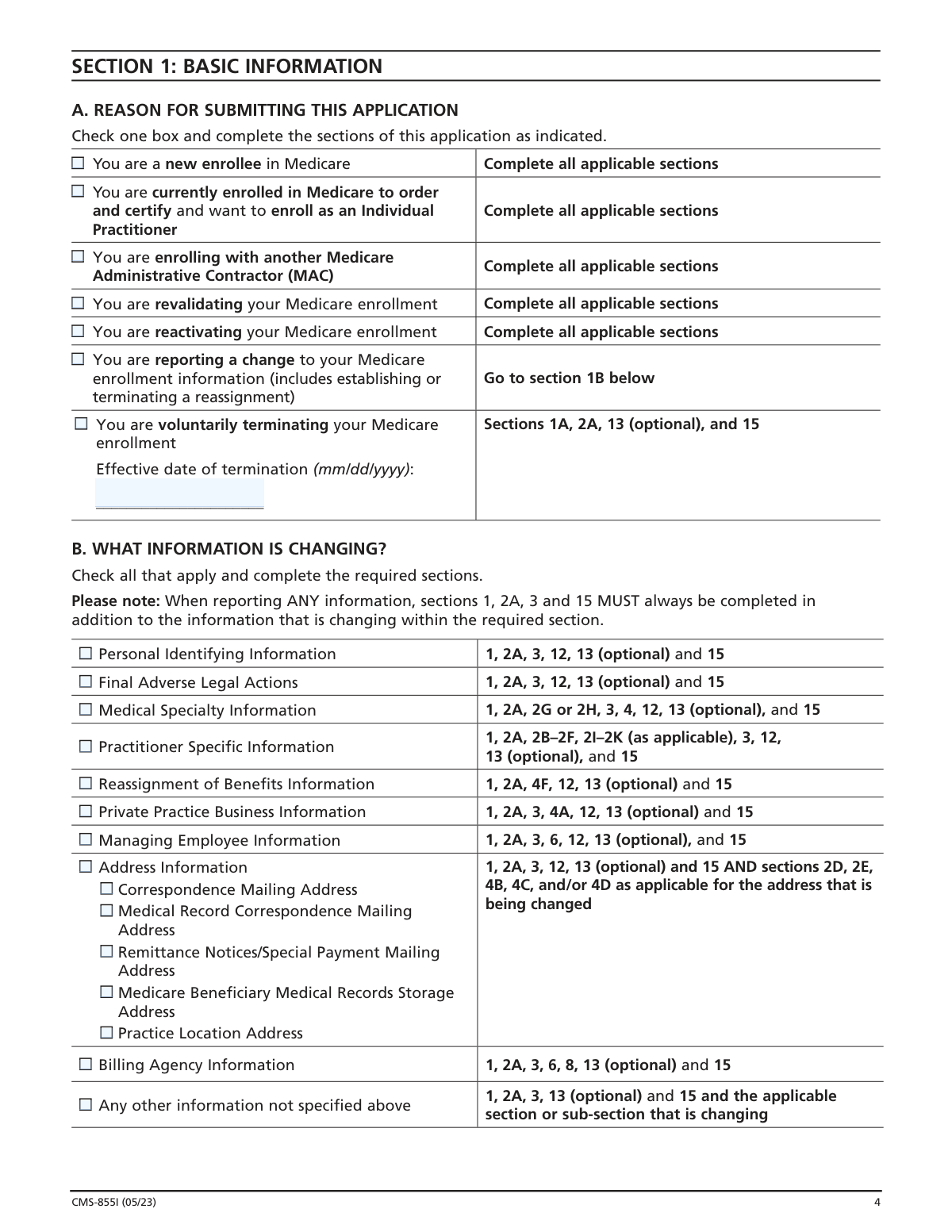
If the applicant checks 'You are reporting a change to your Medicare enrollment information' in Section 1A, this validation ensures that at least one corresponding checkbox is selected in Section 1B ('WHAT INFORMATION IS CHANGING?'). This is necessary to direct the Medicare Administrative Contractor (MAC) to the specific sections that need review. Failure to specify the change will halt the update process, as the system cannot determine what information to modify.
4
Mandatory Disclosure of Adverse Legal Action Details
This check ensures that if a provider answers 'YES' to having a final adverse legal action in Section 3C, they must provide the specific details (Action, Date, and Action Taken By) in the table that follows. Full disclosure is a condition of enrollment and is used to determine eligibility. An incomplete disclosure will render the application invalid and may lead to denial or revocation of billing privileges.
5
Practice Location Address Physicality Check
Verifies that any address entered in Section 4B (Practice Location Information) is a physical street address and not a Post Office (P.O.) Box. Medicare requires a physical location where services are rendered to beneficiaries for site verification and program integrity purposes. An application with a P.O. Box as a practice location will be returned for correction, delaying the enrollment or update.
6
Correspondence Address Restriction
This validation confirms that the 'Correspondence Mailing Address' provided in Section 2D is not the address of a billing agent or agency. The form explicitly states this address must be for the provider directly, ensuring they receive important notices from the MAC. If the address is identified as a billing agency, the application will be flagged for correction.
7
Business Name and TIN Verification with IRS Records
When a business entity is reported in Section 4A, this check validates that the Legal Business Name (LBN) and Tax Identification Number (TIN) are provided and consistent with IRS records. The form requires submission of an IRS document (like a CP-575) for this purpose. A mismatch between the application and IRS records will cause the application to be rejected until the discrepancy is resolved with the IRS or on the form.
8
Dual Signature Requirement for New Reassignments
If Section 4F is completed to 'Add' a new reassignment of benefits, this check ensures that both the individual practitioner has signed Section 15B and a delegated/authorized official of the receiving group has signed Section 15C. Both signatures are legally required to authorize the reassignment. Missing one or both signatures will make the reassignment invalid and the application will be returned.
9
SSN and TIN Format Validation
This check ensures that all Social Security Number (SSN) and Tax Identification Number (TIN/EIN) fields throughout the form are formatted correctly as 9-digit numbers without letters or special characters. Correct formatting is essential for database matching and identity verification with the SSA and IRS. An incorrectly formatted number will cause a data entry failure and require correction.
10
Date Format and Logical Plausibility
Validates that all date fields (e.g., Date of Birth, license effective dates, termination dates) are in the correct 'mm/dd/yyyy' format and are logically sound. For example, a Date of Birth cannot be in the future, and a graduation year cannot precede the date of birth. Illogical or improperly formatted dates will cause processing errors and require the applicant to submit a corrected application.
11
Managing Employee Requirement for Business Entities
If the provider enrolls a business entity in Section 4A (e.g., a professional corporation or LLC), this validation ensures that at least one managing employee is identified in Section 6. The provider can either check 'I am the managing employee' or provide the full details of another individual. This is a Medicare requirement for organizational providers; failure to report a managing employee will result in an incomplete application.
12
Termination Date Mandate
This check verifies that if 'You are voluntarily terminating your Medicare enrollment' is selected in Section 1A, the 'Effective date of termination' field is completed with a valid date. This date is crucial for determining the final date for which the provider can bill Medicare. An application to terminate enrollment without this date is incomplete and cannot be processed.
13
Completeness of License and Certification Information
If 'Active License' or 'Active Certification' is checked in Section 2B, this validation ensures that all associated detail fields (Number, Effective Date, and State/Entity) are fully completed. This information is necessary to verify the practitioner's credentials and qualifications to practice. Incomplete credentialing information will halt the enrollment process until the missing data is provided.
14
Logical Consistency of Business Structure Selection
This check ensures that the checkboxes at the beginning of Section 4 are used logically. An applicant cannot select both 'do NOT have a private practice' and 'DO have a private practice'. This selection dictates which subsequent parts of Section 4 must be completed. A contradictory selection makes the applicant's intent unclear and will require clarification, delaying the application.
Common Mistakes in Completing CMS-855I
This occurs when the provider's legal name and Social Security Number (SSN) in Section 2A, or the Legal Business Name (LBN) and Tax Identification Number (TIN) in Section 4A, do not exactly match records at the IRS and the National Plan and Provider Enumeration System (NPPES). CMS systems cross-reference this data, and any discrepancy leads to application rejection and significant processing delays. To avoid this, applicants must verify their information with all relevant agencies before submission. AI-powered tools like Instafill.ai can help prevent these errors by cross-validating data against official sources during the form-filling process.
Section 2D explicitly states that the Correspondence Mailing Address cannot be a billing agent's or medical management company's address, a mistake often made for convenience. This violation will cause the application to be returned for correction, delaying enrollment and communication from the Medicare Administrative Contractor (MAC). The address must be one where the provider can directly receive mail. Using a smart form-filling tool can help by flagging entries that violate specific form rules, ensuring compliance.
In Section 3, applicants may omit past legal actions, believing they are irrelevant, expunged, or under appeal, but the form requires full disclosure. Failure to report is considered falsification and can lead to denial of enrollment, revocation of billing privileges, and even criminal penalties. Applicants must report every action and attach all related documentation, as omissions are easily discovered during routine background checks.
The instructions on page 2 clearly state the form must be typed, but applicants sometimes submit a handwritten version, leading to immediate rejection by the MAC. This simple oversight forces the applicant to restart the entire process, causing major delays. Since the official form is a non-fillable PDF, tools like Instafill.ai are invaluable as they can convert it into a fillable format, allowing for easy typing and ensuring a professional, compliant submission.
When establishing a new reassignment of benefits in Section 4F, the application requires two original signatures in Section 15: one from the individual practitioner (15B) and one from the group's official (15C). It is common for one of these signatures to be missing, which invalidates the reassignment and halts the application process. Both parties must coordinate to ensure their original signatures are on the same submitted form before mailing.
Section 12 lists numerous documents that may be required, such as the CMS-588 for Electronic Funds Transfer or an IRS letter (CP-575) confirming a business's TIN. Applicants frequently forget to attach one or more of these essential documents, causing the MAC to request the missing information and pause the review. This is a leading cause of enrollment delays. An intelligent form platform like Instafill.ai can help by creating a dynamic checklist of required documents based on the user's answers.
In Section 2G, the form instructs physicians to designate only one primary specialty (P) per application. Applicants with multiple board certifications may mistakenly mark more than one specialty as primary, which will cause the MAC to reject the application. A separate CMS-855I must be submitted for each primary specialty. To avoid this, practitioners must choose one primary specialty for the application and list any others as secondary (S).
Section 4B requires a physical street address where services are rendered and explicitly prohibits using a P.O. Box. Providers, especially those who make house calls, may incorrectly list a P.O. Box, which will result in the application being returned. CMS requires a verifiable physical location for potential site visits. AI-powered form fillers like Instafill.ai can validate address formats and flag P.O. boxes in fields where they are not permitted, preventing this common error.
When submitting the form to report a change (Section 1B), applicants often only fill out the section with the new information. However, the instructions state that Sections 1, 2A, 3, and 15 must always be completed in addition to the section that is changing. This frequent oversight causes the MAC to reject the submission as incomplete. Smart form software can automatically highlight all required sections based on the 'Reason for Submission,' ensuring a complete application is prepared.
Section 4A requires practitioners with a private practice to correctly identify their business structure (e.g., LLC, Sole Proprietor) and provide the corresponding IRS documentation. Applicants often get confused between being a sole proprietor paid under their SSN versus an EIN, or they fail to submit the required IRS Form 8832 for a Disregarded Entity LLC. This error leads to processing delays while the MAC requests clarification and correct documentation. Using a guided process can help ensure the right structure is chosen and the correct documents are attached.
Saved over 80 hours a year
“I was never sure if my IRS forms like W-9 were filled correctly. Now, I can complete the forms accurately without any external help.”
Kevin Martin Green
Your data stays secure with advanced protection from Instafill and our subprocessors

Robust compliance program
Transparent business model
You’re not the product. You always know where your data is and what it is processed for.
ISO 27001, HIPAA, and GDPR
Our subprocesses adhere to multiple compliance standards, including but not limited to ISO 27001, HIPAA, and GDPR.
Security & privacy by design
We consider security and privacy from the initial design phase of any new service or functionality. It’s not an afterthought, it’s built-in, including support for two-factor authentication (2FA) to further protect your account.
Fill out CMS-855I with Instafill.ai
Worried about filling PDFs wrong? Instafill securely fills form-cms-855i-medicare-enrollment-application-for-physicians-and-non-physician-practitioners-3 forms, ensuring each field is accurate.



