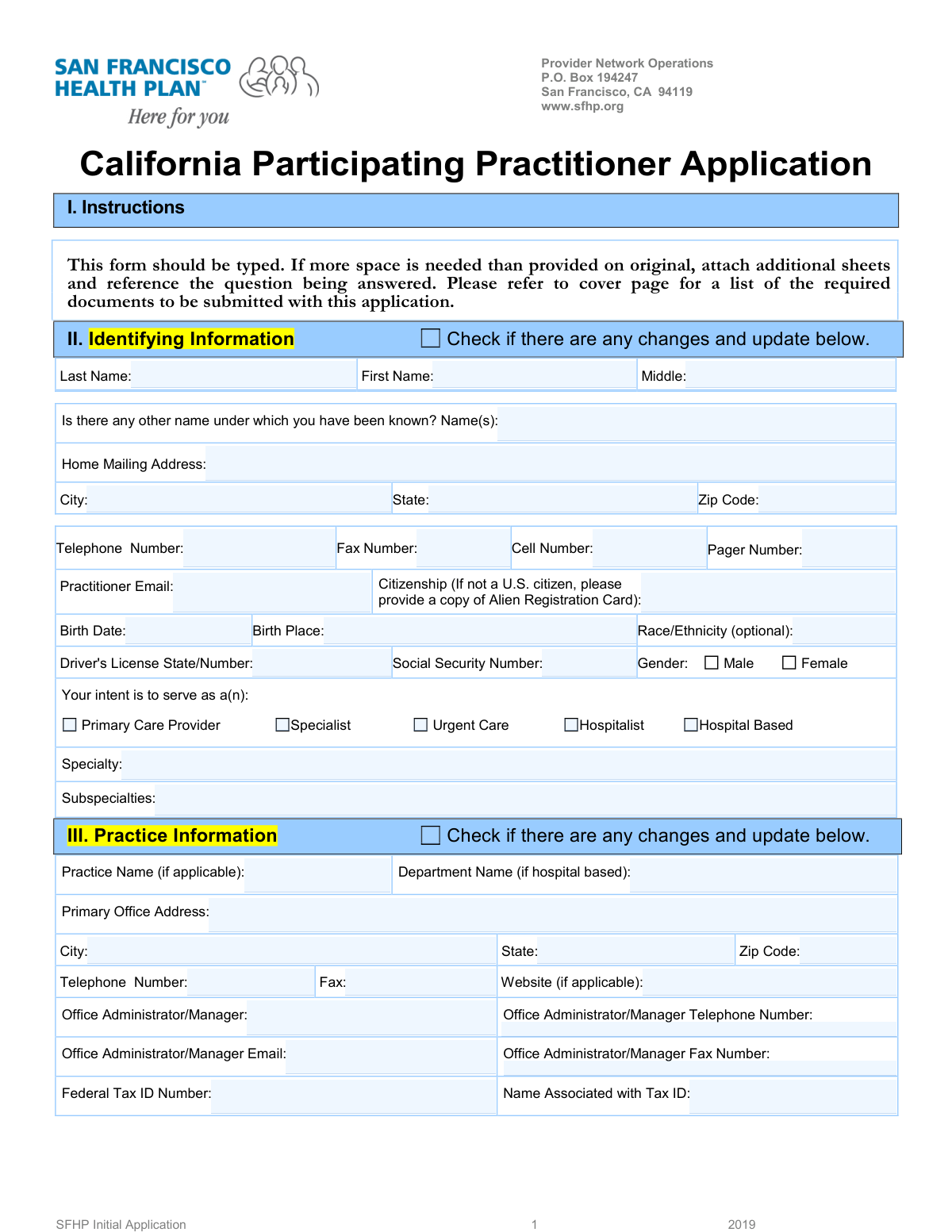
Yes! You can use AI to fill out SFHP Initial Application - California Participating Practitioner Application
This form is a comprehensive application for medical practitioners seeking to join the San Francisco Health Plan (SFHP) provider network. It gathers extensive details on the practitioner's identity, practice information, education, licensure, work history, and professional liability to facilitate the credentialing process. Completing this detailed application is a critical step for providers to become eligible to serve SFHP members. Today, this form can be filled out quickly and accurately using AI-powered services like Instafill.ai, which can also convert non-fillable PDF versions into interactive fillable forms.
Our AI automatically handles information lookup, data retrieval, formatting, and form filling.
It takes less than a minute to fill out SFHP Initial Application using our AI form filling.
Securely upload your data. Information is encrypted in transit and deleted immediately after the form is filled out.
Form specifications
| Form name: | SFHP Initial Application - California Participating Practitioner Application |
| Number of fields: | 695 |
| Number of pages: | 21 |
| Language: | English |
| Categories: | practitioner forms |
Instafill Demo: How to fill out PDF forms in seconds with AI
How to Fill Out SFHP Initial Application Online for Free in 2026
Are you looking to fill out a SFHP INITIAL APPLICATION form online quickly and accurately? Instafill.ai offers the #1 AI-powered PDF filling software of 2026, allowing you to complete your SFHP INITIAL APPLICATION form in just 37 seconds or less.
Follow these steps to fill out your SFHP INITIAL APPLICATION form online using Instafill.ai:
- 1 Navigate to Instafill.ai and upload or select the SFHP Initial Application form.
- 2 Use the AI assistant to automatically fill in your identifying information, practice details, and billing information (Sections II, III, IV).
- 3 Enter your education, training, licensure, certifications, and hospital affiliations (Sections VI, VII, VIII).
- 4 Provide your complete work history, peer references, and professional liability insurance details (Sections IX, X, XI).
- 5 Carefully review and answer all attestation questions, providing detailed explanations on a separate sheet for any 'Yes' answers.
- 6 Review all auto-filled information for accuracy, then electronically sign and date the attestation, information release, and DHCS agreement sections.
- 7 Download the completed, signed application package for submission to the SFHP Provider Network Operations.
Our AI-powered system ensures each field is filled out correctly, reducing errors and saving you time.
Why Choose Instafill.ai for Your Fillable SFHP Initial Application Form?
Speed
Complete your SFHP Initial Application in as little as 37 seconds.
Up-to-Date
Always use the latest 2026 SFHP Initial Application form version.
Cost-effective
No need to hire expensive lawyers.
Accuracy
Our AI performs 10 compliance checks to ensure your form is error-free.
Security
Your personal information is protected with bank-level encryption.
Frequently Asked Questions About Form SFHP Initial Application
This application is for healthcare practitioners, such as physicians and specialists, who wish to join the San Francisco Health Plan (SFHP) provider network. You must complete this form to be credentialed and approved to provide services to SFHP members.
The form's instructions state that a cover page, which is not included here, lists all required documents. Typically, this includes copies of your medical license, DEA certificate, board certifications, and professional liability insurance face sheet.
No, the form explicitly states that a CV is not sufficient for the Work History section. You must chronologically list all work activities since completing your postgraduate training directly on the form or an attached sheet and explain any gaps.
If you answer 'Yes' to any of the attestation questions, you must provide a full, detailed explanation on a separate sheet of paper attached to your application. For questions about professional liability cases, you are also required to complete Addendum B.
Yes, you can still apply, but you must provide a written explanation for why you do not have hospital privileges. The form also requires you to submit a written plan for ensuring continuity of care for your patients who may require hospitalization.
The completed application, along with all required documents, should be mailed to Provider Network Operations at P.O. Box 194247, San Francisco, CA 94119. The form should be typed, not handwritten, for clarity.
According to the Managed Care Provider Enrollment Disclosure, the Managed Care Plan (MCP) aims to complete the enrollment process within 120 days of your application submission. You can request the status of your application in writing from the Credentialing Department.
This section allows you to be officially designated as an HIV/AIDS specialist in the SFHP provider directory if you meet specific criteria set by the Department of Managed Health Care (DMHC). If you do not wish to be designated or do not meet the criteria, you can simply check the 'No' box.
You must list three professional references who are familiar with your clinical work, preferably from your specialty. At least one reference must have the same credentials as you (e.g., an MD for an MD), and you cannot use relatives or current partners in your practice.
Addendum A, 'Practitioner Rights,' outlines your right to review your file and correct erroneous information. You must submit a written notification to the Credentialing Department to initiate a re-verification process.
Yes, you can use AI-powered services like Instafill.ai to help complete this form accurately and efficiently. These tools can auto-fill many of the fields based on your provided information, saving you significant time and reducing the risk of errors.
You can use a service like Instafill.ai to fill out the form online. Simply upload the PDF to their platform, and their AI will help you populate the fields, making the process faster and more convenient than manual entry.
If you have a non-fillable or 'flat' PDF, you can use a service like Instafill.ai to make it interactive. Their platform can convert non-fillable PDFs into fillable forms, allowing you to type your information directly into the fields online.
The application provides dedicated sections for a Primary, Secondary, and Tertiary practice. You should fill out the complete details for each location, including address, office manager contact, hours, and accessibility information.
You must complete a separate Addendum B for each professional liability lawsuit or arbitration filed against you in the past seven years, regardless of the outcome. This is required if you answer 'Yes' to Attestation Questions 9 or 10.
Compliance SFHP Initial Application
Validation Checks by Instafill.ai
1
Social Security Number Format Validation
This check verifies that the Social Security Number field contains exactly nine digits and is not left blank. The SSN is a critical unique identifier for background checks, identity verification, and reporting to regulatory bodies like the National Practitioner Data Bank. If the format is incorrect or the field is empty, the application cannot be processed for credentialing.
2
DEA Registration Number Validity
This validation ensures the Drug Enforcement Agency (DEA) Registration Number follows the standard format of two letters followed by seven numbers and passes the checksum algorithm. A valid DEA number is legally required for a practitioner to prescribe controlled substances. An invalid or expired number would halt the application and require immediate correction, as it directly impacts the practitioner's ability to function in their role.
3
Medical License Expiration Date Check
This check confirms that the 'Expiration Date' for the California State Medical License is a future date. It is illegal and a significant compliance risk for a health plan to contract with a practitioner holding an expired license. If the license is expired or near expiration, the system should flag the application for follow-up to obtain proof of renewal before proceeding.
4
Attestation 'Yes' Answer Explanation Requirement
This validation ensures that if any of the 'Attestation Questions' (1-16) are answered with 'Yes', a corresponding detailed explanation is attached as required by the form's instructions. These questions pertain to licensure actions, sanctions, malpractice history, and other critical issues. A 'Yes' answer without a complete explanation represents a significant gap in information needed for risk assessment and credentialing review, and the application will be considered incomplete.
5
Work History Gap Analysis
This check analyzes the 'From' and 'To' dates in the 'Work History' section to identify any time gaps since the completion of postgraduate training. The form explicitly requires an explanation for any gaps. This validation is crucial for ensuring a complete and continuous record of the practitioner's professional activities, which is a standard for credentialing. An unexplained gap will cause the application to be flagged as incomplete.
6
Training Program Completion Explanation
This validation triggers if the applicant answers 'No' to the question 'Did you successfully complete the program?' for any internship, residency, or fellowship. If 'No' is selected, the system verifies that a detailed explanation has been attached as instructed. Failure to complete a training program is a significant event in a practitioner's history that requires thorough review and documentation.
7
Conditional Requirement for Allied Health Professionals
This check ensures that if the applicant answers 'Yes' to 'Do you employ any allied health professionals?', then at least one entry with a Name, Type of Provider, and License Number is completed. This information is necessary to understand the full scope of the practice and ensure all associated providers are properly credentialed or registered. An empty list after a 'Yes' response would render the section incomplete.
8
Date Chronology for Training and Employment
This validation checks that for all entries in the Education, Training, and Work History sections, the 'To' date is after the 'From' date. This ensures the chronological integrity of the practitioner's history. Inconsistent or illogical dates can indicate data entry errors or misrepresentation and must be corrected before the application can be properly evaluated.
9
CLIA Certificate Conditional Requirement
This check is activated if the practitioner indicates they provide direct laboratory services and answers 'Yes' to having a CLIA certificate. The system must then validate that the 'CLIA Certificate Number' and 'CLIA Certificate Expiration Date' fields are both completed. This is a federal regulatory requirement for practices performing lab tests, and missing information prevents verification of compliance.
10
HIV Specialist Designation Logic
This validation ensures that if an applicant checks 'Yes, I do wish to be designated as an HIV/AIDS specialist', they must also select at least one of the subsequent qualification criteria checkboxes. This confirms that the request for designation is supported by a specific, documented qualification as defined by regulations. An application with a 'Yes' but no selected criteria would be considered incomplete for this designation.
11
Federal Tax ID and Associated Name Pair Completeness
This check verifies that for every instance where a 'Federal Tax ID Number' is provided (in Primary, Secondary, Tertiary, and Billing sections), the corresponding 'Name Associated with Tax ID' field is also filled out. This pairing is essential for correct financial setup, claims processing, and IRS verification. A missing associated name would lead to payment and reporting errors.
12
Individual NPI Number Format and Validity
This validation confirms that the 'Individual National Physician Identifier (NPI)' is present and follows the correct 10-digit numeric format. The NPI is a standard, unique identifier for healthcare providers in the U.S. and is mandatory for billing and administrative functions. An invalid or missing NPI will prevent the provider from being properly enrolled and reimbursed.
13
Signature and Date Presence on Attestation
This check verifies that the 'APPLICANT SIGNATURE', 'PRINTED NAME', and 'DATE' fields are all completed on the Attestation page (page 14) and other required signature blocks. The signature legally attests to the truthfulness of the application content. A missing signature or date invalidates the entire application, making it legally non-binding and unprocessed.
14
Conditional Field for 'Other' Mailing Address
This validation ensures that if the 'Other' checkbox is selected in the 'Mailing Address' section, the subsequent text field for the alternate mailing address is filled out. This logic prevents a situation where the applicant indicates a non-standard mailing address but fails to provide it. Failure to provide the address would lead to misdirected correspondence.
Common Mistakes in Completing SFHP Initial Application
Sections VI (Training) and X (Work History) require a complete, chronological history. Applicants frequently leave unexplained time gaps of several months between training programs or employment, which is a major red flag in credentialing. The form explicitly requires an explanation for any gaps on a separate page, and failing to provide one will halt the application process pending verification. To avoid this, carefully review your timeline and attach a clear, concise explanation for any period not accounted for, such as travel, family leave, or job searching.
The Attestation Questions in Section XIII are a critical legal part of the application. When an applicant answers 'Yes' to questions about license sanctions, legal issues, or malpractice history, they must provide a full, detailed explanation on a separate sheet. A common and serious error is checking 'Yes' but failing to attach this mandatory documentation. This omission automatically flags the application as incomplete and can lead to denial until the information is provided.
Section X (Work History) explicitly states, 'A curriculum vitae is not sufficient.' Despite this clear instruction, many practitioners attempt to save time by attaching their CV and leaving this section blank, which will result in the application being returned as incomplete. Credentialing requires the specific format and contact information requested in the form for primary source verification. To prevent delays, you must manually enter all work history details directly into the form as requested.
The application asks for both individual identifiers (e.g., Individual NPI in Section VII) and group identifiers (e.g., Group NPI and Federal Tax ID in Section III). Practitioners sometimes mistakenly enter their personal NPI in the 'Group NPI' field or their Social Security Number instead of the practice's Federal Tax ID. This error causes mismatches during data verification and can delay payment setup. It's crucial to differentiate between your personal provider numbers and the numbers assigned to the business entity or group practice.
Applicants often have multiple practice locations (Primary, Secondary, Tertiary) and may fail to fill out all required fields for each one, such as Group NPI, Tax ID, or office manager details. Inconsistencies, like listing a different Tax ID for the same practice in the billing section, are also common. This leads to significant processing delays as credentialing staff must contact the applicant for clarification. Carefully complete every field for each practice location and cross-reference information between sections to ensure consistency.
This extensive application has at least six separate signature lines on pages 14, 15, 16, 18, 19, and 20. It is very common for applicants to miss one or more of these required signatures, particularly on the addenda pages. An unsigned application is legally invalid and cannot be processed, leading to immediate rejection and the need to resubmit. Before submitting, double-check every page for a signature and date field to ensure all have been completed.
Section XI requires a complete list of all professional liability carriers for the past five years, with the most recent listed first. Applicants often forget a previous carrier, list them in the wrong chronological order, or omit key details like policy numbers, coverage amounts, or whether tail coverage was purchased. This incomplete information requires extensive follow-up from the credentialing team. Before filling out this section, gather all your malpractice insurance declaration pages from the last five years to ensure all information is accurate and complete.
If an applicant answers 'Yes' to questions about professional liability cases, they must complete Addendum B for each instance. A frequent error is providing a vague, one-sentence summary instead of the detailed clinical narrative requested, which includes diagnosis, treatment rendered, and patient outcome. This lack of detail forces the credentialing committee to request more information, delaying the review. When completing Addendum B, provide a thorough, objective clinical summary as if you were presenting the case to a peer review committee.
Section VII requires the applicant to list their California license and 'All Other State Medical Licenses.' Practitioners who have worked in multiple states sometimes forget to list licenses from states where they no longer practice, even if the license is still active or was recently inactive. This omission will be discovered during a background check and will cause delays as the credentialing team requests the missing information. It is critical to list every state medical license ever held, along with its status, number, and dates.
The form's first instruction is, 'This form should be typed.' Submitting a handwritten form can lead to data entry errors due to illegible writing and often results in the application being returned for re-completion. Since the form is a non-fillable PDF, this can be challenging. To avoid this, use a PDF editor or an AI-powered tool like Instafill.ai, which can convert the flat PDF into a fillable version, making it easy to type information and ensure legibility.
Several sections, such as Education (Section VI) and Work History (Section X), require dates in a specific 'mm/yyyy' format. Applicants may use different formats (e.g., 'June 2018', '6/1/18'), creating inconsistencies that slow down the verification process, as precise dates are needed to identify employment gaps. Always use the specified 'mm/yyyy' format consistently throughout the application. AI form-filling tools like Instafill.ai can help prevent this by automatically standardizing dates into the required format.
Saved over 80 hours a year
“I was never sure if my IRS forms like W-9 were filled correctly. Now, I can complete the forms accurately without any external help.”
Kevin Martin Green
Your data stays secure with advanced protection from Instafill and our subprocessors

Robust compliance program
Transparent business model
You’re not the product. You always know where your data is and what it is processed for.
ISO 27001, HIPAA, and GDPR
Our subprocesses adhere to multiple compliance standards, including but not limited to ISO 27001, HIPAA, and GDPR.
Security & privacy by design
We consider security and privacy from the initial design phase of any new service or functionality. It’s not an afterthought, it’s built-in, including support for two-factor authentication (2FA) to further protect your account.
Fill out SFHP Initial Application with Instafill.ai
Worried about filling PDFs wrong? Instafill securely fills sfhp-initial-application-california-participating-practitioner-application forms, ensuring each field is accurate.