Yes! You can use AI to fill out Oregon Practitioner Recredentialing Application

The Oregon Practitioner Recredentialing Application is a standardized form developed by the Advisory Committee on Physician Credentialing Information (ACPCI) for use by healthcare organizations across Oregon. Its purpose is to collect updated information from medical practitioners to verify their qualifications, licenses, work history, and insurance coverage for the recredentialing process. This ensures practitioners continue to meet the standards required by hospitals and health plans. Today, this form can be filled out quickly and accurately using AI-powered services like Instafill.ai, which can also convert non-fillable PDF versions into interactive fillable forms.
300-265500 MSC 9048r is part of the practitioner application forms category on Instafill.
300-265500 MSC 9048r has a very complex Form Complexity Index of 100/100 — 762 fillable fields across 13 pages. Instafill’s AI completes it accurately in under a minute.

Form specifications

Form name: Oregon Practitioner Recredentialing Application
Number of fields: 762
Number of pages: 13
FCI: Very Complex (100/100)
Language: English
Our AI automatically handles information lookup, data retrieval, formatting, and form filling.
It takes less than a minute to fill out 300-265500 MSC 9048r using our AI form filling.
Securely upload your data. Information is encrypted in transit and deleted immediately after the form is filled out.
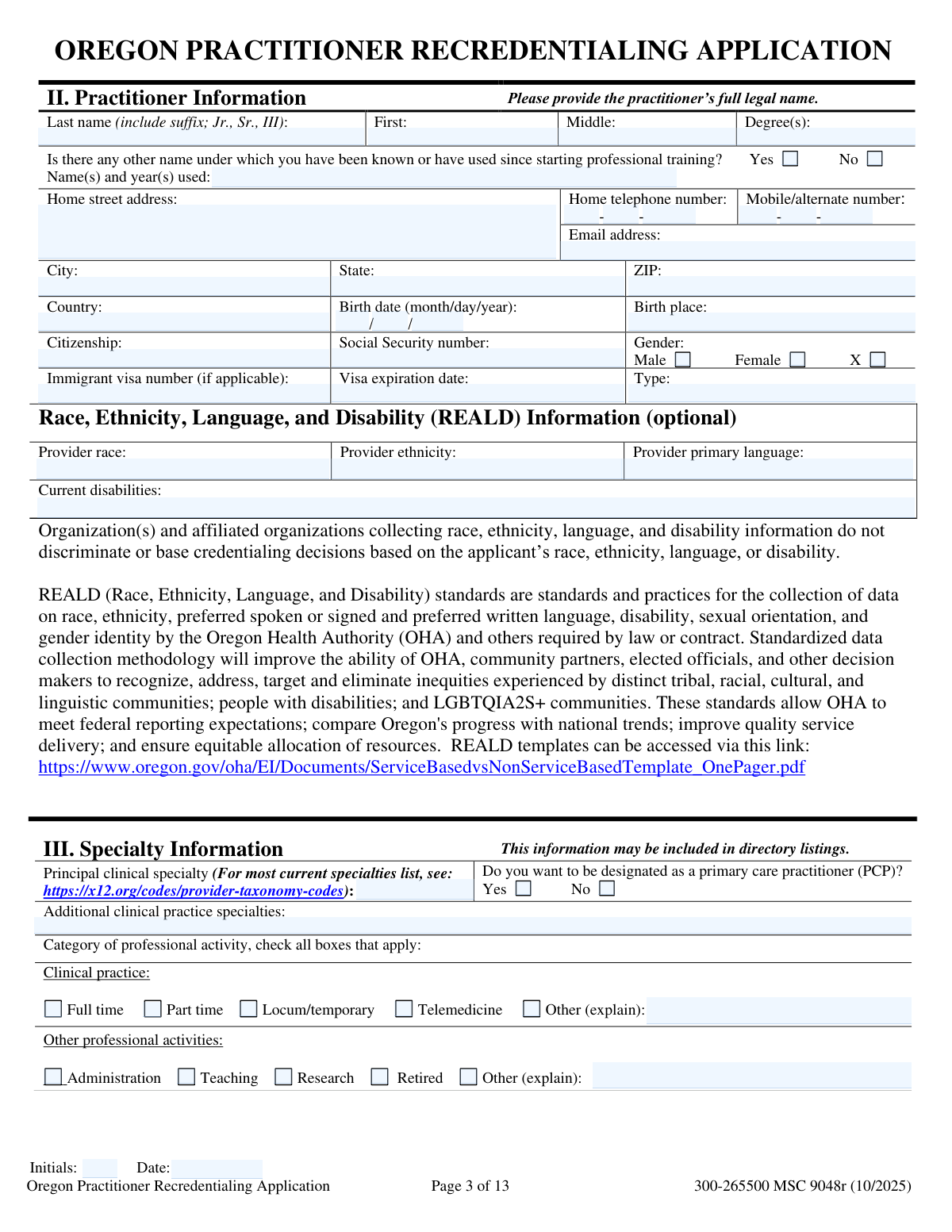
Preview of Oregon Practitioner Recredentialing Application

Instafill Demo: How to fill out PDF forms in seconds with AI

How to Fill Out 300-265500 MSC 9048r Online for Free in 2026

Are you looking to fill out a 300-265500 MSC 9048R form online quickly and accurately? Instafill.ai offers the #1 AI-powered PDF filling software of 2026, allowing you to complete your 300-265500 MSC 9048R form in just 37 seconds or less.
Follow these steps to fill out your 300-265500 MSC 9048R form online using Instafill.ai:
  1. 1 Navigate to Instafill.ai and upload or select the Oregon Practitioner Recredentialing Application.
  2. 2 Use the AI assistant to automatically populate personal details, contact information, license numbers, and specialty information from your saved profile.
  3. 3 Review and complete the sections on practice history, hospital affiliations, continuing medical education, and professional liability insurance, attaching additional sheets if necessary.
  4. 4 Carefully answer all attestation questions in Section XVI, providing detailed explanations on a separate sheet for any 'yes' answers.
  5. 5 Upload digital copies of required documents, such as your state license, DEA certificate, and the face sheet of your professional liability policy.
  6. 6 Electronically sign and date the attestation on page 11 and the Authorization and Release of Information Form on page 12.
  7. 7 Download the completed, signed application package and submit it directly to the requesting healthcare organization.

Our AI-powered system ensures each field is filled out correctly, reducing errors and saving you time.

Why Choose Instafill.ai for Your Fillable 300-265500 MSC 9048r Form?

Speed

Complete your 300-265500 MSC 9048r in as little as 37 seconds.

Up-to-Date

Always use the latest 2026 300-265500 MSC 9048r form version.

Cost-effective

No need to hire expensive lawyers.

Accuracy

Our AI performs 10 compliance checks to ensure your form is error-free.

Security

Your personal information is protected with bank-level encryption.

Frequently Asked Questions About 300-265500 MSC 9048r

300-265500 MSC 9048r has a Form Complexity Index of 100 out of 100, placing it in the very complex complexity tier. This score is calculated deterministically from the form’s own structure using Instafill’s published Form Complexity Index methodology, so it can be reproduced and independently verified — it is not a subjective estimate.

For 300-265500 MSC 9048r specifically, the score reflects 762 fillable fields across 13 pages, grouped into 118 sections, and 247 conditional fields that only apply depending on earlier answers, 13 tables or repeating lists. The number of fields is the largest factor in the base score (weighted 36%), followed by how difficult those fields are to complete based on their type, where free-text and signature fields count for more than simple checkboxes (26%). The number of pages that actually contain fields (15%), the amount of conditional “fill-only-if” logic (16%), and how many sections the form is divided into (7%) account for the rest of the base. On top of that base, the index adds points for tables and repeating lists, bundled instruction pages, and dense page layouts — capturing difficulty the base alone can miss.

In practical terms, a very complex score means the form is exceptionally demanding — a very large number of fields, often combined with tables, dense pages or extensive conditional logic. Instafill removes that effort entirely: our AI reads your information, maps each value to the correct field — including the conditional ones — and completes 300-265500 MSC 9048r accurately in under a minute, with every field available for you to review before you download. See exactly how the Form Complexity Index is calculated.

This application is a uniform document used by Oregon hospitals and health plans to recredential medical practitioners. You need to fill it out if you are a practitioner seeking to renew your credentials with a healthcare organization in Oregon.

You must submit current copies of your State Professional License(s), DEA Certificate, ECFMG certificate (if applicable), and the face sheet of your Professional Liability Insurance policy. A curriculum vitae (CV) is optional and cannot be used as a substitute for completing the application.

You should submit your completed and signed application directly to the hospital, health plan, or other healthcare organization that requested it. Do not send the application to the State of Oregon.

The application requires you to explain any gaps in your professional practice or work history greater than two months within the past three years. Use Section XIII, Part B to provide the dates and a brief explanation for each gap.

If you answer 'yes' to any attestation question, you must provide a detailed explanation on a separate sheet of paper. Be sure to sign and date each additional sheet you attach to the application.

You must list three peer references who are familiar with your current clinical skills and competence through recent observation. You cannot use relatives, and you should try to include at least one member from the medical staff of each facility where you have privileges.

If you do not have admitting privileges at any of your affiliated facilities, you must explain your plan for ensuring continuity of care for patients who require hospital admission. This explanation is required in Section XII, Part A.

No, any modification to the wording or format of the Oregon Practitioner Recredentialing Application will invalidate it. If you need more space, attach additional sheets and reference the question you are answering.

No, providing REALD information is optional. This data is collected to help the Oregon Health Authority address health inequities and is not used in credentialing decisions.

If you have had a professional liability claim filed against you in the last five years, you must complete Attachment B for each claim. You will need to provide details about the incident, your role, the case status, and any settlement amount.

You must initial and date each page to confirm that you have reviewed the information on that page and that it is current and accurate as of that date. This is a requirement for the application to be considered complete.

Yes, services like Instafill.ai use AI to accurately auto-fill form fields, which can save you significant time and help prevent errors. This is especially useful for long and detailed applications like this one.

To fill this form online, you can upload the PDF to a platform like Instafill.ai. The service will make the form fillable and use your saved information to automatically populate the fields, after which you can review, sign, and download it.

If your PDF is not interactive, you can use a service like Instafill.ai to convert it into a fillable form. Simply upload the flat PDF, and the platform will make the fields interactive so you can type your information directly.

Compliance 300-265500 MSC 9048r
Validation Checks by Instafill.ai

1
Verifies Explanation for Work History Gaps
This check analyzes the chronological work history in Section XIII and identifies any time gaps greater than two months between employment periods. If a gap is found, the system verifies that a corresponding explanation has been provided in Section XIII-B. Unexplained gaps are a significant concern in credentialing as they may hide periods of inactivity, license suspension, or other issues, so failure to explain them will result in the application being returned as incomplete.
2
Ensures Each Page is Initialed and Dated
This validation confirms that the applicant's initials and the date of review are present on every page of the application as instructed on page 2. This serves as a continuous attestation that all information provided was reviewed and is accurate as of the specified date. An application missing any initials or dates is considered incomplete and will be sent back to the applicant for correction before processing can continue.
3
Requires Explanation for 'Yes' Answers in Attestation Section
This check verifies that for any 'Yes' answer to the attestation questions (A-N) on page 11, the applicant has attached a separate, signed sheet providing a detailed explanation. These questions relate to critical issues like license sanctions, criminal charges, and malpractice history, making the explanations mandatory for review. If a 'Yes' answer is present without a corresponding explanation, the application is flagged as critically incomplete and cannot be processed.
4
Validates Conditional Completion of Attachment B for Liability Claims
This validation ensures that if an applicant answers 'Yes' to Attestation Question M (regarding professional liability claims in the last five years), they have also completed and submitted Attachment B for each claim. Attachment B provides the necessary details for the credentialing committee to assess the nature and outcome of malpractice suits. An application with a 'Yes' to question M but a missing or incomplete Attachment B is invalid and will be rejected pending submission of the required details.
5
Confirms Signatures on Attestation and Authorization Forms
This check verifies that a valid signature and date are present on the Attestation section (Page 11) and the Authorization and Release of Information Form (Page 12). These signatures are legally binding, confirming the information's accuracy and granting permission to verify credentials. An application lacking either of these signatures is legally invalid and will be immediately rejected.
6
Validates National Provider Identifier (NPI) Format
The system must validate that the Entity Type 1 (Individual) and Entity Type 2 (Group) NPI numbers consist of exactly 10 digits. The NPI is a standard, unique identifier essential for billing, referrals, and federal program participation. An incorrectly formatted NPI will cause failures in downstream systems and verification processes, so the application must be corrected before it can be accepted.
7
Validates License and Certification Expiration Dates
This check scans all provided licenses, DEA registrations, and certifications to ensure their expiration dates are in the future. Practicing with an expired license or certification is illegal and a major liability risk for any healthcare organization. The system should flag any credentials that are already expired or will expire shortly, as this requires immediate action and updated documentation from the applicant.
8
Requires Continuity of Care Plan if No Admitting Privileges
This validation is triggered if the applicant indicates 'No' to having admitting privileges at any listed hospital affiliation in Section XII. It then verifies that the applicant has completed the subsequent field explaining their plan for ensuring continuity of care for patients who require hospital admission. This plan is a critical patient safety requirement, and its absence will render the application incomplete.
9
Verifies Chronological Consistency of Dates
This check validates that for all date ranges provided in the application (e.g., education, work history, insurance coverage), the 'From' or 'Start' date occurs before the 'To' or 'End' date. Illogical date ranges indicate data entry errors or potential attempts to obscure the timeline of events. Such inconsistencies must be resolved before the applicant's history can be accurately verified.
10
Ensures Three Complete Peer References are Provided
This validation confirms that the applicant has provided all required contact information for three distinct peer references in Section XIV, and that none are relatives. Peer references are fundamental to the primary source verification of a practitioner's clinical competence and professionalism. An application with fewer than three references or with incomplete contact information for a reference will be halted until the missing information is supplied.
11
Validates Social Security Number (SSN) Format
This check ensures the Social Security Number provided on page 3 adheres to the 9-digit format (XXX-XX-XXXX or XXXXXXXXX). The SSN is a key identifier used for background checks and identity verification with various national databases. An invalid or missing SSN prevents these critical checks from being performed, thereby stopping the credentialing process.
12
Validates Conditional Entry for Previous Names
This validation ensures that if the applicant answers 'Yes' to having been known by other names on page 3, the subsequent field detailing those names and the years they were used is filled out. This is critical for conducting a comprehensive background check and verifying credentials under all known aliases. If 'Yes' is selected but no names are provided, the application is flagged for missing information.
13
Verifies DEA Registration Number Format
This check validates that the DEA registration number on page 6 follows the correct format, which typically consists of two letters followed by seven numbers. It can also include a checksum validation to catch common data entry errors. An invalid DEA number prevents verification of the practitioner's authority to prescribe controlled substances, which is a critical credentialing requirement for most specialties.

Common Mistakes in Completing 300-265500 MSC 9048r

Forgetting to Initial and Date Every Page

The instructions on page 2 explicitly require the applicant's initials and the date on each page of the application. This is a very common oversight due to the form's length, but it is critical for verifying that the applicant has reviewed all information. Missing initials or dates on any page can lead to the application being returned as incomplete, causing significant processing delays.

Incomplete Work History and Unexplained Gaps

Section XIII requires a complete, chronological work history for the past three years and a specific explanation for any gap longer than two months. Applicants often miscalculate dates, omit short-term positions, or forget to explain periods of non-employment, leading to an incomplete timeline. This is a major red flag for credentialing committees and will always result in a request for additional information, delaying the entire process.

Improperly Handling 'Yes' Answers in Attestation

The Attestation Questions in Section XVI are critical legal declarations. If an applicant answers 'yes' to any question (e.g., regarding past license issues or liability claims), they must provide a detailed explanation on a separate, signed sheet. A common mistake is to answer 'yes' but fail to attach the required explanation, or to attach an unsigned explanation, which invalidates the response and halts the application review.

Missing Required Document Attachments

Page 2 clearly lists the documents that must be submitted with the application, such as state licenses, DEA certificate, and the professional liability policy face sheet. Applicants frequently forget to include one or more of these required attachments, assuming the organization already has them on file. Submitting an application without all necessary documents will render it incomplete and prevent the credentialing process from starting.

Failing to Complete Attachment B for Each Liability Claim

If an applicant answers 'yes' to question M regarding professional liability claims in the last five years, they must complete a separate Attachment B for each individual claim. People often make the mistake of listing multiple claims on one form or simply attaching court documents instead of filling out the form as instructed. This failure to provide detailed, structured information for each incident will cause the application to be rejected pending proper completion.

Leaving Sections Blank Instead of Checking 'Does Not Apply'

Many sections, such as Board Certification (IV) or Other State Licenses (XI), include a 'Does not apply' checkbox. Applicants sometimes leave these sections entirely blank if they have no information to report, assuming it's self-explanatory. However, credentialing staff must treat blank sections as incomplete, forcing them to follow up for clarification and delaying the review process. Always check the 'Does not apply' box to affirmatively complete the section.

Missing Signatures on Critical Pages

The application is not valid without signatures in two key places: the Attestation on page 11 and the Authorization and Release of Information on page 12. Forgetting to sign and date these pages is a critical error that immediately invalidates the entire submission. This mistake often happens when applicants are rushing and can be easily avoided by performing a final review focused solely on signature lines. AI-powered tools like Instafill.ai can flag missing signature fields to prevent this error.

Submitting a CV Instead of Completing the Work History Section

The instructions for Section XIII on page 8 explicitly state, 'A curriculum vitae is not sufficient.' Despite this clear warning, some practitioners attach their CV and leave the work history section blank, assuming the CV contains the same information. This violates the standardized format required for verification and will result in the application being returned for proper completion.

Providing Inappropriate or Incomplete Peer References

Section XIV requires three peer references who are familiar with the applicant's *current* clinical skills and competence. Common mistakes include listing relatives, non-peer administrators, or colleagues from many years ago who cannot attest to current abilities. Furthermore, applicants often provide incomplete contact information, making it difficult for the credentialing organization to reach the reference, which significantly slows down the verification process.

Using Inconsistent or Incorrect Date Formats

The form requires various date formats, such as 'month/year' for work history and 'month/day/year' for licenses and birth dates. Applicants often enter dates inconsistently (e.g., using '01/24' instead of '01/2024') or in the wrong format, which can cause data entry errors and require clarification. Using an AI form-filling tool like Instafill.ai can help prevent these mistakes by automatically validating and formatting dates according to the specific requirements of each field.

Submitting the Application to the Wrong Entity

A note on page 2 explicitly instructs applicants to return the completed application to the 'health care related organization to which you are applying, not to the State.' However, because the form is an official Oregon state-approved document, applicants sometimes mistakenly mail it to a state agency like the Oregon Health Authority. This error can cause weeks of delay as the application must be rerouted or, more likely, returned to the applicant to be sent to the correct destination.
Saved over 80 hours a year

“I was never sure if my IRS forms like W-9 were filled correctly. Now, I can complete the forms accurately without any external help.”

Kevin Martin Green

Your data stays secure with advanced protection from Instafill and our subprocessors

Robust compliance program

Transparent business model

You’re not the product. You always know where your data is and what it is processed for.

ISO 27001, HIPAA, and GDPR

Our subprocesses adhere to multiple compliance standards, including but not limited to ISO 27001, HIPAA, and GDPR.

Security & privacy by design

We consider security and privacy from the initial design phase of any new service or functionality. It’s not an afterthought, it’s built-in, including support for two-factor authentication (2FA) to further protect your account.

Fill out 300-265500 MSC 9048r with Instafill.ai

Worried about filling PDFs wrong? Instafill securely fills oregon-practitioner-recredentialing-application forms, ensuring each field is accurate.