Yes! You can use AI to fill out California Participating Practitioner Application (CPPA)

The California Participating Practitioner Application (CPPA) is a Health Industry Collaboration Effort (HICE) standardized credentialing application used across multiple California health plans and provider organizations to evaluate practitioners for initial credentialing and recredentialing. It captures comprehensive information such as demographics, practice and billing details, education and training, state licensure and certifications, hospital privileges/affiliations, peer references, work history, professional liability coverage, and extensive attestation and release/acknowledgement statements, with Addendum A (Practitioner Rights) and Addendum B (Professional Liability Action Explanation) when applicable. Completing it accurately is important because omissions or inconsistencies can delay credentialing or lead to denial/termination of participation. Today, this form can be filled out quickly and accurately using AI-powered services like Instafill.ai, which can also convert non-fillable PDF versions into interactive fillable forms.
Our AI automatically handles information lookup, data retrieval, formatting, and form filling.
It takes less than a minute to fill out CPPA using our AI form filling.
Securely upload your data. Information is encrypted in transit and deleted immediately after the form is filled out.

Form specifications

Form name: California Participating Practitioner Application (CPPA)
Number of pages: 17
Language: English
Categories: healthcare forms, credentialing forms, California medical forms, practitioner forms
main-image

Instafill Demo: filling out a legal form in seconds

How to Fill Out CPPA Online for Free in 2026

Are you looking to fill out a CPPA form online quickly and accurately? Instafill.ai offers the #1 AI-powered PDF filling software of 2026, allowing you to complete your CPPA form in just 37 seconds or less.
Follow these steps to fill out your CPPA form online using Instafill.ai:
  1. 1 Go to Instafill.ai and upload the CPPA PDF (or select the California Participating Practitioner Application from the form library).
  2. 2 Let the AI detect and map all fields (including primary/secondary/tertiary practice sections, attestations, and addenda) and confirm the form version (e.g., 2/2025 HICE update).
  3. 3 Provide your core profile data (name, contact info, identifiers like NPI/Medicare/Medi-Cal, specialty, and demographics as desired) and allow Instafill.ai to auto-populate repeated fields across sections.
  4. 4 Enter practice location, accessibility, office hours, languages, administrator/manager contacts, tax ID details, and billing arrangements; have the AI validate formatting (addresses, phone numbers, ZIP codes, IDs).
  5. 5 Complete education/training, licensure/DEA/CDS, board certifications, hospital affiliations, peer references, work history, and professional liability coverage; upload supporting documents (license, DEA, CV, insurance certificate, board certification, ECFMG/CLIA if applicable).
  6. 6 Answer all attestation questions and, if needed, have Instafill.ai generate and attach structured addenda narratives (e.g., Addendum B claim explanations) based on your inputs.
  7. 7 Review the final packet for completeness, e-sign where required (attestation and information release/acknowledgements, plus Addenda A/B as applicable), then download and submit to the credentialing entity with the checklist items.

Our AI-powered system ensures each field is filled out correctly, reducing errors and saving you time.

Why Choose Instafill.ai for Your Fillable CPPA Form?

Speed

Complete your CPPA in as little as 37 seconds.

Up-to-Date

Always use the latest 2026 CPPA form version.

Cost-effective

No need to hire expensive lawyers.

Accuracy

Our AI performs 10 compliance checks to ensure your form is error-free.

Security

Your personal information is protected with bank-level encryption.

Frequently Asked Questions About Form CPPA

The CPPA is a standardized credentialing application used by participating California healthcare organizations (HICE collaborators) to evaluate a practitioner’s qualifications for network participation or recredentialing. It collects your identity, practice locations, training, licensure, hospital affiliations, work history, liability coverage, and required attestations.

Practitioners applying to participate with a credentialing entity (or recredentialing with updates) should complete it, including physicians and other provider types referenced in the form (e.g., midlevel providers where applicable). If you are recredentialing, you typically check the “changes” boxes and update only what has changed, but still sign required signature pages.

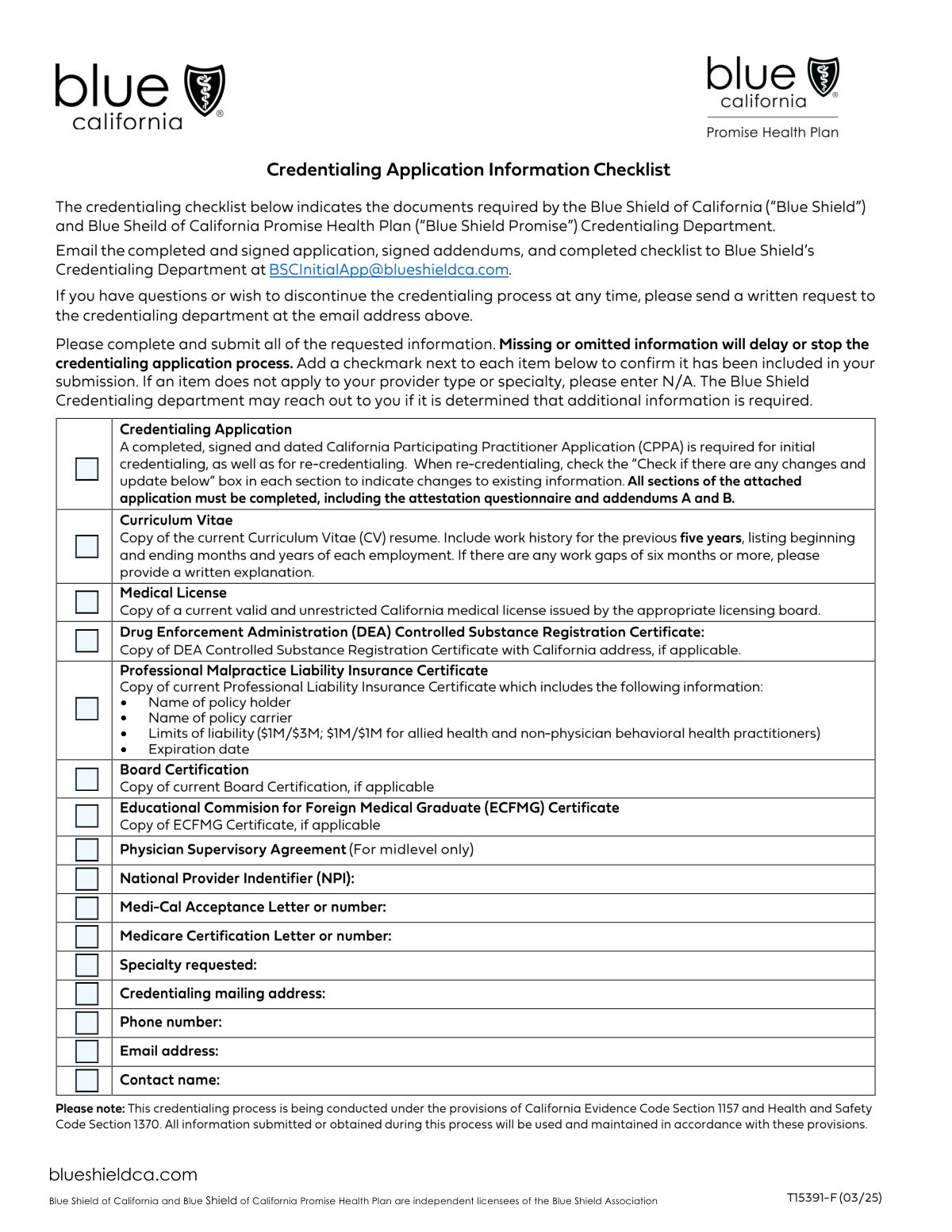
The checklist indicates you may need: a current CV (with 5-year work history and gap explanations), California medical license, DEA certificate (if applicable), malpractice liability insurance certificate, board certification (if applicable), ECFMG certificate (if applicable), and a physician supervisory agreement for midlevel providers (if applicable). Include Addenda A and B when required and ensure the application is signed and dated.

The form includes “Check if there are any changes and update below” prompts for many sections, which are intended for recredentialing updates. Even if little has changed, you must still provide enough information for evaluation and complete required attestations and signatures as instructed by the credentialing entity.

Enter your main location under Primary Practice Information, then complete Secondary and Tertiary sections only if you practice at additional sites. Be sure to include each site’s address, phone/fax, office manager contact, tax ID/name associated with the tax ID, accessibility level, hours, languages, and group identifiers (NPI/PTAN) if applicable.

Choose the option that best matches patient access at that office: “Basic” for generally accessible facilities, “Limited” for partial accessibility or barriers, and “None” if there are no accessibility features. If you’re unsure, base it on entrance access, restrooms, and exam room accessibility for mobility-impaired patients.

You must explain why you do not have privileges and provide a written plan for continuity of care (e.g., where patients are admitted, covering/admitting arrangements, and contact details). This is specifically requested in the Hospital and Other Institutional Affiliations section.

The form states a CV alone is not sufficient—you must chronologically list all work activities since completing postgraduate training and explain any gaps on a separate page. Attach your CV as supporting documentation, but still complete the form’s work history entries and gap explanations.

Complete Addendum B if you answer “Yes” to attestation questions about professional liability judgments/settlements in the last 7 years or lawsuits/arbitrations that are pending or were dismissed. If you have multiple cases, photocopy Addendum B and complete one per case; if none, you can check the “no pending/settled claims” box and sign.

It’s optional and is used to identify qualified HIV/AIDS specialists for standing referrals and provider directory listings under DMHC rules. If you want the designation, you must meet one of the listed credentialing/board certification/clinical volume and CME criteria and select the applicable option(s).

You must provide full details on a separate sheet for each “Yes” response, as instructed. In some cases (e.g., liability history), you must also complete the relevant addendum (such as Addendum B).

You must sign and date the Attestation page and the Information Release/Acknowledgements page, and sign Addendum A (Practitioner Rights) and Addendum B when applicable. The form explicitly states that a stamp is not acceptable for the applicant signature.

Processing time varies by organization and depends on whether your application is complete and how quickly primary source verifications are returned. To avoid delays, submit all checklist documents, complete all required fields, and promptly respond to requests for missing information or discrepancy clarifications.

Yes—AI form-filling tools can help you transfer data from your CV, licenses, insurance certificate, and identifiers into the correct CPPA fields and reduce manual typing. Services like Instafill.ai use AI to auto-fill form fields accurately and save time, but you should still review everything for correctness before signing.

Upload the CPPA PDF to Instafill.ai, add your supporting documents (e.g., CV, license, DEA, insurance), and let the AI map and auto-fill the fields; then review, edit, and export for signature and submission. If the PDF is flat/non-fillable, Instafill.ai can convert non-fillable PDFs into interactive fillable forms so you can complete and sign them more easily.

Compliance CPPA
Validation Checks by Instafill.ai

1
Applicant legal name completeness and character validation
Validates that Last Name and First Name are present and contain only expected characters (letters, spaces, hyphens, apostrophes) and are not placeholder values (e.g., “N/A”, “.”). Middle name/initial may be blank, but if provided it must follow the same character rules. This is important for identity matching across licensing, NPI, and payer enrollment systems. If validation fails, the submission should be rejected or routed to manual review because downstream primary source verification may not match.
2
Other names used required when indicated and properly formatted
If the applicant indicates they have been known under another name, the “Other Names Used” field must be populated with at least one non-empty name and separated by commas when multiple are provided. The check also flags entries that repeat the current legal name only or contain non-name placeholders. This matters because credentialing and sanctions checks often rely on historical names. If it fails, the system should require correction before submission to avoid incomplete background checks.
3
Date fields format and validity (DOB, issue/expiration, training, work history)
Ensures all date fields follow the form’s expected formats: full dates where requested (e.g., Birth Date, signature dates) and month/year where specified (mm/yyyy or mm/yy) for training, affiliations, and work history. It also validates that dates are real calendar dates and not future-dated where inappropriate (e.g., DOB cannot be in the future). Correct date formatting is critical for automated eligibility and timeline checks. If invalid, the system should block submission and highlight the specific field and required format.
4
Phone and fax number format validation across all contact fields
Validates that telephone, fax, cell, pager, medical staff phone, registrar phone, and administrator phone fields contain valid phone patterns (10 digits for US numbers, optional country code, and optional extension) and are not alphabetic strings. This prevents failed outreach to references, hospitals, and carriers during verification. If validation fails, the system should prompt for correction and optionally allow a “no fax” scenario only when the fax field is truly optional.
5
Email address format validation (practitioner, administrator, references, carriers, answering service)
Checks that all provided email addresses conform to standard email syntax (local@domain) and do not contain spaces or invalid characters. It should also flag obvious placeholders (e.g., test@test, none@none) if your business rules disallow them. Email accuracy is important for credentialing communications and document follow-ups. If validation fails, the system should require correction or mark the record for manual outreach depending on whether the email is required.
6
Address completeness and state/ZIP validation for US locations
Ensures that required addresses (home mailing, primary office, and any secondary/tertiary/billing/answering service/hospital addresses when provided) include street, city, state, and ZIP. State should be a valid US state/territory abbreviation (e.g., CA) and ZIP should be 5 digits or ZIP+4. This is important for network directory accuracy, service area validation, and correspondence. If validation fails, the system should block submission for required addresses and warn for optional sections that were partially completed.
7
SSN format and basic plausibility validation
Validates that Social Security Number is 9 digits (allowing hyphens) and rejects known invalid patterns (e.g., 000-00-0000, 123-45-6789) if your policy includes plausibility checks. SSN is used for identity verification and payer enrollment matching. If validation fails, the system should prevent submission and require correction because incorrect SSNs can cause verification failures and delays.
8
Driver’s license state/number structure validation
Checks that the driver’s license entry includes an issuing state (two-letter code) and a non-empty license number, and that the number matches expected alphanumeric patterns (without illegal characters). This supports identity verification and reduces manual follow-up. If validation fails, the system should request correction or allow omission only if the field is not required by the receiving organization.
9
Role selection and specialty consistency validation
Ensures at least one “intent to serve as” role is selected (Primary Care Provider, Specialist, Urgent Care, Hospitalist, Hospital Based) and that Specialty is provided when a clinical role is selected. If “Hospital Based” is selected, Department Name fields for applicable practice locations should be required or explicitly marked not applicable. This matters for correct network assignment, directory listing, and appropriate credentialing pathways. If validation fails, the system should block submission and prompt the applicant to reconcile role and specialty/department details.
10
Practice location section integrity (primary required; secondary/tertiary all-or-nothing)
Validates that the Primary Practice section has minimum required fields (office address, city/state/ZIP, phone, accessibility selection, and at least one practice type). For Secondary and Tertiary locations, if any key field is entered (e.g., address or phone), then the rest of the required location fields must also be completed to avoid partial, unusable locations. This prevents directory and claims routing errors caused by incomplete locations. If validation fails, the system should either require completion of the location or clear the partial entry.
11
Physical accessibility selection is mutually exclusive per office
Ensures exactly one accessibility option (Basic, Limited, None) is selected for each office location that is being submitted (primary and any completed secondary/tertiary). This is important for regulatory and directory accessibility reporting. If multiple or none are selected, the data becomes ambiguous and may violate directory requirements. If validation fails, the system should require the user to select one option only.
12
Mailing address selection and conditional mailing address requirement
Validates that exactly one option is selected for “Which practice is your primary mailing address?” (Primary/Secondary/Tertiary/Other). If “Other” is selected or if the applicant indicates the mailing address differs from practice, the separate mailing address fields must be completed with valid city/state/ZIP. This ensures correspondence and credentialing notices are sent to the correct address. If validation fails, the system should block submission until a single selection and any required address details are provided.
13
Billing responsibility selection and conditional billing company completeness
Ensures exactly one billing handler is selected (Primary/Secondary/Tertiary/None). If “None” is selected, then Billing Company Name, full billing address, contact person, phone, Federal Tax ID, and Name Associated with Tax ID must all be present and properly formatted. This is critical for claims payment setup and tax reporting. If validation fails, the system should prevent submission because incomplete billing data will cause payment and enrollment delays.
14
Federal Tax ID (EIN/TIN) format and name association validation
Validates that each Federal Tax ID Number provided (practice and billing) is 9 digits (allow hyphen) and that “Name Associated with Tax ID” is not blank when a TIN is present. It should also flag if the same TIN is used with conflicting associated names across sections, which may indicate data entry errors. Correct TIN/name pairing is essential for IRS reporting and payer contracting. If validation fails, the system should require correction or route to manual review for potential entity mismatch.
15
Licensure and identifier format validation (CA license, NPI, DEA, PTAN, Medi-Cal)
Checks that the California medical license number is present and matches expected state license patterns, and that issue/expiration dates are provided and valid. Validates NPI is exactly 10 digits and passes the NPI Luhn check, and that DEA number matches the standard format (2 letters + 7 digits) with a valid check digit; PTAN/Medi-Cal fields should meet length/character constraints if provided. These identifiers are core to credentialing, enrollment, and claims. If validation fails, the system should block submission for required identifiers (CA license, NPI if required by workflow) and warn for optional identifiers.
16
Expiration date logical checks (license/DEA/CDS/board cert/CLIA/insurance)
Ensures that expiration dates occur after their corresponding issue/effective dates and are not already expired as of the submission date (unless the workflow explicitly allows expired items with explanation). It also checks that professional liability policy expiration is after original effective date and that board certification expiration (if provided) is not earlier than certification date. This prevents credentialing with invalid or lapsed credentials and reduces rework. If validation fails, the system should block submission or require an explanation/updated document depending on policy.
17
Attestation questionnaire completeness and conditional addendum requirement
Validates that every attestation question (1–15, including 8a/8b and the Q13 follow-up when Q13 is Yes) has exactly one Yes/No selected. If any question is answered “Yes,” the system must require an attached/entered explanation and, for professional liability questions 9 or 10, require Addendum B completion (or an equivalent structured claim record) for each case. This is essential for compliance and risk assessment and prevents incomplete disclosures. If validation fails, the system should block submission until all attestations are answered and required explanations/addenda are provided.

Common Mistakes in Completing CPPA

Leaving the “Check if there are any changes and update below” sections blank during recredentialing

Applicants often assume these checkboxes are informational and skip them, especially when recredentialing. Credentialing teams use these indicators to quickly identify what changed; leaving them blank can trigger follow-up requests or a full re-review of sections. If nothing changed, still mark the appropriate “no changes” indicator (or clearly note “No changes” where allowed) and ensure any updated fields are actually edited. AI-powered tools like Instafill.ai can flag unchanged vs. changed fields and help ensure the correct sections are updated consistently.

Inconsistent names across the application, addenda, and supporting documents

A very common issue is using a nickname, missing middle initial, or forgetting to list “Other Names Used” (maiden/former/professional names) while documents (license, DEA, malpractice certificate, CV) show a different version. This can cause primary source verification mismatches and delays while the credentialing entity requests clarification. Always enter your legal name exactly as on your license and list all other names under which you’ve been known. Instafill.ai can help standardize name formatting across all pages and attachments to prevent discrepancies.

Wrong or incomplete identifier numbers (NPI, PTAN, Medi-Cal, license, DEA) and mixing individual vs. group IDs

People frequently enter a group NPI where an individual NPI is required, omit digits, transpose numbers, or provide an outdated PTAN/Medi-Cal number. These errors can block enrollment, claims routing, and payer verification, leading to credentialing holds. Double-check that the “Individual NPI” is the provider’s 10-digit NPI, and that “Group NPI/PTAN” fields contain the organization’s identifiers (if applicable). Instafill.ai can validate number lengths/formats and reduce transposition errors.

Date format mistakes and incomplete timelines (mm/yyyy vs. mm/yy, missing ‘To’ dates, or not explaining gaps)

This form repeatedly requires month/year formats (mm/yyyy or mm/yy), but applicants often enter full dates, years only, or leave end dates blank without indicating “present.” Work history must be complete since postgraduate training and gaps must be explained; submitting only a CV (the form explicitly says a CV is not sufficient) is a common reason for delays. Use the exact date format requested, list every position chronologically, and attach a written gap explanation for any missing periods. Instafill.ai can enforce date formatting and prompt for gap explanations when it detects timeline breaks.

Not completing required “Yes” follow-ups and addenda (especially Addendum B for malpractice history)

Applicants sometimes check “Yes” to attestation questions (e.g., lawsuits, settlements, sanctions) but forget to attach the required narrative details or Addendum B, or they provide vague statements without dates and outcomes. This creates an automatic incomplete file and can significantly delay committee review. If any attestation answer is “Yes,” provide full details on a separate sheet and complete Addendum B for each case as instructed (including status and amounts if applicable). Instafill.ai can detect conditional requirements (e.g., “If YES, complete Addendum B”) and ensure the right addenda are generated and attached.

Missing signatures/dates or using an unacceptable signature method (stamp, missing printed name, unsigned addenda)

This application requires signatures on the attestation page, the information release/acknowledgements page, and Addendum A (and Addendum B if applicable), and it states that a stamp is not acceptable. Applicants often sign only once, forget to date, or omit the printed name, which results in rejection or resubmission requests. Before submitting, verify every signature block is completed with a handwritten or compliant e-signature, printed name, and date. Instafill.ai can highlight all signature/date fields and prevent submission until each required signature is present.

Practice location confusion (primary/secondary/tertiary) and mismatched mailing/billing selections

Many providers list multiple offices but forget to indicate which is the primary mailing address, which location handles billing, or they select “None” for billing without completing the billing company section. This causes misrouted credentialing mail, incorrect directory listings, and billing setup issues. Ensure each location has complete address/phone/fax details, then explicitly select the correct primary mailing and billing practice (or provide full billing company information if none). Instafill.ai can cross-check that your selections align with the presence/absence of billing and mailing address fields.

Incomplete office operational details (hours, languages, accessibility) that affect directory compliance

Applicants often skip office hours, staff/provider languages, and physical accessibility (Basic/Limited/None), assuming they are optional. These fields are commonly used for provider directory accuracy and accessibility compliance; missing data can trigger follow-ups or lead to incorrect public listings. Provide clear hours (days and times), list languages separated by commas, and select exactly one accessibility level per office. Instafill.ai can format these entries consistently and prompt you when a required operational field is left blank.

Hospital privileges section errors (not listing all affiliations, wrong order, or missing continuity-of-care plan)

The form asks for current affiliations and previous privileges in reverse chronological order, but applicants frequently list only one facility, omit prior privileges, or fail to explain lack of privileges. If you do not have hospital privileges, the form requires a written continuity-of-care plan; missing this is a common stop point in credentialing. List all current and prior institutions with dates and status, and attach a detailed continuity plan if you have no privileges. Instafill.ai can help ensure all required subfields (status, dates, medical staff contact info) are completed for each affiliation.

Document checklist mismatches (checking boxes without attaching documents, or attaching documents without checking boxes)

Applicants often mark the checklist items (license, DEA, malpractice certificate, board certification, ECFMG, CV) but forget to include the actual copies, or they attach documents but leave the checklist blank. This creates avoidable back-and-forth and can reset processing timelines. Reconcile the checklist against your upload packet: every checked item should be included, and every included item should be checked (and current/valid). Instafill.ai can automatically verify that required attachments are present and remind you when a checked item is missing from the submission.

Misunderstanding optional vs. required fields (demographics, HIV/AIDS specialist designation, CLIA/ancillary services)

Some applicants leave required clinical/credentialing fields blank because they assume they are optional, while others provide unnecessary sensitive demographic data thinking it is required. Race/ethnicity/language are explicitly optional, but sections like HIV/AIDS specialist designation require a clear Yes/No choice, and CLIA details require certificate/waiver information if direct lab services are provided. Read the prompts carefully and make an explicit selection where a designation is requested, even if the answer is “No.” Instafill.ai can guide you through conditional sections so you only complete what applies while still making required selections.
Saved over 80 hours a year

“I was never sure if my IRS forms like W-9 were filled correctly. Now, I can complete the forms accurately without any external help.”

Kevin Martin Green

Your data stays secure with advanced protection from Instafill and our subprocessors

Robust compliance program

Transparent business model

You’re not the product. You always know where your data is and what it is processed for.

ISO 27001, HIPAA, and GDPR

Our subprocesses adhere to multiple compliance standards, including but not limited to ISO 27001, HIPAA, and GDPR.

Security & privacy by design

We consider security and privacy from the initial design phase of any new service or functionality. It’s not an afterthought, it’s built-in, including support for two-factor authentication (2FA) to further protect your account.

Fill out CPPA with Instafill.ai

Worried about filling PDFs wrong? Instafill securely fills california-participating-practitioner-application-cppa forms, ensuring each field is accurate.



