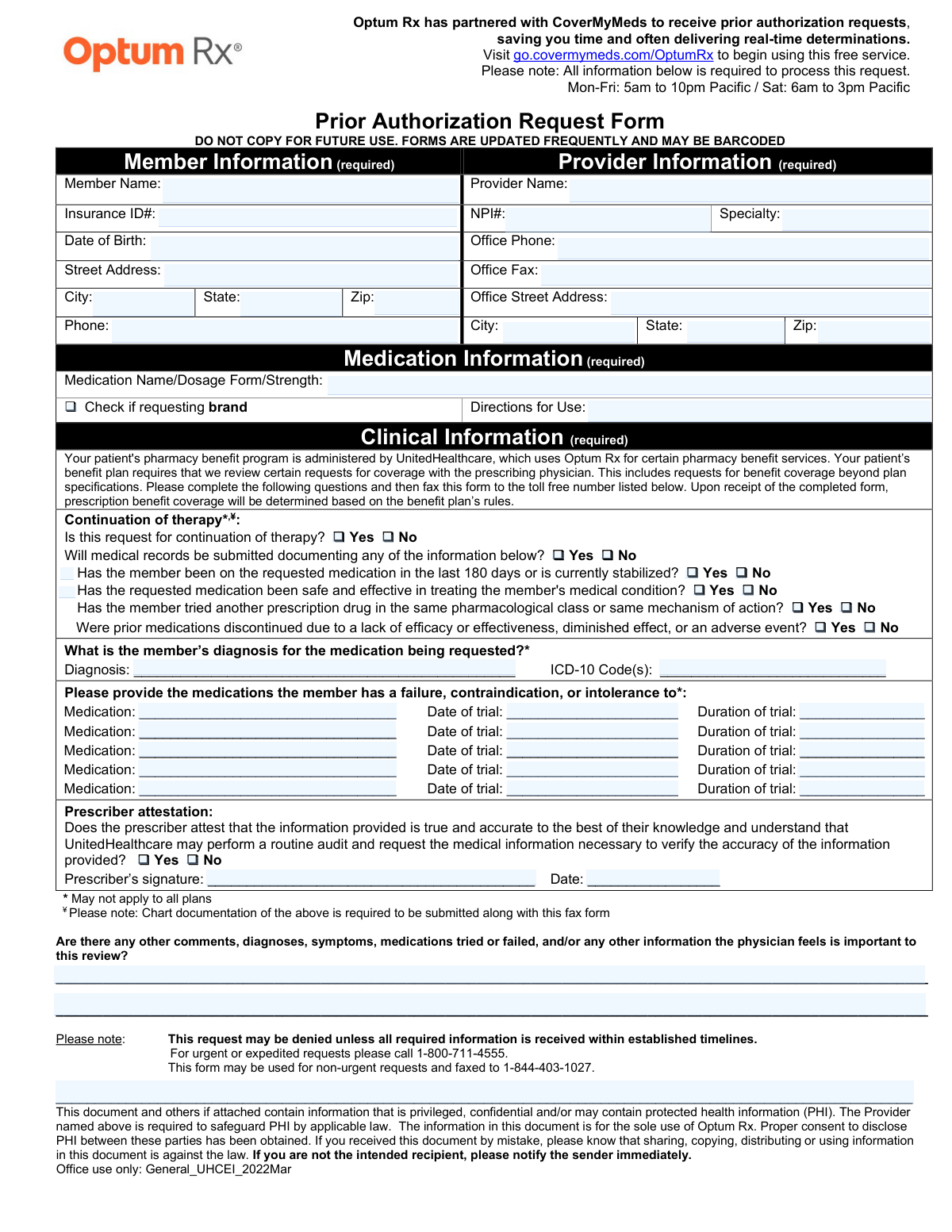
Yes! You can use AI to fill out Optum Rx / UnitedHealthcare Prior Authorization Request Form

This form is a formal request submitted by a healthcare provider to UnitedHealthcare and its pharmacy benefit manager, Optum Rx, to obtain pre-approval for a prescribed medication. It is essential for demonstrating the medical necessity of a drug that is not automatically covered under the patient's plan, requiring detailed clinical justification. Today, this form can be filled out quickly and accurately using AI-powered services like Instafill.ai, which can also convert non-fillable PDF versions into interactive fillable forms.
Our AI automatically handles information lookup, data retrieval, formatting, and form filling.
It takes less than a minute to fill out General_UHCEI_2022Mar using our AI form filling.
Securely upload your data. Information is encrypted in transit and deleted immediately after the form is filled out.

Form specifications

Form name: Optum Rx / UnitedHealthcare Prior Authorization Request Form
Number of pages: 1
Language: English
Categories: prior authorization forms, healthcare forms, CAR forms, health care forms, authorization forms, L.A. Care forms
main-image

Instafill Demo: How to fill out PDF forms in seconds with AI

How to Fill Out General_UHCEI_2022Mar Online for Free in 2026

Are you looking to fill out a GENERAL_UHCEI_2022MAR form online quickly and accurately? Instafill.ai offers the #1 AI-powered PDF filling software of 2026, allowing you to complete your GENERAL_UHCEI_2022MAR form in just 37 seconds or less.
Follow these steps to fill out your GENERAL_UHCEI_2022MAR form online using Instafill.ai:
  1. 1 Navigate to Instafill.ai and upload or select the Prior Authorization Request Form.
  2. 2 Use the AI assistant to accurately fill in the required Member Information, including name, insurance ID, and date of birth.
  3. 3 Provide the Provider Information, such as the prescriber's name, NPI number, and office contact details.
  4. 4 Enter the complete Medication Information, specifying the drug name, dosage, strength, and directions for use.
  5. 5 Complete the Clinical Information section by providing the patient's diagnosis, ICD-10 codes, and details on past medication trials.
  6. 6 Review all auto-filled fields for accuracy, then have the prescriber electronically sign and date the attestation section.
  7. 7 Securely download, print, or fax the completed form to the designated number to finalize the prior authorization request.

Our AI-powered system ensures each field is filled out correctly, reducing errors and saving you time.

Why Choose Instafill.ai for Your Fillable General_UHCEI_2022Mar Form?

Speed

Complete your General_UHCEI_2022Mar in as little as 37 seconds.

Up-to-Date

Always use the latest 2026 General_UHCEI_2022Mar form version.

Cost-effective

No need to hire expensive lawyers.

Accuracy

Our AI performs 10 compliance checks to ensure your form is error-free.

Security

Your personal information is protected with bank-level encryption.

Frequently Asked Questions About Form General_UHCEI_2022Mar

This form is used by a healthcare provider to request coverage for a specific medication from UnitedHealthcare/Optum Rx. It gathers the necessary member, provider, and clinical information to determine if the medication will be covered under the patient's benefit plan.

The prescribing physician or their office staff must complete and submit this form. The prescriber is required to sign the form to attest to the accuracy of the information provided.

For non-urgent requests, you can fax the completed form to 1-844-403-1027. Alternatively, you can use the free online service CoverMyMeds, which partners with Optum Rx for electronic submissions.

For any urgent or expedited requests, you should call 1-800-711-4555. Do not fax the form for urgent matters, as this may delay the review process.

The form states that the request may be denied if all required information is not received. To avoid delays or denial, ensure all sections for Member, Provider, Medication, and Clinical Information are fully completed.

If you are requesting a continuation of therapy, you must submit the patient's chart documentation along with this form. This documentation should support the information provided, such as the medication's safety and effectiveness for the patient.

The form explicitly states not to copy it for future use because forms are updated frequently and may be barcoded. Using an outdated version could result in your request being delayed or rejected.

You need to list the medications the patient has tried and failed, or had a contraindication or intolerance to. For each medication, you must provide the name, the date of the trial, and the duration of the trial.

Yes, the prescriber's signature is required in the attestation section. This signature confirms that the information provided is true and accurate to the best of their knowledge.

Yes, services like Instafill.ai use AI to auto-fill form fields accurately and save time. This can help reduce manual data entry and minimize errors when completing the form.

Simply upload the Prior Authorization Request Form to the Instafill.ai platform. Its AI will make the document interactive, allowing you to quickly fill in the required fields, save, and download the completed PDF for submission.

If you have a non-fillable PDF, you can use a service like Instafill.ai. It can convert flat PDFs into interactive, fillable forms that you can easily complete on your computer.

The NPI is the National Provider Identifier, a unique 10-digit ID for healthcare providers. This number should be part of your provider's standard office information and is required in the 'Provider Information' section.

Compliance General_UHCEI_2022Mar
Validation Checks by Instafill.ai

1
NPI Number Format and Validity
This check ensures the National Provider Identifier (NPI) is a 10-digit number. The NPI is a unique identifier for healthcare providers, and an incorrect or improperly formatted number will prevent proper identification and processing. If the NPI is not a 10-digit number, the submission should be rejected and the user prompted to correct the entry.
2
Member Date of Birth Validity
Validates that the Member's Date of Birth is a real calendar date and is in the past. This prevents data entry errors like future dates or non-existent dates (e.g., Feb 30). This is crucial for correctly identifying the member and verifying their eligibility for benefits. An invalid date would halt the authorization process until corrected.
3
ICD-10 Code Format Validation
This check verifies that the provided ICD-10 code(s) follow the standard format, which typically starts with a letter followed by two digits, and may include a decimal and further characters. An invalid code cannot be processed by billing or clinical review systems, making it impossible to verify the medical necessity for the requested drug. The form should be flagged for correction if the format is incorrect.
4
Required Information Section Completeness
Ensures that all three sections marked as '(required)'—Member Information, Provider Information, and Medication Information—are filled out. These sections contain the minimum data necessary to initiate a prior authorization review. If any of these core sections are incomplete, the request cannot be processed and must be returned to the sender for completion.
5
Prescriber Attestation Confirmation
This validation confirms that the 'Yes' checkbox for the Prescriber Attestation has been selected. This attestation is a legal confirmation that the provided information is accurate and is mandatory for processing. If 'No' is selected or no selection is made, the form is considered invalid and cannot be accepted for review.
6
Signature and Date Presence
Verifies that both the 'Prescriber’s signature' and the 'Date' fields are completed. A signature and date are required to authenticate the request and confirm the prescriber's intent. Missing either of these elements renders the form legally incomplete and will result in a denial or a request for more information.
7
Signature Date Logical Consistency
Checks that the Signature Date is a valid date that is not in the future. It also ensures the signature date is on or after any 'Date of trial' listed for previously failed medications. This maintains a logical timeline of events and prevents submission of forms with anachronistic or impossible dates.
8
Conditional Requirement for Prior Medication Details
If the user answers 'Yes' to 'Has the member tried another prescription drug...', this check ensures that at least one medication is listed in the 'medications the member has a failure...' section. This is a critical logical check to ensure that a claim of prior medication trials is substantiated with actual details. A failure to provide these details would result in the request being flagged as incomplete.
9
Completeness of Medication Trial Data
For every medication listed in the 'medications the member has a failure...' section, this validation ensures that the corresponding 'Date of trial' and 'Duration of trial' fields are also filled. Incomplete trial information prevents reviewers from assessing the adequacy of the prior therapy. The system should prompt the user to complete all three fields for each medication entry.
10
Phone and Fax Number Formatting
This check validates that the 'Office Phone' and 'Office Fax' numbers are in a recognizable format (e.g., 10 digits, with or without common separators like hyphens or parentheses). Correctly formatted contact information is essential for the review team to communicate with the provider's office if questions arise. An invalid format could delay the review process due to communication failures.
11
Diagnosis and ICD-10 Code Co-dependency
Ensures that if a 'Diagnosis' is provided, an 'ICD-10 Code(s)' is also provided, and vice-versa. These two fields are intrinsically linked and are both required to justify the medical necessity of the prescription. Submitting one without the other provides incomplete clinical information and will likely cause the request to be pended or denied.
12
Continuation of Therapy Logical Check
If 'Is this request for continuation of therapy?' is answered 'Yes', this validation checks if the answer to 'Has the member been on the requested medication in the last 180 days or is currently stabilized?' is also 'Yes'. A mismatch ('Yes' for continuation but 'No' for recent use) indicates a logical contradiction that requires clarification. The system should flag this inconsistency for manual review or prompt the user for correction.

Common Mistakes in Completing General_UHCEI_2022Mar

Incomplete Medication Details

Staff often enter just the medication name, omitting the required dosage form and strength (e.g., writing 'Ozempic' instead of 'Ozempic 1mg/0.74mL pen-injector'). This ambiguity forces the reviewer to make a follow-up call or deny the request for being incomplete, delaying patient care. To avoid this, always provide the full medication details as written on the prescription.

Missing or Incorrect ICD-10 Code

The form requires both a written diagnosis and the corresponding ICD-10 code, but staff may forget to look up the code or enter an outdated one. An absent or incorrect code is a common reason for denial, as it is essential for verifying the medical necessity for the requested drug. Always confirm the specific ICD-10 code for the patient's diagnosis before submission.

Incomplete Prior Medication Trial Information

When listing medications the member has already tried, it is common to omit the date or duration of the trial. This information is critical for the insurer to confirm that an adequate trial was completed before approving a non-preferred drug. Missing these details can result in the request being denied for 'insufficient information,' requiring the provider's office to refile the entire form.

Failing to Submit Required Medical Records

The form explicitly notes (with a '¥' symbol) that chart documentation is required for continuation of therapy requests. Offices frequently overlook this fine print and fail to fax the supporting clinical notes along with the form. This omission almost guarantees a denial for lack of supporting evidence, causing significant delays and administrative rework.

Missing Prescriber Signature or Date

In the rush to complete and fax paperwork, the final step of obtaining the prescriber's signature and the current date is often missed. A form without a valid, dated signature is legally incomplete and cannot be processed by the payer. This simple oversight leads to an immediate rejection and requires the form to be re-signed and re-faxed, delaying the patient's access to medication.

Using an Outdated Form

The form header explicitly warns 'DO NOT COPY FOR FUTURE USE' because forms are frequently updated with new questions or barcodes. Offices that save and reuse a local PDF copy risk submitting an obsolete version, which can lead to automatic rejection. To prevent this, always download the current form from the payer's portal. Note that if the form is a non-fillable PDF, tools like Instafill.ai can convert it into an interactive, fillable version.

Incorrect or Transposed ID Numbers

Simple data entry errors, such as transposing digits in the Member's Insurance ID# or the Provider's NPI#, are very common. An incorrect ID number will cause an immediate system mismatch, making it impossible to identify the patient or provider and leading to a rejection. Carefully double-checking all identification numbers against source documents is crucial. AI-powered form filling tools like Instafill.ai can help validate number formats to catch potential errors.

Vague 'Directions for Use'

Entering ambiguous directions like 'take as directed' is insufficient for a prior authorization review. The reviewer needs to know the exact dosage, frequency, and route (e.g., 'Inject 1mg subcutaneously once weekly') to assess appropriateness and quantity limits. Vague instructions will trigger a request for clarification, delaying the decision and frustrating both the provider and the patient.

Contradictory Checkbox Answers

A user might check 'No' for 'Is this request for continuation of therapy?' but then check 'Yes' for 'Has the member been on the requested medication in the last 180 days?'. These conflicting answers create confusion for the reviewer and can halt the process until clarification is received. It is essential to read each question carefully and ensure the answers are logically consistent to present a clear clinical case.

Forgetting the Prescriber Attestation

The form includes a mandatory attestation question that must be answered 'Yes' to confirm the accuracy of the provided information. Forgetting to check this box, which is located just above the signature line, invalidates the entire submission. This oversight is an unforced error that leads to an automatic rejection, as the payer cannot process a form where the provider has not attested to its validity.
Saved over 80 hours a year

“I was never sure if my IRS forms like W-9 were filled correctly. Now, I can complete the forms accurately without any external help.”

Kevin Martin Green

Your data stays secure with advanced protection from Instafill and our subprocessors

Robust compliance program

Transparent business model

You’re not the product. You always know where your data is and what it is processed for.

ISO 27001, HIPAA, and GDPR

Our subprocesses adhere to multiple compliance standards, including but not limited to ISO 27001, HIPAA, and GDPR.

Security & privacy by design

We consider security and privacy from the initial design phase of any new service or functionality. It’s not an afterthought, it’s built-in, including support for two-factor authentication (2FA) to further protect your account.

Fill out General_UHCEI_2022Mar with Instafill.ai

Worried about filling PDFs wrong? Instafill securely fills optum-rx-unitedhealthcare-prior-authorization-request-form forms, ensuring each field is accurate.