Yes! You can use AI to fill out Molina Healthcare Prior Authorization Request Form
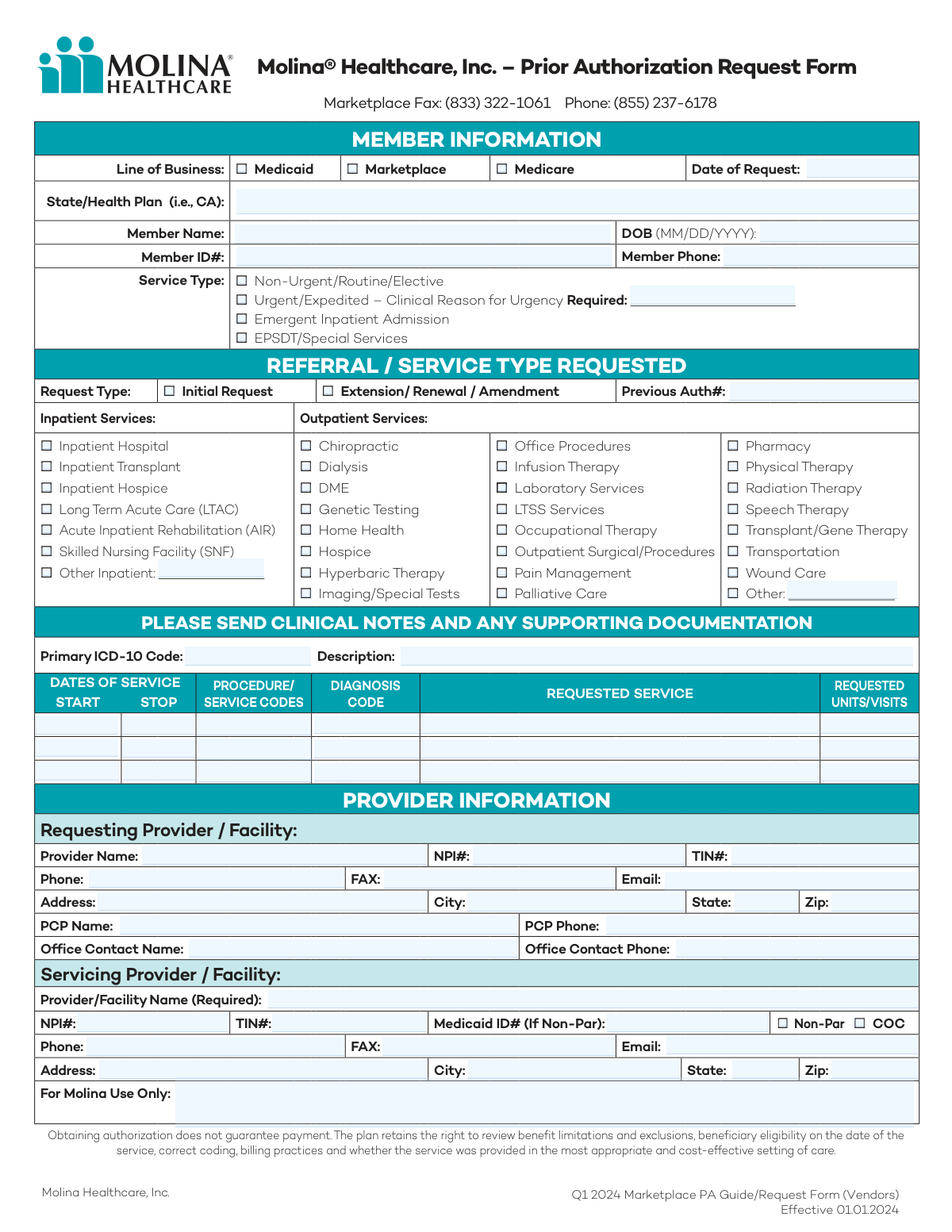
This form is a formal request submitted by healthcare providers to Molina Healthcare to obtain prior authorization (PA) for specific medical services, procedures, or medications before they are rendered to a patient. It is crucial for ensuring that the requested services are deemed medically necessary and will be covered by the patient's insurance plan, thus preventing unexpected denials and billing issues. Today, this form can be filled out quickly and accurately using AI-powered services like Instafill.ai, which can also convert non-fillable PDF versions into interactive fillable forms.
Our AI automatically handles information lookup, data retrieval, formatting, and form filling.
It takes less than a minute to fill out Molina PA Request Form using our AI form filling.
Securely upload your data. Information is encrypted in transit and deleted immediately after the form is filled out.
Form specifications
| Form name: | Molina Healthcare Prior Authorization Request Form |
| Number of pages: | 2 |
| Language: | English |
| Categories: | prior authorization forms, healthcare forms, CAR forms, health care forms, authorization forms, L.A. Care forms |
Instafill Demo: How to fill out PDF forms in seconds with AI
How to Fill Out Molina PA Request Form Online for Free in 2026
Are you looking to fill out a MOLINA PA REQUEST FORM form online quickly and accurately? Instafill.ai offers the #1 AI-powered PDF filling software of 2026, allowing you to complete your MOLINA PA REQUEST FORM form in just 37 seconds or less.
Follow these steps to fill out your MOLINA PA REQUEST FORM form online using Instafill.ai:
- 1 Navigate to Instafill.ai and upload or select the Molina Healthcare Prior Authorization Request Form.
- 2 Use the AI assistant to accurately fill in the Member Information section, including their name, ID number, date of birth, and line of business (Medicaid, Marketplace, etc.).
- 3 Specify the type of request (e.g., Initial, Urgent, Inpatient) and select the specific services being requested from the provided checklists.
- 4 Enter the details for each requested service, including start/stop dates, procedure codes (CPT), diagnosis codes (ICD-10), and the number of units/visits.
- 5 Complete the Provider Information sections for both the requesting and servicing providers, ensuring all NPI, TIN, and contact details are correct.
- 6 Review all the auto-filled information for accuracy, make any necessary corrections, and prepare to attach required clinical notes and supporting documents.
- 7 Finalize and download the completed form, then submit it to Molina Healthcare via the appropriate fax number or portal as indicated on the form.
Our AI-powered system ensures each field is filled out correctly, reducing errors and saving you time.
Why Choose Instafill.ai for Your Fillable Molina PA Request Form Form?
Speed
Complete your Molina PA Request Form in as little as 37 seconds.
Up-to-Date
Always use the latest 2026 Molina PA Request Form form version.
Cost-effective
No need to hire expensive lawyers.
Accuracy
Our AI performs 10 compliance checks to ensure your form is error-free.
Security
Your personal information is protected with bank-level encryption.
Frequently Asked Questions About Form Molina PA Request Form
This is a Prior Authorization (PA) Request Form used by healthcare providers and vendors to request approval from Molina Healthcare for services before they are rendered to a member. It helps ensure the requested service is medically necessary and covered.
The document contains two separate forms: one for general medical services and another for Behavioral Health (BH) services. You should use the form that corresponds to the type of service you are requesting authorization for.
You will need the member's complete information (Name, DOB, Member ID), details of the service being requested (procedure and diagnosis codes), and information for both the requesting and servicing providers (Name, NPI, TIN).
You must submit all relevant clinical notes and any other supporting documentation that justifies the medical necessity of the requested service. The form explicitly states this is required for processing.
For Marketplace plans, you can fax the completed form and all supporting clinical documentation to (833) 322-1061. For questions, you can call the provided phone number, (855) 237-6178.
If the request is urgent, check the "Urgent/Expedited" box in the Service Type section. You must also provide a specific clinical reason explaining why the request requires expedited handling.
The 'Requesting Provider' is the healthcare professional initiating the prior authorization request. The 'Servicing Provider' is the professional or facility that will actually perform the service for the member.
To request an extension, check the "Extension/Renewal/Amendment" box under the "Request Type" section. You must also provide the authorization number from the previous approval in the "Previous Auth#" field.
No, obtaining a prior authorization does not guarantee payment. Molina still reviews factors like member eligibility on the date of service, benefit limitations, and correct billing practices before issuing payment.
If the specific service is not listed, check the "Other" box in the appropriate section (Inpatient or Outpatient) and write in the name of the service. Be sure to include the correct procedure and diagnosis codes in the table below.
Yes, you can use AI-powered services like Instafill.ai to help complete this form. These tools can accurately auto-fill patient, provider, and service information, which helps save time and reduce errors.
To use Instafill.ai, you would upload the Molina PA form to their platform. The AI will make the form fillable online and help you auto-fill the required fields with your saved information, after which you can download the completed PDF.
If you have a non-fillable or 'flat' PDF, you can use a service like Instafill.ai. It can convert the non-fillable PDF into an interactive, fillable form that you can easily complete on your computer.
Compliance Molina PA Request Form
Validation Checks by Instafill.ai
1
Conditional Previous Authorization Number Requirement
This check ensures that if the 'Extension/Renewal/Amendment' checkbox is selected under 'Request Type', the 'Previous Auth#' field must be populated. This is critical for linking the new request to an existing authorization, allowing for proper tracking and review continuity. If this validation fails, the system should prompt the user to enter the previous authorization number before proceeding.
2
Conditional Clinical Urgency Justification
Validates that if the 'Urgent/Expedited' service type is selected, the corresponding text field for 'Clinical Reason for Urgency' is not empty. This justification is a regulatory and clinical requirement to prioritize a request ahead of routine processing. A failed validation would prevent submission and require the user to provide a clinical reason for the urgency.
3
Member Date of Birth Format and Plausibility
This validation confirms that the 'DOB' field is entered in the correct MM/DD/YYYY format and represents a valid date that is in the past. It prevents data entry errors and ensures the member's age can be accurately calculated for eligibility and clinical appropriateness checks. An invalid format or a future date would trigger an error message requiring correction.
4
NPI Number Format Validation
This check verifies that both the Requesting and Servicing Provider 'NPI#' fields contain exactly 10 digits. The National Provider Identifier is a standard, unique identifier, and an incorrect format can lead to claim denials and provider identification failures. The system should reject any entry that does not meet the 10-digit numeric format.
5
TIN Number Format Validation
Ensures that the 'TIN#' (Taxpayer Identification Number) for both the Requesting and Servicing providers is a 9-digit number. This is essential for financial processing, billing, and provider verification. If the entered value is not exactly 9 digits, the form should display an error and prevent submission until corrected.
6
Service Dates Logical Consistency
This validation checks each line item in the 'DATES OF SERVICE' table to ensure the 'STOP' date is on or after the 'START' date. This prevents logical impossibilities in service date ranges, which would cause processing and payment errors. If a stop date is before a start date, the user must correct the entry.
7
Date of Request Validity
Verifies that the 'Date of Request' is a valid date and is not set to a future date. This ensures the integrity of the request timeline and prevents post-dating or future-dating of submissions. The system should default to the current date and flag any manual entry that is in the future.
8
Primary ICD-10 Code Format
This check validates that the 'Primary ICD-10 Code' field follows the standard format for ICD-10 codes (e.g., starts with a letter, is 3-7 characters long, and may contain a decimal). An invalid code format would prevent proper clinical review and automated processing. The system should check the pattern of the code and flag it if it doesn't conform to ICD-10 standards.
9
Required Servicing Provider Name
This check enforces the completion of the 'Servicing Provider/Facility Name' field, which is explicitly marked as 'Required' on the form. This information is fundamental to know who will perform the service and where it will be rendered. A submission attempt with this field left blank should be blocked with a clear error message.
10
Email Address Format Validation
This validation ensures that any email address entered in the provider information sections (Requesting and Servicing) follows a standard format (e.g., '[email protected]'). This is important for ensuring that communication regarding the authorization can be successfully delivered. An invalid format would prompt the user with an error message to correct the email address.
11
Line of Business Selection Completeness
This check ensures that at least one checkbox under 'Line of Business' (Medicaid, Marketplace, or Medicare) has been selected. This information is critical for routing the request to the correct department and applying the correct benefit rules. If no selection is made, the form cannot be submitted, and the user will be prompted to choose a line of business.
12
Conditional 'Other' Service Description
Validates that if the 'Other Inpatient' or 'Other' outpatient checkbox is selected, the corresponding text field to describe the service is filled out. This prevents ambiguous requests where the specific service is not defined. If the checkbox is ticked but the description is empty, the system should require the user to provide the service details.
13
Requested Units/Visits Data Type
This check ensures that the 'REQUESTED UNITS/VISITS' field in the service table contains a positive numerical value. This data is essential for determining the scope of the authorization and for utilization management. Any non-numeric or zero/negative values should be rejected, and the user should be prompted to enter a valid number of units.
14
Core Member Information Completeness
Verifies that the essential member identification fields—'Member Name', 'DOB', and 'Member ID#'—are all populated. Without this core information, the plan cannot identify the member to verify eligibility or review their clinical history. The form submission should be blocked if any of these three fields are empty.
Common Mistakes in Completing Molina PA Request Form
Users often check the 'Extension/Renewal/Amendment' box but forget to enter the corresponding 'Previous Auth#'. This happens due to oversight when rushing to complete the form. Without this number, the reviewer cannot link the new request to the existing case, leading to processing delays or an outright rejection while they request the missing information.
A frequent error is selecting 'Urgent/Expedited' service type without providing a detailed 'Clinical Reason for Urgency'. Payers have strict criteria for what constitutes an urgent request, and failing to provide a compelling clinical justification will likely result in the request being downgraded to a routine processing timeline. Always clearly and concisely explain why the member's health would be jeopardized by a standard review timeframe.
Providers often mistakenly enter the same information for both the 'Requesting Provider' and the 'Servicing Provider', even when services are performed at a different facility or by a specialist. The 'Servicing Provider/Facility Name' is marked as required and must be accurate for claims processing. This error can lead to payment denials or misdirected payments, so it's crucial to verify and enter the correct details for both entities if they are different.
Entering invalid, outdated, or non-specific ICD-10 or CPT/HCPCS codes in the service details table is a major cause of denials. This often occurs when staff are not using the latest codebooks or fail to code to the highest level of specificity. Inaccurate codes can lead to automatic rejections by the payer's system, requiring a full resubmission and delaying patient care. AI-powered tools like Instafill.ai can help by validating codes against current databases.
The form explicitly states, 'PLEASE SEND CLINICAL NOTES AND ANY SUPPORTING DOCUMENTATION.' Despite this, submissions often arrive without the necessary clinicals to prove medical necessity. This is one of the most common reasons for denial, as the reviewer has no information to justify approving the service. Always compile and attach all relevant patient charts, test results, and notes with the form submission.
An error occurs when the 'Primary ICD-10 Code' at the top of the section does not align with the specific 'Diagnosis Code' listed next to a procedure in the service table. Payers' systems check for medical necessity by ensuring the diagnosis justifies the requested procedure. A mismatch suggests a data entry error or lack of justification, which can trigger a denial or a request for additional information.
Users frequently enter dates in the wrong format (e.g., YYYY-MM-DD instead of MM/DD/YYYY) or enter an illogical range, such as a 'STOP' date that occurs before the 'START' date. These simple data entry mistakes can cause the form to be rejected by automated systems, forcing a manual correction and resubmission. Using a tool like Instafill.ai can help prevent these errors by auto-formatting dates correctly and flagging logical inconsistencies.
The provided information shows two distinct forms: a general Prior Authorization (PA) form and a Behavioral Health (BH) PA form. Submitting a request for psychological testing on the general form, or for a DME on the BH form, will cause it to be routed to the wrong department. This results in significant delays as the form must be re-routed or, more likely, rejected, requiring the provider to start the process over with the correct form.
Leaving the NPI or TIN fields blank, or transposing digits, is a critical error. These numbers are the primary identifiers for providers in the healthcare system and are essential for verification and payment. An incorrect NPI or TIN will almost certainly lead to the request being pended or denied. Double-check these numbers for accuracy before submission to avoid unnecessary administrative hurdles.
When a requested service is not listed, providers check the 'Other' box but often forget to write a description in the adjacent text field. This leaves the reviewer with no information about what is being requested, making an approval impossible. If you select 'Other', you must provide a clear and complete description of the service or procedure to avoid an immediate request for clarification, which delays the authorization process.
Saved over 80 hours a year
“I was never sure if my IRS forms like W-9 were filled correctly. Now, I can complete the forms accurately without any external help.”
Kevin Martin Green
Your data stays secure with advanced protection from Instafill and our subprocessors

Robust compliance program
Transparent business model
You’re not the product. You always know where your data is and what it is processed for.
ISO 27001, HIPAA, and GDPR
Our subprocesses adhere to multiple compliance standards, including but not limited to ISO 27001, HIPAA, and GDPR.
Security & privacy by design
We consider security and privacy from the initial design phase of any new service or functionality. It’s not an afterthought, it’s built-in, including support for two-factor authentication (2FA) to further protect your account.
Fill out Molina PA Request Form with Instafill.ai
Worried about filling PDFs wrong? Instafill securely fills molina-healthcare-prior-authorization-request-form forms, ensuring each field is accurate.