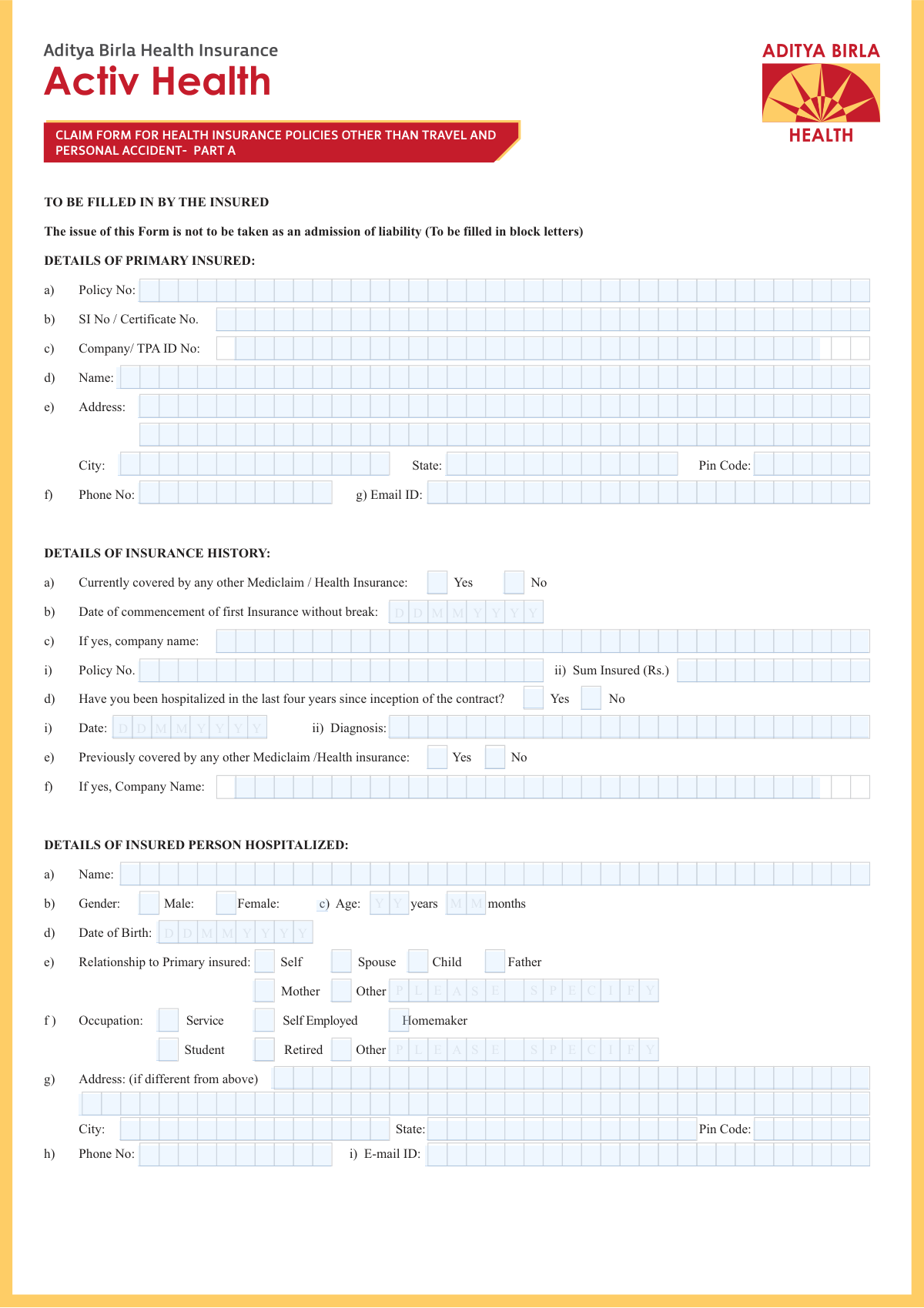
Yes! You can use AI to fill out Standard Health Insurance Claim Form - Part B

This form is a standardized document used by an insured individual to file a claim for medical expenses with their health insurance company. It captures essential information about the policyholder, the patient, the hospitalization details, and the costs incurred, which is necessary for the insurer to process the reimbursement. Today, this form can be filled out quickly and accurately using AI-powered services like Instafill.ai, which can also convert non-fillable PDF versions into interactive fillable forms.
Our AI automatically handles information lookup, data retrieval, formatting, and form filling.
It takes less than a minute to fill out Health Insurance Claim Form using our AI form filling.
Securely upload your data. Information is encrypted in transit and deleted immediately after the form is filled out.

Form specifications

Form name: Standard Health Insurance Claim Form - Part B
Number of pages: 8
Language: English
Categories: insurance forms, insurance claim forms, health insurance forms, VA claim forms, health forms
main-image

Instafill Demo: How to fill out PDF forms in seconds with AI

How to Fill Out Health Insurance Claim Form Online for Free in 2026

Are you looking to fill out a HEALTH INSURANCE CLAIM FORM form online quickly and accurately? Instafill.ai offers the #1 AI-powered PDF filling software of 2026, allowing you to complete your HEALTH INSURANCE CLAIM FORM form in just 37 seconds or less.
Follow these steps to fill out your HEALTH INSURANCE CLAIM FORM form online using Instafill.ai:
  1. 1 Navigate to Instafill.ai and upload or select the Health Insurance Claim Form.
  2. 2 Provide the primary insured's details, including name, address, and policy number.
  3. 3 Enter the details of the hospitalized person, such as their name, date of birth, and relationship to the primary insured.
  4. 4 Fill in the hospitalization details, including the hospital's name, dates of admission and discharge, and the diagnosis.
  5. 5 Itemize the claimed expenses, detailing costs for hospitalization, pre/post-hospitalization care, and ambulance charges.
  6. 6 Use the AI assistant to review all entered information for accuracy and check off the list of submitted documents like bills and discharge summaries.
  7. 7 Sign the declaration, download the completed form, and submit it to your insurance company or TPA with all required attachments.

Our AI-powered system ensures each field is filled out correctly, reducing errors and saving you time.

Why Choose Instafill.ai for Your Fillable Health Insurance Claim Form Form?

Speed

Complete your Health Insurance Claim Form in as little as 37 seconds.

Up-to-Date

Always use the latest 2026 Health Insurance Claim Form form version.

Cost-effective

No need to hire expensive lawyers.

Accuracy

Our AI performs 10 compliance checks to ensure your form is error-free.

Security

Your personal information is protected with bank-level encryption.

Frequently Asked Questions About Form Health Insurance Claim Form

This form is used to file a claim for reimbursement of medical expenses from your health insurance provider after a hospitalization.

The primary policyholder (insured) or a representative should complete this form on behalf of the person who was hospitalized.

The 'Primary Insured' is the person who owns the health insurance policy. The 'Insured Person Hospitalized' is the patient who received medical care, who can be the policyholder or a dependent like a spouse or child.

Yes, you must fill out the 'Insured Person Hospitalized Details' section. You can simply check the 'Self' box for the relationship to the primary insured.

You must attach the hospital's main bill, payment receipts, discharge summary, all investigation reports, and doctor's prescriptions. Use the checklist on the form to ensure you have included all necessary documents.

This refers to cases that require legal proceedings, such as injuries from a road traffic accident or assault. If your case is medico-legal, you must also submit the Medico Legal Case (MLC) report and the Police FIR.

Enter the costs in the 'Pre-hospitalization Expenses' and 'Post-hospitalization Expenses' fields and specify the number of days. Be sure to attach all original bills and receipts for these expenses.

You must declare it in the 'Insurance History Details' section by checking 'Yes' for 'Currently covered by any other Mediclaim/Health Insurance' and providing the requested policy details.

This refers to medical treatment taken at home for an illness or injury that would normally require hospitalization. You should only claim for this if your policy covers it and the situation meets the insurer's criteria.

You can use services like Instafill.ai, which can convert flat, non-fillable PDFs into interactive forms that you can easily fill out on your computer.

Yes, AI-powered services like Instafill.ai can help by accurately auto-filling your personal and policy information, which saves time and helps prevent common errors.

Upload the form to the Instafill.ai platform, and its AI will identify all the fields. You can then type in your information or use the auto-fill feature to populate details from your saved profile before downloading the completed form.

Compliance Health Insurance Claim Form
Validation Checks by Instafill.ai

1
Ensures Discharge Date is not before Admission Date
This validation checks that the 'Discharge Date' is on or after the 'Admission Date'. This is a critical logical check to ensure the integrity of the hospitalization period data. If this validation fails, the form submission should be rejected, and the user prompted to correct the dates, as a discharge cannot precede an admission.
2
Validates Email Address Format
This check verifies that the 'Email ID' fields for both the primary insured and the hospitalized person follow the standard email format (e.g., '[email protected]'). Correct email formatting is essential for communication regarding the claim status. A failed validation will prevent form submission and require the user to enter a valid email address.
3
Conditional Requirement for 'Other' Relationship
This rule ensures that if the 'Relationship – Other' checkbox is selected, the corresponding text field specifying the relationship is not left empty. This is necessary to capture complete and accurate information about the patient's relationship to the primary insured. If the checkbox is ticked but the text field is blank, the user will be prompted to provide the specific relationship.
4
Conditional Requirement for 'Other' Occupation
This validation confirms that if the 'Occupation – Other' checkbox is selected, the text field to specify the occupation is filled out. This information is important for underwriting and claim assessment. A failure to provide the specific occupation when 'Other' is selected will result in an error message, requiring the user to complete the field.
5
Verifies Sum of Treatment Expenses
This check calculates the sum of individual expense fields ('Hospitalization Expenses', 'Pre-hospitalization Expenses', 'Post-hospitalization Expenses', 'Ambulance Charges', etc.) and verifies that it matches the 'Total Claim Amount (Rs.)'. This ensures the financial data is consistent and accurate, preventing miscalculations in the claim amount. If the amounts do not tally, the form will flag an error, asking the user to review and correct the expense entries.
6
Validates PIN Code Format
This rule checks that the 'Pin Code' fields contain only numeric characters and adhere to the expected length for the region (e.g., 6 digits in India). A valid PIN code is crucial for verifying the address and for any physical correspondence. An invalid entry will trigger an error, prompting the user to enter a correct postal code.
7
Enforces Mutually Exclusive Checkbox Selections
This validation applies to pairs of 'Yes'/'No' checkboxes, such as 'Currently covered by any other Mediclaim/Health Insurance'. It ensures that a user cannot select both 'Yes' and 'No' for the same question. This prevents contradictory data entry and ensures a clear response is recorded. If both are selected, the system will show an error and require the user to choose only one option.
8
Mandatory Fields for Concurrent Insurance Coverage
This rule is triggered if 'Currently covered by any other Mediclaim/Health Insurance - Yes' is checked. It validates that the 'Policy Number', 'Sum Insured (Rs.)', and 'First Insurance Company Name' fields in the Insurance History section are all filled. This information is vital for the coordination of benefits between insurers. Failure to provide these details will block submission and prompt the user to complete the required fields.
9
Consistency Check between Age and Date of Birth
This validation compares the patient's 'Date of Birth' with the entered 'Age (years)' to ensure they are consistent. The system calculates the age from the date of birth and flags any significant discrepancy with the manually entered age. This helps prevent data entry errors and ensures the patient's age, a key factor in insurance, is accurate. If a mismatch is found, the user will be asked to verify and correct the information.
10
Mandatory Fields for Medico-Legal Cases
This check ensures that if 'If Medico legal: Yes' is selected, the user must also make a selection for the 'Reported to police (Yes / No)' field. Medico-legal cases require specific documentation and reporting procedures. Failing to specify if the police were notified will result in an incomplete claim, so the form will prompt the user for this information.
11
Mandatory Police Report Attachment Status for Reported Cases
If a user indicates an incident was 'Reported to police — Yes', this validation ensures they also specify whether the 'MLC Report & Police FIR attached' is 'Yes' or 'No'. This is crucial for processing claims related to accidents or other legal matters, as these documents are often required. The form will prevent submission until this status is confirmed.
12
Requires Reason for Hospitalization
This validation ensures that at least one of the checkboxes under 'Hospitalization Due' ('Injury', 'Illness', or 'Maternity') is selected. The reason for hospitalization is fundamental to a claim and determines which policy benefits apply. If no reason is selected, the form submission will be blocked with a message requiring the user to specify the cause of hospitalization.
13
Validates Phone Number Format
This check verifies that the 'Phone Number' fields contain a valid sequence of numbers, potentially with a country code, and meet a standard length. A correct phone number is essential for the insurance company to contact the insured for claim-related queries. If the format is incorrect, the system will display an error and ask the user to provide a valid contact number.
14
Mandatory Details for Prior Hospitalization
This rule activates if 'Hospitalized in the last four years since inception of the contract - Yes' is checked. It validates that the 'Hospitalization Date' and 'Diagnosis' fields are filled out. This information is critical for understanding the patient's medical history and assessing the current claim. If these fields are left blank after selecting 'Yes', the user will be prompted to provide the necessary details.

Common Mistakes in Completing Health Insurance Claim Form

Failing to Fill Required Conditional Fields

The form has many fields that are only required if a specific checkbox is selected, such as providing other insurance details only if 'Yes' is checked. People often check the 'Yes' box but then forget to provide the corresponding details like the policy number. This omission leads to an incomplete application and requires the insurance company to follow up, delaying claim processing. To avoid this, carefully review each section after checking a 'Yes' box to ensure all subsequent required information is provided.

Mismatch Between Total Claim Amount and Itemized Expenses

A frequent error is when the 'Total Claim Amount (Rs.)' does not equal the sum of the individual costs listed (Hospitalization, Pre-hospitalization, Post-hospitalization, etc.). This often happens due to manual calculation errors or last-minute changes to one field without updating the total. Such discrepancies raise red flags and will cause the processing to be paused for clarification. Always double-check your math to ensure all figures add up correctly before submitting.

Selecting 'Other' Without Providing a Description

When a person's relationship or occupation isn't listed, they may correctly check the 'Other' box but then forget to write the specific details in the corresponding text field. This leaves critical information missing, forcing the claims processor to send the form back for completion and significantly delaying the claim. Always ensure that if you check an 'Other' box, you immediately fill in the required specification in the associated field.

Inconsistent or Incomplete Address Details

The form asks for the primary insured's address and, if different, the hospitalized person's address. People sometimes forget to fill out the second address section even when it's different, or they provide incomplete details like a missing Pin Code. This can cause important correspondence to be lost or delayed. Confirm if the addresses are different and, if so, fill out all fields for both sections completely and accurately.

Mishandling the Medico-Legal Case Section

If hospitalization is due to an accident or other event involving the police, it's a medico-legal case. People often get confused, either checking 'If Medico legal: Yes' but failing to attach the required MLC Report and Police FIR, or not realizing their case is medico-legal at all. Missing these mandatory documents will halt the process until they are submitted. Always clarify with the hospital if the case is medico-legal and ensure you check the correct boxes and attach all necessary reports.

Providing Incomplete Prior Insurance History

When applicants indicate they have other health insurance, they frequently omit crucial details like the 'Policy Number', 'Sum Insured', or the 'Date of Commencement of First Insurance'. This information is vital for the insurer to understand the continuity of coverage and assess the claim correctly. Leaving these fields blank despite checking 'Yes' for prior coverage will result in follow-up queries and delays. Before filling the form, gather all documents from previous or current policies to ensure you can provide complete information.

Neglecting or Incorrectly Filling the Document Checklist

The 'Claim Documents Submitted - Check List' is often ignored or filled out hastily. People may forget to check the boxes for the documents they've attached, or check boxes for documents they haven't included. This forces the claims team to manually verify every attachment, slowing down the initial review. To expedite your claim, use the checklist to ensure you have all required documents, and then carefully tick each box corresponding to an attached document.

Entering Invalid Contact Information

Simple typos in the 'Email ID' or 'Phone Number' fields are extremely common but have significant consequences. An incorrect email or phone number means the insurance company cannot contact the claimant for clarifications, leading to major delays. Carefully proofread your contact details before submission. AI-powered form fillers like Instafill.ai can help by validating the format of email addresses and phone numbers to catch these errors automatically.

Submitting a Form with Illegible Handwriting

Many insurance forms are distributed as non-fillable PDFs, forcing users to print and fill them out by hand. Illegible handwriting, especially for critical data like names and policy numbers, is a primary cause of processing errors and delays. To avoid this, you can use a tool like Instafill.ai, which can convert a flat PDF into a digitally fillable version, ensuring all entries are perfectly legible and professional.

Incorrectly Entering Age in Years and Months

The form asks for age in both completed years and additional months, which is particularly important for infants. People often get confused, either entering the total age in months in the 'years' field or leaving the 'months' field blank for a baby who is 0 years and 8 months old. This can affect policy eligibility and claim calculations. Ensure you enter the number of full years in the 'Age (years)' field and any remaining months in the 'Age (months)' field.
Saved over 80 hours a year

“I was never sure if my IRS forms like W-9 were filled correctly. Now, I can complete the forms accurately without any external help.”

Kevin Martin Green

Your data stays secure with advanced protection from Instafill and our subprocessors

Robust compliance program

Transparent business model

You’re not the product. You always know where your data is and what it is processed for.

ISO 27001, HIPAA, and GDPR

Our subprocesses adhere to multiple compliance standards, including but not limited to ISO 27001, HIPAA, and GDPR.

Security & privacy by design

We consider security and privacy from the initial design phase of any new service or functionality. It’s not an afterthought, it’s built-in, including support for two-factor authentication (2FA) to further protect your account.

Fill out Health Insurance Claim Form with Instafill.ai

Worried about filling PDFs wrong? Instafill securely fills standard-health-insurance-claim-form-part-b forms, ensuring each field is accurate.