Yes! You can use AI to fill out Form SA296, Claim for a Commonwealth Seniors Health Card

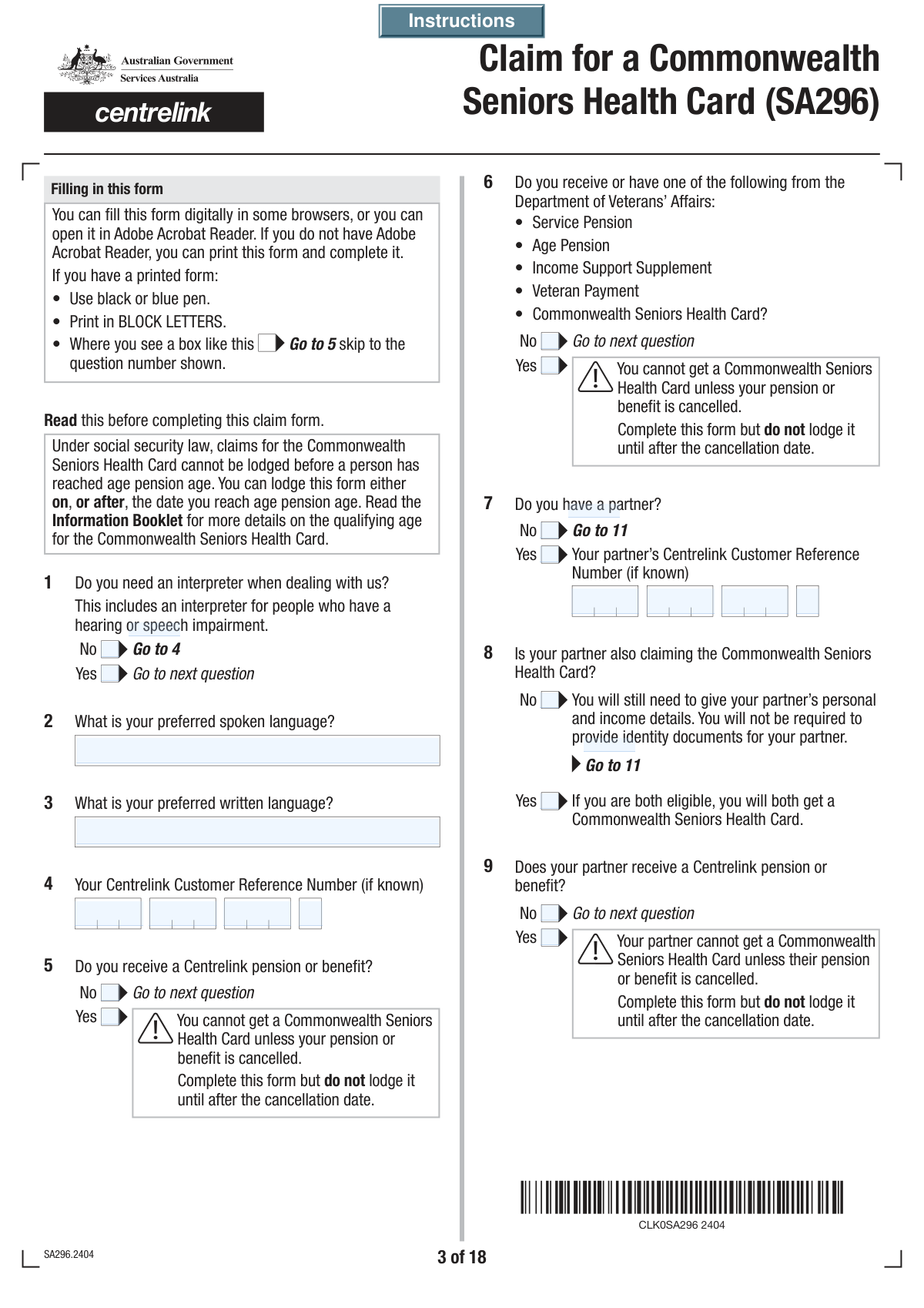
Form SA296, Claim for a Commonwealth Seniors Health Card, is an application used by Australian residents who have reached the Age Pension age to apply for a concession card. This card is crucial for self-funded retirees as it helps lower the cost of prescription medicines and may offer other government concessions. The form requires comprehensive details about the applicant's (and their partner's) identity, residency status, and a detailed income assessment to determine eligibility. Today, this form can be filled out quickly and accurately using AI-powered services like Instafill.ai, which can also convert non-fillable PDF versions into interactive fillable forms.
SA296 is part of the CAR forms, health claim forms, health forms and VA claim forms categories on Instafill.
Our AI automatically handles information lookup, data retrieval, formatting, and form filling.
It takes less than a minute to fill out SA296 using our AI form filling.
Securely upload your data. Information is encrypted in transit and deleted immediately after the form is filled out.

Form specifications

Form name: Form SA296, Claim for a Commonwealth Seniors Health Card
Number of fields: 508
Number of pages: 18
Filled form examples: Form SA296 Examples
Language: English
main-image

Instafill Demo: How to fill out PDF forms in seconds with AI

How to Fill Out SA296 Online for Free in 2026

Are you looking to fill out a SA296 form online quickly and accurately? Instafill.ai offers the #1 AI-powered PDF filling software of 2026, allowing you to complete your SA296 form in just 37 seconds or less.
Follow these steps to fill out your SA296 form online using Instafill.ai:
  1. 1 Navigate to Instafill.ai and upload the SA296 form, or select it from the library of templates.
  2. 2 Use the AI assistant to accurately fill in your personal details, including your name, date of birth, contact information, and Centrelink Customer Reference Number.
  3. 3 Complete the sections on your residency status, travel history, and relationship status. If you have a partner, provide their corresponding details as prompted.
  4. 4 Provide detailed financial information for the relevant financial year, including taxable income, investments, and superannuation for both yourself and your partner. The AI can help calculate totals and ensure all required fields are completed.
  5. 5 Answer questions about any dependent children and provide details for account-based income streams if applicable.
  6. 6 Review the checklist of required supporting documents. Instafill.ai will help you identify which documents you need to attach based on your answers.
  7. 7 Carefully review all the information pre-filled by the AI for accuracy. Once confirmed, digitally sign the declaration to finalize your application before lodging it with Services Australia.

Our AI-powered system ensures each field is filled out correctly, reducing errors and saving you time.

Why Choose Instafill.ai for Your Fillable SA296 Form?

Speed

Complete your SA296 in as little as 37 seconds.

Up-to-Date

Always use the latest 2026 SA296 form version.

Cost-effective

No need to hire expensive lawyers.

Accuracy

Our AI performs 10 compliance checks to ensure your form is error-free.

Security

Your personal information is protected with bank-level encryption.

Frequently Asked Questions About Form SA296

This form is an application to claim the Commonwealth Seniors Health Card, which provides concessions on healthcare costs and medicines for eligible self-funded retirees.

You should complete this form if you have reached Age Pension age, meet Australian residency rules, are not receiving a Centrelink pension or DVA benefit, and your income is below the specified limit.

Have your personal details, Centrelink Customer Reference Number (CRN), Tax File Number (TFN), and detailed income information for the required financial year ready. If you have a partner, you will need their information as well.

No, you can use this single form to apply together by selecting 'Yes' to the question 'Is your partner also claiming?'. You must provide your partner's personal and financial details in the designated sections, and they will also need to sign the form.

No, the form states that you cannot get a Commonwealth Seniors Health Card if you are currently receiving a Centrelink pension or benefit. Your existing payment would need to be cancelled to become eligible for this card.

This is a type of retirement income product, and its value is included in the income test using a method called 'deeming'. You must provide details for any such products you or your partner own so your eligibility can be correctly assessed.

The form has a specific section to declare if your income in the current financial year will be lower. You will need to provide an estimate of your current year's income and may be required to supply documents to support this change.

You may need to provide documents like proof of identity, your Australian Taxation Office Notice of Assessment, and details of any account-based income streams (e.g., form SA330). A checklist is provided near the end of the form to help you identify exactly what is required for your situation.

Yes, the form has a section where you can indicate that you need an interpreter. You can also specify your preferred spoken and written language to ensure you receive assistance when dealing with the agency.

Providing your TFN is voluntary, but it is recommended as it helps to correctly identify you and verify your income details with the Australian Taxation Office (ATO). Not providing it could delay the processing of your claim.

You must provide details about your residency and travel history, including countries you have lived in and the date you last entered Australia. This information is used to confirm you meet the residency requirements for the card.

Yes, services like Instafill.ai use AI to help you accurately auto-fill form fields, which can save you significant time and reduce the chance of errors.

You can use a service like Instafill.ai to easily fill out this form on your computer or mobile device. Simply upload the form, and the platform will make it interactive for you to complete and sign electronically.

If you have a non-fillable PDF, you can upload it to Instafill.ai. The service uses AI to convert flat PDFs into interactive, fillable forms that you can complete online without needing to print.

Compliance SA296
Validation Checks by Instafill.ai

1
Partner Details Conditional Requirement
This check ensures that if the user indicates they have a partner by selecting 'Yes (Partner Status)', all mandatory partner-related fields are subsequently filled out. This includes the partner's name, date of birth, and income details. If 'No (Partner Status)' is selected, these fields should be disabled or cleared to prevent inconsistent data submission.
2
Interpreter Language Requirement
Validates that if 'Yes (Interpreter Requirement)' is checked, the 'Preferred Spoken Language' and/or 'Preferred Written Language' fields are not empty. This is crucial for ensuring the agency can communicate effectively with the applicant. If this validation fails, the user should be prompted to specify their language preference before proceeding.
3
Date of Birth Validity
This validation confirms that the 'Day of Birth', 'Month of Birth', and 'Year of Birth' fields combine to form a valid calendar date that is in the past. It also checks if the calculated age meets the eligibility criteria for the Commonwealth Seniors Health Card. An invalid or future date, or an age outside the eligible range, would result in an error and prevent submission.
4
Centrelink CRN Format Validation
This check verifies that the combined parts of the 'Centrelink Customer Reference Number' (CRN) adhere to the official format, which is typically 9 numbers followed by a letter. It ensures the data entered is structurally correct, which is essential for matching the applicant to their record in the Centrelink system. Failure to provide a correctly formatted CRN would prevent automated processing and require manual correction.
5
Total Income Calculation Verification
This validation performs a calculation to ensure the value entered in 'Your Total Income' is the correct sum of the individual income components (Taxable Income, Foreign Income, Net Investment Losses, Employer Benefits, Super Contributions). This cross-check prevents mathematical errors and ensures the income assessment is based on accurate totals. A mismatch would trigger an error, requiring the user to review and correct the income figures.
6
Dependent Children Count Consistency
This check ensures that if the user answers 'Yes' to having dependent children, the number entered in 'Number of Dependent Children' matches the number of child detail sections that are filled out. For example, if the number is '2', the system must find completed details for 'Child 1' and 'Child 2'. This prevents discrepancies between the stated number of dependents and the details provided, ensuring all children are accounted for.
7
Citizenship Path Logic
This validation enforces the conditional logic related to Australian citizenship. If the user selects 'Yes (Australian Citizenship Status)' (indicating they were born in Australia), subsequent questions about country of birth, visa details, and citizenship grant dates must be skipped or disabled. Conversely, if 'No' is selected, these sections become mandatory, ensuring the correct information is collected based on the applicant's citizenship history.
8
Relationship Date Chronology
This check verifies that any provided relationship date (e.g., 'Date Married or Reconciled') is logically sound. The date must be after the applicant's date of birth and, if applicable, their partner's date of birth. It also cannot be a future date. This prevents the entry of impossible dates and ensures the timeline of life events is accurate.
9
Mutually Exclusive Option Selection
This validation applies to all pairs of 'Yes'/'No' checkboxes, such as 'Partner Status' or 'Travel History Outside Australia'. It ensures that for each question, exactly one of the two options is selected. The system should prevent a state where both or neither checkbox is ticked, which would make the applicant's answer ambiguous and halt processing.
10
Other' Field Dependency
This check ensures that whenever a user selects an 'Other' option from a list (e.g., 'Other Title', 'Other (Reason For Not Living Together)'), the corresponding free-text field for providing details is mandatory. If the 'Other' option is not selected, the text field should be empty or disabled. This rule guarantees that a choice of 'Other' is always accompanied by a necessary explanation.
11
Australian Postcode Format
This validation ensures that all postcode fields, such as 'Postcode (Permanent Address)' and 'Postal Postcode', contain a valid 4-digit number. This is critical for mail delivery and for verifying the applicant's address details against official databases. An incorrectly formatted postcode would be rejected to ensure data quality and prevent communication failures.
12
Income Lodgement Reason Requirement
This check validates that if a user selects 'No (Your Income Tax Return Lodgement Status)', they must also select a reason from the subsequent options (e.g., 'Income was below tax free threshold'). This ensures that a declaration of not lodging a tax return is properly justified as per the form's requirements. Failure to provide a reason would leave a critical information gap for income assessment.
13
Financial Year Sequence Validation
This check ensures the 'Financial Year Start' and 'Financial Year End' fields represent a valid and sequential financial year. The end year must be exactly one year after the start year (e.g., Start: 2022, End: 2023). This prevents illogical date ranges and ensures income data is reported for the correct period, which is fundamental for eligibility assessment.
14
Signature Date Logic
This validation ensures the 'Day of Signature', 'Month of Signature', and 'Year of Signature' form a valid date that is not in the future. The signature date is a legal confirmation of the information's accuracy at a specific point in time. A future date would invalidate the declaration, so the form cannot be submitted until a current or past date is entered.

Common Mistakes in Completing SA296

Incorrectly Entering Segmented ID Numbers

The form requires multi-part numbers like the Centrelink Customer Reference Number (CRN) and Tax File Number (TFN) to be entered into separate fields. Applicants often try to paste the entire number into the first box or misalign the segments, causing data validation failures. This leads to processing delays as the system cannot match their identity or financial records. To avoid this, carefully enter each segment of the number into its corresponding box as it appears on your official card or document. AI-powered tools like Instafill.ai can automatically parse and correctly place these segmented numbers, preventing such errors.

Ignoring Conditional Logic and Skipping Sections

This form uses extensive conditional logic (e.g., 'Fill only if Yes is Yes', 'Q23GoToQ31'). A common mistake is either answering questions that should be skipped or skipping required sections based on a previous answer. For example, an applicant might check 'No' to having a partner but then proceed to fill in partner details later in the form, creating contradictory data. This confusion can result in an incomplete application or require manual correction by a case officer, significantly delaying the claim. It is crucial to read the instructions for each question carefully. If the form is a non-fillable PDF, tools like Instafill.ai can convert it to a smart, fillable version that automatically shows or hides relevant sections based on your answers.

Miscalculating Total and Assessable Income

The income section (Questions 72 & 76) requires applicants to sum multiple components, including taxable income, foreign income, net investment losses, and superannuation contributions. People frequently make arithmetic errors or misunderstand what to include, such as incorrectly subtracting investment losses instead of adding them back for assessment purposes. An incorrect income declaration can lead to a wrongful rejection, underpayment, or an overpayment that results in a future debt. To prevent this, use a calculator and double-check the instructions for each income type. AI form-fillers can perform these calculations automatically, ensuring accuracy.

Forgetting to Attach Required Supporting Documents

The checklist at the end of the form (Question 80) lists numerous potential documents that must be provided based on answers throughout the application, such as identity confirmation, income tax Notices of Assessment, and details of income stream products. Applicants often overlook this section or forget to attach one or more necessary documents. An application submitted without all required proof cannot be processed and will be marked as incomplete, halting the entire process until the documents are received. Before submitting, meticulously review your answers and the checklist to gather and include all relevant paperwork.

Confusing Applicant and Partner Information

The form contains nearly identical, parallel sections for the applicant and their partner (e.g., personal details, income, citizenship). It is very easy for applicants to get disoriented in the long document and accidentally enter their own information into the partner's section or vice versa. This data mix-up can cause significant issues with identity verification and income assessment for both individuals. To avoid this, take your time and consistently check the heading of each section to confirm whether you are filling out 'Your' details or 'Your partner's' details. Using a tool like Instafill.ai can help by managing separate profiles for the applicant and partner, reducing the risk of data crossover.

Incomplete or Inaccurate Visa and Residency History

Questions regarding citizenship, country of birth, visa history on arrival, and subsequent visa changes (Questions 23-30) are highly detailed and complex. Applicants, especially those with a long or complicated immigration history, may forget exact dates, visa subclasses, or the sequence of events. Providing incomplete or inaccurate information can trigger further investigation and requests for evidence, significantly delaying the assessment of eligibility. It is vital to refer to passports, visa grant notices, and citizenship certificates to ensure all dates and details are precise.

Failing to Disclose All 'Other Names'

The form asks for any other names the applicant or their partner has been known by, including maiden names, previous married names, aliases, or adoptive names. People sometimes forget to include a previous name or don't think a certain name is relevant, but these details are crucial for identity verification and cross-referencing government records. Omitting a name can lead to a mismatch in the system and cause the application to be flagged for manual review or rejection. Always list all legal names you have used to ensure a smooth verification process.

Incorrectly Reporting Account-Based Income Streams

Question 73 requires specific details about account-based income streams, including the product provider, reference number, and commencement date, which are used for income deeming rules. Applicants often struggle to locate this information on their financial statements or provide incomplete details, such as just the provider's name without a reference number. Incorrect or missing information prevents the correct application of income tests, leading to processing delays or an inaccurate assessment. Before filling this section, have your latest superannuation or pension statement on hand to copy the details exactly.

Contradictory Answers on Relationship Status

The form has multiple questions about partnership: 'Do you have a partner?', 'What is your current relationship status?', and 'Do you live with your partner?'. A common error is providing conflicting answers, such as stating 'No' to having a partner at the beginning but then selecting 'Separated' or 'Divorced' in the detailed relationship status section. Such contradictions create ambiguity about the applicant's true circumstances and will halt the application pending clarification. Ensure your answers across all related questions are consistent with your current situation.

Omitting Postal Address When Different from Permanent Address

The form provides separate sections for a permanent address and a postal address. Applicants whose postal address is different (e.g., a PO Box) sometimes forget to fill out the postal address section, assuming the permanent address is sufficient. This can result in important correspondence, including the health card itself, being sent to the wrong address and getting lost. If you use a different address for mail, you must complete the 'Postal Address' fields to ensure you receive all communications.
Saved over 80 hours a year

“I was never sure if my IRS forms like W-9 were filled correctly. Now, I can complete the forms accurately without any external help.”

Kevin Martin Green

Your data stays secure with advanced protection from Instafill and our subprocessors

Robust compliance program

Transparent business model

You’re not the product. You always know where your data is and what it is processed for.

ISO 27001, HIPAA, and GDPR

Our subprocesses adhere to multiple compliance standards, including but not limited to ISO 27001, HIPAA, and GDPR.

Security & privacy by design

We consider security and privacy from the initial design phase of any new service or functionality. It’s not an afterthought, it’s built-in, including support for two-factor authentication (2FA) to further protect your account.

Fill out SA296 with Instafill.ai

Worried about filling PDFs wrong? Instafill securely fills form-sa296-claim-for-a-commonwealth-seniors-health-card forms, ensuring each field is accurate.