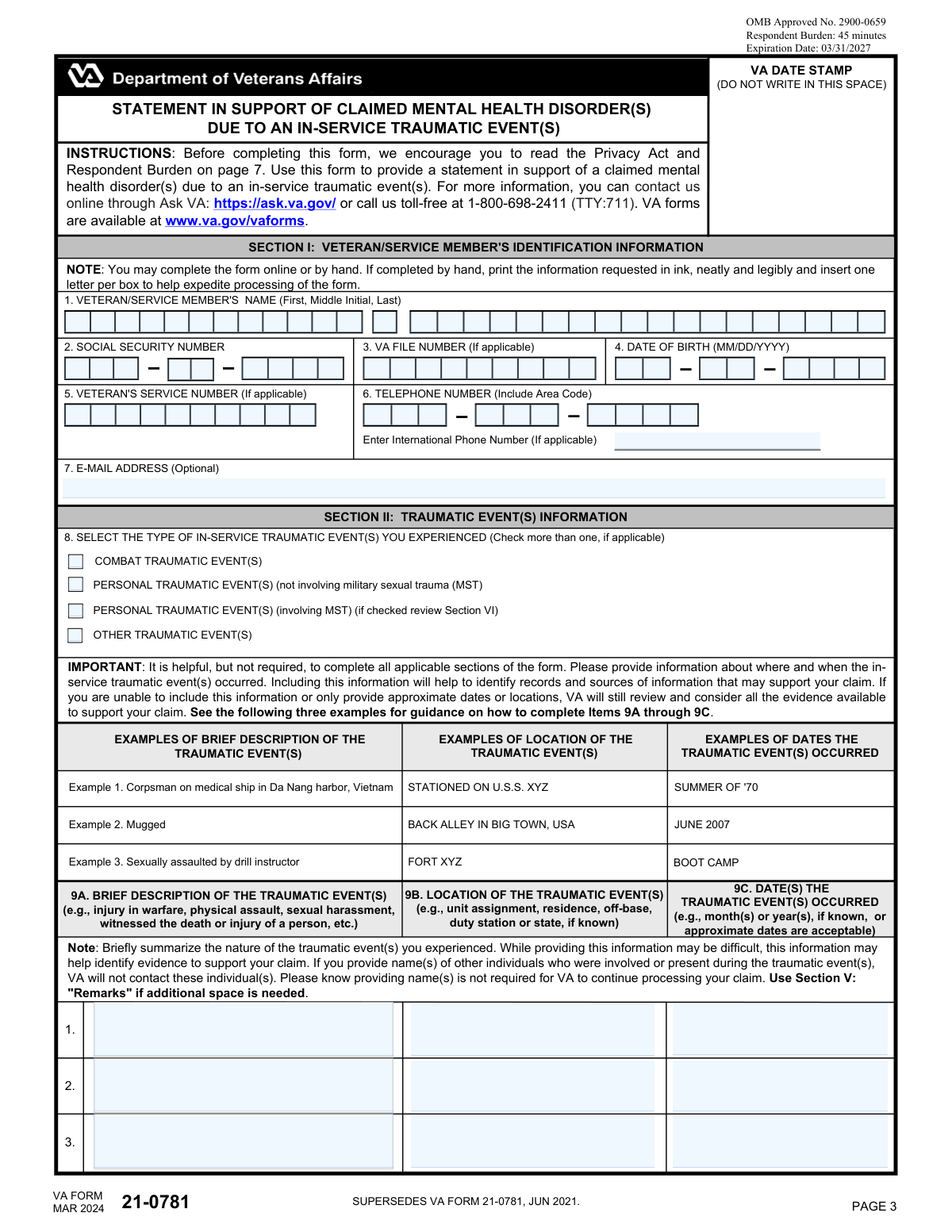
Yes! You can use AI to fill out VA Form 21-0781, Statement in Support of Claimed Mental Health Disorder(s) Due to an In-Service Traumatic Event(s)
VA Form 21-0781, Statement in Support of Claimed Mental Health Disorder(s) Due to an In-Service Traumatic Event(s), is a Department of Veterans Affairs document used by veterans to provide detailed information about traumatic events experienced during military service that have led to mental health conditions. This statement is a critical component of a disability claim, as it helps the VA understand the circumstances of the trauma and its impact on the veteran's life. Today, this form can be filled out quickly and accurately using AI-powered services like Instafill.ai, which can also convert non-fillable PDF versions into interactive fillable forms.
Our AI automatically handles information lookup, data retrieval, formatting, and form filling.
It takes less than a minute to fill out VA Form 21-0781 using our AI form filling.
Securely upload your data. Information is encrypted in transit and deleted immediately after the form is filled out.
Form specifications
| Form name: | VA Form 21-0781, Statement in Support of Claimed Mental Health Disorder(s) Due to an In-Service Traumatic Event(s) |
| Number of pages: | 5 |
| Language: | English |
| Categories: | mental health forms |
Instafill Demo: How to fill out PDF forms in seconds with AI
How to Fill Out VA Form 21-0781 Online for Free in 2026
Are you looking to fill out a VA FORM 21-0781 form online quickly and accurately? Instafill.ai offers the #1 AI-powered PDF filling software of 2026, allowing you to complete your VA FORM 21-0781 form in just 37 seconds or less.
Follow these steps to fill out your VA FORM 21-0781 form online using Instafill.ai:
- 1 Navigate to Instafill.ai and upload or select VA Form 21-0781.
- 2 Use the AI assistant to accurately fill in your personal identification details in Section I, including your name, Social Security Number, and VA file number.
- 3 Carefully complete Section II by describing the traumatic event(s), including the location and date, providing as much detail as you can recall.
- 4 In Section III, document any behavioral changes you experienced after the event and identify potential sources of evidence that can support your claim.
- 5 Provide information about any treatment you have received for the condition in Section IV, including facility names and dates.
- 6 Review all entered information for accuracy, then securely e-sign and date the form in Section VII before downloading or submitting it as directed by the VA.
Our AI-powered system ensures each field is filled out correctly, reducing errors and saving you time.
Why Choose Instafill.ai for Your Fillable VA Form 21-0781 Form?
Speed
Complete your VA Form 21-0781 in as little as 37 seconds.
Up-to-Date
Always use the latest 2026 VA Form 21-0781 form version.
Cost-effective
No need to hire expensive lawyers.
Accuracy
Our AI performs 10 compliance checks to ensure your form is error-free.
Security
Your personal information is protected with bank-level encryption.
Frequently Asked Questions About Form VA Form 21-0781
This form is used by veterans and service members to provide a detailed statement supporting a claim for a mental health condition, like PTSD, that resulted from a traumatic event during military service.
You should fill out this form if you are filing a VA disability claim for a mental health disorder and believe it was caused by a specific in-service traumatic event, such as combat, personal assault, or military sexual trauma (MST).
That's okay; you are not required to know the exact details. Provide as much information as you can, as even approximate dates and general locations can help the VA find records to support your claim.
The VA understands that traumatic events are often not officially reported. Documenting behavioral changes, like shifts in work performance or increased anxiety, can serve as indirect evidence that the event occurred and had a lasting impact.
You should still complete and submit this form. The VA will consider other sources of evidence you provide, such as descriptions of behavioral changes or statements from friends, family, or clergy who knew you at the time.
This section gives you the option to let the VBA inform your VA healthcare providers about upcoming claim events, like C&P exams. This is intended to ensure you have support, but consenting is voluntary and does not affect your claim's outcome.
The VA can access your records from VA Medical Centers (VAMC) and military treatment facilities (MTF). For private medical records or Vet Center records, you must provide consent by completing and submitting VA Forms 21-4142 and 21-4142a.
Mail your completed and signed form to the Department of Veterans Affairs, Compensation Intake Center, at P.O. Box 4444, Janesville, WI 53547-4444.
Yes, Section II has space to describe up to three separate traumatic events. If you need to provide information on more events, you can use the 'Remarks' section (Section V).
Yes, the information you submit is confidential as per federal law (38 U.S.C. 5701). The VA will only disclose it for routine uses authorized under the Privacy Act, such as administering your benefits.
If you cannot sign, an alternate signer may do so if a VA Form 21-0972 is attached or on file. A court-appointed representative or an individual with Power of Attorney (POA) can also sign in the designated sections.
Yes, services like Instafill.ai use AI to help you accurately auto-fill form fields with your information. This can save you time and help you avoid common mistakes.
Simply upload the VA Form 21-0781 PDF to the Instafill.ai platform. Their service will make the document interactive, allowing you to type your answers directly into the fields before downloading the completed form.
If you have a non-fillable or 'flat' PDF, you can use a service like Instafill.ai to convert it into an interactive, fillable form. This allows you to easily type your information instead of printing and filling it out by hand.
Compliance VA Form 21-0781
Validation Checks by Instafill.ai
1
Ensures Veteran Identification is Complete
This check verifies that the veteran's first name, last name, Social Security Number, and date of birth in Section I are all filled out. This information is critical for correctly identifying the claimant and locating their records within the VA system. If this information is missing, the form cannot be processed, leading to significant delays or rejection of the claim.
2
Validates Social Security Number Format
This check ensures that the Social Security Number (Item 2) is entered as a complete 9-digit number. It validates that all three parts of the SSN are present and contain only numeric characters. An incorrect or incomplete SSN will prevent the VA from matching the form to the correct veteran's file, halting the entire claim process until it is corrected.
3
Validates Date of Birth Chronology
This check confirms that the Date of Birth (Item 4) is a valid, real date and that it occurs before the signature date and any event or treatment dates listed on the form. This is important for establishing a logical timeline and ensuring data integrity. A future or invalid date would indicate a data entry error and must be corrected before submission.
4
Requires Traumatic Event Details if Type is Selected
This validation ensures that if any checkbox is marked in Item 8 (Type of In-Service Traumatic Event), at least one corresponding event is described in the table in Item 9 (Description, Location, Date). The purpose of the form is to detail these events, so selecting a type without providing details makes the submission incomplete. Failure to provide details will result in a request for more information, delaying the claim.
5
Enforces Signature Requirement
This check verifies that the form has been signed in one of the required sections: Veteran's Signature (16A), Alternate Signer's Signature (19A), or POA/Authorized Representative's Signature (20A). A signature is required to certify that the information provided is true and correct. A form without any signature is legally invalid and will be rejected.
6
Manages Alternate and POA Signature Logic
This validation rule ensures that if the Veteran's Signature (16A) is left blank, either the Alternate Signer (Section IX) or the POA (Section X) section is completed, but not both. This prevents ambiguity about who is certifying the form's contents. If the veteran does not sign, a single, clear alternate authority must be established for the form to be valid.
7
Conditional Requirement for Witness Signatures
This check activates if the veteran signs with an 'X' in Item 16A. It requires that both witness signature blocks in Section VIII (Items 17 and 18) are fully completed. This is a legal requirement to validate a signature made by mark, ensuring the veteran's intent is properly witnessed. The form will be considered improperly signed if the witness information is missing.
8
Validates Signature Date is Not in the Future
This check ensures that any signature date entered on the form (Items 16B, 19B, 20B) is not a future date. A signature certifies the state of affairs at the time of signing, so a future date is logically impossible and indicates an error. The system should reject any future dates to maintain the legal validity of the document.
9
Enforces Conditional Logic for MST Notification
This validation ensures that the consent options in Section VI (Item 15) can only be selected if the 'Personal Traumatic Event(s) (involving MST)' box is checked in Item 8. This section is explicitly noted as only applying to MST-related claims. This check prevents irrelevant or confusing data from being submitted and ensures the claimant's privacy choices are handled correctly.
10
Requires Report Type if Official Report is Indicated
This check verifies that if 'YES' is selected in Item 11 ('Was an official report filed?'), then at least one of the subsequent report type checkboxes (Restricted, Unrestricted, Police, Other) is also selected. Simply stating a report was filed without specifying the type provides incomplete information for the VA to locate it. The form will be considered incomplete if a report type is not specified.
11
Requires Treatment Details if Treatment is Indicated
This validation ensures that if 'YES' is selected in Item 13A ('Have you received treatment?'), then at least one treatment location type is checked in 13B and details are provided in the grid (13C/13D). This information is essential for the VA to gather supporting medical evidence for the claim. Failure to provide these details after indicating treatment was received will result in a follow-up request for information.
12
Prevents Conflicting Treatment Date Entries
For each treatment entry in Section IV, this check ensures a user cannot simultaneously enter a date in Item 13D and check the 'Don't have date' box in Item 13E for the same entry. These two options are mutually exclusive and entering both creates a data conflict. The system should enforce that only one of these options can be selected per treatment row to ensure data clarity.
13
Requires Specification for 'Other' Checkboxes
This check verifies that if the 'Other' checkbox is selected in Item 11 (Report Type) or Item 12 (Sources of Evidence), the corresponding text field to specify the 'Other' information is not left blank. Selecting 'Other' without providing an explanation leaves the information incomplete and unusable for processing. The validation prompts the user to provide the necessary clarification.
14
Validates Chronology of Event and Treatment Dates
This check compares the dates of traumatic events (Item 9C) with the dates of treatment (Item 13D). It ensures that any treatment dates listed occurred on or after the dates of the traumatic events. Treatment for an event cannot logically precede the event itself, and a mismatch indicates a data entry error that needs correction for the claim's timeline to be coherent.
Common Mistakes in Completing VA Form 21-0781
In Section II, Item 9A, veterans may provide descriptions that are too brief (e.g., "saw combat") or omit key details, often due to the difficulty of recalling or writing about the trauma. This lack of specificity makes it challenging for the VA to identify corroborating evidence in service records. To avoid this, provide a concise but clear summary of what happened, who was involved (if comfortable), and the direct outcome, as this information is crucial for establishing the in-service stressor. Using a tool like Instafill.ai can help structure these narratives by providing clear prompts for the necessary information.
Many applicants leave Item 9B (Location) and 9C (Date) blank if they cannot recall the exact information. The form explicitly states that approximate dates (e.g., "Summer of '70") and general locations (e.g., "Boot Camp at Fort XYZ") are acceptable and helpful. Leaving these fields empty can hinder the VA's ability to search for records, potentially delaying or weakening the claim. It is always better to provide an estimated timeframe or location than to provide nothing at all.
In Item 8, selecting the wrong event type—such as checking only "Combat" when a "Personal Traumatic Event (involving MST)" also occurred—can lead to the VA applying the wrong evidentiary standards. MST-related claims, for example, have different requirements for corroboration than combat-related claims. This mistake can cause significant processing delays or an improper evaluation of the evidence. Carefully review the definitions and select all applicable boxes to ensure your claim is routed and reviewed correctly from the start.
In Section IV, if a veteran indicates they received treatment from a "Private Healthcare Provider" or "VA Vet Center," they must also submit VA Forms 21-4142 and 21-4142a to authorize the VA to obtain these records. A very common mistake is checking the box on this form but failing to submit the separate consent forms. This brings the evidence-gathering process to a halt until the required forms are received, causing major delays in the claim decision.
In Section III, Item 10, applicants often check boxes indicating behavioral changes (e.g., "Increased/decreased use of leave") but fail to provide explanatory details in the corresponding space (Item 10B). Without context, the VA cannot connect the behavior to the traumatic event. For a stronger claim, briefly explain the change, such as, "Began taking leave to avoid morning formation after the incident." This detail helps establish a clear pattern of behavior linked to the stressor.
Forgetting to sign and date the form in Section VII (Item 16A/16B) is a simple but critical error that completely invalidates the submission. The VA cannot process an unsigned statement. This often happens due to oversight when rushing to complete the paperwork. Always double-check that you have physically or digitally signed and dated the form before submitting it. AI-powered tools like Instafill.ai can flag missing signature fields to prevent this common mistake.
Sections IX and X are frequently misused. A spouse or family member may sign as an Alternate Signer without attaching the required VA Form 21-0972, or a representative may sign as a POA without a valid VA Form 21-22 on file. These errors will cause the VA to reject the form, as the signature is not legally valid. Ensure the correct supporting documentation is already on file or submitted along with this form if someone other than the veteran is signing.
Veterans often leave the 'Remarks' section (Section V) blank, viewing it as purely optional. This is a missed opportunity to provide crucial context, clarify answers from previous sections, or list additional traumatic events if more than three occurred. Use this space to explain complex situations or provide details that don't fit neatly into the structured fields. A well-utilized remarks section can significantly strengthen a claim by painting a fuller picture for the VA reviewer.
When listing treatment facilities in Section IV, Item 13C, applicants may provide partial information, such as just a doctor's name or a clinic name without a city and state. This makes it nearly impossible for the VA to locate and request the medical records, even with a consent form. To avoid delays, provide the full name of the facility, its complete address (street, city, state, zip code), and a phone number if possible.
The form explicitly requests printing information neatly in ink, one letter per box. However, many handwritten submissions are difficult to read, leading to data entry errors for names, Social Security Numbers, and other critical identifiers. These errors can cause significant delays, misidentification, or rejection of the form. To prevent this, complete the form online if possible. If filling by hand, take your time and write clearly. Tools like Instafill.ai can convert this non-fillable PDF into an easily fillable version, eliminating handwriting issues entirely.
For claims involving MST, veterans may not fully understand the choice presented in Item 15 regarding VHA notification. They might ignore the section or make a choice without realizing its implications—that consenting places a non-specific indicator in their VHA medical record. This can lead to anxiety if a provider intuits the meaning of the indicator. It's important to carefully read the description and make an informed decision based on your personal comfort level with VHA providers being aware of upcoming claim-related events.
Saved over 80 hours a year
“I was never sure if my IRS forms like W-9 were filled correctly. Now, I can complete the forms accurately without any external help.”
Kevin Martin Green
Your data stays secure with advanced protection from Instafill and our subprocessors

Robust compliance program
Transparent business model
You’re not the product. You always know where your data is and what it is processed for.
ISO 27001, HIPAA, and GDPR
Our subprocesses adhere to multiple compliance standards, including but not limited to ISO 27001, HIPAA, and GDPR.
Security & privacy by design
We consider security and privacy from the initial design phase of any new service or functionality. It’s not an afterthought, it’s built-in, including support for two-factor authentication (2FA) to further protect your account.
Fill out VA Form 21-0781 with Instafill.ai
Worried about filling PDFs wrong? Instafill securely fills va-form-21-0781-statement-in-support-of-claimed-mental-health-disorders-due-to-an-in-service-traumatic-events-1 forms, ensuring each field is accurate.