Yes! You can use AI to fill out ACORD 25 (2016/03), Certificate of Liability Insurance
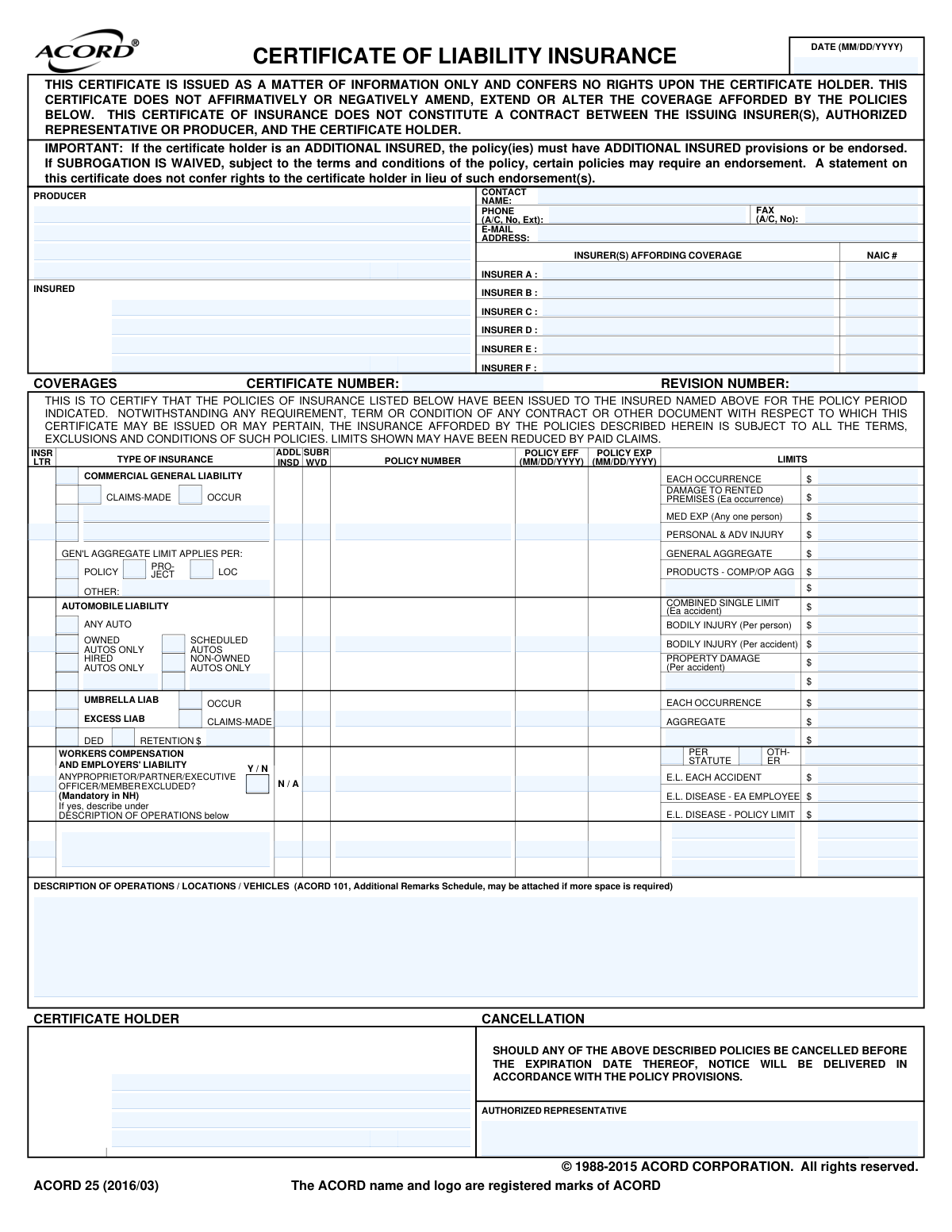
ACORD 25 (Certificate of Liability Insurance) is an industry-standard form that provides a snapshot of liability insurance policies issued to a named insured, including insurers, policy numbers, effective/expiration dates, and coverage limits (e.g., general liability, auto liability, umbrella/excess, and workers’ compensation). It is issued for informational purposes to a certificate holder (such as a client or landlord) to demonstrate that required insurance is in place. The form does not change the underlying policies and does not grant rights to the certificate holder; items like Additional Insured or Waiver of Subrogation typically require policy endorsements. It is important because many contracts require a current COI to confirm compliance with insurance requirements before work begins or access is granted.
Our AI automatically handles information lookup, data retrieval, formatting, and form filling.
It takes less than a minute to fill out ACORD 25 using our AI form filling.
Securely upload your data. Information is encrypted in transit and deleted immediately after the form is filled out.
Form specifications
| Form name: | ACORD 25 (2016/03), Certificate of Liability Insurance |
| Number of pages: | 1 |
| Filled form examples: | Form ACORD 25 Examples |
| Language: | English |
| Categories: | insurance forms, ACORD forms |
Instafill Demo: filling out a legal form in seconds
How to Fill Out ACORD 25 Online for Free in 2026
Are you looking to fill out a ACORD 25 form online quickly and accurately? Instafill.ai offers the #1 AI-powered PDF filling software of 2026, allowing you to complete your ACORD 25 form in just 37 seconds or less.
Follow these steps to fill out your ACORD 25 form online using Instafill.ai:
- 1 Enter the certificate date and complete the Producer section (agency name, address, phone, email, and contact details).
- 2 Fill in the Insured’s legal name and mailing address exactly as shown on the insurance policies.
- 3 List each insurer providing coverage (Insurer A–F), including the insurer name and NAIC number where applicable.
- 4 For each coverage line (Commercial General Liability, Automobile Liability, Umbrella/Excess Liability, Workers’ Compensation/Employers’ Liability), enter the policy number, effective date, expiration date, and applicable limits.
- 5 Indicate key status fields such as Additional Insured (ADDL INSD) and Subrogation Waived (SUBR WVD) as required, ensuring endorsements exist when needed.
- 6 Complete the Description of Operations/Locations/Vehicles section with the certificate holder’s required wording (project name, location, additional insured language, waiver wording, primary/noncontributory, etc.), attaching ACORD 101 if more space is needed.
- 7 Enter the Certificate Holder’s name and address, review the cancellation notice language, and add the Authorized Representative signature/name before generating and delivering the certificate.
Our AI-powered system ensures each field is filled out correctly, reducing errors and saving you time.
Why Choose Instafill.ai for Your Fillable ACORD 25 Form?
Speed
Complete your ACORD 25 in as little as 37 seconds.
Up-to-Date
Always use the latest 2026 ACORD 25 form version.
Cost-effective
No need to hire expensive lawyers.
Accuracy
Our AI performs 10 compliance checks to ensure your form is error-free.
Security
Your personal information is protected with bank-level encryption.
Frequently Asked Questions About Form ACORD 25
This is a Certificate of Liability Insurance (ACORD 25) used to provide evidence that the insured has certain insurance policies in force during the listed policy period. It summarizes coverages and limits but is not the insurance policy itself.
A business, contractor, vendor, or tenant typically provides it when a client, landlord, or project owner requests proof of insurance. The certificate is usually issued by the insured’s insurance agent/broker (the Producer).
No. The form states it is for information only and does not amend, extend, or alter coverage. Actual coverage is governed by the policy terms, exclusions, and conditions.
You’ll need the insured’s legal name and address, the producer’s contact information, and the insurance company names with NAIC numbers. This identifies who is insured, who issued the certificate, and which insurers provide coverage.
The certificate holder is the person or organization requesting proof of insurance (for example, a general contractor or property manager). Enter their full legal name and mailing address exactly as requested.
A certificate holder only receives the certificate; it does not automatically grant coverage. An Additional Insured is added to the policy by endorsement or policy wording, which must be in place for them to have insured status.
Mark the “ADDL INSD” indicator for the applicable coverage line(s) and describe the Additional Insured wording in the Description of Operations/Locations/Vehicles section. The form notes that the policy must include Additional Insured provisions or an endorsement.
It indicates the insurer waives its right to recover costs from another party after a claim, when allowed by the policy. The form warns that many policies require an endorsement, so the waiver must be supported by the actual policy/endorsement.
Common lines include Commercial General Liability, Automobile Liability, Umbrella/Excess Liability, and Workers Compensation/Employers Liability. Each line shows the insurer letter, policy number, effective/expiration dates, and limits.
Select the boxes that match the insured’s auto coverage (e.g., Any Auto, Hired Autos Only, Non-Owned Autos Only, Scheduled Autos). Then list the combined single limit and/or bodily injury/property damage limits as shown on the auto policy.
“OCCUR” generally covers incidents that happen during the policy period, regardless of when the claim is made. “CLAIMS-MADE” generally covers claims made during the policy period (subject to policy terms), so the correct box must match the policy.
Enter the Workers Comp policy information and the Employers’ Liability limits (Each Accident, Disease—Policy Limit, Disease—Each Employee). If asked whether any proprietor/partner/executive officer/member is excluded, answer based on the policy and describe details in the Description section if “Yes.”
Use this area to add required contract wording such as Additional Insured status, waiver of subrogation, primary and noncontributory language, project name/location, or specific operations. If more space is needed, attach an ACORD 101 Additional Remarks Schedule.
The cancellation wording states notice will be delivered in accordance with the policy provisions. This means notice requirements depend on the policy and applicable law; the certificate itself does not guarantee advance notice to the certificate holder.
The certificate is typically signed/issued by the Producer or an authorized representative of the insurer/agency in the “Authorized Representative” area, along with the date. The insured usually does not sign this form unless their agent requires it for internal processing.
Compliance ACORD 25
Validation Checks by Instafill.ai
1
Certificate Issue Date Format and Validity (MM/DD/YYYY)
Validates that the certificate DATE field is present and matches the required MM/DD/YYYY format, including a real calendar date (e.g., no 02/30/2026). This is important because the certificate’s issuance date is used for compliance tracking and determining whether coverage evidence is current. If validation fails, the submission should be rejected or routed for correction because downstream systems may mis-sort or misinterpret the certificate timing.
2
Producer Contact Information Completeness (Name, Phone, Email/Address)
Ensures the PRODUCER section includes a producer name and at least one reliable contact method (phone or email), plus address when required by business rules. Producer contact details are critical for verification, endorsements, and cancellation/coverage questions. If missing or incomplete, the form should be flagged as non-compliant and held until contact details are provided.
3
Phone Number Format Validation (Producer/Contact)
Checks that all phone fields (CONTACT phone and PRODUCER phone) follow an accepted format (e.g., 10-digit US numbers with optional country code) and do not contain invalid characters. Correct phone formatting prevents failed dial attempts and improves automated parsing and normalization. If invalid, the system should prompt for correction and avoid using the number for notifications.
4
Fax Number Format Validation (If Provided)
Validates that the FAX field, if populated, matches an accepted fax/phone number format and is not identical to clearly invalid placeholders (e.g., 000-000-0000). Fax numbers are often used for legacy certificate delivery and carrier communications. If invalid, the system should either clear the field (if optional) or require correction (if the workflow depends on fax delivery).
5
Email Address Syntax and Domain Validation
Ensures the E-MAIL field contains a syntactically valid email address (local@domain) and rejects obvious invalid entries (missing '@', spaces, or trailing punctuation). Email is frequently used for certificate delivery and follow-up, so invalid emails cause delivery failures and compliance delays. If validation fails, the submission should be flagged and the user required to correct the email or provide an alternate contact method.
6
Insured Entity Identification Completeness
Checks that the INSURED section includes the insured’s legal name and address (or other required identifying details per implementation). The insured identity is the anchor for all policy matching and compliance checks, and missing/partial identity can lead to attaching the certificate to the wrong account. If incomplete, the system should block submission or route to manual review depending on risk tolerance.
7
Insurer Entries Require Both Name and NAIC Number (When Listed)
Validates that for each INSURER A–F entry that is used, both the insurer NAME and NAIC # are present and properly formatted (NAIC typically numeric). This is important for unambiguous carrier identification and for integrating with carrier/market databases. If an insurer is listed without NAIC or with a non-numeric NAIC, the record should be flagged because carrier matching and reporting may fail.
8
Certificate Number and Revision Number Format/Presence
Ensures CERTIFICATE NUMBER is present and conforms to allowed character rules (e.g., alphanumeric and limited punctuation), and that REVISION NUMBER (if required) is numeric or matches the organization’s revision scheme. These identifiers are used for deduplication, version control, and audit trails. If invalid or missing, the system should prevent issuance/acceptance to avoid duplicate or untraceable certificates.
9
Policy Effective/Expiration Date Format and Chronology
Validates that POLICY EFF and POLICY EXP dates are present for each policy line included, match MM/DD/YYYY, and that expiration is after effective (no same-day or reversed ranges unless explicitly allowed). Correct policy period chronology is essential to confirm active coverage and avoid accepting expired or not-yet-effective policies. If the date logic fails, the policy line should be rejected and the certificate flagged as not meeting coverage requirements.
10
Coverage Type Selection Consistency (Occurrence vs Claims-Made)
Checks that for applicable coverages (e.g., Commercial General Liability, Umbrella/Excess), exactly one trigger type is selected (OCCUR or CLAIMS-MADE) and that contradictory selections are not both marked. Trigger type affects how claims are covered and is a key compliance requirement in many contracts. If inconsistent, the system should require correction because the coverage interpretation would be ambiguous.
11
Limits Fields Are Numeric Currency and Non-Negative
Validates that all limit fields (e.g., EACH OCCURRENCE, GENERAL AGGREGATE, PRODUCTS-COMP/OP AGG, AUTO CSL, WC/EL limits) contain valid numeric currency amounts and are not negative or non-numeric text. Accurate limits are required to confirm contractual minimums and to support automated compliance scoring. If invalid, the system should block automated approval and request corrected limit values.
12
General Liability Aggregate Application Selection (Policy/Project/Loc)
Ensures that the GEN’L AGGREGATE LIMIT APPLIES PER selection is present and only one of POLICY / PROJECT / LOC is chosen when the CGL section is completed. This selection changes how aggregate limits apply and can materially affect compliance with contract requirements. If missing or multiple selected, the submission should be flagged for clarification and not auto-approved.
13
Automobile Liability ‘Any Auto’ vs Specific Auto Categories Logic
Validates that AUTO coverage selections are logically consistent (e.g., if ANY AUTO is selected, the form should not require separate selection of OWNED/HIRED/NON-OWNED unless the business rules allow it; if ANY AUTO is not selected, at least one applicable category should be selected). This prevents ambiguous or incomplete auto coverage representation. If inconsistent, the system should prompt the user to correct selections to reflect the actual policy coverage.
14
Workers’ Compensation Officer/Member Exclusion Requires Description When Yes
Checks that if OFFICER/MEMBER EXCLUDED? is marked Yes (or any proprietor/partner/executive exclusion is indicated), the DESCRIPTION OF OPERATIONS section includes the required explanatory text. Exclusions can materially reduce coverage and often must be disclosed to certificate holders for compliance. If the description is missing, the submission should be rejected or routed to manual review to prevent undisclosed exclusions.
15
ADDL INSD and SUBR WVD Indicators Require Supporting Endorsement/Remarks
Validates that if ADDL INSD and/or SUBR WVD is indicated for a policy, the DESCRIPTION OF OPERATIONS / LOCATIONS / VEHICLES (or attached schedule) includes endorsement references or wording supporting the status. The form itself states these may require endorsements, and many compliance programs require explicit evidence. If indicators are set without supporting remarks, the system should flag the certificate as not meeting additional insured/waiver requirements.
16
Certificate Holder Section Completeness
Ensures the CERTIFICATE HOLDER name and address are present and sufficiently complete for delivery and compliance association. The certificate holder is the party relying on the certificate, and missing details can cause misdelivery and inability to match to a contract or job. If incomplete, the system should block submission or require correction before acceptance.
Common Mistakes in Completing ACORD 25
People often skip the INSURER A–F and NAIC # fields or enter the agency/producer name instead of the actual carrier issuing the policy. This creates confusion about who is financially responsible for the coverage and can cause the certificate to be rejected by the certificate holder. Always list the correct legal insurer name for each policy and the corresponding NAIC number exactly as shown on the policy declarations.
A frequent error is entering a trade name, project name, or an abbreviated company name instead of the insured’s full legal entity name, or forgetting to include the DBA when the contract uses it. This can lead to disputes about whether the coverage applies to the contracting party and may delay onboarding or payment. Use the exact legal name from the policy and match it to the contract; include DBA wording only if it appears on the policy or is properly endorsed.
Certificate holders are often entered with typos, outdated addresses, or the wrong entity (e.g., property manager instead of owner, or parent company instead of the contracting subsidiary). The result is a rejected COI or a request to reissue, which can delay work start dates. Copy the certificate holder’s legal name and mailing address directly from the contract or the holder’s written instructions and verify spelling and entity suffixes (LLC/Inc.).
Many submissions have dates in the wrong format, swapped effective/expiration dates, or dates that don’t cover the required project period. This triggers compliance failures because the holder cannot confirm active coverage for the needed timeframe. Use MM/DD/YYYY, confirm the policy term from the declarations page, and ensure the effective date is before the start of work and the expiration date extends through the required period.
People sometimes paste a quote number, binder reference, or prior-year policy number instead of the current in-force policy number. This makes verification difficult and can cause the holder to treat the COI as invalid. Pull the policy number from the current declarations page and double-check each line (GL, Auto, WC, Umbrella) corresponds to the correct policy.
A common misunderstanding is checking the wrong box for CGL (OCCUR vs CLAIMS-MADE) or leaving it blank. This matters because claims-made coverage can require additional conditions (like retro dates) and may not meet contract requirements. Confirm the form type on the policy and mark the correct option; if claims-made, include any required retro date details in the description/remarks.
Users often place limits in the wrong line (e.g., putting General Aggregate where Each Occurrence belongs) or omit key limits like Products/Completed Operations Aggregate. This can cause immediate rejection because the holder cannot confirm compliance with contractual minimums. Enter each limit in its specific field (Each Occurrence, Gen’l Aggregate, Products-Comp/Op Agg, Personal & Adv Injury, Med Exp, Damage to Rented Premises) and compare against the contract requirements before issuing.
A frequent error is checking 'Any Auto' when the policy is actually scheduled-only, or failing to check Hired and Non-Owned when required by contract. This can create a false impression of coverage and may expose the insured to breach-of-contract issues. Review the auto policy symbols and check only the boxes supported by the policy; if coverage is limited (e.g., scheduled autos only), clarify in the description/remarks.
People often leave the WC 'STATUTE/PER' and limits blank, omit the covered states, or misunderstand the 'Officer/Member excluded?' question. This can lead to noncompliance, especially when a state-specific requirement applies or when owners are excluded and the holder requires inclusion. Indicate statutory WC where applicable, list covered states in the description/remarks if required, and answer the officer/member exclusion question accurately with details if 'Yes.'
Many certificates list an Umbrella/Excess policy but don’t specify whether it is occurrence vs claims-made, the retention/deductible, or whether it follows form over GL/Auto/WC. This can cause the holder to question whether the umbrella actually satisfies required limits across all lines. Complete the umbrella section fully (each occurrence/aggregate, occur/claims-made, retention) and use remarks to clarify underlying coverage and any restrictions.
A very common compliance issue is checking ADDL INSD and/or SUBR WVD on the certificate without the policy actually including the required endorsement(s). The certificate language states it does not confer rights, so the holder may demand endorsements and reject the COI. Only mark these boxes when the endorsement is issued for the correct entity and coverage; reference the endorsement form number and wording in the Description of Operations/Remarks when possible.
People often leave the Description of Operations/Locations/ Vehicles section blank or use generic text that doesn’t include contract-required language (e.g., additional insured wording, primary and noncontributory, waiver of subrogation, project name/location). This leads to repeated back-and-forth and delays because the holder cannot confirm the COI matches the contract. Include the specific project name, job/site address, required status wording, and any special conditions exactly as requested; attach ACORD 101 if more space is needed.
Saved over 80 hours a year
“I was never sure if my IRS forms like W-9 were filled correctly. Now, I can complete the forms accurately without any external help.”
Kevin Martin Green
Your data stays secure with advanced protection from Instafill and our subprocessors




Robust compliance program
Transparent business model
You’re not the product. You always know where your data is and what it is processed for.
ISO 27001, HIPAA, and GDPR
Our subprocesses adhere to multiple compliance standards, including but not limited to ISO 27001, HIPAA, and GDPR.
Security & privacy by design
We consider security and privacy from the initial design phase of any new service or functionality. It’s not an afterthought, it’s built-in, including support for two-factor authentication (2FA) to further protect your account.
Fill out ACORD 25 with Instafill.ai
Worried about filling PDFs wrong? Instafill securely fills acord-25-201603-certificate-of-liability-insurance-1 forms, ensuring each field is accurate.
