Yes! You can use AI to fill out John Hancock Independent Care Provider Service Reimbursement
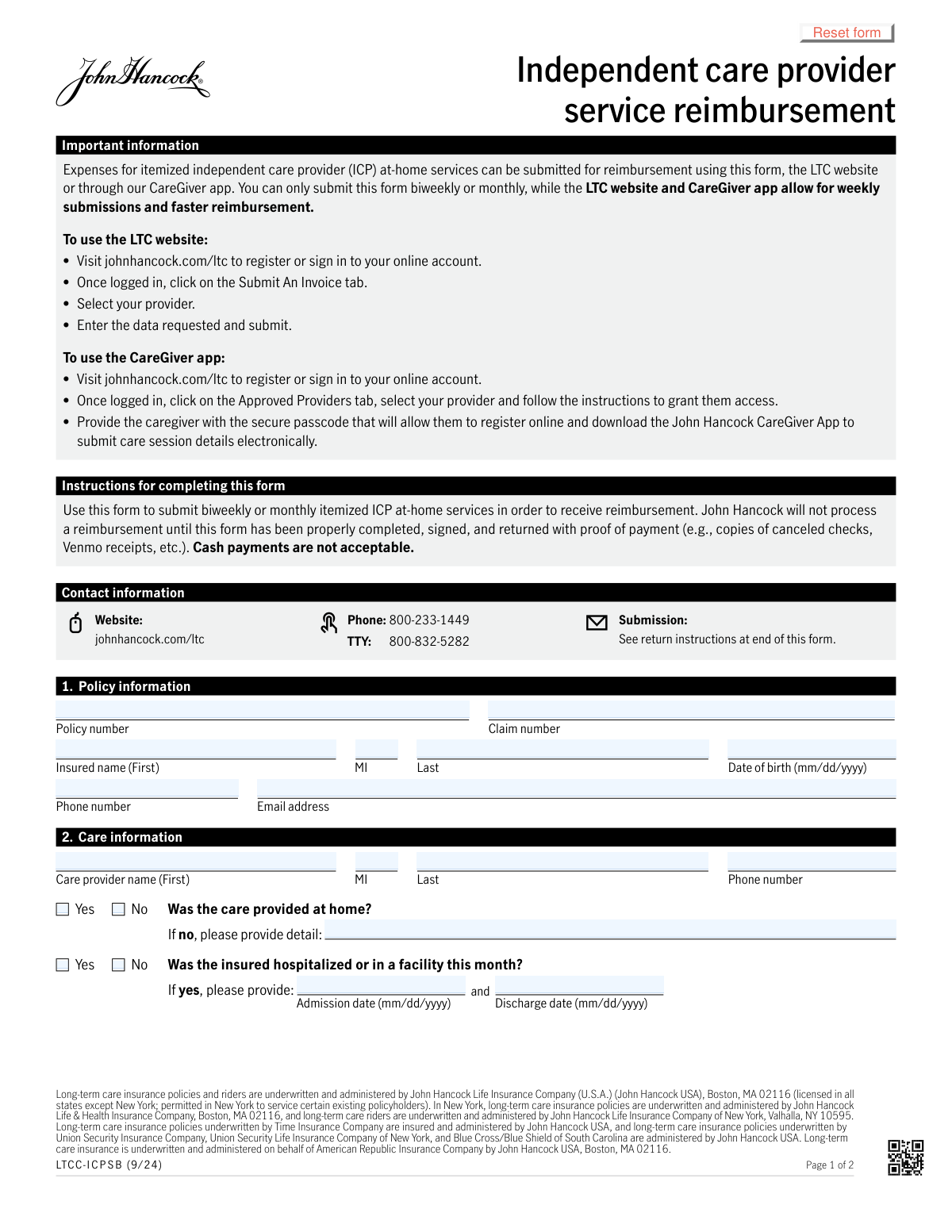
The John Hancock Independent Care Provider Service Reimbursement form allows policyholders to claim payment for at-home care services received from an independent provider. It requires detailed information about the policyholder, the care provider, and an itemized list of services, dates, and charges. Completing this form accurately is crucial for receiving timely reimbursement under a long-term care insurance plan. Today, this form can be filled out quickly and accurately using AI-powered services like Instafill.ai, which can also convert non-fillable PDF versions into interactive fillable forms.
Our AI automatically handles information lookup, data retrieval, formatting, and form filling.
It takes less than a minute to fill out LTCC-IC P S B using our AI form filling.
Securely upload your data. Information is encrypted in transit and deleted immediately after the form is filled out.
Form specifications
| Form name: | John Hancock Independent Care Provider Service Reimbursement |
| Number of pages: | 2 |
| Filled form examples: | Form LTCC-IC P S B Examples |
| Language: | English |
| Categories: | L.A. Care forms |
Instafill Demo: How to fill out PDF forms in seconds with AI
How to Fill Out LTCC-IC P S B Online for Free in 2026
Are you looking to fill out a LTCC-IC P S B form online quickly and accurately? Instafill.ai offers the #1 AI-powered PDF filling software of 2026, allowing you to complete your LTCC-IC P S B form in just 37 seconds or less.
Follow these steps to fill out your LTCC-IC P S B form online using Instafill.ai:
- 1 Navigate to Instafill.ai and upload the Independent Care Provider Service Reimbursement form.
- 2 Use the AI assistant to accurately fill in the policy information, including the policy number, claim number, and the insured's personal details.
- 3 Enter the care provider's name and contact information, and specify if the care was provided at home.
- 4 Detail each care service in the itemized section, including the date, time in/out, total hours, charges, and the specific activities of daily living performed.
- 5 Calculate and enter the total charges for the billing period.
- 6 Review all entered information for accuracy, then securely e-sign the form in the designated fields for both the insured (or fiduciary) and the care provider.
- 7 Download the completed form and submit it to John Hancock along with the required proof of payment (e.g., copies of canceled checks, Venmo receipts) via their online portal or by mail.
Our AI-powered system ensures each field is filled out correctly, reducing errors and saving you time.
Why Choose Instafill.ai for Your Fillable LTCC-IC P S B Form?
Speed
Complete your LTCC-IC P S B in as little as 37 seconds.
Up-to-Date
Always use the latest 2026 LTCC-IC P S B form version.
Cost-effective
No need to hire expensive lawyers.
Accuracy
Our AI performs 10 compliance checks to ensure your form is error-free.
Security
Your personal information is protected with bank-level encryption.
Frequently Asked Questions About Form LTCC-IC P S B
This form is used to request reimbursement for at-home services provided by an independent care provider under a John Hancock long-term care insurance policy.
This paper form can be submitted biweekly or monthly. For faster reimbursement, you can submit claims weekly through the John Hancock LTC website or the CareGiver app.
You must attach proof of payment, such as copies of canceled checks or Venmo receipts. If signing as a Power of Attorney or Guardian, you must also include supporting legal documents.
No, the form explicitly states that cash payments are not acceptable. You must use a payment method that provides a verifiable receipt or record.
The form requires two signatures to be processed: one from the insured person (or their legal fiduciary) and one from the care provider.
Yes, the form notes that using the LTC website (johnhancock.com/ltc) or the CareGiver app allows for weekly submissions and faster reimbursement compared to mailing this form.
For each day of service, you must enter the date, time in/out, total hours, and the daily charge. You also need to check the boxes that correspond to the specific care activities provided that day.
You can check the 'Other' box for that day's entry and then write a brief description of the service in the space provided below the itemized grid.
You can upload the completed form to your online account at johnhancock.com/ltc or mail it to John Hancock LTC Claims, PO Box 55231, Boston, MA 02205.
This information is necessary for claim processing, as a hospital or facility stay can affect the benefits payable for at-home care during that period.
Yes, services like Instafill.ai use AI to help you accurately auto-fill form fields with your saved information, which saves time and helps prevent errors.
You can upload the form to Instafill.ai, which will make the fields fillable online. After you enter your information, you can download the completed PDF to print or upload to the John Hancock portal.
If you have a non-fillable or 'flat' PDF, you can use a service like Instafill.ai. It can convert the document into an interactive, fillable form that you can easily complete on your device.
A fiduciary is someone legally authorized to act on another person's behalf, such as a Power of Attorney or a legal Guardian. If you are signing as a fiduciary, you must indicate your title and provide proof of your authority.
Compliance LTCC-IC P S B
Validation Checks by Instafill.ai
1
Policy and Claim Number Cross-Page Consistency
Validates that the Policy Number and Claim Number entered at the top of Page 2 match the corresponding values entered in Section 1 on Page 1. This is crucial for maintaining data integrity across multi-page forms and ensures the itemized services are correctly associated with the policyholder. If the numbers do not match, the form processing will be halted pending manual correction to prevent misapplication of charges.
2
Logical Hospitalization Date Sequence
Ensures that if the insured was hospitalized, the 'Discharge date' is on or after the 'Admission date'. This check prevents logical impossibilities in the data, which could indicate a typo or error in reporting. A validation failure would require the user to correct the dates before the claim can be processed, ensuring accurate records of care periods.
3
Conditional Requirement for Hospitalization Dates
Verifies that if the 'Yes' option is selected for 'Was the insured hospitalized or in a facility this month?', both the 'Admission date' and 'Discharge date' fields are filled. This is important because the location of care impacts policy benefits and eligibility for reimbursement. Failure to provide these dates when required will result in an incomplete submission and prevent the claim from being processed.
4
Service Time In/Out Chronology
For each itemized service row, this validation confirms that the 'Time out' is later than the 'Time in'. This fundamental check prevents nonsensical time entries and ensures the calculated duration of service is positive and accurate. An error here would block the submission and prompt the user to correct the time entries for the specific service date.
5
Verification of Total Hours Calculation
This check automatically calculates the duration between 'Time in' and 'Time out' for each service row and compares it to the value entered in the 'Total hours' field. This ensures mathematical accuracy and prevents manual calculation errors that could lead to incorrect payment amounts. If the entered total hours do not match the calculated duration, the form will be flagged for correction.
6
Verification of Total Daily Charge Calculation
Validates that the 'Total daily charge' for each service row is the correct product of 'Total hours' multiplied by 'Hourly charge'. This is a critical financial control to ensure the amount being claimed is arithmetically correct based on the hours and rate provided. A discrepancy will cause a validation failure, preventing over or under-billing.
7
Aggregate Total Charges Calculation
Ensures the value in the final 'Total charges' field is the correct sum of all 'Total daily charge' values from each itemized service row. This check confirms the overall claim amount is accurate and reflects the sum of its parts. If the total does not add up correctly, the form will be rejected to prevent incorrect reimbursement.
8
Conditional Requirement for 'Other' Service Details
This validation checks that if the 'Other' checkbox is selected for any service row, the corresponding 'If you selected other above, please provide detail' text box is not empty. This is necessary to understand the nature of the service being claimed and to determine if it is a covered expense under the policy. A failure to provide details will mark the form as incomplete.
9
Signature Date Logical Check
Verifies that the 'Date signed' by both the insured/fiduciary and the care provider is on or after the latest service date listed in the 'Itemized care services' grid. This ensures the signatures are attesting to services that have already been rendered, which is a legal and compliance requirement. A signature date that precedes the final service date would invalidate the attestation and block processing.
10
Conditional Fiduciary Title Specification
Checks that if the 'Other' box is selected under the insured's signature section to indicate a fiduciary relationship, the adjacent text field specifying the title is filled out. This is crucial for establishing the legal authority of the person signing on behalf of the insured. If the 'Other' box is checked but the title is missing, the submission will be flagged for missing information.
11
Minimum Service Selection per Row
For each row in the itemized grid that contains any data, this check ensures at least one of the service checkboxes (Bathing, Continence, etc.) has been selected. This confirms that a billable activity was performed during the time claimed. A row with time and charges but no specified service is incomplete and will cause a validation error.
12
Insured Date of Birth Format and Plausibility
This check validates that the insured's 'Date of birth' is in the correct 'mm/dd/yyyy' format and represents a plausible date (e.g., not in the future, and the person is not over a certain age like 120). This ensures data quality and prevents obvious errors that could cause issues with policy verification. An invalid or implausible date will require correction.
13
Claim Submission Frequency Check
Validates that the service dates on the form comply with the biweekly or monthly submission rule stated in the instructions. The system should check the date range of services against the last submission date for this policy to prevent overly frequent submissions. A submission that violates the frequency rule would be rejected with an explanation.
Common Mistakes in Completing LTCC-IC P S B
This form explicitly requires proof of payment, such as copies of canceled checks or digital payment receipts, to be submitted along with the claim. Many users forget to include this documentation, which is the most common reason for processing delays or outright rejection. To avoid this, create a checklist before submission and ensure all required attachments are included with the completed form.
The itemized care services grid requires manual calculation for 'Total hours' and 'Total daily charge' for each entry, as well as a final 'Total charges' sum. These manual calculations are highly prone to error, leading to incorrect reimbursement amounts and processing delays while the insurer verifies the figures. To prevent this, double-check all calculations, or use a calculator. AI-powered form fillers like Instafill.ai can perform these calculations automatically, eliminating mathematical errors.
The form requires two separate signatures: one from the insured (or their fiduciary) and one from the care provider, both with corresponding dates. It is a frequent mistake for one of the parties to forget to sign or date the form, which immediately invalidates the submission. Always review Section 4 to ensure both signatures and dates are present before submitting the form to prevent it from being returned unprocessed.
When a Power of Attorney (POA) or Guardian signs on behalf of the insured, they often forget to check the appropriate title box or fail to include the required supporting legal documentation. The insurer cannot process a claim signed by a fiduciary without proof of their authority. To avoid delays, ensure the correct title is selected and a copy of the POA or guardianship document is attached to the submission.
Users often make typos when entering the Policy and Claim numbers, such as transposing digits, which can lead to the claim being rejected or misfiled. A common oversight is also forgetting to re-enter these numbers at the top of page 2, which can cause major issues if the pages become separated. Using a tool like Instafill.ai can help by storing these numbers and auto-filling them correctly and consistently across all required fields.
The form specifies 'Time in' and 'Time out' with '(a.m./p.m.)', but users often enter times ambiguously, for example, writing '8' instead of '8:00 a.m.'. This ambiguity can lead to incorrect 'Total hours' calculations and requires clarification, delaying the claim. Always be explicit by including the full time and the a.m./p.m. designation for every entry.
In the 'Itemized care services' grid, users may check the 'Other' box for a service but then forget to provide a description in the corresponding detail field at the bottom of the section. Without a description, the service is undocumented and likely cannot be reimbursed. If you check 'Other', you must always provide a clear, concise explanation of the service provided.
The instructions clearly state, 'Cash payments are not acceptable.' Despite this warning, individuals sometimes submit claims for services they paid for in cash, which are automatically denied. To ensure reimbursement, always use a trackable payment method like a check, credit card, or a digital service like Venmo, and retain the receipt as proof.
For each dated entry in the service log, the user must check one or more boxes (Bathing, Dressing, etc.) to specify the care that was provided. People sometimes fill in the hours and charges but forget to check these boxes, leaving the entry incomplete. This forces the processor to guess or reject the line item, so it's crucial to check all applicable activities for each service.
In Section 2, if a user checks 'Yes' to the question 'Was the insured hospitalized or in a facility this month?', they must also provide the admission and discharge dates. It is a common mistake to check 'Yes' but leave the dates blank. This information is critical for the insurer to coordinate benefits and will halt the claim until the missing dates are provided.
Saved over 80 hours a year
“I was never sure if my IRS forms like W-9 were filled correctly. Now, I can complete the forms accurately without any external help.”
Kevin Martin Green
Your data stays secure with advanced protection from Instafill and our subprocessors

Robust compliance program
Transparent business model
You’re not the product. You always know where your data is and what it is processed for.
ISO 27001, HIPAA, and GDPR
Our subprocesses adhere to multiple compliance standards, including but not limited to ISO 27001, HIPAA, and GDPR.
Security & privacy by design
We consider security and privacy from the initial design phase of any new service or functionality. It’s not an afterthought, it’s built-in, including support for two-factor authentication (2FA) to further protect your account.
Fill out LTCC-IC P S B with Instafill.ai
Worried about filling PDFs wrong? Instafill securely fills john-hancock-independent-care-provider-service-reimbursement forms, ensuring each field is accurate.



