Yes! You can use AI to fill out UnitedHealthcare Prior Authorization Request Form

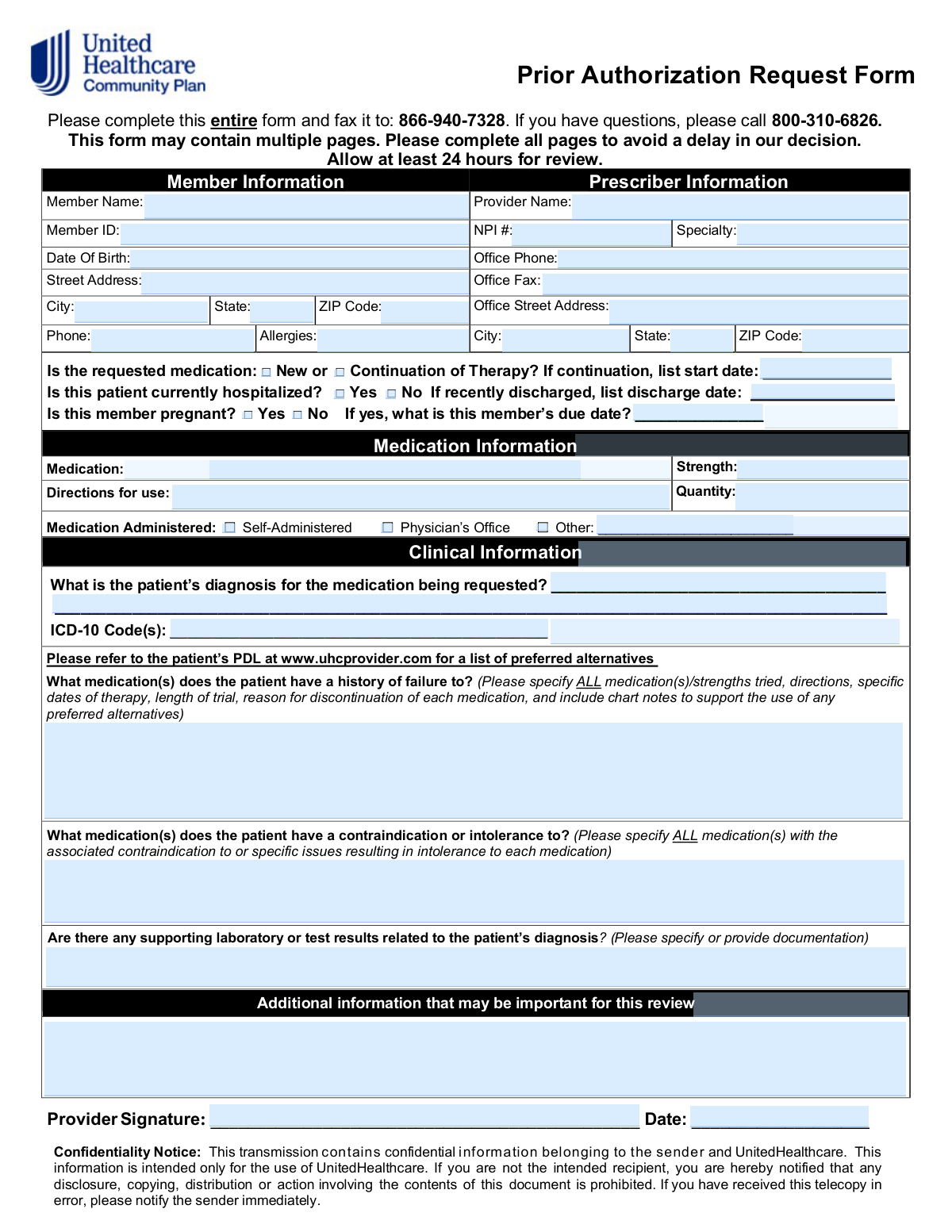
This form is a formal request submitted by a healthcare provider to UnitedHealthcare to obtain pre-approval for a medication that is not on the insurer's preferred drug list or requires justification for medical necessity. It is crucial for ensuring patients receive coverage for necessary treatments by providing detailed clinical information, including diagnosis, treatment history, and supporting lab results. Today, this form can be filled out quickly and accurately using AI-powered services like Instafill.ai, which can also convert non-fillable PDF versions into interactive fillable forms.
Our AI automatically handles information lookup, data retrieval, formatting, and form filling.
It takes less than a minute to fill out Prior Authorization Request using our AI form filling.
Securely upload your data. Information is encrypted in transit and deleted immediately after the form is filled out.

Form specifications

Form name: UnitedHealthcare Prior Authorization Request Form
Number of pages: 1
Language: English
Categories: prior authorization forms, healthcare forms, CAR forms, health care forms, authorization forms, L.A. Care forms
main-image

Instafill Demo: How to fill out PDF forms in seconds with AI

How to Fill Out Prior Authorization Request Online for Free in 2026

Are you looking to fill out a PRIOR AUTHORIZATION REQUEST form online quickly and accurately? Instafill.ai offers the #1 AI-powered PDF filling software of 2026, allowing you to complete your PRIOR AUTHORIZATION REQUEST form in just 37 seconds or less.
Follow these steps to fill out your PRIOR AUTHORIZATION REQUEST form online using Instafill.ai:
  1. 1 Navigate to Instafill.ai and upload or select the Prior Authorization Request Form.
  2. 2 Use the AI assistant to automatically populate the Member Information and Prescriber Information sections.
  3. 3 Enter the specific details for the requested medication, including its name, strength, quantity, and directions for use.
  4. 4 Complete the Clinical Information section by providing the patient's diagnosis, ICD-10 codes, and a detailed history of medication failures or contraindications.
  5. 5 Attach any required supporting documentation, such as lab results or clinical chart notes, to substantiate the request.
  6. 6 Review all auto-filled and manually entered data for accuracy before the provider digitally signs and dates the form.
  7. 7 Download the completed form to fax to the number provided or submit it through the required electronic portal.

Our AI-powered system ensures each field is filled out correctly, reducing errors and saving you time.

Why Choose Instafill.ai for Your Fillable Prior Authorization Request Form?

Speed

Complete your Prior Authorization Request in as little as 37 seconds.

Up-to-Date

Always use the latest 2026 Prior Authorization Request form version.

Cost-effective

No need to hire expensive lawyers.

Accuracy

Our AI performs 10 compliance checks to ensure your form is error-free.

Security

Your personal information is protected with bank-level encryption.

Frequently Asked Questions About Form Prior Authorization Request

This form is used by a healthcare provider to request approval from UnitedHealthcare for a medication that is not automatically covered by a member's insurance plan. It helps establish the medical necessity for the requested drug.

The prescribing healthcare provider's office is responsible for filling out the form with the patient's medical details and submitting it for review. The provider must also sign and date the form.

The completed form should be faxed to 866-940-7328. You should allow at least 24 hours for the review process, but note that incomplete forms may cause delays.

This section requires the patient's diagnosis with ICD-10 codes, a detailed history of medications that have failed, and any medications the patient cannot take. You should also attach any supporting lab results or chart notes.

You must list all previous medications tried, including their strength, directions, dates of therapy, and the specific reason for discontinuation. Including chart notes is recommended to support this information.

The form directs providers to the patient’s Prescription Drug List (PDL) on the UnitedHealthcare provider website (www.uhcprovider.com) for a list of covered, preferred medications.

Submitting a form with missing information will cause a delay in the review and decision process. It is critical to complete all pages and fields to ensure a timely response.

This information helps the reviewer understand the clinical urgency and context of the request. Certain situations, like a recent hospital discharge or pregnancy, can influence the decision-making process.

NPI stands for National Provider Identifier, a unique 10-digit identification number for covered health care providers. The prescriber's NPI number should be readily available within their office's administrative records.

Yes, services like Instafill.ai use AI to accurately auto-fill form fields from your existing records. This can help save time and reduce the chance of manual data entry errors.

Simply upload the Prior Authorization PDF to the Instafill.ai platform. You can then type directly into the form fields, add a digital signature, and download the completed document to fax.

If your PDF is flat or non-fillable, you can use a service like Instafill.ai to instantly convert it into an interactive, fillable form. This allows you to easily complete it on your computer without printing.

Select 'New' if the patient is starting the requested medication for the first time. Select 'Continuation of Therapy' if the patient is already taking the medication and needs a new authorization to continue it, and be sure to provide the original start date.

Compliance Prior Authorization Request
Validation Checks by Instafill.ai

1
NPI Number Format Validation
This check verifies that the 'Provider NPI' field contains a valid, 10-digit National Provider Identifier. The NPI is a unique identifier essential for verifying the prescriber's credentials and processing the request. If the NPI is missing or incorrectly formatted, the system cannot authenticate the provider, leading to an immediate rejection or delay.
2
Member Date of Birth Validity
This validation ensures the 'Member Date Of Birth' is a valid calendar date and occurs in the past. This is critical for verifying the member's identity and applying any age-specific clinical criteria for the requested medication. A future or invalid date indicates a data entry error and will prevent the form from being processed.
3
ICD-10 Code Format Check
This check validates that the 'ICD-10 Code(s)' field follows the standard format (e.g., a letter followed by numbers, potentially with a decimal). Correctly formatted codes are required for automated systems to apply clinical rules and determine medical necessity. An invalid format will cause processing failures and require manual correction.
4
Conditional Requirement for Continuation Start Date
This validation ensures that if 'Continuation of Therapy' is selected, the 'Continuation Start Date' field is populated with a valid date. This date is crucial for assessing the duration and history of the patient's treatment. A request marked as a continuation without a start date is considered incomplete and will be delayed pending clarification.
5
Conditional Requirement for Pregnancy Due Date
This check verifies that if the 'Member is pregnant?' box is checked 'Yes', the 'Due Date' field is filled with a valid, future date. This information is vital for assessing the safety and appropriateness of the medication during pregnancy. A missing or past due date when pregnancy is indicated is a logical error that will halt the review.
6
Conditional Requirement for Discharge Date
This validation ensures that if the patient was 'recently discharged', the 'Discharge Date' field is populated with a valid date in the past. This information provides critical context about the patient's recent acute care episode and level of need. Failure to provide this date when indicated leaves a gap in the clinical picture and can delay the authorization decision.
7
Medication Details Completeness
This check confirms that the 'Medication', 'Strength', 'Directions for use', and 'Quantity' fields are all filled out. These details are the absolute minimum required to identify the specific drug, dosage, and regimen being requested. If any of this core information is missing, the request is ambiguous and cannot be processed.
8
Conditional Requirement for 'Other' Administration Method
This validation ensures that if the 'Medication Administered - Other' option is selected, the corresponding text field is filled in to specify the method. This detail is important for understanding the care plan and may impact coverage rules. An empty 'Other' field makes the request incomplete and requires follow-up.
9
Signature Date Validity
This check validates that the 'Signature Date' is a real calendar date that is not in the future. The signature date attests to the currency of the provider's assessment. A future date is a logical impossibility, and an excessively old date may trigger a request for a more recent evaluation.
10
Core Member Identifier Completeness
This validation verifies that the 'Member Name' and 'Member ID' fields are both populated. These two fields are the primary keys used to identify the patient within the health plan's system. A submission lacking either of these identifiers cannot be matched to a member's benefits and will be rejected.
11
Core Prescriber Identifier Completeness
This check ensures that the 'Provider Name' and 'NPI #' fields are both filled in. This information is mandatory for authenticating the request and verifying that the prescriber is licensed and in-network. A request without complete provider identification cannot be processed.
12
Phone and Fax Number Format
This check ensures that the 'Office Phone' and 'Office Fax' numbers are in a recognizable format (e.g., 10 digits with optional formatting). Valid contact information is crucial for the review team to be able to contact the provider's office for clarifications. An invalid number can significantly delay the decision-making process.
13
Diagnosis and Code Correlation
This validation confirms that both the 'Patient’s diagnosis' text field and the 'ICD-10 Code(s)' field are populated. The text-based diagnosis provides clinical context that complements the structured ICD-10 code used for processing. Missing either piece of information can result in a denial for insufficient clinical information.
14
Logical Date Sequence Check
This check ensures that key dates are in a logical order, such as 'Member Date Of Birth' being before the 'Signature Date', and 'Continuation Start Date' being before the 'Signature Date'. This serves as a basic sanity check to catch significant data entry errors. Illogical dates would invalidate the form's data integrity and require correction.

Common Mistakes in Completing Prior Authorization Request

Providing Insufficient Detail on Failed Medications

Staff often list previously tried drugs in the 'Medication History of Failure' section without the required specifics like trial duration, dosage, and the clinical reason for discontinuation. This is a primary reason for denial, as insurers need to verify that preferred, lower-cost alternatives were adequately trialed before approving a non-preferred drug. To avoid this, meticulously document each failed medication with dates, strengths, and specific outcomes, and attach relevant chart notes as requested.

Incorrect or Mismatched Member Information

Entering an incorrect Member ID, or a name and Date of Birth that don't exactly match the insurance record, is a frequent error due to typos or outdated information. This leads to immediate rejection or processing delays as the system cannot identify the patient, requiring the office to correct and resubmit the entire form. Double-checking this information against the member's insurance card is critical before submission.

Using Vague Medication Directions

Writing 'take as directed' or other non-specific phrases in the 'Directions for use' field is a common shortcut but is insufficient for a prior authorization review. Insurers require precise instructions (e.g., 'Take one 50mg tablet by mouth twice daily') to assess the appropriateness of the dose and quantity requested. Vague directions will trigger a request for clarification, delaying the approval process and patient care.

Omitting or Using Non-Specific ICD-10 Codes

The form requires a specific ICD-10 code that medically justifies the requested drug, but staff sometimes leave it blank or use a general, non-billable code. The diagnosis description and the ICD-10 code must align perfectly and support the medication's use for that specific condition. A missing or mismatched code will halt the review and result in a denial or a request for more information.

Missing Provider Signature or Date

A provider's signature and the current date are required to legally validate the request, but forms are often faxed without them, especially in busy clinics. An unsigned or undated form is considered incomplete and will be rejected immediately, forcing a complete resubmission. This simple oversight can cause significant and unnecessary delays in a patient receiving their medication.

Illegible Handwriting on a Faxed Form

Since this form is submitted via fax, poor handwriting can render critical information like the Member ID, NPI, or clinical notes unreadable. This leads to data entry errors on the insurer's end or an immediate request for a new, legible form, delaying the patient's access to medication. Since the form is a non-fillable PDF, using a tool like Instafill.ai to convert it into a fillable version can prevent this issue entirely by allowing information to be typed.

Incomplete 'Continuation of Therapy' Information

When a request is for a medication the patient is already taking, it's easy to check the 'Continuation of Therapy' box but forget to enter the required start date. This date is crucial for the reviewer to understand the patient's history with the medication and establish ongoing need. Omitting it causes unnecessary delays as the reviewer must contact the provider's office to obtain the missing information.

Failing to Include Supporting Lab Results or Chart Notes

The form explicitly asks for supporting laboratory results and chart notes, yet these documents are often forgotten during the faxing process. This clinical evidence is vital for justifying the medical necessity of a non-preferred drug or demonstrating the failure of other therapies. Submitting the form without this documentation almost guarantees a denial or a lengthy process of requesting and reviewing additional information.

Vague Descriptions of Contraindications or Intolerances

Simply stating a patient has an 'allergy' or 'intolerance' to a preferred medication is not enough to justify an alternative. Reviewers need to know the specific reaction (e.g., 'developed severe rash,' 'caused acute kidney injury,' 'experienced angioedema') to validate bypassing that drug. Lack of detail leads to follow-up questions and delays, as the insurer must confirm the clinical severity of the contraindication.

Entering an Incorrect Provider NPI Number

A simple typo in the 10-digit National Provider Identifier (NPI) is a common data entry error that can derail the entire request. The NPI is used to verify the prescriber's identity and credentials, so an incorrect number will cause the request to fail system validation. AI-powered form-filling tools like Instafill.ai can help prevent this by auto-populating and validating provider data, ensuring accuracy before submission.
Saved over 80 hours a year

“I was never sure if my IRS forms like W-9 were filled correctly. Now, I can complete the forms accurately without any external help.”

Kevin Martin Green

Your data stays secure with advanced protection from Instafill and our subprocessors

Robust compliance program

Transparent business model

You’re not the product. You always know where your data is and what it is processed for.

ISO 27001, HIPAA, and GDPR

Our subprocesses adhere to multiple compliance standards, including but not limited to ISO 27001, HIPAA, and GDPR.

Security & privacy by design

We consider security and privacy from the initial design phase of any new service or functionality. It’s not an afterthought, it’s built-in, including support for two-factor authentication (2FA) to further protect your account.

Fill out Prior Authorization Request with Instafill.ai

Worried about filling PDFs wrong? Instafill securely fills unitedhealthcare-prior-authorization-request-form forms, ensuring each field is accurate.