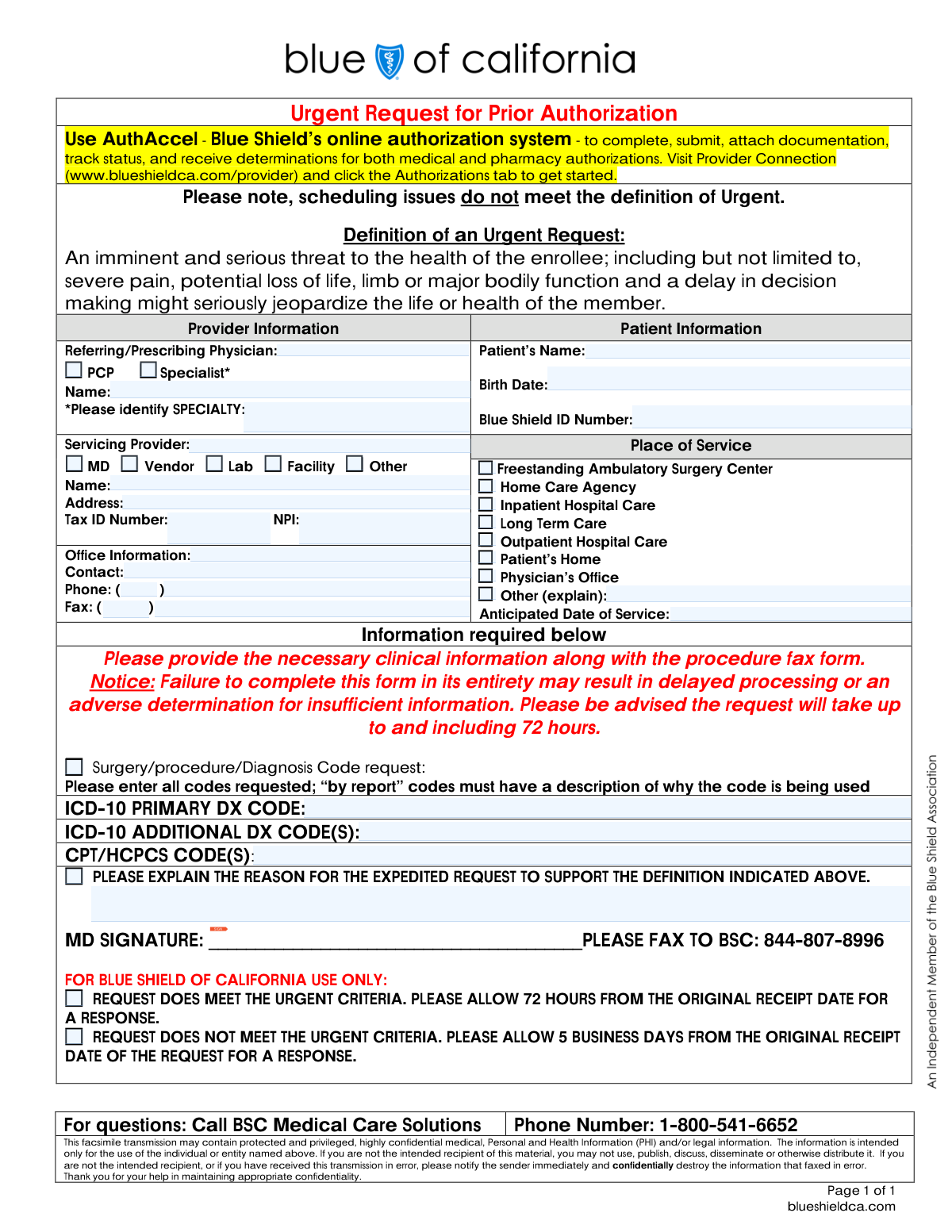
Yes! You can use AI to fill out Blue Shield of California Urgent Request for Prior Authorization

This form is a formal request submitted by healthcare providers to Blue Shield of California to obtain pre-approval for medical services, procedures, or equipment on an urgent basis. It is used when a delay in care could seriously jeopardize the patient's life, health, or ability to regain maximum function. The form requires detailed information about the patient, the provider, the requested services with specific medical codes, and a justification for the urgency. Today, this form can be filled out quickly and accurately using AI-powered services like Instafill.ai, which can also convert non-fillable PDF versions into interactive fillable forms.
Our AI automatically handles information lookup, data retrieval, formatting, and form filling.
It takes less than a minute to fill out BSC Urgent Prior Authorization using our AI form filling.
Securely upload your data. Information is encrypted in transit and deleted immediately after the form is filled out.

Form specifications

Form name: Blue Shield of California Urgent Request for Prior Authorization
Number of pages: 1
Language: English
Categories: prior authorization forms, authorization forms, Blue Shield of California forms
main-image

Instafill Demo: How to fill out PDF forms in seconds with AI

How to Fill Out BSC Urgent Prior Authorization Online for Free in 2026

Are you looking to fill out a BSC URGENT PRIOR AUTHORIZATION form online quickly and accurately? Instafill.ai offers the #1 AI-powered PDF filling software of 2026, allowing you to complete your BSC URGENT PRIOR AUTHORIZATION form in just 37 seconds or less.
Follow these steps to fill out your BSC URGENT PRIOR AUTHORIZATION form online using Instafill.ai:
  1. 1 Navigate to Instafill.ai and upload or select the Blue Shield of California Urgent Request for Prior Authorization form.
  2. 2 Provide the patient's information, including their full name, date of birth, and Blue Shield ID number.
  3. 3 Enter the details for the referring/prescribing physician and the servicing provider, including names, addresses, Tax ID, and NPI numbers.
  4. 4 Specify the place of service, the anticipated date of service, and input all required ICD-10 and CPT/HCPCS codes.
  5. 5 Clearly explain the reason for the expedited request, detailing how the situation meets the definition of an urgent medical need.
  6. 6 Review all the information auto-filled by the AI for accuracy, make any necessary corrections, and provide a digital signature.
  7. 7 Download the completed form and fax it to the Blue Shield of California number listed on the document.

Our AI-powered system ensures each field is filled out correctly, reducing errors and saving you time.

Why Choose Instafill.ai for Your Fillable BSC Urgent Prior Authorization Form?

Speed

Complete your BSC Urgent Prior Authorization in as little as 37 seconds.

Up-to-Date

Always use the latest 2026 BSC Urgent Prior Authorization form version.

Cost-effective

No need to hire expensive lawyers.

Accuracy

Our AI performs 10 compliance checks to ensure your form is error-free.

Security

Your personal information is protected with bank-level encryption.

Frequently Asked Questions About Form BSC Urgent Prior Authorization

This form is used by healthcare providers to request an urgent prior authorization from Blue Shield of California for a medical service or procedure that poses an imminent threat to a patient's health.

The patient's referring, prescribing, or servicing provider's office must complete and submit this form. A physician's signature is required to validate the request.

An urgent request is defined as a situation involving an imminent and serious threat to the patient's health, such as severe pain or potential loss of life, limb, or major bodily function. Scheduling difficulties do not meet the criteria for urgency.

If the request is approved as urgent, you will receive a response within 72 hours. If it is deemed not urgent, the review will follow the standard timeline of 5 business days.

You can fax the form to 844-807-8996 or use Blue Shield's online system, AuthAccel, on the Provider Connection website for faster submission and tracking.

Failure to complete the form in its entirety may result in a delayed decision or an adverse determination due to insufficient information. Ensure all provider, patient, and clinical code fields are filled.

Yes, you must attach all necessary clinical information and documentation that supports the medical necessity and urgency of the requested service.

You must provide the primary ICD-10 diagnosis code, any additional ICD-10 codes, and all relevant CPT/HCPCS procedure codes. If using a 'by report' code, you must include a description.

In this section, you must provide a clear clinical justification explaining how the patient's condition meets the definition of an urgent request, detailing the serious threat to their health.

If you have questions, you can contact BSC Medical Care Solutions at 1-800-541-6652 for assistance.

Yes, services like Instafill.ai use AI to accurately auto-fill form fields, which can save time and help prevent errors during completion.

Simply upload the form to the Instafill.ai platform. Its AI will make the document interactive and help you fill in the required information quickly before you download it for submission.

If you have a non-fillable PDF, you can use a tool like Instafill.ai. It can convert flat, non-interactive PDFs into fillable forms that you can easily complete on your computer.

Compliance BSC Urgent Prior Authorization
Validation Checks by Instafill.ai

1
Mandatory Urgency Justification
This check ensures the 'REASON FOR THE EXPEDITED REQUEST' field is not empty. As this is an 'Urgent Request' form, a detailed clinical justification is required to meet the criteria for expedited processing. Failure to provide this information will result in the request being delayed or denied for insufficient information, as the urgency cannot be substantiated.
2
Patient Birth Date Validity
Validates that the 'Birth Date' field contains a complete and logical date (e.g., MM/DD/YYYY) that is in the past. This is crucial for correctly identifying the patient and verifying their eligibility for services. An invalid or future date would cause a processing failure and require manual correction, delaying the authorization.
3
Servicing Provider NPI Format
This validation confirms that the National Provider Identifier (NPI) is a 10-digit number. The NPI is a unique identifier for health care providers and is essential for billing and regulatory compliance. An incorrect NPI format will prevent the system from identifying the provider, leading to an immediate rejection of the submission.
4
Conditional Specialist Field Requirement
This check enforces a rule that if the 'Specialist' checkbox is selected for the 'Referring/Prescribing Physician', the 'SPECIALTY' text field must be filled out. This information is necessary to confirm the referring physician's qualifications and relevance to the requested service. If the specialty is missing, the request may be flagged for manual review or returned as incomplete.
5
Anticipated Date of Service Logic
Verifies that the 'Anticipated Date of Service' is not a date in the past. Prior authorizations are for future services, so this check ensures the request is logically sound and timely. Submitting a request for a service date that has already passed will result in an automatic denial or require significant clarification.
6
ICD-10 Primary Diagnosis Code Format
This check validates that the 'ICD-10 PRIMARY DX CODE' field contains a code that follows the standard ICD-10 format (e.g., a letter followed by two digits, with potential for further decimal characters). This code is fundamental for establishing medical necessity for the requested procedure. An invalid code format will prevent processing and lead to a determination of insufficient information.
7
Servicing Provider Tax ID Format
Ensures the 'Tax ID Number' for the servicing provider is a 9-digit number, consistent with the format of a federal Employer Identification Number (EIN). This ID is critical for financial processing and provider verification. An incorrectly formatted Tax ID will cause failures in downstream billing and payment systems, halting the request.
8
Conditional 'Other' Place of Service Explanation
This validation ensures that if the 'Other (explain)' checkbox is selected under 'Place of Service', the corresponding text field contains an explanation. This context is required to understand the service location when it's not a standard option. Without this explanation, the reviewer cannot assess the appropriateness of the service location, causing a delay.
9
Blue Shield ID Number Completeness
This check verifies that the 'Blue Shield ID Number' field is not empty and contains data. This ID is the primary key for identifying the patient within the Blue Shield system and accessing their plan details. A missing ID number makes it impossible to process the request, resulting in an immediate failure.
10
CPT/HCPCS Code Presence
Validates that the 'CPT/HCPCS CODE(S)' field is not empty and contains at least one procedure or service code. These codes specify the exact service for which authorization is being requested and are essential for medical review. A submission without these codes is fundamentally incomplete and cannot be evaluated.
11
Referring Physician Type Selection
This check ensures that either the 'PCP' or 'Specialist' checkbox is selected for the 'Referring/Prescribing Physician'. This designation helps determine the care path and whether a specialist referral is part of the request. Failure to select one will leave the physician's role ambiguous and may require manual follow-up to clarify.
12
Signature Presence Verification
Verifies that the 'MD SIGNATURE' field is not blank, indicating that a signature has been provided by the physician. A signature is a legal requirement for attesting to the accuracy of the information and the medical necessity of the request. A missing signature invalidates the entire form, leading to an immediate rejection.
13
Office Phone Number Format
This check ensures that the combined 'Phone' and 'Area Code' fields for the provider's office constitute a valid 10-digit telephone number. This contact information is vital if the reviewer needs to call the office for clarification or additional clinical details. An incomplete or invalid number hinders communication and can significantly delay the authorization decision.
14
Completeness of Servicing Provider Details
This validation performs a group check to ensure that the Servicing Provider's Name, Address, Tax ID, and NPI are all provided. This complete set of information is required to uniquely and correctly identify the entity performing the service for both clinical and financial processing. Missing any of these key identifiers will cause the submission to be rejected as incomplete.

Common Mistakes in Completing BSC Urgent Prior Authorization

Providing Insufficient Justification for an Urgent Request

This form is specifically for urgent requests, defined as an imminent and serious threat to health. Staff often provide weak justifications, such as 'patient is in pain' or citing scheduling issues, which the form explicitly states is not a valid reason. This leads to the request being reclassified as standard, delaying the response from 72 hours to 5 business days and potentially postponing critical care. To avoid this, clearly describe how the patient's condition meets the urgent criteria, detailing the potential for loss of life, limb, or major bodily function.

Forgetting the Physician's Signature

The MD signature line is one of the most critical fields, yet it is frequently left blank, especially when administrative staff fill out the form on behalf of the physician. An unsigned request is considered invalid and will not be processed, leading to an automatic rejection and requiring a complete resubmission. Always ensure the form is reviewed and signed by the physician before faxing to prevent these unnecessary and critical delays.

Entering Incorrect or Incomplete Provider Identifiers

Mistakes in the Servicing Provider's Tax ID Number or National Provider Identifier (NPI) are common due to manual data entry errors or using outdated information. These numbers are essential for correctly identifying the provider for authorization and payment, and errors will cause processing to halt until the information is corrected. Using a tool like Instafill.ai can help by saving and auto-populating correct provider details, reducing the risk of typos and ensuring consistency across all submissions.

Omitting the Specialty for a Referring Specialist

When the 'Specialist' box is checked for the Referring/Prescribing Physician, it is mandatory to write in the specific specialty. This detail is often overlooked, leaving the field blank. This missing information can delay the review process, as the reviewer may need to verify the referring provider's qualifications or context for the request. Always double-check that if 'Specialist' is selected, the corresponding specialty is clearly identified.

Using Invalid or Outdated Medical Codes

The form requires current ICD-10 and CPT/HCPCS codes, but users sometimes enter outdated ICD-9 codes, nonspecific codes, or codes with transposed digits. This leads to an 'adverse determination for insufficient information' or requires the reviewer to contact the office for clarification, delaying the authorization. To prevent this, verify all codes against the latest coding manuals or use practice management software to ensure accuracy before submission.

Transposing Digits in the Patient's Blue Shield ID Number

The patient's Blue Shield ID number is a long string of characters that is prone to manual entry errors like transposed digits. An incorrect ID prevents the system from locating the patient's policy, causing an immediate processing failure. This requires the provider's office to be contacted for correction, delaying the start of the 72-hour urgent review window. Carefully proofread the ID number against the patient's insurance card or use an AI-powered tool like Instafill.ai to scan and accurately populate this field.

Failing to Attach Necessary Clinical Documentation

The form explicitly states to 'provide the necessary clinical information along with the procedure fax form.' Staff often fax the form alone, without the supporting clinical notes, lab results, or imaging reports that justify the request. This lack of evidence will almost certainly result in a denial for insufficient information, forcing a time-consuming appeal or resubmission. Always compile and fax all relevant clinical documents with the completed form to support medical necessity.

Leaving Office Contact Information Incomplete

Fields for the office contact person, phone number, and fax number are sometimes left blank or are illegible. If Blue Shield has a question or needs to communicate the determination, missing contact information makes it difficult or impossible, leading to significant delays. Ensure a specific contact person and their direct, accurate phone and fax numbers are clearly written to facilitate quick communication. Since this is a non-fillable PDF, a tool like Instafill.ai can convert it to a fillable version, ensuring contact details are typed and legible.

Confusing the Referring Physician with the Servicing Provider

Users sometimes enter the same provider's information in both the 'Referring/Prescribing Physician' and 'Servicing Provider' sections, even when they are different entities. This is especially common when a PCP refers a patient to a specialist or facility for a procedure. This error creates confusion and can delay processing as the insurer tries to determine who is performing the service. Carefully distinguish between the provider ordering the service and the one who will actually perform it, filling out each section accurately.

Selecting 'Other' Place of Service Without an Explanation

When a service location doesn't fit the standard checkboxes (e.g., Physician's Office, Inpatient Hospital), the 'Other' box is checked, but the required explanation is often forgotten. This leaves the reviewer guessing about the service location, which is a critical component for determining coverage and reimbursement. This omission will halt the review process until the office is contacted for clarification. If you check 'Other,' always provide a clear and concise description in the space provided.
Saved over 80 hours a year

“I was never sure if my IRS forms like W-9 were filled correctly. Now, I can complete the forms accurately without any external help.”

Kevin Martin Green

Your data stays secure with advanced protection from Instafill and our subprocessors

Robust compliance program

Transparent business model

You’re not the product. You always know where your data is and what it is processed for.

ISO 27001, HIPAA, and GDPR

Our subprocesses adhere to multiple compliance standards, including but not limited to ISO 27001, HIPAA, and GDPR.

Security & privacy by design

We consider security and privacy from the initial design phase of any new service or functionality. It’s not an afterthought, it’s built-in, including support for two-factor authentication (2FA) to further protect your account.

Fill out BSC Urgent Prior Authorization with Instafill.ai

Worried about filling PDFs wrong? Instafill securely fills blue-shield-of-california-urgent-request-for-prior-authorization forms, ensuring each field is accurate.