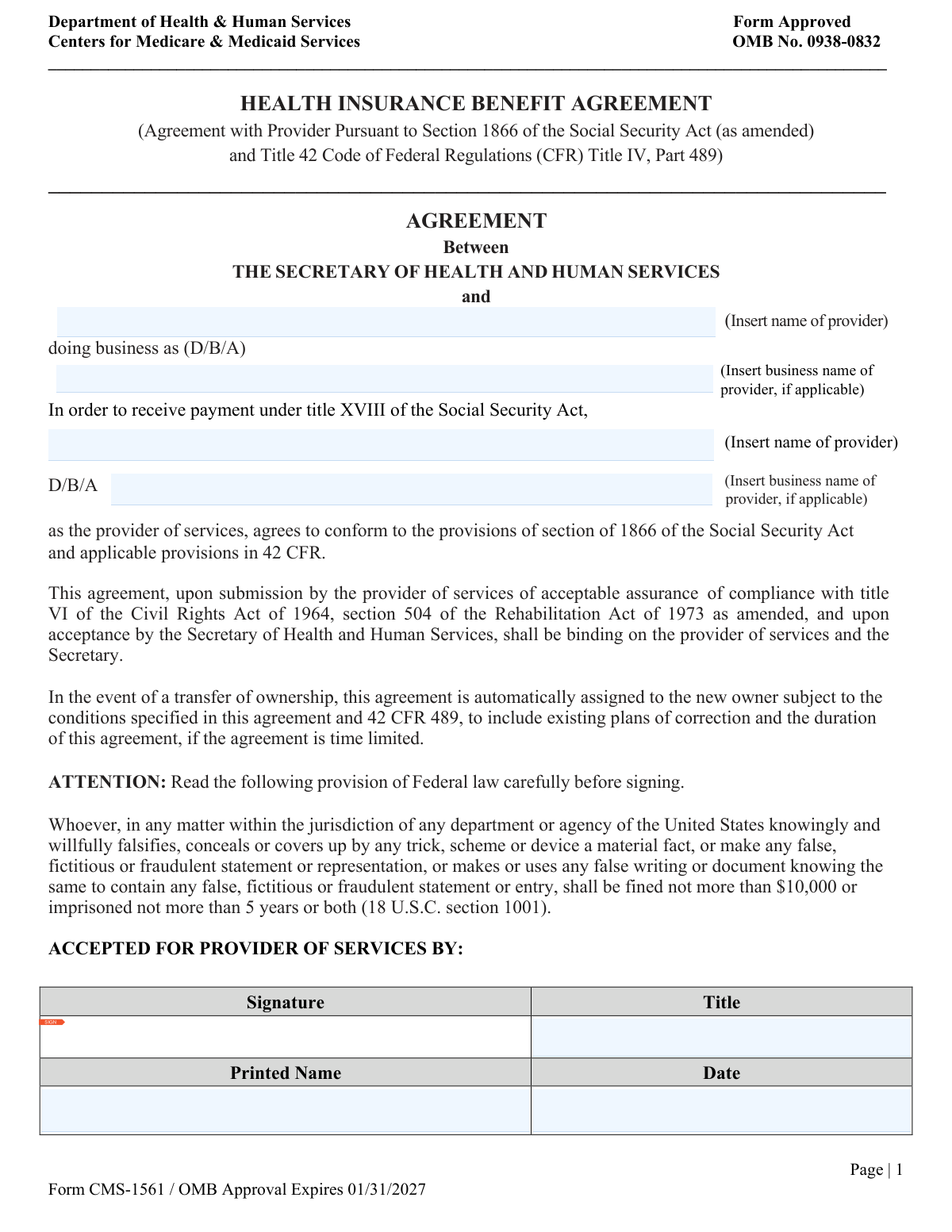
Yes! You can use AI to fill out Form CMS-1561, Health Insurance Benefit Agreement

Form CMS-1561 is a binding contract between a healthcare provider and the Secretary of Health and Human Services (HHS) that allows the provider to receive payments under Title XVIII of the Social Security Act (Medicare). By signing, the provider agrees to comply with all applicable federal regulations, including civil rights provisions. Today, this form can be filled out quickly and accurately using AI-powered services like Instafill.ai, which can also convert non-fillable PDF versions into interactive fillable forms.
Our AI automatically handles information lookup, data retrieval, formatting, and form filling.
It takes less than a minute to fill out CMS-1561 using our AI form filling.
Securely upload your data. Information is encrypted in transit and deleted immediately after the form is filled out.

Form specifications

Form name: Form CMS-1561, Health Insurance Benefit Agreement
Number of pages: 2
Language: English
Categories: insurance forms, health insurance forms, benefit forms, health benefit forms, CMS forms, health forms
main-image

Instafill Demo: How to fill out PDF forms in seconds with AI

How to Fill Out CMS-1561 Online for Free in 2026

Are you looking to fill out a CMS-1561 form online quickly and accurately? Instafill.ai offers the #1 AI-powered PDF filling software of 2026, allowing you to complete your CMS-1561 form in just 37 seconds or less.
Follow these steps to fill out your CMS-1561 form online using Instafill.ai:
  1. 1 Navigate to Instafill.ai and upload or select Form CMS-1561, the Health Insurance Benefit Agreement.
  2. 2 Allow the AI to process the document and then provide your provider's legal name and 'Doing Business As' (D/B/A) name where indicated.
  3. 3 Review the information entered into the agreement section to ensure it is correct and complete.
  4. 4 Electronically sign the form in the 'ACCEPTED FOR PROVIDER OF SERVICES BY' section, and enter your printed name, title, and the current date.
  5. 5 Note the signature sections for the Secretary of HHS and any potential successor provider, which are to be completed by those respective parties.
  6. 6 Download the completed agreement, ready for submission to the appropriate Centers for Medicare & Medicaid Services (CMS) entity.

Our AI-powered system ensures each field is filled out correctly, reducing errors and saving you time.

Why Choose Instafill.ai for Your Fillable CMS-1561 Form?

Speed

Complete your CMS-1561 in as little as 37 seconds.

Up-to-Date

Always use the latest 2026 CMS-1561 form version.

Cost-effective

No need to hire expensive lawyers.

Accuracy

Our AI performs 10 compliance checks to ensure your form is error-free.

Security

Your personal information is protected with bank-level encryption.

Frequently Asked Questions About Form CMS-1561

This form is a legal agreement between a healthcare provider and the Secretary of Health and Human Services. By signing it, the provider agrees to comply with federal regulations in order to receive payments from Medicare for services rendered.

Any healthcare provider or facility that wishes to participate in the Medicare program and receive payments for services provided to Medicare beneficiaries must complete this agreement.

The legal name is the official name of your organization as registered with the government. The D/B/A is the trade or operating name you use for business; if you don't have a separate D/B/A name, you can leave that field blank.

An individual with the legal authority to bind the provider to a contract, such as an owner, CEO, or other designated official, must sign the form. Their title, printed name, and the date must also be included.

The agreement is automatically assigned to the new owner, who is then bound by its terms, including any existing plans of correction. The new owner (successor provider) must also sign the agreement to formalize the transfer.

Yes, the agreement is contingent upon submitting assurance of compliance with the Civil Rights Act and Rehabilitation Act. You should contact your Medicare Administrative Contractor (MAC) for a complete list of required enrollment documents.

Do not send the form to the PRA Reports Clearance Office. You should submit the completed agreement to your designated Medicare Administrative Contractor (MAC) or State Survey Agency as part of your enrollment or revalidation package.

This is a standard federal warning stating that knowingly providing false information on the form is a criminal offense. It can result in significant fines and imprisonment, so you must ensure all information is accurate.

This section is only for situations involving a change of ownership. The new owner (the successor provider) would complete this part to formally accept the assignment of the existing Medicare agreement.

The form itself is estimated to take one hour to complete, but processing time by CMS can vary. For specific timelines regarding your enrollment and agreement acceptance, you should contact your Medicare Administrative Contractor (MAC).

Yes, services like Instafill.ai use AI to accurately auto-fill form fields with your saved information, which can save time and reduce errors. This is especially helpful for repetitive information like your provider name and title.

Simply upload the CMS-1561 PDF to the Instafill.ai platform. The AI will identify the form fields, allowing you to use your saved profile to automatically populate your information, review for accuracy, and complete the form digitally.

You can use a service like Instafill.ai, which can convert flat, non-fillable PDFs into interactive, fillable forms. This allows you to type your information directly into the fields instead of printing and filling it out by hand.

Compliance CMS-1561
Validation Checks by Instafill.ai

1
Ensures Provider Legal Name is Provided
This check verifies that the 'Provider Legal Name' field is not empty. The legal name is the primary identifier of the entity entering into the agreement with the Secretary of Health and Human Services. A missing name makes the agreement legally unenforceable and will result in rejection of the form.
2
Verifies Provider Representative Signature Presence
This validation confirms that a signature has been captured in the 'Signature' field under 'ACCEPTED FOR PROVIDER OF SERVICES BY:'. A signature is a legal requirement to indicate the provider's consent to the terms of the agreement. An unsigned form is invalid and cannot be processed.
3
Validates Provider Representative Title is Complete
This check ensures that the 'Title' field for the provider's representative is filled out. The title establishes the individual's authority to bind the provider organization to this legal agreement. Failure to provide a title can call the validity of the signature into question and will halt processing.
4
Checks Provider Signature Date Format
This validation ensures the 'Date' provided in the 'ACCEPTED FOR PROVIDER OF SERVICES BY' section is in a valid format (e.g., MM/DD/YYYY). A standardized date format is crucial for accurate record-keeping and establishing a clear timeline of events. An invalid format will cause a data entry error and require correction.
5
Logical Check for Provider Signature Date
This check verifies that the provider's signature date is not set in the future. A legal document cannot be signed on a future date, as it would be invalid. This validation prevents clerical errors and ensures the date reflects the actual time of signing.
6
Consistency Check for Provider Name Fields
This validation compares the two 'Insert name of provider' fields on the first page to ensure they contain the exact same text. Inconsistent naming within a legal document can create ambiguity about the identity of the contracting party. A mismatch will require correction to ensure the agreement is clear and legally sound.
7
Consistency Check for D/B/A Name Fields
This check ensures that if a 'doing business as (D/B/A)' name is provided, it is identical in both locations it appears on the first page. This consistency is vital for legal clarity, especially if the provider operates under a different name than its legal one. Discrepancies must be resolved before the agreement can be accepted.
8
Verifies Logical Sequence of Signature Dates
This validation confirms that the 'Date' in the 'ACCEPTED BY THE SECRETARY OF HEALTH AND HUMAN SERVICES' section is on or after the provider's signature date. The government cannot legally accept an agreement before the provider has signed it. This check maintains the logical and legal sequence of the agreement's execution.
9
Completeness of Successor Provider Section
This check ensures that if any field in the 'ACCEPTED FOR THE SUCCESSOR PROVIDER OF SERVICES' section is filled out, then all fields in that section (Signature, Title, Printed Name, Date) must be complete. This is critical during a transfer of ownership to ensure the new owner is fully and properly bound to the agreement. Incomplete information will render the assignment of the agreement invalid.
10
Logical Check for Successor Provider Acceptance Date
This validation verifies that the 'Acceptance Date' for the successor provider is on or after the acceptance date by the Secretary of Health and Human Services. A successor cannot legally assume the agreement before it has been fully executed by the original parties. This ensures the chain of assignment is legally and chronologically correct.
11
Validates Printed Name Field Format
This check ensures that all 'Printed Name' fields contain only valid characters for a name (e.g., letters, spaces, hyphens) and are not blank. This prevents data entry errors, such as entering a date or random symbols, and ensures the signatory can be clearly identified. An invalid name format will trigger a review and require correction.
12
Form Version Check via OMB Expiration Date
This system-level check verifies that the form being submitted has not passed its OMB approval expiration date of 01/31/2027. Submitting an outdated form is a violation of the Paperwork Reduction Act and can lead to automatic rejection. This ensures the provider is using the current, legally approved version of the agreement.

Common Mistakes in Completing CMS-1561

Confusing Legal Name with 'Doing Business As' (D/B/A) Name

Providers often incorrectly enter their D/B/A name in the legal name field or vice versa. The legal name is the official name of the entity registered with the government, while the D/B/A is the operating name used for business. This error can cause mismatches with tax and banking records, leading to payment rejections and delays in processing the agreement. Always verify the exact legal entity name and enter it separately from any trade names.

Inconsistent Provider Name Entry

The form requires the provider's name and D/B/A to be entered twice: once at the top of the agreement and again within the main body of the text. A common mistake is to have slight variations, typos, or omissions between these entries. Such inconsistencies can raise legal questions about the agreement's validity and will likely cause the form to be returned for correction. Ensure the names are entered identically in all required locations on the form.

Signature by an Unauthorized Individual

This agreement must be signed by an individual with the legal authority to bind the provider organization to a federal contract, such as a CEO, President, or Owner. An office manager or other staff member without this specific authority may sign, rendering the agreement invalid. This can lead to immediate rejection and require the entire process to be restarted. Always confirm that the signatory is an authorized official as per the organization's bylaws or legal structure.

Using a Vague or Incomplete Job Title

When signing, entering a generic title like 'Manager' or 'Administrator' is a frequent error. The title must clearly and specifically reflect the signatory's authority to enter into a binding agreement (e.g., 'Chief Executive Officer', 'Managing Partner', 'Sole Proprietor'). A vague title can cause reviewers to question the signer's authority, leading to processing delays or rejection. Be as specific as possible to avoid ambiguity.

Incorrectly Filling Out Reserved Sections

Applicants sometimes mistakenly fill out sections reserved for other parties, such as the signature blocks for the 'SECRETARY OF HEALTH AND HUMAN SERVICES' or the 'SUCCESSOR PROVIDER'. These sections are only to be completed by CMS officials or in the specific case of an ownership transfer, respectively. Filling them out incorrectly will invalidate the form and require a new, clean copy to be submitted, delaying the entire enrollment or update process.

Omitting Information in the Agreement Body

The main paragraph of the agreement contains blank lines where the provider's legal name and D/B/A must be inserted again. It is very common for applicants to focus on the signature block at the bottom and overlook these embedded fields. Failure to complete these blanks results in an incomplete legal document and will cause the form to be rejected. Carefully read the entire agreement text and fill in all required information.

Illegible Handwriting or Unclear Printed Name

When filling out a non-fillable PDF by hand, poor handwriting can make names, titles, and dates impossible to read, leading to data entry errors by the processing agency. The printed name must be perfectly legible to identify the signatory. If the form is a flat PDF, tools like Instafill.ai can convert it into a fillable version, allowing you to type directly into the fields to ensure perfect clarity and avoid rejections due to illegibility.

Incorrect or Ambiguous Date Formatting

Applicants often use non-standard date formats (e.g., DD/MM/YYYY) or forget to include the year, which can create confusion and processing errors. Submitting a form without a signature date or with a future date will also lead to rejection. Always use the standard U.S. format (MM/DD/YYYY) and ensure the date reflects the actual day of signing. AI-powered tools like Instafill.ai can help by automatically formatting dates correctly.

Using a Typed Name Instead of a Handwritten Signature

In the signature field, some applicants type their name, believing it counts as a digital signature. However, for legal agreements like this, a handwritten ('wet') or a valid, secured electronic signature is typically required. Simply typing a name in a standard font is not legally binding and will result in the form being rejected. Always print the form to sign it by hand unless explicit instructions for a specific digital signature platform are provided.

Submitting an Expired Version of the Form

Government agencies regularly update their forms, and submitting an outdated version is an automatic cause for rejection. This form clearly displays an OMB approval expiration date of 01/31/2027; using a version with a past expiration date will not be accepted. Before filling out the form, always verify you have downloaded the most current version directly from the official CMS website to avoid unnecessary delays.
Saved over 80 hours a year

“I was never sure if my IRS forms like W-9 were filled correctly. Now, I can complete the forms accurately without any external help.”

Kevin Martin Green

Your data stays secure with advanced protection from Instafill and our subprocessors

Robust compliance program

Transparent business model

You’re not the product. You always know where your data is and what it is processed for.

ISO 27001, HIPAA, and GDPR

Our subprocesses adhere to multiple compliance standards, including but not limited to ISO 27001, HIPAA, and GDPR.

Security & privacy by design

We consider security and privacy from the initial design phase of any new service or functionality. It’s not an afterthought, it’s built-in, including support for two-factor authentication (2FA) to further protect your account.

Fill out CMS-1561 with Instafill.ai

Worried about filling PDFs wrong? Instafill securely fills form-cms-1561-health-insurance-benefit-agreement forms, ensuring each field is accurate.