Yes! You can use AI to fill out Discovery Health Practice Registration Form 2026 (DHHPR2001)
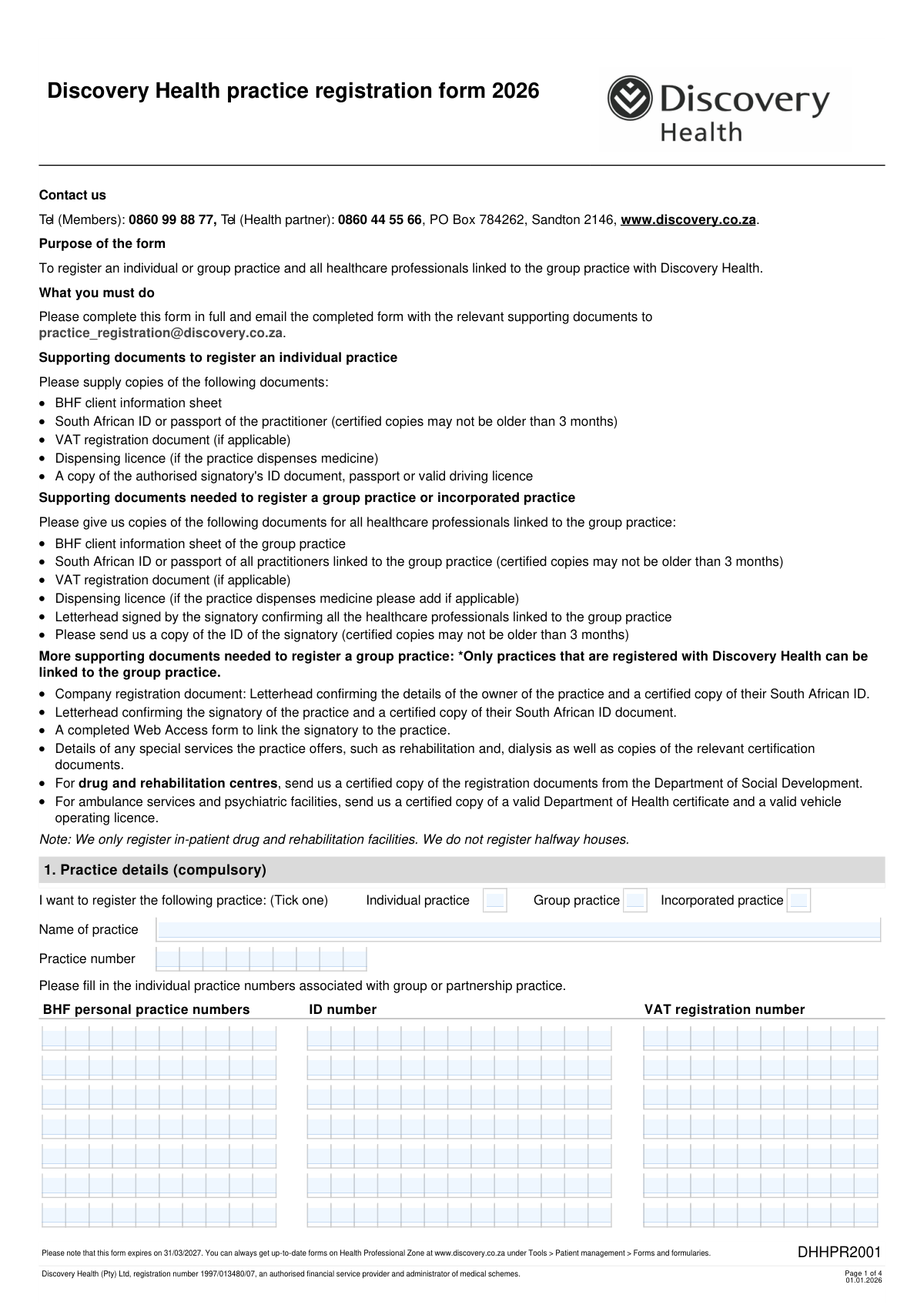
The Discovery Health Practice Registration Form 2026 (DHHPR2001) is an official application used by healthcare providers to register a practice (individual, group, or incorporated) with Discovery Health and to capture key practice, contact, and banking details for claims payments. It also sets out terms and conditions and POPIA-related privacy obligations that the signatory agrees to when submitting the application. Registration is important because Discovery Health uses the submitted identifiers (such as BHF practice numbers and ID/company registration details) to validate the provider and administer claims payments correctly. Today, this form can be filled out quickly and accurately using AI-powered services like Instafill.ai, which can also convert non-fillable PDF versions into interactive fillable forms.
Our AI automatically handles information lookup, data retrieval, formatting, and form filling.
It takes less than a minute to fill out DHHPR2001 using our AI form filling.
Securely upload your data. Information is encrypted in transit and deleted immediately after the form is filled out.
Form specifications
| Form name: | Discovery Health Practice Registration Form 2026 (DHHPR2001) |
| Number of pages: | 4 |
| Language: | English |
| Categories: | health insurance forms, Discovery Health forms, medical provider forms, healthcare registration forms |
Instafill Demo: filling out a legal form in seconds
How to Fill Out DHHPR2001 Online for Free in 2026
Are you looking to fill out a DHHPR2001 form online quickly and accurately? Instafill.ai offers the #1 AI-powered PDF filling software of 2026, allowing you to complete your DHHPR2001 form in just 37 seconds or less.
Follow these steps to fill out your DHHPR2001 form online using Instafill.ai:
- 1 Go to Instafill.ai and upload the Discovery Health Practice Registration Form 2026 (DHHPR2001) PDF (or select it from the form library if available).
- 2 Let the AI detect and map the form fields, then confirm the practice type (individual, group, or incorporated) and enter the practice name and practice number(s), including any BHF personal practice numbers/ID/VAT details required for linked practitioners.
- 3 Complete Section 1 practice details by entering the physical address, postal address, and practice office contact information (telephone, cellphone, and email).
- 4 Complete Section 2 by adding the healthcare professional/practice owner contact details (surname, name, maiden surname if applicable, work phone, cellphone, and email) for each listed contact.
- 5 Complete Sections 3–4 banking details for claims payments by entering the ID or company registration number, bank name, branch details, account number/type, account holder, what the account applies to, and the contact person details.
- 6 Upload the required supporting documents (e.g., BHF client information sheet, certified ID/passport copies, VAT document if applicable, dispensing licence if applicable, bank-stamped letter or statement, company registration/letterheads for group/incorporated practices) and have the authorised account holder/signatory apply signatures and dates where required.
- 7 Review the AI validation checks for missing fields and formatting, export the completed form, and email it with supporting documents to [email protected].
Our AI-powered system ensures each field is filled out correctly, reducing errors and saving you time.
Why Choose Instafill.ai for Your Fillable DHHPR2001 Form?
Speed
Complete your DHHPR2001 in as little as 37 seconds.
Up-to-Date
Always use the latest 2026 DHHPR2001 form version.
Cost-effective
No need to hire expensive lawyers.
Accuracy
Our AI performs 10 compliance checks to ensure your form is error-free.
Security
Your personal information is protected with bank-level encryption.
Frequently Asked Questions About Form DHHPR2001
This form is used to register an individual practice, group practice, or incorporated practice with Discovery Health. It also registers the healthcare professionals linked to a group practice so they can be associated correctly for claims and administration.
Any healthcare provider or practice owner who wants to be registered with Discovery Health must complete it. Group or incorporated practices must also provide details for all linked healthcare professionals and the authorised signatory.
Email the completed form and all required supporting documents to [email protected]. Make sure the form is completed in full to avoid delays.
You must provide a BHF client information sheet, a certified copy of the practitionerâs South African ID or passport (not older than 3 months), a VAT registration document (if applicable), a dispensing licence (if you dispense medicine), and the authorised signatoryâs ID/passport/valid driving licence.
You must provide the group practice BHF client information sheet, certified IDs/passports for all linked practitioners (not older than 3 months), VAT and dispensing licence (if applicable), and a letterhead signed by the signatory confirming all linked professionals, plus the signatoryâs certified ID (not older than 3 months). Additional documents may be required for incorporated/group setups (e.g., company registration and web access linking).
Tick âIndividual practiceâ for a single practitioner practice, âGroup practiceâ for multiple healthcare professionals linked under one group, and âIncorporated practiceâ if the practice is a legally incorporated entity. Your selection affects which supporting documents and linked practitioner details are required.
For group or partnership practices, you must list the individual practice numbers associated with the group. The form includes multiple âPractice Entryâ lines where you capture each linked practitionerâs BHF personal practice number, ID number, and VAT number (if applicable).
VAT details are required only if the practice is VAT-registered. If you are not VAT-registered, you can leave the VAT registration number fields blank and do not need to attach a VAT document.
If the practice dispenses medicine, you must include a copy of the dispensing licence. If you do not dispense medicine, this document is not required.
Provide the bank name, branch name, branch code, account number, account type (cheque or savings), and account holder details, and indicate whether the account is linked to an ID number or a company registration number. Attach a stamped bank letter or stamped bank statement (not older than 3 months) and ensure the authorised account holder signs where required.
It can take up to three working days to add banking details, and Discovery Health may contact you to validate the request. Do not submit claims for payment into the new account until you receive confirmation that the banking details have been added.
No. The form specifically states that credit card account details cannot be accepted for claim payments.
Delays often happen when the form is incomplete, supporting documents are missing, certified ID copies are older than 3 months, or banking details donât match the account holder information on the stamped bank letter/statement. Banking details also cannot be added without a company registration number or ID number.
No. The form notes that Discovery Health only registers in-patient drug and rehabilitation facilities and does not register halfway houses. Drug and rehabilitation centres must also provide certified registration documents from the Department of Social Development.
YesâAI tools like Instafill.ai can help auto-fill form fields accurately using the information and documents you provide, saving time and reducing errors. You can upload the PDF to Instafill.ai, map or confirm key fields (practice details, contacts, and banking), and then export a completed version ready to email to [email protected]; if the PDF is flat/non-fillable, Instafill.ai can convert it into an interactive fillable form first.
Compliance DHHPR2001
Validation Checks by Instafill.ai
1
Practice type selection is exactly one option (Individual vs Group vs Incorporated)
Validates that the applicant has selected exactly one practice type checkbox and not left all unselected or selected multiple options. This is critical because downstream required fields and supporting-document rules differ by practice type. If validation fails, the submission should be rejected and the user prompted to select one practice type before continuing.
2
Mandatory Practice Details completeness (Practice name, Practice number, physical address, office contact email/phone)
Checks that all compulsory Practice Details fields are present: practice name, practice number, physical address core fields (street number, street name, city/suburb, postal code), and at least one reliable office contact method (telephone or cellphone) plus an email address. These are required to identify the practice and enable operational communication. If any required field is missing, the form should be flagged incomplete and not accepted for registration.
3
Practice number format and numeric integrity
Ensures the Discovery Health practice number is provided in the expected numeric format (digits only, no letters), within an acceptable length range, and not obviously invalid (e.g., all zeros). Correct formatting prevents failed matching to Discovery Health systems and reduces manual rework. If invalid, the system should block submission and request a corrected practice number.
4
Group practice entries required only when Group practice is selected
Validates conditional logic: the Practice Entry rows (BHF personal practice number / ID number / VAT number) must be empty when the practice type is not Group practice, and must contain at least one fully completed entry when Group practice is selected. This prevents collecting irrelevant personal identifiers for individual/incorporated practices and ensures group practices provide linked practitioner details. If the condition is violated, the submission should be rejected with a clear message indicating which entries must be added or removed.
5
BHF personal practice number format and uniqueness across group entries
Checks that each provided BHF personal practice number matches the expected pattern/length (as per BHF documentation) and that no BHF number is duplicated across Practice Entry 1â7. Unique BHF numbers are essential to correctly link multiple professionals to the group practice without collisions. If duplicates or malformed values are found, the system should require correction and highlight the conflicting entry rows.
6
South African ID number validation (checksum and date-of-birth plausibility)
Validates SA ID numbers (13 digits) using checksum rules (Luhn) and verifies embedded date components are plausible (e.g., month 01â12, day 01â31) and not in the future. This reduces fraud risk and prevents downstream identity verification failures. If validation fails, the system should reject the ID value and request a valid SA ID or, where applicable, a passport number in the correct field.
7
Passport/ID field mutual exclusivity and minimum identity requirement for banking
Ensures that the banking identity section has exactly one identity basis selected/used: either an ID/passport number for a person or a company registration number for an entity, and that the chosen identifier is actually provided. The form states banking details cannot be added without a company registration number or ID number, so this is a hard requirement. If missing or conflicting, the banking section should be marked invalid and the submission should not proceed until corrected.
8
Company registration number format validation (when selected)
When the applicant indicates the account is registered to a company, validates the company registration number format (e.g., typical South African pattern such as YYYY/NNNNNN/NN) and disallows obviously malformed values. Correct formatting is required to match legal entity records and to support compliance checks. If invalid, the system should block submission and request the correct company registration number as per official documents.
9
VAT registration number validation (optional but strict when provided)
Validates that VAT numbers, when supplied, match the expected SARS VAT format (commonly 10 digits) and are not placeholders. Because VAT is 'if applicable', the check should not require a value, but should enforce correctness if present to avoid payment and tax reporting issues. If the VAT number is present but invalid, the system should reject the value and request a corrected VAT registration number or removal if not applicable.
10
Physical address postal code format and South African length check
Ensures the physical address postal code is numeric and matches South African postal code length (typically 4 digits), and that city/suburb is not blank. Accurate postal codes support geographic validation, correspondence, and network administration. If invalid, the system should prompt for a corrected postal code before accepting the form.
11
Postal address type selection and dependent fields completeness
Validates that if any postal address type is selected (PO Box, Private Bag, Suite, Postnet Suite), the corresponding number field (Box number or Number) plus suburb, city, and postal code are completed; and that mutually exclusive postal types are not selected simultaneously. This prevents undeliverable mail addresses and ambiguity in routing. If validation fails, the system should require the user to select one postal type and complete all dependent fields.
12
Phone number structure validation (area/country code + local number) for practice and contacts
Checks that phone inputs split into code/prefix and number contain only digits (allowing leading '+'' in country code where applicable), meet minimum/maximum lengths, and are not identical placeholders (e.g., 0000000). Reliable phone formatting is necessary for contactability and reduces failed outreach. If invalid, the system should flag the specific phone field and require correction.
13
Email address format validation for practice office and each listed contact
Validates that each provided email address conforms to standard email syntax (local@domain) and rejects obvious invalid entries (missing '@', invalid domain). Email is a primary channel for registration follow-ups and notifications, so invalid emails cause process delays. If an email is required (practice office) and invalid, submission should be blocked; if optional (additional contacts), the field should be flagged for correction.
14
Banking details completeness and non-credit-card enforcement
Ensures bank name, branch name, branch code, account number, account type (Cheque/Savings), and account holder are all provided, and explicitly rejects credit card account numbers (e.g., 13â19 digit PAN-like numbers with typical card prefixes) per the form note. Complete and valid banking data is required to pay claims and fees correctly. If any required banking field is missing or appears to be a credit card account, the banking section should be rejected and the user instructed to provide valid bank account details.
15
Branch code format validation (3-part or standard numeric) and field-type mismatch detection
Validates that the branch code is numeric and matches expected South African branch code length (commonly 6 digits), even if captured in segmented fields; also detects and rejects date-formatted inputs in branch code fields (a common OCR/mapping error given the field IDs). Correct branch codes are essential for successful EFT payments. If invalid or mis-typed as a date, the system should block submission and request a corrected numeric branch code.
16
Signatures and dates present, correctly formatted, and logically consistent
Checks that required signatures are present (authorised account holder and requestor in banking section; acceptance signature in terms section) and that associated dates are provided in DDMMYYYY format and are not in the future. Signatures and dates provide legal authorization for banking changes and agreement to terms. If missing or invalid, the submission should be rejected as unauthorized/incomplete and routed back for completion.
Common Mistakes in Completing DHHPR2001
People often skip the tick-box or choose the wrong option because the terms sound similar or they assume âgroupâ just means multiple staff. This can cause Discovery Health to apply the wrong requirements, leading to missing documents and delays or rejection. Confirm your legal structure (solo practitioner, group of linked practitioners, or incorporated entity) before completing the rest of the form, and ensure the supporting documents match that selection. AI-powered tools like Instafill.ai can prompt for the correct pathway and prevent completing fields that donât apply.
A very common error is entering a BHF personal practice number where the Discovery Health practice number is required (or vice versa), or putting an ID number in a practice-number field. This creates identity mismatches in Discoveryâs system and can prevent registration or correct linking of practitioners to the group practice. Always copy numbers directly from the correct source document (Discovery practice registration vs BHF client information sheet vs ID/passport). Instafill.ai can help by validating number patterns and mapping each identifier to the correct field.
The form indicates the individual practice numbers linked to a group/partnership must be listed, but applicants often either fill these rows for an individual practice or forget to list all linked practitioners for a group practice. The consequence is incomplete linking, which can block claims processing for some practitioners or require resubmission. Only complete the Practice Entry rows when registering a group practice/incorporated practice, and include every linked healthcare professionalâs BHF number, ID/passport, and VAT number (if applicable). Instafill.ai can enforce conditional logic so these rows appear only when âGroup practiceâ is selected.
Applicants frequently attach ID/passport copies that are not certified, or certified copies that are older than the stated 3-month limit, because they reuse old onboarding packs. Discovery may reject the submission or request updated documents, delaying registration. Ensure each required ID/passport copy is properly certified and the certification date is within the last 3 months for the practitioner(s) and signatory. Use a checklist before emailing, and consider Instafill.ai to track document recency and flag expired certifications.
People often attach only the BHF sheet and ID, but miss items like VAT registration (if applicable), dispensing licence (if dispensing), company registration documents (for incorporated practices), or the signed letterhead confirming linked professionals. Missing documents typically result in back-and-forth emails and a stalled registration. Review the âSupporting documentsâ section that matches your practice type and include documents for all linked professionals where required. Instafill.ai can generate a tailored document checklist based on your selections and reduce omissions.
Applicants commonly enter a street address in the PO Box fields, forget to tick the correct postal option (PO Box/Private Bag/Suite/Postnet Suite), or leave suburb/city/postal code incomplete. This can cause correspondence and confirmations to go to the wrong place and may trigger verification queries. Enter the physical address as a street location and the postal address only in the selected postal format, ensuring suburb/city/postal code are completed. Instafill.ai can standardize address formatting and ensure the correct fields are completed based on the postal option selected.
Because the form separates country/area code and the local number, people often put the full number in both fields, omit the area code, or include spaces/symbols inconsistently. This leads to failed contact attempts during validation, delaying banking verification or registration follow-ups. Enter only the code/prefix in the code field and only the remaining digits in the number field, using a consistent format. Instafill.ai can automatically parse and place phone numbers into the correct sub-fields.
Applicants sometimes type an email with a small typo, use a personal email when a practice email is required for ongoing correspondence, or provide an inbox that no one checks. This can cause missed requests for additional documents and delays in confirming registration or banking updates. Double-check spelling, use the primary practice correspondence email, and ensure it is actively monitored. Instafill.ai can validate email formatting and reduce typos during entry.
A frequent cause of rejection is that the banking fields donât exactly match the stamped bank letter/statementâespecially account type (cheque vs savings), branch code formatting, or the account holder name (company vs individual). Discovery may refuse to add banking details, which delays claim payments and can require resubmission with corrected proof. Copy the details exactly as shown on the stamped bank document (not older than 3 months) and ensure the account holder matches the ID/company registration number provided. Instafill.ai can cross-check entered banking data against uploaded proof and flag inconsistencies.
The form explicitly states credit card account details are not accepted, yet some applicants still submit them or select âID numberâ when the account is registered to a company (or vice versa). This prevents banking details from being added and can stop payments until corrected. Confirm whether the bank account is held under an individual ID or a company registration number and complete only the relevant identifier fields. Instafill.ai can guide the correct selection and prevent entry of disallowed account types.
Applicants often forget to sign, leave the date blank, or have someone other than the authorised account holder/practice owner sign the banking section and acceptance section. This can invalidate the request and force Discovery to request a re-signed form, delaying registration and payment setup. Ensure the authorised account holder signs where required, include the town/city, and use the correct DDMMYYYY date format. Instafill.ai can highlight signature/date omissions before submission and ensure all mandatory sign-off fields are completed.
Saved over 80 hours a year
âI was never sure if my IRS forms like W-9 were filled correctly. Now, I can complete the forms accurately without any external help.â
Kevin Martin Green
Your data stays secure with advanced protection from Instafill and our subprocessors

Robust compliance program
Transparent business model
Youâre not the product. You always know where your data is and what it is processed for.
ISO 27001, HIPAA, and GDPR
Our subprocesses adhere to multiple compliance standards, including but not limited to ISO 27001, HIPAA, and GDPR.
Security & privacy by design
We consider security and privacy from the initial design phase of any new service or functionality. Itâs not an afterthought, itâs built-in, including support for two-factor authentication (2FA) to further protect your account.
Fill out DHHPR2001 with Instafill.ai
Worried about filling PDFs wrong? Instafill securely fills discovery-health-practice-registration-form-2026-dhhpr2001 forms, ensuring each field is accurate.