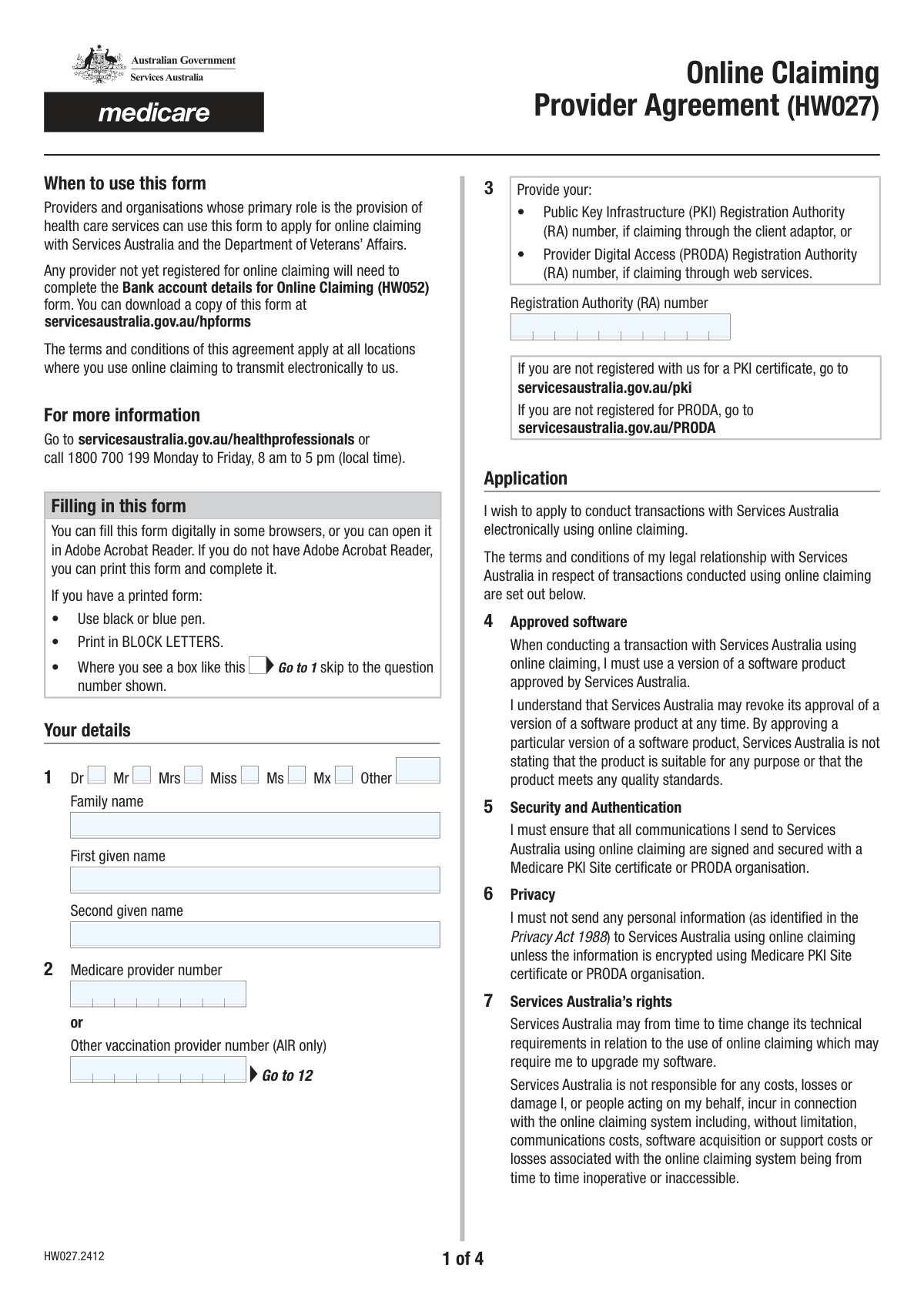
Yes! You can use AI to fill out Form HW027, Online Claiming Provider Agreement
Form HW027, the Online Claiming Provider Agreement, is a crucial document for healthcare providers and organizations in Australia who wish to conduct electronic transactions with Services Australia and the Department of Veterans’ Affairs. By completing this form, providers agree to the terms and conditions for submitting claims electronically, ensuring secure and efficient processing of payments for services rendered. Today, this form can be filled out quickly and accurately using AI-powered services like Instafill.ai, which can also convert non-fillable PDF versions into interactive fillable forms.
Our AI automatically handles information lookup, data retrieval, formatting, and form filling.
It takes less than a minute to fill out HW027 using our AI form filling.
Securely upload your data. Information is encrypted in transit and deleted immediately after the form is filled out.
Form specifications
| Form name: | Form HW027, Online Claiming Provider Agreement |
| Number of pages: | 4 |
| Language: | English |
| Categories: | VA claim forms |
Instafill Demo: How to fill out PDF forms in seconds with AI
How to Fill Out HW027 Online for Free in 2026
Are you looking to fill out a HW027 form online quickly and accurately? Instafill.ai offers the #1 AI-powered PDF filling software of 2026, allowing you to complete your HW027 form in just 37 seconds or less.
Follow these steps to fill out your HW027 form online using Instafill.ai:
- 1 Navigate to Instafill.ai and upload or select the Online Claiming Provider Agreement (HW027).
- 2 Provide your personal details, including your title, name, and Medicare provider number or other vaccination provider number.
- 3 Enter your Registration Authority (RA) number and location identifier (Minor ID).
- 4 Complete the relevant section with your practice or organisation details, including name, address, and contact information.
- 5 Input your financial institution details for Electronic Funds Transfer (EFT), specifying the account for Medicare, DVA, and/or Australian Immunisation Register claims.
- 6 Indicate if you are registering software to transact with the Australian Immunisation Register (AIR).
- 7 Carefully review the pre-filled information, read the privacy notice and declaration, then electronically sign and date the agreement to confirm its accuracy and your acceptance of the terms.
Our AI-powered system ensures each field is filled out correctly, reducing errors and saving you time.
Why Choose Instafill.ai for Your Fillable HW027 Form?
Speed
Complete your HW027 in as little as 37 seconds.
Up-to-Date
Always use the latest 2026 HW027 form version.
Cost-effective
No need to hire expensive lawyers.
Accuracy
Our AI performs 10 compliance checks to ensure your form is error-free.
Security
Your personal information is protected with bank-level encryption.
Frequently Asked Questions About Form HW027
This form is used by healthcare providers and organisations to apply for online claiming with Services Australia and the Department of Veterans’ Affairs. It establishes the terms and conditions for submitting claims electronically.
Any healthcare provider or organisation whose primary role is providing health care services and wants to start conducting transactions like bulk billing or AIR claims electronically with Services Australia must complete this form.
Your RA number is a unique identifier required for secure online claiming, associated with either your PRODA (Provider Digital Access) or PKI (Public Key Infrastructure) registration. If you don't have one, you must register for PRODA or a PKI certificate via the Services Australia website.
Yes, you must provide your bank account details for Electronic Funds Transfer (EFT) payments. However, if you are a new provider not yet registered for online claiming, you must also complete the separate 'Bank account details for Online Claiming (HW052)' form.
You can submit the signed form by emailing it to [email protected], faxing it to 1300 505 866, or posting it to the GPO Box address listed in the 'Returning this form' section.
You should only complete the section that applies to your situation. Fill out 'Practice details' (questions 13-17) if you are a practice, or 'Organisation details' (questions 18-22) if you are part of a larger organisation.
Only complete questions 25 and 26 if you intend to register your software to submit claims or report immunisations to the Australian Immunisation Register (AIR). If you are not reporting to the AIR, you can skip this section.
You must be able to provide evidence of service for any bulk bill claims upon request from Services Australia. This can include electronic billing information, appointment records, or notes in your practice software.
No, the terms and conditions of this single agreement apply to all locations where you use online claiming. You will need to provide the Minor ID (location ID) for the specific practice location in question 12.
Yes, services like Instafill.ai use AI to help you accurately auto-fill form fields, which can save you time and reduce errors.
Simply upload the HW027 form to the Instafill.ai platform. The AI will identify the fields, allowing you to fill them out interactively online, save your progress, and download the completed document.
If you have a non-fillable or 'flat' PDF, you can use a service like Instafill.ai. It can convert the static PDF into an interactive, fillable form that you can complete digitally on your computer.
The declaration section clarifies that the individual health professional is responsible for the claims lodged, not the organisation they work for. By signing, you agree to the terms and confirm the information provided is correct.
You can terminate this agreement at any time by providing written notice to Services Australia. After giving notice, you will no longer be able to conduct transactions using online claiming.
Compliance HW027
Validation Checks by Instafill.ai
1
Provider Identifier Exclusivity Check
This validation ensures that the applicant has provided either a 'Medicare provider number' or an 'Other vaccination provider number (AIR only)'. The form requires one of these two identifiers for registration, but not necessarily both. If neither number is provided, the form submission will be rejected as the provider cannot be uniquely identified in the system.
2
Registration Authority (RA) Number Presence
This check verifies that the 'Registration Authority (RA) number' field (Question 3) is completed. This number is critical for authenticating claims via PKI or PRODA, and the application for online claiming cannot be processed without it. Failure to provide this number will result in an error, prompting the user to enter the required RA number before proceeding.
3
Practice or Organisation Details Completeness
This validation ensures that the applicant completes either the 'Practice details' section (Questions 13-17) or the 'Organisation details' section (Questions 18-22). The form is for providers or organisations, so details for at least one entity type must be supplied for contact and identification purposes. If neither section is filled, the submission will be flagged as incomplete.
4
Australian Postcode Format Validation
This check confirms that all postcode fields ('Practice address', 'Postal address', 'Organisation address') contain a valid 4-digit numeric Australian postcode. Correct postcodes are essential for mail delivery and location verification. An invalid format will trigger an error message requiring the user to correct the entry to a 4-digit number.
5
Daytime Phone Number Format
This validation verifies that the 'Daytime phone number' fields in the Practice and Organisation sections are in a valid format, including the area code. A valid phone number is crucial for Services Australia to contact the provider or organisation regarding their application or claims. The system should check for appropriate length and numeric characters, rejecting entries that do not conform to a standard phone number structure.
6
Email Address Format Validation
This check ensures that the email address fields provided for the practice and/or organisation contact details are in a valid format (e.g., '[email protected]'). A valid email is required for electronic communication, including notifications about changes to terms as stated in clause 10. An invalid entry will prevent submission and prompt the user to enter a correctly formatted email address.
7
Financial Institution Details Completeness
This validation ensures all fields in Question 23 ('Name of bank', 'Branch number (BSB)', 'Account number', 'Account held in the name(s) of') are filled out. These details are mandatory for setting up Electronic Funds Transfer (EFT) for claim payments. If any of these fields are left blank, the form cannot be processed, and an error will be displayed.
8
BSB Number Format Validation
This check verifies that the 'Branch number (BSB)' is a 6-digit numeric value. The BSB is a standard format used by Australian financial institutions to identify a specific branch, and it must be correct for EFT payments to be routed successfully. Entries that are not exactly 6 digits long or contain non-numeric characters will be rejected.
9
Online Transaction Type Selection
This validation confirms that the user has selected at least one option in Question 24 ('What type of online transactions do you want paid to this account?'). The purpose of providing bank details is to receive payments for specific claim types. If no transaction type is selected, the bank details have no purpose, and the submission will be considered incomplete.
10
AIR Software Registration Conditional Logic
This check enforces the dependency between Questions 25 and 26. If the user selects 'Yes' for Question 25 ('Do you want to register your software to transact with the Australian Immunisation Register?'), they must then provide an answer ('Yes' or 'No') to Question 26. This ensures complete information is gathered for AIR software registration if the user opts in.
11
Declaration Date Presence and Format
This validation ensures that the 'Date' field in the declaration section (Question 28) is not empty and adheres to the specified DD MM YYYY format. A properly formatted and signed date is a legal requirement for the agreement to be valid. The system will reject the form if the date is missing or does not match the required format.
12
Declaration Date Validity
This check verifies that the date entered in the declaration section is a real, valid calendar date and is not a future date. An invalid date (e.g., 32 01 2024) or a future date would invalidate the legal agreement. If the date is invalid, the user will be prompted to enter a correct date that is on or before the current day.
13
Provider Signature Presence
This validation confirms that the 'Provider’s signature' field has been signed. A signature is required to legally execute the agreement and declare the provided information as complete and correct. A digital form submission should check for a digital signature or a non-empty signature image field, preventing submission until it is completed.
14
Applicant Name Completeness
This check ensures that the 'Family name' and 'First given name' fields (Question 1) are both completed. These fields are fundamental for identifying the individual provider entering into the agreement. The form cannot be processed without the provider's full name, and a failure will result in an error message prompting the user to fill in the required name fields.
Common Mistakes in Completing HW027
Applicants frequently make typos in the BSB or account number, or provide an account name that doesn't exactly match the bank's records. This often occurs when entering a trading name for an account held under a different legal entity name. These errors lead to payment rejections and significant delays in receiving funds for claims. To avoid this, double-check all details against an official bank statement before submitting.
The form has separate sections for 'Practice details' (13-17) and 'Organisation details' (18-22), and applicants must only fill out the one that applies to them. Many users either fill out the wrong section or both, creating confusion for the processing team. This mistake can lead to the provider being registered under the incorrect entity type, causing administrative and claiming issues down the line. Carefully read the instructions to determine which section is appropriate for your business structure.
A very common error is submitting the form without a valid signature and date in the declaration section. Applicants often fill out the form digitally and email it, forgetting the instruction to print the form for a handwritten signature. An unsigned form is legally invalid and will be immediately rejected, forcing the applicant to restart the process.
The Medicare provider number and Registration Authority (RA) number are critical for identifying the provider in the system, but they are often mistyped or left blank. Applicants may not know where to find their PRODA or PKI RA number, leading to incorrect entries. An invalid identifier will cause the application to fail verification, preventing the setup of online claiming entirely.
The form explicitly warns against this, indicating it's a frequent mistake where applicants enter their 16-digit debit or credit card number in the 'Account number' field. Payments are made via Electronic Funds Transfer (EFT), which requires a BSB and bank account number, not a card number. This error guarantees payment failure and requires resubmission of corrected bank details.
The Minor ID in question 12 is a crucial identifier that links claims to a specific practice location, but it is often overlooked or entered incorrectly. Providers may not be aware of their location's Minor ID or its importance, leading them to skip the field. Failure to provide a correct Minor ID can result in claims being rejected or misallocated, causing significant payment and reconciliation problems.
In question 24, applicants must specify which claim types (e.g., Medicare bulk bill, AIR claims) should be paid into the nominated bank account by ticking the appropriate boxes. It's easy to overlook this step, but failing to select any option means the system does not know which payments to direct to the account. This results in an incomplete setup where no payments can be processed until the information is provided.
Questions 25 and 26 regarding the Australian Immunisation Register (AIR) have conditional logic that is often missed. Applicants may answer 'No' to question 25 but still fill out question 26, or answer 'Yes' to 25 and forget to complete 26. This creates contradictory or incomplete data that halts the AIR registration part of the application, requiring clarification and delaying the ability to transact with the register.
If the provider has a non-fillable PDF version, they must print it and write in block letters. Common mistakes include illegible handwriting or using the wrong color pen, which can lead to data entry errors by the processing team. This can be avoided by using a tool like Instafill.ai, which can convert flat PDFs into easily fillable forms, ensuring all information is clear, legible, and correctly formatted.
Applicants sometimes enter a nickname, a shortened first name, or omit their middle name in the 'Your details' section. This causes a mismatch with their official provider registration records held by Services Australia. Any discrepancy in the name can flag the application for manual review and delay identity verification, prolonging the entire setup process.
Saved over 80 hours a year
“I was never sure if my IRS forms like W-9 were filled correctly. Now, I can complete the forms accurately without any external help.”
Kevin Martin Green
Your data stays secure with advanced protection from Instafill and our subprocessors

Robust compliance program
Transparent business model
You’re not the product. You always know where your data is and what it is processed for.
ISO 27001, HIPAA, and GDPR
Our subprocesses adhere to multiple compliance standards, including but not limited to ISO 27001, HIPAA, and GDPR.
Security & privacy by design
We consider security and privacy from the initial design phase of any new service or functionality. It’s not an afterthought, it’s built-in, including support for two-factor authentication (2FA) to further protect your account.
Fill out HW027 with Instafill.ai
Worried about filling PDFs wrong? Instafill securely fills form-hw027-online-claiming-provider-agreement forms, ensuring each field is accurate.