
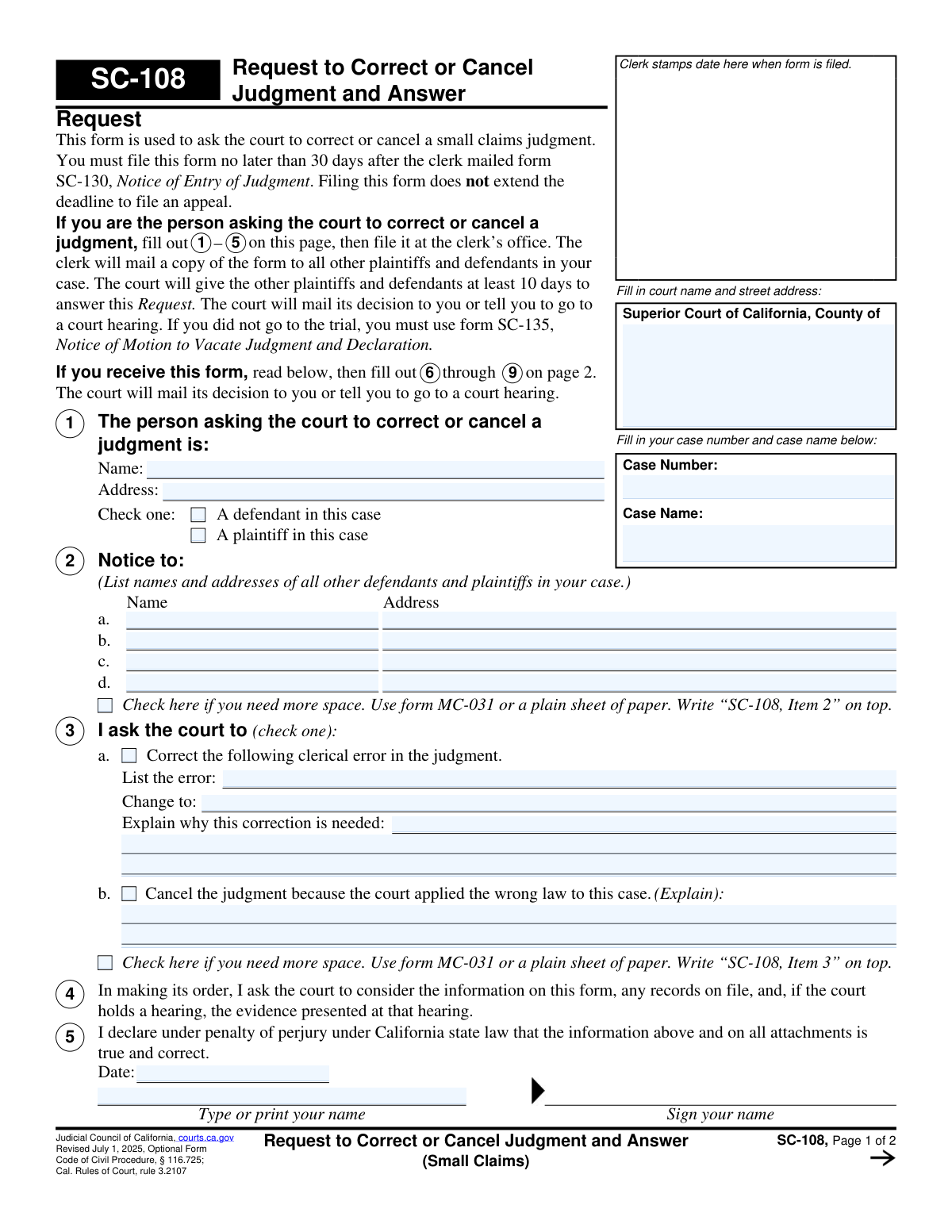
Yes! You can use AI to fill out SC-108, Request to Correct or Cancel Judgment and Answer (Small Claims)
Don't type 54 fields by hand. Tell our AI about yourself, or upload a document you already have, and it fills every field in seconds. You check it, then download, print or sign.
The AI does the filling. You just check it.
No typing into boxes, nothing to install.
What this form asks for
The AI fills all of it, from your answers or your documents.
The AI checks your answers before you download
16 checks built for this form, so a wrong date or a missing answer is caught before anyone else sees it.
Validates that the court name section includes the county (e.g., "Superior Court of California, County of ___") and a street address or clearly identified court location. This is required so the filing is routed to the correct court and can be processed without manual research. If missing or ambiguous, the submission should be rejected or flagged for correction because the clerk cannot reliably file it in the proper venue.
Checks that both Case Number and Case Name are provided and not left blank on each page where requested. The case number should match an expected small-claims format for the county (allowing county-specific patterns) and the case name should be non-empty text. If either is missing or malformed, the form cannot be associated with the correct case and should fail validation or be routed to manual review.
Ensures Item 1 includes the requestor’s full name and a complete mailing address (street, city, state, ZIP or equivalent). This is necessary for service, court notices, and to confirm who is seeking relief. If incomplete, the court and other parties may be unable to provide notice, so the submission should be rejected or marked incomplete.
Validates that the requestor in Item 1 checks exactly one role: either "A defendant" or "A plaintiff" in the case. This prevents contradictory filings and helps the court interpret standing and party alignment. If neither or both are selected, the form should fail validation and require correction.
Checks that Item 2 lists names and addresses for all other plaintiffs/defendants, with at least one entry present unless an attachment is explicitly indicated (MC-031 or plain sheet labeled "SC-108, Item 2"). Proper notice is essential for due process and for the clerk’s certificate of mailing. If no parties are listed and no attachment is referenced, the submission should be rejected as non-compliant.
Validates that each listed party address (and the answer filer’s address in Item 6) contains minimum deliverability components (e.g., street/PO box and city/state/ZIP). This reduces returned mail and ensures the clerk can mail notices and decisions. If an address is clearly incomplete (e.g., only a city or only a street with no city/state), the system should flag it and require correction before filing.
And 10 more checks
- Request Type Selection (Item 3) Exactly One: Correct Clerical Error vs Cancel for Wrong Law
- Clerical Error Details Required When Item 3(a) Selected
- Wrong Law Explanation Required When Item 3(b) Selected
- Attachment Reference Consistency (MC-031 / Plain Sheet Labeling)
- Perjury Declaration Completion for Request (Item 5 Date, Printed Name, Signature)
- Answer Filer Identity Required Fields (Item 6 Name and Address)
- Answer Filer Role Selection (Item 6 Plaintiff vs Defendant) Exactly One
- Answer Position Selection and Explanation Requirements (Item 7)
- Mailing Date Provided for Service of Answer (Item 8 Valid Date)
- Perjury Declaration Completion for Answer (Item 9 Date, Printed Name, Signature)
Let AI fill out your SC-108
No typing. Every field filled in seconds, checked, ready to sign.
How to Fill Out SC-108 Online for Free in 2026
What the AI walks you through.
- Enter the court information (Superior Court county and address), plus the case number and case name exactly as shown on the judgment/SC-130.
- Identify the requesting party in Item 1 (name, address, and whether you are the plaintiff or defendant).
- List all other parties in Item 2 with current mailing addresses; add an attachment (MC-031 or plain paper labeled “SC-108, Item 2”) if needed.
- Complete Item 3 by selecting the type of request: (a) describe the clerical error, the requested change, and why it is needed, or (b) request cancellation because the wrong law was applied (attach additional explanation if needed, labeled “SC-108, Item 3”).
- Review Item 4, then sign and date Item 5 under penalty of perjury; file the form with the small claims clerk within 30 days of the mailing of SC-130.
- If you are responding (Answer section), complete Items 6–7 to state whether you agree or disagree and whether you want a hearing; attach extra pages labeled “SC-108, Item 7” if needed.
- For an Answer, complete Item 8 (mailing date), sign Item 9, then promptly mail/file the completed Answer with the court and mail copies to all parties listed in Items 1 and 2.
Common Mistakes in Completing SC-108
The ones the AI is built to catch.
Missing the 30-day filing deadline (or miscalculating it)
Using SC-108 when SC-135 is required (did not attend the trial)
Leaving the court, county, case number, or case name blank or inconsistent
Not listing all parties in Item 2 (or providing incomplete addresses)
Requesting the wrong type of relief: clerical correction vs. legal error cancellation
Not specifying the exact clerical error and the exact corrected wording/amount
Providing conclusions instead of facts and support in the explanation sections
Failing to use attachments correctly (MC-031) or not labeling them as instructed
Missing signature, date, or printed name under penalty of perjury
Answer side: not mailing copies to all parties and not completing the mailing date (Items 8–9)
Assuming SC-108 extends the appeal deadline or replaces an appeal
Frequently Asked Questions About SC-108
Is it really free for 7 days?
Can I fill other forms too?
How do I cancel?
How does the AI fill out SC-108?
What happens to my information?
How complex is SC-108 to fill out?
What is form SC-108 used for?
Who can file SC-108—plaintiffs, defendants, or both?
What is the deadline to file SC-108?
Does filing SC-108 extend my deadline to appeal the judgment?
Can I use SC-108 if I did not go to the trial?
What’s the difference between correcting a clerical error and canceling a judgment for wrong law?
What information do I need to fill out on page 1 if I’m the person making the request?
Do I need to list all parties and addresses in item 2?
What should I write in item 3(a) if I’m asking to correct a clerical error?
What happens after I file the request (items 1–5) with the clerk?
If I receive SC-108, how do I respond and what sections do I fill out?
What if I agree or disagree with the request—where do I say that?
Can I ask for a hearing on the request?
What happens if I do nothing after receiving SC-108?
Do I have to prove I mailed copies to the other parties when I file an answer?
Get your SC-108 filled out by AI
$0 today. Cancel before Nov 1 and you pay nothing.
Other forms like this one
small claims forms: Form SC-100, Plaintiff's Claim and ORDER to Go to Small Claims Court, Judicial Council of California Form SC-104, Proof of Service (Small Claims), Judicial Council of California Form SC-105, Request for Court Order and Answer (Small Claims), SC-120, Defendant’s Claim and ORDER to Go to Small Claims Court (Small Claims), Judicial Council of California Form SC-104, Proof of Service (Small Claims), Judicial Council of California Form SC-108, Request to Correct or Cancel Judgment and Answer (Small Claims), SC-105, Request for Court Order and Answer (Small Claims), Judicial Council of California Form SC-120, Defendant’s Claim and ORDER to Go to Small Claims Court (Small Claims), Form SC-100, Plaintiff’s Claim and ORDER to Go to Small Claims Court, Form N161, Appellant’s notice (All appeals except small claims track appeals and appeals to the Family Division of the High Court), Plaintiff's Claim and ORDER to Go to Small Claims Court (SC-100), Form N161, Appellant's Notice (All appeals except small claims track appeals and appeals to the Family Division of the High Court), Form SC-100A, Other Plaintiffs or Defendants (Attachment to Plaintiff's Claim and ORDER to Go to Small Claims Court), Form A, Claim Form, European Small Claims Procedure, Form EJ-001, Abstract of Judgment—Civil and Small Claims, Form SC-109, Authorization to Appear (Small Claims), Form SC-112A, Proof of Service by Mail (Small Claims), Form SC-114, Request to Amend Party Name Before Hearing (Small Claims), Form SC-132, Attorney-Client Fee Dispute (Attachment to Notice of Entry of Judgment), Form SC-152, Order on Request to Postpone Trial (Small Claims)
VA claim forms: Form OWCP-915, Claim for Medical Reimbursement, Form 8862, Information To Claim Certain Credits, Form CA-7, Claim for Compensation, Form CA-5, Claim for Compensation, Form SC-100, Plaintiff's Claim and ORDER to Go to Small Claims Court, Form 20-0995, Decision Review Request: Supplemental Claim, Form 104, List of Creditors 20 Largest Unsecured Claims, Form 941-X (Rev. April 2023), Adjusted Employer’s QUARTERLY Federal Tax Return or Claim for Refund, Judicial Council of California Form SC-104, Proof of Service (Small Claims), Immigration and Refugee Board of Canada (IRB) – Refugee Protection Division (RPD) Basis of Claim Form (for persons claiming refugee protection in Canada) (RPD.02.01), Judicial Council of California Form SC-105, Request for Court Order and Answer (Small Claims), SC-120, Defendant’s Claim and ORDER to Go to Small Claims Court (Small Claims), Judicial Council of California Form SC-104, Proof of Service (Small Claims), Continental American Insurance Company (CAIC) / Aflac Group Critical Illness Claim Form (with Attending Physician’s Statement, HIPAA Authorization to Obtain Information, and Electronic Funds Transaction Authorization), Judicial Council of California Form SC-108, Request to Correct or Cancel Judgment and Answer (Small Claims), SC-105, Request for Court Order and Answer (Small Claims), Judicial Council of California Form SC-120, Defendant’s Claim and ORDER to Go to Small Claims Court (Small Claims), Small Claim and Notice of Small Claim (ORS 46.425) (OJD Official) (Jan 2026), VA Form 21-4138, Statement in Support of Claim, Form SSA-795, Statement of Claimant or Other Person
Let AI fill out your SC-108
Your trial starts once a card is added. You pay nothing before Nov 1.
Our AI already knows this form, all 54 fields of it. Skip the typing: tell it about yourself, or upload what you have, and it fills the whole form in seconds.
- AI fills every field on both pages, tables and checkboxes included
- No typing into boxes: answer a few questions, or upload a document you already have, an old copy of this form, a photo of a document
- The AI checks the answers; you review and change anything before you download
- Download the finished PDF, print it, or sign it online
- Encrypted, and never used to train AI
Cancel before Nov 1 and you pay nothing.
A card is needed to start the trial. Cancel in two clicks from your account.
Terms · Privacy