
Instafill.ai
7 days free
AI form filling · 161 fields · 7 pages · done in seconds

Yes! You can use AI to fill out Form 20-0995, Decision Review Request: Supplemental Claim

Don't type 161 fields by hand. Tell our AI about yourself, or upload a document you already have, and it fills every field in seconds. You check it, then download, print or sign.
7 days free, then $19.99/month · Cancel anytime
AI fills it, no typingEncrypted, never used to train AICancel in two clicks
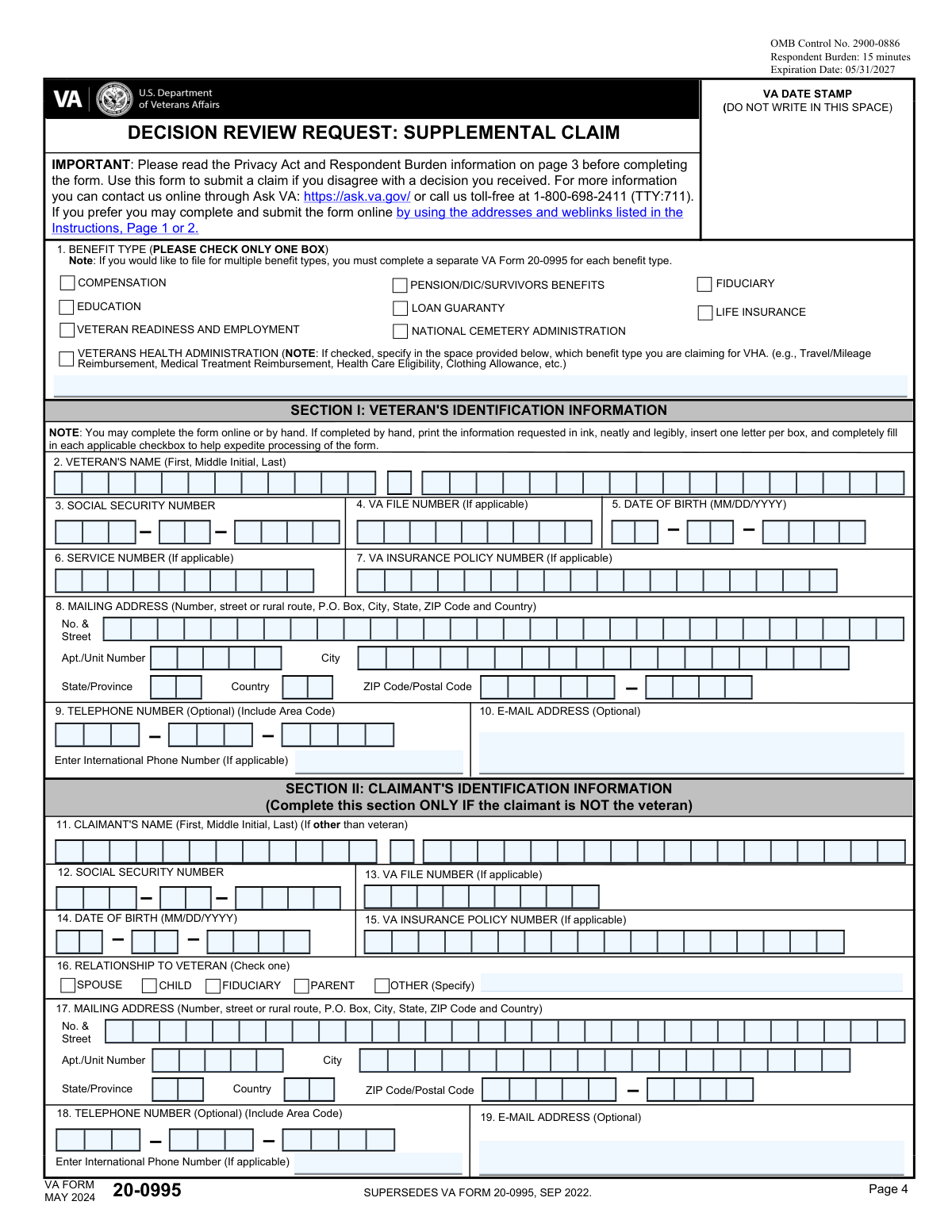
Form 20-0995, Decision Review Request: Supplemental Claim, page 1
Complex · 70/100Form Complexity Index

The AI does the filling. You just check it.

No typing into boxes, nothing to install.

Tell the AI about youAnswer a few questions in plain words, or upload a document you already have. That is all the typing there is.
AI fills every field in secondsIt puts each answer in the right box on every page, tables and checkboxes included.
Check it and downloadReview every field, change anything, then download, print or sign the PDF.

What this form asks for

The AI fills all of it, from your answers or your documents.

Form 20-0995, Decision Review Request: Supplemental Claim, is used to request a new review of a previously decided issue by the Department of Veterans Affairs. It is important for veterans who disagree with a decision and have new evidence to support their claim.
Fillable fields161
Pages7
Sections46
Tables and lists2
Questions that depend on earlier answers18
Form Complexity IndexComplex, 70/100

The AI checks your answers before you download

15 checks built for this form, so a wrong date or a missing answer is caught before anyone else sees it.

Verifies that the form is being used for a supplemental claim based on new and relevant evidence

This validation check ensures that the form is specifically designated for a supplemental claim, confirming that the user has selected the correct form for their intended purpose. It verifies that the evidence provided is indeed new and relevant, which is crucial for the claim's success. By checking this, the software helps prevent the submission of incorrect forms that could delay the review process. This step is essential for maintaining the integrity of the claims process and ensuring that claimants receive the appropriate consideration.

Confirms that only one benefit type is selected in Item 1

This validation check confirms that the claimant has selected only one benefit type in Item 1, ensuring compliance with the requirement to file separate forms for multiple claims. It verifies that the form is filled out correctly to avoid any confusion or processing delays. By enforcing this rule, the software helps streamline the review process and ensures that each claim is evaluated on its own merits. This check is vital for maintaining an organized and efficient claims system.

Ensures that all requested personal information is provided in Section I or II

This validation check ensures that all necessary personal information is provided in Section I or II, including the claimant's name, Social Security Number, VA file number, and contact details. It verifies that the information is complete to facilitate proper identification and processing of the claim. By checking for this completeness, the software helps prevent delays that could arise from missing or incorrect information. This step is crucial for ensuring that the claim is associated with the correct individual and processed efficiently.

Checks that Section III is completed if the claimant is homeless or at risk of homelessness

This validation check ensures that Section III is completed if the claimant indicates that they are homeless or at risk of homelessness, prioritizing the claim appropriately. It verifies that the necessary information is provided to address the urgent needs of vulnerable claimants. By enforcing this requirement, the software helps to expedite the review process for those in critical situations, ensuring they receive timely assistance. This check is essential for safeguarding the welfare of claimants facing housing instability.

Verifies that all issues for review are listed in Section IV

This validation check verifies that all issues for review are clearly listed in Section IV, including references to the decision notification letter and the date of the VA's decision notice. It ensures clarity in the claim by confirming that all relevant issues are documented for the review process. By checking this, the software helps to prevent misunderstandings or omissions that could hinder the evaluation of the claim. This step is important for maintaining transparency and thoroughness in the claims review process.

Confirms that new and relevant evidence is submitted in Section V

This validation check ensures that new and relevant evidence is submitted in Section V of the form. It verifies that the evidence provided is not only new but also directly pertinent to the issues being claimed. By confirming the relevance of the evidence, the check helps to strengthen the claimant's case. This process is crucial for the successful review of the supplemental claim.

And 9 more checks
  • Ensures that the claimant acknowledges the evidence notice in Section VI
  • Checks for consent in Section VII regarding notifications to the VHA
  • Verifies that Sections VIII and IX are signed and dated
  • Confirms that the completed form is submitted to the correct VA address based on the selected benefit type
  • Ensures that a copy of the completed form and supporting documents is retained for the claimant's records
  • Verifies that the claimant is aware of the option to seek assistance from an accredited representative or the VA
  • Checks that the form is submitted by the appropriate method (mail, in person, or electronically)
  • Confirms that the claimant has reviewed the instructions thoroughly
  • Ensures that any additional documentation required for alternate signers is included if applicable

Let AI fill out your Form 20-0995

No typing. Every field filled in seconds, checked, ready to sign.

7 days free, then $19.99/month · Cancel anytime

Common Mistakes in Completing Form 20-0995

The ones the AI is built to catch.

Not determining eligibility before using the form
Failing to assess eligibility prior to submitting Form 20-0995 can lead to unnecessary delays and complications in the review process. It is crucial to ensure that you meet the eligibility criteria for a supplemental claim before proceeding. To avoid this mistake, carefully review the eligibility requirements outlined by the Department of Veterans Affairs and confirm your status before filling out the form.
Checking multiple benefit types in Item 1
Selecting more than one benefit type in Item 1 can create confusion and may result in processing delays. Each benefit type has specific criteria and processes, and checking multiple options can complicate your claim. To prevent this issue, take the time to read the instructions carefully and select only the benefit type that applies to your situation.
Failing to provide complete identifying information
Incomplete identifying information can hinder the processing of your claim and may lead to requests for additional information. It is essential to provide all required personal details, including your full name, Social Security number, and contact information. To avoid this mistake, double-check that all fields are filled out accurately and completely before submitting the form.
Omitting homeless information when applicable
Neglecting to include information about homelessness when it applies to your situation can affect the consideration of your claim. The Department of Veterans Affairs may have specific provisions for homeless veterans, and failing to disclose this information could limit your access to benefits. To ensure your claim is fully considered, always include relevant details about your living situation if you are experiencing homelessness.
Not listing all issues for review in Section IV
Omitting issues that you wish to have reviewed in Section IV can result in an incomplete claim and may prevent you from receiving the benefits you deserve. It is important to list all relevant issues clearly and concisely to ensure they are addressed during the review process. To avoid this mistake, take the time to reflect on all the issues you want to contest and ensure they are documented in the appropriate section of the form.
Submitting previously submitted evidence
Submitting evidence that has already been provided in previous claims can lead to delays in processing your request. It is essential to review your prior submissions and ensure that any new evidence is distinct and relevant to your current claim. To avoid this mistake, maintain a clear record of all evidence submitted in past claims and only include new or additional information that supports your case. This will help streamline the review process and improve the chances of a favorable outcome.
Failing to provide sufficient details for evidence requests
Insufficient details in your evidence requests can hinder the review process and may result in a denial of your claim. It is crucial to provide clear and comprehensive information about the evidence you are submitting, including how it relates to your claim. To prevent this issue, take the time to thoroughly explain the significance of each piece of evidence and how it supports your case. This clarity will assist the reviewer in understanding your position and expedite the decision-making process.
Not acknowledging evidence notice in Section VI
Failing to acknowledge the evidence notice in Section VI can lead to misunderstandings regarding the evidence you are submitting. This section is designed to confirm your awareness of the evidence requirements, and neglecting it may result in your claim being processed incorrectly. To avoid this mistake, carefully read and acknowledge the notice as instructed, ensuring that you understand what is required for your claim. This will help ensure that all necessary evidence is considered during the review.
Neglecting to consent for notifications in Section VII
Not consenting to notifications in Section VII can prevent you from receiving important updates regarding your claim. This consent is vital for ensuring that you are informed about the status of your request and any additional information needed. To avoid this oversight, make sure to read the consent section thoroughly and provide your agreement where required. This proactive step will keep you informed and engaged throughout the review process.
Forgetting to sign and date the form
Omitting your signature and date on the form can result in delays or outright rejection of your claim. A signature is a critical component that verifies your identity and agreement to the information provided. To prevent this mistake, double-check the form before submission to ensure that you have signed and dated it appropriately. This simple step can save you time and ensure that your claim is processed without unnecessary complications.
Using an alternate signer without required documentation
Submitting the form with an alternate signer can lead to delays or rejection if the necessary documentation is not included. It is crucial to ensure that any alternate signer has the proper authority to act on behalf of the claimant. To avoid this mistake, always check the requirements for alternate signers and include any required documentation, such as power of attorney forms, with your submission.
Not submitting to the correct VA address
Sending the form to the wrong address can result in significant delays in processing your claim. Each type of claim may have a specific submission address, and using an incorrect one can lead to your form being misplaced or returned. To prevent this issue, always verify the correct submission address on the official VA website or the instructions provided with the form before sending your application.
Failing to keep a copy of the completed form
Not retaining a copy of the completed form can create challenges in tracking the status of your claim or addressing any issues that arise during processing. Keeping a copy serves as a reference for your records and can be invaluable if you need to follow up with the VA. To avoid this mistake, always make a photocopy or digital scan of your completed form before submission and store it in a safe place.
Not seeking assistance when needed
Many individuals may hesitate to seek help when filling out the form, which can lead to errors or incomplete submissions. The VA provides resources and support for claimants, and utilizing these can enhance the accuracy of your application. To mitigate this risk, do not hesitate to reach out to VA representatives, veteran service organizations, or legal advisors if you have questions or need clarification on any part of the form.

Frequently Asked Questions About Form 20-0995


Is it really free for 7 days?
Yes. You pay $0 today. Cancel before Nov 1 and you are never charged. Keep it, and it is $19.99 a month for 5 fills of your Form 20-0995.
Can I fill other forms too?
This plan is for your Form 20-0995: your own AI agent fills it as often as 5 times a month. To fill other forms and upload your own, choose a Professional plan from your account.
How do I cancel?
From your account, in two clicks, any time. No email, no call.
How does the AI fill out Form 20-0995?
You answer a few questions in plain words, or upload a document you already have. The AI reads what you give it and puts each answer into the right field of Form 20-0995, on every page, in seconds. It checks the answers against the form's own rules, and you review and change anything before you download, print or sign.
What happens to my information?
It is encrypted in transit and at rest, and it is never used to train AI.
How complex is Form 20-0995 to fill out?
Form 20-0995 has a Form Complexity Index of 70 out of 100, in the complex tier: 161 fillable fields across 7 pages. Instafill.ai's AI fills it in under a minute, with every field there for you to review before you download.
What is VA Form 20-0995 used for?
VA Form 20-0995, also known as the Decision Review Request: Supplemental Claim, is used by veterans to request a review of a previous decision made by the Department of Veterans Affairs (VA) regarding their benefits. This form allows veterans to submit new and relevant evidence that may support their claim and potentially lead to a favorable decision.
When should I use the Decision Review Request: Supplemental Claim form?
You should use VA Form 20-0995 when you believe that the VA made an incorrect decision regarding your benefits and you have new and relevant evidence to support your claim. This form is appropriate if you want to challenge a decision that has already been made and provide additional information that was not previously considered.
What is a supplemental claim?
A supplemental claim is a request for the VA to reconsider a previous decision based on new and relevant evidence. This process allows veterans to present additional information that may change the outcome of their claim. It is an important avenue for veterans who believe that their initial claim was not fully evaluated.
How do I submit VA Form 20-0995?
To submit VA Form 20-0995, you can complete the form online through the VA's website, or you can print it out and mail it to the appropriate VA regional office. Ensure that you include all necessary documentation and evidence to support your supplemental claim when submitting the form.
Can I submit a supplemental claim for multiple benefit types?
Yes, you can submit a supplemental claim for multiple benefit types using VA Form 20-0995. However, it is important to clearly indicate each benefit type you are requesting a review for and provide the relevant evidence for each claim. This will help the VA process your request more efficiently.
What types of benefits can I request a supplemental claim for?
You can request a supplemental claim for various types of benefits, including disability compensation, pension benefits, education benefits, and other VA benefits that you believe were incorrectly decided or require reconsideration based on new evidence.
What information do I need to provide in Section I and II of the form?
In Section I of the form, you need to provide your personal information, including your name, Social Security number, and contact information. In Section II, you should specify the benefit type you are claiming and provide details about the decision you are appealing, including the date of the decision and any relevant case numbers.
What is considered new and relevant evidence for my supplemental claim?
New and relevant evidence is any information that was not previously considered in your claim and that could potentially change the outcome of the decision. This may include medical records, service records, or any other documentation that supports your claim.
How can I check the status of my claim after submitting this form?
You can check the status of your claim by visiting the VA's official website and using the 'Check Your Claim Status' tool. You may also contact the VA directly via phone or visit a local VA office for assistance.
What should I do if I am currently homeless or at risk of becoming homeless?
If you are currently homeless or at risk of becoming homeless, it is important to reach out to the VA's Homeless Veterans Program or local resources that can provide immediate assistance. You may also indicate your situation on the form to ensure that your claim is prioritized.
What happens if I do not submit new and relevant evidence?
If you do not submit new and relevant evidence with your supplemental claim, the Department of Veterans Affairs (VA) will review your claim based on the existing evidence in your file. If the evidence does not support a change in the decision, your claim may be denied.
Can I appeal a decision after submitting a supplemental claim?
Yes, you can appeal a decision after submitting a supplemental claim. If your supplemental claim is denied, you have the right to appeal the decision through the VA's appeals process.
What is the difference between a supplemental claim and a higher-level review?
A supplemental claim allows you to submit new and relevant evidence to support your case, while a higher-level review is a process where a more senior reviewer examines your claim without considering new evidence. The higher-level review focuses on whether the original decision was correct based on the existing evidence.
How can I get assistance in filling out this form?
You can get assistance in filling out Form 20-0995 by contacting a Veterans Service Organization (VSO), a claims agent, or a representative who is accredited by the VA. Additionally, you can reach out to the VA directly for guidance.
What should I do if I want to change my representative?
If you want to change your representative, you need to submit a new VA Form 21-22, Appointment of Veterans Service Organization as Claimant's Representative, or VA Form 21-22a, Appointment of Individual as Claimant's Representative, to officially designate your new representative.
Is there a fee for using an attorney or claims agent for my supplemental claim?
No, there is no fee for using an attorney or claims agent for your supplemental claim. However, if you choose to hire an attorney or claims agent, they may charge you for their services, but this is separate from the claim process itself.
How long does it take to process a supplemental claim?
The processing time for a supplemental claim can vary depending on the complexity of the claim and the volume of claims being processed. Generally, it may take several months to receive a decision. You can check the status of your claim through the VA's online portal or by contacting them directly.
What should I do if I receive a decision I still disagree with after my supplemental claim?
If you disagree with the decision made on your supplemental claim, you have the option to appeal the decision. You can file a Notice of Disagreement (NOD) to initiate the appeals process. It is advisable to seek assistance from a qualified representative or attorney to help you navigate the appeals process.
How can I ensure my claim is processed quickly and accurately?
To ensure your claim is processed quickly and accurately, make sure to provide all required documentation and information when you submit your claim. Double-check that your forms are filled out completely and correctly. Additionally, responding promptly to any requests for additional information from the VA can help expedite the process.
What if I need to submit additional documents after filing my claim?
If you need to submit additional documents after filing your claim, you can do so by contacting the VA directly. It is important to provide any new evidence or information as soon as possible to ensure it is considered in the review of your claim.
Encrypted in transit and at restNever used to train AIDelete your forms any time

Get your Form 20-0995 filled out by AI

$0 today. Cancel before Nov 1 and you pay nothing.

Other forms like this one

VA forms: Ankle Conditions Disability Benefits Questionnaire, Shoulder and Arm Conditions Disability Benefits Questionnaire, VA Form 10-7959f-2, Foreign Medical Program (FMP) Claim Cover Sheet, VA Form 21-0781a, Statement in Support of Claim for Service Connection for Post-Traumatic Stress Disorder (PTSD) Secondary to Personal Assault, VA Form 21-0788, Information Regarding Apportionment of Beneficiary's Award, VA Form 21-4138, Statement in Support of Claim, Wrist Conditions Disability Benefits Questionnaire (DBQ), VA Form 21-0781, Statement in Support of Claimed Mental Health Disorder(s) Due to an In-Service Traumatic Event(s), VA Form 29-357, Claim for Disability Insurance Benefits (Government Life Insurance), VA Form 21-686c, Declaration of Status of Dependents, Form #170, Voluntary Account Withdrawal Request Form, Meritain Health Claim Form (Health Claim Form), Form 4852, Substitute for Form W-2 or 1099-R, Meritain Health Claim Form (Health Claim Form), PSA Form/K/II/052025 - Formulir Pembukaan Rekening / Account Opening Form, Form WH-347, Davis-Bacon and Related Acts Weekly Certified Payroll Form, Vanguard IRA Distribution Kit (including IRA Distribution Form RRDFT and Form W-4R), Davis-Bacon and Related Acts Weekly Certified Payroll Form (Form WH-347), Uniform Underwriting and Transmittal Summary (Fannie Mae Form 1008 / Freddie Mac Form 1077), Form 5385BSP, Behavioral Health Utilization Management Applied Behavioral Analysis (ABA) Initial Request Form

VA claim forms: Form OWCP-915, Claim for Medical Reimbursement, Form 8862, Information To Claim Certain Credits, Form CA-7, Claim for Compensation, Form CA-5, Claim for Compensation, Form SC-100, Plaintiff's Claim and ORDER to Go to Small Claims Court, Form 104, List of Creditors 20 Largest Unsecured Claims, Form 941-X (Rev. April 2023), Adjusted Employer’s QUARTERLY Federal Tax Return or Claim for Refund, Judicial Council of California Form SC-104, Proof of Service (Small Claims), Immigration and Refugee Board of Canada (IRB) – Refugee Protection Division (RPD) Basis of Claim Form (for persons claiming refugee protection in Canada) (RPD.02.01), SC-108, Request to Correct or Cancel Judgment and Answer (Small Claims), Judicial Council of California Form SC-105, Request for Court Order and Answer (Small Claims), SC-120, Defendant’s Claim and ORDER to Go to Small Claims Court (Small Claims), Judicial Council of California Form SC-104, Proof of Service (Small Claims), Continental American Insurance Company (CAIC) / Aflac Group Critical Illness Claim Form (with Attending Physician’s Statement, HIPAA Authorization to Obtain Information, and Electronic Funds Transaction Authorization), Judicial Council of California Form SC-108, Request to Correct or Cancel Judgment and Answer (Small Claims), SC-105, Request for Court Order and Answer (Small Claims), Judicial Council of California Form SC-120, Defendant’s Claim and ORDER to Go to Small Claims Court (Small Claims), Small Claim and Notice of Small Claim (ORS 46.425) (OJD Official) (Jan 2026), VA Form 21-4138, Statement in Support of Claim, Form SSA-795, Statement of Claimant or Other Person

supplemental forms: Form F1C, Account Application Supplemental, Form I-130A, Supplemental Info for Spouse Beneficiary, Form SSA-8000-BK, Application for Supplemental Security Income (SSI), Missouri Department of Social Services, Family Support Division — Application for Supplemental Nutrition Assistance Program (SNAP) (MO 886-0460 / FS-1), Supplemental Alternative Documentation of Income (for use when other income documentation is not available), National Apartment Association (NAA) Rental Application for Residents and Occupants (Virginia) and Supplemental Rental Application for Units Under Government Regulated Affordable Housing Programs, Horizon Blue Cross Blue Shield of New Jersey Applied Behavior Analysis Supplemental Information Form, Form I-130A, Supplemental Information for Spouse Beneficiary, Form H1504, Commodity Supplemental Food Program Participant Application, Truckers/Warehouse Supplemental Application, Form UD-101, Plaintiff's Mandatory Cover Sheet and Supplemental Allegations—Unlawful Detainer, Missouri Application for Temporary Assistance (TA) and Supplemental Nutrition Assistance Program (SNAP) Benefits, Form S-320, Supplemental Application: LLC Ownership, Equestrian Day Camp Supplemental Application

7 days free, then $19.99/month · Cancel anytime