Yes! You can use AI to fill out Medicaid Alaska EDI Enrollment - Provider Information Submission Agreement
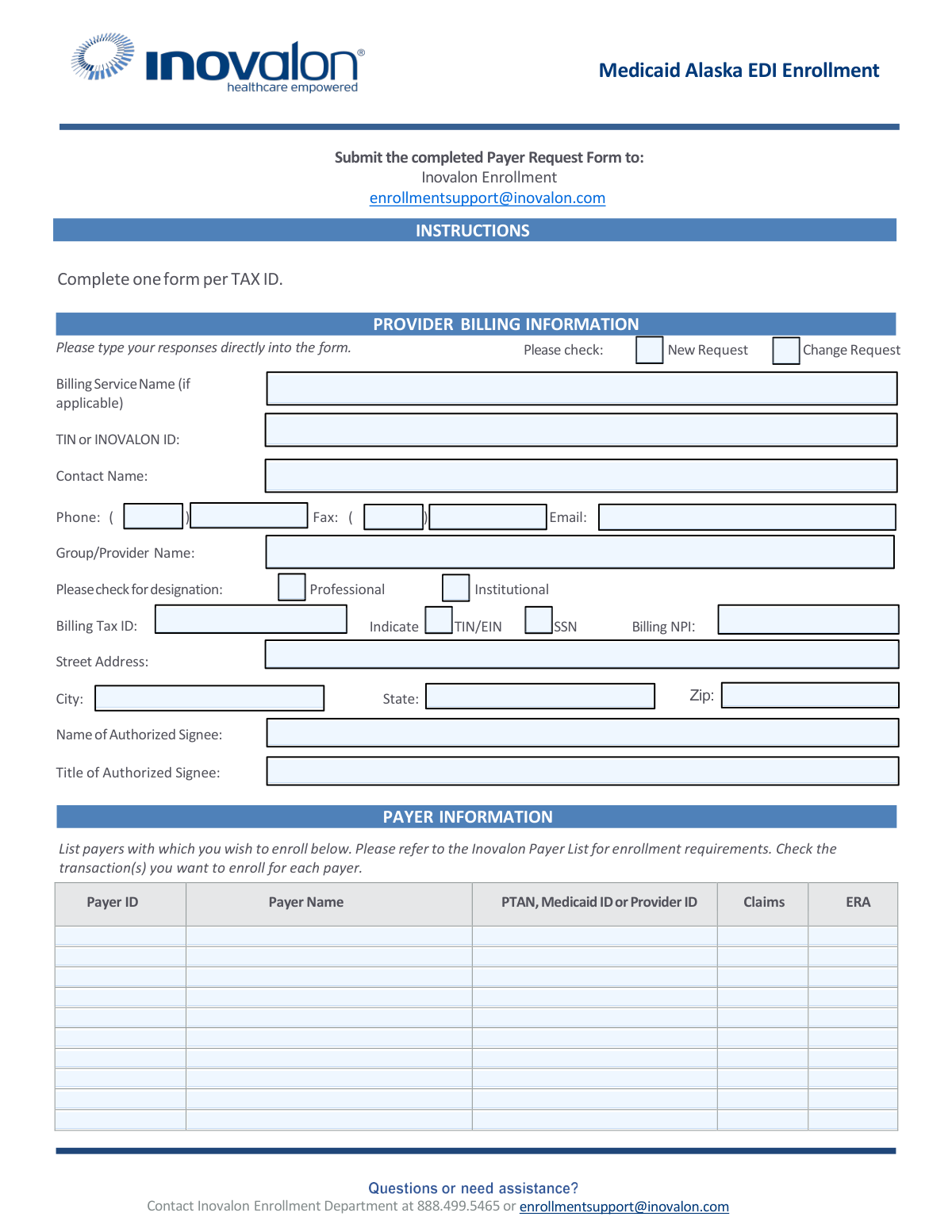
The Medicaid Alaska EDI Enrollment form is an official State of Alaska Department of Health and Social Services document that establishes a Provider Information Submission Agreement, enabling enrolled Medicaid providers to submit clinical and financial information electronically, either directly or through a billing agent. The form covers provider billing information, authorized payer enrollment, and legally binding terms ensuring compliance with HIPAA, state, and federal laws governing electronic transactions. It is a critical document for healthcare providers seeking to streamline claims submission and receive electronic remittance advice from Alaska Medicaid. Today, this form can be filled out quickly and accurately using AI-powered services like Instafill.ai, which can also convert non-fillable PDF versions into interactive fillable forms.
Medicaid Alaska EDI Enrollment is part of the
healthcare forms, Medicaid forms, enrollment forms, provider enrollment forms, provider agreement forms, Alaska Medicaid forms and EDI enrollment forms categories on Instafill.
Rather not fill this in by hand? Instafill is an online form filler that completes PDF forms automatically — upload the blank form, answer a few questions, and the AI fills every field.
Form specifications
| Form name: | Medicaid Alaska EDI Enrollment - Provider Information Submission Agreement |
| Number of pages: | 1 |
| Language: | English |
Our AI automatically handles information lookup, data retrieval, formatting, and form filling.
It takes less than a minute to fill out Medicaid Alaska EDI Enrollment using our AI form filling.
Securely upload your data. Information is encrypted in transit and deleted immediately after the form is filled out.
Instafill Demo: How to fill out PDF forms in seconds with AI
How to Fill Out Medicaid Alaska EDI Enrollment Online for Free in 2026
Are you looking to fill out a MEDICAID ALASKA EDI ENROLLMENT form online quickly and accurately? Instafill.ai offers the #1 AI-powered PDF filling software of 2026, allowing you to complete your MEDICAID ALASKA EDI ENROLLMENT form in just 37 seconds or less.
Follow these steps to fill out your MEDICAID ALASKA EDI ENROLLMENT form online using Instafill.ai:
- 1 Navigate to Instafill.ai and upload or select the Medicaid Alaska EDI Enrollment form to begin filling it out online.
- 2 Complete the Provider Billing Information section, including your Billing Service Name (if applicable), TIN or Inovalon ID, contact name, phone, fax, email, group/provider name, billing tax ID, NPI, and address.
- 3 Indicate whether this is a New Request or a Change Request, and specify your provider designation as Professional or Institutional.
- 4 Fill in the Payer Information section by listing each payer ID, payer name, and applicable PTAN, Medicaid ID, or Provider ID, and check the transactions (Claims and/or ERA) you wish to enroll for each payer.
- 5 Complete the Provider Information Submission Agreement (Section I), reviewing and agreeing to all terms, and fill in your Billing Agent information if you will be submitting claims through a third party.
- 6 Enter the authorized signee's name, title, and signature details, along with the State Provider Identification Number and the application tracking number.
- 7 Review the completed form for accuracy, then submit the Payer Request Form electronically to [email protected] and mail the signed Provider Information Submission Agreement to Conduent HIPAA Provider Support Team, PO Box 240808, Anchorage, AK 99524-0808.
Our AI-powered system ensures each field is filled out correctly, reducing errors and saving you time.
Why Choose Instafill.ai for Your Fillable Medicaid Alaska EDI Enrollment Form?
Speed
Complete your Medicaid Alaska EDI Enrollment in as little as 37 seconds.
Up-to-Date
Always use the latest 2026 Medicaid Alaska EDI Enrollment form version.
Cost-effective
No need to hire expensive lawyers.
Accuracy
Our AI performs 10 compliance checks to ensure your form is error-free.
Security
Your personal information is protected with bank-level encryption.
Frequently Asked Questions About Medicaid Alaska EDI Enrollment
This form is used to enroll providers in Electronic Data Interchange (EDI) with Alaska Medicaid, allowing them to submit claims and receive Electronic Remittance Advices (ERAs) electronically. It establishes a legal agreement between the provider and the State of Alaska, Department of Health and Social Services, governing the submission of clinical and financial information.
Any provider enrolled in the Alaska Medical Assistance Program who wants to submit claims electronically — either directly or through a Billing Agent, clearinghouse, or billing service — must complete this form. Both individual providers and group practices can use this form, completing it with their respective provider information on file with Alaska Medicaid.
You must submit the form in two ways: mail the completed and signed Provider Information Submission Agreement to Conduent HIPAA Provider Support Team, PO Box 240808, Anchorage, AK 99524-0808, AND email a copy along with the Payer Request Form to Inovalon at [email protected]. Both submissions are required to complete enrollment.
You can contact the Inovalon Enrollment Department by phone at 888.499.5465 or by email at [email protected]. They can assist with questions about the Payer Request Form, enrollment requirements, and any additional documentation needed.
You will need to provide your Group/Provider Name, Billing Tax ID (TIN/EIN or SSN), Billing NPI, street address, city, state, zip code, contact name, phone, fax, email, and the name and title of the authorized signee. You must also indicate whether this is a new request or a change request, and whether the provider is Professional or Institutional.
Yes, you can list up to ten payers on a single form in the Payer Information section. If you need to enroll with more than ten payers, you should make additional copies of the form. You must specify at least one payer — forms with no payers listed will be returned.
For each payer listed, you can enroll for Claims submission and/or Electronic Remittance Advice (ERA). You will need to check the appropriate transaction type(s) for each payer and provide the Payer ID, Payer Name, and your PTAN, Medicaid ID, or Provider ID for that payer.
The Provider Information Submission Agreement is a legal contract between you (the provider) and the State of Alaska that authorizes electronic submission of clinical and financial information. By signing it, you agree to comply with HIPAA regulations, state and federal laws, accurate claims submission, and other responsibilities. Original signatures are required — photocopies or faxed signatures are not accepted.
An authorized representative is a duly appointed official of a business entity (corporation, partnership, LLC, etc.) with legal authority to enroll the entity in the Alaska Medical Assistance Program. This includes a general partner, chairman of the board, CFO, CEO, president, or a direct owner of at least 5% of the entity. Note that individuals and sole proprietors must sign their own enrollment agreement.
If you use a Billing Agent, clearinghouse, or other third-party submitter, you must complete Section I, Item 16 of the Provider Information Submission Agreement with the Billing Agent's business name, telephone, fax, mailing and physical addresses, and contact information. You must also execute a new agreement before allowing any new Billing Agent to submit information on your behalf.
Yes, some payers may require additional documentation to be completed and signed by the provider. If additional forms are required, Inovalon will send them to you for completion. Be sure to refer to the Inovalon Payer List for specific enrollment requirements for each payer.
You must complete one form per Tax ID (TIN). If your practice or organization has multiple Tax IDs, a separate Payer Request Form must be submitted for each one.
Yes, AI-powered services like Instafill.ai can help you accurately auto-fill the form fields, saving time and reducing errors. Instafill.ai can also convert flat, non-fillable PDFs into interactive fillable forms, making it easier to complete and submit your enrollment documents.
Simply upload the Medicaid Alaska EDI Enrollment PDF to Instafill.ai, and the AI will guide you through each field, auto-filling information where possible based on your provider details. Once completed, you can download the filled form, print it for signature, and submit it to the required addresses as instructed.
If you have a flat, non-fillable version of the Medicaid Alaska EDI Enrollment PDF, Instafill.ai can convert it into an interactive fillable form so you can type your responses directly into the document. This eliminates the need to print and handwrite your information before scanning and submitting.
Compliance Medicaid Alaska EDI Enrollment
Validation Checks by Instafill.ai
1
At Least One Payer Must Be Specified with Complete Information
Validates that at least one payer row in the Payer Information section contains a Payer ID, Payer Name, and at least one transaction type (Claims or ERA) checked. The form explicitly warns that enrollment forms will be returned if no payers are specified. Failure to include at least one complete payer entry will result in the form being rejected and returned without processing, causing enrollment delays.
2
Billing Tax ID Format and Tax ID Type Designation Consistency
Validates that the Billing Tax ID field is populated and that exactly one of the TIN/EIN or SSN checkboxes is selected to indicate the type of tax identifier provided. A TIN/EIN should follow a 9-digit format (XX-XXXXXXX), while an SSN should follow the format XXX-XX-XXXX. If the tax ID type is not designated or the format does not match the selected type, the form cannot be properly processed against Medicaid of Alaska's provider records.
3
Billing NPI Format Validation
Validates that the Billing NPI field contains a valid 10-digit National Provider Identifier number consisting only of numeric characters. The NPI is a critical identifier used to match the provider in the Medicaid Management Information System (MMIS), and an incorrectly formatted or missing NPI will prevent successful enrollment. If this field is blank or improperly formatted, the submission cannot be linked to the correct provider record.
4
Request Type Selection is Required
Validates that exactly one of the two checkboxes — 'New Request' or 'Change Request' — is selected in the Provider Billing Information section. This designation determines how the enrollment team processes the submission, as new enrollments and changes to existing enrollments follow different workflows. If neither or both options are selected, the form is ambiguous and cannot be correctly routed for processing.
5
Provider Designation Type Selection is Required
Validates that exactly one of the 'Professional' or 'Institutional' checkboxes is selected to designate the provider billing type. This distinction affects claim format requirements (CMS-1500 vs. UB-04) and payer enrollment rules. If neither or both options are checked, the enrollment team cannot determine the appropriate transaction standards to apply, potentially resulting in incorrect EDI setup.
6
Contact Phone Number Format Validation
Validates that the Phone field in the Provider Billing Information section contains a properly formatted 10-digit U.S. phone number, including area code, in the format (XXX) XXX-XXXX. A valid contact phone number is required so that the Inovalon Enrollment Department can reach the submitter if there are questions or issues with the enrollment. An improperly formatted or missing phone number may delay resolution of enrollment issues.
7
Contact Email Address Format Validation
Validates that the Email field in the Provider Billing Information section contains a properly formatted email address following the standard pattern (e.g., [email protected]). Email is one of the primary communication channels used by Inovalon to send additional required forms and enrollment status updates. An invalid or missing email address will prevent the enrollment team from delivering critical documentation to the submitter.
8
Provider Business Name and State Provider Identification Number Are Required on Agreement
Validates that both the Provider Business Name (print) field and the State Provider Identification Number field are populated on the Provider Information Submission Agreement signature block. The form instructions specify that only one ID per agreement is permitted, and the provider name must match what is on file with Medicaid of Alaska. Missing or mismatched values in these fields will cause the agreement to be rejected as incomplete or unverifiable.
9
Provider Signature and Date of Signature Are Required
Validates that the Signature of Provider or Authorized Representative field and the Date of Signature field are both completed on the Provider Information Submission Agreement. The form explicitly states that no photocopies or facsimile signatures will be accepted, meaning an original wet signature is required. An unsigned or undated agreement is legally invalid and will be returned without processing.
10
Authorized Signee Name and Title Are Required
Validates that both the Name of Authorized Signee and Title of Authorized Signee fields are populated in the Provider Billing Information section. The authorized signee must hold a qualifying position such as general partner, CFO, CEO, president, or direct owner of at least 5% of the entity, as defined in the agreement instructions. If these fields are blank or the title does not reflect a qualifying authority level, the enrollment agreement may be considered unauthorized and rejected.
11
Billing Agent Information Completeness When Billing Agent Is Used
Validates that if a Billing Agent is being authorized (i.e., the provider is billing indirectly), all required Billing Agent fields are completed, including Business Name, Telephone Number, Mailing Address, Physical Address, and Contact Name. Item 16 of the agreement specifies these fields must be completed only when a Billing Agent is involved, but when they are applicable, all fields are required. Incomplete Billing Agent information will prevent the State from properly recognizing the authorized submitter and may result in claim rejections.
12
Payer Row Transaction Type Selection Validation
Validates that for each payer row where a Payer ID and Payer Name are entered, at least one transaction type checkbox (Claims or ERA) is selected. Enrolling a payer without specifying the desired transaction type provides no actionable instruction for the enrollment team. If a payer is listed without a transaction type, that payer row is incomplete and cannot be processed, potentially leaving the provider without the necessary EDI connection.
13
One Form Per Tax ID Compliance Check
Validates that the form contains only one Tax ID (TIN/EIN or SSN) in the Billing Tax ID field, consistent with the instruction that one form must be completed per Tax ID. Submitting multiple Tax IDs on a single form violates the form's processing rules and will result in the form being returned. If a provider needs to enroll multiple Tax IDs, separate forms must be submitted for each.
14
Street Address, City, State, and Zip Code Completeness
Validates that the provider's Street Address, City, State, and Zip Code fields are all populated in the Provider Billing Information section. A complete mailing address is required to match the provider's information on file with Medicaid of Alaska and to ensure that any mailed correspondence, checks, or remittance advices are delivered correctly. Missing address components will prevent verification against the MMIS provider file and may cause enrollment failure.
15
Application Tracking Number Format Validation
Validates that the Application Tracking Number field on the Provider Information Submission Agreement is populated if one has been assigned, and that it follows the expected alphanumeric format used by the State of Alaska. This number is used to track the application through the enrollment process and link the Payer Request Form to the Provider Information Submission Agreement. A missing or incorrectly formatted tracking number may cause the two documents to be processed separately, leading to incomplete enrollment.
16
PTAN, Medicaid ID, or Provider ID Provided for Each Listed Payer
Validates that for each payer row where a Payer ID and Payer Name are entered, the corresponding PTAN, Medicaid ID, or Provider ID field is also populated. These identifiers are required by payers to verify the provider's enrollment status and authorize EDI transactions. If this field is left blank for any listed payer, the enrollment for that payer cannot be completed, as the payer will be unable to associate the EDI request with a valid provider record.
Common Mistakes in Completing Medicaid Alaska EDI Enrollment
Many providers submit the form without filling in any payer information, assuming the enrollment department will know which payers to set up. The instructions explicitly warn that forms with no payers specified WILL BE RETURNED, causing significant delays in enrollment. Always consult the Inovalon Payer List and enter at least one Payer ID, Payer Name, and corresponding Provider ID for each payer you wish to enroll with. Tools like Instafill.ai can flag empty required sections before submission.
Providers often enter their current or preferred business name, address, or Tax ID rather than the exact information on file with the payer. This mismatch causes enrollment failures or rejections because the payer cannot verify the provider's identity. Always cross-reference your Medicaid of Alaska enrollment records before completing the form, ensuring the Group/Provider Name, Billing Tax ID, NPI, and address match exactly what is on file.
The instructions clearly state 'Complete one form per TAX ID,' but providers with multiple Tax IDs frequently try to consolidate everything onto one form to save time. This results in the form being returned or only partially processed, delaying enrollment for all Tax IDs involved. Complete a separate Payer Request Form for each unique Tax ID and submit them together or separately to Inovalon.
The form requires providers to indicate whether the Billing Tax ID is a TIN/EIN or an SSN, but many providers skip this checkbox or select the wrong type. This is especially common among sole proprietors who may use their SSN as their Tax ID but mistakenly check TIN/EIN. Selecting the wrong designation can cause processing errors or compliance issues; verify your tax identification type before checking the appropriate box.
Providers sometimes leave the Billing NPI field blank or enter their rendering/individual NPI instead of their billing NPI, particularly when a group practice is enrolling. The billing NPI is critical for claims routing and ERA matching, and an incorrect NPI will cause claim rejections. Confirm whether you are enrolling as a group (Type 2 NPI) or individual (Type 1 NPI) and enter the corresponding NPI that matches your Medicaid of Alaska records.
The form requires providers to indicate whether they are a Professional or Institutional biller, but this checkbox is frequently overlooked. This distinction determines which claim types (CMS-1500 vs. UB-04) and transaction sets are applicable to the enrollment, and omitting it can result in incorrect setup or returned forms. Review your provider type and billing practices carefully before selecting the appropriate designation.
Providers often leave the Claims and ERA checkboxes blank for one or more payers in the Payer Information table, or they check only one when they need both. Failing to specify transactions means the enrollment cannot be completed for those transaction types, requiring resubmission. For each payer row, deliberately decide whether you need electronic claims submission, Electronic Remittance Advice (ERA), or both, and check all applicable boxes.
The PTAN, Medicaid ID, or Provider ID field is often left blank or filled with the wrong identifier because providers confuse their NPI with their payer-specific provider number. Each payer assigns a unique provider identifier that is separate from the NPI, and without the correct ID, the payer cannot match the enrollment to the provider's account. Locate your provider-specific ID for each payer by checking your remittance advices, payer portals, or by contacting each payer directly.
The agreement explicitly states that 'No photocopies or facsimile signatures will be accepted,' yet providers frequently fax or scan a pre-signed copy of the agreement. This renders the agreement invalid and requires resubmission with an original signature, causing enrollment delays. The signed original must be mailed to Conduent HIPAA Provider Support Team at the Anchorage address, while an emailed copy is sent to Inovalon — ensure the mailed copy contains an original wet signature.
Section I, Item 16 instructs providers to complete Billing Agent information ONLY if billing indirectly through a Billing Agent, Clearinghouse, or other entity, but providers often fill it in unnecessarily or, conversely, leave it blank when they do use a Billing Agent. Incorrectly completing or omitting this section creates authorization discrepancies that can delay or invalidate the agreement. Carefully read the conditional instruction and only complete the Billing Agent fields if a third party will be submitting claims on your behalf.
The Provider Information Submission Agreement has a prominent field at the top for an Application Tracking Number, which is frequently left blank because providers are unsure where to obtain it or assume it is optional. This number is used to track the application through the State's system, and its absence can complicate follow-up and processing. Contact the Inovalon Enrollment Department at 888.499.5465 or [email protected] to obtain your tracking number before submitting the form.
The instructions require providers to both mail the signed Provider Information Submission Agreement to Conduent in Anchorage AND email a copy along with the Payer Request Form to Inovalon at [email protected], but many providers only complete one of these steps. Submitting to only one destination means enrollment cannot be fully processed, as both the State and Inovalon require their respective documents. Create a checklist to confirm both submissions are completed before considering the enrollment process finished. AI-powered tools like Instafill.ai can help organize multi-destination submission requirements to prevent this oversight.
Saved over 80 hours a year
“I was never sure if my IRS forms like W-9 were filled correctly. Now, I can complete the forms accurately without any external help.”
Kevin Martin Green
Your data stays secure with advanced protection from Instafill and our subprocessors




Robust compliance program
Transparent business model
You’re not the product. You always know where your data is and what it is processed for.
ISO 27001, HIPAA, and GDPR
Our subprocesses adhere to multiple compliance standards, including but not limited to ISO 27001, HIPAA, and GDPR.
Security & privacy by design
We consider security and privacy from the initial design phase of any new service or functionality. It’s not an afterthought, it’s built-in, including support for two-factor authentication (2FA) to further protect your account.
Fill out Medicaid Alaska EDI Enrollment with Instafill.ai
Worried about filling PDFs wrong? Instafill securely fills medicaid-alaska-edi-enrollment-provider-information-submission-agreement forms, ensuring each field is accurate.
