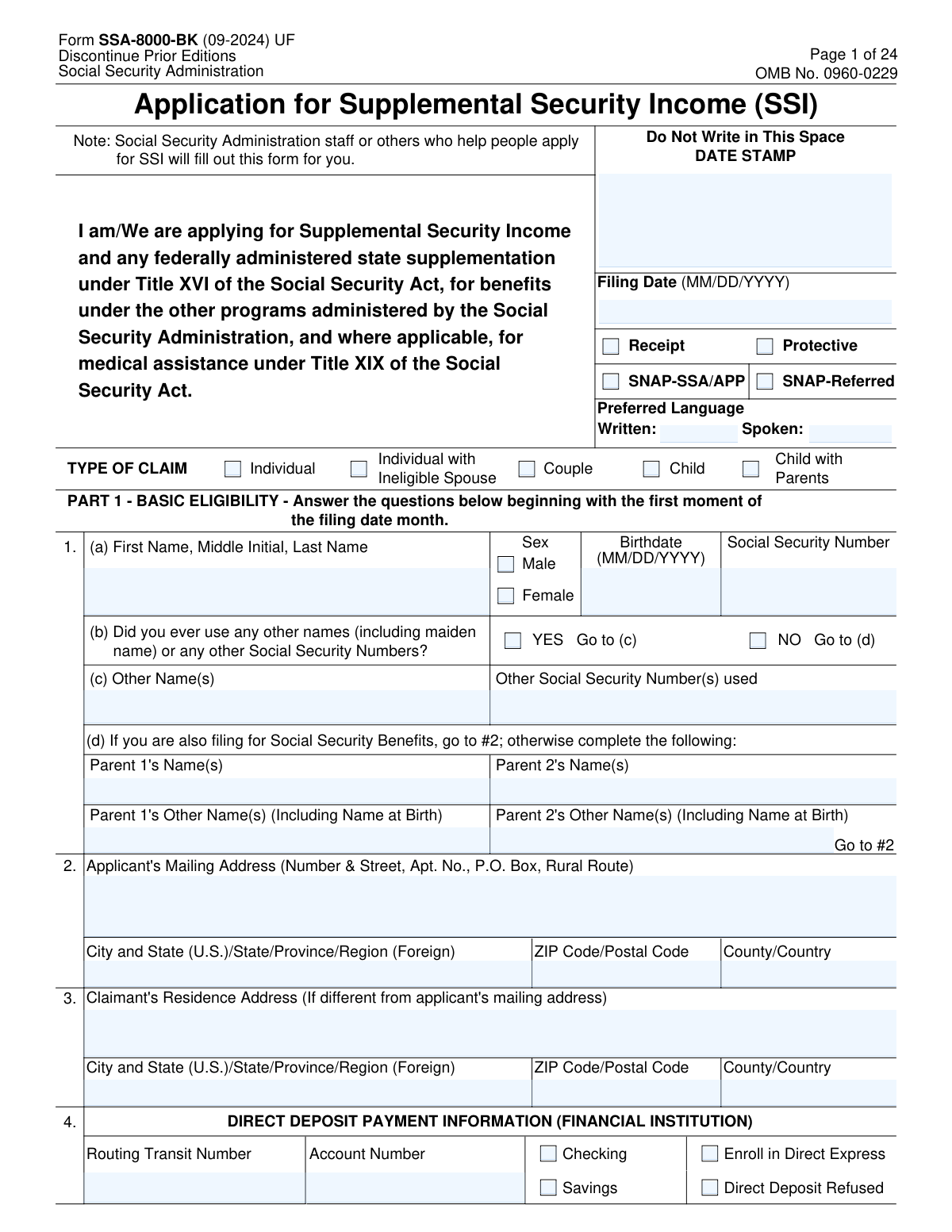
Yes! You can use AI to fill out Form SSA-8000-BK, Application for Supplemental Security Income (SSI)

Form SSA-8000-BK is the official Social Security Administration application for Supplemental Security Income (SSI) under Title XVI of the Social Security Act. It documents the applicant’s personal information, citizenship/immigration status, living arrangements, resources, and income so SSA can determine eligibility and calculate the correct monthly benefit. The form also supports related determinations such as federally administered state supplementation and, in some cases, medical assistance (Medicaid) and SNAP-related screening. Accurate completion is important because SSA uses the information for verification and ongoing reporting responsibilities, and incorrect or missing information can delay a decision or affect benefit amounts.
Our AI automatically handles information lookup, data retrieval, formatting, and form filling.
It takes less than a minute to fill out SSA-8000-BK using our AI form filling.
Securely upload your data. Information is encrypted in transit and deleted immediately after the form is filled out.

Form specifications

Form name: Form SSA-8000-BK, Application for Supplemental Security Income (SSI)
Number of pages: 24
Language: English
main-image

Instafill Demo: filling out a legal form in seconds

How to Fill Out SSA-8000-BK Online for Free in 2026

Are you looking to fill out a SSA-8000-BK form online quickly and accurately? Instafill.ai offers the #1 AI-powered PDF filling software of 2026, allowing you to complete your SSA-8000-BK form in just 37 seconds or less.
Follow these steps to fill out your SSA-8000-BK form online using Instafill.ai:
  1. 1 Confirm who the application is for (individual, couple, child, or child with parents) and gather key documents (SSNs, birth information, immigration documents if applicable, bank account details, income proofs, and resource records).
  2. 2 Enter basic identity and contact details: applicant name/SSN, other names used, parents’ information (if required), mailing and residence addresses, and preferred language.
  3. 3 Provide payment setup information (direct deposit routing/account number or Direct Express) and complete marital/household relationship sections (spouse details, prior marriages, and “holding out” information if applicable).
  4. 4 Complete citizenship/immigration and U.S. residency history questions, including dates in/out of the U.S., sponsor information (if applicable), and felony warrant questions.
  5. 5 Answer living arrangement questions for the signature date (household vs. institution vs. non-institutional care vs. homeless), including who lives with you, rent/mortgage liability, household expenses, and any outside help with shelter or meals.
  6. 6 Report resources and income starting from the first moment of the filing date month (trusts, vehicles, property, bank accounts, investments, life insurance, transfers/gifts, wages, self-employment, and other income sources), and add explanations in the Remarks section when needed.
  7. 7 Review the important information and reporting responsibilities, then sign and date (and obtain spouse signature if applying for spouse payments); select accessible notice options if needed and add witnesses only if signing by mark.

Our AI-powered system ensures each field is filled out correctly, reducing errors and saving you time.

Why Choose Instafill.ai for Your Fillable SSA-8000-BK Form?

Speed

Complete your SSA-8000-BK in as little as 37 seconds.

Up-to-Date

Always use the latest 2026 SSA-8000-BK form version.

Cost-effective

No need to hire expensive lawyers.

Accuracy

Our AI performs 10 compliance checks to ensure your form is error-free.

Security

Your personal information is protected with bank-level encryption.

Frequently Asked Questions About Form SSA-8000-BK

Form SSA-8000-BK is the application for Supplemental Security Income (SSI) and any federally administered state supplementation under Title XVI. It may also be used to apply for other SSA-administered benefits and, where applicable, medical assistance under Title XIX (Medicaid).

Usually, no—SSA staff or someone helping you apply will fill out the form based on your answers. You are still responsible for making sure the information is accurate before you sign.

The form supports several claim types, including an individual, an individual with an ineligible spouse, a couple, a child, or a child with parents. SSA will select the correct claim type based on who is applying and who lives in the household.

The filing date is the date SSA treats your application as filed (often tied to your first contact/protective filing). Many SSI rules look at your situation as of the first moment of that month, so resources and some eligibility factors are evaluated from that point in time.

You’ll need your name, Social Security number, birthdate, birthplace, and mailing/residence addresses. You may also need parents’ names (especially if also filing for Social Security benefits or for certain disability-related questions) and any other names/SSNs you have used.

Answer “Yes” and list the other name(s) and any other SSN(s) used. This helps SSA match records and avoid delays caused by identity or earnings record issues.

The form asks for routing and account numbers for direct deposit, or you can choose Direct Express. If direct deposit is refused, SSA may use another payment method, but providing an account generally helps you get paid faster and more reliably.

If you are married, you’ll provide the marriage date, your spouse’s identifying information, and whether you live together. If you live apart, you’ll provide the date you began living apart and, in some cases, your spouse’s address or a contact who knows where they are.

It refers to living together and presenting yourselves to others as if you are married, even if you are not legally married. If you answer “Yes,” SSA may develop this using Form SSA-4178.

If applying for yourself, you’ll be asked whether you are unable to work due to illnesses/injuries/conditions, the date you became unable to work, and whether you are blind or have low vision even with correction. If applying for a child, you’ll provide the child’s disability onset date and blindness/low vision information.

SSI eligibility depends in part on citizenship or qualifying immigration status. The form collects details such as naturalization, lawful permanent resident admission date, refugee/asylee status dates, and other categories to determine whether you meet SSI requirements.

You must report trips outside the U.S., and the form asks whether you were outside the U.S. for 30 consecutive days prior to the filing date and the dates you left/returned. Extended time outside the U.S. can affect SSI eligibility and payment.

You must select your current living situation (household, non-institutional care, institution, or transient/homeless) and provide dates and details. SSA uses this information to determine how your living arrangement affects your SSI payment amount.

You must report trusts, vehicles, real property, cash, bank/credit union accounts, ABLE accounts, CDs, IRAs/Keogh accounts, stocks/bonds, life insurance cash value, burial funds, and burial spaces. SSA evaluates resources as of the first moment of the filing date month and also asks about changes and transfers within the prior 36 months.

You should send or bring the completed form to your local Social Security office (you can find it at ssa.gov or by calling 1-800-772-1213; TTY 1-800-325-0778). The receipt section says you should hear from SSA within a stated number of days after you provide all requested information, but some claims take longer if additional information is needed.

Compliance SSA-8000-BK
Validation Checks by Instafill.ai

1
Validates Filing Date format and allowable range
Checks that the Filing Date is present and formatted as MM/DD/YYYY, with a real calendar date (e.g., not 02/30/2026). Ensures the filing date is not in the future and is within an administratively acceptable window (e.g., not unreasonably far in the past for the intake channel). If validation fails, the submission should be rejected or routed for manual review because many downstream “first moment of filing month” rules depend on this date.
2
Ensures Applicant identity fields are complete and consistent (Name, Sex, Birthdate, SSN)
Verifies that applicant first name and last name are provided, sex is selected (Male/Female), and birthdate is present and valid MM/DD/YYYY. Validates SSN is exactly 9 digits (allowing standard hyphen formatting) and not all zeros or other invalid patterns. If any of these fail, the application should be blocked because identity matching, eligibility, and record retrieval depend on accurate core identifiers.
3
Conditional capture of prior names/SSNs when 'ever used other names/SSNs' is YES
If the applicant answers YES to having used other names or SSNs, requires at least one entry in Other Name(s) and/or Other Social Security Number(s) used, and validates any SSN provided is properly formatted. This prevents incomplete identity history that can cause missed records, duplicate claims, or incorrect eligibility determinations. If missing, the system should prompt for completion or flag for follow-up development.
4
Validates spouse section completeness when marital status is YES
If 'Are you married?' is YES, requires date of marriage, spouse name, spouse birthdate, and spouse SSN (with proper SSN format). Also enforces that the marriage date is not after the filing date and not before either party’s plausible age threshold (e.g., not before birthdate). If validation fails, the claim should be held because spouse information affects deeming, payment computation, and living arrangement rules.
5
Validates living-apart logic and dates when spouses are not living together
If married and 'Are you and your spouse living together?' is NO, requires the date living apart began and validates it is a real date and not after the signature date (or filing date, depending on business rule). If the form indicates spouse is age 65/blind/disabled and not living together, requires spouse address or a contact who knows spouse’s whereabouts. Failures should trigger a hard stop or manual review because living arrangement and deeming rules depend on this information.
6
Validates prior marriage details when 'other marriages' is YES
When the applicant or spouse indicates prior marriages, requires at least one prior marriage record with former spouse name, marriage date, marriage end date, and how marriage ended. Validates that end date is on/after marriage date and not in the future. If invalid or incomplete, the system should request corrections because marital history can affect eligibility, deeming, and potential entitlement under other SSA programs.
7
Validates disability onset/work limitation dates based on filing type (adult vs child)
If filing for self and 'unable to work' is YES, requires the date became unable to work and validates it is not in the future and is not before birthdate. If filing for a child, requires the child disability onset date and validates similarly. If missing/invalid, route for correction because disability onset timing drives medical development and potential eligibility pathways.
8
Validates citizenship/immigration pathway consistency and required supporting dates
Enforces that the citizenship/immigration sequence is logically consistent: if U.S. citizen by birth is YES, immigration status fields must be blank; if NO, then naturalized/immigration status must be completed. For selected immigration statuses that require dates (e.g., asylee/conditional entrant status granted date, refugee date of entry, parolee date, LPR date of admission), requires those dates and validates MM/DD/YYYY. If inconsistent or missing, the submission should be flagged because alien eligibility and deeming/sponsor rules depend on correct status and dates.
9
Validates U.S. residence history dates and outside-U.S. periods
Requires 'When did you first make your home in the United States?' when applicable and validates the date is not in the future and is after birthdate. If the applicant indicates living outside the U.S. since then, requires at least one From/To range and validates From ≤ To and ranges do not overlap illogically. Failures should be corrected or reviewed because residency affects eligibility and payment status.
10
Validates 30-consecutive-day absence logic and travel dates
If the applicant/spouse indicates being outside the U.S. 30 consecutive days prior to the filing date, requires Date Left and Date Returned and validates both are real dates with Left ≤ Returned. Also checks that the absence period plausibly intersects the 30-day window prior to filing date (business-rule dependent). If invalid, flag for manual review because extended absences can affect SSI eligibility.
11
Validates mailing and residence address completeness and postal formats
Ensures mailing address includes street/PO box line, city, state/province/region, and ZIP/postal code; validates U.S. ZIP as 5 digits (or ZIP+4) and state as a valid code when U.S. is selected. If a separate residence address is provided, applies the same checks and ensures it is not identical to mailing address unless explicitly allowed. If validation fails, the system should block or prompt because SSA notices, jurisdiction (county), and field office routing depend on accurate addresses.
12
Validates Direct Deposit/Direct Express selection and banking number formats
If direct deposit is selected (checking/savings), requires routing transit number (9 digits with valid ABA checksum) and account number (numeric/alphanumeric per bank rules, length within configured bounds). If 'Enroll in Direct Express' is selected, routing/account fields should be blank; if 'Direct Deposit Refused' is selected, all bank fields must be blank. If inconsistent, reject or prompt because payment delivery failures cause delays and potential fraud risk.
13
Validates living arrangement selection and required facility/institution details
Requires exactly one living situation in #19 (Household, Non-Institutional Care, Institution, Transient/Homeless) and a valid 'Since' date. If Institution is selected, requires institution type, name, admission date, and expected release date (if provided, must be on/after admission). If Non-Institutional Care is selected, requires facility name, placing agency details, and who pays room/board when applicable; failures should be flagged because living arrangement drives payment rate and in-kind support rules.
14
Validates household member roster fields and age-dependent subquestions
When the applicant indicates they live with others (#25 NO), requires at least one household member entry with name, relationship, sex, birthdate, and SSN (if collected) in valid formats. If any listed person is under 22 and not married, enforces completion of #26(b) and, if YES, requires income source/type and monthly amount for each child receiving income. If invalid, prompt for correction because deeming, household composition, and income calculations depend on accurate roster data.
15
Validates shelter expense and contribution arithmetic and non-negative currency fields
Ensures all currency fields (rent, mortgage, contributions, household expenses, monthly values) are numeric, non-negative, and within reasonable upper bounds to catch keying errors (e.g., extra zeros). If a TOTAL is provided in #35, verifies it equals the sum of listed expense lines (within rounding tolerance) or recalculates and flags discrepancies. If validation fails, route for correction because incorrect shelter costs and contributions can materially change SSI payment computations.
16
Validates signature requirements, dates, and witness rules for mark (X)
Requires applicant signature and signature date in MM/DD/YYYY; if spouse is applying for payments, requires spouse signature as well. Validates signature date is not before filing date (or outside allowed workflow rules) and not in the future. If the applicant signed by mark (X), requires two witness signatures and full addresses; failures should block submission because an unsigned/invalidly signed application is not legally actionable.

Common Mistakes in Completing SSA-8000-BK

Using the wrong date reference (filing date month vs. signature date)

This form switches timeframes: Parts 1, 3, and 4 often refer to “the first moment of the filing date month,” while Part 2 (Living Arrangements) refers to the “signature date.” People commonly answer everything based on “today,” which can make resources, income, and living arrangement answers inconsistent. That inconsistency can trigger follow-up development, delays, or incorrect payment calculations. To avoid this, write down the filing date month and answer each section using the timeframe stated in that section.

Leaving “other names/other SSNs used” blank after answering YES

Applicants often check YES for having used other names (maiden names, prior married names, aliases) or other SSNs, but then don’t list the details in 1(c) or 5(e). This happens because people assume SSA can “find it anyway,” or they don’t remember exact spellings. Missing prior identity information can slow identity verification and record matching, and may delay medical or earnings record development. Avoid this by listing every prior legal name exactly as it appeared on documents and providing any prior SSN information you have (even partial details can help, but be as complete as possible).

Confusing mailing address with residence address (and not completing both correctly)

Many people put the same address in #2 and #3 without thinking, or they list a P.O. Box as their residence address. SSA uses residence information for living arrangement rules and state/county-related determinations, while mailing address is for correspondence. Incorrect residence details can lead to wrong living arrangement determinations, missed notices, or state supplementation issues. To avoid this, use #2 for where you receive mail and #3 for where you physically live (shelter, apartment, family home, facility), even if you are homeless or staying temporarily.

Direct deposit errors (routing/account number mix-ups or wrong account type)

A very common mistake is transposing digits, using a deposit slip number instead of the bank’s routing number, or checking the wrong account type (checking vs. savings) in #4. These errors happen because bank documents show multiple numbers and people assume they are interchangeable. The consequence is delayed or rejected payments and extra verification steps. Avoid this by using the routing number from a check or official bank letter, confirming the account number with the bank, and ensuring the account is in the correct name(s) and can accept ACH deposits.

Misreporting marital status and “living together/holding out” situations

Applicants often answer “not married” and stop there, but overlook questions about living together and presenting as married (#6(c)) or separation dates (#5(g)). This happens because people interpret “married” only as legally married and don’t realize SSI has rules about spouses and “holding out.” Incorrect answers can cause incorrect deeming of income/resources, overpayments, or denials. To avoid this, answer every marital/living-together follow-up honestly, include dates (marriage, separation, holding out began), and use Remarks to explain complex situations.

Incomplete prior marriage details (missing end date or how marriage ended)

In #6(b), people frequently list a former spouse but omit the date the marriage ended or select vague explanations (or leave “how marriage ended” blank). This happens because divorces/annulments can be emotionally difficult to revisit or documents aren’t readily available. Missing details can delay eligibility determinations and development for potential Social Security benefits or deeming rules. Avoid this by providing the best available dates (month/day/year if possible) and specifying whether it ended by divorce, death, or annulment; add additional marriages in Remarks as instructed.

Citizenship/immigration section mistakes (skipping status dates and sponsor information)

Non-citizens often check an immigration category in #11(c) but leave required dates blank (e.g., date status granted, date of entry, date of admission) or skip sponsor details in #12(b)-(c). This happens because applicants don’t have documents in front of them or don’t realize the dates drive SSI eligibility rules. Missing or inconsistent immigration details can lead to denial, lengthy follow-up, or requests for proof. Avoid this by using immigration documents (I-94, green card, approval notices) to enter exact dates and providing sponsor name/address/phone when asked.

Underreporting time outside the U.S. (30-day rule and residence history)

People often answer “No” to living outside the U.S. (#15) or being outside 30 consecutive days (#16) because they think short trips don’t matter or they forget exact dates. SSI eligibility and payment can be affected by extended absences, and SSA may verify travel through other records. Incorrect answers can cause overpayments, penalties, or later eligibility issues. To avoid this, list all periods of residence outside the U.S. since establishing a home here and provide exact departure/return dates for any 30+ consecutive day absence.

Living arrangement and household expense errors (mixing up who pays and what counts as shelter items)

In #19–#36, applicants frequently misclassify their situation (household vs. non-institutional care vs. institution) or leave out help from others who don’t live with them (#36). People also confuse “contribute to household expenses” (#33) with “pay for all meals” (#32), and they often omit utilities/taxes/insurance in #35. These mistakes happen because SSI’s in-kind support and maintenance rules are unfamiliar and the expense list is detailed. The consequence can be an incorrect payment amount (often lower) or later overpayment. Avoid this by identifying the correct living category, listing everyone in the home, and documenting who pays rent/mortgage and each utility; include outside help even if it’s informal.

Resource omissions (trusts, jointly owned accounts, vehicles, burial funds, and safe deposit items)

Applicants commonly answer “No” to resources because they think only cash counts, or they forget jointly titled items, trusts, ABLE accounts, IRAs, life insurance cash value, or property stored in a safe deposit box (#38–#47). This happens because some assets don’t feel “available,” or they are held with family members. Missing resources can lead to denial, overpayments, and potential fraud concerns if discovered later through verification. Avoid this by reviewing titles and statements for anything with your name on it (even jointly), listing trusts and burial arrangements, and providing estimated market values and amounts owed.

Income reporting gaps (not listing non-cash support, irregular income, or expected income in next 14 months)

In Part 4, people often report wages but forget other income types (pensions, unemployment, child support, rental income, gambling winnings) and especially non-cash support like meals or gifts (#51). They also miss the “expect to receive in the next 14 months” requirement (#49 and #52(e)), assuming only past income matters. These gaps can cause incorrect eligibility/payment calculations and later overpayments when SSA discovers the income. Avoid this by listing every income source since the filing date month, including one-time or irregular payments, and noting any expected changes or upcoming payments with dates and sources.
Saved over 80 hours a year

“I was never sure if my IRS forms like W-9 were filled correctly. Now, I can complete the forms accurately without any external help.”

Kevin Martin Green

Your data stays secure with advanced protection from Instafill and our subprocessors

Robust compliance program

Transparent business model

You’re not the product. You always know where your data is and what it is processed for.

ISO 27001, HIPAA, and GDPR

Our subprocesses adhere to multiple compliance standards, including but not limited to ISO 27001, HIPAA, and GDPR.

Security & privacy by design

We consider security and privacy from the initial design phase of any new service or functionality. It’s not an afterthought, it’s built-in, including support for two-factor authentication (2FA) to further protect your account.

Fill out SSA-8000-BK with Instafill.ai

Worried about filling PDFs wrong? Instafill securely fills form-ssa-8000-bk-application-for-supplemental-secu forms, ensuring each field is accurate.