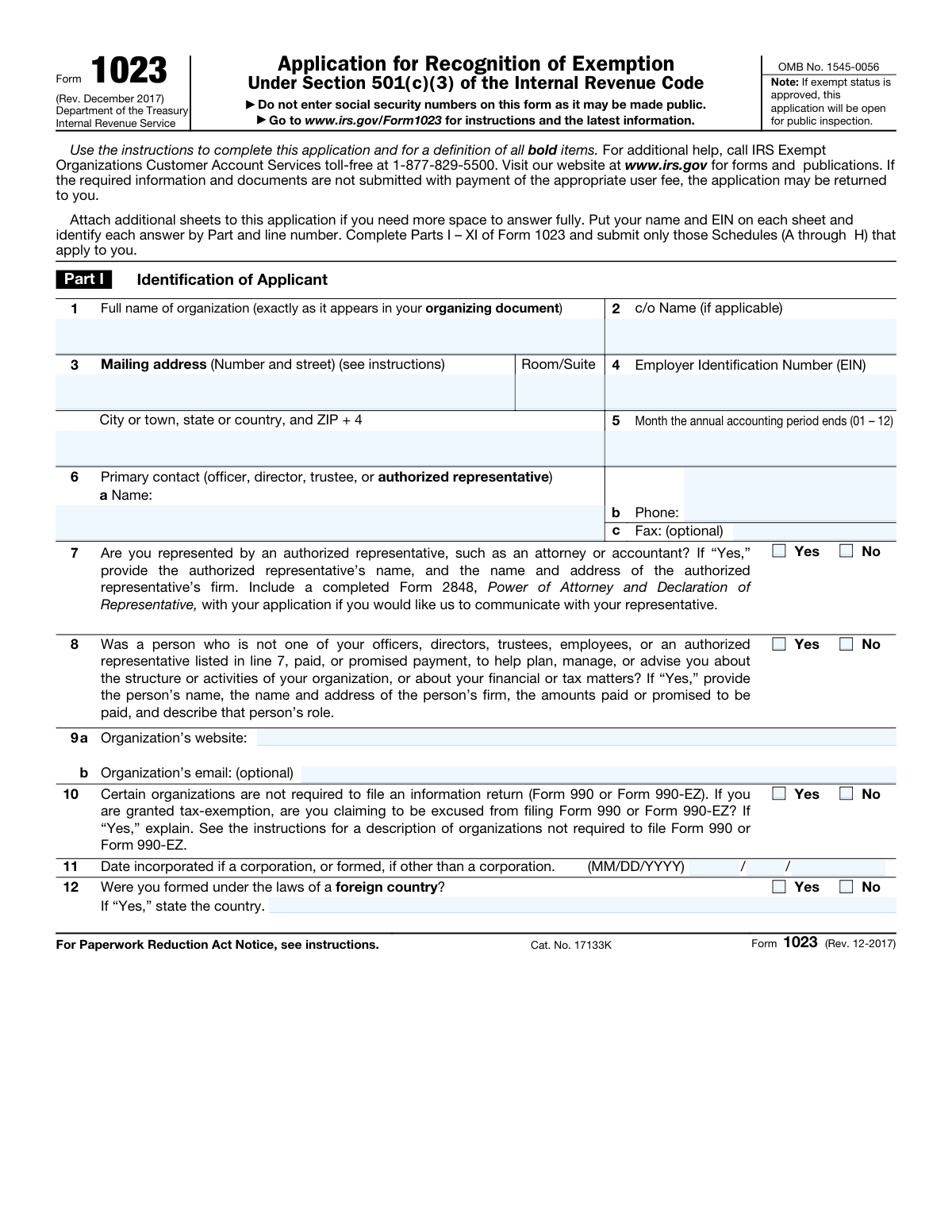
Yes! You can use AI to fill out Form 1023, Application for Recognition of Exemption Under Section 501(c)(3) of the Internal Revenue Code
IRS Form 1023 is the application submitted by organizations seeking federal tax-exempt status as a charity under Section 501(c)(3) of the Internal Revenue Code. Successfully filing this form is crucial as it allows an organization to be exempt from federal income tax and enables donors to make tax-deductible contributions. The application is lengthy and detailed, requiring extensive information about the organization's structure, activities, and finances. Today, this complex form can be filled out quickly and accurately using AI-powered services like Instafill.ai, which can also convert non-fillable PDF versions into interactive fillable forms.
Our AI automatically handles information lookup, data retrieval, formatting, and form filling.
It takes less than a minute to fill out Form 1023 using our AI form filling.
Securely upload your data. Information is encrypted in transit and deleted immediately after the form is filled out.
Form specifications
| Form name: | Form 1023, Application for Recognition of Exemption Under Section 501(c)(3) of the Internal Revenue Code |
| Number of fields: | 921 |
| Number of pages: | 30 |
| Language: | English |
| Categories: | SEC forms, Section 8 forms |
Instafill Demo: How to fill out PDF forms in seconds with AI
How to Fill Out Form 1023 Online for Free in 2026
Are you looking to fill out a FORM 1023 form online quickly and accurately? Instafill.ai offers the #1 AI-powered PDF filling software of 2026, allowing you to complete your FORM 1023 form in just 37 seconds or less.
Follow these steps to fill out your FORM 1023 form online using Instafill.ai:
- 1 Navigate to Instafill.ai and upload or select Form 1023 from their library of official documents.
- 2 Provide your organization's core details, including its legal name, Employer Identification Number (EIN), and address, allowing the AI to populate this information throughout the form.
- 3 Complete the sections on your organization's structure, purpose, and governing documents, referencing your articles of organization for the purpose and dissolution clauses.
- 4 Detail your organization's activities, compensation structures, and specific operations by filling out the main form and any required schedules (A through H) for activities like schools, hospitals, or supporting other organizations.
- 5 Enter your financial data in Part IX, including the Statement of Revenues and Expenses and the Balance Sheet for the required tax periods.
- 6 Review the entire application package, using the AI assistant to check for completeness and consistency across all parts and schedules before finalizing.
- 7 Electronically sign the application in Part XI, pay the required IRS user fee, and submit the completed Form 1023 and all attachments.
Our AI-powered system ensures each field is filled out correctly, reducing errors and saving you time.
Why Choose Instafill.ai for Your Fillable Form 1023 Form?
Speed
Complete your Form 1023 in as little as 37 seconds.
Up-to-Date
Always use the latest 2026 Form 1023 form version.
Cost-effective
No need to hire expensive lawyers.
Accuracy
Our AI performs 10 compliance checks to ensure your form is error-free.
Security
Your personal information is protected with bank-level encryption.
Frequently Asked Questions About Form Form 1023
This form is an Application for Recognition of Exemption, used by organizations to apply for tax-exempt status under section 501(c)(3) of the Internal Revenue Code. It gathers detailed information about your organization's structure, activities, and finances to determine if you qualify as a charitable, religious, or educational entity.
Any organization seeking to be officially recognized as a tax-exempt 501(c)(3) entity must complete this application. This includes a wide range of non-profits, such as charities, churches, schools, hospitals, and other similar organizations.
These are required clauses in your organization's creating document, like your articles of incorporation. The exempt purpose clause must state your charitable purpose, and the dissolution clause must specify that assets will be distributed for an exempt purpose if the organization dissolves. Missing these clauses is a primary reason for application delays.
You must provide a detailed statement of revenues and expenses for the current year and up to three prior years, or a projection for future years if you are a new organization. A balance sheet detailing your organization's current assets, liabilities, and net assets is also required.
If you are filing this application more than 27 months after your legal formation, you must complete and attach Schedule E. This schedule addresses why the application is late and helps the IRS determine if your tax-exempt status can be effective from your formation date.
Yes, you must still complete the compensation section. If no compensation is or will be paid to an officer, director, or trustee, you should enter 'none' in the compensation amount field for that individual.
These are supplemental schedules that provide detailed information for specific types of organizations or activities. For example, Schedule A is for churches, Schedule B is for schools, and Schedule H is for organizations providing scholarships; you only need to complete the schedules that apply to you.
You must attach an exact copy of your complete organizing document (e.g., articles of incorporation) with all amendments, and your bylaws if adopted. Depending on your answers, you may also need to attach financial statements, conflict of interest policies, and other supporting documents.
The application must be signed by an officer, director, trustee, or another official who is legally authorized to sign for the organization. The signature must be accompanied by the signer's name and official title.
Yes, services like Instafill.ai use AI to auto-fill form fields accurately, which can save you significant time and help reduce errors. This is especially useful for populating recurring information like your organization's name and EIN across all pages of the application.
To fill out the form online, you can upload the PDF to the Instafill.ai platform. The AI will identify all the fields, allowing you to provide your information once and have it automatically populated throughout the document where needed.
If you have a non-fillable or 'flat' PDF, you can use a service like Instafill.ai to instantly convert it into an interactive, fillable form. This enables you to easily type your information into the fields instead of having to print the form and complete it by hand.
While not strictly required for all organizations, the form asks if you have adopted one and the instructions provide a sample. Adopting a conflict of interest policy is a best practice that demonstrates good governance to the IRS and is highly recommended.
The form requires you to identify your organization's status, which is a crucial determination for the IRS. Generally, a public charity receives support from the general public, while a private foundation is typically funded by a small number of donors, a single family, or a corporation.
Compliance Form 1023
Validation Checks by Instafill.ai
1
Validates EIN Format and Cross-Page Consistency
This check ensures the Employer Identification Number (EIN) is entered in the correct XX-XXXXXXX format. It also cross-references the EIN across all pages where it is entered (e.g., headers, main sections) to guarantee the same number is used throughout the application. This is critical for correct identification by the IRS, and failure to comply will result in processing delays or rejection.
2
Ensures Exclusive Selection for Yes/No Checkbox Pairs
This validation scans all pairs of 'Yes' and 'No' checkboxes that correspond to a single question. It verifies that for each pair, exactly one box is checked, not both and not neither. This prevents ambiguity and ensures a clear response for every binary question. A failure would trigger an error message prompting the user to select only one option for the specific question.
3
Validates Conditional Requirement for Foreign Country Name
This check enforces a dependency rule where the 'Foreign Country Name' text field must be completed if the 'Yes' checkbox for 'Foreign Country Formation Status' is selected. This ensures that required supplemental information is provided when applicable. If 'Yes' is checked but the country name is missing, the form submission will be blocked until the name is entered.
4
Verifies Accuracy of Financial Statement Totals
This validation applies to the Statement of Revenue and Expenses. It programmatically calculates the sum of individual revenue and expense line items for each tax year column and compares the result to the value entered in the corresponding 'Total' field. This ensures the mathematical accuracy of the financial data presented. If a calculated sum does not match the entered total, an error is flagged to prevent the submission of inaccurate financial statements.
5
Confirms Balance Sheet Equation (Assets = Liabilities + Net Assets)
A fundamental accounting principle is that a balance sheet must balance. This validation checks that the value entered for 'Total Assets' is exactly equal to the value entered for 'Total Liabilities and Fund Balances or Net Assets'. This is a critical integrity check for the organization's financial position. A mismatch indicates a significant error in the financial data, and the form would be considered invalid until corrected.
6
Enforces Data Entry for Late Application Filers
This validation checks the response to 'Application submitted after 27 months - Yes'. If this box is checked, the system verifies that the financial data columns for prior or succeeding tax years are filled out as required throughout the financial sections. This ensures that organizations filing late provide the necessary historical or projected financial data. If the box is checked but the required data is missing, the user will be prompted to complete the relevant sections.
7
Validates Conditional Logic for Dissolution Provision
This check enforces the logic for documenting the dissolution clause. If the user checks 'No' for 'Confirm Dissolution Provision' (indicating no express provision exists), the system requires that the 'State' field and the 'Rely on State Law for Dissolution' checkbox must be filled. This ensures the organization properly declares how it meets the dissolution requirement. Failure to provide this conditional information would halt the submission process.
8
Validates Format for Officer and Employee Compensation
This validation examines all compensation fields for officers, employees, and contractors. It ensures the entry is either a valid numerical currency value or the exact, case-insensitive string 'none' as specified in the instructions. This prevents invalid entries like 'N/A', 'zero', or leaving the field blank when no compensation is paid. An invalid entry would prompt the user to correct the format.
9
Ensures Schedule Checklist Matches Triggering Questions
This validation links answers in the main form to the final checklist. For example, if the user answers 'Yes' to 'Do you or will you operate a school?', the system checks that the 'Schedule B Yes' box is also checked in the final application checklist. This ensures that all required supplementary schedules are acknowledged and presumably completed. A mismatch would result in a warning that a required schedule may be missing.
10
Validates Selection of Public Charity Status
This check is for organizations that are not private foundations. If 'No' is checked for 'Private Foundation Status', this validation ensures that exactly one of the public charity status options (e.g., 509(a)(1), 509(a)(2)) is selected. This is a critical choice that determines the basis for the organization's public charity status. The form would be considered incomplete if no option or multiple options are selected.
11
Requires Fundraising Method if Fundraising is Indicated
This validation ensures that if an organization indicates it undertakes fundraising by checking 'Yes' for 'Fundraising Undertaking and Programs', it must also select at least one specific method from the sub-list (e.g., mail solicitations, email solicitations). This prevents a vague 'Yes' answer and forces the applicant to provide necessary detail about their fundraising activities. If 'Yes' is checked but no method is selected, an error will be displayed.
12
Ensures Complete Information for Each Listed Officer
This validation checks the officer information section. For each officer block (First Officer, Second Officer, etc.), if the 'Name' field is populated, the system verifies that the corresponding 'Title' and 'Mailing Address Line 1' fields are also filled. This ensures that partial, unusable records for officers are not submitted. A failure would highlight the incomplete officer record and require the user to either complete it or remove the officer's name.
13
Verifies Summation of Racial Composition Data in Schedule B
This validation applies to the table in Schedule B detailing the racial composition of the student body, faculty, and staff. It checks that for each column (e.g., 'Student Body Current Year'), the value in the 'Total' row is the correct sum of the values entered in the preceding racial category rows. This ensures the internal mathematical consistency of the demographic data provided. If the totals do not add up, the form will flag an error.
14
Ensures Incorporation Date is Valid and Not in the Future
This validation checks the combined 'Incorporation Month', 'Incorporation Day', and 'Incorporation Year' fields. It ensures that the resulting date is a valid calendar date (e.g., not February 30th) and that the date is not in the future. An organization cannot be legally formed on a future date. If the date is invalid or in the future, the submission will be blocked with an error message.
Common Mistakes in Completing Form 1023
Applicants often use a DBA ('doing business as') name or an abbreviation instead of the full legal name as it appears in the organizing documents. This mistake occurs on nearly every page where the name is requested, creating inconsistencies. This leads to processing delays and potential rejection, as the IRS must verify the legal entity. To avoid this, meticulously copy the full legal name from the articles of incorporation onto every field, or use an AI-powered tool like Instafill.ai which can autofill the correct, consistent name across the entire form.
The organizing document (e.g., articles of incorporation) must contain specific language for the organization's exempt purpose and a clause for the distribution of assets upon dissolution, as required by Section 501(c)(3). Many applicants either omit these clauses or use language that is too broad or not compliant with IRS requirements, which is a primary reason for application delays. Ensure your creating documents are reviewed by a legal professional or use templates with IRS-approved language before filing.
The financial sections, including the Statement of Revenues and Expenses and the Balance Sheet, are prone to mathematical errors. Common mistakes include individual line items not adding up to the stated totals or the Balance Sheet failing to balance (Total Assets must equal Total Liabilities + Total Fund Balances/Net Assets). These errors signal poor financial oversight and will cause the IRS to return the application for correction. Double-check all calculations manually or use software to ensure accuracy; AI tools like Instafill.ai can perform these calculations and validations automatically.
Choosing the correct public charity status under Section 509(a) is complex and a frequent point of error, especially distinguishing between 509(a)(1) and 509(a)(2). Applicants often misunderstand the public support test calculations or incorrectly classify themselves as a supporting organization (509(a)(3)) without meeting the strict control tests. An incorrect selection can lead to being misclassified as a private foundation, which has more restrictive operating rules and can jeopardize funding. It is crucial to understand the definitions or seek expert advice when completing this section.
This form requires detailed information on the compensation for all officers, directors, trustees, and highest-paid employees, as well as disclosure of any family or business relationships. Applicants frequently leave compensation fields blank instead of writing 'none' or '$0', or they fail to disclose relationships, which raises red flags for private inurement or benefit. Full transparency is required to demonstrate that the organization is not operating for the benefit of private individuals, and failure to provide it will result in significant scrutiny and delays.
The form is filled with questions that require follow-up information only if 'Yes' is selected (e.g., 'Fill only if Yes is checked'). A common mistake is to check 'Yes' but then fail to provide the required details in the subsequent fields, rendering the application incomplete. Conversely, some applicants fill out sections that are not applicable to them. This often happens when filling out a flat PDF; an intelligent form-filling tool like Instafill.ai can convert non-fillable PDFs and guide users by showing or hiding relevant fields based on their answers.
Organizations are generally required to apply for 501(c)(3) status within 27 months of formation to have their status be effective from the formation date. If an application is filed late, the applicant must answer a series of questions and may need to complete Schedule E to request an extension. Many filers are unaware of this rule, answer the question incorrectly, or fail to provide a compelling reason for the delay, which can result in their tax-exempt status only being recognized from the application's postmark date, creating potential tax liabilities for prior periods.
The main application directs applicants to complete specific schedules (A through H) based on their activities, such as operating a school (Schedule B) or providing scholarships (Schedule H). A frequent oversight is failing to identify, complete, and attach the correct schedules with the submission. This results in an incomplete application that will be returned by the IRS, delaying the entire review process. The checklist at the end of the form should be used carefully to ensure all necessary components are included.
The form asks for the exact page, article, and paragraph number where the required purpose and dissolution clauses can be found in the organization's legal documents. Applicants often provide vague, incorrect, or incomplete references, forcing the IRS agent to hunt for the information. This simple data entry error adds unnecessary time to the review process. To avoid this, have the organizing document open and carefully transcribe the precise location of each required clause into the form.
The Employer Identification Number (EIN) is a critical identifier used on nearly every page of the application. Mistakes include transposing digits, entering a Social Security Number by accident, or using incorrect formatting (e.g., XX-XXXXXXX). An invalid EIN will halt the application process immediately, as the IRS cannot link the form to the correct entity in their system. Always double-check the EIN against the official notice (CP 575) received from the IRS, and use automated validation tools like Instafill.ai that can check for correct formatting to prevent such errors.
Saved over 80 hours a year
“I was never sure if my IRS forms like W-9 were filled correctly. Now, I can complete the forms accurately without any external help.”
Kevin Martin Green
Your data stays secure with advanced protection from Instafill and our subprocessors

Robust compliance program
Transparent business model
You’re not the product. You always know where your data is and what it is processed for.
ISO 27001, HIPAA, and GDPR
Our subprocesses adhere to multiple compliance standards, including but not limited to ISO 27001, HIPAA, and GDPR.
Security & privacy by design
We consider security and privacy from the initial design phase of any new service or functionality. It’s not an afterthought, it’s built-in, including support for two-factor authentication (2FA) to further protect your account.
Fill out Form 1023 with Instafill.ai
Worried about filling PDFs wrong? Instafill securely fills form-1023-application-for-recognition-of-exemption-under-section-501c3-of-the-internal-revenue-code forms, ensuring each field is accurate.