
Yes! You can use AI to fill out Form SSA-1042S, Social Security Benefit Statement
Don't type 13 fields by hand. Tell our AI about yourself, or upload a document you already have, and it fills every field in seconds. You check it, then download, print or sign.
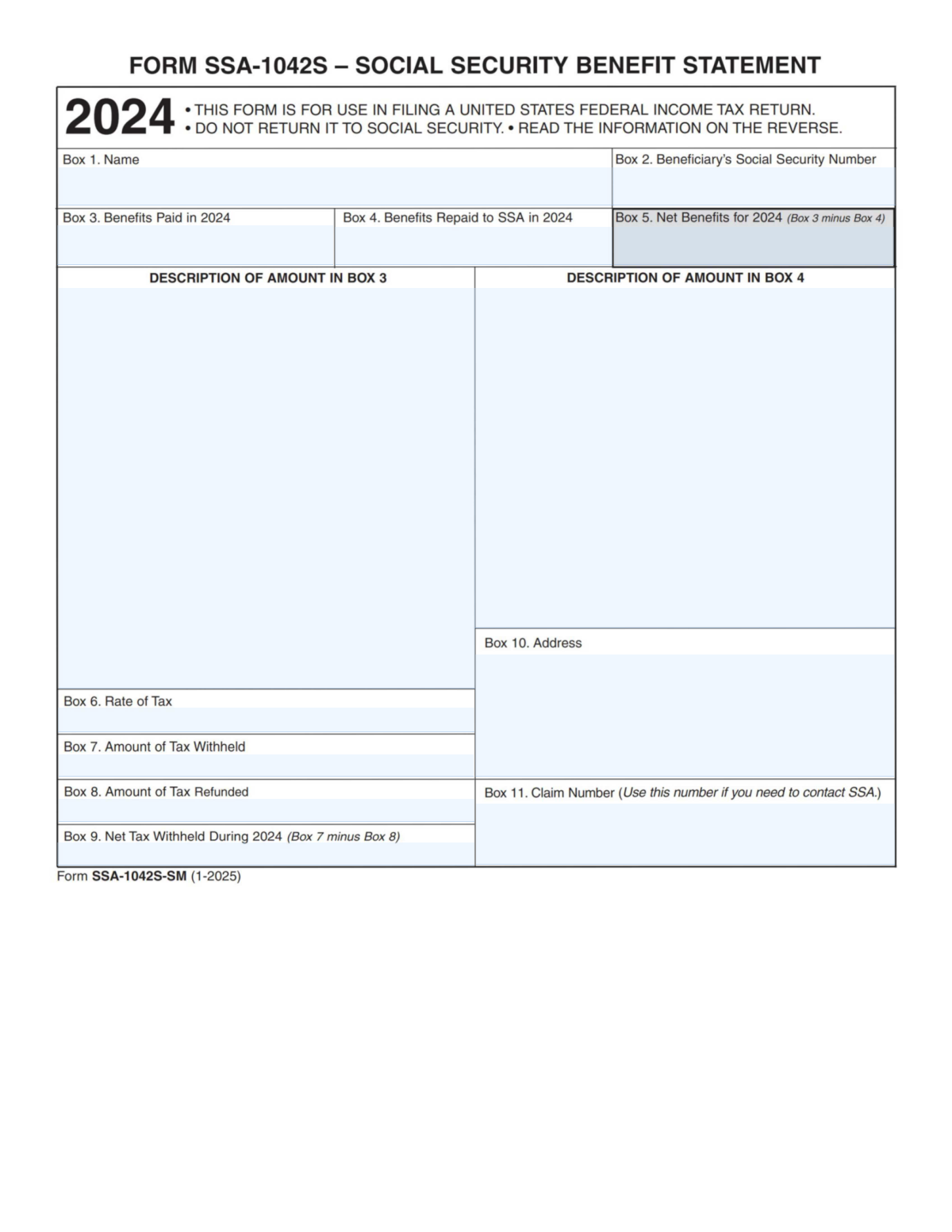
The AI does the filling. You just check it.
No typing into boxes, nothing to install.
What this form asks for
The AI fills all of it, from your answers or your documents.
The AI checks your answers before you download
15 checks built for this form, so a wrong date or a missing answer is caught before anyone else sees it.
Validates that the statement year is present and explicitly indicates 2024 (e.g., “Benefits Paid in 2024”). This is important because all monetary boxes and withholding calculations are year-specific and must align to the taxpayer’s filing year. If the year is missing or not 2024, the submission should be rejected or flagged for manual review to prevent reporting amounts for the wrong tax year.
Checks that Box 1 contains a non-empty beneficiary name with reasonable characters (letters, spaces, hyphens, apostrophes) and is not only initials or placeholder text. This matters for identity matching and downstream tax reporting, especially when reconciling with SSN and claim number. If invalid, the system should require correction because identity cannot be reliably established.
Validates that the SSN is exactly 9 digits (allowing optional hyphens in the display format) and rejects known invalid patterns (e.g., all zeros in any group, 000/666/9xx in the first three digits). This is critical for taxpayer identification and preventing misapplied benefits/tax withholding. If the SSN fails validation, the submission should be blocked and routed for correction or verification.
Ensures Box 10 includes required address components appropriate to the country context (e.g., street line, city, state/province, postal code; for U.S. addresses validate 2-letter state and 5-digit or ZIP+4). Accurate address data is important for correspondence, identity verification, and audit support. If incomplete or malformed, the system should flag the record and request a corrected address.
Validates that Boxes 3, 4, 5, 7, 8, and 9 contain numeric values with at most two decimal places and are not negative. This prevents parsing errors and ensures consistent financial calculations and reporting. If any amount is non-numeric, has excessive decimals, or is negative, the submission should fail validation and require correction.
Checks that Box 5 equals Box 3 minus Box 4 within an acceptable rounding tolerance (e.g., $0.01). This is essential because Box 5 is a derived value used for tax reporting and must reconcile to the paid and repaid amounts. If the calculation does not match, the system should flag the discrepancy and either recompute Box 5 or require the submitter to correct the inputs.
And 9 more checks
- Benefits Repaid (Box 4) Cannot Exceed Benefits Paid (Box 3)
- Tax Rate (Box 6) Format and Range Validation
- Withholding Amount (Box 7) Consistency with Benefits Paid (Box 3)
- Tax Refunded (Box 8) Cannot Exceed Tax Withheld (Box 7)
- Net Tax Withheld Calculation (Box 9 = Box 7 − Box 8)
- Conditional Presence: Tax Fields Required When Any Withholding/Refund Is Reported
- Claim Number (Box 11) Presence and Format Validation
- Cross-Field Identity Consistency: SSN (Box 2) vs Claim Number (Box 11)
- Descriptions for Amounts (Boxes 3 and 4) Must Be Present When Amounts Are Non-Zero
Let AI fill out your SSA-1042S
No typing. Every field filled in seconds, checked, ready to sign.
How to Fill Out SSA-1042S Online for Free in 2026
What the AI walks you through.
- Enter the beneficiary’s name (Box 1) exactly as shown on official records.
- Provide the beneficiary’s Social Security Number (Box 2).
- Input total benefits paid for the year (Box 3) and, if applicable, benefits repaid to SSA (Box 4), then confirm net benefits (Box 5).
- Review and record the descriptions associated with the amounts in Box 3 and Box 4 to ensure the correct type of payments/repayments are reflected.
- Enter the tax rate (Box 6) and the amount of tax withheld (Box 7), and include any tax refunded (Box 8) to calculate net tax withheld (Box 9).
- Add the beneficiary’s address (Box 10) and the SSA claim number (Box 11) for reference if contacting SSA is needed.
- Download or save the completed form details and use them to populate the Social Security benefits and withholding sections of the U.S. federal income tax return.
Common Mistakes in Completing SSA-1042S
The ones the AI is built to catch.
Mailing the SSA-1042S back to Social Security
Using the wrong tax year amounts (mixing 2024 with another year)
Entering an incorrect or mismatched Social Security Number (Box 2)
Reporting Box 3 (Benefits Paid) instead of Box 5 (Net Benefits)
Forgetting to include benefits repaid to SSA (Box 4) when applicable
Misunderstanding tax withheld vs. tax refunded (Boxes 7, 8, and 9)
Entering the tax rate (Box 6) as a dollar amount or percentage in the wrong format
Using the address in Box 10 as the filing address without updating current information
Confusing the Claim Number (Box 11) with the Social Security Number
Ignoring the “Description of amount” sections for Boxes 3 and 4
Frequently Asked Questions About SSA-1042S
Is it really free for 7 days?
Can I fill other forms too?
How do I cancel?
How does the AI fill out SSA-1042S?
What happens to my information?
How complex is SSA-1042S to fill out?
What is Form SSA-1042S used for?
Who receives Form SSA-1042S?
Do I need to send Form SSA-1042S back to Social Security?
What information do I need from the form to file my tax return?
What does Box 3 “Benefits Paid in 2024” mean?
What does Box 4 “Benefits Repaid to SSA in 2024” mean?
How is Box 5 “Net Benefits for 2024” calculated?
What is Box 6 “Rate of Tax” and when would it be filled in?
What does Box 7 “Amount of Tax Withheld” represent?
What is Box 8 “Amount of Tax Refunded” and why would it appear?
What does Box 9 “Net Tax Withheld During 2024” mean?
What is the address in Box 10 used for?
What is the “Claim Number” in Box 11 and when do I use it?
What should I do if my name or Social Security number is wrong on the form?
Where can I find instructions for this form?
Get your SSA-1042S filled out by AI
$0 today. Cancel before Nov 1 and you pay nothing.
Other forms like this one
social security forms: Form 4137, Social Security and Medicare Tax on Unreported Tip Income, Form 8919, Uncollected Social Security and Medicare Tax, Form SS-5-FS, Application for a Social Security Card, Form SSA-4-BK, Application for Social Security Benefits, Form SSA-3369-BK, Work History Report (Social Security Administration), Form 8919, Uncollected Social Security and Medicare Tax on Wages, Form SSA-827 (06-2024), Authorization to Disclose Information to the Social Security Administration (SSA), Form SSA-1694, Entity Registration and Taxpayer Information, Form SSA-3379-BK, Function Report - Child Age 12 to 18th Birthday, Form SSA-632-BK, Request for Waiver of Overpayment Recovery, Form SSA-769, Request for Change in Time/Place of Disability Hearing, Form SSA-820-BK, Work Activity Report - Self-Employment, Form SSA-821-BK, Work Activity Report - Employee, Form SS-5, Application for a Social Security Card (12-2024), Form SS-5, Application for a Social Security Card (10-2021), Form CMS-1561, Health Insurance Benefit Agreement
benefit forms: Form SSA-16, Application for Disability Benefits, Form SSA-1-BK, Application for Retirement Benefits, Form SSA-2-BK, Application for Spouse's Benefits, Form SSA-4-BK, Application for Child's Insurance Benefits, Form SSA-10, Application for Widow's or Widower's Insurance Benefits, Form SSA-10, Widow's or Widower's Benefits, Form SSA-4-BK, Application for Social Security Benefits, Form SSA-5-BK, Application for Mother's or Father's Benefits, Form DBQ, Knee and Lower Leg Disability Benefits, Form DBQ, Heart Conditions Disability Benefits, Form DBQ, Hypertension Disability Benefits, Form DBQ, Scars/Disfigurement Disability Benefits, Form DBQ, Diabetes Mellitus Disability Benefits Questionnaire, Form DBQ, Endocrine Diseases Disability Benefits, Form DBQ, Diabetes Mellitus Disability Benefits Questionnaire, Back (Thoracolumbar Spine) Conditions Disability Benefits Questionnaire, Ankle Conditions Disability Benefits Questionnaire, Back (Thoracolumbar Spine) Conditions Disability Benefits Questionnaire, Elbow and Forearm Conditions Disability Benefits Questionnaire, Foot Conditions, Including Flatfoot (Pes Planus) Disability Benefits Questionnaire
SSA forms: Form SSA-44, Medicare Income-Related Monthly Adjustment Amount - Life-Changing Event, Form SSA-3368-BK, Disability Report - Adult, Form SSA-16, Application for Disability Benefits, Form SSA-1-BK, Application for Retirement Benefits, Form SSA-2-BK, Application for Spouse's Benefits, Form SSA-827, Authorization to Disclose Information, Form SSA-3820-BK, Disability Report - Child, Form SSA-4-BK, Application for Child's Insurance Benefits, Form SSA-10, Application for Widow's or Widower's Insurance Benefits, Form SSA-3373, Function Report - Adult, Form SSA-8, Application for Lump-Sum Death Payment, Form SSA-10, Widow's or Widower's Benefits, Form SSA-4-BK, Application for Social Security Benefits, Form SSA-454-BK, Continuing Disability Review, Form SSA-5-BK, Application for Mother's or Father's Benefits, Form SSA-8000-BK, Application for Supplemental Security Income (SSI), Function Report - Adult - Third Party (Form SSA-3380-BK), Dakota County CDA New Admissions Informal Review Request Form (Housing Choice Voucher Program) and HUD Form 5382, Certification of Domestic Violence, Dating Violence, Sexual Assault, or Stalking, and Alternate Documentation, Form SSA-3369-BK, Work History Report, Function Report – Adult – Third Party (Form SSA-3380-BK)
PA state forms: Form 1095-A, Health Insurance Marketplace Statement, Form W-2, Wage and Tax Statement, Form 593, Real Estate Withholding, Form 8938, Statement of Specified Foreign Financial Assets, Form CMS-2567, Statement of Deficiencies, Form 1098, Mortgage Interest Statement, Form 1098-T, Tuition Statement, Form 1099-S, Proceeds From Real Estate Transactions, Form 1098-E, Student Loan Interest Statement, Form DS-3053, Statement of Consent, Form DS-86, Statement of Non-Receipt of a U.S. Passport, Form DS-86, Statement of Non-Receipt of a U.S. Passport, Form 108, Statement of Intention, Form 107, Statement of Financial Affairs, Form 121, Statement About Your SSNs, Form 122A-1, Chapter 7 Statement of Current Monthly Income, Center for Infertility & Reproductive Surgery – New Patient Questionnaire and Patient/Guarantor Statement (Brigham and Women’s Hospital, Department of Obstetrics and Gynecology), Adult Travel Document Application for Stateless and Protected Persons in Canada (16 years of age or over) (PPTC 190), Form W-8IMY (Rev. October 2021), Certificate of Foreign Intermediary, Foreign Flow-Through Entity, or Certain U.S. Branches for United States Tax Withholding and Reporting, Form W-2, Wage and Tax Statement (2025)
SEC forms: Form 4137, Social Security and Medicare Tax on Unreported Tip Income, Form 8919, Uncollected Social Security and Medicare Tax, Form SS-5-FS, Application for a Social Security Card, Form SSA-4-BK, Application for Social Security Benefits, Form I-485 Supp A, Adjustment of Status Under Section 245(i), Form 104, List of Creditors 20 Largest Unsecured Claims, Form SSA-8000-BK, Application for Supplemental Security Income (SSI), QBCC Licence Application Form – Mutual Recognition (Application under section 19 of the Mutual Recognition Act 1992 (Cwlth) and section 18 of the Trans-Tasman Mutual Recognition Act 1997 (Cwlth)), QBCC Licence Application Form – Company (Application made under section 33, Queensland Building and Construction Commission Act 1991), ACORD 140 (2014/12), Property Section (Attach to ACORD 125), Form SSA-3369-BK, Work History Report (Social Security Administration), European Public Prosecutor’s Office (EPPO) Application Form, Washington Single-Family Property Term Lease & Security Deposit Receipt (WA Single-Family Lease) | Revised 10/08/2025, Form 8919, Uncollected Social Security and Medicare Tax on Wages, VA Form 21-0781a, Statement in Support of Claim for Service Connection for Post-Traumatic Stress Disorder (PTSD) Secondary to Personal Assault, Louisiana Secretary of State – Notice of Change of Registered Office and/or Change of Registered Agent (Domestic Limited Liability Company) (R.S. 12:1308) (Form SS983, Rev. 01/24), Building Regulation 2021 (Queensland) – Section 143A(3) – Form 18 (Version 6, March 2023), Notice to the owner (where owner is not the client) that a private certifier has been engaged, Form SSA-827 (06-2024), Authorization to Disclose Information to the Social Security Administration (SSA), Intra-Brokerage Securities Transfer, Order Instituting Administrative and Cease-and-Desist Proceedings, Pursuant to Sections 15(b) and 21C of the Securities Exchange Act of 1934 and Sections 203(e) and 203(k) of the Investment Advisers Act of 1940, Making Findings, and Imposing Remedial Sanctions and a Cease-and-Desist Order
NJ state forms: Form 1095-A, Health Insurance Marketplace Statement, Form W-2, Wage and Tax Statement, Form 593, Real Estate Withholding, Form 8938, Statement of Specified Foreign Financial Assets, Form CMS-2567, Statement of Deficiencies, Form 1098, Mortgage Interest Statement, Form 1098-T, Tuition Statement, Form 1099-S, Proceeds From Real Estate Transactions, Form 1098-E, Student Loan Interest Statement, Form DS-3053, Statement of Consent, Form DS-86, Statement of Non-Receipt of a U.S. Passport, Form DS-86, Statement of Non-Receipt of a U.S. Passport, Form 108, Statement of Intention, Form 107, Statement of Financial Affairs, Form 121, Statement About Your SSNs, Form 122A-1, Chapter 7 Statement of Current Monthly Income, Center for Infertility & Reproductive Surgery – New Patient Questionnaire and Patient/Guarantor Statement (Brigham and Women’s Hospital, Department of Obstetrics and Gynecology), Adult Travel Document Application for Stateless and Protected Persons in Canada (16 years of age or over) (PPTC 190), Form W-8IMY (Rev. October 2021), Certificate of Foreign Intermediary, Foreign Flow-Through Entity, or Certain U.S. Branches for United States Tax Withholding and Reporting, Form W-2, Wage and Tax Statement (2025)
state ID forms: Application for Renewal or Duplicate of Alabama Driver License or ID card, Form 1095-A, Health Insurance Marketplace Statement, Form W-2, Wage and Tax Statement, Form 593, Real Estate Withholding, Form 8938, Statement of Specified Foreign Financial Assets, Form CMS-2567, Statement of Deficiencies, Form 1098, Mortgage Interest Statement, Form 1098-T, Tuition Statement, Form 1099-S, Proceeds From Real Estate Transactions, Form 1098-E, Student Loan Interest Statement, Form DS-3053, Statement of Consent, Form DS-86, Statement of Non-Receipt of a U.S. Passport, Form 108, Statement of Intention, Form 107, Statement of Financial Affairs, Form 121, Statement About Your SSNs, Form 122A-1, Chapter 7 Statement of Current Monthly Income, Center for Infertility & Reproductive Surgery – New Patient Questionnaire and Patient/Guarantor Statement (Brigham and Women’s Hospital, Department of Obstetrics and Gynecology), Adult Travel Document Application for Stateless and Protected Persons in Canada (16 years of age or over) (PPTC 190), Form W-8IMY (Rev. October 2021), Certificate of Foreign Intermediary, Foreign Flow-Through Entity, or Certain U.S. Branches for United States Tax Withholding and Reporting, Form W-2, Wage and Tax Statement (2025)
SOC forms: Form SOC 295, Application for In-Home Supportive Services, Form 4137, Social Security and Medicare Tax on Unreported Tip Income, Form 8919, Uncollected Social Security and Medicare Tax, Form SS-5-FS, Application for a Social Security Card, Form SSA-4-BK, Application for Social Security Benefits, California Department of Social Services (CDSS) Community Care Licensing Child Care Forms Packet (LIC 9150, LIC 282, LIC 627, LIC 700, LIC 995A, CDPH 286, LIC 9227), Application for Scope of Clinical Practice (SoCP) – Application Form SoCP Only (v1.00 06/2014), Missouri Department of Social Services, Family Support Division — Application for Supplemental Nutrition Assistance Program (SNAP) (MO 886-0460 / FS-1), Form SSA-3369-BK, Work History Report (Social Security Administration), California Department of Social Services (CDSS) Community Care Licensing Division — Administrative Organization (LIC 309), California/National Apartment Association Official Form B-15, Rental Application for Residents and Occupants (May 2015) with Application Agreement, National Apartment Association (NAA) Rental Application for Residents and Occupants (Virginia) and Supplemental Rental Application for Units Under Government Regulated Affordable Housing Programs, California Association of REALTORS® (C.A.R.) Form LR, Residential Lease or Month-to-Month Rental Agreement (Revised 12/19), Pacific Gastroenterology Associates Referral Form, Chicago Residential Lease for Apartments, Condominiums, Single Family Homes, and Townhomes (Chicago Association of REALTORS®) (V13.0 2026), Form 8919, Uncollected Social Security and Medicare Tax on Wages, Liantis / RSVZ – Aanvraagformulier voor vrijstelling van sociale bijdragen als zelfstandige (artikel 17 van het koninklijk besluit nr. 38 van 27 juli 1967), Form SSA-827 (06-2024), Authorization to Disclose Information to the Social Security Administration (SSA), Tesorería General de la Seguridad Social (TGSS) — Mandato / Orden de domiciliación de adeudos directos SEPA para el pago de cuotas de la Seguridad Social (TC 1/15-3, 06-2022), California Department of Social Services Form RFA 07 (2/18), Resource Family Approval (RFA) Health Questionnaire (Mandatory)
Let AI fill out your SSA-1042S
Your trial starts once a card is added. You pay nothing before Nov 1.
Our AI already knows this form, all 13 fields of it. Skip the typing: tell it about yourself, or upload what you have, and it fills the whole form in seconds.
- AI fills every field on the form, checkboxes included
- No typing into boxes: answer a few questions, or upload a document you already have, an old copy of this form, a photo of a document
- The AI checks the answers; you review and change anything before you download
- Download the finished PDF, print it, or sign it online
- Encrypted, and never used to train AI
Cancel before Nov 1 and you pay nothing.
A card is needed to start the trial. Cancel in two clicks from your account.
Terms · Privacy