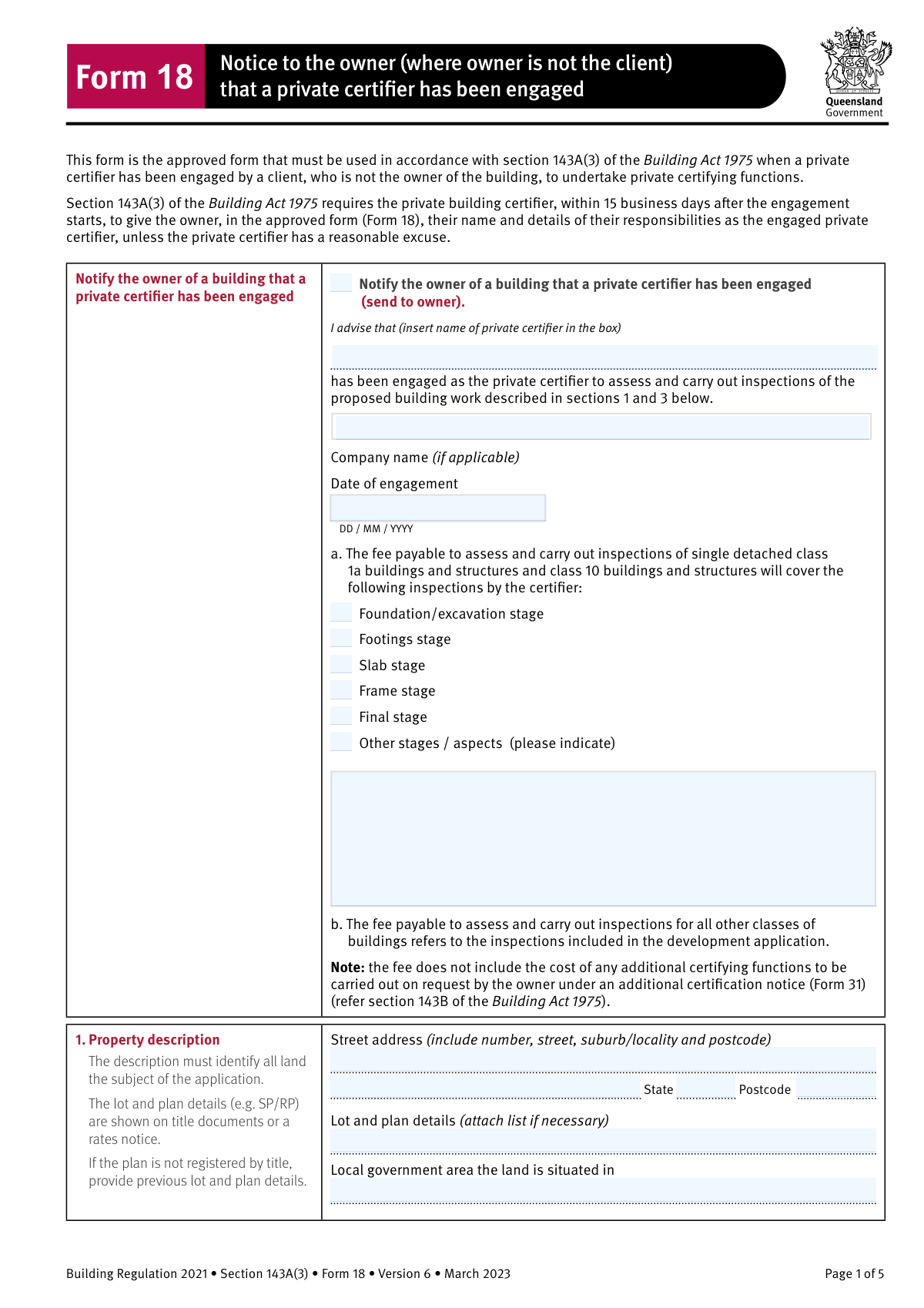
Yes! You can use AI to fill out Building Regulation 2021 (Queensland) – Section 143A(3) – Form 18 (Version 6, March 2023), Notice to the owner (where owner is not the client) that a private certifier has been engaged

Form 18 is the approved Queensland form required under section 143A(3) of the Building Act 1975 when a private certifier is engaged by a client who is not the building owner. It formally provides the owner with the certifier’s identity, engagement date, inspection scope/fee coverage, property details, and the proposed building work description, helping ensure transparency and compliance with statutory notice requirements (generally within 15 business days of engagement). It also supports the owner’s rights to request inspection documentation or additional certifying functions (via related forms such as Form 35 and Form 31). Today, this form can be filled out quickly and accurately using AI-powered services like Instafill.ai, which can also convert non-fillable PDF versions into interactive fillable forms.
Our AI automatically handles information lookup, data retrieval, formatting, and form filling.
It takes less than a minute to fill out QLD Form 18 (s143A(3)) using our AI form filling.
Securely upload your data. Information is encrypted in transit and deleted immediately after the form is filled out.

Form specifications

Form name: Building Regulation 2021 (Queensland) – Section 143A(3) – Form 18 (Version 6, March 2023), Notice to the owner (where owner is not the client) that a private certifier has been engaged
Number of pages: 2
Language: English
Categories: construction forms, Queensland building forms, building regulation forms, Queensland government forms
main-image

Instafill Demo: filling out a legal form in seconds

How to Fill Out QLD Form 18 (s143A(3)) Online for Free in 2026

Are you looking to fill out a QLD FORM 18 (S143A(3)) form online quickly and accurately? Instafill.ai offers the #1 AI-powered PDF filling software of 2026, allowing you to complete your QLD FORM 18 (S143A(3)) form in just 37 seconds or less.
Follow these steps to fill out your QLD FORM 18 (S143A(3)) form online using Instafill.ai:
  1. 1 Go to Instafill.ai and upload the Form 18 PDF (or select it from the form library if available).
  2. 2 Let the AI detect and map the fields, then confirm you are completing “Notice to the owner (where owner is not the client) that a private certifier has been engaged.”
  3. 3 Enter the property details: street address, state/postcode, lot and plan details, and the local government area.
  4. 4 Fill in the owner’s details: full name (and company/contact person if applicable), phone numbers, email, and postal address.
  5. 5 Complete the description of the proposed building work and specify the inspection stages covered by the fee (foundation/excavation, footings, slab, frame, final, and any other stages/aspects).
  6. 6 Enter the private certifier’s details: certifier name, company/contact person (if applicable), contact information, postal address, and licence number, plus the date of engagement.
  7. 7 Review for completeness and accuracy, then apply the private certifier’s signature and signature date, and download/send the completed Form 18 to the owner.

Our AI-powered system ensures each field is filled out correctly, reducing errors and saving you time.

Why Choose Instafill.ai for Your Fillable QLD Form 18 (s143A(3)) Form?

Speed

Complete your QLD Form 18 (s143A(3)) in as little as 37 seconds.

Up-to-Date

Always use the latest 2026 QLD Form 18 (s143A(3)) form version.

Cost-effective

No need to hire expensive lawyers.

Accuracy

Our AI performs 10 compliance checks to ensure your form is error-free.

Security

Your personal information is protected with bank-level encryption.

Frequently Asked Questions About Form QLD Form 18 (s143A(3))

Form 18 is a notice to the building owner that a private certifier has been engaged to assess and inspect proposed building work. It is the approved form under section 143A(3) of the Building Act 1975 (Qld).

The private certifier must give Form 18 to the owner when the certifier is engaged by a client who is not the owner (for example, a builder or designer). The form is sent to the owner to inform them of the certifier’s details and role.

The private certifier must give the owner Form 18 within 15 business days after the engagement starts, unless the certifier has a reasonable excuse. The “date of engagement” field should match when the engagement began.

No—Form 18 is signed by the private certifier. The owner’s details are included for correct identification and correspondence, but the owner does not sign this notice.

You must provide the street address (including suburb/locality and postcode), the lot and plan details (e.g., SP/RP), and the local government area. If there isn’t enough space for lot/plan details, attach a separate list.

Lot and plan details are usually shown on title documents or a rates notice. If the plan is not registered by title, provide the previous lot and plan details.

Provide a concise description of the building work (e.g., “new single detached dwelling,” “rear extension and renovation,” “new garage/shed,” or “new swimming pool and fencing”). Include enough detail to clearly identify the scope of work being certified.

Tick the stages covered by the certifier’s engagement/fee (commonly foundation/excavation, footings, slab, frame, and final for class 1a and class 10 work). Use “Other stages/aspects” to list any additional inspections not already shown (and add details in the space provided).

No—the form notes that the fee does not include additional certifying functions requested by the owner under an Additional certification notice (Form 31). If the owner requests extra functions, the owner is responsible for the reasonable costs.

You must include the certifier’s full name, company name (if applicable), contact person (if applicable), phone numbers, email, postal address, and licence number. These details allow the owner to contact the certifier and confirm their credentials.

The owner can request inspection documentation before the final stage inspection by completing Form 35 (Building owner request for inspection documentation) and giving it to the private certifier. The certifier must provide the requested documents within 5 business days after receiving Form 35 (with some eligibility limits for engagements before 1 October 2020).

If the owner did not engage the certifier, the owner may request additional certifying functions using Form 31 (Additional certification notice), subject to the rules in section 143B of the Building Act 1975. Timing requirements apply (including providing copies to the client and certifier within specified business days).

Yes—AI tools can help extract details from your documents and place them into the correct fields to reduce errors and save time. Services like Instafill.ai use AI to auto-fill form fields accurately based on the information you provide.

Upload the Form 18 PDF to Instafill.ai, then upload or paste the relevant details (owner info, property address, lot/plan, certifier details, licence number, and engagement date). Instafill.ai can auto-map your information into the correct fields, after which you review, edit if needed, and export the completed form for signing and sending to the owner.

If the PDF is not fillable, you can use Instafill.ai to convert a flat, non-fillable PDF into an interactive fillable form and then auto-fill it. This helps avoid printing/scanning and reduces manual typing errors.

Compliance QLD Form 18 (s143A(3))
Validation Checks by Instafill.ai

1
Owner Notification Checkbox Must Be Affirmatively Selected
Validates that the checkbox indicating the form is being used to notify the owner (who is not the client) is checked. This is important because Form 18 is only applicable when the owner is not the client and the notice is being sent to the owner. If not selected, the submission should be rejected or flagged as an incorrect form/use-case and require user confirmation before acceptance.
2
Private Certifier Identity Completeness (Name + Licence Number Required)
Ensures the private certifier’s full name and licence number are both provided and not placeholders (e.g., 'N/A', 'TBA'). This is critical for legal traceability and for verifying the certifier is authorised to perform certifying functions. If either field is missing or invalid, the form should fail validation and prompt for correction.
3
QBCC/Certifier Licence Number Format Validation
Checks that the licence number matches the expected format rules (e.g., numeric length/structure as configured for the issuing authority) and contains only permitted characters. This reduces data entry errors and supports downstream verification against licensing registers. If the format check fails, block submission and require a corrected licence number.
4
Engagement Date Format and Valid Calendar Date
Validates that the Date of engagement is provided in DD/MM/YYYY format and represents a real calendar date (e.g., not 31/02/2025). This is important because statutory timeframes in the form are based on the engagement start date. If invalid or missing, the submission should be rejected and the user prompted to enter a valid date.
5
Signature Date Format and Not Earlier Than Engagement Date
Ensures the private certifier signature date is in DD/MM/YYYY format, is a valid date, and is not earlier than the engagement date. This prevents logically impossible timelines (signing before engagement) and supports audit defensibility. If the signature date is invalid or precedes engagement, fail validation and require correction.
6
Statutory Timing Check: Notice Sent Within 15 Business Days of Engagement
If the system captures a submission/sent date, validate that the notice is being issued within 15 business days after the engagement starts (as stated in the form text). This check is important for compliance monitoring and to flag late notices that may require a 'reasonable excuse' workflow. If outside the window, the system should warn/block and require an override reason or compliance flag.
7
Property Address Completeness and Postcode Format
Validates that the property street number/street name and suburb/locality are present, and that the postcode is exactly 4 digits (Australian postcode format). A complete and correctly formatted address is necessary to identify the land subject to the application and to avoid misdirected notices. If incomplete or postcode format fails, reject submission and request corrected address details.
8
State/Territory Must Be One of Allowed Values and Consistent Across Addresses
Checks that state/territory fields use only the allowed set (QLD, NSW, VIC, TAS, SA, WA, NT, ACT) and that the property state is consistent with the form’s Queensland legislative context (typically QLD). Also validates that owner/certifier postal state values are valid codes. If an invalid code is used or the property is not QLD (if enforced by business rules), the submission should be blocked or routed for manual review.
9
Lot and Plan Details Presence and Pattern Validation
Ensures lot and plan details are provided and follow an expected pattern (e.g., includes a lot identifier and plan type such as SP/RP/CP with numbers), and are not free-text placeholders. This is important because the form requires identification of all land subject to the application and lot/plan is a primary legal identifier. If missing or malformed, fail validation and require corrected lot/plan information or an attached list indicator.
10
Local Government Area (LGA) Required and Non-Placeholder
Validates that the Local government area field is completed with a plausible LGA name and is not blank or 'N/A'. LGA is required for routing, council notification processes, and record archiving. If missing, the submission should be rejected and the user prompted to provide the LGA.
11
Owner Details Completeness and Company Contact Person Rule
Ensures the owner name is provided, and if an owner company name is provided (or the owner is indicated as a company), a contact person must also be provided. This is required by the form instructions and ensures there is a responsible individual for correspondence. If the company/contact dependency is not satisfied, fail validation and request the missing contact person.
12
Owner Contact Channels Validation (Email and Phone Formats)
Validates owner email address format (RFC-like basic pattern) and phone numbers to Australian conventions (allowing spaces, +61, area codes; rejecting alphabetic characters and too-short numbers). Reliable contact details are essential because the form states correspondence will be mailed and contact may be required for compliance actions. If formats fail, block submission and prompt for corrected contact details.
13
Private Certifier Contact Details Validation (Email and Phone Formats)
Validates the certifier’s business phone, mobile, and email address formats using the same rules as owner contacts, and ensures at least one phone number is provided (business or mobile). This is important for operational communication about inspections and documentation requests. If invalid or no phone is provided, fail validation and require corrected/complete contact information.
14
Inspection Stages Selection Must Be Coherent (At Least One Stage or DA Reference)
Checks that at least one inspection stage checkbox is selected, or that the submission indicates inspections are per the development application (for non-class 1a/10 scenarios), and prevents a completely empty inspection coverage section. This matters because the form explicitly describes fee coverage for inspections and an empty selection undermines the notice’s purpose. If no stages are selected and no alternative reference is provided, reject submission and require clarification.
15
‘Other Stages/Aspects’ Requires Details When Selected
Validates that when 'Other stages / aspects (please indicate)' is checked, the 'Inspections/stages to be covered — details' field is non-empty and sufficiently descriptive (e.g., minimum character count, not 'see attached' unless an attachment flag exists). This prevents ambiguous inspection scope and fee coverage disputes. If 'Other' is selected without details, fail validation and prompt for the missing description.
16
Proposed Building Work Description Required and Not Generic
Ensures the description of proposed building work is provided and is not overly generic (e.g., 'building work', 'renovation') by applying a minimum length and/or keyword diversity rule. A meaningful description is necessary to align inspections, approvals, and records with the actual scope of work. If the description is missing or too vague, block submission and request a more specific scope statement.

Common Mistakes in Completing QLD Form 18 (s143A(3))

Not checking the ‘Notify owner (send to owner)’ box

People often skip the initial selection because it looks like a heading rather than a required confirmation. If it’s left unchecked, it can be unclear whether the form is actually being issued to the owner (who is not the client), which may create compliance and audit issues. Always confirm the form’s purpose by ticking the notification box before completing the rest of the fields. AI-powered tools like Instafill.ai can flag unticked required checkboxes and prevent submission with missing confirmations.

Using the wrong party’s details (owner vs client vs certifier)

A frequent error is entering the client/builder’s details in the Owner’s details section, especially when the owner is not the person managing the project. This can result in notices being sent to the wrong party and may undermine the legal requirement to notify the actual owner within the required timeframe. Verify ownership from title/rates notice and ensure the Owner’s details are the legal owner, not the applicant or builder. Instafill.ai can help by mapping data to the correct fields and warning when roles appear inconsistent.

Incorrect or incomplete ‘Date of engagement’ (wrong format or wrong date)

Many people enter the date the form was signed or sent instead of the date the certifier was engaged, or they use a non-AU format (MM/DD/YYYY). This matters because the legislation references timeframes (e.g., notice within 15 business days after engagement starts), and an incorrect date can create apparent non-compliance. Use DD/MM/YYYY and confirm the engagement start date from the contract/appointment letter. Instafill.ai can enforce date formatting and prompt you to confirm the correct event date.

Leaving inspection stages blank or selecting stages that don’t match the project class

Users often forget to tick the relevant inspection stages (foundation/footings/slab/frame/final) or they tick a generic set without considering whether the work is a class 1a/10 project versus “all other classes” tied to the development approval. This can cause disputes about what the fee covers and confusion about mandatory inspections. Tick only the stages covered by the engagement/fee and align them with the development approval requirements; if unsure, cross-check the approval conditions. Instafill.ai can help validate that at least the expected stages are addressed and prompt for missing stage selections.

Checking ‘Other stages/aspects’ but not describing them (or describing them without checking the box)

A common mismatch is selecting ‘Other stages/aspects’ and leaving the details field empty, or writing extra stages in the details area without ticking the ‘Other’ checkbox. This creates ambiguity about what is included in the fee and what inspections are expected. If ‘Other’ applies, provide clear, specific items (e.g., waterproofing inspection, pool barrier inspection, retaining wall) and ensure the checkbox and details field are consistent. Instafill.ai can detect conditional-field dependencies and require the details when ‘Other’ is selected.

Incomplete property description (missing lot/plan or using an informal description)

People often provide only a street address and omit lot and plan details, or they enter informal identifiers (e.g., “behind the shops”) that don’t uniquely identify the land. The form explicitly requires identification of all land subject to the application, and missing lot/plan can delay processing or create legal uncertainty. Use the title documents or rates notice to enter the correct Lot and Plan (e.g., Lot 12 on SP123456) and attach a list if multiple lots apply. Instafill.ai can standardize lot/plan formatting and remind you when required land identifiers are missing.

Wrong local government area (LGA) or leaving it blank

Applicants frequently confuse the suburb with the council/LGA name, especially in areas where suburb boundaries don’t match council boundaries. An incorrect LGA can lead to misrouting, delays, or inconsistencies with council records. Look up the property’s council/LGA using the rates notice or the council’s property search and enter the full LGA name. Instafill.ai can help by suggesting LGAs based on the address and flagging mismatches.

Vague ‘Description of proposed building work’

Many entries are too generic (e.g., “renovation” or “new build”) and don’t describe scope, type, or key elements, which makes it harder to align inspections and approvals. Vague descriptions can trigger follow-up requests and slow down certification and council archiving. Provide a concise but specific description (e.g., “New single detached dwelling (Class 1a) with attached garage (Class 10a), slab-on-ground, including retaining wall and pool barrier”). Instafill.ai can prompt for missing scope elements and help format a complete, consistent work description.

Missing or incorrect certifier licence number

People sometimes enter an internal company reference, an expired number, or leave the licence number blank. This can invalidate the credibility of the notice and may cause compliance checks to fail or require re-issue of the form. Enter the certifier’s current QBCC-issued licence/registration number exactly as recorded and double-check digits. Instafill.ai can validate number patterns and reduce transcription errors.

Contact details errors (email/phone/postal address) that prevent delivery

Typos in email addresses, missing digits in phone numbers, or incomplete postal addresses are extremely common, especially when copying from signatures or old records. The form states correspondence will be mailed to the provided address; incorrect details can mean the owner never receives the notice, creating compliance risk and project delays. Verify contact details against reliable sources (company records, title/rates notice, engagement contract) and include unit/PO Box/suburb/state/postcode as applicable. Instafill.ai can automatically format phone numbers, validate emails, and standardize addresses to reduce undeliverable correspondence.

Signature/date issues (unsigned form, wrong signer, or date mismatch)

Forms are often submitted without a signature, signed by an unauthorized staff member, or dated inconsistently with the engagement date. This can lead to rejection, rework, and questions about whether the notice was properly issued within statutory timeframes. Ensure the private certifier signs the form (or an authorized signatory where permitted) and date it accurately in DD/MM/YYYY. If the form is a flat non-fillable PDF, Instafill.ai can convert it into a fillable version and help ensure signature/date fields are completed before sending.
Saved over 80 hours a year

“I was never sure if my IRS forms like W-9 were filled correctly. Now, I can complete the forms accurately without any external help.”

Kevin Martin Green

Your data stays secure with advanced protection from Instafill and our subprocessors

Robust compliance program

Transparent business model

You’re not the product. You always know where your data is and what it is processed for.

ISO 27001, HIPAA, and GDPR

Our subprocesses adhere to multiple compliance standards, including but not limited to ISO 27001, HIPAA, and GDPR.

Security & privacy by design

We consider security and privacy from the initial design phase of any new service or functionality. It’s not an afterthought, it’s built-in, including support for two-factor authentication (2FA) to further protect your account.

Fill out QLD Form 18 (s143A(3)) with Instafill.ai

Worried about filling PDFs wrong? Instafill securely fills building-regulation-2021-queensland-section-143a3-form-18-version-6-march-2023-notice-to-the-owner-where-owner-is-not forms, ensuring each field is accurate.