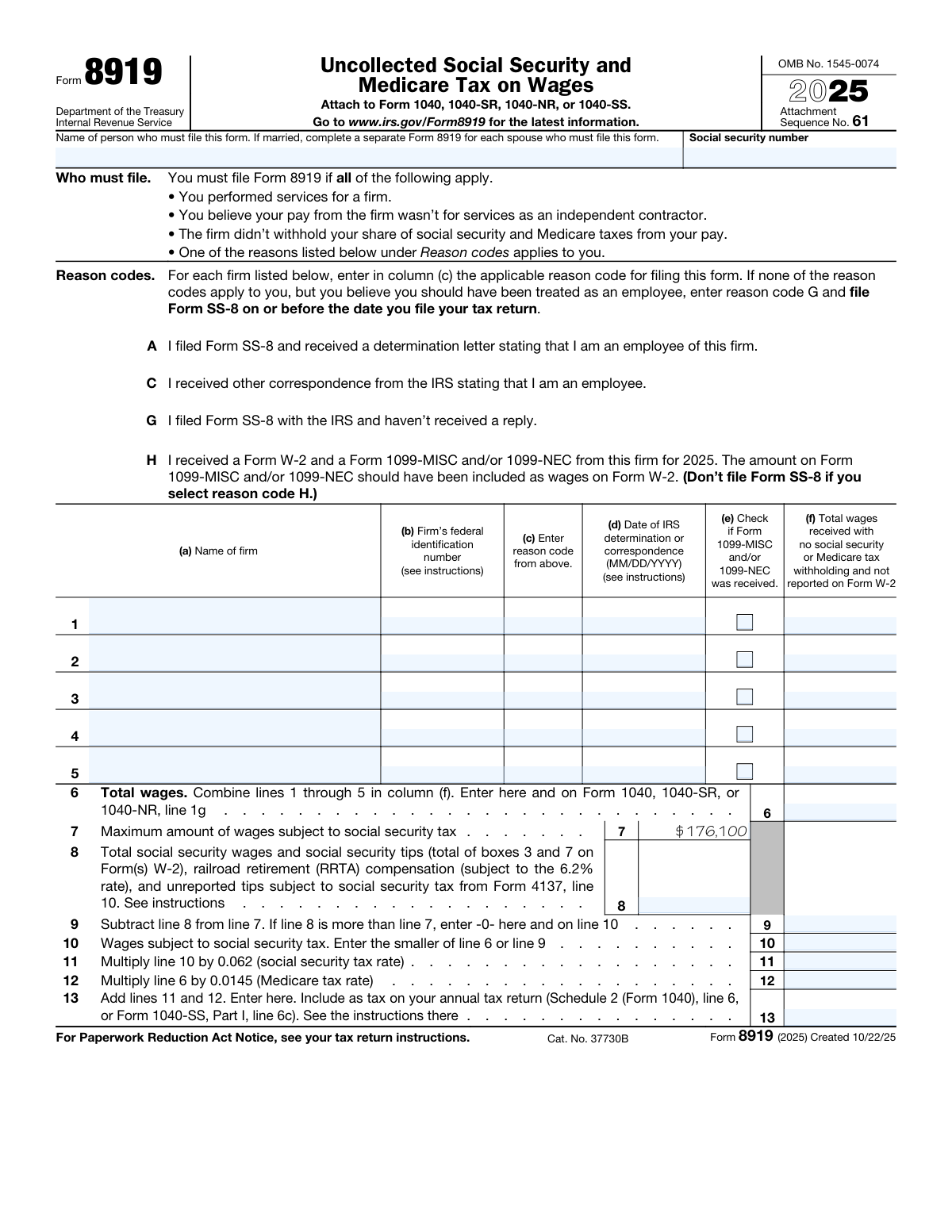
Yes! You can use AI to fill out Form 8919, Uncollected Social Security and Medicare Tax on Wages

Form 8919 is an IRS attachment used with Form 1040/1040-SR/1040-NR/1040-SS to figure and report the employee portion of Social Security and Medicare taxes that weren’t withheld by a firm that treated you as a nonemployee. It requires you to list each firm, identify a qualifying reason code (such as an IRS determination or a filed Form SS-8), and compute the Social Security and Medicare tax due based on the wages involved and annual wage limits. Filing it helps ensure your earnings are properly credited to your Social Security record and that the correct payroll taxes are paid. Today, this form can be filled out quickly and accurately using AI-powered services like Instafill.ai, which can also convert non-fillable PDF versions into interactive fillable forms.
Our AI automatically handles information lookup, data retrieval, formatting, and form filling.
It takes less than a minute to fill out Form 8919 using our AI form filling.
Securely upload your data. Information is encrypted in transit and deleted immediately after the form is filled out.

Form specifications

Form name: Form 8919, Uncollected Social Security and Medicare Tax on Wages
Number of pages: 1
Language: English
Categories: tax forms, IRS forms, employment tax forms, payroll forms, social security forms
main-image

Instafill Demo: filling out a legal form in seconds

How to Fill Out Form 8919 Online for Free in 2026

Are you looking to fill out a FORM 8919 form online quickly and accurately? Instafill.ai offers the #1 AI-powered PDF filling software of 2026, allowing you to complete your FORM 8919 form in just 37 seconds or less.
Follow these steps to fill out your FORM 8919 form online using Instafill.ai:
  1. 1 Go to Instafill.ai and upload Form 8919 (or select it from the form library) and start a new filing session for the correct tax year.
  2. 2 Enter the filer’s identifying information (name and Social Security number) and confirm you will attach the form to the correct return (Form 1040, 1040-SR, 1040-NR, or 1040-SS).
  3. 3 For each firm (up to five per form), input the firm name and federal identification number (EIN/SSN if applicable), select the correct reason code (A, C, G, or H), and indicate whether you received a Form 1099-MISC/1099-NEC; add the IRS determination/correspondence date when required (reason code A or C).
  4. 4 Enter the total wages for each firm that had no Social Security/Medicare withholding and were not reported on Form W-2, then let the AI calculate the combined total wages for line 6.
  5. 5 Provide supporting wage totals needed for the calculation (for example, total Social Security wages/tips from Forms W-2 and any RRTA compensation as applicable) so the AI can compute lines 7–10 using the annual Social Security wage limit.
  6. 6 Review the computed Social Security and Medicare tax amounts (lines 11–13), confirm the amounts that flow to your tax return (for example, Schedule 2 (Form 1040) line 6 or Form 1040-SS Part I line 6c), and run Instafill.ai’s validation checks for missing fields and inconsistencies.
  7. 7 Download the completed, signed-ready PDF and attach/file it with your annual tax return, keeping copies of related documents (W-2, 1099s, and any IRS correspondence) for your records.

Our AI-powered system ensures each field is filled out correctly, reducing errors and saving you time.

Why Choose Instafill.ai for Your Fillable Form 8919 Form?

Speed

Complete your Form 8919 in as little as 37 seconds.

Up-to-Date

Always use the latest 2026 Form 8919 form version.

Cost-effective

No need to hire expensive lawyers.

Accuracy

Our AI performs 10 compliance checks to ensure your form is error-free.

Security

Your personal information is protected with bank-level encryption.

Frequently Asked Questions About Form Form 8919

Form 8919 is used to figure and report your share of uncollected Social Security and Medicare taxes when you believe you were an employee but were treated as an independent contractor. Filing it also helps ensure your earnings are credited to your Social Security record.

You must file Form 8919 if you performed services for a firm, believe you should have been treated as an employee, the firm didn’t withhold Social Security/Medicare taxes, and one of the listed reason codes (A, C, G, or H) applies.

Yes. Attach Form 8919 to Form 1040, 1040-SR, 1040-NR, or 1040-SS when you file your annual return.

Complete a separate Form 8919 for each spouse who must file it. Even on a joint return, each spouse with uncollected Social Security/Medicare tax should have their own Form 8919.

Use A if you filed Form SS-8 and received an IRS determination letter saying you’re an employee; C if you received other IRS correspondence stating you’re an employee; G if you filed SS-8 and haven’t received a reply; H if you received both a W-2 and a 1099 (and the 1099 amount should have been wages). If none apply, use G and file Form SS-8 on or before the date you file your return.

Only in certain cases: if you use reason code G, you must file Form SS-8 on or before the date you file your tax return. Do not attach Form SS-8 to your return—file it separately.

Complete the date in column (d) only if you entered reason code A or C for that firm. If you used G or H, leave the date blank.

Use the number shown on the firm’s Form 1099-MISC/1099-NEC if you received one. If you don’t have it, you can request it using Form W-9; if you still can’t obtain it, enter “unknown.”

Enter the wages you were paid by that firm that were not reported on a W-2 and had no Social Security or Medicare tax withheld. If you have multiple firms, complete a separate line for each firm.

Attach additional Form(s) 8919 to list the extra firms (lines 1–5). Then complete lines 6–13 on only one Form 8919 using the combined totals from all the forms.

Line 6 total wages are also entered on Form 1040/1040-SR/1040-NR line 1g. The tax from line 13 is included as tax on Schedule 2 (Form 1040) line 6, or on Form 1040-SS Part I line 6c.

For 2025, the maximum wages subject to Social Security tax is $176,100 (line 7). Your Social Security portion on Form 8919 is limited so you don’t pay Social Security tax above that cap when combined with your other Social Security wages.

No. If you were an independent contractor, report income on Schedule C and calculate self-employment tax on Schedule SE; for unreported tips, use Form 4137 instead.

Possibly. Form 8919 calculates the regular Medicare tax (1.45%), but if your Medicare wages exceed the threshold for your filing status, you may also need Form 8959 to calculate the Additional Medicare Tax.

Yes. AI form-filling services like Instafill.ai can help extract information from your tax documents (like W-2s and 1099s) and auto-fill Form 8919 fields to save time and reduce data-entry errors.

You can upload the Form 8919 PDF and your supporting documents (W-2/1099 and any IRS correspondence) to Instafill.ai, then review and approve the auto-filled fields before downloading the completed form. If your PDF is flat/non-fillable, Instafill.ai can convert it into an interactive fillable form so you can complete and sign it more easily.

Compliance Form 8919
Validation Checks by Instafill.ai

1
Filer name is present and appears to be a full legal name
Validates that the filer’s name field is not blank and contains at least a first and last name (and optionally a middle initial), rather than a single token or placeholder text. This matters because the IRS uses the name/SSN combination to match the form to the taxpayer’s account and return. If validation fails, the submission should be rejected or flagged for correction to prevent identity mismatch and processing delays.
2
Filer Social Security Number (SSN) format and validity checks
Ensures the SSN is exactly 9 digits (allowing either ###-##-#### or #########), preserves leading zeros, and is not an obvious invalid value (e.g., all zeros). This is critical for taxpayer identification and for crediting Social Security earnings properly. If validation fails, block submission and require correction because an invalid SSN can cause the form to be unprocessable or misapplied.
3
At least one firm row is meaningfully completed
Checks that at least one of rows 1–5 includes the minimum required firm information (firm name, reason code, and wages amount). Form 8919 is only applicable when there is at least one firm for which uncollected SS/Medicare tax is being reported. If no firm rows are completed, the form should be rejected as incomplete or unnecessary.
4
Per-firm required fields completeness (name, reason code, wages) when a row is used
For each firm row where any field is entered, validates that the firm name, reason code, and column (f) wages are all provided (and that the EIN/SSN/unknown is provided in the federal ID field). This prevents partial rows that cannot be interpreted or computed into totals. If validation fails, the system should prompt the user to complete the missing fields or clear the row entirely.
5
Firm federal identification number format (EIN/SSN) or allowed literal 'unknown'
Validates that the firm’s federal identification number is either a properly formatted EIN (9 digits, optionally with a dash as XX-XXXXXXX), a properly formatted SSN (9 digits, optionally with dashes), or the exact allowed value "unknown". This is important because the IRS uses the identifier to associate the wages with the correct payer and to resolve mismatches with 1099/W-2 data. If validation fails, require correction to an acceptable format/value before submission.
6
Reason code is restricted to allowed set (A, C, G, H) and single-letter only
Ensures each firm row’s reason code is exactly one of A, C, G, or H (case-insensitive handling may be allowed but should normalize to uppercase). This matters because downstream rules (such as whether a date is required) depend on the reason code. If validation fails, the row should be rejected and the user must select a valid reason code.
7
IRS determination/correspondence date required only for reason codes A or C
Checks that column (d) is populated when the reason code is A or C, and is blank when the reason code is G or H. This is required by the form instructions and ensures the IRS can tie the claim to a specific determination/correspondence event. If validation fails, prompt the user to either enter the date (A/C) or remove it (G/H) to avoid inconsistent filing.
8
IRS determination/correspondence date format and plausible range
Validates that any entered determination/correspondence date is a real calendar date in MM/DD/YYYY format and is not an impossible value (e.g., 02/30/2025). It should also be plausibly related to the tax year (e.g., not far in the future relative to filing and not unreasonably old without warning). If validation fails, block submission for invalid dates and warn/flag for out-of-range dates.
9
1099 received checkbox consistency with reason code H
Ensures that if a firm row uses reason code H (received both W-2 and 1099 and 1099 amount should have been wages), the 1099 received checkbox is checked. Conversely, if the checkbox is checked, the system should warn if the reason code is not H because the presence of a 1099 often drives the selection of H (though it may still be valid under other codes). If validation fails, require correction for H rows and provide a warning for other mismatches.
10
Per-firm wages (column f) numeric format, non-negative, and currency precision
Validates that each firm’s wages amount is numeric, non-negative, and uses valid currency precision (typically whole dollars or two decimals depending on system policy). This is essential because these values drive line 6 totals and tax computations on lines 11–13. If validation fails, reject the entry and require a corrected numeric amount.
11
Line 6 total wages equals sum of column (f) wages across completed firm rows
Recomputes line 6 as the sum of wages entered in rows 1–5 (and, if the system supports attachments/additional Forms 8919, across all included instances) and compares it to the user-entered line 6. This prevents arithmetic errors that would cascade into incorrect Social Security and Medicare tax calculations. If validation fails, either auto-correct line 6 or block submission until the total matches the computed sum.
12
Line 7 maximum Social Security wage base is correct for tax year 2025
Validates that line 7 is present and equals $176,100 for 2025 (as stated on the form), and is not user-altered if the field is editable. This matters because the wage base caps the Social Security portion of the tax and directly affects lines 9–11. If validation fails, the system should override to the correct statutory amount or prevent submission with an error.
13
Line 9 calculation and floor-at-zero rule
Checks that line 9 equals line 7 minus line 8, and if line 8 exceeds line 7 then line 9 must be 0 (not negative). This is required by the form instructions and ensures the Social Security wage cap is applied correctly. If validation fails, recalculate line 9 or require correction to prevent negative wage-base values.
14
Line 10 equals the smaller of line 6 and line 9
Validates that line 10 is exactly min(line 6, line 9), reflecting wages subject to Social Security tax after applying the remaining wage base. This is critical because line 11 is computed from line 10 and errors here misstate Social Security tax due. If validation fails, the system should recompute line 10 and flag the discrepancy.
15
Tax computation accuracy for lines 11, 12, and 13 (rate and summation checks)
Verifies that line 11 equals line 10 × 0.062, line 12 equals line 6 × 0.0145, and line 13 equals line 11 + line 12, using consistent rounding rules (e.g., to the nearest cent or dollar per system/IRS e-file requirements). This ensures the reported uncollected Social Security and Medicare tax is mathematically correct and consistent with statutory rates. If validation fails, the system should recalculate the amounts and either auto-fill corrected values or block submission until corrected.

Common Mistakes in Completing Form 8919

Filing Form 8919 when the income is actually self-employment

People often use Form 8919 anytime they receive a 1099, even when they truly were an independent contractor. This can lead to incorrect tax treatment (you may owe self-employment tax on Schedule SE instead) and IRS notices or delays. Before filing, confirm you were acting as an employee but were misclassified; otherwise report the income on Schedule C and Schedule SE. AI-powered tools like Instafill.ai can help by prompting the correct form path based on your answers and preventing misclassification-driven filing errors.

Using the wrong reason code (A/C/G/H) or leaving it blank

Reason codes are frequently misunderstood, especially the difference between having an IRS determination (A), other IRS correspondence (C), having filed SS-8 with no reply (G), or receiving both W-2 and 1099 for the same firm (H). Choosing the wrong code can invalidate the basis for Form 8919, trigger follow-up requests, or cause the IRS to reject the calculation. Carefully match your situation to exactly one code per firm; if none apply, use code G and file Form SS-8 on or before filing your return. Instafill.ai can reduce this mistake by validating that the selected code is consistent with the documents you indicate you received.

Entering a date in column (d) when it’s not allowed (or omitting it when required)

Column (d) should be completed only when the reason code is A or C, but many filers enter a date for G or H, or forget the date for A/C. Incorrect or missing dates can slow processing because the IRS may need to verify the determination/correspondence. Only enter the IRS determination/correspondence date for A or C, and use the required MM/DD/YYYY format. Instafill.ai can enforce conditional logic so the date field appears only when A/C is selected and can auto-format the date correctly.

Not completing a separate Form 8919 for each spouse who must file

Married filers sometimes combine both spouses’ firms and wages on one Form 8919, even though the form instructs a separate Form 8919 for each spouse who must file. This can misattribute wages and taxes to the wrong Social Security record and cause mismatches with the primary/secondary SSNs on the return. Each spouse with misclassified wages should complete their own Form 8919 with their own name and SSN. Instafill.ai can help by detecting multiple earners and generating separate, correctly labeled forms.

Incorrect firm name (not matching the 1099/W-2) or using a trade name inconsistently

Filers often enter a shortened business name, a DBA, or a client-facing brand name that doesn’t match the payer name on Form 1099-MISC/1099-NEC or W-2. Name mismatches can complicate IRS matching and increase the chance of correspondence or delays. Use the firm name exactly as shown on the 1099/W-2 for that payer, and be consistent across all tax documents. Instafill.ai can extract the payer name from uploaded tax forms and populate it consistently to avoid mismatches.

Entering the wrong federal identification number (EIN/SSN) or formatting it incorrectly

A common error is transposing digits, using the wrong payer’s EIN, entering a state ID instead of a federal ID, or formatting the EIN/SSN incorrectly. This can prevent the IRS from associating the wages with the correct firm and may trigger requests for clarification. Enter the federal identification number exactly as shown on the 1099 (EIN as XX-XXXXXXX or SSN as XXX-XX-XXXX), or enter “unknown” if you truly cannot obtain it (and consider requesting it via Form W-9). Instafill.ai can validate ID length/format and flag likely transpositions before submission.

Forgetting to check the 1099-MISC/1099-NEC box when a 1099 was received (or checking it incorrectly)

The checkbox indicating receipt of Form 1099-MISC/1099-NEC is often missed, especially when filers focus only on the wage amount. An incorrect checkbox can create inconsistencies with the reason code (especially code H) and with the firm identification details pulled from the 1099. Check the box only for the specific firm/row where you received a 1099 for the year, and ensure it aligns with the documents you’re using. Instafill.ai can cross-check your selected documents and automatically set the checkbox appropriately.

Putting the wrong amount in column (f) (using gross payments, including reimbursed expenses, or including W-2 wages)

Column (f) should include wages received with no Social Security/Medicare withholding and not reported on Form W-2, but filers often enter total payments from the 1099, include reimbursements, or double-count amounts already on a W-2. This inflates line 6 and overstates the tax on line 13, potentially causing overpayment and later amendments. Use only the portion that should have been treated as wages and that was not already included on a W-2; reconcile against your W-2 boxes and 1099 amounts. Instafill.ai can help by reconciling totals across documents and warning about likely double-counting.

Not attaching additional Forms 8919 when there are more than five firms (or incorrectly totaling across multiple forms)

When there are more than five firms, filers sometimes squeeze multiple firms into one line, omit firms, or complete lines 6–13 on multiple forms instead of only one. This can lead to incorrect totals and inconsistent reporting on Form 1040 line 1g and Schedule 2 line 6. If you have more than five firms, attach additional Forms 8919 with only lines 1–5 completed, and compute lines 6–13 on just one form using the combined column (f) totals from all forms. Instafill.ai can automatically add continuation pages and ensure the final totals roll up correctly.

Miscomputing the Social Security wage limit calculation (lines 7–10)

Filers frequently ignore the Social Security wage base limit ($176,100 for 2025), forget to include W-2 box 3 and box 7 amounts on line 8, or fail to enter 0 on line 9 when line 8 exceeds line 7. These mistakes can overstate Social Security tax on line 11 or understate it if the cap is applied incorrectly. Carefully compute line 8 from all W-2s (and any RRTA/unreported tips as instructed), then apply the cap logic on lines 9–10 (line 10 is the smaller of line 6 or line 9). Instafill.ai can calculate these lines automatically and apply the wage-base cap rules to prevent arithmetic and cap errors.

Forgetting to carry amounts to the main return (Form 1040 line 1g and Schedule 2 line 6) or carrying to the wrong lines

Even when Form 8919 is completed correctly, people often fail to transfer line 6 to Form 1040/1040-SR/1040-NR line 1g and line 13 to Schedule 2 (Form 1040) line 6 (or Form 1040-SS Part I line 6c). This results in mismatched totals between attachments and the main return, which can trigger IRS notices or processing delays. Always follow the form’s “Enter here and on
” instructions and verify the amounts appear on the correct lines of your return. Instafill.ai can auto-map these carryovers to the correct lines and flag missing transfers before filing.
Saved over 80 hours a year

“I was never sure if my IRS forms like W-9 were filled correctly. Now, I can complete the forms accurately without any external help.”

Kevin Martin Green

Your data stays secure with advanced protection from Instafill and our subprocessors

Robust compliance program

Transparent business model

You’re not the product. You always know where your data is and what it is processed for.

ISO 27001, HIPAA, and GDPR

Our subprocesses adhere to multiple compliance standards, including but not limited to ISO 27001, HIPAA, and GDPR.

Security & privacy by design

We consider security and privacy from the initial design phase of any new service or functionality. It’s not an afterthought, it’s built-in, including support for two-factor authentication (2FA) to further protect your account.

Fill out Form 8919 with Instafill.ai

Worried about filling PDFs wrong? Instafill securely fills form-8919-uncollected-social-security-and-medicare-tax-on-wages forms, ensuring each field is accurate.