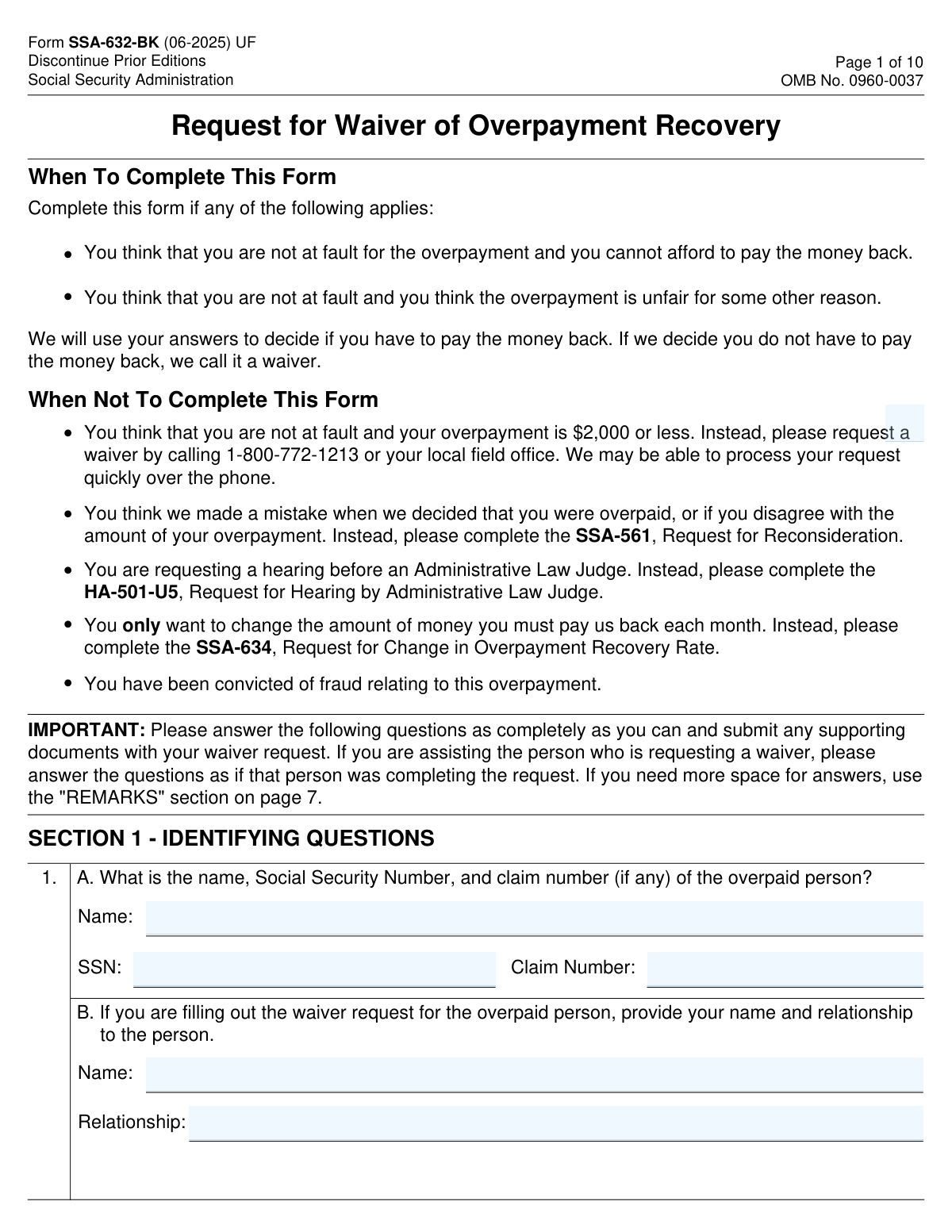
Yes! You can use AI to fill out Form SSA-632-BK, Request for Waiver of Overpayment Recovery
Form SSA-632-BK, the Request for Waiver of Overpayment Recovery, is a document submitted to the Social Security Administration (SSA) when you believe you should not have to repay an overpayment of benefits. It is important because it allows you to formally state that you were not at fault for the overpayment and/or that repaying it would cause financial hardship. Today, this form can be filled out quickly and accurately using AI-powered services like Instafill.ai, which can also convert non-fillable PDF versions into interactive fillable forms.
Our AI automatically handles information lookup, data retrieval, formatting, and form filling.
It takes less than a minute to fill out SSA-632-BK using our AI form filling.
Securely upload your data. Information is encrypted in transit and deleted immediately after the form is filled out.
Form specifications
| Form name: | Form SSA-632-BK, Request for Waiver of Overpayment Recovery |
| Number of pages: | 10 |
| Language: | English |
| Categories: | SSA forms, payment forms |
Instafill Demo: How to fill out PDF forms in seconds with AI
How to Fill Out SSA-632-BK Online for Free in 2026
Are you looking to fill out a SSA-632-BK form online quickly and accurately? Instafill.ai offers the #1 AI-powered PDF filling software of 2026, allowing you to complete your SSA-632-BK form in just 37 seconds or less.
Follow these steps to fill out your SSA-632-BK form online using Instafill.ai:
- 1 Navigate to Instafill.ai and upload your Form SSA-632-BK or select it from the platform's template library.
- 2 Use the AI assistant to accurately fill in Section 1 with the identifying information of the overpaid person and yourself, if applicable.
- 3 In Section 2, state your reason(s) for the waiver request and provide details about the overpayment notice.
- 4 Complete Sections 3, 4, and 5 by providing comprehensive details about your household members, financial resources, assets, and any needs-based assistance you receive.
- 5 Detail your complete monthly household income and expenses in Sections 6 and 7, allowing the AI to help with calculations and ensure accuracy.
- 6 Carefully review the authorization and penalty clauses, then sign and date the form in Section 9. Instafill.ai can guide you on where a signature is required.
- 7 Download the completed form and submit it along with any required supporting documents to the Social Security Administration as instructed on the form.
Our AI-powered system ensures each field is filled out correctly, reducing errors and saving you time.
Why Choose Instafill.ai for Your Fillable SSA-632-BK Form?
Speed
Complete your SSA-632-BK in as little as 37 seconds.
Up-to-Date
Always use the latest 2026 SSA-632-BK form version.
Cost-effective
No need to hire expensive lawyers.
Accuracy
Our AI performs 10 compliance checks to ensure your form is error-free.
Security
Your personal information is protected with bank-level encryption.
Frequently Asked Questions About Form SSA-632-BK
This form is used to request a 'waiver of overpayment recovery' from the Social Security Administration. You fill it out if you believe you were not at fault for being overpaid and you cannot afford to pay the money back or feel it would be unfair to do so.
No, if your overpayment is $2,000 or less, you should not complete this form. Instead, call the SSA at 1-800-772-1213, as they may be able to process your waiver request over the phone.
You should not use this form if you disagree with the overpayment decision or amount. Instead, you need to complete Form SSA-561, Request for Reconsideration.
No, if you or a dependent in your household receives benefits like SSI, TANF, SNAP, or others listed in Section 3, you only need to complete that section and then sign the form on page 9. You can skip the detailed financial sections.
You should submit copies of recent financial documents, such as pay stubs, bank statements, and utility bills, dated within the last 3 months. These documents support the income, resource, and expense information you provide.
The SSA requests authorization to verify your financial information directly from institutions like banks. This helps them determine if repaying the overpayment would cause you financial hardship, but providing authorization is optional.
The form states that if you do not give permission or revoke it, the SSA may deny your waiver request on that basis. They may determine you have not proven that repayment would deprive you of funds for necessary expenses.
You must send or bring the completed and signed form to your local Social Security office. You can find your local office's address on the SSA website or by calling their main number.
Yes, services like Instafill.ai use AI to accurately auto-fill form fields, which can save you time and help ensure the information is entered correctly.
You can use a service like Instafill.ai to upload the PDF and fill it out on your computer. After completing the fields, you can download the form to print, sign, and submit.
If you have a non-fillable PDF, you can use a tool like Instafill.ai to convert it into an interactive, fillable form. This allows you to type your answers directly into the fields before printing.
If the overpaid person is a minor child, a parent or legal guardian must complete and sign the form on the child's behalf. The same applies if an adult has a court-appointed legal guardian.
Waiving the 'entire overpayment' asks the SSA to forgive the total amount, including any money you have already paid back. Waiving the 'remaining amount' only asks them to forgive the balance you still owe.
No, the form specifically states that you do not need to provide supporting documents for the monthly household expenses you list in Section 7.
Compliance SSA-632-BK
Validation Checks by Instafill.ai
1
SSN Format and Presence Validation
This check verifies that the Social Security Number (SSN) in Section 1A is provided and follows the standard 9-digit format (XXX-XX-XXXX or XXXXXXXXX). An accurate SSN is critical for identifying the correct individual and their case file within the Social Security Administration's system. If the SSN is missing or invalid, the form cannot be processed, and the request will be rejected until a valid SSN is provided.
2
Overpayment Amount Conditional Logic
This validation enforces the form's primary screening question in Section 2. If the user checks 'Yes' (overpayment is $2,000 or less), the system should prevent them from filling out the rest of the form and display the instruction to call the SSA instead. If 'No' is selected, the subsequent sections must be made available. This prevents users from completing a lengthy form unnecessarily and ensures they follow the correct, expedited procedure for smaller amounts.
3
Needs-Based Assistance Skip Logic
This check validates the branching logic in Section 3, Question 6. If the user answers 'Yes' (they receive needs-based assistance), the system must require at least one specific assistance program to be checked and then allow the user to skip the detailed financial sections (4-7) and proceed to the signature page. If 'No' is answered, Sections 4-7 must be marked as required. This logic is crucial for reducing applicant burden as specified by the form's instructions.
4
Date of Notice Validity
This validation ensures the 'Date of the notice' in Section 2, Question 3, is entered in a valid MM/DD/YYYY format and is not a future date. This date is essential for establishing the context and timeliness of the waiver request in relation to the SSA's correspondence. An invalid or future date would be nonsensical and would cause processing delays, requiring clarification from the applicant.
5
Waiver Scope Consistency Check
This check enforces the logical dependency in Section 2, Question 4. If the user answers 'No' to 'Waive entire overpayment', they must then answer either 'Yes' or 'No' to 'Waive only remaining amount'. It should be impossible to answer 'No' to the first question and leave the second question blank. This ensures the SSA receives a clear and unambiguous request regarding the scope of the waiver being sought.
6
Reason for Waiver Completeness
This validation ensures that if the form is continued (i.e., overpayment is >$2,000), at least one checkbox for the 'Reason for requesting a waiver' in Section 2 is selected. Furthermore, if checkbox 'C. The overpayment is unfair for other reasons' is selected, the corresponding explanation text field must not be empty. This guarantees that a fundamental component of the waiver request—the justification—is provided for review.
7
Conditional Assisting Person Fields
This check verifies that the 'Name' and 'Relationship' fields in Section 1B are only filled out if the person completing the form is different from the overpaid person named in Section 1A. It could also flag an error if Section 1B is completed but the signature on the form belongs to the overpaid person. This ensures clarity on who is providing the information and in what capacity, which is important for legal and communication purposes.
8
Asset Declaration Requirement
This validation checks for consistency in Section 5, Question 9. If a user answers 'Yes' to owning more than two vehicles (9.A), co-owning real estate (9.B), or owning other property (9.C), the system must require at least one entry in the corresponding details table. Leaving the table blank after a 'Yes' response is a contradiction. This ensures that all declared assets are properly itemized for financial evaluation.
9
Income Cross-Reference Validation
This check ensures data integrity between the income source sections and the income summary table. It verifies that the 'Take Home Pay' amounts in Section 11.A match the totals from Section 10, and that income from assets and real estate in Section 11.D and 11.H correctly reflects the totals from Section 9 and 8.B. Failure to sync this data would lead to incorrect financial calculations and an invalid assessment of the waiver request.
10
Income and Expense Totals Calculation
This validation verifies that the 'TOTALS' row in the income table (Section 11) and the 'TOTAL' expense field (Section 12) are correctly calculated. It should sum all preceding numeric entries in their respective columns/tables. An incorrect total would invalidate the entire financial picture, making it impossible to determine if the applicant can afford to repay the debt. If the calculation is incorrect, the form should be flagged for manual review or correction.
11
Signature and Date Requirement
This check confirms that the signature and date fields on Page 9 are completed. The signature under the penalty of perjury clause is legally required to certify the truthfulness of the provided information. Without a valid signature and date, the form is incomplete and has no legal standing, and therefore cannot be accepted or processed by the SSA.
12
Phone Number Format Validation
This check ensures that the 'Home Telephone Number' and 'Cell Phone Number' fields on Page 9 adhere to a standard 10-digit format. While not as critical as an SSN, a valid phone number is vital for case workers who may need to contact the applicant for clarification or additional information. An invalid format could prevent communication, delaying the waiver decision.
13
Conditional Witness Requirement
This validation enforces the rule for witnesses on Page 9. The system should check if the signature field was signed by a mark (X). If it was, then the signature and address fields for both Witness 1 and Witness 2 must be completed. If the form was not signed by mark, these fields should be optional or ignored. This is crucial for the legal validity of a document signed by an individual who cannot write their name.
14
Loan Balance vs. Market Value Logic
This check applies to the asset tables in Section 9 (Vehicles, Real Estate, Business). It validates that for any given asset, the 'Loan Balance' entered is not greater than the 'Present Value' or 'Market Value'. While not impossible, it is a highly unusual situation that may indicate a data entry error. Flagging this for review ensures the net value of assets is calculated correctly and prevents simple mistakes from skewing the financial assessment.
Common Mistakes in Completing SSA-632-BK
Applicants often fail to read the 'When Not To Complete This Form' section on page 1 and use this form when they should be calling the SSA (for overpayments of $2,000 or less) or filing a different form (like SSA-561 for reconsideration). This mistake leads to immediate rejection of the request and significant delays, as the applicant must start the entire process over with the correct procedure. To avoid this, carefully review the instructions on page 1 to confirm this is the appropriate form for your specific situation.
In Section 3, the form provides a significant shortcut for individuals receiving benefits like SSI, TANF, or SNAP, allowing them to skip the detailed financial sections. Many people overlook this question, completing the entire lengthy form unnecessarily and delaying their submission. This also means they may forget to provide the required proof of assistance. Always check Section 3 carefully; if you receive any of the listed benefits, you can save significant time and effort.
In Section 2, Question 5, applicants are asked to explain why the overpayment happened. A common error is providing a vague or emotional response like 'It wasn't my fault' without specific facts, dates, and details. A weak explanation makes it difficult for the SSA to rule in your favor. To avoid this, clearly describe the sequence of events, explain why you were unable to report a change, and reference any supporting documents that prove your case.
Section 6 explicitly asks for monthly 'take home pay (Net),' but people frequently enter their gross salary before taxes and other deductions are taken out. This inflates their reported income, weakening their argument that they 'cannot afford to pay the money back.' Always use the net amount that is actually deposited into your bank account, as shown on your pay stubs, to provide an accurate picture of your financial situation.
In Section 7, applicants often list expenses that are already accounted for elsewhere, leading to inaccurate totals. For example, they might list property tax as a separate expense when it's already included in their mortgage payment, or list health insurance premiums that are automatically deducted from their paycheck. This can make their financial statement appear inconsistent. Carefully read the instructions for each expense line to avoid listing any cost more than once.
In Section 5, people sometimes omit financial resources, such as PayPal accounts, prepaid debit cards, or small savings accounts, thinking they are insignificant. The form requires a complete list of all assets, and omitting them can be viewed as misrepresentation, potentially leading to a denial of the waiver. Be thorough and list every account and asset, no matter how small the balance, to ensure full transparency.
The form requires submitting recent supporting documents like pay stubs, bank statements, and utility bills to verify the financial information provided. A frequent mistake is submitting the form without these documents or with documents that are older than 3 months. This will cause the SSA to request the information later, delaying a decision, or they may deny the waiver due to a lack of evidence. Gather all required documents before you submit the form.
The form requires a wet signature in two critical places: the financial authorization on page 8 and the penalty certification on page 9. Applicants often forget to sign one or both sections, or they fail to check a box authorizing the SSA to obtain financial records. An unsigned form is incomplete and will be returned, while refusing financial authorization may result in an automatic denial of the waiver request. AI-powered tools like Instafill.ai can convert this PDF into a fillable version and highlight signature fields to prevent this oversight before printing.
A common red flag is when the total monthly expenses listed in Section 7 are significantly higher than the total monthly income from Section 6, with no explanation. This inconsistency undermines the credibility of the entire financial statement. If your expenses exceed your income, you must use the 'REMARKS' section to explain how you are covering the shortfall (e.g., using savings, receiving help from family). AI form-filling tools like Instafill.ai can help by performing calculations automatically, making it easier to spot and correct such discrepancies.
Section 4 asks for information about dependents and other household members, which determines whose income and assets must be reported. People often get confused by the definition of a 'dependent' or fail to list non-dependents who contribute to household expenses. This leads to an incomplete financial picture of the household. Carefully read the definitions in Section 4 to ensure you list all required individuals and report their financial information correctly in the subsequent sections.
Saved over 80 hours a year
“I was never sure if my IRS forms like W-9 were filled correctly. Now, I can complete the forms accurately without any external help.”
Kevin Martin Green
Your data stays secure with advanced protection from Instafill and our subprocessors

Robust compliance program
Transparent business model
You’re not the product. You always know where your data is and what it is processed for.
ISO 27001, HIPAA, and GDPR
Our subprocesses adhere to multiple compliance standards, including but not limited to ISO 27001, HIPAA, and GDPR.
Security & privacy by design
We consider security and privacy from the initial design phase of any new service or functionality. It’s not an afterthought, it’s built-in, including support for two-factor authentication (2FA) to further protect your account.
Fill out SSA-632-BK with Instafill.ai
Worried about filling PDFs wrong? Instafill securely fills form-ssa-632-bk-request-for-waiver-of-overpayment-recovery forms, ensuring each field is accurate.