
Yes! You can use AI to fill out Record of Advice and Needs Analysis (Non-Life Insurance — Personal and Commercial Lines)
Don't type 90 fields by hand. Tell our AI about yourself, or upload a document you already have, and it fills every field in seconds. You check it, then download, print or sign.
The AI does the filling. You just check it.
No typing into boxes, nothing to install.
What this form asks for
The AI fills all of it, from your answers or your documents.
The AI checks your answers before you download
15 checks built for this form, so a wrong date or a missing answer is caught before anyone else sees it.
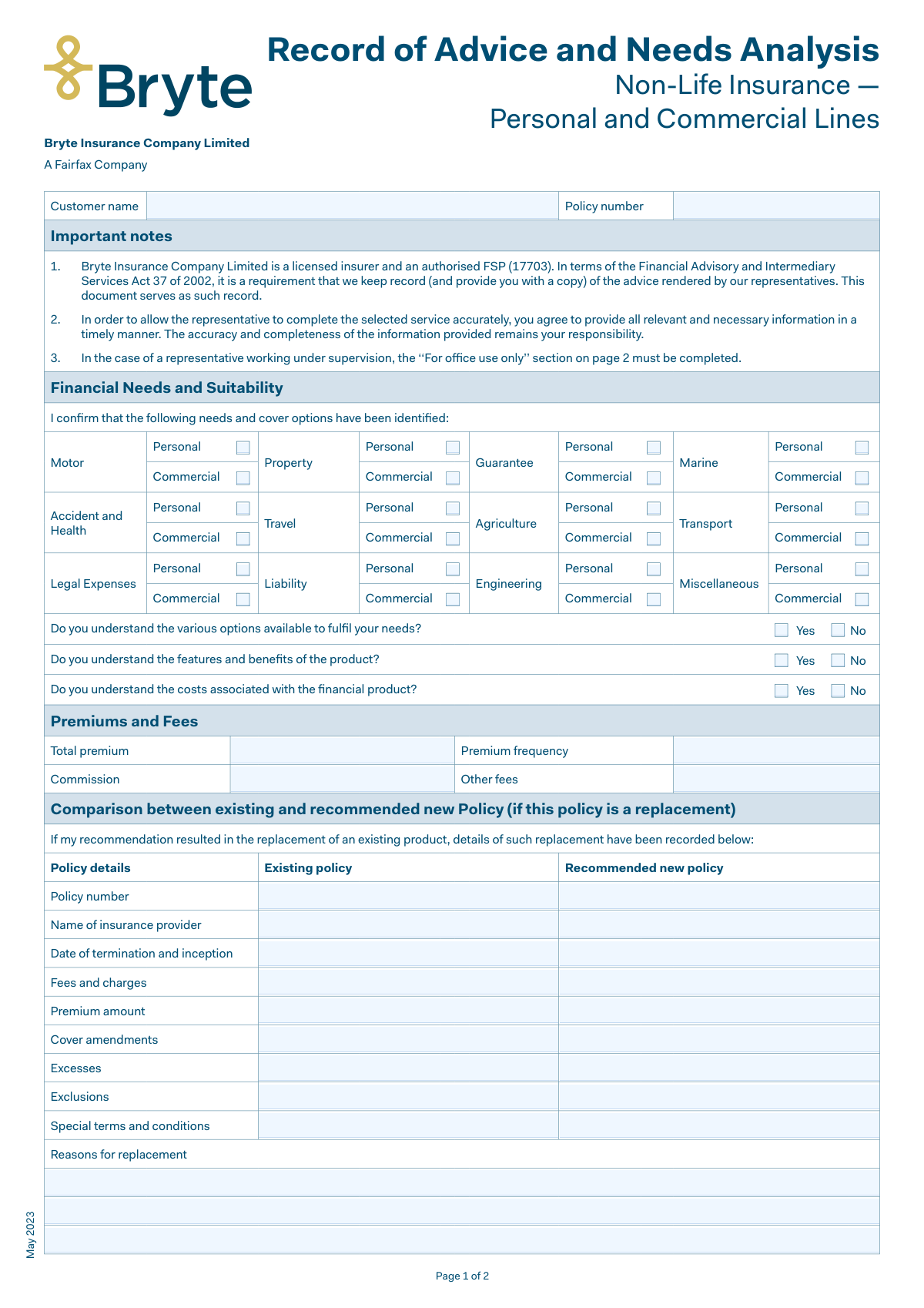
Validates that the Customer name field is completed and contains a plausible full name (e.g., at least two alphabetic tokens, not only initials or symbols). This is important because the record of advice must be attributable to a specific client for compliance and audit purposes. If validation fails, the submission should be rejected or routed for manual review with a prompt to capture the client’s full legal name.
Ensures the Policy number is provided and matches the insurer’s expected policy number format (e.g., alphanumeric length constraints, no illegal characters, no whitespace-only values). Policy number accuracy is critical for linking the advice record to the correct policy and for downstream servicing. If validation fails, block submission and request correction, or validate against a policy database if available.
Checks that at least one needs/cover category is selected (e.g., Motor, Property, Liability, etc.) and that the selection is not contradictory (e.g., both Personal and Commercial selected for the same line if the form design intends a single choice). This confirms the advice scope and prevents empty or ambiguous records. If validation fails, require the advisor to select applicable cover types or clarify the intended scope.
Validates that each of the three understanding questions (options available, features/benefits, costs) has exactly one of Yes/No selected, not both and not blank. These acknowledgements are key to demonstrating that disclosures were made and understood. If validation fails, prevent completion until each question has a single, explicit response.
Ensures Total premium, Commission, and Other fees (if provided) are valid monetary amounts (numeric, non-negative, reasonable precision such as two decimals, and within configured maximum thresholds). This prevents calculation errors and ensures the client’s cost disclosure is accurate. If validation fails, flag the field(s) and require correction before submission.
Checks that Premium frequency is completed and matches an allowed set (e.g., Monthly, Quarterly, Bi-annual, Annual) as configured by the business. Frequency is required to interpret the total premium correctly and to avoid misleading disclosures. If validation fails, require selection from the approved list and disallow free-text values that cannot be standardized.
And 9 more checks
- Replacement Policy Section Trigger and Conditional Requirements
- Replacement Comparison Field Pair Completeness (Existing vs New)
- Replacement Dates: Termination and Inception Format and Logic
- Replacement Reasons Mandatory When Replacement Occurs
- Customer Declaration Date Completeness and Validity
- Signature Presence and Role Consistency
- Representative Name Required and Supervision Indicator Validation
- Office Use Only Section Required When Under Supervision
- Supervisor Evaluation Logic and Recommendations Requirement
Let AI fill out your Record of Advice (Bryte) May 2023
No typing. Every field filled in seconds, checked, ready to sign.
How to Fill Out Record of Advice (Bryte) May 2023 Online for Free in 2026
What the AI walks you through.
- Enter customer and policy identifiers (customer name and policy number) and confirm the document date/version if required by your process.
- Complete the Financial Needs and Suitability section by selecting the relevant insurance categories (e.g., motor, property, liability, travel, etc.) for personal and/or commercial lines.
- Answer the understanding confirmations (options available, product features/benefits, and costs) by selecting Yes/No for each question.
- Fill in Premiums and Fees details, including total premium, premium frequency, commission, and any other fees.
- If the recommendation replaces an existing policy, complete the comparison table (existing vs recommended policy) including provider, policy numbers, termination/inception dates, premiums, fees, amendments, excesses, exclusions, special terms, and reasons for replacement.
- Complete the Customer Acknowledgement and Declaration section, ensure the advisor has discussed the listed items (benefits/disadvantages, exclusions, excesses, claims/cancellation procedures, insured amounts, etc.), then enter the signing date and collect client and representative signatures.
- If applicable, complete Non-acceptance of Advice and/or the “For office use only” supervisor evaluation (recommendations, date, supervisor signature) for representatives acting under supervision.
Common Mistakes in Completing Record of Advice (Bryte) May 2023
The ones the AI is built to catch.
Leaving customer name and policy number blank or inconsistent
Not clearly indicating which needs/cover categories apply (Personal vs Commercial)
Answering the understanding questions incorrectly or leaving them unanswered
Premium and fee fields completed with the wrong figures or missing frequency
Skipping the replacement policy comparison section when replacing cover
Incorrect or missing termination and inception dates (creating cover gaps)
Vague or generic reasons for replacement
Not confirming key disclosures discussed (excesses, exclusions, average, claims/cancellation)
Incomplete or incorrect signature and date details
Failing to complete the Non-acceptance of Advice section when declining recommendations
Omitting supervision details and ‘For office use only’ when the representative is under supervision
Frequently Asked Questions About Record of Advice (Bryte) May 2023
Is it really free for 7 days?
Can I fill other forms too?
How do I cancel?
How does the AI fill out Record of Advice (Bryte) May 2023?
What happens to my information?
How complex is Record of Advice (Bryte) May 2023 to fill out?
What is the purpose of the “Record of Advice and Needs Analysis” form?
Who needs to complete and sign this form?
Do I have to fill in all the information myself?
What information should I have ready before the form is completed?
What does “Financial Needs and Suitability” mean on this form?
How do I answer the questions about understanding options, features/benefits, and costs?
What are “Premiums and Fees” and what must be recorded there?
When is the “Comparison between existing and recommended new policy” section required?
What does “date of termination and inception” refer to in the replacement comparison?
What is “material non-disclosure” and why does the form mention it?
What am I confirming when I sign the “Customer Acknowledgement of Service and Declaration” section?
What topics should my advisor explain to me before I sign?
What if I don’t want to follow the advisor’s recommendation?
What is the “For office use only” section and when is it completed?
How do I submit this form and how long does processing take?
Get your Record of Advice (Bryte) May 2023 filled out by AI
$0 today. Cancel before Nov 1 and you pay nothing.
Other forms like this one
insurance forms: Form 1095-A, Health Insurance Marketplace Statement, Form SSA-4-BK, Application for Child's Insurance Benefits, Form SSA-10, Application for Widow's or Widower's Insurance Benefits, Form 1095-C, Employer-Provided Health Insurance Offer and Coverage, National Integrity Life Insurance Company Ownership Change Request Form (NI-77-0039-2505), Form 7206 (2025), Self-Employed Health Insurance Deduction, Continental American Insurance Company (CAIC) / Aflac Group Critical Illness Claim Form (with Attending Physician’s Statement, HIPAA Authorization to Obtain Information, and Electronic Funds Transaction Authorization), Prudential Group Disability Insurance – Education and Employment History Form (GL.2009.009, Ed. 06/2017), acord-25-201603-certificate-of-liability-insurance-1, Brotherhood Mutual Insurance Company Ministry Driver Screening Form (A99), Assurity Life Insurance Company Disability Claim Form — Attending Physician’s Statement, Amateur Sports / Activities Accident Insurance Quote Request Form (Philadelphia Insurance Companies), Martial Arts Studio General Liability and Property Application (Fitness and Wellness Insurance / Philadelphia Insurance Companies) (03/2011), The Prudential Insurance Company of America Group Disability Insurance – Education and Employment History Form (GL.2009.009, Ed. 06/2017), VA Form 29-357, Claim for Disability Insurance Benefits (Government Life Insurance), CMS-1500 (02-12), Health Insurance Claim Form (NUCC Approved) (OMB 0938-1197), Prudential Group Disability Insurance – Education and Employment History Form (GL.2009.009, Ed. 06/2017), HDFC ERGO General Insurance Company Limited – Request for Cashless Hospitalisation for Health Insurance (Policy Part – C), Beneficiary Designation/Change - Principal Life Insurance Company, Principal Life Insurance Company UCTIE INTERNATIONAL UNION 401(K) SAVINGS PLAN Enrollment Form
life insurance forms: National Integrity Life Insurance Company Ownership Change Request Form (NI-77-0039-2505), Assurity Life Insurance Company Disability Claim Form — Attending Physician’s Statement, VA Form 29-357, Claim for Disability Insurance Benefits (Government Life Insurance), Beneficiary Designation/Change - Principal Life Insurance Company, Principal Life Insurance Company UCTIE INTERNATIONAL UNION 401(K) SAVINGS PLAN Enrollment Form, Principal Life Insurance Company Death Notification Form, Principal Life Insurance Company Form PG4701, In-Plan Roth Conversion – No Spousal Consent Needed, Principal Life Insurance Company Administration Guide, Principal Life Insurance Company Small Amounts Benefit Election, Transamerica Life Insurance Company - New Business Cover Sheet, Transamerica Life Insurance Company Individual Whole Life Insurance Application, Transamerica Life Insurance Company Beneficiary Designation Form (TOB 306M-0809), Beneficiary Designation Form For Life Insurance Policies, Transamerica Life Insurance Company Beneficiary Designation Form, TIAA Life Insurance Beneficiary Designation Form, Fidelity Investments Beneficiaries — Term Life Insurance, American Fidelity Change of Beneficiary Form, PruLife Private Placement VUL and Private Placement Variable Annuity Purchaser Questionnaire and Agreement, Discovery Life Personal Life Insurance Application for the Classic, Essential and Purple Life Plans on Adviser 360, Assignment of Life Insurance Policy as Collateral
commercial forms: Form DE 1, Commercial Employer Account Registration, Form UCS-840C, Request for Judicial Intervention Commercial Division Addendum, Form 1449, Solicitation/Contract/Order for Commercial Products and Services, Fauquier County Department of Community Development – Building Trades Permit or Amendment to Existing Permit Application (Residential or Commercial), Commercial Lease Agreement (C.A.R. Form CL, Revised 10/01), Commercial and Lease Application (Commercial Credit Application) (Rev. 02/2023), Blue Shield of California Prior Authorization Request Form for Applied Behavioral Analysis (ABA) – Commercial Products, State of Connecticut Form R-229, Application for a Non-Commercial Learner Permit and/or Driver License, ACORD 125, Commercial Insurance Application and ACORD 143, Transportation Section, Form DL-180, Pennsylvania Non-Commercial Learner's Permit Application, ACORD 125, Commercial Insurance Application, ACORD 125, Commercial Insurance Application, Applicant Information Section, State of California Department of Veterans Affairs COMMERCIALLY USEFUL FUNCTION (CUF) CERTIFICATION FORM, Evidence of Commercial Property Insurance, Form 590, Commercial – Sale MLS® Data Information Form, ACORD 126 (2010/05), Commercial General Liability Section, ACORD 126 (2009/08), Commercial General Liability Section
commercial insurance forms: Habitational Risks Supplement Application Form, ACORD 125, Commercial Insurance Application and ACORD 143, Transportation Section, ACORD 125, Commercial Insurance Application, ACORD 125, Commercial Insurance Application, Applicant Information Section, Evidence of Commercial Property Insurance, ACORD 127, Business Auto Section, ACORD 137 CA, Commercial Auto Application - California, ACORD 140, Property Section, ACORD 155, Equipment Breakdown Section, ACORD 163, Commercial Auto Driver Information Schedule, ACORD 141, Commercial Insurance Application - Crime Section, ACORD 159, Business Income Worksheet, ACORD 175, Commercial Policy Change Request, ACORD 28, Evidence of Commercial Property Insurance, ACORD 129, Vehicle Schedule (2009/11), ACORD 139, Statement of Values, ACORD 152, Commercial Inland Marine Section, ACORD 185, Restaurant/Tavern Supplement, ACORD 810, Business Income / Extra Expense / Rental Value, ACORD 131, Umbrella / Excess Section
Let AI fill out your Record of Advice (Bryte) May 2023
Your trial starts once a card is added. You pay nothing before Nov 1.
Our AI already knows this form, all 90 fields of it. Skip the typing: tell it about yourself, or upload what you have, and it fills the whole form in seconds.
- AI fills every field on both pages, tables and checkboxes included
- No typing into boxes: answer a few questions, or upload a document you already have, an old copy of this form, a photo of a document
- The AI checks the answers; you review and change anything before you download
- Download the finished PDF, print it, or sign it online
- Encrypted, and never used to train AI
Cancel before Nov 1 and you pay nothing.
A card is needed to start the trial. Cancel in two clicks from your account.
Terms · Privacy