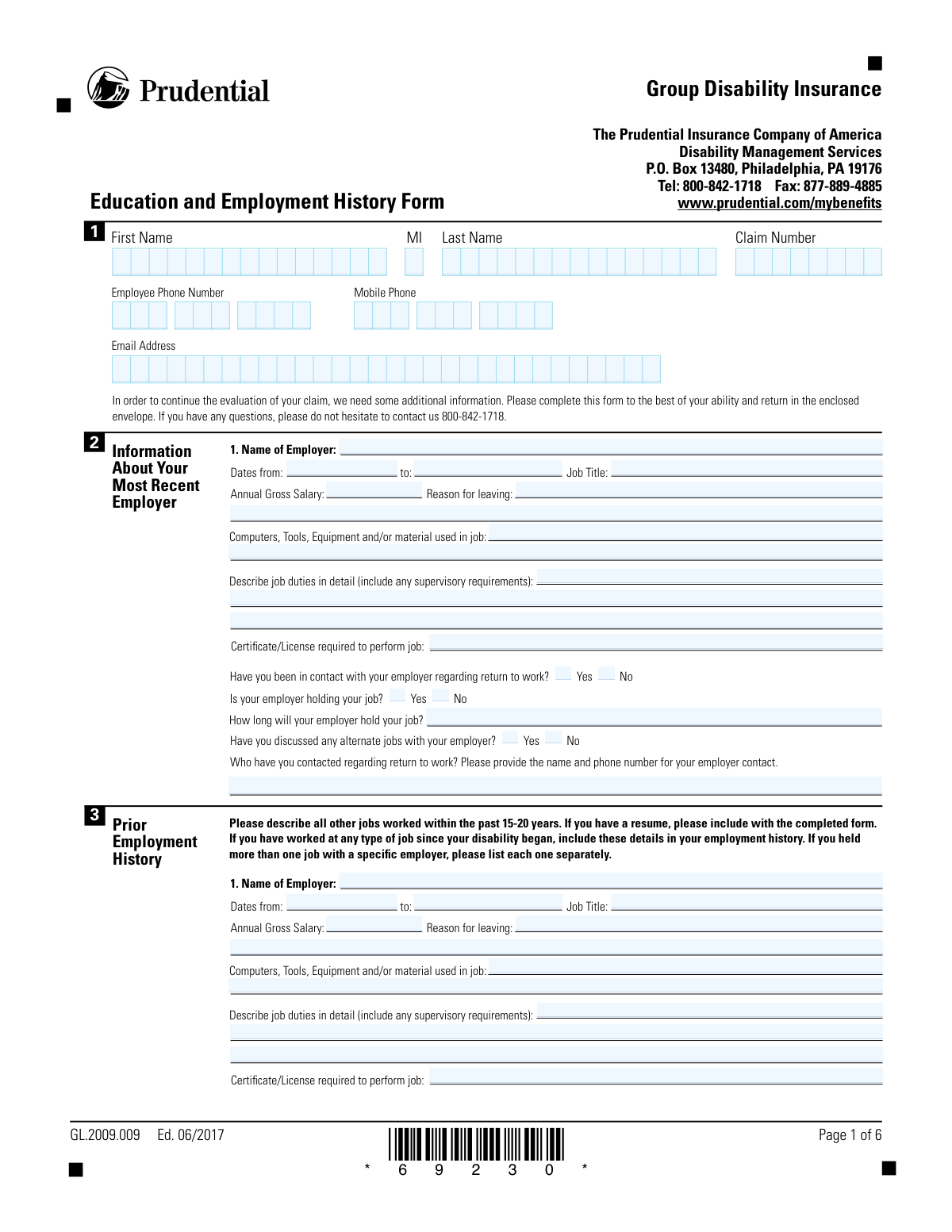
Yes! You can use AI to fill out The Prudential Insurance Company of America Group Disability Insurance – Education and Employment History Form (GL.2009.009, Ed. 06/2017)
The Prudential Group Disability Insurance Education and Employment History Form (GL.2009.009) is a claimant questionnaire used by Prudential Disability Management Services to gather detailed information about your most recent job, prior employment over the past 15â20 years, education and training credentials, computer skills, and any return-to-work/job-seeking efforts. Insurers use this information to assess occupational duties, transferable skills, and vocational factors that may affect eligibility, benefits, and return-to-work planning for a disability claim. The form also includes a fraud notice and requires the claimantâs signature and date to certify the accuracy of the information provided. Today, this form can be filled out quickly and accurately using AI-powered services like Instafill.ai, which can also convert non-fillable PDF versions into interactive fillable forms.
Our AI automatically handles information lookup, data retrieval, formatting, and form filling.
It takes less than a minute to fill out GL.2009.009 using our AI form filling.
Securely upload your data. Information is encrypted in transit and deleted immediately after the form is filled out.
Form specifications
| Form name: | The Prudential Insurance Company of America Group Disability Insurance – Education and Employment History Form (GL.2009.009, Ed. 06/2017) |
| Number of pages: | 4 |
| Language: | English |
| Categories: | insurance claim forms, employment forms, education forms, Prudential forms, disability insurance forms, Prudential insurance forms |
Instafill Demo: filling out a legal form in seconds
How to Fill Out GL.2009.009 Online for Free in 2026
Are you looking to fill out a GL.2009.009 form online quickly and accurately? Instafill.ai offers the #1 AI-powered PDF filling software of 2026, allowing you to complete your GL.2009.009 form in just 37 seconds or less.
Follow these steps to fill out your GL.2009.009 form online using Instafill.ai:
- 1 Go to Instafill.ai and upload the Prudential Education and Employment History Form (GL.2009.009) or select it from the form library.
- 2 Let the AI detect and map the form fields, then confirm the form version/edition (Ed. 06/2017) and your claim number.
- 3 Enter claimant personal and contact information (name, claim number, phone numbers, email) and validate formatting (e.g., phone segments, dates).
- 4 Complete the “Most Recent Employer” section, including employer details, dates, job title, salary, reason for leaving, tools/equipment used, and detailed job duties; answer return-to-work questions and provide employer contact details if applicable.
- 5 Add prior employment entries for the past 15–20 years (each job separately), including dates, duties, equipment used, salary, reasons for leaving, and any required certificates/licenses; attach or upload a resume if you have one.
- 6 Fill in education/training, certifications/licenses (including expiration/maintenance), computer skills, and (if applicable) recent/current job-seeking details and resources used.
- 7 Review the completed form for accuracy, acknowledge the fraud notice, e-sign and date the form, then download and submit it to Prudential via the instructed method (mail/fax/portal) while keeping a copy for your records.
Our AI-powered system ensures each field is filled out correctly, reducing errors and saving you time.
Why Choose Instafill.ai for Your Fillable GL.2009.009 Form?
Speed
Complete your GL.2009.009 in as little as 37 seconds.
Up-to-Date
Always use the latest 2026 GL.2009.009 form version.
Cost-effective
No need to hire expensive lawyers.
Accuracy
Our AI performs 10 compliance checks to ensure your form is error-free.
Security
Your personal information is protected with bank-level encryption.
Frequently Asked Questions About Form GL.2009.009
This form helps Prudential gather your education, work history, and job skills to continue evaluating your group disability claim. The information is used to understand your prior job duties, training, and potential return-to-work options.
You should complete this form if Prudential Disability Management Services requested it as part of your disability claim review. It is completed by the claimant (the person applying for disability benefits).
List all jobs you worked within the past 15â20 years, as requested on the form. If you held more than one job with the same employer, list each job separately.
Yes. The form specifically asks you to include any work you performed after your disability began, even if it was part-time, temporary, or a different type of job.
Provide your best estimate and note that it is approximate if needed (for example, âapprox. May 2018âAug 2019â). If you have a resume, pay stubs, W-2s, or HR records, use them to help fill in missing details.
Describe your day-to-day tasks, physical demands (standing, lifting, driving, typing, etc.), and any supervisory responsibilities. Include the tools, equipment, software, or materials you used and how often you performed key tasks.
List any required credentials for that job (for example, RN license, CDL, state cosmetology license, forklift certification). If none were required, write âNoneâ rather than leaving it blank.
Answer âYesâ or âNoâ based on your current situation, and if you have contacted your employer, provide the contact personâs name and phone number. If your employer is holding your job, include how long they will hold it (a timeframe or specific date).
The form says to add pages if you held more than the listed number of jobs in the past 20 years. You can attach additional sheets in the same format or include a resume that covers the extra positions.
Only complete that section if you have been exploring returning to work in some capacity. If you have not been job-seeking, you can leave that section blank.
Prudential uses this information to understand your transferable skills and potential work options, including return-to-work services. Answer honestly and check the boxes for programs and tasks you have actually used at work and/or at home.
Return the completed form using the enclosed envelope, or submit it using the fax number listed on the form (877-889-4885) if that is an option for you. For questions, call Prudential Disability Management Services at 800-842-1718.
The form does not list a specific processing time, and timing can vary based on claim complexity and whether additional information is needed. Submitting a complete form (and attaching your resume if available) can help avoid delays.
The fraud notice explains that providing false, incomplete, or misleading information can lead to denial of benefits and civil or criminal penalties depending on your state. Your signature and date certify that the information you provided is true to the best of your knowledge.
YesâAI tools can help organize your work history and accurately auto-fill form fields to save time (for example, Instafill.ai). If your PDF is flat/non-fillable, Instafill.ai can convert it into an interactive fillable form and then help you complete it online by uploading the PDF and following the prompts to map and fill the fields.
Compliance GL.2009.009
Validation Checks by Instafill.ai
1
Claimant name fields completeness and character validation
Validates that First Name and Last Name are present and contain only reasonable name characters (letters, spaces, hyphens, apostrophes) and are not placeholder values (e.g., 'N/A', 'Unknown'). Middle Initial must be either blank or exactly one alphabetic character. This is important to correctly match the submission to claim records and avoid downstream identity mismatches. If validation fails, the form should be rejected or routed to manual review with a prompt to correct the name fields.
2
Claim Number required and format/length validation
Ensures Claim Number is provided and matches an expected pattern (alphanumeric, no illegal symbols, trimmed of leading/trailing spaces) and meets minimum/maximum length constraints configured for Prudential claim IDs. This prevents misrouting the form to the wrong claim and reduces manual reconciliation. If the claim number is missing or malformed, the submission should be blocked and the user asked to re-enter the claim number exactly as shown on their paperwork.
3
Phone number segment validation (employee and mobile)
Validates that each phone number, when provided, has a 3-digit area code, 3-digit prefix, and 4-digit line number, all numeric and not all zeros (e.g., 000-000-0000). Also validates that at least one contact phone (employee or mobile) is present unless an email address is provided (configurable business rule). This is important for timely claim follow-up and return-to-work coordination. If validation fails, the system should highlight the incorrect segment(s) and require correction before submission.
4
Email address format and deliverability sanity checks
Checks that Email Address, if provided, conforms to standard email syntax (local@domain), contains no spaces, and uses a plausible domain (e.g., includes a dot in the domain portion). Optionally flags common typos (e.g., 'gmial.com') for user confirmation. This matters because email is a primary communication channel and invalid addresses cause missed notices and delays. If validation fails, the user should be prompted to correct the email or provide a phone number instead.
5
Most recent employer required fields completeness
Ensures the Most Recent Employer section includes Employer Name, Job Title, Dates From, and either Dates To or an explicit indicator that employment is ongoing (if supported by the implementation). Annual Gross Salary and Reason for Leaving should be required when an end date is provided (i.e., employment ended). This is important for evaluating occupational duties and benefit eligibility. If required fields are missing, the submission should be rejected with field-level error messages.
6
Employment date format validation (all employment entries)
Validates that all employment dates (Most Recent Employer and Prior Employment entries) are in an accepted date format and represent real calendar dates (e.g., no 02/30/2024). If the UI captures separate month/day/year, each component must be numeric and within valid ranges. Correct date formatting is critical for calculating work history timelines and assessing disability onset context. If validation fails, the system should prevent submission and request corrected dates.
7
Employment date logical consistency (From <= To, no future end dates)
Checks that for each job entry, the employment start date is not after the end date, and that end dates are not in the future unless the job is marked as current/ongoing. Also flags implausible ranges (e.g., start date more than 50 years ago) for review. This prevents contradictory work history that can distort claim evaluation. If validation fails, the entry should be blocked or routed to manual review depending on severity.
8
Prior employment entry completeness when partially filled
For each prior employment slot (Entries 1â5), if any key field is populated (e.g., Employer Name or Job Title), then require the minimum set: Employer Name, Dates From, Dates To (or current indicator), Job Title, and Reason for Leaving. This avoids unusable partial job records that cannot be interpreted reliably. If validation fails, the system should prompt the claimant to either complete the entry or clear it entirely.
9
Annual Gross Salary numeric and range validation
Validates that Annual Gross Salary fields contain a numeric value (allowing currency symbols/commas to be normalized) and are within a reasonable range (e.g., > 0 and below a configured upper bound such as 2,000,000). This is important for benefit calculations and to detect data entry errors like monthly pay entered as annual or extra zeros. If validation fails, the user should be asked to correct the amount and confirm the figure is annual gross salary.
10
Return-to-work contact conditional requirements
If 'Have you been in contact with your employer regarding return to work?' is Yes, require the Employer Contact for Return-to-Work (name and phone) and validate the phone format. If the answer is No, the contact field should be blank or ignored to prevent conflicting data. This ensures the case manager has actionable contact information when the claimant indicates outreach occurred. If validation fails, the system should require completion or clear conflicting fields.
11
Employer holding job conditional requirement and format for hold duration
If 'Is your employer holding your job?' is Yes, require 'How Long Employer Will Hold Your Job' and validate it as either a recognizable duration (e.g., '30 days', '6 weeks') or a specific date through which the job is held. If 'holding job' is No, the hold-duration field should be empty. This matters for return-to-work planning and determining job protection timelines. If validation fails, the system should prompt for a clearer duration/date or remove the value when not applicable.
12
Alternate jobs discussion Yes/No exclusivity and consistency
Ensures the 'Have you discussed any alternate jobs with your employer?' field has exactly one selection (Yes or No) and does not allow both or neither when the section is required. Optionally, if Yes is selected, the system can require a brief note in job duties/notes or a follow-up field (if available) to capture what was discussed. This prevents ambiguous return-to-work status reporting. If validation fails, the user must select a single option before submission.
13
Education section: highest grade and graduation date consistency
Validates that Highest Grade Completed is present and is either a numeric grade within an expected range (e.g., 1â20) or an allowed token such as 'GED'. Date of Graduation must be a valid date and should be consistent with the education level (e.g., if highest grade is 12, graduation date should not be unreasonably recent/ancient relative to typical schooling). This is important for vocational assessment and employability evaluation. If validation fails, the system should request correction or route to manual review for atypical but possible cases.
14
GED conditional logic validation
If the claimant indicates they are not a high school graduate and selects 'Did you obtain your GED? â Yes', require GED Date obtained and validate it as a real date not in the future. If 'GED â No' is selected, the GED date must be blank. This ensures the education record is internally consistent and supports accurate vocational profiling. If validation fails, the system should block submission until the GED fields align with the Yes/No selection.
15
Certification/license expiration conditional validation (vocational/other)
If 'Has this certification or license expired?' is Yes, require Expiration Date (MM/DD/YYYY components) and validate it as a real date; if No, the expiration date should be blank. Also checks that the expiration date is not unreasonably far in the future/past given typical credential cycles (configurable) and flags inconsistencies for review. This matters because active vs. expired credentials affect job qualification and return-to-work options. If validation fails, the system should prompt for a valid expiration date or clear it when not applicable.
16
Signature and date signed required with valid date
Ensures Claimant Signature is present (captured as an e-signature mark or typed signature per system design) and Date Signed is complete and forms a valid calendar date. Date Signed should not be in the future and should be within an acceptable recency window if required by business rules (e.g., signed within the last 90 days). This is important for attestation, fraud notice acknowledgment, and legal enforceability of the statements. If validation fails, the submission must be rejected until the claimant signs and provides a valid date.
Common Mistakes in Completing GL.2009.009
People often enter a nickname, omit a suffix (Jr./Sr.), swap first/last name order, or mistype the claim number (especially if it includes letters). This can delay matching the form to the correct claim file and slow the evaluation of benefits. Copy your name and claim number exactly as shown on Prudential correspondence and double-check every character. AI-powered form filling tools like Instafill.ai can help prevent these errors by pulling the correct identifiers and validating the format before submission.
Because the form splits phone numbers into area code, prefix, and line number, many people type the full 10-digit number into one box, transpose digits, or leave one segment blank. Incorrect phone formatting can prevent Prudential from contacting you for time-sensitive claim questions. Enter exactly 3 digits for area code, 3 for prefix, and 4 for line number, and confirm both employee and mobile numbers are complete. Instafill.ai can automatically format and validate phone numbers into the correct segments.
Common issues include misspellings (e.g., gmial.com), missing characters, or listing an old work email that is no longer accessible. This can cause missed requests for additional documentation and extend claim processing time. Use a personal email you actively monitor and carefully verify spelling, especially around dots, underscores, and domain names. Instafill.ai can flag invalid email formats and reduce typo-related errors.
Claimants frequently provide an abbreviated employer name, omit the full mailing address, or leave the employment end date unclear (e.g., not writing âPresentâ if still employed). Missing or unclear employer details can trigger follow-up calls or requests and delay return-to-work coordination. Provide the full legal employer name, complete address (street, city, state, ZIP), and clear âFromâ and âToâ dates (or âPresentâ). If youâre working from a flat non-fillable PDF, Instafill.ai can convert it into a fillable version to reduce omissions and improve consistency.
Many people enter hourly wage, monthly pay, or net (after-tax) amounts instead of gross annual salary, or they forget to include bonuses/commissions when applicable. Incorrect salary information can affect benefit calculations and may require re-verification. Convert your pay to a gross annual figure (or note the pay basis clearly if you must) and ensure it reflects gross earnings. Instafill.ai can help standardize currency formatting and prompt for clarification when the entry looks like an hourly rate.
People often write short entries like âmedicalâ or âleftâ without context, or they provide a reason that conflicts with other claim documents. Vague or inconsistent explanations can lead to additional scrutiny and requests for clarification. Provide a specific, factual reason (e.g., âstopped working due to disability symptoms,â âlaid off,â âend of contractâ) and keep it consistent with your claim history. Instafill.ai can prompt for more complete explanations when entries are too short or ambiguous.
A frequent mistake is listing duties like âoffice workâ or âmanaged projectsâ without describing physical demands, frequency, or supervisory responsibilities, and listing âcomputerâ without naming software/tools. This can hinder Prudentialâs ability to assess occupational requirements and functional limitations, potentially delaying decisions. Include detailed tasks, how often you performed them, any lifting/standing/driving requirements, and specific tools/software (e.g., âExcel, SAP, forklift, CNC machineâ). Instafill.ai can guide structured entries and ensure key details (supervision, physical demands, tools) arenât missed.
Claimants sometimes check âYesâ for employer contact or job being held but leave the employer contact name/phone or âhow long will they hold your jobâ blank, or they answer âNoâ but still provide partial details. Inconsistent answers create confusion and often trigger follow-up outreach. If you answer âYes,â complete the related fields (contact person, phone number, and timeframe); if âNo,â leave those follow-up fields blank unless the form requests otherwise. Instafill.ai can enforce conditional logic so required follow-up fields are completed when a âYesâ box is selected.
The form asks for all other jobs within the past 15â20 years and to list each job separately if you held more than one role with the same employer, but people often list only a few recent jobs or merge multiple roles into one entry. Missing job history can affect vocational evaluation and may lead to requests for a resume or additional pages. Include every job in the timeframe, add pages if needed, and separate distinct roles (different titles/duties/dates) even under the same employer. Instafill.ai can help organize multi-job histories and keep dates/titles aligned across entries.
Common errors include leaving graduation dates blank, checking GED/college/vocational boxes without completing the âwhen/where/typeâ fields, or entering expiration dates in a non-mm dd yyyy format. Missing or misformatted credential information can slow vocational review and may require verification. Provide complete school/training details and enter expiration dates exactly as requested (mm dd yyyy), even if approximate (note âapprox.â if needed). Instafill.ai can format dates correctly and prompt for required supporting details when a training checkbox is selected.
People often leave the computer skills section blank even when they use devices, or they complete the job-seeking section even though they have not been exploring return-to-work (the form says to complete it only if applicable). Incomplete or contradictory information can affect return-to-work planning and may lead to follow-up questions. Answer computer/device questions accurately and only complete the job-seeking section if you have been actively searching; if not, leave it blank or clearly indicate âNot applicable.â Instafill.ai can help ensure only relevant sections are completed and that checkboxes align with the written explanations.
A very common submission issue is forgetting to sign, using initials instead of a signature, or entering the date in the wrong order (dd/mm/yyyy) or with missing digits. Unsigned or incorrectly dated forms may be rejected or require resubmission, delaying claim evaluation. Sign exactly as you normally sign legal documents and enter the date in mm dd yyyy with two-digit month/day and four-digit year. Instafill.ai can flag missing signatures/date fields and ensure the date is formatted correctly before you send the form.
Saved over 80 hours a year
âI was never sure if my IRS forms like W-9 were filled correctly. Now, I can complete the forms accurately without any external help.â
Kevin Martin Green
Your data stays secure with advanced protection from Instafill and our subprocessors

Robust compliance program
Transparent business model
Youâre not the product. You always know where your data is and what it is processed for.
ISO 27001, HIPAA, and GDPR
Our subprocesses adhere to multiple compliance standards, including but not limited to ISO 27001, HIPAA, and GDPR.
Security & privacy by design
We consider security and privacy from the initial design phase of any new service or functionality. Itâs not an afterthought, itâs built-in, including support for two-factor authentication (2FA) to further protect your account.
Fill out GL.2009.009 with Instafill.ai
Worried about filling PDFs wrong? Instafill securely fills the-prudential-insurance-company-of-america-group-disability-insurance-education-and-employment-history-form-gl2009009 forms, ensuring each field is accurate.