Yes! You can use AI to fill out Martial Arts Studio General Liability and Property Application (Fitness and Wellness Insurance / Philadelphia Insurance Companies) (03/2011)
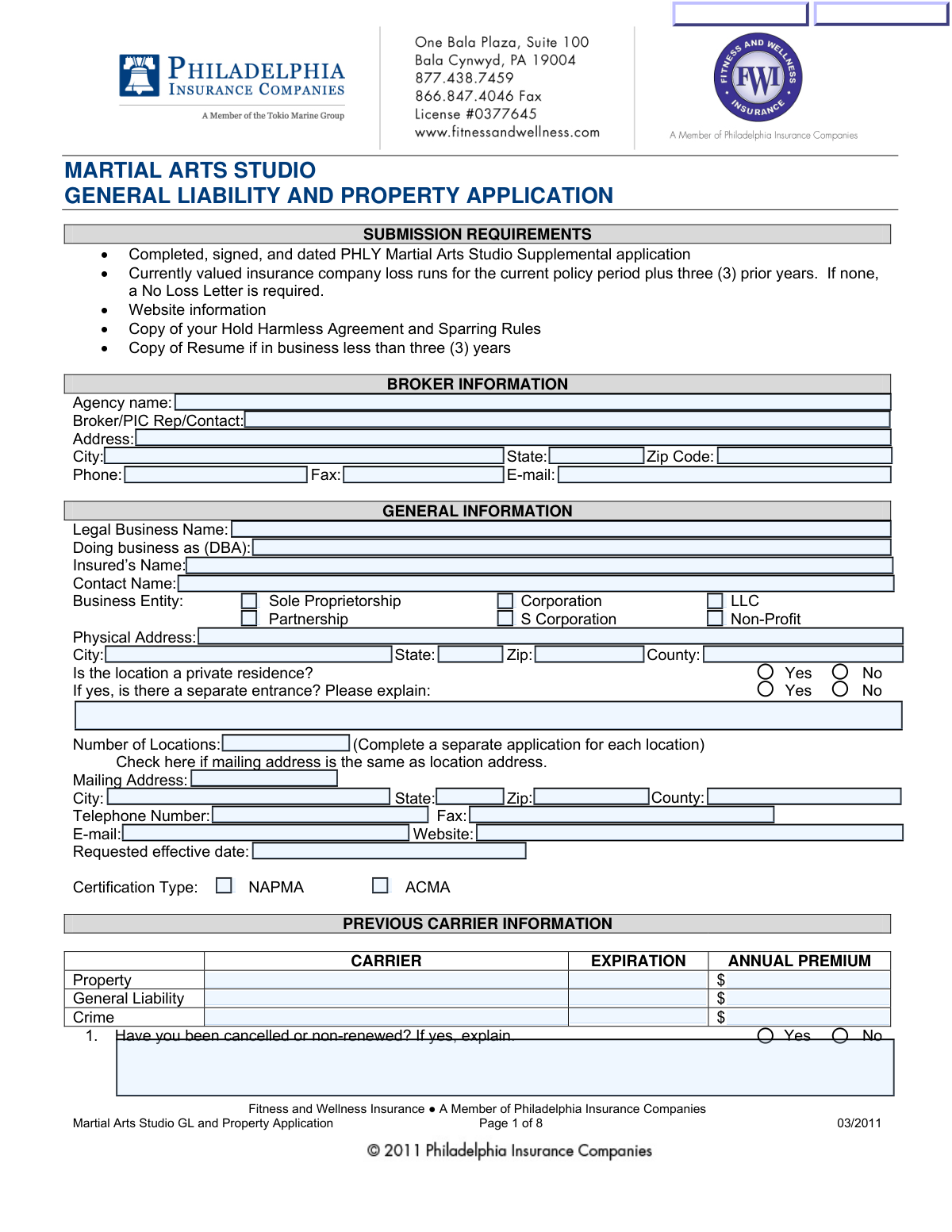
This is an insurance underwriting application for martial arts studios requesting Commercial General Liability/Professional Liability coverage and, if desired, related property, business income, flood, and crime coverages. It collects broker details, insured/business information, operations and exposure details (e.g., sparring/contact level, tournaments, equipment), prior carrier history, and required property underwriting information to help the insurer evaluate risk and price coverage. The form is important because incomplete or inaccurate answers can delay quoting, affect eligibility, or impact coverage terms. Today, this form can be filled out quickly and accurately using AI-powered services like Instafill.ai, which can also convert non-fillable PDF versions into interactive fillable forms.
Our AI automatically handles information lookup, data retrieval, formatting, and form filling.
It takes less than a minute to fill out Martial Arts Studio GL & Property Application using our AI form filling.
Securely upload your data. Information is encrypted in transit and deleted immediately after the form is filled out.
Form specifications
| Form name: | Martial Arts Studio General Liability and Property Application (Fitness and Wellness Insurance / Philadelphia Insurance Companies) (03/2011) |
| Number of pages: | 8 |
| Filled form examples: | Form Martial Arts Studio GL & Property Application Examples |
| Language: | English |
| Categories: | insurance forms |
Instafill Demo: filling out a legal form in seconds
How to Fill Out Martial Arts Studio GL & Property Application Online for Free in 2026
Are you looking to fill out a MARTIAL ARTS STUDIO GL & PROPERTY APPLICATION form online quickly and accurately? Instafill.ai offers the #1 AI-powered PDF filling software of 2026, allowing you to complete your MARTIAL ARTS STUDIO GL & PROPERTY APPLICATION form in just 37 seconds or less.
Follow these steps to fill out your MARTIAL ARTS STUDIO GL & PROPERTY APPLICATION form online using Instafill.ai:
- 1 Go to Instafill.ai and upload the “Martial Arts Studio GL & Property Application (03/2011)” PDF (or select it from the form library).
- 2 Let the AI detect and map the fields, then provide your business basics (legal name/DBA, entity type, contact info, locations, and requested effective date).
- 3 Enter broker/agency information and prior carrier details (property, general liability, crime), including loss history and any cancellation/non-renewal explanations.
- 4 Complete the General Liability section by entering revenues/payroll, membership counts, styles taught, contact level, and selecting desired liability limits and optional coverages (e.g., non-owned/hired auto, stop gap, accident/medical).
- 5 Fill out Operations and Exposures details (equipment, sparring rules, kickboxing/boxing, tournaments, waivers, maintenance logs, supervision/abuse & molestation controls, and any additional services).
- 6 If requesting property coverage, complete the Property and Required Underwriting Information sections (building/contents limits, deductibles, construction details, alarms/sprinklers, wiring, flood/crime options, and mortgagee/loss payee).
- 7 Use Instafill.ai’s review/validation to check for missing items and attachments (loss runs, hold harmless agreement, sparring rules, website info, resumes if needed), then e-sign, date, and export/submit the completed application.
Our AI-powered system ensures each field is filled out correctly, reducing errors and saving you time.
Why Choose Instafill.ai for Your Fillable Martial Arts Studio GL & Property Application Form?
Speed
Complete your Martial Arts Studio GL & Property Application in as little as 37 seconds.
Up-to-Date
Always use the latest 2026 Martial Arts Studio GL & Property Application form version.
Cost-effective
No need to hire expensive lawyers.
Accuracy
Our AI performs 10 compliance checks to ensure your form is error-free.
Security
Your personal information is protected with bank-level encryption.
Frequently Asked Questions About Form Martial Arts Studio GL & Property Application
This application is used to request General Liability (and optionally Property and Crime) insurance for a martial arts studio through Fitness and Wellness Insurance/Philadelphia Insurance Companies. It collects details about your operations, exposures, and building/property so underwriting can provide a quote.
Any martial arts studio seeking General Liability coverage (and optional Property/Crime coverage) through this program should complete it. If you have multiple locations, you must complete a separate application for each location.
You must submit the completed, signed, and dated PHLY Martial Arts Studio Supplemental application, loss runs for the current policy period plus three prior years (or a No Loss Letter), website information, your Hold Harmless Agreement and Sparring Rules, and a resume if youâve been in business less than three years.
Loss runs are claim history reports from your current insurer showing losses for the current policy period plus the prior three years. If you have no loss history or cannot obtain loss runs, the form indicates a No Loss Letter is required.
Select the option that matches how your business is legally organized and taxed (e.g., LLC, Corporation, Partnership). If youâre unsure, use the entity shown on your formation documents or tax filings.
Use the Legal Business Name exactly as it appears on legal/tax records, and list a DBA only if you operate under a trade name. âInsuredâs Nameâ should match the entity/person that should appear on the insurance policy.
Check âYesâ for the private residence question and then indicate whether there is a separate entrance. Use the explanation box to describe how clients access the studio (e.g., separate door, dedicated space, controlled access).
It describes how much physical contact occurs in your training (no contact, controlled/light contact, or full contact sparring/grappling). Underwriters use this to evaluate injury risk and determine eligibility, pricing, and coverage terms.
Answer âYes/Noâ for each activity and specify whether it is light contact, full contact, or cardio-only where requested. If you allow higher-risk activities (like kicks to the head), provide a clear explanation of rules, supervision, and safety controls.
List the total pieces of equipment (excluding free weights, steps, mats, bands, and balls) and indicate whether you have items like pools/spas, saunas, steam rooms, tanning beds, boxing rings, trampolines, or climbing walls. If you have climbing walls, the form states a separate climbing wall supplement is required.
Noâthis form states that Property coverage cannot be purchased on a stand-alone basis. If you do not want Property coverage, you can check the box indicating you do not want it and proceed to the signature page.
Youâll need building construction details (walls/roof/floor), year built, square footage, roof age, updates if the building is over 25 years old (roof/wiring/plumbing/heating), protection features (alarms/sprinklers), distance to hydrant/fire station, and information about aluminum wiring retrofits if applicable.
Additional Insureds are entities that may need to be added to your policy, such as landlords, property managers, equipment rental companies, mortgagees, and lien holders. For special events or off-site activities needing additional insured wording, the form directs you to contact customer service for a quote (877-438-7459).
The application asks whether you require signed waivers, keep maintenance logs, use signage to prevent injury, and have non-slip surfaces in wet areas. If you currently do not, it asks whether you are willing to implement these by the policy effective date, which can affect underwriting.
YesâAI tools like Instafill.ai can help auto-fill form fields accurately using your business details and supporting documents, saving time and reducing missed fields. You typically upload the PDF to Instafill.ai, map or confirm key data (business info, locations, revenues, exposures, limits), and then review and export the completed form for signature and submission.
If the application is a flat/non-fillable PDF, Instafill.ai can convert it into an interactive fillable form so you can enter data cleanly. After conversion, you can auto-fill, review, and generate a completed version ready to print or send.
Compliance Martial Arts Studio GL & Property Application
Validation Checks by Instafill.ai
1
Broker/Agency Contact Information Completeness
Validates that Broker Information contains the minimum required fields to identify and contact the submitting agency: Agency Name, Broker/PIC Contact, Address, City, State, ZIP, Phone, and E-mail. This is important for underwriting follow-up, binding instructions, and delivery of quotes/endorsements. If any required broker fields are missing or blank, the submission should be flagged as incomplete and prevented from being marked âready to underwrite.â
2
Address Fields Format and State/ZIP Validity (Broker, Physical, Mailing)
Checks that all address blocks (Broker Address, Physical Address, Mailing Address when provided) include valid City/State/ZIP combinations, with State as a 2-letter abbreviation and ZIP as 5 digits or ZIP+4. This reduces rating and jurisdiction errors and supports correct policy issuance and tax/fee calculations. If validation fails, the system should prompt for correction and disallow submission until the address format is corrected.
3
Phone/Fax Number Format Validation
Ensures Phone and Fax fields (broker and insured contact numbers) contain valid North American numbering formats (10 digits, allowing punctuation and optional extension). Correct phone formatting is critical for time-sensitive underwriting questions and loss control coordination. If invalid, the system should reject the value and require a corrected phone number; fax may be optional but must be valid if provided.
4
Email Address and Website URL Validation
Validates that all provided email addresses follow standard email syntax and that the Website field is a valid URL (e.g., includes a valid domain; scheme optional but recommended). Website information is a stated submission requirement and is often used for underwriting review of operations and marketing representations. If an email/URL is malformed (or website is missing when required by workflow), the submission should be flagged and the user prompted to correct or provide the missing data.
5
Insured Identity and Legal Name Consistency
Checks that Legal Business Name and Insuredâs Name are populated and not obviously placeholder text, and that they are reasonably consistent (e.g., not two unrelated entities). This prevents issuing a policy to the wrong named insured and reduces downstream endorsement and claims issues. If inconsistency is detected, the system should require clarification (e.g., confirm named insured vs. DBA) before allowing submission.
6
Business Entity Type Selection (Exactly One)
Validates that exactly one Business Entity option is selected (Sole Proprietorship, Partnership, Corporation, LLC, S Corporation, or Non-Profit). Entity type affects underwriting appetite, required documentation, and policy forms/endorsements. If none or multiple are selected, the submission should be blocked until a single entity type is chosen.
7
Private Residence Logic and Separate Entrance Explanation Requirement
If âIs the location a private residence?â is Yes, validates that the separate entrance question is answered and that an explanation is provided when required (especially if no separate entrance or if details are needed). This is important because home-based operations can materially change premises liability and eligibility. If the residence flag is Yes but follow-up fields are missing, the system should require completion before submission.
8
Number of Locations and Per-Location Application Requirement
Validates that Number of Locations is a positive integer (>=1) and, if greater than 1, flags that separate applications are required for each location per the form instructions. This prevents combining exposures incorrectly and ensures accurate rating by location. If the number is invalid or indicates multiple locations without corresponding separate submissions, the system should stop submission or create a task to collect additional location applications.
9
Requested Effective Date Format and Timing Rules
Ensures Requested Effective Date is a valid date and is not unreasonably in the past (or violates internal lead-time rules, if applicable). Effective date drives eligibility, prior coverage evaluation, and document dating requirements. If the date is invalid or outside allowed bounds, the system should require correction and prevent binding/quote generation until resolved.
10
Previous Carrier Table Completeness and Date/Premium Validation
Validates that when prior coverage is provided (Property/GL/Crime), each row has Carrier name, Expiration date (valid date), and Annual Premium (valid currency >= 0). Prior carrier and premium history are used for underwriting and pricing, and missing/invalid values can lead to incorrect risk evaluation. If any populated row has missing or malformed fields, the system should flag the row and require correction or explicit confirmation that coverage was not carried.
11
Cancellation/Non-Renewal Explanation Conditional Requirement
If âHave you been cancelled or non-renewed?â is Yes, requires a non-empty explanation including reason and relevant dates/carrier details. Cancellation/non-renewal is a key underwriting indicator and must be documented for compliance and auditability. If Yes is selected without an explanation, the submission should be blocked until the explanation is provided.
12
Non-Martial-Arts Operations Percentage and Description Validation
If the applicant engages in operations not martial-arts related, validates that a description is provided and that the percent of receipts is numeric between 0 and 100 (and not blank). This is important because non-core operations may be ineligible or require different classification and rating. If the percent is out of range or missing, the system should reject the entry and require correction before submission.
13
Core Exposure Metrics Numeric and Non-Negative Checks
Validates that Years in Business, Gross Annual Revenues, Gross Payroll, Square Footage, Active Members/Clients, Projected Maximum Students, and Monthly Membership Dues are present (where required) and are numeric with sensible bounds (e.g., non-negative; square footage > 0). These values are fundamental rating inputs and are used to assess scale of operations and exposure. If any required metric is missing or non-numeric, the system should prevent submission and highlight the specific field(s).
14
Student Count Logical Consistency (Projected Peak vs. Active Members)
Checks that Projected Maximum Students at busiest time is not less than Total Active Members/Clients (or, if it is, requires an explanation because âactiveâ may be defined differently). This consistency check helps catch data entry errors that can materially affect rating and underwriting assumptions. If the projected maximum is lower than active count without explanation, the system should flag the submission for correction or underwriter review.
15
Coverage Option Exclusivity and 'Other Limit' Dependency
Validates that exactly one Occurrence/Aggregate limit option is selected, and if âOtherâ is selected, the Other Occurrence/Aggregate Limit field must be completed with two valid currency amounts (occurrence and aggregate). It also validates that exactly one Tenant Legal Limit and one Medical Payments option are selected when those sections are required. If multiple options are selected or âOtherâ lacks values, the system should block submission and require a single, complete selection.
16
Claims-Made Retroactive Date Requirement and Date Validity
If current liability is written on a Claims-Made basis, validates that a Retroactive Date is provided and is a valid date (and typically not after the requested effective date). Retroactive date is essential to determine prior-acts coverage and avoid gaps. If claims-made is selected without a valid retro date, the system should prevent submission until corrected.
Common Mistakes in Completing Martial Arts Studio GL & Property Application
Applicants often enter the studioâs marketing name in the âLegal Business Nameâ field or mix the ownerâs personal name with the entity name, especially when the business is an LLC or corporation. This can cause policy issuance delays, incorrect named-insured wording, and problems with certificates, claims, or lender/landlord requirements. To avoid it, copy the exact legal entity name from formation/tax documents into âLegal Business Name,â put the trade name only in âDBAâ (if applicable), and ensure âInsuredâs Nameâ matches the entity that should be insured. AI-powered tools like Instafill.ai can help standardize names across fields and flag mismatches before submission.
Many studios check multiple entity boxes or choose the tax status (e.g., âS Corporationâ) when the legal structure is actually an LLC taxed as an S-Corp. Incorrect entity selection can lead to underwriting questions, incorrect policy forms, and coverage/contract issues if the named insured doesnât align with the entity type. To avoid this, select the legal structure shown on your state registration (LLC/Corporation/Partnership/Sole Prop) and only select S-Corp if the business is actually organized as a corporation. Instafill.ai can reduce this error by prompting for the formation type and validating consistency with the legal name format.
This application has many âIf yes, explainâ and follow-up questions (private residence/separate entrance, non-martial-arts operations %, cancellations, weapons training, tournaments, tanning controls, etc.). People frequently check âYesâ but leave the explanation blank, which triggers underwriting follow-ups and can stall quoting. To avoid it, treat every âYesâ as requiring a short, specific narrative and any requested numbers/percentages, and confirm all dependent fields are filled. Instafill.ai can automatically detect missing conditional fields and require completion before the form is finalized.
Applicants often list multiple locations but submit only one application, or they forget to check the box indicating the mailing address is the same as the location address. This creates rating errors (wrong premises exposure), misdirected policy documents, and delays when underwriters request separate applications per location. To avoid it, enter the correct âNumber of Locations,â complete a separate application for each location, and clearly indicate whether the mailing address matches the physical address. If youâre working from a flat, non-fillable PDF, Instafill.ai can convert it into a fillable version and help replicate consistent data across multiple location applications.
A common issue is mixing monthly vs annual figures (e.g., putting monthly revenue into âGross Annual Revenuesâ or annual dues into âMonthly Membership Duesâ), or including symbols/text instead of clean numbers. Incorrect financial inputs can materially change the premium, trigger audits, or lead to re-rating and billing surprises. To avoid it, confirm each fieldâs time period (annual vs monthly), enter numeric values only (e.g., 250000 not â$250kâ), and ensure payroll reflects total annual payroll for all employees. Instafill.ai can format currency consistently and validate that annual and monthly fields arenât accidentally swapped.
Studios sometimes select âNoneâ or âLightâ contact while also indicating free sparring, head kicks, full-contact kickboxing, or tournaments elsewhere in the form. These inconsistencies raise underwriting red flags and can lead to declination, coverage restrictions, or claim disputes if the described operations donât match reality. To avoid it, align âLevel of contactâ with your most contact-intensive program and ensure sparring/head-kick/free-sparring answers match that selection. Instafill.ai can cross-check related answers and flag contradictions before submission.
Applicants often donât know whether their current liability is claims-made or occurrence, and if they choose claims-made they frequently omit the retroactive date. This can delay underwriting and, more importantly, can create gaps in prior-acts coverage if the retro date is wrong or not maintained. To avoid it, pull the declarations page from the current policy and copy the form type and retroactive date exactly as shown. Instafill.ai can prompt for the dec page details and ensure the retro date is provided when claims-made is selected.
The submission requirements are easy to overlook, and many applicants submit only the application without loss runs (current + 3 prior years), a No Loss Letter, website info, hold harmless agreement, sparring rules, or a resume if in business under 3 years. Missing documents commonly result in the submission being marked incomplete and not being quoted until everything is received. To avoid it, use a checklist and attach each required item at the time of submission, naming files clearly (e.g., âLossRuns_2022-2025.pdfâ). Instafill.ai can help by generating a completeness checklist and reminding you to upload required supporting documents.
Applicants frequently include excluded items in the equipment count (the form says not to count free weights, steps, mats, bands, balls) or forget to disclose special exposures like climbing walls, pools/spas, trampolines, or tanning beds. These exposures can require supplements (e.g., climbing wall supplement), compliance confirmations (VGB Pool & Spa Act), or may be excluded/limited, so omissions can lead to declination or coverage gaps. To avoid it, follow the counting instructions exactly and answer every exposure question even if the answer is âNo,â then provide quantities and required details when âYes.â Instafill.ai can guide the equipment count rules and ensure required supplements are triggered when certain exposures are selected.
In the property section, people often guess at construction type, year built, roof age, wiring/plumbing updates, hydrant/station distances, or alarm/sprinkler details. Inaccurate or missing property data can cause incorrect pricing, underwriting delays, or later coverage disputes if the building characteristics are misrepresented. To avoid it, obtain details from the landlord, building records, or inspection reports and enter specific values (including feet/miles where requested). Instafill.ai can help by enforcing required fields and consistent units, reducing omissions and formatting errors.
Applicants commonly leave crime limits blank or fail to answer operational control questions like number of people with custody of money, audit frequency, countersignature procedures, deposit frequency, and separation of duties. Missing or weak controls can lead to underwriting concerns, reduced limits, or declination for crime coverage. To avoid it, coordinate with your bookkeeper/CPA to provide accurate procedures and select realistic limits that match your cash/receivables exposure. Instafill.ai can prompt for these operational details and ensure the crime section is complete and internally consistent.
Saved over 80 hours a year
âI was never sure if my IRS forms like W-9 were filled correctly. Now, I can complete the forms accurately without any external help.â
Kevin Martin Green
Your data stays secure with advanced protection from Instafill and our subprocessors

Robust compliance program
Transparent business model
Youâre not the product. You always know where your data is and what it is processed for.
ISO 27001, HIPAA, and GDPR
Our subprocesses adhere to multiple compliance standards, including but not limited to ISO 27001, HIPAA, and GDPR.
Security & privacy by design
We consider security and privacy from the initial design phase of any new service or functionality. Itâs not an afterthought, itâs built-in, including support for two-factor authentication (2FA) to further protect your account.
Fill out Martial Arts Studio GL & Property Application with Instafill.ai
Worried about filling PDFs wrong? Instafill securely fills martial-arts-studio-general-liability-and-property-application-fitness-and-wellness-insurance-philadelphia-insurance forms, ensuring each field is accurate.



