
Yes! You can use AI to fill out R+V Krankenversicherung AG Antrag Krankenversicherung und Pflegepflichtversicherung
Don't type 380 fields by hand. Tell our AI about yourself, or upload a document you already have, and it fills every field in seconds. You check it, then download, print or sign.
The AI does the filling. You just check it.
No typing into boxes, nothing to install.
What this form asks for
The AI fills all of it, from your answers or your documents.
The AI checks your answers before you download
14 checks built for this form, so a wrong date or a missing answer is caught before anyone else sees it.
This check verifies that if any health question (e.g., questions 1-7 on page 4) is answered with 'ja' (yes) for an insured person, the 'Ergänzende Angaben' table on page 5 must contain at least one corresponding entry detailing the condition. This is critical for the underwriting process to accurately assess the health risk and determine the correct premium or potential exclusions. If details are missing, the application is incomplete and cannot be processed, leading to a request for more information from the applicant.
Validates that the 'Geburtsdatum' (Date of Birth) for the applicant and any insured person is a valid date in DD.MM.YYYY format. It also checks for plausibility, ensuring the date is not in the future and the person is not older than a reasonable maximum age (e.g., 110 years). This prevents data entry errors and ensures the age-dependent calculations for premiums and eligibility are correct. An invalid date will cause the form submission to be rejected.
This validation ensures that the 'Steuer-Identifikationsnummer' provided on page 7 for the applicant and insured persons consists of exactly 11 digits. This number is legally required for the insurer to report paid contributions to the German financial authorities for tax purposes. An incorrect format would lead to a failure in this mandatory reporting process, so the application would be flagged for correction before it can be finalized.
Checks if an insured person is marked as a 'Beamter' (civil servant) or 'Beamtenanwärter' (civil servant trainee) on page 3. If so, it validates that the corresponding 'Beihilfesätze' (benefit rates for outpatient and inpatient care) fields are filled with valid percentage values. This information is essential for calculating the correct insurance coverage and premium, as the private insurance only needs to cover the portion not paid by the employer's benefits. Missing rates will halt the application pending clarification.
This check ensures the date provided in the 'Selbstständiger seit' (Self-employed since) field is logically valid. The year must be before the current application year and must be after the applicant would have reached a plausible working age (e.g., 16), based on their date of birth. This prevents illogical or erroneous data entry. If the date is invalid, the system will return an error asking the user to correct the entry.
Validates the International Bank Account Number (IBAN) provided in the SEPA direct debit mandate on page 9. The check confirms the IBAN follows the correct country-specific structure (e.g., 22 characters for Germany, starting with 'DE') and passes the MOD-97 checksum algorithm. This is crucial to ensure that premium payments can be collected successfully. An invalid IBAN will prevent the setup of the payment mandate and the contract cannot be activated.
And 8 more checks
- Conditional Mandatory Fields for Deviating SEPA Account Holder
- Missing Teeth Count Mandatory if Applicable
- Existing R+V Customer Number Requirement
- Age Verification for 'PKB' Tariff Eligibility
- Signature Requirement for Insured Persons Over 16
- Applicant Address Completeness
- Height and Weight Plausibility (BMI Check)
- Previous Insurance Rejection Details
Let AI fill out your R+V Form 2052
No typing. Every field filled in seconds, checked, ready to sign.
How to Fill Out R+V Form 2052 Online for Free in 2026
What the AI walks you through.
- Navigate to Instafill.ai and upload the 'Antrag Krankenversicherung und Pflegepflichtversicherung' form or select it from the template library.
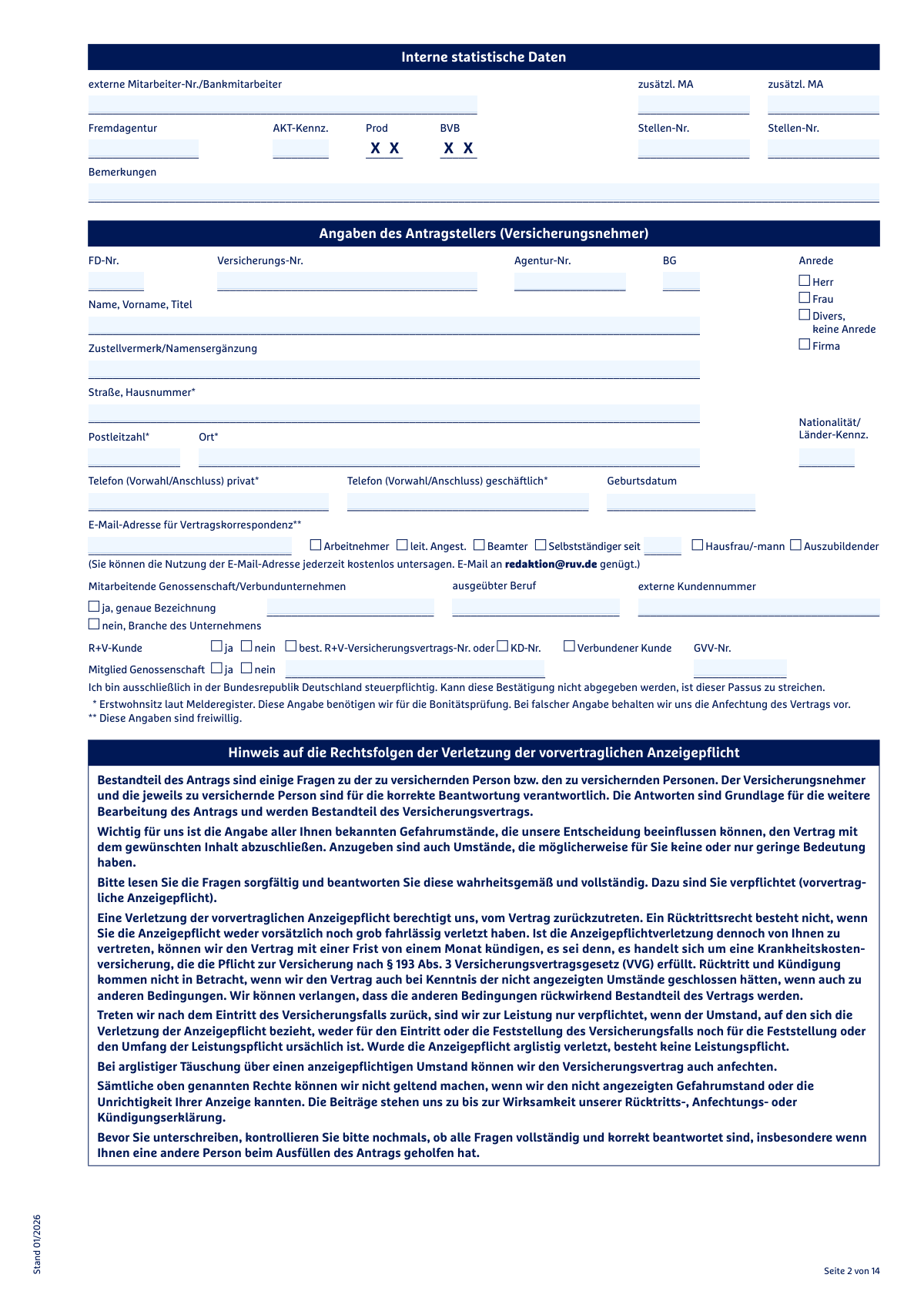
- Enter the applicant's personal information, including name, address, contact details, and professional status in the 'Angaben des Antragstellers' section.
- Specify the details for each person to be insured, including their personal data, desired tariffs, and coverage amounts in the 'Angaben zu den zu versichernden Personen/Versicherungsumfang' section.
- Carefully and accurately complete the 'Gesundheitsangaben' (Health Information) section for each person, answering all questions about medical history, treatments, and current health status.
- Provide details about any existing or prior insurance policies in the 'Sonstige Versicherungen' section and supply tax identification numbers for data transmission to financial authorities.
- Review all provided information for accuracy, read the data protection and consent declarations, and provide the required digital signatures for the applicant and other insured persons to complete the submission.
Common Mistakes in Completing R+V Form 2052
The ones the AI is built to catch.
Incomplete or Vague Health Disclosures
Failing to Detail 'Yes' Answers in the Health Section
Entering Incorrect Civil Servant Aid Rates (Beihilfesätze)
Misinterpreting the 'Permanently Dependent Relative' Status
Overlooking the German Tax Liability Declaration
Missing Signatures for All Required Parties
Entering an Incorrect IBAN for the SEPA Mandate
Inaccurate or Incomplete Previous Insurance History
Incorrectly Counting Missing Teeth
Forgetting to Provide Existing R+V Customer or Contract Numbers
Frequently Asked Questions About R+V Form 2052
Is it really free for 7 days?
Can I fill other forms too?
How do I cancel?
How does the AI fill out R+V Form 2052?
What happens to my information?
How complex is R+V Form 2052 to fill out?
What is the purpose of this R+V application form?
Who needs to fill out this form?
What information is most important when filling out the health questions on pages 4-5?
What happens if I have a pre-existing medical condition?
Why do I need to provide my tax identification number (Steuer-Identifikationsnummer)?
I'm switching from another insurer. What do I need to know?
How long does it take for my application to be processed?
What am I agreeing to by signing the data protection and confidentiality waiver on page 8?
Who needs to sign the application form?
What should I do if I have a planned dental treatment?
Can I get my insurance coverage to start without a waiting period?
Can AI tools help me fill out this application?
How can I fill out this R+V application online using Instafill.ai?
What should I do if my PDF of the form is not fillable?
Get your R+V Form 2052 filled out by AI
$0 today. Cancel before Nov 5 and you pay nothing.
Other forms like this one
health insurance forms: Form 1095-A, Health Insurance Marketplace Statement, Form 1095-C, Employer-Provided Health Insurance Offer and Coverage, Form 7206 (2025), Self-Employed Health Insurance Deduction, CMS-1500 (02-12), Health Insurance Claim Form (NUCC Approved) (OMB 0938-1197), HDFC ERGO General Insurance Company Limited – Request for Cashless Hospitalisation for Health Insurance (Policy Part – C), Standard Health Insurance Claim Form - Part B, Blue Shield of California Network Participation Letter of Intent, Blue Shield of California Prior Authorization Request Form, Blue Shield of California Urgent Request for Prior Authorization, Cigna Out-of-Network Referral Disclosure Form, Identificación Estado Sanitario Poblacional, Anexo II, Res. 83/2007 (Superintendencia de Servicios de Salud), John Hancock Independent Care Provider Service Reimbursement, John Hancock Independent Care Provider Service Reimbursement, Kaiser Permanente Washington Request for Authorization, Oscar Grievance and Appeal Form - Florida, UnitedHealthcare Prior Authorization Request Form, Form CMS-1561, Health Insurance Benefit Agreement, CMS-1500 Health Insurance Claim Form (OMB-0938-0999), Form 8941, Credit for Small Employer Health Insurance Premiums, Affinity Healthcare Non-Emergency Medical Transportation Insurance Application
Let AI fill out your R+V Form 2052
Your trial starts once a card is added. You pay nothing before Nov 5.
Our AI already knows this form, all 380 fields of it. Skip the typing: tell it about yourself, or upload what you have, and it fills the whole form in seconds.
- AI fills every field on all 15 pages, tables and checkboxes included
- No typing into boxes: answer a few questions, or upload a document you already have, an old copy of this form, a photo of a document
- The AI checks the answers; you review and change anything before you download
- Download the finished PDF, print it, or sign it online
- Encrypted, and never used to train AI
Cancel before Nov 5 and you pay nothing.
A card is needed to start the trial. Cancel in two clicks from your account.
Terms · Privacy