
Yes! You can use AI to fill out Form SOC 295, Application for In-Home Supportive Services
Don't type 157 fields by hand. Tell our AI about yourself, or upload a document you already have, and it fills every field in seconds. You check it, then download, print or sign.
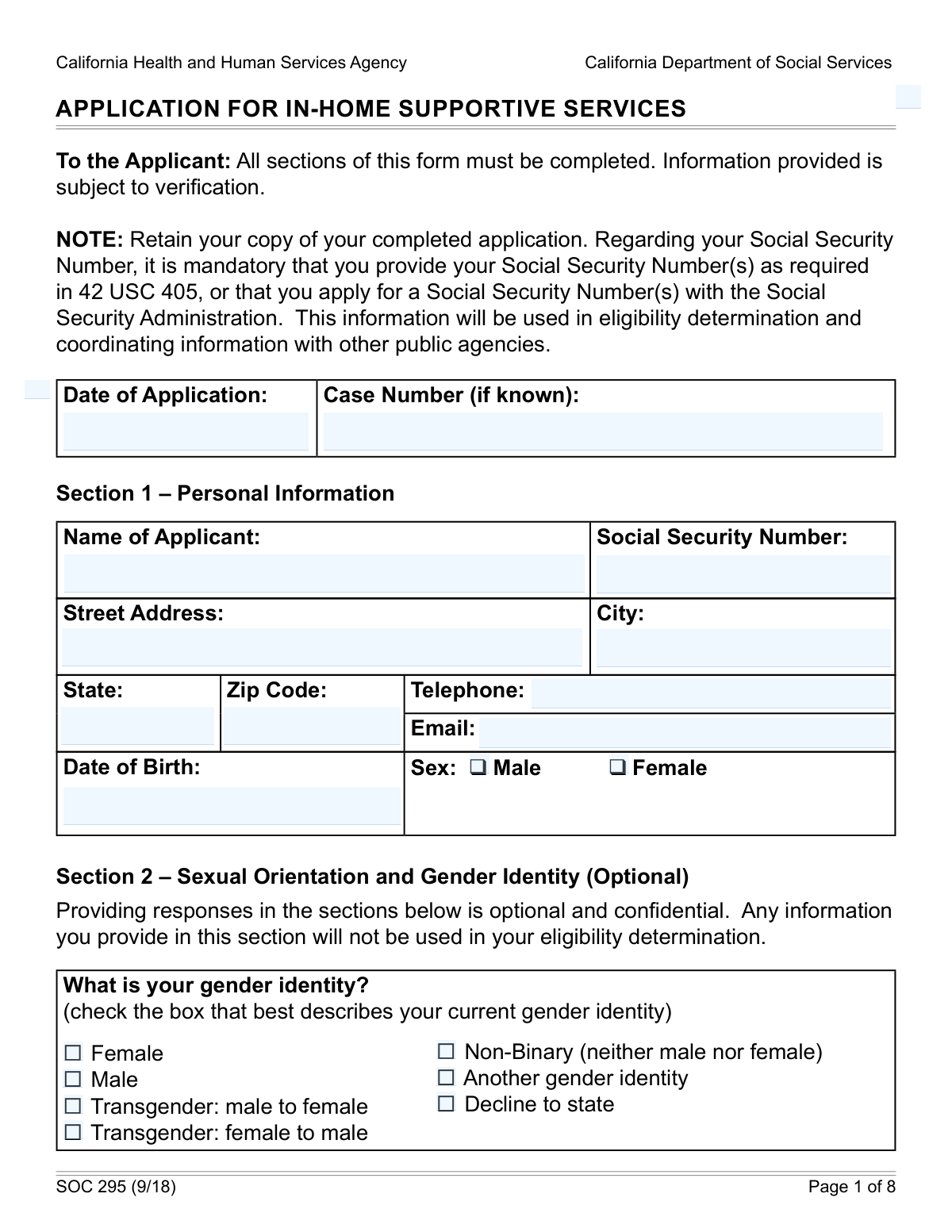
The AI does the filling. You just check it.
No typing into boxes, nothing to install.
What this form asks for
The AI fills all of it, from your answers or your documents.
The AI checks your answers before you download
14 checks built for this form, so a wrong date or a missing answer is caught before anyone else sees it.
This check ensures the Social Security Number field in Section 1 is not empty and follows the 9-digit format (XXX-XX-XXXX or XXXXXXXXX). This is a mandatory field required by federal law for eligibility determination and data coordination with other public agencies. A missing or incorrectly formatted SSN will prevent the application from being processed and will require the applicant to correct the information before submission.
This validation confirms that the applicant's Date of Birth in Section 1 is a valid calendar date and occurs before the application submission date. This is crucial for verifying identity and eligibility for age-related services or benefits. An invalid date, such as February 30, or a future date would be rejected as a data entry error, blocking the form submission.
This check is triggered if the applicant answers 'Yes' to 'Are you a Veteran?' in Section 3. It ensures that the subsequent field, 'Veteran Name and Claim Number,' is not left blank. This information is necessary for the agency to verify veteran status and coordinate potential benefits, so failure to provide it will result in an incomplete application and a request for more information.
This validation ensures that the 'Signature of Applicant' and the corresponding 'Date' field in Section 10 are both completed. The signature legally affirms the truthfulness of the provided information and agreement to the program's terms. An application without a signature is not legally binding and cannot be processed.
If the applicant checks 'Yes' for receiving SSI/SSP benefits in Section 4, this rule verifies that one of the living arrangement options is selected and the 'Services being requested' field is filled. This information is critical for determining the correct level and type of service needs. An omission here would halt the eligibility determination process until the information is provided.
When an applicant indicates 'Yes' to having received IHSS in the past (Section 5), this validation ensures the 'Date and county where service was last received' and 'Total Monthly Hours' fields are filled. This historical data is vital for understanding the applicant's service history and expediting the assessment process. Missing this information would require follow-up from the social worker, delaying the application.
And 8 more checks
- Validates Completeness of Representative Information
- Validates State of Residence as California
- Ensures ZIP Code Format is Correct
- Checks for Logical Date Sequence between Birth and Application
- Requires Description for 'County Support' Accommodation
- Validates 4-Digit RAN Format for Telephonic Timesheets
- Ensures Mandatory Ethnic and Language Selections are Made
- Verifies Household Member Data Integrity
Let AI fill out your SOC 295
No typing. Every field filled in seconds, checked, ready to sign.
How to Fill Out SOC 295 Online for Free in 2026
What the AI walks you through.
- Navigate to Instafill.ai and upload your Form SOC 295 or select it from their template library.
- Use the AI assistant to accurately fill in your personal details in Section 1, including your name, address, Social Security Number, and date of birth.
- Complete the sections regarding your veteran status, any past IHSS services received, and current SSI/SSP benefits.
- Provide information about all members of your household in Section 6, including their names, birthdates, and relationship to you.
- Indicate your ethnic origin, language preferences, and any necessary communication accommodations for blindness or visual impairment in Sections 7 and 8.
- Carefully review the affirmation in Section 9, then electronically sign and date the application in Section 10 to certify the information is true and complete.
Common Mistakes in Completing SOC 295
The ones the AI is built to catch.
Forgetting to Sign and Date the Application
Writing Out Ethnicity/Language Instead of Using Codes
Ignoring Follow-Up Questions in Conditional Sections
Entering an Incorrect or Incomplete Social Security Number
Providing Incomplete Household Member Information
Requesting 'County Support' Without Explanation
Using a Nickname Instead of a Full Legal Name
Failing to Specify Requested Services
Submitting an Illegible, Handwritten Form
Omitting Representative's Details After Signing
Frequently Asked Questions About SOC 295
Is it really free for 7 days?
Can I fill other forms too?
How do I cancel?
How does the AI fill out SOC 295?
What happens to my information?
How complex is SOC 295 to fill out?
What is the purpose of the SOC 295 form?
Who needs to fill out this application?
Is providing my Social Security Number mandatory?
Do I have to answer the questions about my sexual orientation and gender identity in Section 2?
Who should I list in the 'Household Information' section?
What if I have received IHSS in the past?
What are the 'Communication Accommodations' in Section 8 for?
What responsibilities do I accept by signing this application?
Where do I submit the completed SOC 295 form?
What does 'Share-of-Cost' (SOC) mean?
Can I use an AI tool to help me fill out this application?
How can I fill out the SOC 295 form online?
The PDF version of the form I have is not fillable. What can I do?
Is the ethnic and language information in Section 7 required?
Get your SOC 295 filled out by AI
$0 today. Cancel before Nov 3 and you pay nothing.
Other forms like this one
California social services forms: California Department of Social Services (CDSS) Community Care Licensing Child Care Forms Packet (LIC 9150, LIC 282, LIC 627, LIC 700, LIC 995A, CDPH 286, LIC 9227), California Department of Social Services (CDSS) Community Care Licensing Division — Administrative Organization (LIC 309), California Department of Social Services Form RFA 07 (2/18), Resource Family Approval (RFA) Health Questionnaire (Mandatory), California Department of Social Services, Sworn Statement, Health & Human Services Agency California Department of Social Services APPLICATION FOR A FAMILY CHILD HOME LICENSE LIC 279
disability support forms: Form 3111E (2018/12), Ontario Works / Ontario Disability Support Program (ODSP) Application for Special Diet Allowance, Form 3111E, Application for Special Diet Allowance (Ontario Disability Support Program / Ontario Works)
SOC forms: Form 4137, Social Security and Medicare Tax on Unreported Tip Income, Form 8919, Uncollected Social Security and Medicare Tax, Form SS-5-FS, Application for a Social Security Card, Form SSA-4-BK, Application for Social Security Benefits, California Department of Social Services (CDSS) Community Care Licensing Child Care Forms Packet (LIC 9150, LIC 282, LIC 627, LIC 700, LIC 995A, CDPH 286, LIC 9227), Form SSA-1042S, Social Security Benefit Statement, Application for Scope of Clinical Practice (SoCP) – Application Form SoCP Only (v1.00 06/2014), Missouri Department of Social Services, Family Support Division — Application for Supplemental Nutrition Assistance Program (SNAP) (MO 886-0460 / FS-1), Form SSA-3369-BK, Work History Report (Social Security Administration), California Department of Social Services (CDSS) Community Care Licensing Division — Administrative Organization (LIC 309), California/National Apartment Association Official Form B-15, Rental Application for Residents and Occupants (May 2015) with Application Agreement, National Apartment Association (NAA) Rental Application for Residents and Occupants (Virginia) and Supplemental Rental Application for Units Under Government Regulated Affordable Housing Programs, California Association of REALTORS® (C.A.R.) Form LR, Residential Lease or Month-to-Month Rental Agreement (Revised 12/19), Pacific Gastroenterology Associates Referral Form, Chicago Residential Lease for Apartments, Condominiums, Single Family Homes, and Townhomes (Chicago Association of REALTORS®) (V13.0 2026), Form 8919, Uncollected Social Security and Medicare Tax on Wages, Liantis / RSVZ – Aanvraagformulier voor vrijstelling van sociale bijdragen als zelfstandige (artikel 17 van het koninklijk besluit nr. 38 van 27 juli 1967), Form SSA-827 (06-2024), Authorization to Disclose Information to the Social Security Administration (SSA), Tesorería General de la Seguridad Social (TGSS) — Mandato / Orden de domiciliación de adeudos directos SEPA para el pago de cuotas de la Seguridad Social (TC 1/15-3, 06-2022), California Department of Social Services Form RFA 07 (2/18), Resource Family Approval (RFA) Health Questionnaire (Mandatory)
Let AI fill out your SOC 295
Your trial starts once a card is added. You pay nothing before Nov 3.
Our AI already knows this form, all 157 fields of it. Skip the typing: tell it about yourself, or upload what you have, and it fills the whole form in seconds.
- AI fills every field on all 8 pages, checkboxes included
- No typing into boxes: answer a few questions, or upload a document you already have, an old copy of this form, a photo of a document
- The AI checks the answers; you review and change anything before you download
- Download the finished PDF, print it, or sign it online
- Encrypted, and never used to train AI
Cancel before Nov 3 and you pay nothing.
A card is needed to start the trial. Cancel in two clicks from your account.
Terms · Privacy