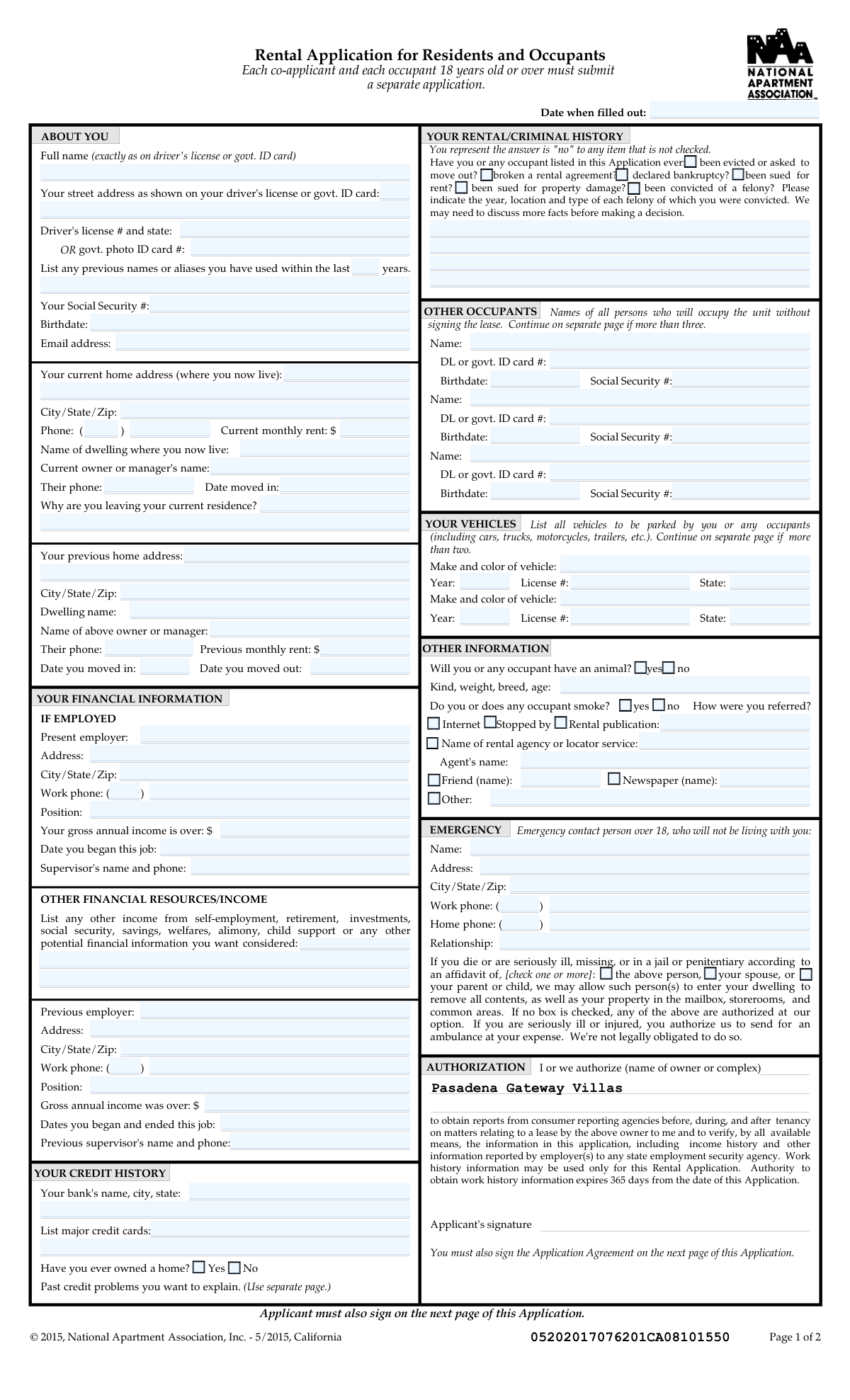
Yes! You can use AI to fill out California/National Apartment Association Official Form B-15, Rental Application for Residents and Occupants (May 2015) with Application Agreement

The California/National Apartment Association Official Form B-15 is a standardized apartment rental application and accompanying application agreement used to evaluate whether an applicant qualifies to rent a specific dwelling. It gathers personal identification details (including SSN and ID numbers), current and prior housing history, employment and income verification information, credit and criminal/rental history disclosures, vehicle and pet details, and emergency authorizations, and it includes consent for background/consumer reporting and work-history verification. It is important because it documents the applicant’s representations and permissions that a property owner/manager relies on to make an approval decision and to comply with screening and notice requirements. Today, this form can be filled out quickly and accurately using AI-powered services like Instafill.ai, which can also convert non-fillable PDF versions into interactive fillable forms.
Our AI automatically handles information lookup, data retrieval, formatting, and form filling.
It takes less than a minute to fill out NAA Form B-15 (CA) using our AI form filling.
Securely upload your data. Information is encrypted in transit and deleted immediately after the form is filled out.

Form specifications

Form name: California/National Apartment Association Official Form B-15, Rental Application for Residents and Occupants (May 2015) with Application Agreement
Number of pages: 5
Filled form examples: Form NAA Form B-15 (CA) Examples
Language: English
Categories: California rental forms, CAA forms, apartment association forms
main-image

Instafill Demo: filling out a legal form in seconds

How to Fill Out NAA Form B-15 (CA) Online for Free in 2026

Are you looking to fill out a NAA FORM B-15 (CA) form online quickly and accurately? Instafill.ai offers the #1 AI-powered PDF filling software of 2026, allowing you to complete your NAA FORM B-15 (CA) form in just 37 seconds or less.
Follow these steps to fill out your NAA FORM B-15 (CA) form online using Instafill.ai:
  1. 1 Go to Instafill.ai and upload the PDF (or select the NAA Form B-15 / Rental Application for Residents and Occupants from the form library).
  2. 2 Let the AI detect and map the fields, then enter applicant identity details (full legal name, previous names/aliases, SSN, birthdate, driver’s license or government ID, email, and phone).
  3. 3 Complete current residence information (current address, rent amount, dwelling/manager contact, move-in date, and reason for leaving) and then add previous residence details (address, dates, rent, and prior owner/manager contact).
  4. 4 Fill in employment and income sections (current employer, position, supervisor contact, start date, gross annual income) and add previous employer details plus any other income sources to be considered.
  5. 5 Provide credit/rental/criminal history disclosures (evictions, broken lease, bankruptcy, lawsuits, felony details if applicable), and list banking and major credit card information if requested.
  6. 6 Add household details: other occupants not signing the lease, vehicles to be parked (make/color, year, license/state), pet/animal information, smoking status, and referral source.
  7. 7 Review the authorization and application agreement language, confirm all entries are accurate, then e-sign and date where required and download/share the completed form with the property manager.

Our AI-powered system ensures each field is filled out correctly, reducing errors and saving you time.

Why Choose Instafill.ai for Your Fillable NAA Form B-15 (CA) Form?

Speed

Complete your NAA Form B-15 (CA) in as little as 37 seconds.

Up-to-Date

Always use the latest 2026 NAA Form B-15 (CA) form version.

Cost-effective

No need to hire expensive lawyers.

Accuracy

Our AI performs 10 compliance checks to ensure your form is error-free.

Security

Your personal information is protected with bank-level encryption.

Frequently Asked Questions About Form NAA Form B-15 (CA)

This is a Rental Application for Residents and Occupants (National Apartment Association Form B-15, California) used by the property/owner to screen applicants for an apartment. It collects identity, rental history, employment/income, credit, criminal history, vehicle, pet, and emergency contact information.

Each co-applicant and each occupant who is 18 years old or over must submit a separate, fully completed, and signed application. People who will live in the unit but are not signing the lease are listed as “other occupants,” but adults may still be required to apply per the community’s criteria.

You must provide your full legal name exactly as shown on your driver’s license or government-issued ID, your ID number (driver’s license and state or government photo ID number), birthdate, and Social Security number (or other acceptable identification per the property’s criteria). Make sure your address matches what is shown on your ID where requested.

If you don’t have a driver’s license, enter your government photo ID card number in the field provided. The property’s criteria also mention other acceptable identification types (e.g., passport, visa/ITIN) for verification purposes.

List any previous names or aliases you have used within the last number of years requested on the form (fill in the “years” count and then list the names). This helps the property run accurate background and credit checks.

You’ll provide your current and previous addresses, dwelling name (if any), owner/manager name and phone, monthly rent, move-in/move-out dates, and the reason you are leaving. If you need more space, the form allows you to continue on a separate page.

If employed, provide your current employer, address, supervisor contact, position, start date, work phone, and gross annual income. You may also list other income sources (self-employment, retirement, investments, benefits, etc.) in the “Other Financial Resources/Income” section.

The approval criteria indicate they may request items like recent pay stubs, an employment verification letter, an offer letter/contract for a new job, tax returns or bank statements for self-employment, and proof of benefits or student status. You should also be prepared to show valid photo identification.

Check the box for any item that applies to you or any listed occupant, and provide details where requested (such as year, location, and type of felony). If an item is not checked, the form states you are representing the answer is “no” for that item.

The form states the owner will notify you within 10 days after receiving a completed application. If they do not notify you within 10 days, the application is considered “disapproved” under the form’s terms (unless a separate written agreement changes the timeline).

An application won’t be processed until all required items are provided, including a fully filled out and signed application for each co-applicant/guarantor (if applicable), payment of the application fee, and payment of the application deposit. The form notes that if no item is checked in the “completed application” checklist, all listed items are necessary.

The application fee is nonrefundable. The application deposit may be credited toward the security deposit if approved and the lease is signed, refunded after disapproval (the form states within 21 days), or partially/fully retained as liquidated damages if you withdraw or fail to sign after approval (per the agreement terms).

List all vehicles that will be parked by you or any occupants, including make/color, year, license plate number, and state. If you have more than two vehicles, the form instructs you to continue on a separate page.

Check “yes” or “no” for whether you or any occupant will have an animal, and provide details such as kind, weight, breed, and age if applicable. For smoking, check “yes” or “no” based on whether you or any occupant smokes.

Yes—AI form-filling services like Instafill.ai can help auto-fill fields accurately from your information, saving time and reducing missed fields. If your PDF is flat/non-fillable, Instafill.ai can convert it into an interactive fillable form and then guide you to complete and export it for submission.

Compliance NAA Form B-15 (CA)
Validation Checks by Instafill.ai

1
Application date is present and in valid date format
Validates that the Date of Application (date when filled out) is provided and matches an accepted date format (e.g., MM/DD/YYYY) and is a real calendar date. This is important because multiple deadlines in the Application Agreement (approval notice window, lease-signing window, refund timing) are calculated from this date. If validation fails, the submission should be flagged as incomplete and the applicant prompted to correct the date before processing.
2
Applicant identity fields completeness (name + address + SSN + DOB + ID)
Ensures the core applicant identity fields are completed: full legal name, street address as shown on ID, Social Security Number, birthdate, and either a driver’s license number/state or a government photo ID card number. These fields are required to run screening, verify identity, and comply with the property’s stated identification requirements. If any are missing, the application should be marked incomplete and not sent to screening until corrected.
3
SSN format and plausibility validation (applicant and occupants)
Checks that each Social Security Number provided is exactly 9 digits (allowing optional hyphens) and rejects known invalid patterns (e.g., all zeros in a group, 000-xx-xxxx, 666-xx-xxxx, 9xx-xx-xxxx). This reduces fraud, prevents downstream screening failures, and improves match rates with consumer reporting agencies. If validation fails, the system should block submission or require correction, and log the failure for fraud review if repeated.
4
Birthdate format and age eligibility checks (18+ where required)
Validates that birthdates are in a valid date format and represent real dates, then calculates age. It should enforce that the primary applicant is at least 18, and that any occupant listed as an adult (or any co-applicant/occupant 18+ per the form language) is flagged as requiring a separate application. If validation fails, the system should prevent completion or route to manual review with a clear message about age/applicant requirements.
5
Driver’s license / government ID mutual requirement and state code validation
Ensures that at least one of the two identification numbers is provided: Driver’s License Number and State OR Government Photo ID Card Number. If a driver’s license is provided, validates that the issuing state is a valid US state/territory abbreviation and that the license number is non-empty and within reasonable length constraints. If validation fails, the application should be considered incomplete and not processed until corrected.
6
Email address format validation
Checks that the applicant email address is syntactically valid (contains a single '@', valid domain, no illegal characters) and is not an obvious placeholder (e.g., '[email protected]' if your rules disallow). Email is often used for notices and follow-up, and invalid emails cause communication failures and missed deadlines. If validation fails, prompt the applicant to correct the email or provide an alternate contact method per policy.
7
Phone number formatting and completeness across all phone fields
Validates that phone numbers (applicant current phone, work phone, owner/manager phones, supervisor phones, emergency contact phones, doctor phone) contain the required digits (typically 10 for US numbers) and that area code and local number parts are both present when split into two fields. This is important for verification calls to employers/landlords and emergency contactability. If validation fails, the system should require correction or mark the related verification section as incomplete.
8
Current residence section completeness and logical consistency
Ensures current home address, city/state/zip, current monthly rent, current owner/manager name, owner/manager phone, and move-in date are provided. Also validates that the move-in date is not in the future and is a valid date. If validation fails, the application should be flagged as incomplete because residence history verification cannot be performed.
9
Previous residence dates and rent consistency checks
Validates that previous move-in and move-out dates are valid dates and that move-out is on/after move-in; also checks that previous monthly rent is a non-negative currency amount. This prevents impossible timelines and supports accurate rental history verification (up to 3 years per the criteria). If validation fails, the system should request corrected dates/amounts or route to manual review if the applicant indicates unknown dates.
10
Employment section conditional requirements (IF EMPLOYED)
If present employer is provided (or if the applicant indicates employment), requires employer name, employer address/city-state-zip, position, gross annual income, and job start date, and validates the job start date is not in the future. This is critical for income verification and meeting the property’s income criteria. If validation fails, the system should block submission or mark the employment verification portion as incomplete.
11
Income fields numeric/currency validation and minimum reasonableness
Checks that gross annual income and any 'income was over' fields are numeric, non-negative, and within reasonable bounds (e.g., not 0 if employed, not excessively large beyond system limits). Also validates current/previous monthly rent fields are valid currency values. If validation fails, the system should prompt correction and prevent automated qualification calculations from running on invalid data.
12
Previous employment dates range validation
Validates that the previous employer employment dates include both a start and end date, are valid dates, and that the end date is on/after the start date. This supports work history verification and reduces mismatches when contacting prior employers. If validation fails, the system should request corrected dates or allow an 'currently employed' indicator to bypass an end date where applicable.
13
Rental/criminal history checkbox-to-details dependency (felony and adverse events)
If any adverse history items are checked (evicted/asked to move out, broken rental agreement, bankruptcy, sued for rent, sued for property damage, convicted of a felony), requires the applicant to provide the corresponding explanatory details where the form requests them (especially felony year/location/type). This is important for fair, consistent screening and for meeting the form’s instruction to discuss more facts before a decision. If validation fails, the system should mark the application incomplete and request the missing details rather than silently accepting partial disclosures.
14
Animal and smoking yes/no exclusivity and animal detail requirement
Ensures the animal question and smoking question are answered with exactly one of Yes/No (not both, not neither). If animal is Yes, requires animal kind/breed/weight/age fields to be completed to support pet policy compliance and potential breed/weight restrictions. If validation fails, the system should prompt the applicant to correct the selection and provide required pet details before submission.
15
Vehicle information completeness and format validation
For each vehicle entry where any field is present, requires make/color, year, license number, and license state to be completed, and validates year is a 4-digit year within a reasonable range (e.g., 1900 to current year+1). Also validates license state is a valid state/territory abbreviation. If validation fails, the system should require completion/correction to avoid parking authorization issues and enforcement errors.
16
Emergency contact eligibility and contactability validation
Ensures emergency contact name, address, city/state/zip, relationship, and at least one phone number (home or work) are provided, and validates phone formatting. The form specifies the emergency contact must be over 18 and not living with the applicant; if occupant names/addresses are available, the system should flag potential matches (same address or same name) for review. If validation fails, the application should be flagged as incomplete because emergency procedures and authorizations depend on this information.

Common Mistakes in Completing NAA Form B-15 (CA)

Name not entered exactly as shown on government ID

Applicants often use nicknames, omit middle names/initials, or enter a married name that doesn’t match the driver’s license/state ID, especially when the form explicitly says “exactly as on driver’s license or govt. ID card.” This can cause identity verification delays, mismatched screening reports, or requests for additional documentation. To avoid it, copy your name character-for-character from your ID (including suffixes like Jr./III) and keep it consistent across all pages and co-applicant/occupant applications. AI-powered tools like Instafill.ai can help by standardizing names across fields and flagging mismatches before submission.

Mixing up “ID address” vs. “current home address” fields

This form asks for both the street address as shown on your ID and your current home address (where you now live), and people frequently enter the same address in both even when they differ. That can look like an inconsistency during screening and may trigger manual follow-up or denial if the landlord can’t verify residency history. Avoid this by entering your ID address exactly as printed on the ID, and separately entering your actual current residence (including unit number) with correct City/State/Zip. Instafill.ai can reduce this error by mapping each address to the correct section and validating completeness (street, unit, city, state, zip).

Incorrect or incomplete driver’s license / government ID number and state

Applicants often forget to include the issuing state, transpose characters, or enter a passport/other number in the driver’s license field (or vice versa). These mistakes can prevent background checks from matching correctly and slow down approval. To avoid it, enter the full ID number exactly as it appears and always include the issuing state abbreviation in the specified field; use the government photo ID field only if you do not have a driver’s license. Instafill.ai can automatically format and validate ID entries (length/character patterns) and prompt you when the state is missing.

Leaving checkboxes blank (unintentionally answering “no”)

The form states that any item not checked is represented as “no,” but many applicants skip the eviction/bankruptcy/felony/rental lawsuit checkboxes thinking they’ll explain later. This can create a false statement if the true answer is “yes,” which may lead to denial, loss of fees/deposit, or even allegations of misrepresentation. Avoid this by actively checking the appropriate boxes and, when “yes,” providing the required details (year, location, type) in the felony/details fields. Instafill.ai can highlight unanswered checkbox groups and require an explicit yes/no selection to prevent accidental omissions.

Not providing required details after checking rental/criminal history items

Applicants sometimes check boxes like “been convicted of a felony” or “declared bankruptcy” but leave the felony detail lines (year/location/type) blank or write vague notes like “see report.” This forces the property to pause processing and request clarification, and it can be interpreted as incomplete or evasive. To avoid it, provide specific, complete details for each item (e.g., “2018, Los Angeles County, CA – felony theft”) and use additional pages if needed. Instafill.ai can prompt for the dependent detail fields whenever a related checkbox is selected and ensure the required format is included.

Phone numbers entered in the wrong format or split fields

This application uses separate fields for area code and the remaining digits for multiple phone numbers (current phone, work phone, emergency contact, doctor), and people often paste a full number into one box or omit the area code. Incorrect formatting can prevent the landlord from contacting employers, managers, or emergency contacts, delaying verification. Avoid this by entering a 3-digit area code in the area code field and the 7-digit number in the main field, and double-check that each phone number is in the correct section (employer vs. manager vs. emergency contact). Instafill.ai can auto-split and format phone numbers correctly and validate digit counts.

Income entered as net/monthly instead of gross annual (or missing the “over $” requirement)

The employment section asks for “gross annual income is over: $” and many applicants enter monthly take-home pay, hourly wage, or a rounded estimate that doesn’t match verification documents. This can cause the application to fail income qualification (often 2.5x rent) or trigger additional documentation requests. Avoid this by entering gross annual income (before taxes) and ensuring it aligns with pay stubs/offer letters; list other income sources in the “Other Financial Resources/Income” fields rather than mixing them into employment income. Instafill.ai can convert pay frequency to annualized gross income and flag entries that look like monthly amounts.

Incomplete rental history (missing dates, manager contact, or rent amounts)

Applicants frequently leave out move-in/move-out dates, monthly rent, dwelling name, or the owner/manager phone number for current and previous addresses. Without complete rental history, the property can’t verify tenancy, which often delays approval or results in a “disapproved/incomplete” status. Avoid this by providing full address details (including unit), exact dates, rent amounts, and a reachable manager/landlord contact for both current and previous residences; use a separate page if you need more space. Instafill.ai can check for missing required components (dates/phone/rent) and prompt you to complete them before submission.

Forgetting to list all occupants and not submitting separate adult applications

This form distinguishes between residents signing the lease and “other occupants” not signing, and it also states each co-applicant and each occupant 18+ must submit a separate application. People often list only the primary applicant, omit roommates/partners, or list adults as “occupants” without separate applications, which can violate occupancy rules and stall screening. Avoid this by listing every person who will live in the unit (including children) and ensuring every adult (18+) completes and signs their own application as required. Instafill.ai can help by generating consistent occupant lists across pages and reminding you when an additional adult application is required.

Vehicle information missing or inconsistent (plate/state/year/make-color)

Applicants commonly list only one vehicle, forget trailers/motorcycles, omit the license plate state, or enter a nickname for the car instead of make and color. Incomplete vehicle data can cause parking permit issues, towing risk, or lease addendum corrections after move-in. Avoid this by listing all vehicles that will be parked (including motorcycles/trailers), and completing each field: make and color, year, license number, and issuing state; add a separate page if more than two vehicles. Instafill.ai can validate plate/state formats and ensure each vehicle entry is complete.

Pet/animal section completed incorrectly (yes/no not checked or missing required details)

Applicants often forget to check “Will you or any occupant have an animal? yes/no” or they check “yes” but don’t provide kind/weight/breed/age, which is critical given breed restrictions and pet policy requirements. This can lead to denial, delays, or a later lease violation if an undisclosed animal is discovered. Avoid this by selecting yes/no explicitly and, if yes, providing complete animal details and confirming the animal complies with property rules; if it’s a service animal, follow the property’s accommodation process rather than leaving the section blank. Instafill.ai can enforce completion of dependent pet detail fields and help format the information clearly.

Missing signatures/dates across pages (Application + Application Agreement)

The form repeatedly states the applicant must also sign the Application Agreement on the next page, and many submissions include only one signature or omit dates (Date of Application, signature dates). Missing signatures/dates can make the application legally incomplete and stop processing until corrected, potentially losing the unit to another applicant. Avoid this by signing and dating everywhere indicated for each applicant/co-applicant, and confirming page 1 and page 2 signature blocks are completed. If the form is provided as a flat non-fillable PDF, Instafill.ai can convert it into a fillable version and guide you to all required signature/date fields before you submit.
Saved over 80 hours a year

“I was never sure if my IRS forms like W-9 were filled correctly. Now, I can complete the forms accurately without any external help.”

Kevin Martin Green

Your data stays secure with advanced protection from Instafill and our subprocessors

Robust compliance program

Transparent business model

You’re not the product. You always know where your data is and what it is processed for.

ISO 27001, HIPAA, and GDPR

Our subprocesses adhere to multiple compliance standards, including but not limited to ISO 27001, HIPAA, and GDPR.

Security & privacy by design

We consider security and privacy from the initial design phase of any new service or functionality. It’s not an afterthought, it’s built-in, including support for two-factor authentication (2FA) to further protect your account.

Fill out NAA Form B-15 (CA) with Instafill.ai

Worried about filling PDFs wrong? Instafill securely fills californianational-apartment-association-official-form-b-15-rental-application-for-residents-and-occupants-may-2015 forms, ensuring each field is accurate.