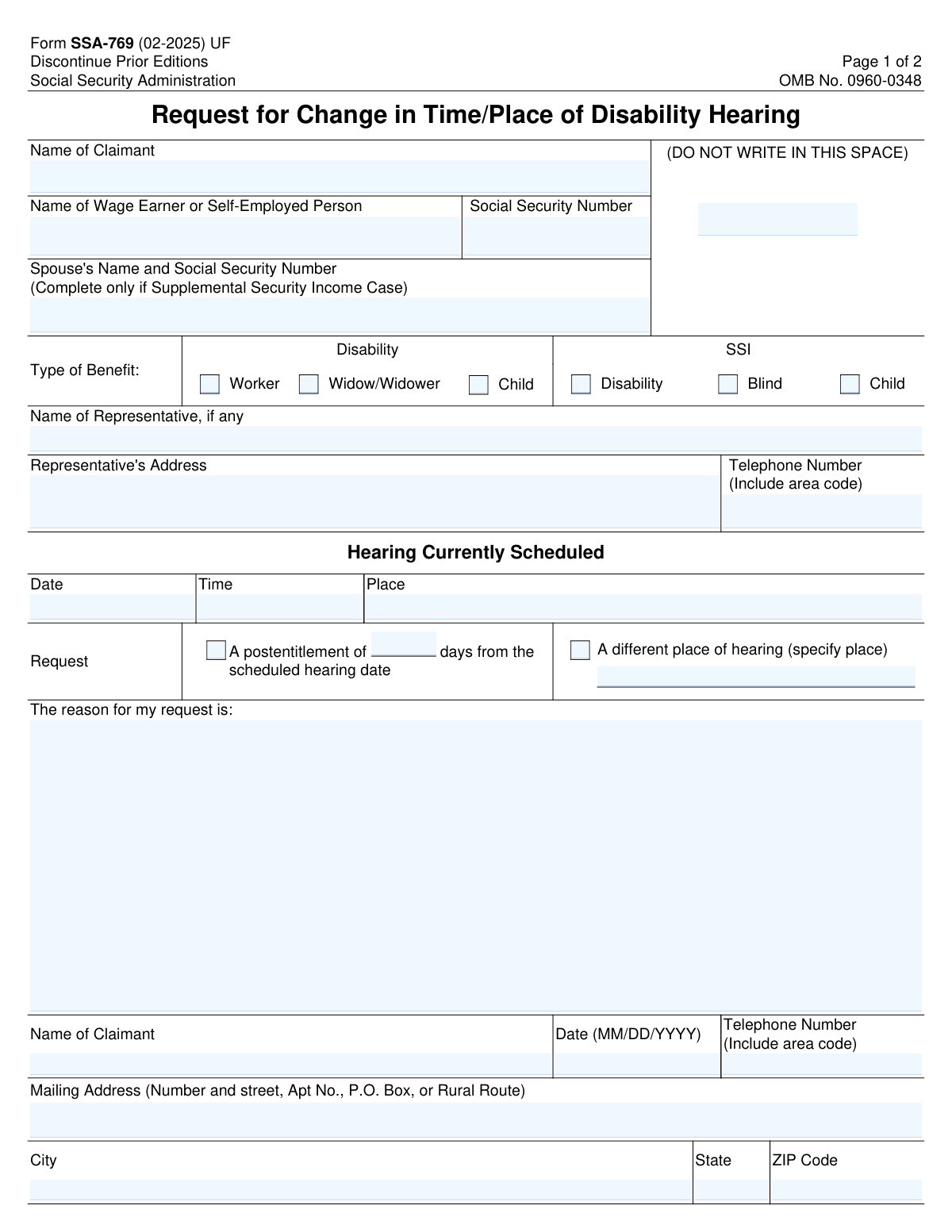
Yes! You can use AI to fill out Form SSA-769, Request for Change in Time/Place of Disability Hearing

Form SSA-769, Request for Change in Time/Place of Disability Hearing, is a Social Security Administration document used by claimants to ask for a postponement or a change of venue for their scheduled disability hearing. It is crucial for individuals who cannot attend their hearing as scheduled to submit this form with a valid reason to avoid potential dismissal of their case. Today, this form can be filled out quickly and accurately using AI-powered services like Instafill.ai, which can also convert non-fillable PDF versions into interactive fillable forms.
Our AI automatically handles information lookup, data retrieval, formatting, and form filling.
It takes less than a minute to fill out SSA-769 using our AI form filling.
Securely upload your data. Information is encrypted in transit and deleted immediately after the form is filled out.

Form specifications

Form name: Form SSA-769, Request for Change in Time/Place of Disability Hearing
Number of pages: 2
Language: English
Categories: disability forms, SSA forms
main-image

Instafill Demo: How to fill out PDF forms in seconds with AI

How to Fill Out SSA-769 Online for Free in 2026

Are you looking to fill out a SSA-769 form online quickly and accurately? Instafill.ai offers the #1 AI-powered PDF filling software of 2026, allowing you to complete your SSA-769 form in just 37 seconds or less.
Follow these steps to fill out your SSA-769 form online using Instafill.ai:
  1. 1 Navigate to Instafill.ai and upload your Form SSA-769 or select it from the platform's template library.
  2. 2 Provide the claimant's name, the wage earner's name, and the associated Social Security Number.
  3. 3 Indicate the type of benefit being claimed by checking the correct box under Disability or SSI categories.
  4. 4 Enter the current hearing details, including the scheduled date, time, and place.
  5. 5 Specify your request by checking the box for a postponement and entering the number of days, or for a different hearing location and specifying the place.
  6. 6 Clearly write the reason for your request in the provided space, explaining why the change is necessary.
  7. 7 Review all the information entered by the AI for accuracy, then provide your signature, date, and contact information before submitting the form to the SSA.

Our AI-powered system ensures each field is filled out correctly, reducing errors and saving you time.

Why Choose Instafill.ai for Your Fillable SSA-769 Form?

Speed

Complete your SSA-769 in as little as 37 seconds.

Up-to-Date

Always use the latest 2026 SSA-769 form version.

Cost-effective

No need to hire expensive lawyers.

Accuracy

Our AI performs 10 compliance checks to ensure your form is error-free.

Security

Your personal information is protected with bank-level encryption.

Frequently Asked Questions About Form SSA-769

Form SSA-769 is used to formally request a change to the scheduled date, time, or location of your Social Security disability hearing.

You should fill out this form if you are a claimant with a scheduled disability hearing that you cannot attend at the assigned time or place and need to request a change.

No, submitting the form is only a request. The Social Security Administration (SSA) will review your reason and decide whether to grant the change based on whether you have shown 'good cause'.

You will need your name and Social Security Number, the date, time, and place of your currently scheduled hearing, and a detailed reason for your request.

You only need to complete the section for your spouse's information if your case is for Supplemental Security Income (SSI). It is not required for other types of disability claims.

Provide a clear and specific explanation for why you need the change, such as a medical emergency, a conflicting and unavoidable appointment, or a significant travel hardship.

You should submit the completed form to the SSA hearing office where your hearing is currently scheduled. Contact that office to confirm their preferred submission method, such as mail or fax.

Yes, while the form has separate options, you can request both. Check the relevant boxes and explain your need for both changes clearly in the 'Reason for my request' section.

Failing to provide all or part of the required information may prevent the SSA from processing your request, which could result in your request being denied.

According to the Paperwork Reduction Act Statement on the form, the SSA estimates it will take the average person about 8 minutes to read the instructions, gather the facts, and complete the questions.

Yes, services like Instafill.ai use AI to accurately auto-fill form fields, which can save you time and help prevent common errors.

You can upload the SSA-769 PDF to the Instafill.ai platform. The service will make the document interactive, allowing you to easily type your information into the fields and then download the completed form.

If you have a non-fillable PDF, you can use a tool like Instafill.ai. It can convert flat PDFs into interactive, fillable forms that you can complete on your computer.

Compliance SSA-769
Validation Checks by Instafill.ai

1
Validates Social Security Number Format
This check ensures that the Social Security Number (SSN) entered for the wage earner and spouse (if applicable) follows the standard 9-digit format, such as XXX-XX-XXXX or XXXXXXXXX. An invalid SSN prevents the SSA from correctly identifying the associated record, which is critical for processing the request. If the format is incorrect, the form submission will be rejected, and the user will be prompted to correct the number.
2
Ensures At Least One Benefit Type is Selected
This validation confirms that the claimant has selected at least one checkbox from the 'Type of Benefit' section (e.g., Worker, Widow/Widower, SSI Disability). This information is fundamental for routing the request to the correct department and understanding the context of the hearing. Failure to select a benefit type will result in a validation error, as the request cannot be processed without this classification.
3
Conditional Requirement for Spouse's Information
This check enforces the rule that the 'Spouse's Name and Social Security Number' field is only completed if the case is for Supplemental Security Income (SSI). This prevents the collection of unnecessary personal information and reduces data entry errors. If the field is filled for a non-SSI case, a warning will be displayed to the user for confirmation before submission.
4
Validates Selection of a Hearing Change Request Type
This validation ensures that the user has selected at least one of the two primary request options: postponement or a change of location. The entire purpose of the form is to request a change, so one of these must be specified. If neither box is checked, the form submission will fail because the nature of the request is unknown.
5
Conditional Validation for Postponement Days
This check verifies that if the user requests a postponement by checking the 'A postentitlement of ... days' box, they must also enter a positive numeric value in the corresponding 'days' field. This number is essential for the scheduling officer to understand the requested delay. If the box is checked but the number of days is missing or non-numeric, the submission will be blocked until a valid number is provided.
6
Conditional Validation for Alternate Hearing Location
This rule ensures that if the claimant checks the box for 'A different place of hearing,' they must provide a specific location in the 'specify place' text field. Without a suggested new location, the SSA cannot evaluate or act upon the request for a change of venue. The form will be considered incomplete and rejected if the box is checked but the location field is left empty.
7
Ensures Reason for Request is Provided
This validation confirms that the 'The reason for my request is' field contains an explanation. The Social Security Administration requires 'good cause' to approve a change in hearing time or place, making this justification the most critical part of the form. An empty reason will likely lead to the request being denied, so the form submission should be blocked if this field is blank.
8
Verifies Consistency of Claimant Name
This check compares the 'Name of Claimant' field at the top of the form with the 'Claimant Name' field in the signature block at the bottom. This ensures consistency and confirms the identity of the person making the request throughout the document. A mismatch could indicate a data entry error or a form filled out by a different person, prompting a review or rejection.
9
Validates Signature Date Format and Logic
This validation ensures the date in the signature block is in the correct MM/DD/YYYY format and is not a future date. The signature date documents when the request was formally made and must be a realistic, non-future date. An invalid format or a future date would render the attestation invalid, so the form submission will be rejected until a valid date is entered.
10
Validates Telephone Number Formatting
This check verifies that all telephone number fields are entered in a recognizable 10-digit format, with or without special characters like parentheses or hyphens. Correctly formatted phone numbers are crucial for the SSA to contact the claimant or their representative with questions. An invalid number could delay the process, so the system should flag incorrectly formatted entries for correction.
11
Ensures Completeness of Representative Contact Information
This validation rule checks that if a representative's name is entered, their address and telephone number must also be provided. Incomplete contact information for a representative makes it impossible for the SSA to communicate with them regarding the case. The system should flag this as an error if the name is present but the contact details are missing.
12
Validates Current Hearing Date is a Future Date
This check ensures the 'Hearing Date' entered under 'Hearing Currently Scheduled' is a valid date that occurs in the future. A request to change a hearing that has already passed is illogical and cannot be processed. This validation prevents nonsensical requests and ensures the data reflects a currently scheduled, upcoming event.
13
Ensures All Current Hearing Details are Provided
This check verifies that the 'Date', 'Time', and 'Place' of the currently scheduled hearing are all filled out. This information is essential context for the SSA to identify the specific hearing event that the claimant wishes to change. Missing any of these details would make it impossible to locate the case in the scheduling system, so the form is considered incomplete without them.
14
Validates Claimant's ZIP Code Format
This validation ensures the claimant's ZIP Code is entered in a valid 5-digit (NNNNN) or 9-digit (NNNNN-NNNN) format. A correct ZIP code is essential for mail delivery and for correctly identifying the claimant's location. An invalid format will cause a validation error to ensure mail from the SSA is deliverable.

Common Mistakes in Completing SSA-769

Confusing the 'Claimant' with the 'Wage Earner'

This error occurs when the person filling out the form enters the same name in both the 'Name of Claimant' and 'Name of Wage Earner' fields, even when the claim is for a child or widow/widower. The claimant is the person applying for benefits, while the wage earner is the individual whose work record the claim is based on. This mistake can cause significant delays as the Social Security Administration (SSA) may be unable to locate the correct case file, potentially leading to the request being rejected. To avoid this, carefully identify each role and enter the correct full legal name in the corresponding field as it appears on official SSA documents.

Providing a Vague or Insufficient 'Reason for Request'

Applicants often provide a reason that is too brief, such as 'I have a doctor's appointment' or 'I cannot travel,' without providing necessary details. The SSA requires a 'good cause' for rescheduling, and a vague reason is unlikely to meet this standard, often resulting in a denial of the request. To prevent this, provide a specific, detailed explanation, including dates of conflicting appointments, the nature of a medical issue preventing travel, or other concrete circumstances. Mentioning that you can provide documentation (e.g., a doctor's note) can also strengthen the request.

Entering an Incorrect or Incomplete Social Security Number

Simple data entry errors like transposing digits, omitting a number, or entering the claimant's SSN in the wage earner's field are very common. An incorrect SSN is a critical error that prevents the SSA from matching the form to the correct case file, leading to immediate processing halts and potential rejection of the request. Always double-check the Social Security Number against an official card or document before submitting. AI-powered tools like Instafill.ai can help by validating the format of the SSN to ensure all nine digits are present.

Selecting the Incorrect 'Type of Benefit'

People frequently get confused between the different benefit types, such as checking 'Disability - Worker' when they are actually on 'SSI - Disability'. These are distinct programs, and selecting the wrong one causes the form to be misrouted internally. This administrative error can add weeks of delay to the rescheduling process while the paperwork is located and sent to the correct department. To avoid this, refer to your original hearing notice or other official SSA correspondence, which will clearly state the type of benefit you are claiming.

Mishandling the Conditional 'Spouse's Name and SSN' Field

The form explicitly states to complete the spouse's information 'only if Supplemental Security Income Case.' Many applicants either miss this instruction and provide unnecessary information for a standard disability case, or they are on SSI and forget to fill it out entirely. Omitting this required information on an SSI case will delay processing, while providing it unnecessarily can introduce confusion. Carefully read all conditional instructions on the form to ensure you are only providing information relevant to your specific case type.

Forgetting to Specify Request Details After Checking a Box

A common oversight is checking the box to request a postponement or a different hearing place but then failing to fill in the required details, such as the number of days for the postponement or the specific alternate location. An incomplete request like this cannot be acted upon by the SSA and will be returned or denied. After checking a box, always look for an associated field to fill in. Using a form-filling tool like Instafill.ai can help prevent this by highlighting required fields that become active after a checkbox is selected.

Omitting Current Hearing Information

Applicants sometimes forget to fill in the date, time, and place of the hearing that is currently scheduled. This information is often on a separate hearing notice, which may not be readily available when they fill out the form. Without these details, the SSA has no way of knowing which hearing the applicant wants to change, rendering the entire request invalid. To avoid this, have your official hearing notice in front of you and transcribe the date, time, and location exactly as they appear.

Using an Informal or Inconsistent Claimant Name

The form asks for the claimant's name in two separate sections, and it must be the full, legal name on file with the SSA. People may use a nickname, a shortened version of their name, or forget a middle initial, causing a mismatch with their official record. This discrepancy can make it difficult for the system to automatically match the form to the case file, requiring manual intervention and causing delays. Always use your full legal name as it appears on your Social Security card or driver's license.

Forgetting to Date the Form

The signature date is a simple but crucial piece of information that is often overlooked. An undated form can be considered incomplete and may raise questions about when the request was officially made, which can be important if there are deadlines for submitting such requests. This can lead to the form being sent back for completion, delaying the outcome. Always perform a final check of the entire form before submission, paying special attention to the signature and date fields at the bottom.

Writing in the 'Do Not Write In This Space' Box

Applicants often see the blank box at the top right of the form and mistakenly write their SSN, case number, or other notes in it. This space is reserved for the SSA's internal tracking codes and stamps. Writing in this area can obscure official markings and interfere with the administrative processing of the form, potentially causing it to be misfiled or delayed. If a form is only available as a non-fillable PDF, tools like Instafill.ai can convert it to a smart, fillable version where such official-use-only fields are locked to prevent accidental entries.
Saved over 80 hours a year

“I was never sure if my IRS forms like W-9 were filled correctly. Now, I can complete the forms accurately without any external help.”

Kevin Martin Green

Your data stays secure with advanced protection from Instafill and our subprocessors

Robust compliance program

Transparent business model

You’re not the product. You always know where your data is and what it is processed for.

ISO 27001, HIPAA, and GDPR

Our subprocesses adhere to multiple compliance standards, including but not limited to ISO 27001, HIPAA, and GDPR.

Security & privacy by design

We consider security and privacy from the initial design phase of any new service or functionality. It’s not an afterthought, it’s built-in, including support for two-factor authentication (2FA) to further protect your account.

Fill out SSA-769 with Instafill.ai

Worried about filling PDFs wrong? Instafill securely fills form-ssa-769-request-for-change-in-timeplace-of-disability-hearing forms, ensuring each field is accurate.