Yes! You can use AI to fill out Back (Thoracolumbar Spine) Conditions Disability Benefits Questionnaire
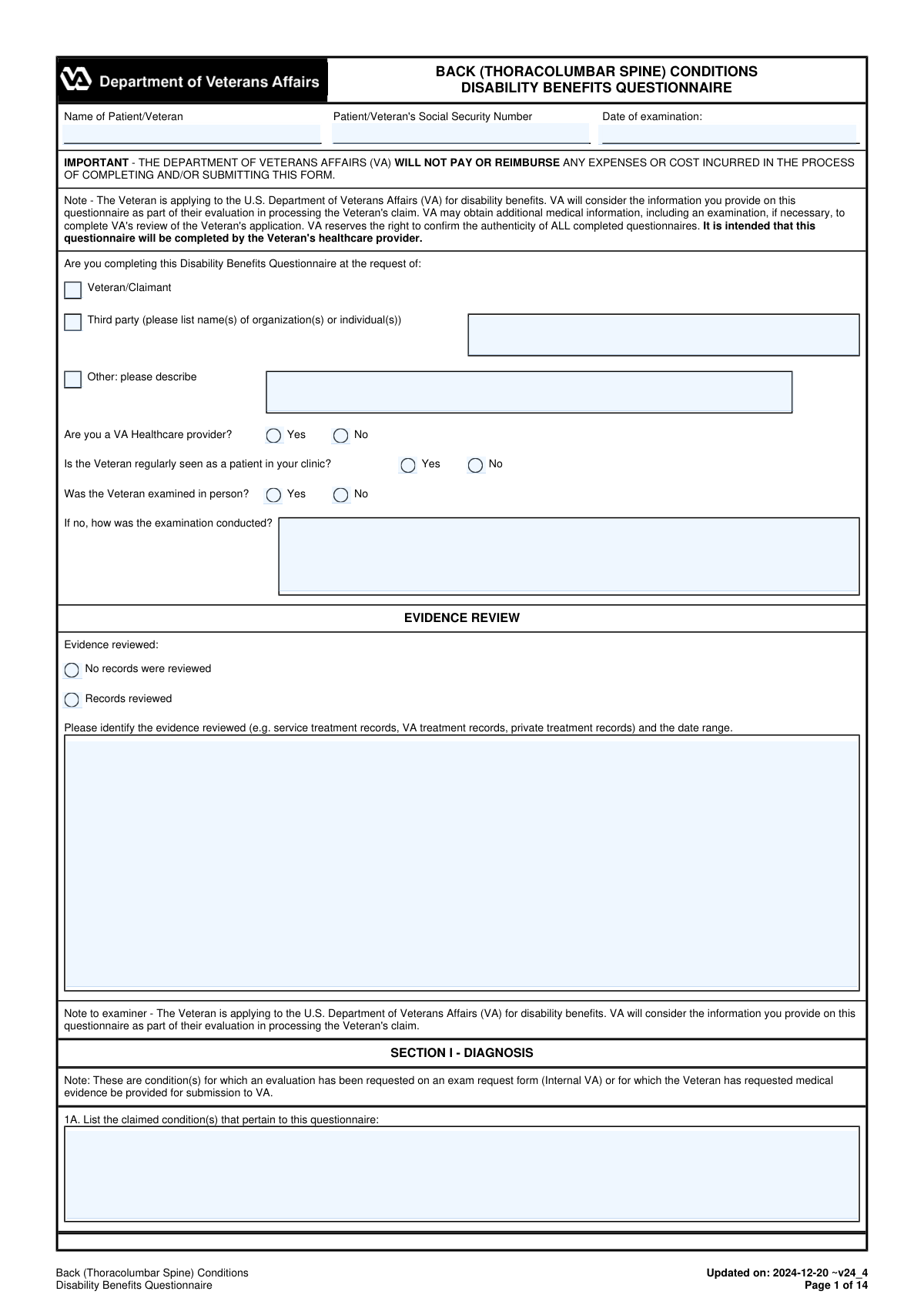
The Back (Thoracolumbar Spine) Conditions Disability Benefits Questionnaire (DBQ) is an official VA medical questionnaire intended to be completed by a healthcare provider to support a Veteranâs claim for disability benefits. It captures key clinical details such as diagnoses (with ICD codes and dates), medical history, flare-ups, range-of-motion testing (active/passive and after repetitive use), neurologic findings (e.g., radiculopathy), IVDS/bed-rest episodes, assistive device use, diagnostic testing, and occupational functional impact. This information is important because VA uses it to evaluate severity and functional impairment under VA rating criteria and to corroborate medical evidence in the claim file. Today, this form can be filled out quickly and accurately using AI-powered services like Instafill.ai, which can also convert non-fillable PDF versions into interactive fillable forms.
Our AI automatically handles information lookup, data retrieval, formatting, and form filling.
It takes less than a minute to fill out VA DBQ Back (Thoracolumbar Spine) Conditions using our AI form filling.
Securely upload your data. Information is encrypted in transit and deleted immediately after the form is filled out.
Form specifications
| Form name: | Back (Thoracolumbar Spine) Conditions Disability Benefits Questionnaire |
| Number of pages: | 14 |
| Language: | English |
| Categories: | disability forms |
Instafill Demo: filling out a legal form in seconds
How to Fill Out VA DBQ Back (Thoracolumbar Spine) Conditions Online for Free in 2026
Are you looking to fill out a VA DBQ BACK (THORACOLUMBAR SPINE) CONDITIONS form online quickly and accurately? Instafill.ai offers the #1 AI-powered PDF filling software of 2026, allowing you to complete your VA DBQ BACK (THORACOLUMBAR SPINE) CONDITIONS form in just 37 seconds or less.
Follow these steps to fill out your VA DBQ BACK (THORACOLUMBAR SPINE) CONDITIONS form online using Instafill.ai:
- 1 Go to Instafill.ai and upload the Back (Thoracolumbar Spine) Conditions DBQ PDF (or select it from the form library).
- 2 Enter patient/Veteran identification details (name, Social Security Number, date of examination) and indicate who requested the DBQ and whether the examiner is a VA provider.
- 3 Use the AI prompts to summarize evidence review and medical history (onset/course, flare-ups, and functional loss statements) and attach or reference relevant records/date ranges as needed.
- 4 Complete the Diagnosis section by selecting applicable thoracolumbar conditions and adding ICD codes and diagnosis dates (including any “Other” diagnoses).
- 5 Fill in the physical exam sections with AI-assisted structured entry: ROM (active/passive), pain findings, repetitive-use results, repeated-use-over-time and flare-up estimates, guarding/spasm, strength/reflex/sensory testing, straight leg raise, and radiculopathy details.
- 6 Complete remaining clinical sections (ankylosis, other neurologic abnormalities, IVDS and bed-rest documentation, assistive devices, imaging/diagnostic testing, and functional impact on work).
- 7 Review the AI-generated completeness checks, add remarks if needed, then finalize examiner certification fields (signature, credentials, specialty, NPI/license, contact/address) and export/download for submission.
Our AI-powered system ensures each field is filled out correctly, reducing errors and saving you time.
Why Choose Instafill.ai for Your Fillable VA DBQ Back (Thoracolumbar Spine) Conditions Form?
Speed
Complete your VA DBQ Back (Thoracolumbar Spine) Conditions in as little as 37 seconds.
Up-to-Date
Always use the latest 2026 VA DBQ Back (Thoracolumbar Spine) Conditions form version.
Cost-effective
No need to hire expensive lawyers.
Accuracy
Our AI performs 10 compliance checks to ensure your form is error-free.
Security
Your personal information is protected with bank-level encryption.
Frequently Asked Questions About Form VA DBQ Back (Thoracolumbar Spine) Conditions
This DBQ documents a Veteranâs thoracolumbar spine diagnosis, symptoms, range of motion, neurologic findings, and functional impact for a VA disability claim. VA uses the completed DBQ as medical evidence when evaluating the claim.
The form is intended to be completed by the Veteranâs healthcare provider (examiner), not the Veteran. The examiner must certify and sign the form in Section XVIII.
No. The form states that VA will not pay or reimburse any expenses or costs incurred to complete and/or submit this questionnaire.
You must enter the Patient/Veteranâs full name, Social Security Number, and the date of examination. These identifiers help VA match the DBQ to the correct claim.
Evidence Review indicates whether the examiner reviewed any records (service treatment records, VA records, private records) and the date range. Records review is not always required, but if records were reviewed, the examiner should list what was reviewed and the timeframe.
Check all applicable diagnoses (e.g., degenerative arthritis, IVDS, lumbosacral strain) and provide ICD codes and dates of diagnosis when available. If there are additional diagnoses not listed, use the âOtherâ fields or Section 1C to add them.
The examiner can check âThe Veteran does not have a current diagnosisâŠâ and must explain the findings and reasons in the Remarks section. VA may still request additional information or an exam to clarify the condition.
If flare-ups are reported, the examiner should record the Veteranâs description including frequency, duration, triggers, relief measures, severity, and functional impact. If functional loss is reported (including after repeated use), it should be documented in the Veteranâs own words.
VA requires detailed ROM and pain information to evaluate functional limitation accurately. If any testing cannot be performed or is medically contraindicated, the examiner must explain why in the designated explanation fields.
The examiner should select âUnable to testâ or indicate testing cannot be performed and provide a clear medical explanation. For repetitive-use testing, if the Veteran cannot complete at least three repetitions, the examiner must explain the reason.
The examiner is asked to estimate additional functional loss in degrees based on procurable information, including the Veteranâs statements, records, and clinical judgment. If an estimate is not feasible, the examiner must provide a case-specific explanation (not a generic statement).
For this DBQ, episodes must involve bed rest prescribed by a physician and treatment by a physician in the past 12 months. The examiner should select the total duration category and document supporting records or note if it is based only on the Veteranâs report.
Imaging is not required to diagnose IVDS, and EMG is rarely required for radiculopathy in typical clinical settings. However, degenerative or post-traumatic arthritis must be confirmed by imaging, and the examiner should summarize the type/date/results if imaging was performed.
YesâAI tools can help organize information and auto-fill form fields to save time, but the licensed examiner must review for accuracy and sign the certification. Services like Instafill.ai use AI to auto-fill form fields accurately and reduce manual data entry.
You can upload the DBQ PDF to Instafill.ai, map or confirm the fields, and let the AI populate entries from your provided information, then download for final review and signature. If the PDF is flat/non-fillable, Instafill.ai can convert it into an interactive fillable form before auto-filling.
Compliance VA DBQ Back (Thoracolumbar Spine) Conditions
Validation Checks by Instafill.ai
1
Patient/Veteran Identification Fields Are Present and Non-Blank
Validates that Patient/Veteran Name, Patient/Veteran Social Security Number, and Date of Examination are all provided and not left empty. These fields are essential to correctly associate the DBQ with the correct claimant and to establish the timing of clinical findings. If any are missing, the submission should be rejected or routed to an exception workflow for completion before acceptance.
2
Social Security Number (SSN) Format and Plausibility Validation
Checks that the SSN is exactly 9 digits (allowing common formats like XXX-XX-XXXX) and contains only numeric characters aside from optional hyphens. Also flags clearly invalid values (e.g., all zeros, 123-45-6789, or repeated digits) if your system uses a known-invalid list. If validation fails, the form should not be accepted because it risks misidentification and downstream claim matching errors.
3
Date Fields Use Valid Date Format and Are Chronologically Plausible
Ensures Date of Examination, Date Signed, and all Date of Diagnosis fields are valid calendar dates (e.g., YYYY-MM-DD or MM/DD/YYYY per system standard) and not impossible dates. Also checks that dates are not in the far future and that Date Signed is on/after Date of Examination (or requires an explanation if not). Failures should trigger a hard error for invalid formats and a soft/hard stop for implausible chronology depending on policy.
4
Mutually Exclusive Yes/No Radio Groups Enforced
Validates that for each Yes/No question (e.g., VA Healthcare provider, regularly seen in clinic, examined in person, flare-ups, functional loss, ankylosis, IVDS, imaging performed), exactly one option is selected. This prevents ambiguous clinical/legal interpretation and ensures conditional sections behave correctly. If both or neither are selected, the submission should be blocked and the user prompted to correct the selection.
5
Questionnaire Requested By Selection Requires Corresponding Details
If 'Third party' is selected, requires Third Party Name(s); if 'Other' is selected, requires Other Description; if only Veteran/Claimant is selected, those detail fields must be blank. This ensures the requestor is clearly documented and prevents stray text from being misattributed. If the required detail is missing or inconsistent, the form should fail validation and request completion/cleanup.
6
Exam Not In Person Requires Method of Examination Narrative
If 'Was the Veteran examined in person?' is 'No', requires the 'If Not Examined In Person, How Examination Was Conducted' field to be completed with a meaningful description (e.g., telehealth, records review, phone interview). This is important for evidentiary weight and auditability of the DBQ. If missing, the submission should be rejected because the exam modality is a required contextual qualifier.
7
Evidence Review Consistency and Required Date Range When Records Reviewed
If 'Records reviewed' is selected, requires 'Evidence reviewed and date range' to include both the type(s) of records and a date range (start and end or clearly stated period). If 'No records were reviewed' is selected, the evidence details field must be empty. If inconsistent, the system should flag the record as incomplete because evidence review affects medical rationale and VA adjudication credibility.
8
Diagnosis Selection Consistency With ICD Code and Date of Diagnosis
For each checked diagnosis (e.g., degenerative arthritis, IVDS, vertebral fracture), requires an ICD code and a date of diagnosis in the associated fields. If 'No current diagnosis for claimed conditions' is checked, no other diagnoses should be checked and a remarks entry should be required to explain findings per the form instructions. Failures should block submission because diagnosis metadata is required for coding, rating, and traceability.
9
‘Other Diagnosis’ Entries Must Be Fully Specified and Non-Duplicate
If 'Other (specify)' is checked, requires at least one of Other diagnosis #1/#2/#3 to have a description plus ICD code and date of diagnosis (where the form expects them). Also checks that the same diagnosis is not duplicated across multiple 'Other diagnosis' lines or duplicated with a standard listed diagnosis. If validation fails, the system should require correction to prevent ambiguous or redundant diagnostic coding.
10
ROM Section 3A Selection Requires Appropriate Supporting Data or Explanation
Validates that the 3A Initial ROM status selection (All Normal / Abnormal / Unable to test / Not indicated) is consistent with the presence of ROM measurements and required explanations. If 'Unable to test' or 'Not indicated' is selected, an explanation is mandatory; if 'All Normal' is selected, active ROM degree fields should be present and within normal endpoints or the system should require clarification. If inconsistent, the submission should be stopped because ROM is central to rating and must be interpretable.
11
ROM Degree Values Are Numeric and Within Anatomically Plausible Ranges
Checks that all ROM endpoint fields (active, passive, post-test, repeated-use estimates, flare-up estimates) are numeric degrees and fall within plausible bounds (e.g., 0â120 for flexion, 0â60 for extension, 0â60 for lateral flexion/rotation, or per your configured clinical limits). Also flags negative values, non-numeric text, or extreme outliers that suggest data entry errors. If invalid, the system should reject or require confirmation because incorrect degrees directly affect disability evaluation.
12
Passive ROM ‘Same as Active’ Logic and Not-Performed Reason Enforcement
If passive ROM testing was performed, each passive endpoint must either be explicitly marked 'Same as active ROM' or have a numeric passive value; it cannot be blank. If passive ROM testing was not performed, at least one reason (medically contraindicated / not necessary / other) must be selected and an explanation provided. Failures should block submission because the form explicitly requires passive ROM documentation or a justified exception.
13
Pain Evidence and Functional Loss Comment Requirements
If 'Evidence of pain' is 'Yes', at least one context checkbox (weight-bearing, nonweight-bearing, active, passive, rest) should be selected to indicate when pain occurs. If 'Pain causes functional loss' is checked, the comments field must be completed with a description of the functional loss; if 'Evidence of pain' is 'No', pain-context checkboxes and pain comments should be empty. If inconsistent, the system should require correction to avoid contradictory clinical statements.
14
Repetitive Use Testing and Post-Test ROM Dependency Validation
If the Veteran is not able to perform repetitive use testing, an explanation is required and post-test ROM fields must be blank. If additional loss after three repetitions is 'Yes', all post-test ROM endpoints must be provided and at least one functional loss factor (pain, fatigability, weakness, lack of endurance, incoordination, other) must be selected (and 'Other' must be specified if chosen). If validation fails, the submission should be blocked because the repetitive-use findings must be complete and internally consistent.
15
IVDS Bed Rest Episode Logic and Documentation Completeness
If IVDS (11A) is 'No', then 11B/11C fields must be blank and not selected. If IVDS is 'Yes' and bed rest episodes (11B) is 'Yes', exactly one total-duration option must be selected and at least one documentation source in 11C must be selected; if 'documented in file' is selected, treatment record dates and facility/provider should be required. Failures should prevent submission because IVDS incapacitating episodes are rating-critical and must be supported.
16
Examiner Credentialing and Contact Information Validation (Signature, NPI, License)
Requires Examiner Signature, Printed Name and Title, Area of Practice/Specialty, Date Signed, and Address to be present, and validates NPI as a 10-digit numeric identifier. Also validates phone/fax numbers to a standard format (e.g., 10 digits with optional separators) and requires Medical License Number and State to be present and state to be a valid US/territory abbreviation. If any credentialing fields are missing/invalid, the form should be rejected because VA may verify authenticity and incomplete examiner identity undermines acceptability.
Common Mistakes in Completing VA DBQ Back (Thoracolumbar Spine) Conditions
People often type nicknames, omit middle initials/suffixes, transpose digits in the Social Security Number, or use a different name than what appears in VA records. This can cause the DBQ to be mismatched to the wrong claim file, delayed for identity verification, or rejected for correction. Always enter the Veteranâs full legal name exactly as it appears in VA/medical records and double-check the SSN digit-by-digit before submission. AI-powered tools like Instafill.ai can help by validating SSN formats and ensuring consistent demographic data across documents.
A common error is leaving âDate of examinationâ blank, using an ambiguous format (e.g., 1/2/24), or entering the date the form was signed instead of the date the exam occurred. VA reviewers rely on the exam date to determine recency and relevance; an unclear or missing date can trigger follow-up requests or reduce the weight of the evidence. Use an unambiguous format (e.g., YYYY-MM-DD) and ensure the exam date matches the clinical encounter date in the record. Instafill.ai can auto-format dates consistently and flag missing required dates.
Many submissions check multiple requestor boxes or select âThird party/Otherâ but forget to provide the required name(s) or description. This creates an incomplete administrative record and can prompt VA to question who initiated the DBQ and whether it was properly requested. Check only one option and complete the conditional fields (third-party organization/individual names or âOtherâ description) when applicable. Instafill.ai can enforce conditional logic so the correct companion fields are completed when a box is selected.
When âWas the Veteran examined in person?â is marked âNo,â people frequently leave the follow-up field blank or write vague notes like âtelehealthâ without details. VA may discount findings if the method is unclear, especially for ROM and objective testing, and may order a new C&P exam. If not in person, specify the modality (telehealth/video/phone/records review), what was assessed, and what could not be assessed. Instafill.ai can prompt for the required explanation whenever âNoâ is selected.
A frequent mistake is checking âRecords reviewedâ but not listing which records and the date range, or checking âNo records were reviewedâ while later citing imaging/notes. This inconsistency can undermine credibility and lead to clarification requests. If records were reviewed, list the specific sources (service treatment records, VA treatment records, private records) and the exact date range reviewed; keep later narratives consistent with that selection. Instafill.ai can help by ensuring the evidence list and date range are completed and consistent with later references.
Clinicians often check a diagnosis box but leave the ICD code and date of diagnosis blank, or mistakenly check âThe Veteran does not have a current diagnosisâ while also selecting conditions like DDD/arthritis. Missing ICD codes/dates and internal contradictions can reduce the probative value of the DBQ and cause VA to seek another exam or medical opinion. Only select diagnoses that are supported, provide ICD codes when requested, and use an approximate diagnosis date if exact is unknown (noting it is approximate). Instafill.ai can validate that ICD/date fields are completed when a diagnosis is selected and flag contradictory selections.
For Sections 2B and 2C, many entries say only âyes, flare-upsâ or âpain with activityâ without frequency, duration, triggers, alleviating factors, severity, and functional impact in the Veteranâs own words. VA rating decisions often hinge on functional loss during flare-ups and after repeated use; vague narratives can lead to underestimation of severity or a request for clarification. Document specifics (how often, how long, what causes it, what helps, what the Veteran cannot do during flare-ups) and include concrete examples (e.g., âcan stand 10 minutesâ). Instafill.ai can guide structured capture of these required elements and reduce omissions.
A common data-entry issue is recording ROM in percentages, writing ranges (e.g., â0â60â) instead of endpoints, swapping left/right values, or entering endpoints beyond the formâs reference normals (e.g., flexion > 90) without explanation. Incorrect ROM data can directly affect the rating outcome and may cause VA to question exam validity. Enter endpoint degrees as single numeric values, confirm left/right laterals and rotations are not transposed, and explain any atypical values or inability to test. Instafill.ai can validate numeric ranges, enforce degree-only inputs, and flag out-of-range entries for review.
The form specifically notes the need to address pain on active vs passive motion and weight-bearing vs nonweight-bearing, but many submissions only mark âpain presentâ without selecting when it occurs or whether it causes functional loss. Incomplete pain characterization can lead to an inadequate exam finding and a remand or re-exam request. If pain is present, check all applicable contexts (active, passive, weight-bearing, nonweight-bearing, rest) and clarify in comments whether it results in functional loss. Instafill.ai can ensure the required sub-selections and comments appear when âEvidence of pain: Yesâ is chosen.
Sections 3C and 3D often get left blank when the Veteran is not examined immediately after repeated use or during a flare-up, or the examiner writes a generic statement like âcannot determine without speculation.â VA expects an estimate based on procurable information (Veteran statements, records, clinical judgment) or a detailed, case-specific explanation of why an estimate is not feasible; generic refusals can render the DBQ inadequate. Provide estimated ROM endpoints in degrees when possible and cite the specific evidence used; if not feasible, explain precisely what information is missing and why it prevents estimation. Instafill.ai can prompt for required estimates/citations and prevent submission with empty mandatory rationale fields.
Many people mark âYesâ for IVDS incapacitating episodes based on the Veteran resting in bed, but the form requires bed rest prescribed by a physician and treatment by a physician in the past 12 months. Overstating episodes without documentation can harm credibility, while understating them can reduce the rating if true prescribed episodes exist. Only select âYesâ if there is physician-prescribed bed rest and then document the supporting records (dates, facility/provider, treatment). Instafill.ai can add validation prompts reminding users of the VA definition and requiring documentation fields when âYesâ is selected.
A very common administrative failure is an unsigned DBQ or missing professional identifiers such as printed name/title, specialty, NPI, medical license number/state, and contact information. VA may reject or heavily discount an unsigned or non-verifiable DBQ because authenticity cannot be confirmed. Ensure Section XVIII is fully completed, legible, and consistent with the providerâs official credentials and licensing. If the DBQ is being completed from a flat, non-fillable PDF, Instafill.ai can convert it into a fillable version and help ensure all certification fields are completed before submission.
Saved over 80 hours a year
âI was never sure if my IRS forms like W-9 were filled correctly. Now, I can complete the forms accurately without any external help.â
Kevin Martin Green
Your data stays secure with advanced protection from Instafill and our subprocessors

Robust compliance program
Transparent business model
Youâre not the product. You always know where your data is and what it is processed for.
ISO 27001, HIPAA, and GDPR
Our subprocesses adhere to multiple compliance standards, including but not limited to ISO 27001, HIPAA, and GDPR.
Security & privacy by design
We consider security and privacy from the initial design phase of any new service or functionality. Itâs not an afterthought, itâs built-in, including support for two-factor authentication (2FA) to further protect your account.
Fill out VA DBQ Back (Thoracolumbar Spine) Conditions with Instafill.ai
Worried about filling PDFs wrong? Instafill securely fills back-thoracolumbar-spine-conditions-disability-benefits-questionnaire forms, ensuring each field is accurate.