Yes! You can use AI to fill out Chicago Residential Lease for Apartments, Condominiums, Single Family Homes, and Townhomes (Chicago Association of REALTORS®) (V13.0 2026)

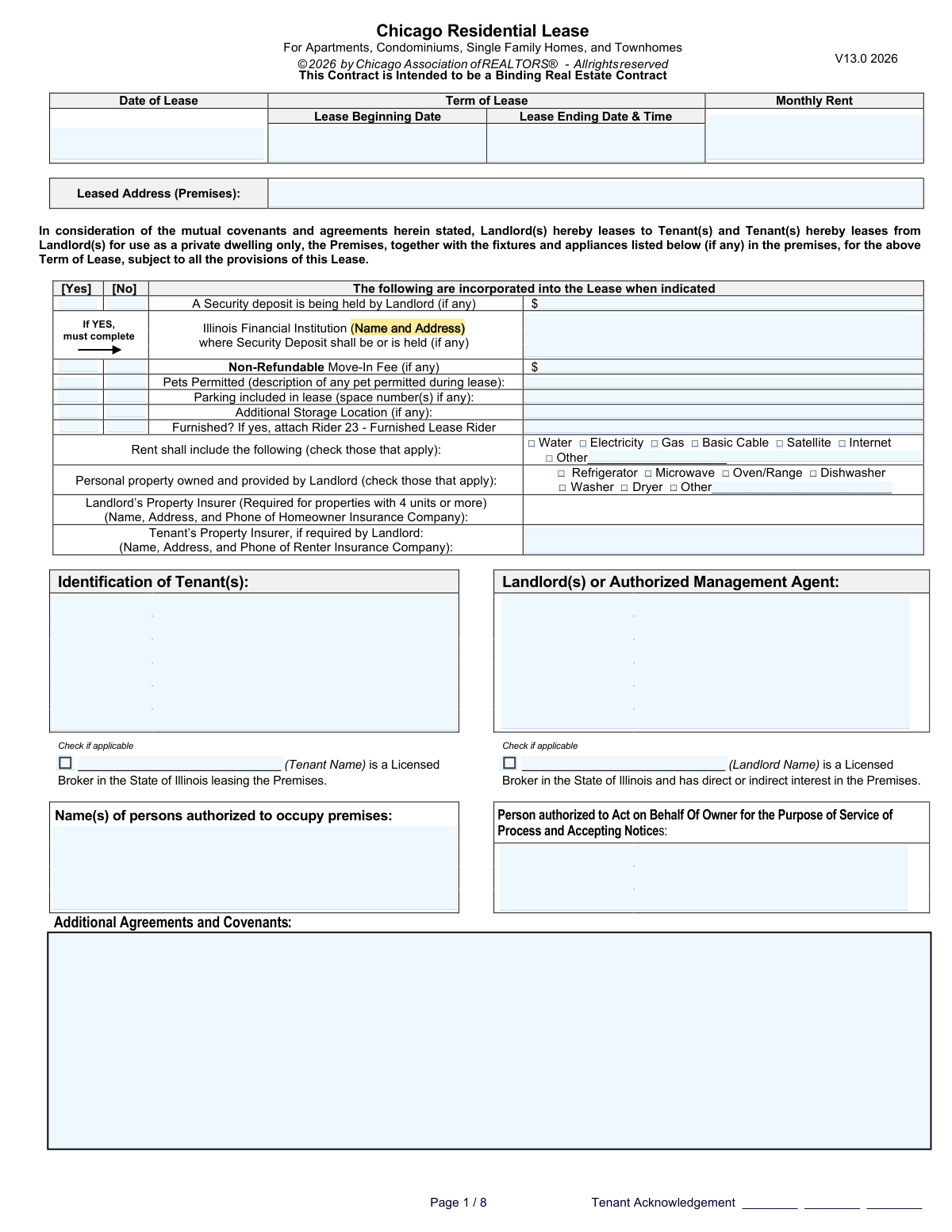
The Chicago Residential Lease (by the Chicago Association of REALTORS¼) is a binding real estate contract that defines the key terms of a residential tenancy, including lease dates, rent, security deposit or move-in fees, permitted occupants, utilities, and any additional agreements. It is important because it documents the parties’ rights and obligations and helps prevent disputes by clearly stating what is included in the rent, what property is provided, and who is authorized to occupy or receive legal notices. The form also captures required disclosures and practical details (like insurance information, parking, storage, and pet permissions) that affect day-to-day tenancy. Today, this form can be filled out quickly and accurately using AI-powered services like Instafill.ai, which can also convert non-fillable PDF versions into interactive fillable forms.
Our AI automatically handles information lookup, data retrieval, formatting, and form filling.
It takes less than a minute to fill out Chicago Residential Lease (CAR) V13.0 (2026) using our AI form filling.
Securely upload your data. Information is encrypted in transit and deleted immediately after the form is filled out.

Form specifications

Form name: Chicago Residential Lease for Apartments, Condominiums, Single Family Homes, and Townhomes (Chicago Association of REALTORS®) (V13.0 2026)
Number of pages: 1
Filled form examples: Form Chicago Residential Lease (CAR) V13.0 (2026) Examples
Language: English
main-image

Instafill Demo: filling out a legal form in seconds

How to Fill Out Chicago Residential Lease (CAR) V13.0 (2026) Online for Free in 2026

Are you looking to fill out a CHICAGO RESIDENTIAL LEASE (CAR) V13.0 (2026) form online quickly and accurately? Instafill.ai offers the #1 AI-powered PDF filling software of 2026, allowing you to complete your CHICAGO RESIDENTIAL LEASE (CAR) V13.0 (2026) form in just 37 seconds or less.
Follow these steps to fill out your CHICAGO RESIDENTIAL LEASE (CAR) V13.0 (2026) form online using Instafill.ai:
  1. 1 Go to Instafill.ai and upload the Chicago Residential Lease (CAR V13.0 2026) PDF or select it from the form library.
  2. 2 Enter the core lease terms: Date of Lease, Lease Beginning Date, Lease Ending Date & Time, Monthly Rent, and the full Leased Address (including unit number).
  3. 3 Complete deposit and fee sections by selecting Yes/No for the Security Deposit and Move-In Fee, then enter the amounts and (if applicable) the Illinois financial institution name and address holding the deposit.
  4. 4 Specify occupancy and parties: list all Tenant(s), the Landlord(s) or Authorized Management Agent, authorized occupant name(s), and the person authorized to accept service of process/notices.
  5. 5 Fill property and use details: indicate pets permitted (and describe them), parking included (and space number(s)), additional storage location, and whether the unit is furnished (attach Rider 23 if applicable).
  6. 6 Check all included utilities and landlord-provided appliances/personal property (and add any “Other” items), then provide insurer information for landlord (if required) and tenant renter’s insurance (if required).
  7. 7 Use Instafill.ai’s review/validation to catch missing fields and inconsistencies, then export the completed lease for e-signature or printing and retain copies for all parties.

Our AI-powered system ensures each field is filled out correctly, reducing errors and saving you time.

Why Choose Instafill.ai for Your Fillable Chicago Residential Lease (CAR) V13.0 (2026) Form?

Speed

Complete your Chicago Residential Lease (CAR) V13.0 (2026) in as little as 37 seconds.

Up-to-Date

Always use the latest 2026 Chicago Residential Lease (CAR) V13.0 (2026) form version.

Cost-effective

No need to hire expensive lawyers.

Accuracy

Our AI performs 10 compliance checks to ensure your form is error-free.

Security

Your personal information is protected with bank-level encryption.

Frequently Asked Questions About Form Chicago Residential Lease (CAR) V13.0 (2026)

This form is a binding lease contract used to rent a Chicago-area residential property (apartment, condo, single-family home, or townhome) for a defined term. It documents key terms like rent, dates, deposits/fees, utilities, and occupancy.

The landlord (or authorized management agent) and all adult tenants who will be responsible for the lease should complete and sign it. Anyone who will live in the unit but is not a tenant should be listed as an authorized occupant if the lease provides a place for that.

“Date of Lease” is the date the agreement is signed/executed. “Lease Beginning Date” is the first day the tenancy starts, and “Lease Ending Date & Time” is the exact end date and time the tenant must vacate (as stated in the lease).

Enter the agreed monthly rent amount as a dollar figure. Utilities are only included if you check them under “Rent shall include the following,” so don’t assume utilities are included unless they’re checked.

Use the full property address including unit/apartment number, city, state, and ZIP code. This should match the official mailing address used for the property.

Check “Yes” if the landlord is holding a security deposit for this lease and enter the deposit amount. You must also provide the name and full address of the Illinois financial institution where the deposit is or will be held.

Check “Security Deposit: No” and then complete the “Non-Refundable Move-In Fee” section if a fee is being charged. Be sure the fee amount is entered only when the move-in fee is marked “Yes.”

If pets are allowed, check “Yes” and describe the permitted pet(s) (for example: “1 dog, 35 lbs max” or “1 cat”). If pets are not allowed, check “No” and leave the description blank or mark it as N/A.

Check the box indicating parking is included and list the assigned space number(s) (use commas for multiple spaces). If parking is not included, leave the space field blank or enter N/A and ensure the “No” option is selected.

If storage is included, check “Yes” and describe the storage area (e.g., “Storage locker #12,” “Basement cage B-4,” or “Garage shelf”). If none is provided, check “No.”

Mark “Furnished: Yes” if the unit is being rented with furniture provided by the landlord, and attach Rider 23 (Furnished Lease Rider). If the unit is not furnished, mark “No” and do not attach the rider.

Check the boxes for utilities included in rent (water, electricity, gas, cable, satellite, internet) and specify any “Other” items on the line provided. Separately, check the boxes for landlord-provided appliances (e.g., refrigerator, oven/range, dishwasher, washer/dryer) and list any additional items under “Other.”

If the property has 4 units or more, the landlord’s property insurer information is required. If the landlord requires renter’s insurance, the tenant should provide the tenant’s property insurer name, address, and phone number.

These checkboxes are disclosures used when a tenant or landlord is a licensed real estate broker in Illinois (and, for the landlord, has a direct or indirect interest in the property). Only check them if they apply and fill in the corresponding name field.

Yes—tools like Instafill.ai can use AI to auto-fill form fields accurately and save time by pulling details like names, dates, rent, deposits, and included utilities into the correct fields. Typically you upload the PDF to Instafill.ai, answer a guided set of questions (or import data), review the populated fields, and then download the completed lease for signature.

If the PDF isn’t fillable, Instafill.ai can convert a flat, non-fillable PDF into an interactive fillable form so you can type directly into the fields. After conversion, you can auto-fill and review the entries before exporting the final document.

Compliance Chicago Residential Lease (CAR) V13.0 (2026)
Validation Checks by Instafill.ai

1
Validates Date of Lease is present and in an acceptable date format
Checks that the Date of Lease field is not blank and matches an allowed date format (e.g., MM/DD/YYYY or YYYY-MM-DD) and represents a real calendar date. This is important because the execution date is used to determine enforceability, timelines, and notice periods. If validation fails, the submission should be rejected or routed for correction because an invalid or missing execution date can create ambiguity about when the contract became effective.
2
Ensures Lease Beginning Date is present, valid, and not after the Lease Ending Date
Verifies the Lease Beginning Date is provided, is a valid calendar date, and occurs on or before the Lease Ending Date. This prevents impossible lease terms and ensures the tenancy start is clearly defined. If the beginning date is missing or later than the ending date, the system should block submission and prompt the user to correct the lease term dates.
3
Validates Lease Ending Date & Time includes both a valid date and time
Checks that the Lease Ending Date & Time contains a valid date and a time component in an accepted format (e.g., HH:MM AM/PM) and that the time is within 00:00–23:59 (or 1:00–12:59 with AM/PM). This matters because many leases end at a specific time (e.g., noon) and missing/invalid time can cause disputes about possession. If invalid, the system should require correction or defaulting rules must be explicitly confirmed by the user.
4
Cross-checks Date of Lease against Lease Beginning Date for logical consistency
Validates that the Date of Lease (execution date) is not unreasonably after the Lease Beginning Date (e.g., signed after move-in) unless explicitly allowed by business rules. This helps detect data entry errors and reduces legal/operational risk from backdated or post-dated agreements. If the execution date is after the start date, the system should flag for review or require an acknowledgment/override reason.
5
Validates Monthly Rent is a positive currency amount with correct precision
Ensures Monthly Rent is provided and is a numeric value greater than 0, formatted as currency (allowing commas and a decimal point) with no more than two decimal places. This is critical for billing, late fee calculations, and accounting integrations. If validation fails, the submission should be blocked because rent cannot be calculated reliably.
6
Validates Leased Address (Premises) completeness and structure
Checks that the leased address includes required components: street number/name, city, state (must be IL for a Chicago lease unless the system allows otherwise), and a 5-digit ZIP code (optionally ZIP+4). Also validates that an apartment/unit number is provided when the address appears to be multi-unit (e.g., contains 'Apt', '#', 'Unit') or when the user indicates an apartment/condo. If incomplete or malformed, the system should reject or request correction to prevent service/notice and occupancy issues.
7
Enforces mutual exclusivity for Yes/No checkbox pairs (Security Deposit, Move-In Fee, Pets, Storage, Furnished)
Validates that for each Yes/No pair, exactly one option is selected (not both and not neither). This prevents ambiguous contract terms and downstream logic errors (e.g., whether to require deposit institution details). If the rule fails, the system should block submission and highlight the specific section requiring a single clear selection.
8
Requires Security Deposit Amount and Holding Institution details when Security Deposit is 'Yes'
If Security Deposit - Yes is selected, checks that the Security Deposit Amount is present and > 0 and that the Holding Institution Name and Address is completed with an Illinois financial institution address (including city, state, ZIP). This is important for statutory compliance and tenant disclosures regarding where funds are held. If missing or invalid, the system should prevent submission because the lease would be incomplete and potentially non-compliant.
9
Prevents Security Deposit fields from being populated when Security Deposit is 'No'
If Security Deposit - No is selected, validates that Security Deposit Amount and Holding Institution fields are empty (or explicitly set to N/A per system rules). This avoids contradictory terms that could be interpreted as a deposit being collected despite the 'No' selection. If populated, the system should require the user to either clear the fields or change the selection.
10
Validates Non-Refundable Move-In Fee amount when Move-In Fee is 'Yes'
When the Move-In Fee 'Yes' box is checked, ensures the fee amount is provided, numeric, and not negative, with no more than two decimal places. This matters for move-in charges, receipts, and ensuring the lease accurately reflects all upfront costs. If invalid or missing, the system should block submission and prompt for a correct fee amount.
11
Requires pet description when Pets Permitted is 'Yes' and blocks it when 'No'
If Pets Permitted is 'Yes', checks that the pet description field is not blank and contains meaningful details (e.g., type/breed, number of pets, or at minimum '1 cat'). If Pets Permitted is 'No', ensures the description field is empty or N/A to avoid conflicting terms. If validation fails, the system should require correction because pet permissions are a frequent source of disputes.
12
Validates Parking space numbers format when Parking Included is selected
If Parking Included in Lease is checked, validates that the parking space field is populated and follows an acceptable pattern (e.g., alphanumeric identifiers separated by commas such as '12, 14A'). This ensures the lease clearly identifies assigned spaces and supports enforcement/towing policies. If missing or malformed, the system should block submission or require the user to enter 'Unassigned' only if that is an allowed standardized value.
13
Requires Additional Storage Location details when Storage is 'Yes'
When Additional Storage Location - Yes is selected, checks that the storage location description/identifier is provided (e.g., locker number, basement cage ID) and is not just whitespace. This is important to define what is included in the tenancy and reduce disputes over access and responsibility. If missing, the system should prevent submission until a specific storage location is entered.
14
Enforces Furnished Rider requirement when Furnished is 'Yes'
If Furnished? Yes is selected, validates that the Furnished Lease Rider (Rider 23) is attached/indicated per system capability (e.g., an attachment flag or rider reference). This matters because furnished terms typically require an inventory and special conditions that must be incorporated. If the rider is not attached/confirmed, the system should block submission or require an explicit acknowledgment that the rider will be provided.
15
Validates 'Other' utility/appliance text is provided when corresponding 'Other' checkbox is checked
If 'Other' is checked under Rent shall include or Personal property owned and provided by Landlord, ensures the corresponding 'Other' text field is completed with a non-trivial description. This prevents blank 'Other' selections that create uncertainty about what is included in rent or provided items. If missing, the system should prompt the user to specify the item/service or uncheck 'Other'.
16
Validates insurer contact blocks include required components and phone number format when provided/required
For Landlord’s Property Insurer and Tenant’s Property Insurer fields, validates that when the block is required or populated it includes a company name, mailing address, and a phone number in a valid format (e.g., 10-digit US number with optional separators). This is important for claims, compliance (especially for 4+ unit properties), and ensuring contactability. If incomplete or the phone format is invalid, the system should flag for correction and, where required, block submission.

Common Mistakes in Completing Chicago Residential Lease (CAR) V13.0 (2026)

Using inconsistent lease dates (signed date vs. start/end dates)

People often enter the Date of Lease (signature/execution date) as the Lease Beginning Date, or they pick an end date that doesn’t match the stated term. This can create disputes about when rent is owed, when notice periods start, and when the tenant must vacate. Avoid this by confirming the execution date is the day all parties sign, then separately entering the exact move-in/start date and the correct end date that matches the agreed term. AI-powered tools like Instafill.ai can flag date inconsistencies and enforce valid date formats before submission.

Leaving the lease end time blank or entering an unclear time

The form asks for “Lease Ending Date & Time,” but many people provide only a date or write vague entries like “noon” without specifying AM/PM. Missing or ambiguous end times can cause move-out day conflicts, cleaning/turnover scheduling issues, and disagreements about prorated rent or holdover. Avoid this by entering a specific time (e.g., 11:59 PM or 12:00 PM) and using a consistent format with AM/PM. Instafill.ai can standardize time entries and prevent incomplete end-date fields.

Entering monthly rent in the wrong format or forgetting cents

A common error is writing rent with symbols or text (e.g., “$2,000/mo”) when the field expects a clean numeric amount, or accidentally omitting cents when the agreement includes them. Incorrect formatting can lead to data entry problems, misapplied payments, and disputes over the actual rent amount. Avoid this by entering a numeric dollar amount consistently (e.g., 2000 or 2000.00) and verifying it matches any listing, offer, or rider. Instafill.ai can auto-format currency fields and validate that the rent is a proper number.

Providing an incomplete leased address (missing unit number or ZIP)

Tenants and landlords frequently forget the apartment/unit number, use a nickname for the building, or omit the ZIP code. An incomplete address can cause notice/service issues, confusion about which unit is covered, and problems with insurance, utilities, and legal enforcement. Avoid this by entering the full street address plus unit number, city, state, and ZIP exactly as recognized by USPS and the property records. Instafill.ai can help normalize addresses and catch missing components like unit numbers.

Checking 'Security Deposit: Yes' but not completing the holding institution details

The form explicitly requires the Illinois financial institution name and address when a security deposit is held, but people often leave that section blank or list a non-bank location (e.g., “landlord’s office”). Missing holding information can violate local requirements, create compliance risk, and complicate deposit return disputes. Avoid this by confirming whether a deposit is actually being held and, if yes, entering the full institution name and complete address (street, city, state, ZIP). Instafill.ai can enforce conditional logic so the holding institution fields must be completed when “Yes” is selected.

Confusing a security deposit with a non-refundable move-in fee

Many renters assume the move-in fee is the same as a deposit, or they enter the same amount in both fields. This misunderstanding can lead to incorrect accounting, disputes at move-out, and confusion about what is refundable and what is not. Avoid this by clearly distinguishing: a security deposit is typically refundable subject to deductions, while a move-in fee is non-refundable; enter only what applies and ensure the amounts match the parties’ agreement. Instafill.ai can prompt clarifying checks and reduce duplicate/contradictory entries.

Marking pets as permitted but failing to describe the pet(s) and terms

People often check “Pets Permitted: Yes” but leave the description blank or write something too vague (e.g., “dog”) without breed/size/count or any agreed restrictions. This can cause enforcement problems, disputes over unauthorized animals, and difficulty applying pet-related rules or fees later. Avoid this by listing each permitted pet with clear identifiers (type, number, approximate weight, and any restrictions) and referencing any pet fee/rules in Additional Agreements and Covenants if applicable. Instafill.ai can require a description when pets are marked “Yes” and help format the entry consistently.

Parking and storage fields left blank or filled with unclear identifiers

When parking or storage is included, people frequently forget to list the space number(s) or storage locker ID, or they write “included” without specifics. Lack of precise identifiers can lead to conflicts with other residents, towing disputes, and disagreements about what the lease actually provides. Avoid this by entering exact space numbers and storage locations (e.g., “Space 14, 15” or “Locker B-12”) and using “N/A” only when truly not provided. Instafill.ai can prompt for required identifiers when the “Yes” box is checked and standardize comma-separated lists.

Not attaching Rider 23 when the unit is furnished (or marking furnished incorrectly)

Some parties mark the premises as furnished but forget to attach the Furnished Lease Rider, or they mark “No” even though landlord-provided furniture is present. This can create disputes over what items must remain, what condition is expected at move-out, and who is responsible for damage. Avoid this by confirming whether any furniture beyond standard appliances is included and, if furnished, attaching Rider 23 and listing key items. Instafill.ai can remind users to include required riders when “Furnished: Yes” is selected.

Misstating included utilities and landlord-provided appliances

A frequent mistake is checking utilities that are not actually included (or forgetting to check ones that are), and failing to specify “Other” items clearly. This leads to billing confusion, service interruptions, and disputes over who must set up accounts or pay for services. Avoid this by verifying the exact utility responsibility (water, gas, electric, internet, etc.) and checking only what the rent truly includes; use the “Other” line to name the service precisely. Instafill.ai can help ensure “Other” fields are completed when selected and keep utility selections consistent with the agreement.

Incomplete or incorrect party identification and notice recipient information

People often use nicknames instead of full legal names for tenants/landlords, omit contact details for the landlord/management agent, or leave blank the person authorized to accept service of process and notices. These omissions can make notices ineffective, delay repairs and communications, and create legal complications if disputes arise. Avoid this by entering full legal names for all signing tenants, the landlord or authorized agent’s full contact information, and a clearly identified notice recipient with mailing address and phone/email. Instafill.ai can validate required identity fields and reduce errors from inconsistent naming across the lease.
Saved over 80 hours a year

“I was never sure if my IRS forms like W-9 were filled correctly. Now, I can complete the forms accurately without any external help.”

Kevin Martin Green

Your data stays secure with advanced protection from Instafill and our subprocessors

Robust compliance program

Transparent business model

You’re not the product. You always know where your data is and what it is processed for.

ISO 27001, HIPAA, and GDPR

Our subprocesses adhere to multiple compliance standards, including but not limited to ISO 27001, HIPAA, and GDPR.

Security & privacy by design

We consider security and privacy from the initial design phase of any new service or functionality. It’s not an afterthought, it’s built-in, including support for two-factor authentication (2FA) to further protect your account.

Fill out Chicago Residential Lease (CAR) V13.0 (2026) with Instafill.ai

Worried about filling PDFs wrong? Instafill securely fills chicago-residential-lease-for-apartments-condominiums-single-family-homes-and-townhomes-chicago-association-of-realtors forms, ensuring each field is accurate.